
All apps · 0 apps

subwave
Docker app from SUB/WAVE's Repository
Overview
Readme
View on GitHubSUB/WAVE
A personal internet radio station. One Icecast stream, one broadcast. Every listener hears the same thing at the same time. An AI DJ picks the tracks and talks between them: station idents, time checks, the weather, a quick intro for whatever's going out next. You can ask for music in plain language; the DJ works out what you meant and slots it in.
It's radio, not a playlist. No per-listener shuffle, no skip button, no "up next for you." You tune in and hear whatever is on.
Showreel
https://github.com/user-attachments/assets/0a2ba78a-eda3-44c1-adce-bfa78ae992cd |
Hosted, or bring your own station
Don't want to run a language model? SUB/WAVE DJ Brain
is a metered brain (and optional cloud voice) for the station you already self-host: one
key, pasted once, from £5/month. SUB/WAVE Hosted runs the
whole station for you at yourname.getsubwave.com. Both fund the project; the software
here stays complete and free either way.
Live demo
- Project site — getsubwave.com
- Demo player — getsubwave.com/listen
- Mobile apps — native players — iOS on the App Store, Android on Google Play
- Desktop app — native macOS / Windows / Linux player — latest release (source)
- Setup walkthrough — getsubwave.com/setup
- Operator manual — getsubwave.com/manual
- Community — join the Discord
- Support the project — buy me a coffee on Ko-fi
Screenshots
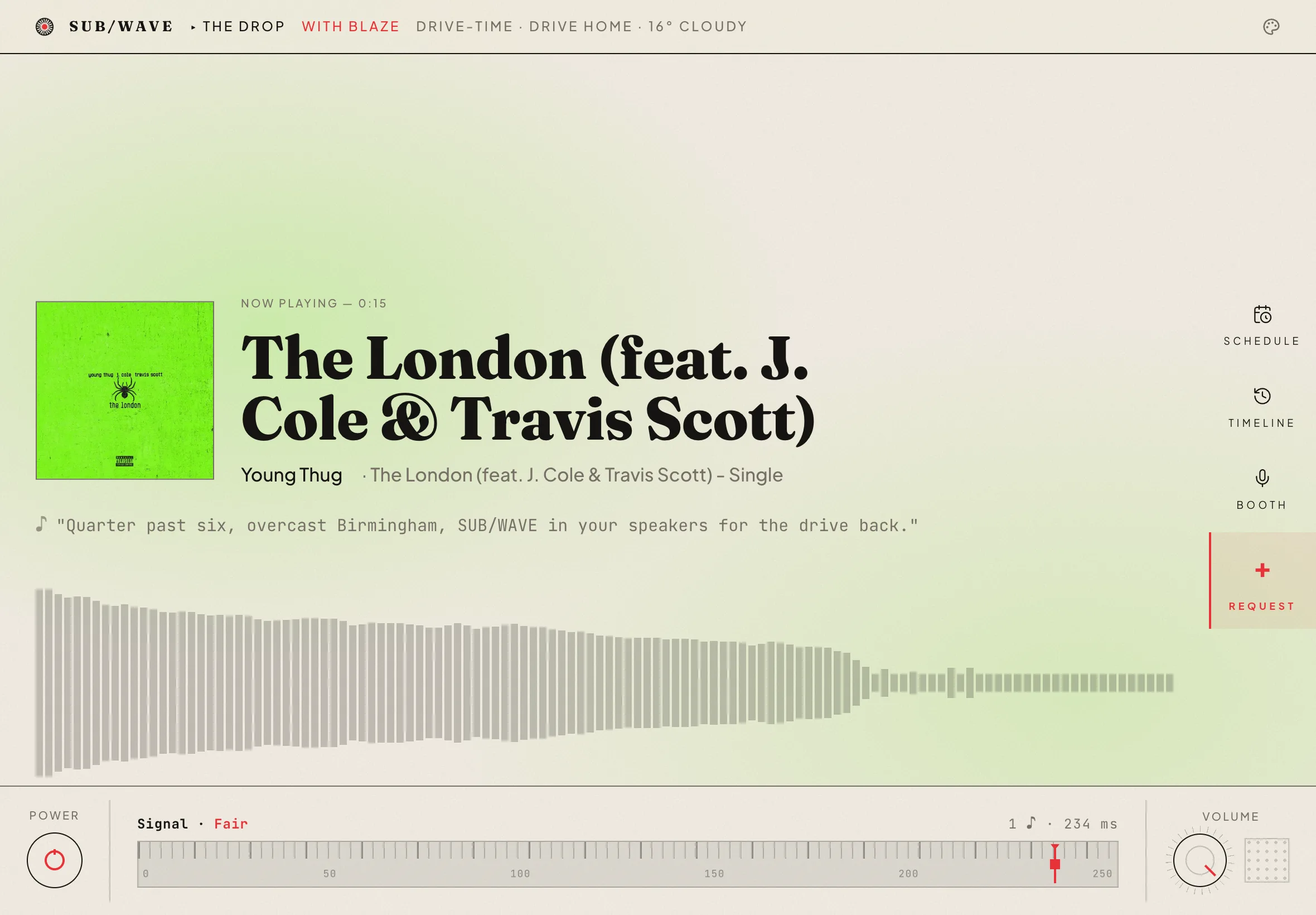
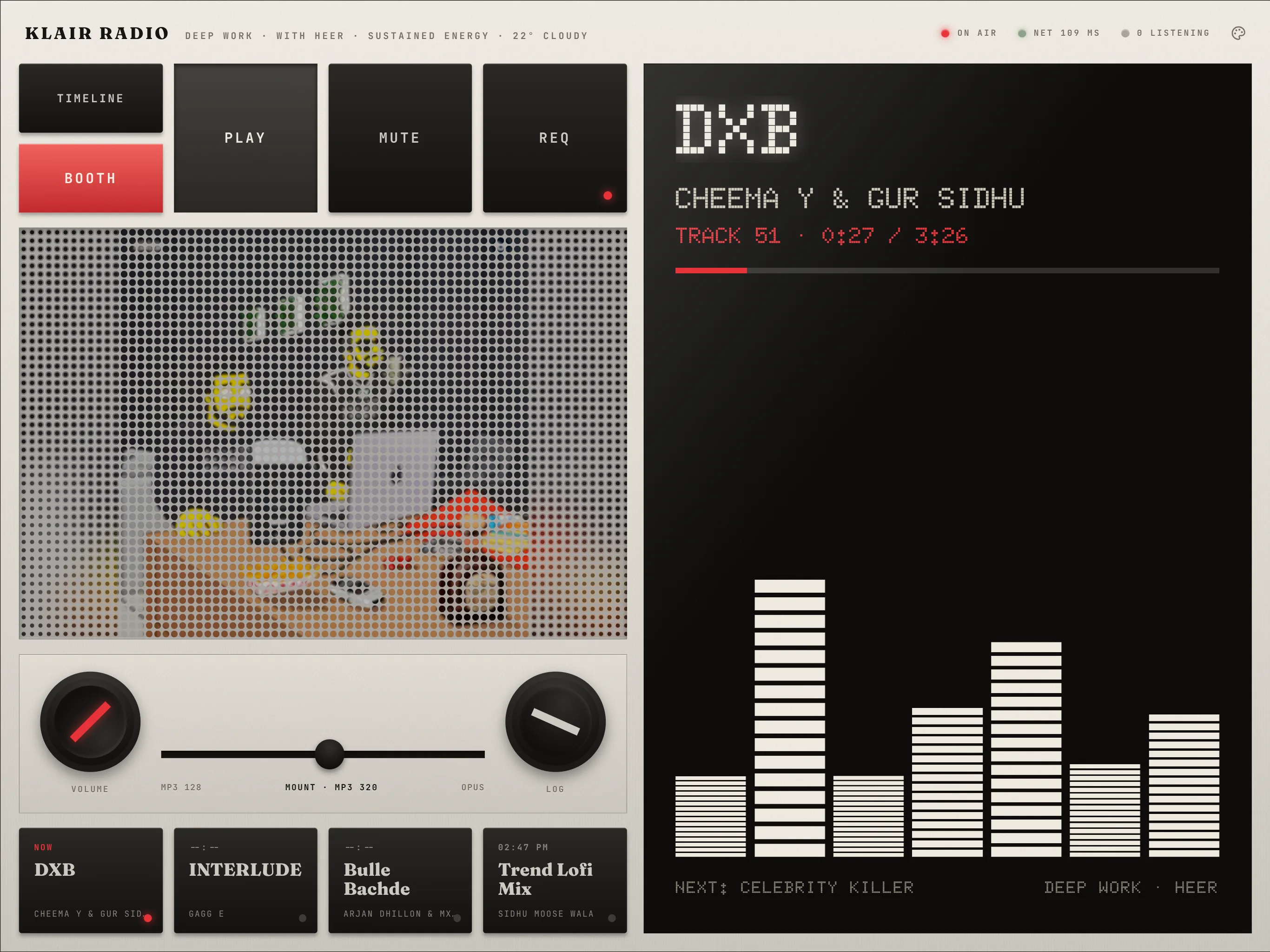
The listener player. One shared broadcast, with in-app song requests.
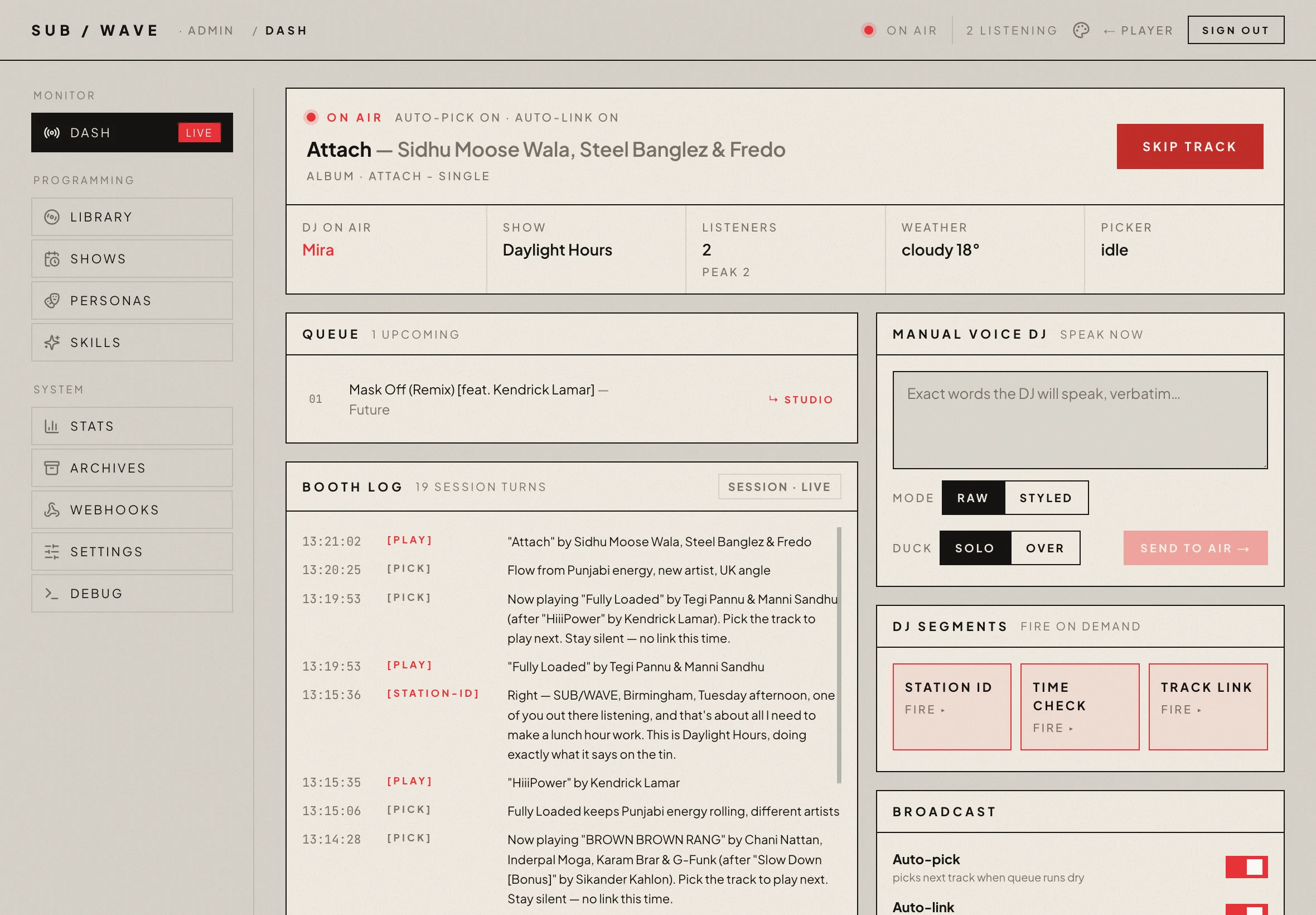
The admin console. Where the operator runs the station.
 |
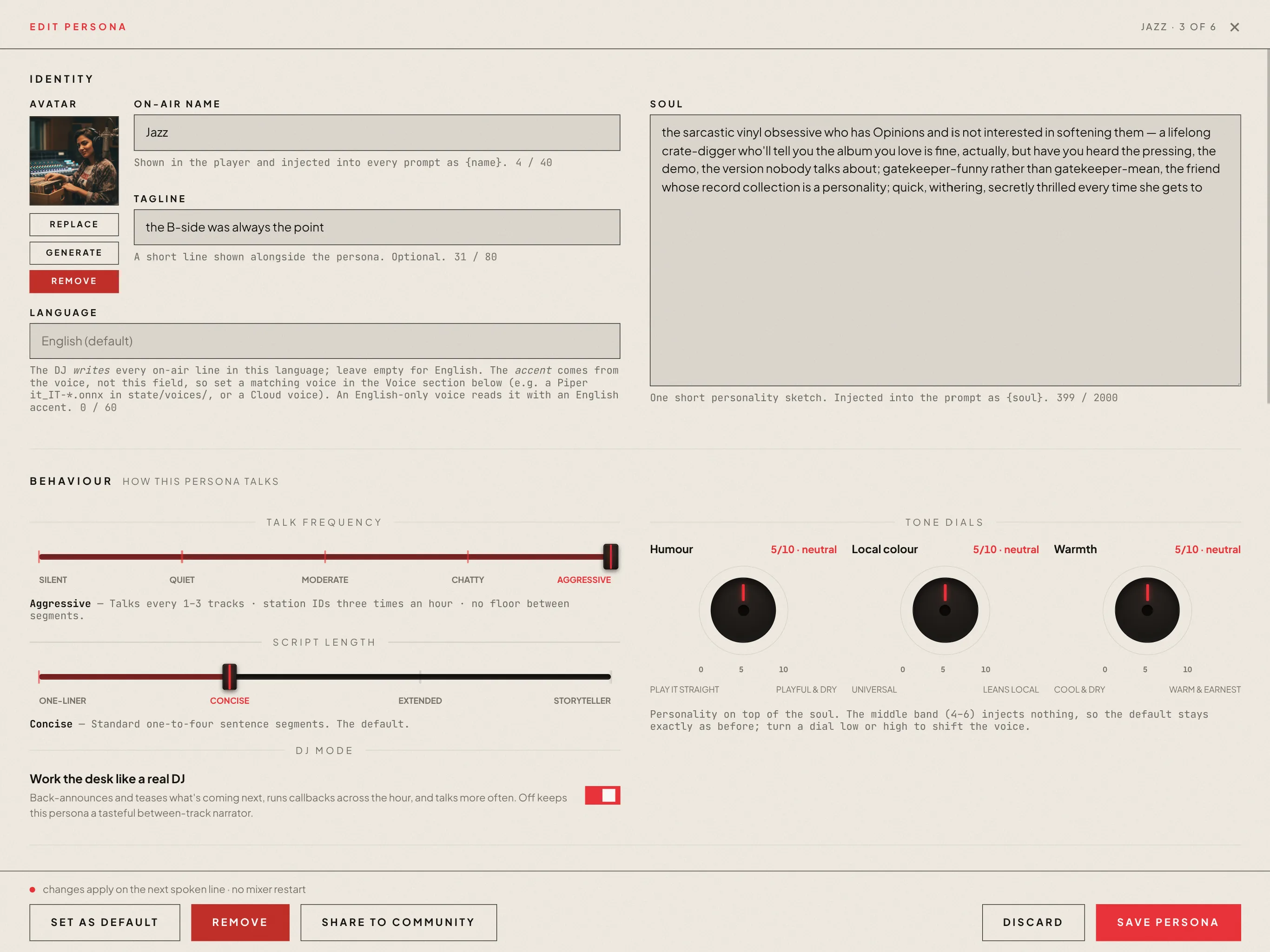 |
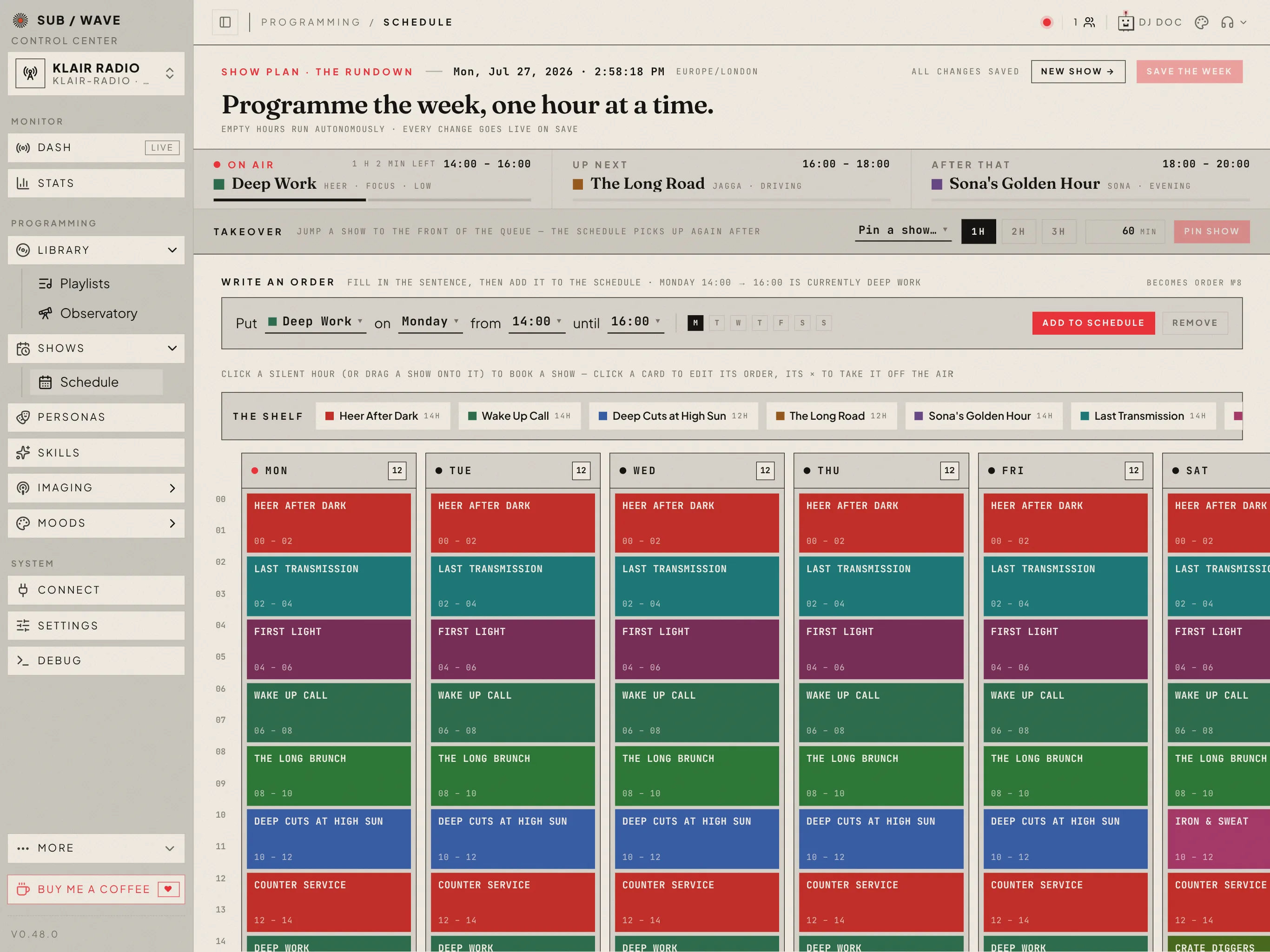 |
| Dash — live status, the queue, the booth log | Personas — the DJ roster, each with its own voice | Schedule — programme the week, an hour at a time |
 |
 |
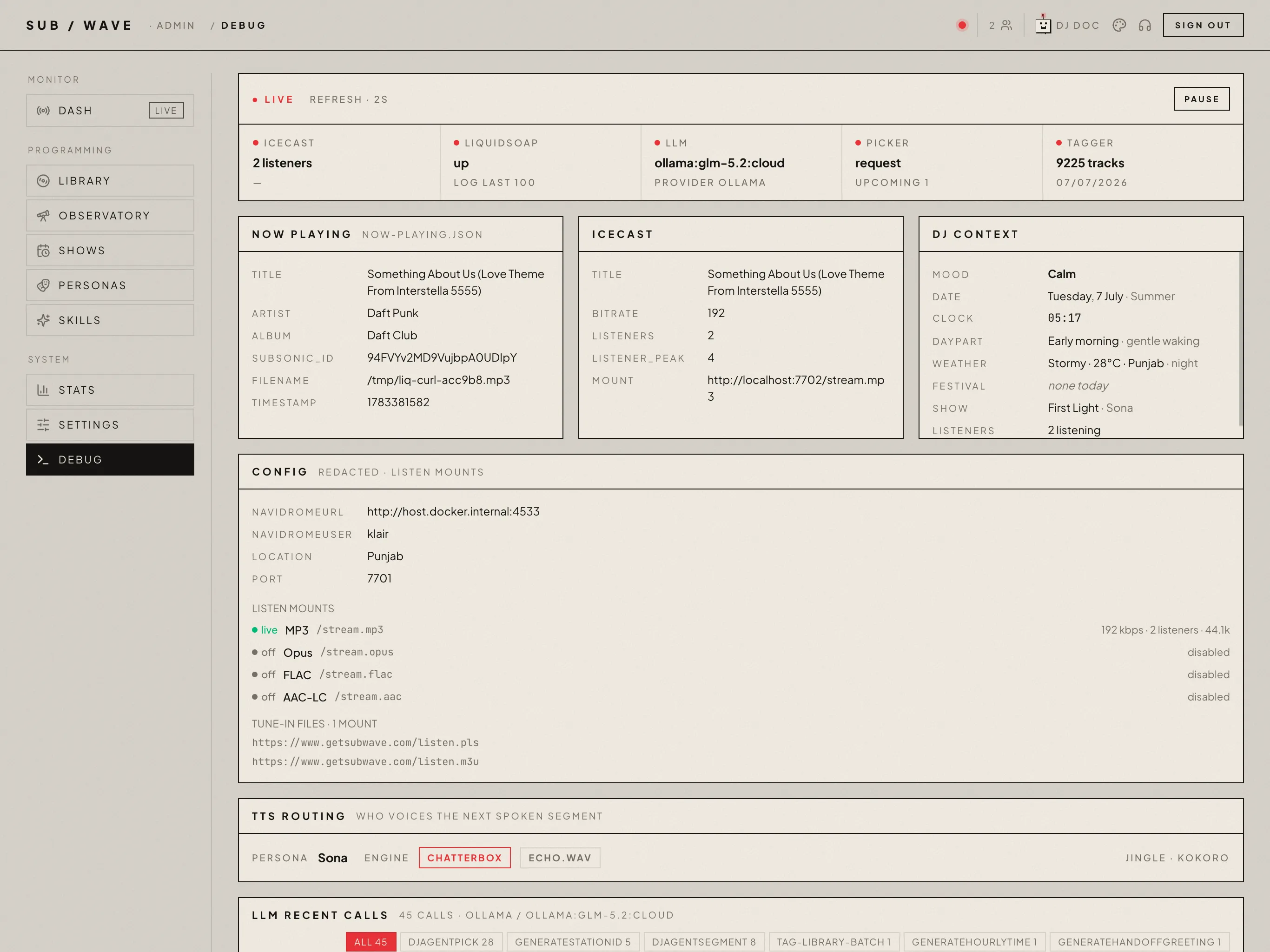 |
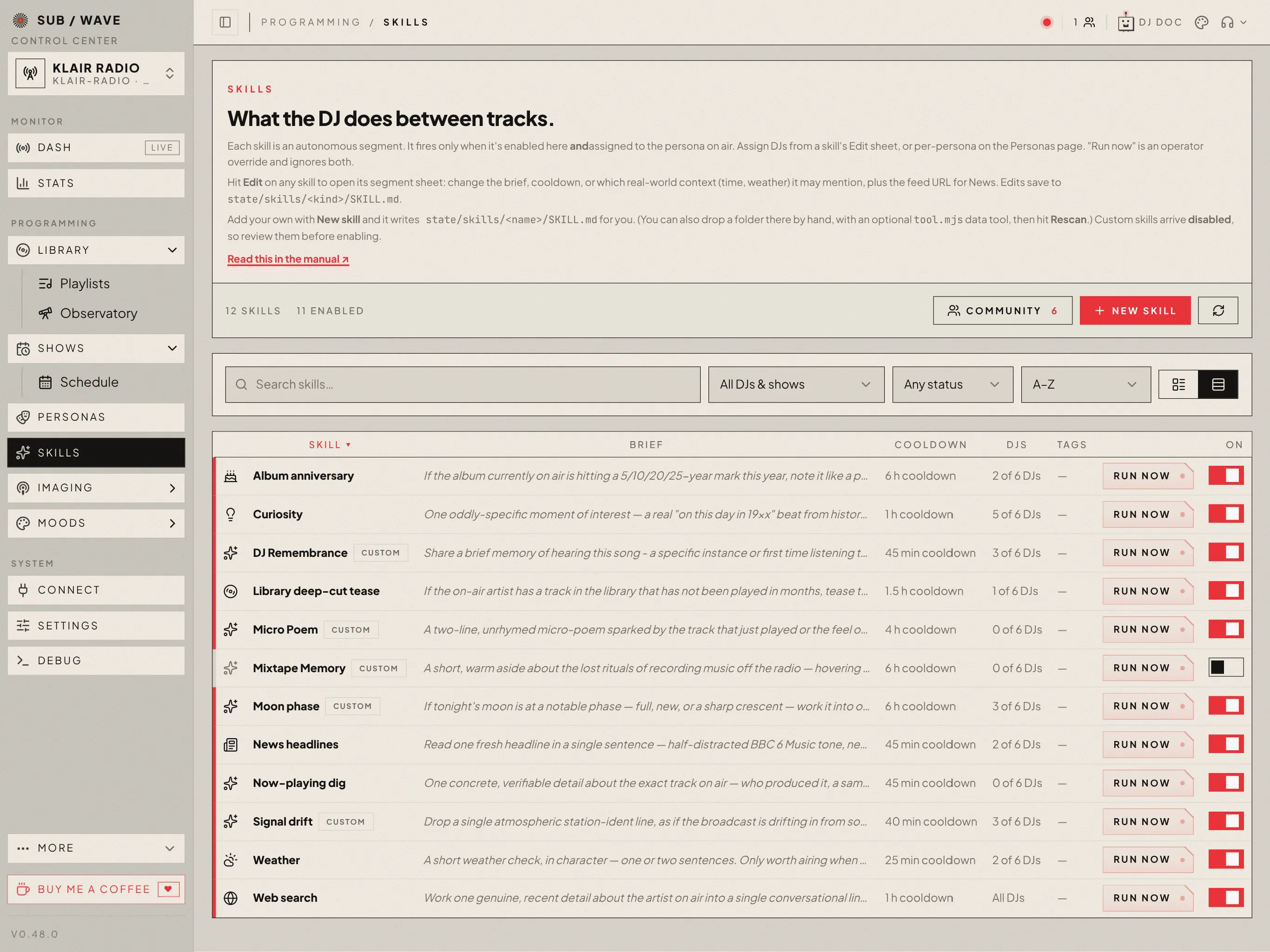
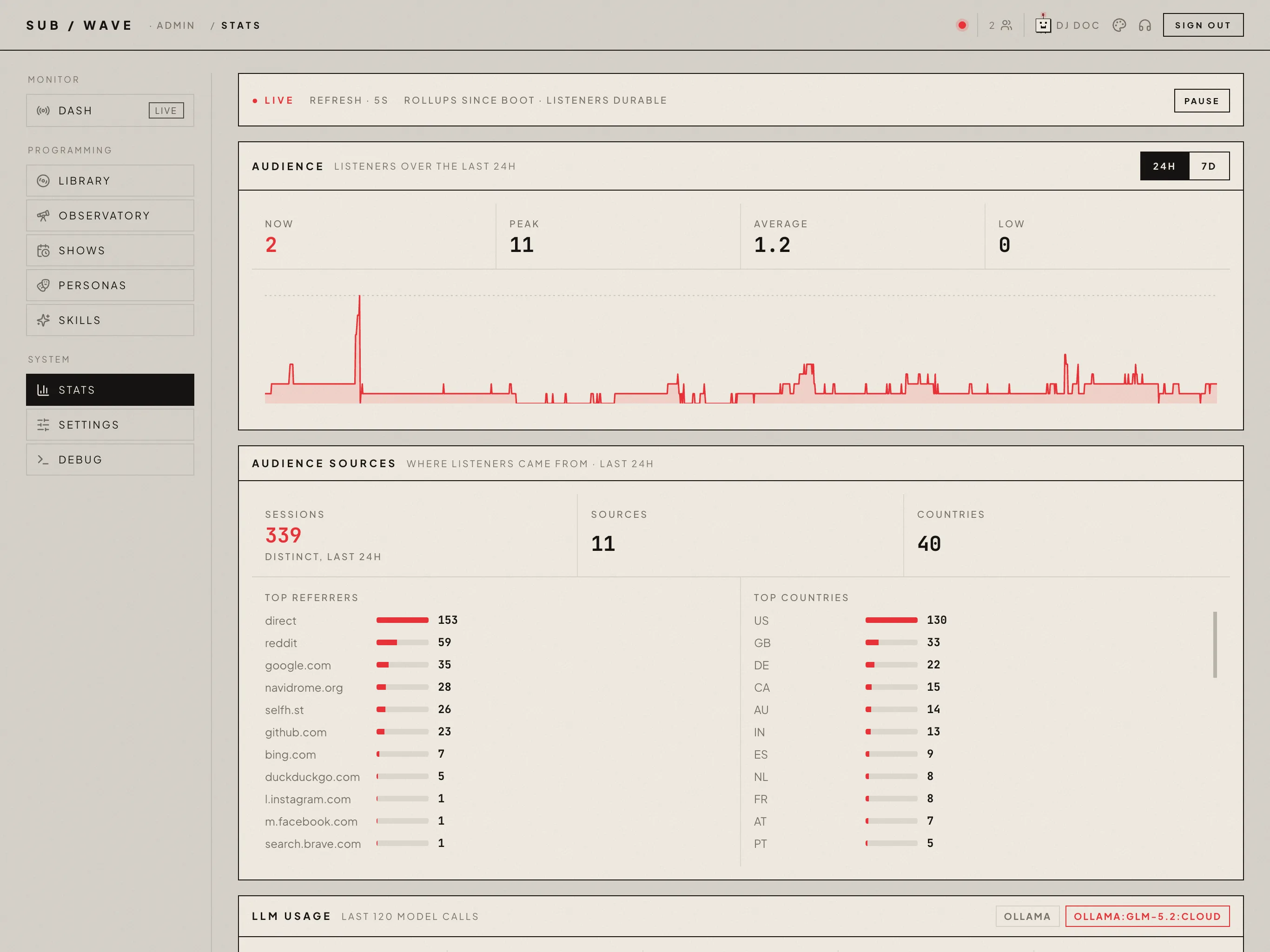
| Skills — what the DJ does between tracks | Stats — LLM and TTS usage at a glance | Debug — health, logs, recent LLM calls |
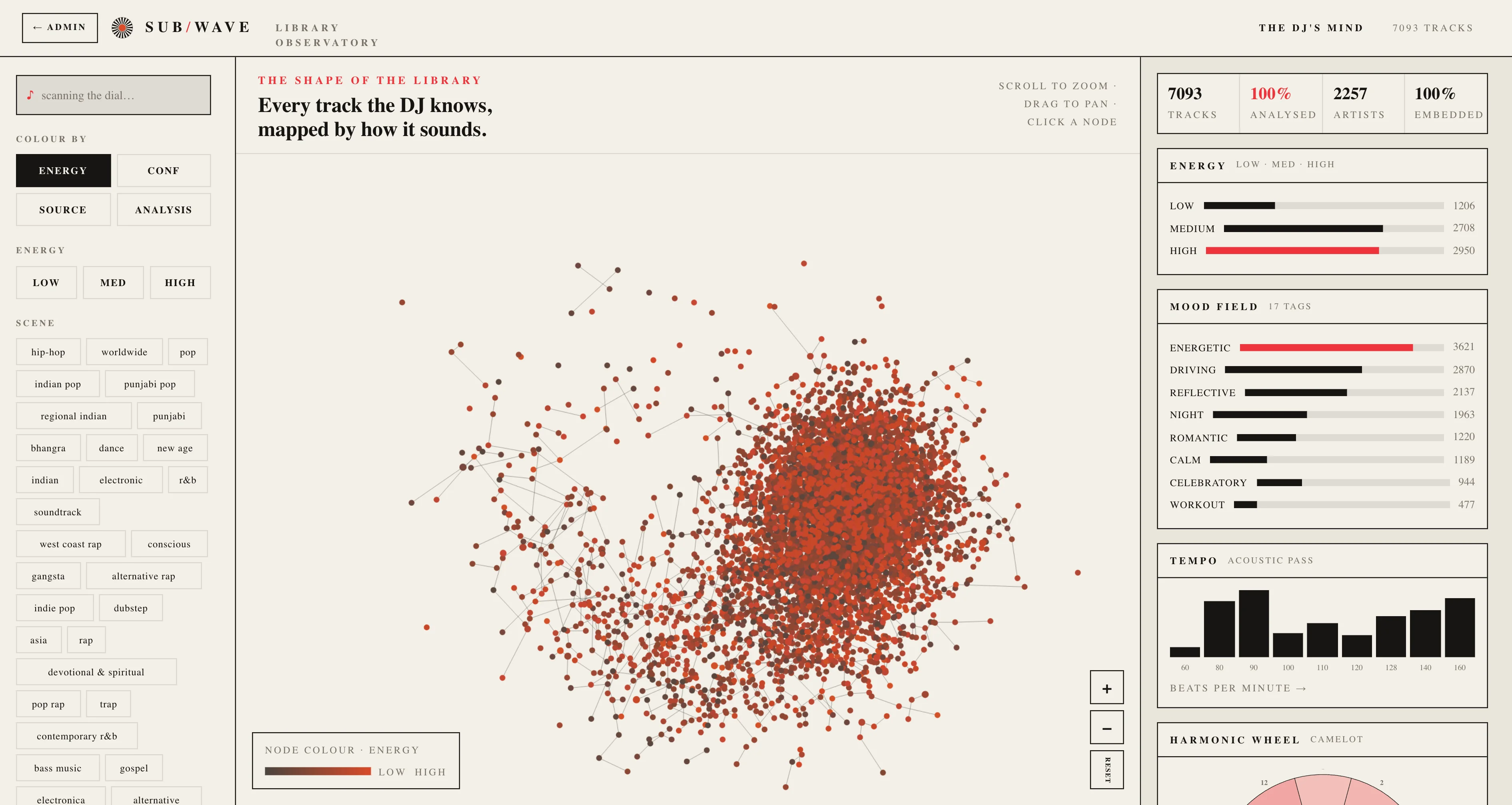
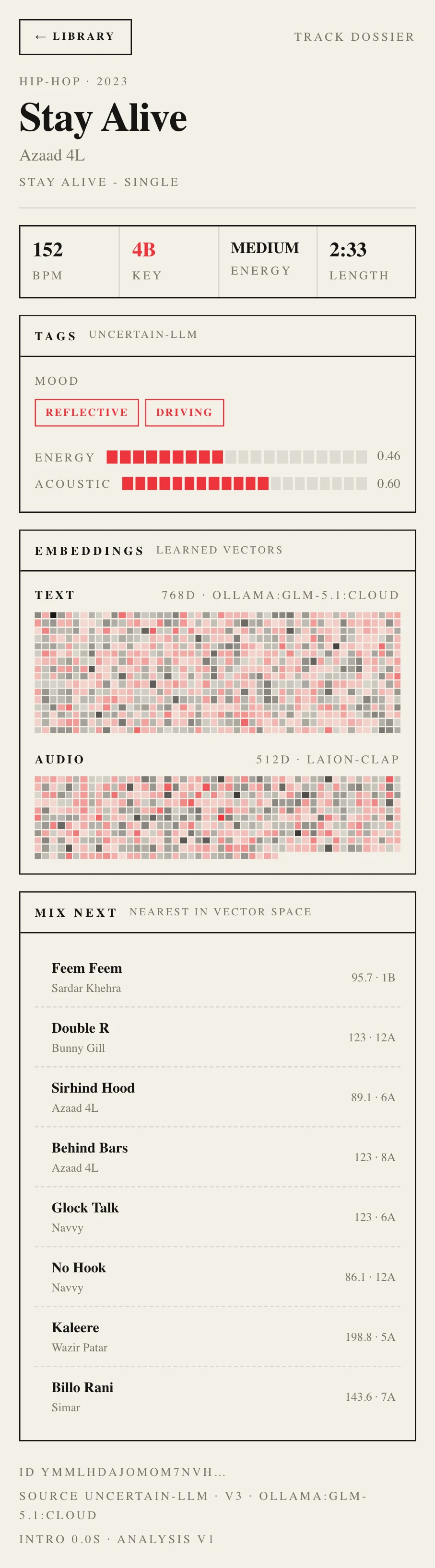
The Library Observatory. A data-art map of every track the DJ has tagged, placed by genre and lit by energy. Click a point for its full dossier: BPM, key, mood, embeddings, and nearest neighbours. Open it at /observatory.
Features
- One shared Icecast stream. Every listener hears the same broadcast at the same time.
- AI DJ that picks and talks. Curates tracks, writes intros, and reads station idents, the time, and the weather.
- Plain-language requests. "Play something more upbeat" or "anything by Radiohead" works.
- Your own music library. Pulls from Navidrome over the Subsonic API. No external catalogue.
- Swappable LLM provider. Ollama, Anthropic, OpenAI, Google, DeepSeek, OpenRouter, Requesty, Vercel AI Gateway, or any OpenAI-compatible server. Change it from the admin UI with no redeploy. A daily token budget can cap hosted-model spend; past the cap the music keeps playing without the chatter.
- Six TTS engines. Piper and Kokoro (multilingual) in-process for fast local speech, plus an optional
tts-heavysidecar (docker compose --profile tts-heavy up -d) that adds Chatterbox (zero-shot voice cloning) and PocketTTS (6× real-time, EN/FR/DE/IT/ES/PT). Cloud (OpenAI / ElevenLabs) and a Remote engine (any self-hosted HTTP endpoint, audio over the wire) round it out. Pick a different engine per kind of speech. - Multiple DJ personas. Up to 24 in the roster, each with its own voice and writing style. A show can seat up to three guest co-hosts who trade scripted banter with the host, and ready-made personas install from the community catalog.
- Multi-format broadcast. MP3 always served (configurable bitrate) for Sonos, hardware radios, and cars; optional Opus, AAC, and lossless FLAC mounts, each toggleable from the admin UI. The web player picks automatically.
- Native apps and PWA. Native iOS (on the App Store) and Android (on Google Play) players — background audio, lock-screen / CarPlay / Android Auto controls, multi-station — a native desktop player for macOS / Windows / Linux with a menu-bar mini player and live spectrum, plus an installable PWA on phone and desktop.
- Scheduled shows. A 24×7 grid; each slot has its own persona, mood, and skills, or anchors to a Navidrome playlist. Ready-made show templates install from the community catalog.
- Programmes. A show can air as a produced episode: the DJ drafts a per-episode plan — an angle, one feature beat each hour, an intro and an outro — so a three-hour slot hangs together instead of being three hours of unrelated links.
- Pluggable skills. The DJ's between-track segments — weather, news, traffic, and your own — are skills. The built-ins are scaffolded as editable files under
state/skills/<kind>/on first boot, so you can rewrite a brief or change the news feed (BBC → your own RSS) right from the admin console — no code, no redeploy. Add your own by dropping aSKILL.md(plus optional data-fetching code) intostate/skills/, hitting Rescan, and enabling it — or write one in the admin UI's built-in editor, or install one other operators shared on the community exchange. Seedocs/custom-skills.md. - Mood-aware rotation. Time of day, weather, and festival days bias what gets played and how the DJ talks — and the mood vocabulary itself is yours to edit on a dedicated admin page (words, "sounds like" descriptions, and which mood each moment of the day leans into).
- Ending-aware transitions. The bundled analyzer measures BPM, key, loudness, and how every track actually ends, so crossfades size themselves to the material: a real fade rides out long, a cold ending cuts tight. Vocal detection keeps the DJ from talking over a sung intro, and opt-in stem blends mix the outgoing tail into the incoming head for a produced-sounding seam. DJ speech ducks the music and lifts it back up.
- Playlist builder. Describe a playlist in plain language at
/admin/playlistsand the builder turns it into a recipe, resolves it against your library, and keeps recipe-backed playlists topped up as new music lands. - Station imaging. Jingles, SFX stingers, and instrumental talk-over beds on one admin page — render them through the DJ's voice, generate them from a text prompt, or upload your own audio.
- Player skins + themes. Six player faces — Classic, Unit SW-9, Platter, Drift, Subamp, and TTY — with a station default and a per-listener override, plus a theme editor with live preview for colours and type.
- Private station mode. Two independent locks over one station password: hide the web player behind a prompt, and/or require listener auth on every stream mount.
- Multi-station profiles. Keep several stations in one install — each with its own library pool, DJ roster, schedule, and settings — and switch which one is live from the admin.
- Hourly archives (opt-in). Save every hour as MP3 for later replay.
- Scrobbling. Every spin can report to Last.fm and ListenBrainz, including self-hosted ListenBrainz instances.
- DJ Doc. A built-in station check-up: runs diagnostics across the stack, then has your configured LLM review the findings.
- Admin console. Live status, queue, booth log, personas, shows, skills, playlists, moods, imaging, stations, stats, and a debug view of recent LLM calls.
- Library Observatory. A full-screen, data-art map of every tagged track at
/observatory— placed by genre, lit by energy, with a full dossier per track (BPM, key, mood, embedding fingerprints, and nearest-in-vector-space neighbours). Scales from a few hundred to tens of thousands of tracks. - MCP server. External agents (Claude Desktop, Cursor, etc.) can request songs and drive the DJ.
- Self-hosted. One
docker compose up -don a single Linux host. Optional Cloudflare in front for TLS.
Why it's built this way
A playlist is a list you control. Radio is a broadcast you join. SUB/WAVE is the second kind:
- One shared stream. A single Icecast mount everyone connects to. Everyone hears the same audio at the same instant. That's what makes it a station instead of a jukebox.
- No skip. Track-end is the only natural transition. The DJ — human-curated personas plus an LLM — owns the pacing, not the listener. (Operators can skip via the admin API; listeners cannot.)
- AI as the DJ, not the catalogue. The music is your own library, served by Navidrome over the Subsonic API. The LLM picks what's next and talks between tracks. It doesn't generate music and it doesn't replace your taste.
- Self-hosted and swappable. Runs on one Linux box behind Cloudflare. The LLM provider is swappable at runtime (Ollama, Anthropic, OpenAI, Google, OpenRouter, Vercel AI Gateway) with no redeploy.
Quick start (CLI — recommended)
curl -fsSL https://cli.getsubwave.com | sh    # installs, then offers to init + start
subwave setup                              # connect Navidrome + LLM
Two Enter prompts during the installer (Run subwave init now?, then
Bring the stack up now?) and the stack is on-air. subwave setup
connects Navidrome and your LLM, or do the same in the browser at
http://localhost:7700/onboarding.
No clone, no Node on the host. subwave status / logs / doctor / update
work from anywhere afterwards.
Quick start (no CLI, raw docker)
If you'd rather skip our binary on your host and stick to docker compose:
mkdir subwave && cd subwave
curl -O https://raw.githubusercontent.com/perminder-klair/subwave/main/docker-compose.yml
curl -O https://raw.githubusercontent.com/perminder-klair/subwave/main/.env.example
mv .env.example .env
# Edit .env: set ADMIN_USER, ADMIN_PASS, SITE_URL (three vars, that's it).
docker compose up -d
# Then open https://your-host/onboarding. The web wizard collects Navidrome,
# LLM, TTS, DJ persona, and offers to render jingles.
Functionally identical: same images, same state layout, same persistence.
The CLI just saves you the curl-and-edit dance and gives you subwave logs,
subwave doctor, etc. for the rest of the lifecycle.
Heavy TTS engines (optional)
Chatterbox (zero-shot voice cloning) and PocketTTS (fast multilingual) live in
a separate subwave-tts-heavy sidecar that adds ~5–6 GB of PyTorch and is
not started by default. To enable:
docker compose --profile tts-heavy up -d
The controller is wired up to discover the sidecar automatically. Stop it
again with docker compose --profile tts-heavy stop tts-heavy; the rest of
the stack keeps running and Chatterbox/PocketTTS personas silently fall back
to Piper. The old docker build --build-arg WITH_CHATTERBOX=1 path still
works if you already have a custom-built controller image — see
docker/Dockerfile.controller.
Run just one engine. Both engines load by default, but each costs RAM and a
first-boot weight download. If you only use one, name it in .env and the other
never loads:
TTS_HEAVY_ENGINES=pocket-tts       # PocketTTS only (no Chatterbox)
# TTS_HEAVY_ENGINES=chatterbox     # Chatterbox only
# TTS_HEAVY_ENGINES=chatterbox,pocket-tts   # default — both
Acoustic analysis (tempo/key/loudness) does not need the heavy TTS sidecar —
it runs in its own subwave-analyzer service, which starts by default
alongside the controller and web. The default image is lean and multi-arch
(~1.1 GB, no PyTorch — so it runs natively on arm64 NAS/Pi/Apple-Silicon). The
two heavier dimensions — CLAP "sounds-like" embeddings and Demucs vocal
ranges — are the opt-in tier; enable them by pulling the heavy image, no rebuild:
# in your root .env
ANALYZER_HEAVY=1
That repoints the analyzer service at subwave-analyzer-heavy (CLAP + Demucs,
~1.9 GB, amd64) on the next docker compose up -d. The subwave setup wizard
also offers it, and Unraid one-click users pull the subwave-aio-heavy image
instead. Only the expressive voices above need the separate tts-heavy sidecar.
If analysis already runs somewhere else — a GPU box you point ANALYZE_URL at —
you can drop the redundant local container entirely with one more line:
# in your root .env — 0 or 1 only; unset means 1 (the default-on station)
ANALYZER_REPLICAS=0
The next docker compose up -d removes it and it stays gone. This is a Compose
setting, so it does nothing on the all-in-one image, which runs the analyzer
in-process. See docs/tts-heavy.md.
Hosts with an NVIDIA GPU can run the heavy stack on CUDA instead. For a one-off
run, layer the docker-compose.analyzer-gpu.yml overlay:
docker compose -f docker-compose.yml -f docker-compose.analyzer-gpu.yml up -d
To keep the overlay across normal rebuilds and restarts, set COMPOSE_FILE in
.env to docker-compose.yml:docker-compose.analyzer-gpu.yml.
All-in-one installs have no analyzer service to swap, so they take the GPU on
the image instead: pull subwave-aio-cuda and hand the container the card
(--gpus all, or the Unraid steps in docs/unraid.md).
Local dev (contributors)
git clone https://github.com/perminder-klair/subwave.git && cd subwave
./scripts/setup.sh                                  # scaffolds a 3-var root .env + state/
docker compose -f docker-compose.dev.yml up -d      # Broadcast (icecast2 + liquidsoap) + Controller
cd web && npm install && npm run dev                # web UI on :7700, separate and hot-reloading
# Then http://localhost:7700/onboarding to finish configuration.
Dev compose bind-mounts controller/src/, radio.liq, and sounds/ from the
repo. Controller runs under tsx watch so src/** edits hot-reload inside
the container; radio.liq edits just need a docker compose -f docker-compose.dev.yml restart broadcast.
The standalone subwave CLI works inside the cloned repo too. cd subwave && subwave start dev does the right thing. The contributor convenience is npm start, which tsx-runs the CLI source directly so unreleased changes are
exercised. Same commands, same flags, no npm install -g needed.
The same CLI doubles as the console for running the station. Run npm start
for a status-aware menu; every menu action is also a one-shot subcommand,
appended after npm start --:
npm start                       # interactive operator console (status-aware menu)
npm start -- setup              # first-boot wizard: Navidrome, LLM, admin, env files
npm start -- status             # compose env, services, now-playing, recent events
npm start -- doctor             # full diagnostic sweep
npm start -- start dev          # docker compose up -d (dev or prod)
npm start -- restart broadcast  # plain restart (radio.liq is bind-mounted in dev)
npm start -- restart controller # rebuild + recreate (source is COPY-d at build)
npm start -- logs controller    # tail one service
npm start -- listen             # open the web player in a browser
npm start -- admin              # open the admin console in a browser
npm start -- stop               # docker compose down (confirms first)
Production deploy
Single Linux host, Cloudflare terminating TLS, Caddy routing to four internal
services. The no-CLI quickstart above is
the canonical path: curl two files, fill in three vars, docker compose up -d, finish setup in the browser. See DEPLOY.md for host
prerequisites, Cloudflare setup, updates, and backup.
On Unraid? One-click install from Community Applications
(search SUB/WAVE in the Apps tab) — or run the full split-container stack via
the Compose Manager Plus plugin. Both in docs/unraid.md.
Bring your own reverse proxy. If you already run Traefik, nginx, or your own Caddy in your homelab, swap the bundled-Caddy compose for the BYO variant:
docker compose -f docker-compose.byo.yml up -d
That exposes the web UI on :7700, the controller API on :7701, and the
Icecast stream on :7702 (all configurable). Point your proxy at those three.
docker/Caddyfile is the canonical route table. Copy-paste nginx, Nginx Proxy
Manager, Traefik, and Cloudflare Tunnel configurations are in
docs/reverse-proxy.md; deployment context remains in
DEPLOY.md.
Images on GHCR. Tagged releases publish to ghcr.io/perminder-klair/subwave-{caddy,broadcast,controller,web}, the default-on subwave-analyzer (lean, multi-arch acoustic analysis) sidecar, and the opt-in subwave-tts-heavy (expressive voices) sidecar. Heavy-analysis variants — subwave-analyzer-heavy and subwave-aio-heavy (CLAP + Demucs, amd64) — are published for operators who enable "sounds-like"/vocals, plus the NVIDIA CUDA builds of that heavy stack (amd64) — subwave-analyzer-cuda for split-stack hosts via the docker-compose.analyzer-gpu.yml overlay, and subwave-aio-cuda for one-click all-in-one hosts.
All compose files pull :latest by default; pin a version with
SUBWAVE_VERSION=v1.2.3 in the root .env.
Repository layout
docker-compose.yml      Production deploy with bundled Caddy (default)
docker-compose.byo.yml  Production deploy for hosts with their own reverse proxy
docker-compose.dev.yml  Local dev (broadcast + controller only; web runs separately)
controller/        Node.js controller, the AI DJ brain
  src/llm/         LLM layer (AI SDK): provider registry, prompts, tools
  src/broadcast/   queue, session, DJ agent, scheduler, jingles
  src/music/       Subsonic client, pool picker, library tagging
  src/audio/       TTS engines: Piper, Kokoro, Chatterbox, PocketTTS, cloud, Remote
  src/routes/      HTTP API split by surface (public, request, onboarding, settings, …)
liquidsoap/        radio.liq, the Liquidsoap mixing pipeline
web/               Next.js 15 web UI (player, landing, admin, setup)
docker/            Caddyfile, Dockerfiles, icecast.xml.template, supervisor entrypoint
scripts/           setup, jingle generation, update, health check
mcp-subwave/       MCP server that lets an agent request songs / drive the DJ
cli/               Operator CLI (TS, run via tsx loader, no build step)
bin/subwave        Operator CLI entry: setup, status, doctor, lifecycle
Notable details
- Controller code needs a rebuild, not a restart, because its source is
COPYd at image build time.radio.liqis bind-mounted, so a Liquidsoap restart is enough after editing it. - The LLM provider is swappable at runtime from the admin UI. Every model call goes through the Vercel AI SDK.
- There is no
/skipfor listeners. Track-end is the only natural transition; operators have an admin-only skip endpoint. - Add to Sonos / VLC with one link. Hardware and software players take a
playlist file, not a raw stream URL — paste
https://<your-station>/listen.pls(or/listen.m3u) into Sonos, VLC, moOde, or a car receiver and it tunes straight in. Both are public (no auth), point at the always-served MP3 mount (plus Opus when you've enabled it), and resolve the origin fromSITE_URLwhen set, otherwise the address you reached the station on (LAN / Tailscale / custom domain)./api/now-playingalso carries astreamblock (mount,format,bitrate,sampleRate,channels) for clients that want the broadcast's shape. - Navidrome ≥0.62 is recommended. It ships several security hardening
fixes (internet-radio management now admin-gated, transcode-config
disclosure restricted to admins, concurrent-transcode DoS limits) and the
OpenSubsonic
sonicSimilarityextension. SUB/WAVE streams withformat=rawso the transcode limits never throttle the radio, and whensonicSimilarityis enabled the picker automatically folds Navidrome's audio-based neighbours in as an extra track-selection source — no config, capability-probed, and a silent no-op when the extension is absent. Any reasonably recent Navidrome still works. - Several areas (queue/playback path,
radio.liq, the crossfade, voice ducking, the LLM layer) have non-obvious constraints that are easy to regress. Read the relevant note inCLAUDE.mdbefore touching them.
Documentation
DEPLOY.md: production deployment, updates, backup.docs/updating.md: updating on every install shape, and the half people need at 2am — how to roll back to a previous version, and how to recover a broken login, a silent stream or a restart-looping controller.docs/concepts.md: the seven things that get asked over and over — the persona tone dials, candidate pool vs the agent picker, playlists vs shows, the stem cache, private player vs stream password, dayparts at high latitude, and what a heart actually does to rotation.docs/reverse-proxy.md: complete nginx, Nginx Proxy Manager, Traefik, and Cloudflare Tunnel route recipes — including public stream, LAN-only admin.docs/unraid.md: running on Unraid — one-click from Community Applications, or the Compose Manager Plus stack.docs/tts-heavy.md: the opt-intts-heavyvoices and the default-on acousticanalyzerservice — what each does and how to toggle them, including running analysis on another machine (a GPU box elsewhere on the network).docs/custom-tts.md: bring your own TTS server — point the DJ at any HTTP endpoint you run (your GPU box, a bridge in front of a vendor API), the same way the LLM side takes a custom base URL.docs/gpu-tts.md: running Chatterbox on an NVIDIA GPU — via the OpenAI layer, or by GPU-enabling the bundled sidecar.docs/private-station.md: locking the player and the stream behind a password — and how to tune in from apps, VLC and hardware once it's on, including a station behind reverse-proxy HTTP Basic Auth.docs/navidrome-libraries.md: keeping audiobooks / seasonal collections off air with a dedicated, library-scoped Navidrome user.CLAUDE.md: deep architecture reference and the non-obvious constraints behind each subsystem.CONTRIBUTING.md: how to contribute.docs/community.md: the community catalog — sharing and installing DJ skills, personas, and shows, plus the public station map. The content itself lives ingetsubwave/community.SECURITY.md: reporting security issues.mcp-subwave/README.md: the MCP server.docs/api.md: the HTTP API, the in-app Connect explorer + playground, OpenAPI export, and Home Assistant / Music Assistant recipes.
Music licensing
SUB/WAVE is playback and automation software. It does not grant you any rights to the music you broadcast through it, and it ships with no licensed content.
Owning a file — a purchased download, a CD you ripped, anything in your Navidrome library — covers your own private listening. It does not cover public performance. The moment SUB/WAVE streams to anyone but you, you are publicly performing copyrighted works, which in most countries requires licences for two separate rights:
- the musical composition (songwriting) — e.g. PRS for Music (UK), ASCAP / BMI / SESAC (US);
- the sound recording (the master) — e.g. PPL (UK), SoundExchange (US, under the statutory webcasting licence and its DMCA §114 conditions).
You are the broadcaster and you are solely responsible for clearing those rights. If you don't want to obtain licences, run the station privately (see DEPLOY.md → Make the station private), or broadcast only content you're cleared to use — music you created or own the rights to, Creative-Commons-licensed tracks, royalty-free libraries, or public-domain recordings.
This is general information, not legal advice. If you run a public station, talk to a media/IP lawyer in your jurisdiction.
License
MIT.
Media gallery
1 / 3Install Subwave on Unraid in a few clicks.
Find Subwave in Community Apps on your Unraid server, review the template, and click Install. Unraid handles the Docker app or plugin setup from the published template.
Requirements
Categories
Related apps
Explore more like this
Explore allDetails
ghcr.io/perminder-klair/subwave-aio:latestRuntime arguments
- Web UI
http://[IP]:[PORT:80]- Network
bridge- Shell
bash- Privileged
- false
- Extra Params
--add-host host.docker.internal:host-gateway
Template configuration
Host port for the SUB/WAVE web UI + audio stream.
- Target
- 80
- Default
- 7700
- Value
- 7700
Persistent state: settings, library cache, rendered voices, hourly archives. If your appdata share lives on a pool, prefer the direct pool path (e.g. /mnt/cache/appdata/subwave) over /mnt/user/... — the library cache is a SQLite database and performs poorly through Unraid's FUSE layer.
- Target
- /var/sub-wave
- Default
- /mnt/user/appdata/subwave
- Value
- /mnt/user/appdata/subwave
Admin username for /admin and the /onboarding wizard.
- Default
- admin
- Value
- admin
Admin password (required — the station refuses to start without it). Generate one, e.g. 'openssl rand -hex 16'.
Public base URL of this station, e.g. http://YOUR-UNRAID-IP:7700 — used for share cards and absolute links.
Timezone — keeps scheduled shows and hourly-archive timestamps on local time.
- Default
- Europe/London
- Value
- Europe/London
GPU analysis only: the GPU UUID from Unraid's Nvidia Driver plugin (or 'all'). Leave EMPTY unless you are running the subwave-aio-cuda image with --runtime=nvidia in Extra Parameters.
GPU analysis only: set to 'compute,utility' when using the subwave-aio-cuda image. Leave EMPTY otherwise.
Where the heavy acoustic models run: auto (default — GPU when one is visible, else CPU), cuda, or cpu. Leave EMPTY unless you want to pin it; only the -cuda image can use a GPU at all.