
All apps · 0 apps

PrusaSlicer
Docker app from junkerderprovinz's Repository
Overview
Readme
View on GitHub







PrusaSlicer, in your browser. Slice from any device. No VNC client, no local install.
This runs the full PrusaSlicer desktop app inside a single container and streams it to your
browser over Selkies (H.264 video), so the
3D plate stays smooth to rotate, zoom and drag, the part of slicing where the old noVNC
containers feel laggy.
A one-knight job: I build it, keep it running, work through the issues and add what people ask for, until nothing is missing. It is free, with no accounts, no telemetry, no ads and no paid tier. No asterisk anywhere. Nothing readable ever leaves your own walls. Forged on evenings and weekends, with heart and stubbornness.
If it has earned a place on your server or computer, toss a coin to your knight: it helps cover the costs and keeps the project alive. It also makes this knight's heart beat a little faster. Three ways below, whichever suits you.
))
))
))
Table of Contents
- What is this?
- Screenshots
- Why Selkies?
- Install on Unraid
- Configuration
- First use
- How it works
- Credits
- License
- How AI is used here
- Support this project
1. What is this?
An own-image container that packages PrusaSlicer (the FDM/SLA slicer from Prusa Research) on top of LinuxServer.io's baseimage-selkies and serves its desktop UI straight to your browser. No X client, no VNC viewer, no separate install on your workstation: open the WebUI and slice.
LinuxServer ship OrcaSlicer and Cura on Selkies, but not PrusaSlicer, and the only other browser-based PrusaSlicer images are years-old, abandoned noVNC builds. This is a maintained, modern Selkies 2.0 build for amd64 and arm64.
PrusaSlicer itself is installed from Debian trixie's prusa-slicer package (PrusaSlicer no
longer ships a Linux AppImage), so it tracks Debian's security updates and works natively on
both architectures.
2. Screenshots
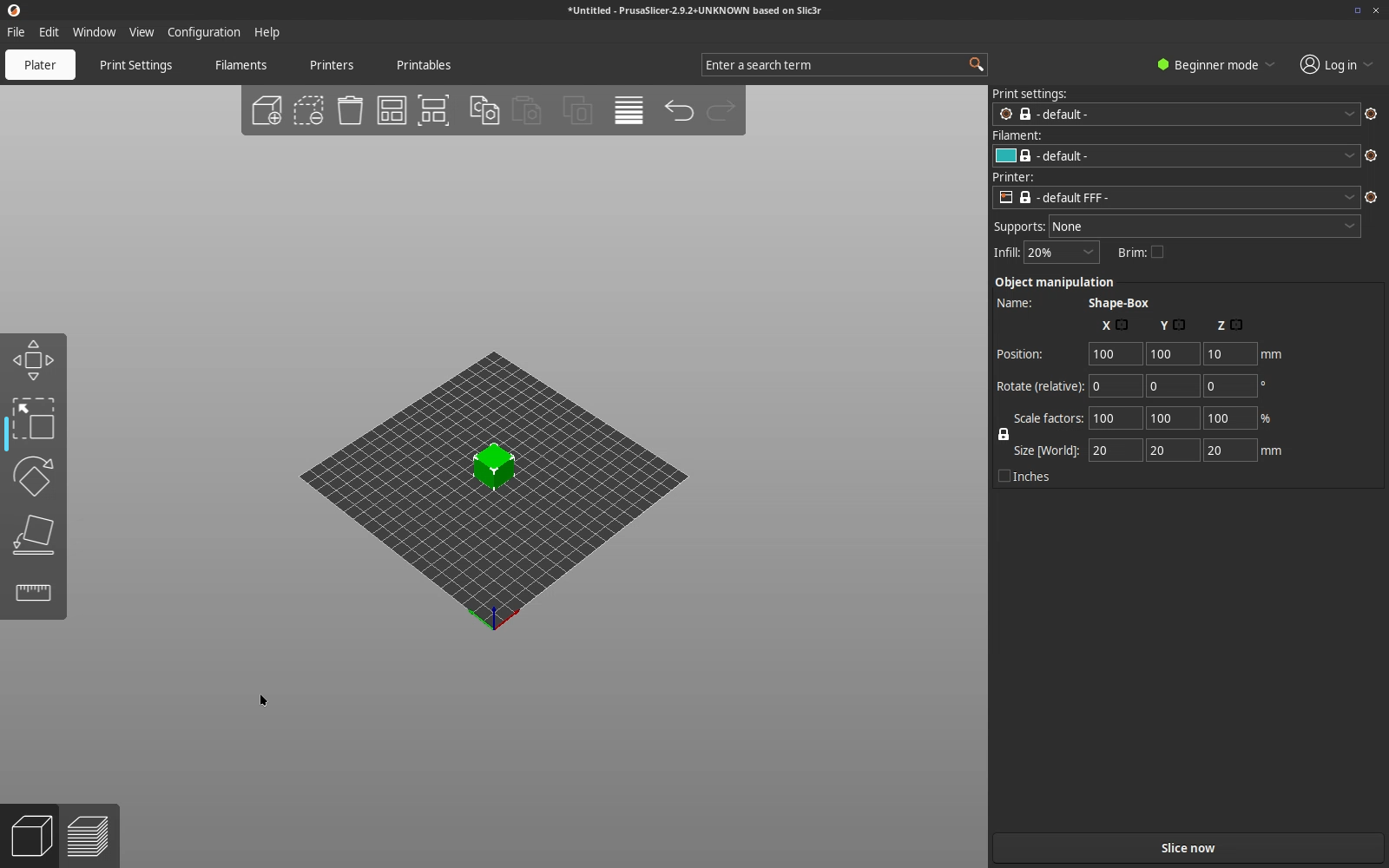
The plater: place and arrange models on the 3D build plate, right in your browser over Selkies.
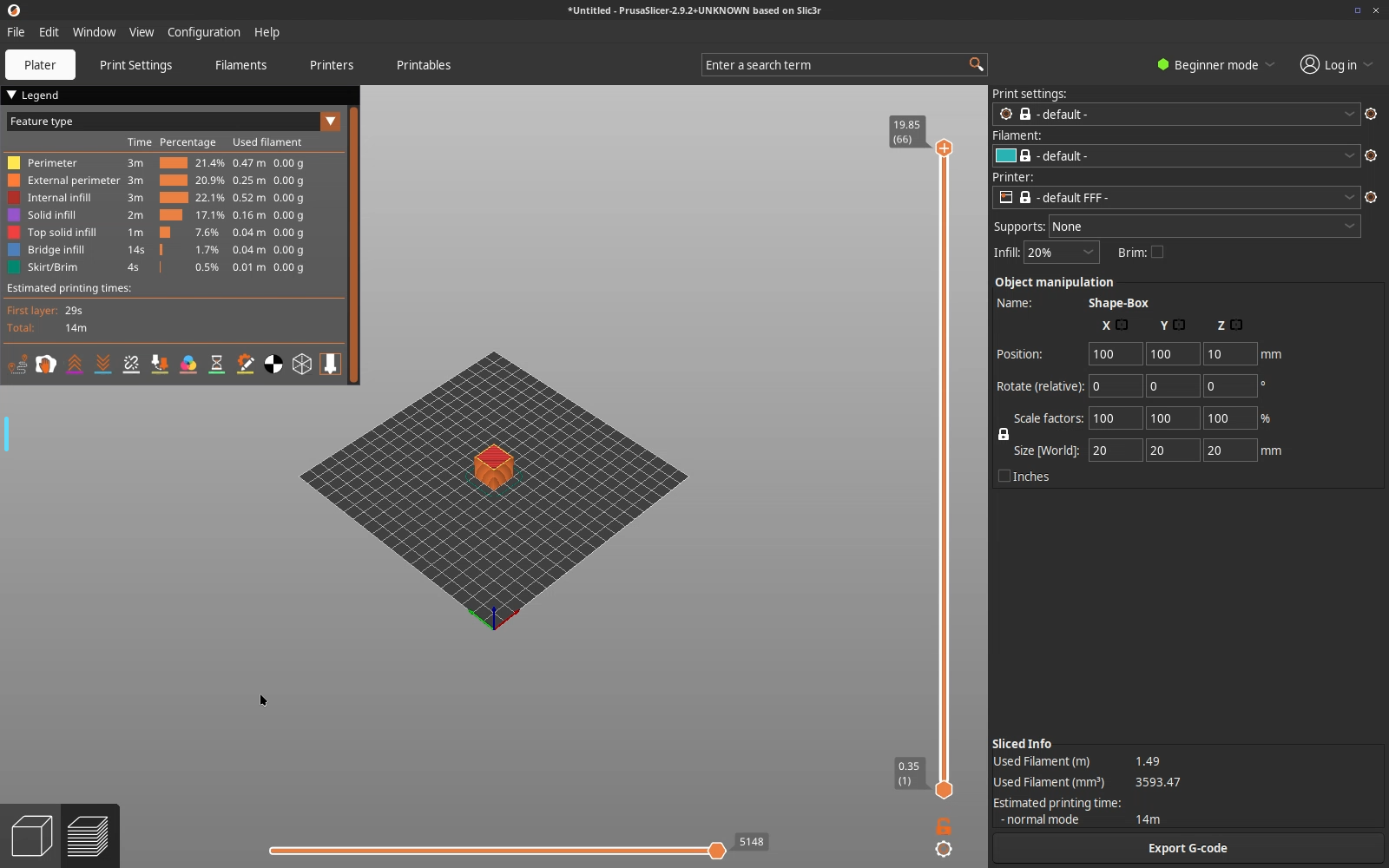
Sliced preview: colour-coded toolpaths, a per-feature breakdown and the print-time / filament estimate, then export the G-code.
3. Why Selkies?
Slicing is a 3D-viewport workflow: you rotate the plate, zoom into overhangs, drag and orient models, and scrub the layer/tool-path preview. Over the older noVNC stack that continuous canvas feels laggy because the whole frame is re-encoded on every change. Selkies streams the desktop as H.264 video, the same reason LinuxServer moved Orca, Cura, Blender and FreeCAD onto it, so the plate stays responsive. When the host has a GPU the base wires it through; without one it falls back to software rendering so it still works.
4. Install on Unraid
Requires Unraid 6.12+. Install via Community Applications: search for PrusaSlicer
(look for the junkerderprovinz maintainer). Or add the template repository manually under
Docker → Add Container → Template repositories:
https://github.com/junkerderprovinz/unraid-apps
Then open the WebUI on the mapped HTTPS port (default 3001).
5. Configuration
| Variable | Required | Description |
|---|---|---|
CUSTOM_USER |
No | WebUI login user. Leave empty (with PASSWORD) for no login on a trusted LAN. |
PASSWORD |
No | WebUI login password. Empty = no login; set both to enable HTTP basic auth on the WebUI. |
CUSTOM_HTTPS_PORT |
No | HTTPS port the WebUI is served on (default 3001). |
PUID / PGID |
No | User/group the app runs as, so files it writes match your share ownership. The Unraid template sets 99/100 (nobody/users). |
TZ |
No | Timezone (e.g. Europe/Berlin). |
Screen size and memory use
The desktop follows your browser window: Selkies resizes the screen to the size the browser reports, so there is no screen size to set and memory only grows with the window you actually use. A 1600x1000 window on a laptop set to 200 % counts as 1600x1000. With HiDPI switched on in the Selkies sidebar the same window counts in physical pixels, 3200x2000.
Display scaling follows the browser without any setting. Every browser is streamed at the size it reports, with the desktop at 96 DPI, so PrusaSlicer looks the same on a 100 % desktop and on a laptop set to 200 %. On the laptop the picture is a little softer, because the browser stretches it. The HiDPI switch in the Selkies sidebar is remembered per browser and wins over this default. With it on, a high-resolution display gets its physical pixels and PrusaSlicer is drawn at half size, so if PrusaSlicer looks tiny on a laptop, switch HiDPI off there.
[!NOTE] Closing PrusaSlicer in the browser starts a fresh one instead of leaving a black screen. That is the base image's watchdog, enabled here by default.
Mount your models/G-code folder to /storage (the Unraid template defaults it to /mnt/user,
giving access to all shares) so imports and slices land on your array. PrusaSlicer's own
configuration (printer/filament/print profiles) persists under /config.
[!NOTE] The WebUI has no login by default for trusted-LAN use. Never expose it directly to the internet. Put it behind a VPN or a reverse proxy that adds authentication, or set
CUSTOM_USER+PASSWORDto enable the built-in basic auth.
6. First use
- Open the WebUI. PrusaSlicer starts maximised, ready to slice.
- Run the Configuration Assistant (first launch) and pick your printer(s) and filament(s).
- Import a model (
File → Import, or drag it onto the plate from your mounted folder), slice, and export the G-code to your mounted output folder. - Prefer a dark UI? PrusaSlicer has its own Dark mode under Preferences → General → Dark mode; the container's GTK chrome is already dark.
Closing the PrusaSlicer window simply reopens a fresh instance. It is the container's single app (kiosk model), so there is nothing else to manage.
7. How it works
Browser ──WebSockets (Selkies)──> PrusaSlicer container
                              ├─ nginx (Selkies WebUI, HTTPS :3001)
                              ├─ openbox + Selkies desktop
                              └─ /usr/bin/prusa-slicer  (Debian trixie package)
                                 └─ /config  (printer/filament/print profiles, persisted)
Built on ghcr.io/linuxserver/baseimage-selkies:debiantrixie. A small s6 overlay seeds the
openbox autostart (which launches PrusaSlicer as the session's single app), keeps the WebUI
login-free unless you set credentials, and prints a PRUSASLICER IS READY banner to the
container log once the WebUI is serving. Images are built natively per architecture, boot-smoke
tested (the binary is present and the WebUI answers) before publishing, and scanned for CVEs.
8. Credits
- PrusaSlicer by Prusa Research (AGPL-3.0), the
slicer this image packages. Installed from the Debian
prusa-slicerpackage. This project is not affiliated with or endorsed by Prusa Research. - LinuxServer.io baseimage-selkies (GPL-3.0), the Selkies web-desktop base.
- Selkies, the desktop streaming stack.
See NOTICE for the full bundled-software license list. This repository's own wrapper
(Dockerfile, rootfs, scripts, artwork) is AGPL-3.0; see LICENSE.
9. License
Copyright (C) 2026 Junker der Provinz.
This repository packages PrusaSlicer as a container for Unraid. The packaging in this repository (Dockerfile, scripts, theme, web assets and everything else original here) is free software under the GNU Affero General Public License v3.0 (AGPL-3.0); see LICENSE. If you distribute it, or run a modified version as a network service, you must release your source under the same AGPL-3.0 terms and keep the existing copyright and attribution notices intact.
Scope. The AGPL applies to this repository's own code and assets. PrusaSlicer itself is a separate project under its own license and name; this repository does not claim it. The banner, logo, theme and other branding original to this repository remain reserved: a fork must use its own branding and may not present itself as this project.
10. How AI is used here
One knight builds this, and AI is one of the tools I work with, the same way I work with an editor or a compiler. It helps me write code and documentation and it checks my work, and that saves me a good many evenings. It does not make the decisions, though. I read and understand everything before it ships, and if something here breaks, that is on me and not on the tool.
You do not have to take my word for it. The code is open and every release note is written by hand. The issue tracker shows how problems actually get handled, including the ones I got wrong the first time. If you find something that is not right, open an issue and I will look at it.
11. Support this project
Questions, bugs, ideas or feature requests? Please open a GitHub issue.
A one-knight job: I build it, keep it running, work through the issues and add what people ask for, until nothing is missing. It is free, with no accounts, no telemetry, no ads and no paid tier. No asterisk anywhere. Nothing readable ever leaves your own walls. Forged on evenings and weekends, with heart and stubbornness.
If it has earned a place on your server or computer, toss a coin to your knight: it helps cover the costs and keeps the project alive. It also makes this knight's heart beat a little faster. Three ways below, whichever suits you.
Install PrusaSlicer on Unraid in a few clicks.
Find PrusaSlicer in Community Apps on your Unraid server, review the template, and click Install. Unraid handles the Docker app or plugin setup from the published template.
Categories
Download Statistics
Related apps
Explore more like this
Explore allLinks
Details
junkerderprovinz/prusaslicer:latestRuntime arguments
- Web UI
https://[IP]:[PORT:3001]/- Network
bridge- Shell
bash- Privileged
- false
- Extra Params
--restart=unless-stopped --shm-size=1gb
Template configuration
HTTPS port of the Selkies WebUI (self-signed cert). This is the default WebUI, and HTTPS is required for clipboard support in the browser. Accept the self-signed certificate once.
- Target
- 3001
- Default
- 3001
- Value
- 3001
HTTP port of the Selkies WebUI. For a reverse proxy that terminates TLS in front of the container, NOT for direct browser access. The Selkies web client requires a secure context, so opening http://IP:3000 directly shows a 'requires a secure connection (HTTPS)' error. For direct access use the HTTPS port 3001.
- Target
- 3000
- Default
- 3000
- Value
- 3000
Persistent PrusaSlicer configuration: printer, filament and print profiles, history and preferences.
- Target
- /config
- Default
- /mnt/user/appdata/prusaslicer
- Value
- /mnt/user/appdata/prusaslicer
Where you keep your STL/3MF models and where sliced G-code is saved. Default /mnt/user gives access to all shares. Import models and export G-code under /storage inside PrusaSlicer's file dialogs.
- Target
- /storage
- Default
- /mnt/user
- Value
- /mnt/user
Optional. Username for HTTP-basic-auth on the WebUI. Leave EMPTY together with the password for no login. Set both fields to enable login (recommended outside trusted LANs).
- Target
- CUSTOM_USER
Optional. Password for HTTP-basic-auth on the WebUI. Leave EMPTY together with the username for no login. STRONGLY recommended whenever the container is reachable from outside your LAN.
- Target
- PASSWORD
Container timezone (affects log timestamps and file mtimes). Use this instead of a /etc/localtime bind-mount, because the LSIO base image manages /etc/localtime internally via TZ.
- Target
- TZ
- Default
- Europe/Vienna
- Value
- Europe/Vienna
User-ID PrusaSlicer runs as. Default 99 (nobody on Unraid).
- Target
- PUID
- Default
- 99
- Value
- 99
Group-ID. Default 100 (users on Unraid).
- Target
- PGID
- Default
- 100
- Value
- 100
Permission mask for newly created files. The default 000 lets every container user read and write them, which is what you want when other containers touch the same shares. Set 022 or 077 for stricter permissions.
- Default
- 000|022|002|077
- Value
- 000