
All apps · 0 apps

PlexLibrarian
Docker app from UnraidUser-0614219466's Repository
Overview
Readme
View on GitHub
Plex Librarian
Find unwatched media, manage users, save bandwidth and space.





Install · Features · Integrations · Configuration · Get help
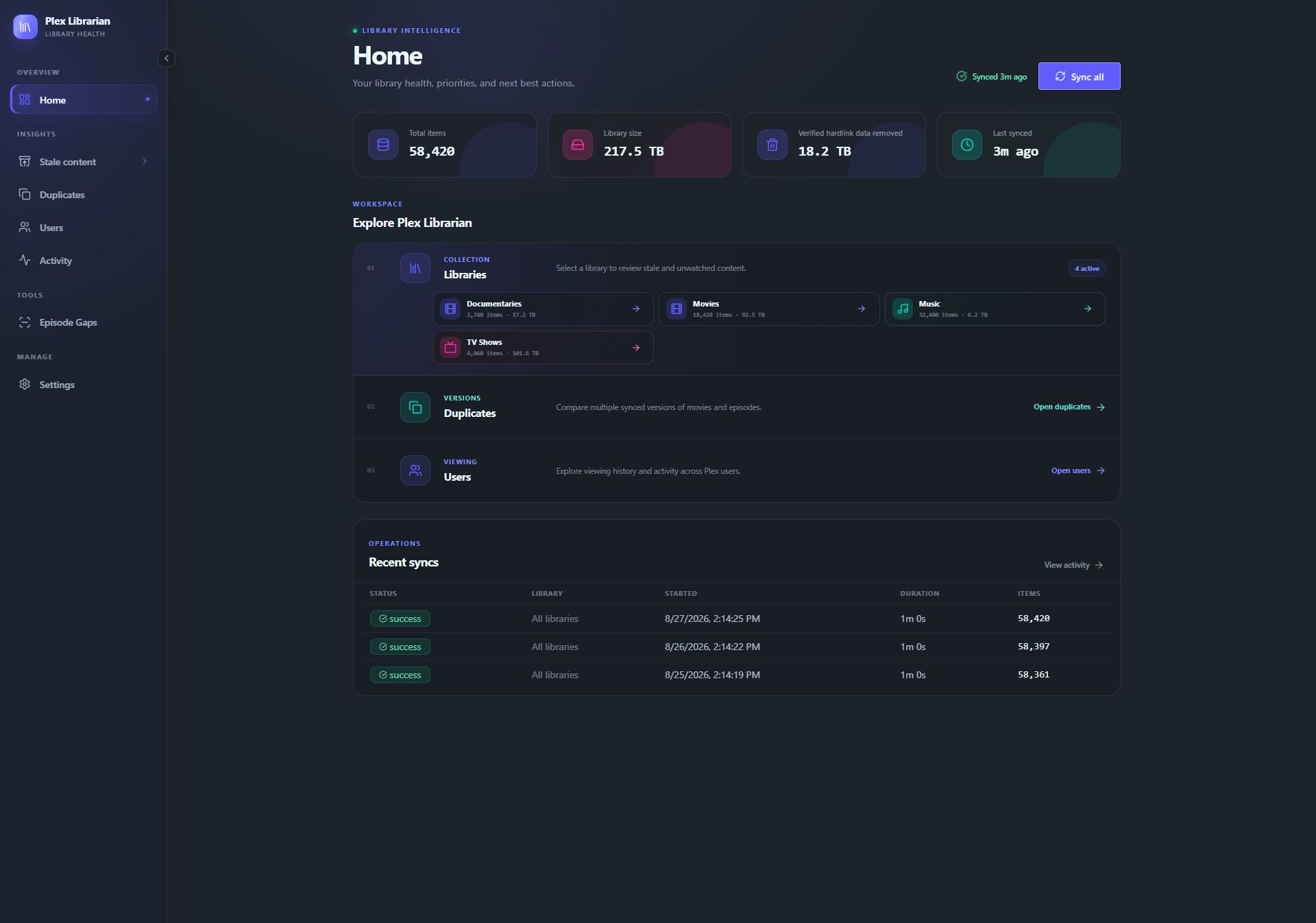
Stale analysis · Duplicates · Episode & Season Gaps · Activity
Plex Librarian helps you keep your Plex library under control: find media nobody watches, remove redundant copies, and review user activity. Built for Docker and Unraid, with optional Sonarr, Radarr, Seerr, and qBittorrent connections.
What it does
| Feature | What you get |
|---|---|
| Stale media discovery | Find unwatched or long-unwatched movies, shows, seasons, and music. Sort by age, size, and play count to choose what to remove. |
| Duplicate cleanup | Compare movie and episode versions, see their sizes, and review suggested copies to keep or remove. |
| Episode & season gaps | Spot missing episode or season numbers between content already in Plex. |
| User insights | Review inactive users, pending invitations, viewing activity, and possible account-sharing signals. |
| Request follow-through | Connect Seerr to see whether users watch the movies and seasons they request. |
| Coordinated cleanup | Review deletions across Plex, Sonarr/Radarr, and optional qBittorrent downloads, with checks to protect retained media and shared downloads. |
Installation
Unraid
Open Plex Librarian in Community Apps, or search for Plex Librarian in the Apps tab. Keep the defaults, select Apply, then open the web UI from the Docker page.
Choose Sign in with Plex, select your server, and let the first sync finish.
Docker Compose
Save this as compose.yml:
services:
  plex-librarian:
    image: edon231/plex-librarian:latest
    container_name: plex-librarian
    ports:
      - "8288:8080"
    volumes:
      - plex-librarian-data:/data
    restart: unless-stopped

volumes:
  plex-librarian-data:
Start it:
docker compose up -d
Open http://<docker-host>:8288, choose Sign in with Plex, and select your
server.
Images support AMD64 and ARM64 and are available on
Docker Hub and
GHCR
(ghcr.io/brycepearce/plex-librarian). Use latest for stable releases, a
version tag to pin a release, or edge for builds from main.
Keep /data persistent; it holds the database and settings. You can replace the
named volume with a bind mount such as /path/to/appdata:/data. Ordinary cleanup
uses service APIs and needs no media mounts or Docker socket.
Integrations
Open Settings → Media connections to add your services. Multiple instances are supported.
- Sonarr / Radarr: add the service URL and API key, then assign Plex libraries. Include the manager in a cleanup to coordinate removal.
- Seerr: add the service URL and API key to enable request follow-through on the Users page.
- qBittorrent: add the Web UI URL and credentials to optionally remove verified downloads during cleanup.
Use addresses reachable from inside the Librarian container, such as
http://192.168.1.20:8989 or http://sonarr:8989 on a shared Docker network.
localhost points to Librarian's own container.
Sonarr/Radarr and qBittorrent cleanup start unchecked. Review the preview and choose which services should delete content before confirming. Track results and any steps needing attention on the Activity page.
Upgrading from the retired host-discovery helper? Follow the upgrade guide to retire the separate helper.
Sonarr/Radarr download source cleanup
Librarian uses Sonarr/Radarr import history to find the original downloaded files
associated with the media being removed, including copies or hardlinks still in
the download folder. It verifies ownership and file identity before cleanup.
To enable this optional cleanup, mount the
same host download folder that Sonarr/Radarr uses into Plex Librarian with
read/write access. This is optional; ordinary service API cleanup does not need
this mount. Keep the existing /data app-data mount unchanged.
Unraid: open Docker → Plex Librarian → Edit, set Completed downloads
folder to your host folder (for example, /mnt/user/downloads/complete), use
/cleanup-downloads as the container path with Read/Write access, and Apply.
Docker Compose: add this entry under Librarian's existing volumes: list,
replacing source with your host's completed-downloads folder:
- type: bind
  source: /mnt/user/downloads/complete
  target: /cleanup-downloads
  read_only: false
  bind:
    create_host_path: false
Run docker compose up -d again. Then open Settings → Media connections →
Download cleanup, finish setup, and enable cleanup after the access check.
For manual setup, enter the download folder as Sonarr/Radarr sees it and
/cleanup-downloads as the folder in Librarian. The container paths can differ,
but must refer to the same host files. Choose the completed-downloads folder,
rather than an individual movie or season folder.
Configuration
Most settings live in the web UI: daily sync scheduling with your time zone, stale-media thresholds, user insights, and ignored titles. Add titles to Settings → Ignored content to exclude them from insights and cleanup tools.
Advanced environment variables
All variables below are optional. Plex and qBittorrent environment credentials override connections saved in the web UI.
| Variable | Required | Description |
|---|---|---|
DB_PATH |
No | SQLite database path. Default: /data/librarian.db |
PORT |
No | Container HTTP port. Default: 8080 |
PLEX_URL |
No | Direct Plex server URL; use with PLEX_TOKEN to skip the setup wizard |
PLEX_TOKEN |
No | Plex authentication token; use with PLEX_URL |
QBITTORRENT_URL |
No | qBittorrent Web UI URL; overrides connections saved in the web UI |
QBITTORRENT_USERNAME |
No | qBittorrent Web UI username; omit only when authentication bypass trusts this container |
QBITTORRENT_PASSWORD |
No | qBittorrent Web UI password; omit only when authentication bypass trusts this container |
LIBRARY_SYNC_CONCURRENCY |
No | Maximum libraries synced in parallel. Default: 3 |
FETCH_CONCURRENCY |
No | Maximum concurrent Plex page requests per library. Default: 8 |
SYNC_STALL_TIMEOUT_MINUTES |
No | Abort a sync after this many minutes without progress. Default: 15 |
LOG_RETENTION_DAYS |
No | Days to retain sync history and activity; use 0 to retain indefinitely. Default: 180 |
Set both PLEX_URL and PLEX_TOKEN to skip the sign-in wizard. For a token,
open an item's Get Info → View XML in Plex Web and copy the X-Plex-Token
parameter from the URL. Keep sync concurrency conservative when sharing a host
with Plex.
Optional Plex webhooks (Plex Pass)
For faster viewing-activity updates, add this URL under Plex Web's Settings → Webhooks:
http://<plex-librarian-host>:8288/api/webhook/plex
Backups and access
Back up /data; it contains the database and service credentials.
Deploy on a trusted network. For remote access, use a reverse proxy with authentication and TLS. Plex sign-in connects your server; it does not restrict access to Librarian's web UI or API.
Support and contributing
Report a bug or suggest a feature.
For development, use Deno 2.9.7 and run deno task fmt and
deno task verify before submitting changes.
AI-assisted contributions are reviewed, tested, and maintained by the project. Licensed under the MIT License.
Categories
Related apps
Explore more like this
Explore allDetails
ghcr.io/brycepearce/plex-librarian:latestRuntime arguments
- Web UI
http://[IP]:[PORT:8080]/- Network
bridge- Shell
sh- Privileged
- false
- Extra Params
--init
Template configuration
Port for the Plex Librarian web UI.
- Target
- 8080
- Default
- 8288
- Value
- 8288
Persistent app data directory for the database and saved settings. The default is ready to use.
- Target
- /data
- Default
- /mnt/user/appdata/plex-librarian
- Value
- /mnt/user/appdata/plex-librarian
Optional. URL of your Plex Media Server (e.g. http://192.168.1.100:32400). Set this together with Plex Token to bypass the OAuth setup wizard.
- Target
- PLEX_URL
Optional. Your Plex authentication token. Set this together with Plex URL to bypass the OAuth setup wizard.
- Target
- PLEX_TOKEN
Full path inside the container where the SQLite database file lives. Only change this if you have a specific reason to.
- Target
- DB_PATH
- Default
- /data/librarian.db
- Value
- /data/librarian.db
Optional power-user override. qBittorrent Web UI URL reachable from this container. Configure qBittorrent in the web UI instead for multiple instances.
- Target
- QBITTORRENT_URL
qBittorrent Web UI username. Leave blank only when authentication bypass trusts this container.
- Target
- QBITTORRENT_USERNAME
qBittorrent Web UI password. Leave blank only when authentication bypass trusts this container.
- Target
- QBITTORRENT_PASSWORD
Max number of libraries synced in parallel. Kept low by default to avoid competing with Plex for resources on the same host — only raise this on dedicated hardware.
- Target
- LIBRARY_SYNC_CONCURRENCY
- Default
- 3
- Value
- 3
Max concurrent Plex page requests per library. Kept low by default to avoid competing with Plex for resources on the same host — only raise this on dedicated hardware.
- Target
- FETCH_CONCURRENCY
- Default
- 8
- Value
- 8
Abort a sync if it reports no progress for this many minutes — e.g. the Plex server going offline mid-sync. Only raise this if you have a very slow or high-latency Plex connection triggering false positives.
- Target
- SYNC_STALL_TIMEOUT_MINUTES
- Default
- 15
- Value
- 15
Days to keep sync history and activity feed entries before they're automatically deleted. Raise this to retain history longer, or set to 0 to keep them forever.
- Target
- LOG_RETENTION_DAYS
- Default
- 180
- Value
- 180
Optional: select the same host folder Sonarr/Radarr uses for completed downloads. Librarian sees it at /cleanup-downloads. After applying, open Media connections to enable download cleanup. Keep the existing /data app-data mount unchanged.
- Target
- /cleanup-downloads