
All apps · 0 apps

Krusader
Docker app from junkerderprovinz's Repository
Overview
Readme
View on GitHub







A modern, plug-and-play Docker image for Krusader on Unraid. Twin-pane file management in your browser, powered by Selkies, with Dark Mode, Kate as external editor, full archive support and 33 UI languages, all configurable from the Unraid template, no SSH or config-file editing required.
A one-knight job: I build it, keep it running, work through the issues and add what people ask for, until nothing is missing. It is free, with no accounts, no telemetry, no ads and no paid tier. No asterisk anywhere. Nothing readable ever leaves your own walls. Forged on evenings and weekends, with heart and stubbornness.
If it has earned a place on your server or computer, toss a coin to your knight: it helps cover the costs and keeps the project alive. It also makes this knight's heart beat a little faster. Three ways below, whichever suits you.
))
))
))
Table of Contents
- Overview
- Screenshots
- Quick Start
- Configuration
- Languages
- Right-Click Actions
- Customisation & Persistence
- Building Locally
- Updating
- Troubleshooting
- Architecture
- Contributing / License
- License
- How AI is used here
- Support this project
1. Overview
This image packages Krusader, KDE's twin-pane file manager, into a self-contained Docker container that runs in any modern web browser. It is built on top of linuxserver/baseimage-selkies, so it benefits from LSIO's actively-maintained Selkies desktop-streaming stack (H.264 video to the browser) and weekly security updates, while everything Krusader-specific (theme, archive tools, right-click actions, language packs, default configs) is layered on top in this repo.
What's included beyond bare Krusader:
- Selkies instead of noVNC: H.264 video for a smooth 60fps web desktop, real bidirectional browser clipboard, native file upload and download, high-DPI ready
- Dark Mode pre-applied to Krusader, Kate and the whole KDE stack; switch to light with one variable
- Row-aware panel icons: Krusader is built from source with our icon-tint patch, the file-list icons follow each row's effective text colour (normal, current and marked rows, including custom Konfigurator colours), so icons stay legible on any row highlight
- Kate wired up as Krusader's external editor, also Dark Mode, with spell-check
- krename: KDE's batch-rename dialog bundled; rename hundreds of files at once using regex, counters, case transforms and metadata patterns
- Kompare: a side-by-side diff viewer bundled, so File → Compare by Content… opens two selected files in a real diff instead of the "cannot find any of the supported diff-frontends" error
- Quit and come back: closing Krusader in the browser starts a fresh Krusader instead of leaving a black screen; no container restart needed
- Full archive support: RAR, 7z, ZIP, TAR, GZ, BZ2, XZ, LHA, ARJ, ACE, RPM, CPIO; right-click "Extract RAR here" works out of the box
- 33 UI languages picked from a dropdown in the Unraid template
- The desktop follows your browser window: no screen size to set, and memory only grows with the window you actually use (see Screen size and memory use)
- Update-safe configs: first-run-only seeding, your customisations in
/configsurvive everydocker pull - Multi-arch: amd64 and arm64
| This image | binhex | jlesage | ich777 | |
|---|---|---|---|---|
| Web stack | Selkies | noVNC | noVNC | noVNC |
| HW-accelerated rendering | ✅ | ❌ | ❌ | ❌ |
| Browser clipboard | ✅ | ⚠️ | ⚠️ | ⚠️ |
| File upload via WebUI | ✅ | ❌ | ❌ | ❌ |
| Dark Mode default | ✅ | ❌ | ❌ | ❌ |
| Kate as editor | ✅ | ❌ | ❌ | ❌ |
| Batch rename (krename) | ✅ | ❌ | ❌ | ❌ |
| RAR right-click | ✅ | ❌ | ❌ | ❌ |
| Language dropdown | ✅ (33) | ❌ | ❌ | ❌ |
| Multi-arch | ✅ amd64 + arm64 | amd64 | ✅ | amd64 |
| Base | LinuxServer | binhex/Arch | jlesage/Alpine | ich777/Debian |
2. Screenshots
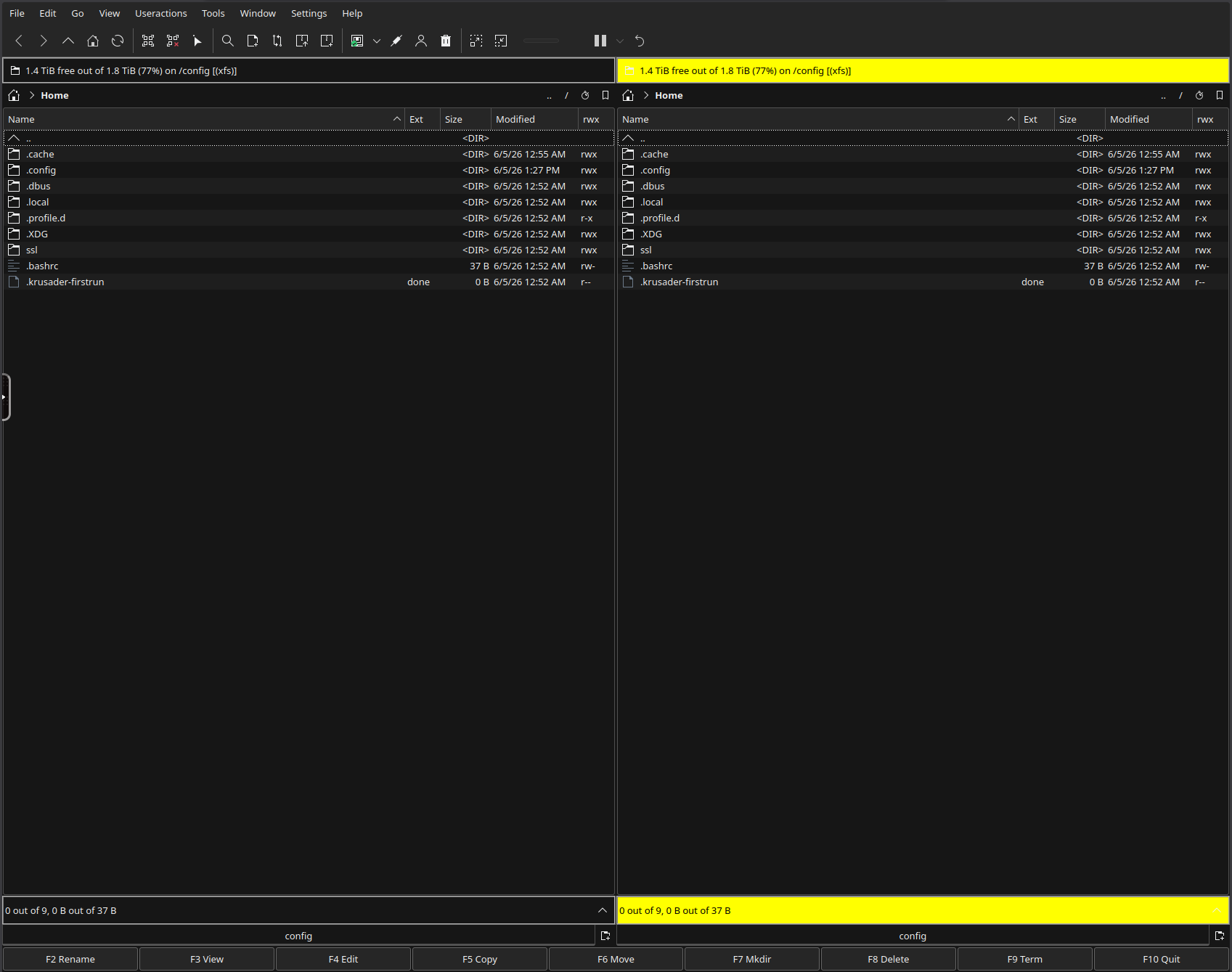
Twin-pane file manager: Dark Mode, F-key shortcuts, in-browser via Selkies.
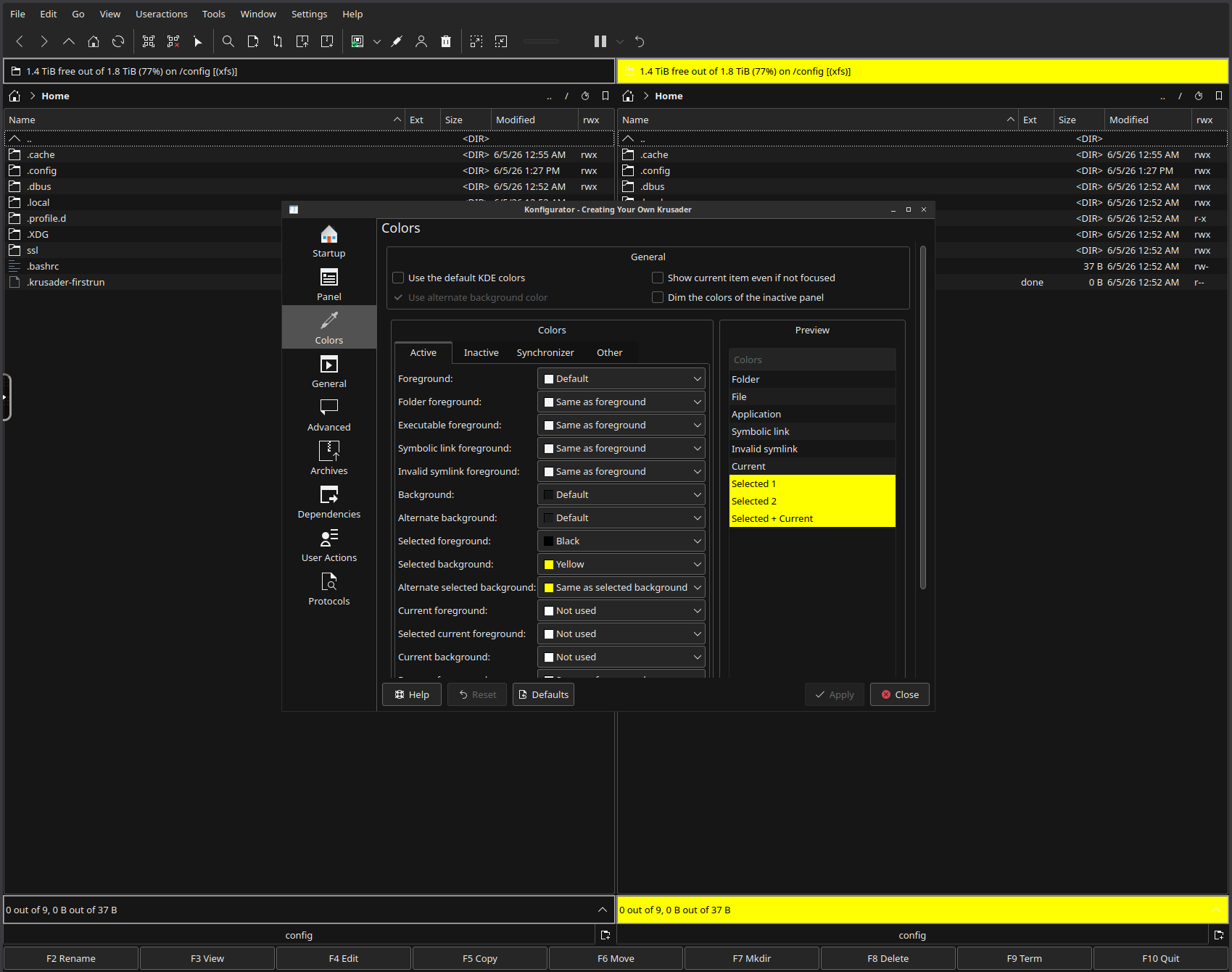
Configurator → Colors: full control over panel foreground / background / selection.
3. Quick Start
Step 1: Install the template
On Unraid: Apps → search for Krusader → click Install. The Community Applications
template is published from the
unraid-apps feed
(one feed for all of junkerderprovinz's apps).
To load it by hand, pull it into Unraid's user-template folder via the console / SSH:
mkdir -p /boot/config/plugins/dockerMan/templates-user && \
curl -fsSL -o /boot/config/plugins/dockerMan/templates-user/my-Krusader.xml \
  https://raw.githubusercontent.com/junkerderprovinz/unraid-apps/main/krusader/krusader.xml
Step 2: Add the container
In the Unraid Web UI: Docker tab → Add Container → in the Template dropdown, pick Krusader under User templates. All fields are pre-filled.
Step 3: Adjust paths and start
The defaults work out of the box, but you may want to tweak:
- Storage (
/storage): defaults to/mnt, which exposes all shares and disks. Restrict to e.g./mnt/userif you want. - UI Language: dropdown, default
de. - Theme:
darkorlight. - WebUI Password: leave empty for LAN-only, set anything for exposure beyond the LAN.
Hit Apply. The first start takes 30 to 60 seconds while the container seeds its config and Selkies generates a self-signed certificate.
Step 4: Open the WebUI
https://<unraid-ip>:3001/ (HTTPS, self-signed, accept the certificate once). Use HTTPS: the Selkies web client requires a secure context, so direct browser access must go through the HTTPS port. Port 3000 (HTTP) is not a usable direct fallback; opening http://<unraid-ip>:3000/ shows a "requires a secure connection (HTTPS)" error and won't load. It exists for a reverse proxy that terminates TLS in front of the container (the proxy serves HTTPS to the browser and forwards HTTP to 3000).
Once Community Applications has accepted this image it will also be installable via Apps → search
Krusader.
Plain Docker (no Unraid)
docker run -d \
  --name krusader \
  --restart unless-stopped \
  --shm-size=1gb \
  -p 3000:3000 -p 3001:3001 \
  -e PUID=99 -e PGID=100 \
  -e TZ=Europe/Vienna \
  -e KRUSADER_LANG=de \
  -e KRUSADER_THEME=dark \
  -v /mnt/user/appdata/krusader:/config \
  -v /mnt:/storage \
  junkerderprovinz/krusader:latest
--shm-size=1gb is required for smooth KDE rendering. The Unraid template sets it for you.
4. Configuration
| Variable | Default | Description |
|---|---|---|
PUID |
99 |
User ID, Unraid's nobody |
PGID |
100 |
Group ID, Unraid's users |
TZ |
Etc/UTC |
Timezone, e.g. Europe/Vienna |
KRUSADER_LANG |
de |
UI language, see Languages |
KRUSADER_THEME |
dark |
dark (Dark Mode) or light (Breeze) |
CUSTOM_USER |
(empty) | WebUI login username; leave empty with PASSWORD for no login |
PASSWORD |
(empty) | WebUI password, set this if exposed beyond LAN |
TITLE |
Krusader |
Browser tab / PWA title (see also SELKIES_UI_TITLE) |
UMASK |
000 |
File-creation mask. Keeps new files writable for other containers on the same shares |
| Port | Purpose | Volume | Purpose | |
|---|---|---|---|---|
3001 |
Selkies HTTPS (self-signed), default WebUI, needed for clipboard | /config |
Persistent KDE / Krusader / Kate configs | |
3000 |
Selkies HTTP (reverse-proxy only; direct access needs HTTPS) | /storage |
Files to manage, default host /mnt |
Screen size and memory use
The desktop follows your browser window: Selkies resizes the screen to the size the browser reports, so there is no screen size to set and memory only grows with the window you actually use. A 1600x1000 window on a laptop set to 200 % counts as 1600x1000. With HiDPI switched on in the Selkies sidebar the same window counts in physical pixels, 3200x2000.
Display scaling follows the browser without any setting. Every browser is streamed at the size it reports, with the desktop at 96 DPI, so Krusader looks the same on a 100 % desktop and on a laptop set to 200 %. On the laptop the picture is a little softer, because the browser stretches it. The HiDPI switch in the Selkies sidebar is remembered per browser and wins over this default. With it on, a high-resolution display gets its physical pixels and Krusader is drawn at half size, so if Krusader looks tiny on a laptop, switch HiDPI off there.
Web file transfers: the Selkies sidebar's upload/download panel and the WebUI's
/filesbrowser both use the base image'sFILE_MANAGER_PATH, which defaults to/config/Desktop, so a file dragged into the browser lands there, not in/storage. It is inside the persisted/configvolume, and Krusader can navigate to it like any other folder. PointFILE_MANAGER_PATHsomewhere under/storageif you would rather upload straight into your data, but choose with care: withoutPASSWORDset,/filesserves that directory to anyone who can reach the WebUI, and/storagedefaults to all of/mnt.
5. Languages
The Unraid template ships a dropdown with 33 UI languages (German default, plus system fallback). Each language has its language-pack-<code> and language-pack-kde-<code> baked in, switching is instant after a restart.
| Region | Languages |
|---|---|
| Western Europe | 🇩🇪 de Deutsch · 🇬🇧 en English · 🇫🇷 fr Français · 🇪🇸 es Español · 🇮🇹 it Italiano · 🇵🇹 pt Português · 🇳🇱 nl Nederlands · 🇪🇸 ca Català · 🇪🇸 eu Euskara · 🇮🇪 ga Gaeilge |
| Northern Europe | 🇩🇰 da Dansk · 🇸🇪 sv Svenska · 🇳🇴 nb Norsk Bokmål · 🇫🇮 fi Suomi · 🇮🇸 is Íslenska |
| Central / Eastern Europe | 🇵🇱 pl Polski · 🇨🇿 cs Čeština · 🇸🇰 sk Slovenčina · 🇭🇺 hu Magyar · 🇷🇴 ro Română · 🇸🇮 sl Slovenščina · 🇭🇷 hr Hrvatski · 🇷🇸 sr Српски · 🇧🇬 bg Български · 🇺🇦 uk Українська · 🇷🇺 ru Русский · 🇬🇷 el Ελληνικά |
| Middle East | 🇹🇷 tr Türkçe · 🇮🇱 he עברית · 🇸🇦 ar العربية |
| Asia / CJK | 🇯🇵 ja 日本語 · 🇰🇷 ko 한국어 · 🇨🇳 zh 中文 |
| Fallback | system, use the container's default locale |
Default: de (Deutsch). Set via KRUSADER_LANG or the Unraid dropdown.
How it works: Unraid renders any
<Default>a|b|c</Default>value with at least one|as a native<select>dropdown. The cont-init hook re-applies the language on every start.
6. Right-Click Actions
Krusader's UserActions are pre-loaded with extras:
| Action | Command |
|---|---|
| Extract RAR here | unrar x -o+ into the current directory |
| Extract RAR to subfolder | Same, but into a folder named after the archive |
| Open with Kate | Opens the selected file(s) in Kate |
| Open Konsole here | New Konsole tab in the current directory |
For generic archive extraction (7z, ZIP, TAR, …) use Ark's built-in right-click menu; it is already installed and avoids a duplicate "Extract" entry in the context menu.
Edit them via Krusader → Settings → Configure UserActions, or directly at /config/.local/share/krusader/useractions.xml.
7. Customisation & Persistence
On the first start only, the container seeds defaults from /defaults/ into /config/:
/config/
├── .config/
│   ├── kdeglobals          # KDE color scheme + Dark Mode
│   ├── krusaderrc          # Editor=kate, theme, panel layout
│   └── katerc              # Kate Dark Mode
└── .local/share/krusader/
    └── useractions.xml     # right-click actions
A marker file /config/.krusader-firstrun.done is written so subsequent container starts never overwrite your customisations. To re-seed defaults, delete the marker and restart.
The two env-driven knobs (KRUSADER_LANG, KRUSADER_THEME) are re-applied on every start via a cont-init.d hook, so you can flip them freely.
The base image also supports /config/custom-cont-init.d/ for your own init scripts, see the LinuxServer docs.
8. Building Locally
git clone https://github.com/junkerderprovinz/krusader.git
cd krusader

# amd64 only (your local arch)
docker build -t krusader:dev .

# Multi-arch (amd64 + arm64) – needs buildx
docker buildx build --platform linux/amd64,linux/arm64 -t krusader:dev --load .

# Test run — http://localhost:3000 is fine here: browsers treat localhost as a
# secure context, so the HTTP port works for local testing but not over the LAN
docker run --rm -it \
  -p 3000:3000 \
  -v "$PWD/.dev-config:/config" \
  -v "$PWD:/storage" \
  krusader:dev
9. Updating
docker pull junkerderprovinz/krusader:latest
docker stop krusader && docker rm krusader
# re-create with the same template / docker run args
On Unraid: Docker tab → click the container → Force Update. Your /config is untouched.
The image is rebuilt weekly via GitHub Actions for upstream Selkies, Ubuntu and KDE patches.
10. Troubleshooting
WebUI is black / desktop never appears
- Make sure
--shm-sizeis at least512mb(Unraid template sets1gb) - Check the container log for Selkies startup errors
- Make sure you opened
https://<ip>:3001/(self-signed) and nothttp://<ip>:3000/; over plain HTTP the Selkies client aborts with "requires a secure connection (HTTPS)" and the desktop never appears - Wait 30 to 60 seconds on first start; KDE caches need to be built once
I closed Krusader and got a black screen
Fixed in v2.5.0. Quitting Krusader (File → Quit, Ctrl+Q, the window X) now
starts a fresh Krusader, so refreshing the browser tab brings the file manager
back instead of an empty desktop. On older versions the desktop kept running
without any window and only a container restart helped.
If Krusader cannot stay up (five failed starts in a row, or twenty instant exits of any kind) the session stops trying instead of looping. That means something is genuinely broken (config, X, a missing library), so restart the container and check the log.
A window slipped behind another / I can't get it back
- Press Alt+Tab to cycle windows (Alt+Shift+Tab goes backwards), or middle-click the empty desktop background for a list of every open window (minimised ones included) and pick one. Krusader also stays maximised so it does not slip behind on its own.
- Krusader's "Show and close to tray" option is disabled in this container on purpose: the minimal openbox desktop has no system tray, so a tray-hidden window could not be recovered. A normal minimise stays reachable via Alt+Tab or the desktop menu.
WebUI is unreachable
- Check the host port isn't already taken:
netstat -tlnp | grep 3000 - Disable the host firewall briefly to rule it out
- Verify the container is listening:
docker exec krusader ss -tlnp - Confirm the network is
bridge(orhost), not a custombr0whose IP isn't reachable from your client
Right-click "Extract RAR here" does nothing
- Open a Konsole inside the container:
which unrarshould print/usr/bin/unrar. If empty, file an issue.
Language change doesn't take effect
- Restart the container; language is applied at start, not live
- Check the env value matches a code from the Languages table
- The script writes
/etc/profile.d/zz-krusader-lang.shand updateskdeglobals[Translations]
Files outside /storage not visible
- That's by design. Map another path:
-v /mnt/disks/somepool:/storage/somepool
"Permission denied" on /storage/...
- Check
PUID/PGID. On Unraid,99:100(nobody:users) match share permissions.
WebUI password not accepted
- Open in a private window once; your browser may have cached old credentials.
Container fails to start with "mkdir /etc/localtime: file exists"
You have a /etc/localtime:/etc/localtime:ro bind-mount configured (e.g. from an old template version). The LSIO base image manages /etc/localtime internally as a symlink; a bind-mount on top causes the conflict.
Fix: Remove the /etc/localtime path mapping from your container settings and use the TZ environment variable instead (e.g. TZ=Europe/Vienna). The TZ variable is the correct and supported way to set the timezone in LSIO-based containers.
Pasted UPPERCASE text arrives lowercase (Firefox)
Known Firefox-specific issue, see issue #27 and
TROUBLESHOOTING.md Bug #5
for the full root-cause chain. Firefox restricts silent clipboard reads more
than Chromium, so it falls back to a Selkies retype path with a real bug,
already fixed upstream, just not yet on the Selkies branch this image
builds from. Workaround: in Firefox, open about:config,
search for dom.events.testing.asyncClipboard, and set it to true. This
gives Firefox the same silent clipboard-sync behaviour Chromium already has,
which sidesteps the retype path (and its case bug) entirely. No container
change or restart needed; it takes effect on the next paste. Chromium-based
browsers (Brave, Edge, Chrome) are not affected.
Bottom status bar hides persistently now
Fixed as of the Selkies release (Krusader 2.9.0). Uncheck View → Show Statusbar once and it stays hidden across restarts; Krusader 2.9.0 auto-saves the statusbar state about a second after toggling and also saves settings on docker stop, so no clean exit is needed. (On the old KasmVNC image, Krusader 2.8.1 could not persist this.) The per-panel (upper) free-space / device status bar is a different widget and is unaffected.
11. Architecture
┌─────────────────────────────────────────────────────────────────┐
│  ghcr.io/linuxserver/baseimage-selkies:dev                      │
│  ┌───────────────────────────────────────────────────────────┐  │
│  │  s6-overlay v3 init                                       │  │
│  │   ↓                                                       │  │
│  │  s6-rc.d/init-krusader/run                                │  │
│  │   ↓ seeds /config from /defaults  (first run only)        │  │
│  │   ↓ sets theme, locale → s6 container environment         │  │
│  │   ↓                                                       │  │
│  │  Selkies (Xvfb+openbox) ← /defaults/autostart             │  │
│  │              → dbus-launch krusader-session               │  │
│  │                 → ksmserver (KDE session manager)         │  │
│  │                 → krusader                                │  │
│  └───────────────────────────────────────────────────────────┘  │
└─────────────────────────────────────────────────────────────────┘
12. Contributing / License
Pull requests welcome. Issues: https://github.com/junkerderprovinz/krusader/issues.
Licensing, dual:
- This wrapper repository (Dockerfile,
rootfs/, scripts, Unraid templates, README and banner/icon artwork) is licensed under the GNU Affero General Public License v3.0 (AGPL-3.0). - Krusader itself and the bundled KDE / Qt / Selkies / unrar / LSIO base-image components retain their upstream licenses (mostly GPL-2.0+ / GPL-3.0+ / LGPL-2.1+, plus unrar's non-free terms). When you run, redistribute or rebuild the resulting container image, you must comply with all of those licenses, not only with this wrapper's AGPL-3.0 license. See the
LICENSEfile for the full notice.
# Run lints locally (CI runs them too)
docker run --rm -i hadolint/hadolint < Dockerfile
docker run --rm -v "$PWD:/mnt" -w /mnt koalaman/shellcheck:stable \
  $(find rootfs -type f \( -name '*.sh' -o -name 'run' -o -name 'autostart' -o -name 'krusader-session' \))
find . -name '*.xml' -not -path './.git/*' -exec xmllint --noout {} +
Credits
- Krusader, KDE community, the actual file manager
- LinuxServer.io, for
baseimage-selkies - Selkies, for an actively developed browser desktop stack
- Kate, a lightweight editor on Linux
- Inspiration: binhex, jlesage and ich777 Krusader containers, they paved the way
13. License
Copyright (C) 2026 Junker der Provinz.
This repository packages Krusader as a container for Unraid. The packaging in this repository (Dockerfile, scripts, theme, web assets and everything else original here) is free software under the GNU Affero General Public License v3.0 (AGPL-3.0); see LICENSE. If you distribute it, or run a modified version as a network service, you must release your source under the same AGPL-3.0 terms and keep the existing copyright and attribution notices intact.
Scope. The AGPL applies to this repository's own code and assets. Krusader itself is a separate project under its own license and name; this repository does not claim it. The banner, logo, theme and other branding original to this repository remain reserved: a fork must use its own branding and may not present itself as this project.
14. How AI is used here
One knight builds this, and AI is one of the tools I work with, the same way I work with an editor or a compiler. It helps me write code and documentation and it checks my work, and that saves me a good many evenings. It does not make the decisions, though. I read and understand everything before it ships, and if something here breaks, that is on me and not on the tool.
You do not have to take my word for it. The code is open and every release note is written by hand. The issue tracker shows how problems actually get handled, including the ones I got wrong the first time. If you find something that is not right, open an issue and I will look at it.
15. Support this project
Questions? Check the support thread. Bugs, ideas or feature requests? Please open a GitHub issue.
A one-knight job: I build it, keep it running, work through the issues and add what people ask for, until nothing is missing. It is free, with no accounts, no telemetry, no ads and no paid tier. No asterisk anywhere. Nothing readable ever leaves your own walls. Forged on evenings and weekends, with heart and stubbornness.
If it has earned a place on your server or computer, toss a coin to your knight: it helps cover the costs and keeps the project alive. It also makes this knight's heart beat a little faster. Three ways below, whichever suits you.
Install Krusader on Unraid in a few clicks.
Find Krusader in Community Apps on your Unraid server, review the template, and click Install. Unraid handles the Docker app or plugin setup from the published template.
Categories
Download Statistics
Related apps
Explore more like this
Explore allLinks
Details
junkerderprovinz/krusader:latestRuntime arguments
- Web UI
https://[IP]:[PORT:3001]/- Network
bridge- Shell
bash- Privileged
- false
- Extra Params
--restart=unless-stopped --shm-size=1gb
Template configuration
HTTPS port of the Selkies WebUI (self-signed cert). This is the default WebUI, because the browser only allows clipboard access over HTTPS. Accept the self-signed certificate once.
- Target
- 3001
- Default
- 3001
- Value
- 3001
HTTP port of the Selkies WebUI. For a reverse proxy that terminates TLS in front of the container, not for direct browser access: the Selkies web client requires a secure context, so opening http://IP:3000 directly shows a 'requires a secure connection (HTTPS)' error. For direct access use the HTTPS port 3001.
- Target
- 3000
- Default
- 3000
- Value
- 3000
Persistent Krusader configs, history, bookmarks, default-files lock.
- Target
- /config
- Default
- /mnt/user/appdata/krusader
- Value
- /mnt/user/appdata/krusader
Main path for file operations. Default /mnt gives access to all shares (/mnt/user) and individual disks (/mnt/disk*). Adjust if you only need specific shares.
- Target
- /storage
- Default
- /mnt
- Value
- /mnt
Language for the Krusader / Kate UI (33 languages). The container reads the leading code, so the full label is fine as a value. Pick 'system' for the container default. Re-applied on every container start.
- Target
- KRUSADER_LANG
- Default
- de = Deutsch|en = English|fr = Français|es = Español|it = Italiano|pt = Português|nl = Nederlands|ca = Català|eu = Euskara|ga = Gaeilge|da = Dansk|sv = Svenska|nb = Norsk (Bokmål)|fi = Suomi|is = Íslenska|pl = Polski|cs = Čeština|sk = Slovenčina|hu = Magyar|ro = Română|sl = Slovenščina|hr = Hrvatski|sr = Srpski|bg = Български|uk = Українська|ru = Русский|el = Ελληνικά|tr = Türkçe|he = עברית|ar = العربية|ja = 日本語|ko = 한국어|zh = 中文|system = System default
- Value
- de = Deutsch
Color scheme. 'dark' = Dark Mode, 'light' = Breeze.
- Target
- KRUSADER_THEME
- Default
- dark|light
- Value
- dark
X keyboard layout loaded at session start (setxkbmap). Binds Shift so pasted upper-case text keeps its case in the web desktop, and gives the correct symbols for your layout. Default 'us' suits most users.
- Target
- KEYBOARD_LAYOUT
- Default
- us|de|gb|fr|es|it|pt|nl|se|no|dk|fi|pl|cz|hu|ru|jp
- Value
- us
Optional. Username for HTTP-basic-auth on the WebUI. Leave it empty together with the password for no login. Set both fields to enable login (recommended outside trusted LANs).
- Target
- CUSTOM_USER
Optional. Password for HTTP-basic-auth on the WebUI. Leave it empty together with the username for no login. Strongly recommended whenever the container is reachable from outside your LAN.
- Target
- PASSWORD
Container timezone (affects log timestamps and file mtimes). Use this instead of a /etc/localtime bind-mount, because the LSIO base image manages /etc/localtime internally via TZ.
- Target
- TZ
- Default
- Europe/Vienna|Africa/Abidjan|Africa/Accra|Africa/Addis_Ababa|Africa/Algiers|Africa/Asmera|Africa/Bamako|Africa/Bangui|Africa/Banjul|Africa/Bissau|Africa/Blantyre|Africa/Brazzaville|Africa/Bujumbura|Africa/Cairo|Africa/Casablanca|Africa/Ceuta|Africa/Conakry|Africa/Dakar|Africa/Dar_es_Salaam|Africa/Djibouti|Africa/Douala|Africa/El_Aaiun|Africa/Freetown|Africa/Gaborone|Africa/Harare|Africa/Johannesburg|Africa/Juba|Africa/Kampala|Africa/Khartoum|Africa/Kigali|Africa/Kinshasa|Africa/Lagos|Africa/Libreville|Africa/Lome|Africa/Luanda|Africa/Lubumbashi|Africa/Lusaka|Africa/Malabo|Africa/Maputo|Africa/Maseru|Africa/Mbabane|Africa/Mogadishu|Africa/Monrovia|Africa/Nairobi|Africa/Ndjamena|Africa/Niamey|Africa/Nouakchott|Africa/Ouagadougou|Africa/Porto-Novo|Africa/Sao_Tome|Africa/Tripoli|Africa/Tunis|Africa/Windhoek|America/Adak|America/Anchorage|America/Anguilla|America/Antigua|America/Araguaina|America/Argentina/La_Rioja|America/Argentina/Rio_Gallegos|America/Argentina/Salta|America/Argentina/San_Juan|America/Argentina/San_Luis|America/Argentina/Tucuman|America/Argentina/Ushuaia|America/Aruba|America/Asuncion|America/Bahia|America/Bahia_Banderas|America/Barbados|America/Belem|America/Belize|America/Blanc-Sablon|America/Boa_Vista|America/Bogota|America/Boise|America/Buenos_Aires|America/Cambridge_Bay|America/Campo_Grande|America/Cancun|America/Caracas|America/Catamarca|America/Cayenne|America/Cayman|America/Chicago|America/Chihuahua|America/Ciudad_Juarez|America/Coral_Harbour|America/Cordoba|America/Costa_Rica|America/Coyhaique|America/Creston|America/Cuiaba|America/Curacao|America/Danmarkshavn|America/Dawson|America/Dawson_Creek|America/Denver|America/Detroit|America/Dominica|America/Edmonton|America/Eirunepe|America/El_Salvador|America/Fort_Nelson|America/Fortaleza|America/Glace_Bay|America/Godthab|America/Goose_Bay|America/Grand_Turk|America/Grenada|America/Guadeloupe|America/Guatemala|America/Guayaquil|America/Guyana|America/Halifax|America/Havana|America/Hermosillo|America/Indiana/Knox|America/Indiana/Marengo|America/Indiana/Petersburg|America/Indiana/Tell_City|America/Indiana/Vevay|America/Indiana/Vincennes|America/Indiana/Winamac|America/Indianapolis|America/Inuvik|America/Iqaluit|America/Jamaica|America/Jujuy|America/Juneau|America/Kentucky/Monticello|America/Kralendijk|America/La_Paz|America/Lima|America/Los_Angeles|America/Louisville|America/Lower_Princes|America/Maceio|America/Managua|America/Manaus|America/Marigot|America/Martinique|America/Matamoros|America/Mazatlan|America/Mendoza|America/Menominee|America/Merida|America/Metlakatla|America/Mexico_City|America/Miquelon|America/Moncton|America/Monterrey|America/Montevideo|America/Montserrat|America/Nassau|America/New_York|America/Nome|America/Noronha|America/North_Dakota/Beulah|America/North_Dakota/Center|America/North_Dakota/New_Salem|America/Ojinaga|America/Panama|America/Paramaribo|America/Phoenix|America/Port-au-Prince|America/Port_of_Spain|America/Porto_Velho|America/Puerto_Rico|America/Punta_Arenas|America/Rankin_Inlet|America/Recife|America/Regina|America/Resolute|America/Rio_Branco|America/Santarem|America/Santiago|America/Santo_Domingo|America/Sao_Paulo|America/Scoresbysund|America/Sitka|America/St_Barthelemy|America/St_Johns|America/St_Kitts|America/St_Lucia|America/St_Thomas|America/St_Vincent|America/Swift_Current|America/Tegucigalpa|America/Thule|America/Tijuana|America/Toronto|America/Tortola|America/Vancouver|America/Whitehorse|America/Winnipeg|America/Yakutat|Antarctica/Casey|Antarctica/Davis|Antarctica/DumontDUrville|Antarctica/Macquarie|Antarctica/Mawson|Antarctica/McMurdo|Antarctica/Palmer|Antarctica/Rothera|Antarctica/Syowa|Antarctica/Troll|Antarctica/Vostok|Arctic/Longyearbyen|Asia/Aden|Asia/Almaty|Asia/Amman|Asia/Anadyr|Asia/Aqtau|Asia/Aqtobe|Asia/Ashgabat|Asia/Atyrau|Asia/Baghdad|Asia/Bahrain|Asia/Baku|Asia/Bangkok|Asia/Barnaul|Asia/Beirut|Asia/Bishkek|Asia/Brunei|Asia/Calcutta|Asia/Chita|Asia/Colombo|Asia/Damascus|Asia/Dhaka|Asia/Dili|Asia/Dubai|Asia/Dushanbe|Asia/Famagusta|Asia/Gaza|Asia/Hebron|Asia/Hong_Kong|Asia/Hovd|Asia/Irkutsk|Asia/Jakarta|Asia/Jayapura|Asia/Jerusalem|Asia/Kabul|Asia/Kamchatka|Asia/Karachi|Asia/Katmandu|Asia/Khandyga|Asia/Krasnoyarsk|Asia/Kuala_Lumpur|Asia/Kuching|Asia/Kuwait|Asia/Macau|Asia/Magadan|Asia/Makassar|Asia/Manila|Asia/Muscat|Asia/Nicosia|Asia/Novokuznetsk|Asia/Novosibirsk|Asia/Omsk|Asia/Oral|Asia/Phnom_Penh|Asia/Pontianak|Asia/Pyongyang|Asia/Qatar|Asia/Qostanay|Asia/Qyzylorda|Asia/Rangoon|Asia/Riyadh|Asia/Saigon|Asia/Sakhalin|Asia/Samarkand|Asia/Seoul|Asia/Shanghai|Asia/Singapore|Asia/Srednekolymsk|Asia/Taipei|Asia/Tashkent|Asia/Tbilisi|Asia/Tehran|Asia/Thimphu|Asia/Tokyo|Asia/Tomsk|Asia/Ulaanbaatar|Asia/Urumqi|Asia/Ust-Nera|Asia/Vientiane|Asia/Vladivostok|Asia/Yakutsk|Asia/Yekaterinburg|Asia/Yerevan|Atlantic/Azores|Atlantic/Bermuda|Atlantic/Canary|Atlantic/Cape_Verde|Atlantic/Faeroe|Atlantic/Madeira|Atlantic/Reykjavik|Atlantic/South_Georgia|Atlantic/St_Helena|Atlantic/Stanley|Australia/Adelaide|Australia/Brisbane|Australia/Broken_Hill|Australia/Darwin|Australia/Eucla|Australia/Hobart|Australia/Lindeman|Australia/Lord_Howe|Australia/Melbourne|Australia/Perth|Australia/Sydney|Europe/Amsterdam|Europe/Andorra|Europe/Astrakhan|Europe/Athens|Europe/Belgrade|Europe/Berlin|Europe/Bratislava|Europe/Brussels|Europe/Bucharest|Europe/Budapest|Europe/Busingen|Europe/Chisinau|Europe/Copenhagen|Europe/Dublin|Europe/Gibraltar|Europe/Guernsey|Europe/Helsinki|Europe/Isle_of_Man|Europe/Istanbul|Europe/Jersey|Europe/Kaliningrad|Europe/Kiev|Europe/Kirov|Europe/Lisbon|Europe/Ljubljana|Europe/London|Europe/Luxembourg|Europe/Madrid|Europe/Malta|Europe/Mariehamn|Europe/Minsk|Europe/Monaco|Europe/Moscow|Europe/Oslo|Europe/Paris|Europe/Podgorica|Europe/Prague|Europe/Riga|Europe/Rome|Europe/Samara|Europe/San_Marino|Europe/Sarajevo|Europe/Saratov|Europe/Simferopol|Europe/Skopje|Europe/Sofia|Europe/Stockholm|Europe/Tallinn|Europe/Tirane|Europe/Ulyanovsk|Europe/Vaduz|Europe/Vatican|Europe/Vilnius|Europe/Volgograd|Europe/Warsaw|Europe/Zagreb|Europe/Zurich|Indian/Antananarivo|Indian/Chagos|Indian/Christmas|Indian/Cocos|Indian/Comoro|Indian/Kerguelen|Indian/Mahe|Indian/Maldives|Indian/Mauritius|Indian/Mayotte|Indian/Reunion|Pacific/Apia|Pacific/Auckland|Pacific/Bougainville|Pacific/Chatham|Pacific/Easter|Pacific/Efate|Pacific/Enderbury|Pacific/Fakaofo|Pacific/Fiji|Pacific/Funafuti|Pacific/Galapagos|Pacific/Gambier|Pacific/Guadalcanal|Pacific/Guam|Pacific/Honolulu|Pacific/Kiritimati|Pacific/Kosrae|Pacific/Kwajalein|Pacific/Majuro|Pacific/Marquesas|Pacific/Midway|Pacific/Nauru|Pacific/Niue|Pacific/Norfolk|Pacific/Noumea|Pacific/Pago_Pago|Pacific/Palau|Pacific/Pitcairn|Pacific/Ponape|Pacific/Port_Moresby|Pacific/Rarotonga|Pacific/Saipan|Pacific/Tahiti|Pacific/Tarawa|Pacific/Tongatapu|Pacific/Truk|Pacific/Wake|Pacific/Wallis
- Value
- Europe/Vienna
User-ID Krusader runs as. Default 99 (nobody on Unraid).
- Target
- PUID
- Default
- 99
- Value
- 99
Group-ID. Default 100 (users on Unraid).
- Target
- PGID
- Default
- 100
- Value
- 100
Permission mask for newly created files. The default 000 lets every container user read and write them, which is what you want when other containers touch the same shares. Set 022 or 077 for stricter permissions.
- Default
- 000|022|002|077
- Value
- 000