
All apps · 0 apps

JDownloader
Docker app from junkerderprovinz's Repository
Overview
Readme
View on GitHub







A modern, plug-and-play Docker image for JDownloader 2 on Unraid with a
fully dark and ad-free UI out of the box: a monochrome IBM Carbon #161616
dark across the entire interface (download list, link grabber and settings, not just
the menu bar), with light fills + readable text on the progress bars and a borderless,
maximised kiosk window. JDownloader's built-in advertisements are switched off, so the
download graph keeps its full height. Full GUI in your browser via Selkies, zero first-run setup.
A one-knight job: I build it, keep it running, work through the issues and add what people ask for, until nothing is missing. It is free, with no accounts, no telemetry, no ads and no paid tier. No asterisk anywhere. Nothing readable ever leaves your own walls. Forged on evenings and weekends, with heart and stubbornness.
If it has earned a place on your server or computer, toss a coin to your knight: it helps cover the costs and keeps the project alive. It also makes this knight's heart beat a little faster. Three ways below, whichever suits you.
))
))
))
Table of Contents
- Overview
- Screenshots
- Quick Start
- Configuration
- Customisation & Persistence
- Troubleshooting
- Architecture
- Contributing / License
- License
- How AI is used here
- Support this project
1. Overview
This image packages JDownloader 2 into a self-contained Docker container that runs in any modern web browser. It is built on top of linuxserver/baseimage-selkies, so it benefits from LSIO's actively-maintained Selkies desktop-streaming stack (a hybrid VNC/H.264 pipeline) and weekly security updates, while everything JDownloader-specific (dark theme, ad-free defaults, Java runtime, auto-install) is layered on top.
What's included beyond bare JDownloader:
- Selkies instead of noVNC: a hybrid VNC/H.264 pipeline for a smooth 60fps web desktop, real bidirectional browser clipboard, native file upload and download, high-DPI ready
- Complete Dark Mode pre-applied: a monochrome IBM Carbon (#161616) dark across the entire GUI (download list, link grabber and settings, not just the menu bar), in a maximised kiosk window; switch to a matching Light theme with one variable
- Ad-free by default: JDownloader's built-in advertisements (the "Become premium user" banner, the premium-alert column nags, the special-deal popups) are switched off, so the GUI stays clean and the download speed graph keeps its full height
- Java 21 JRE: full AWT/Swing support for the JDownloader GUI, not headless
- Auto-install: downloads and installs JDownloader 2 on first container start, no manual JAR setup
- Self-updating: JDownloader updates itself on every start as it normally does
- Update-safe config: all settings, links and session state live in
/configand survive everydocker pull - Multi-arch: amd64 and arm64
| This image | jlesage | jaymoulin | |
|---|---|---|---|
| Web stack | Selkies | noVNC | n/a (headless) |
| HW-accelerated rendering | ✅ | ❌ | ❌ |
| Browser clipboard | ✅ | ⚠️ | ❌ |
| File upload via WebUI | ✅ | ❌ | ❌ |
| Full dark UI (content too) | ✅ | ❌ | ❌ |
| Ad-free by default | ✅ | ❌ | ❌ |
| Auto-install on first start | ✅ | ✅ | ✅ |
| Multi-arch | ✅ amd64 + arm64 | ✅ | ✅ |
| Base | LinuxServer/Selkies | jlesage/Alpine | Alpine |
2. Screenshots
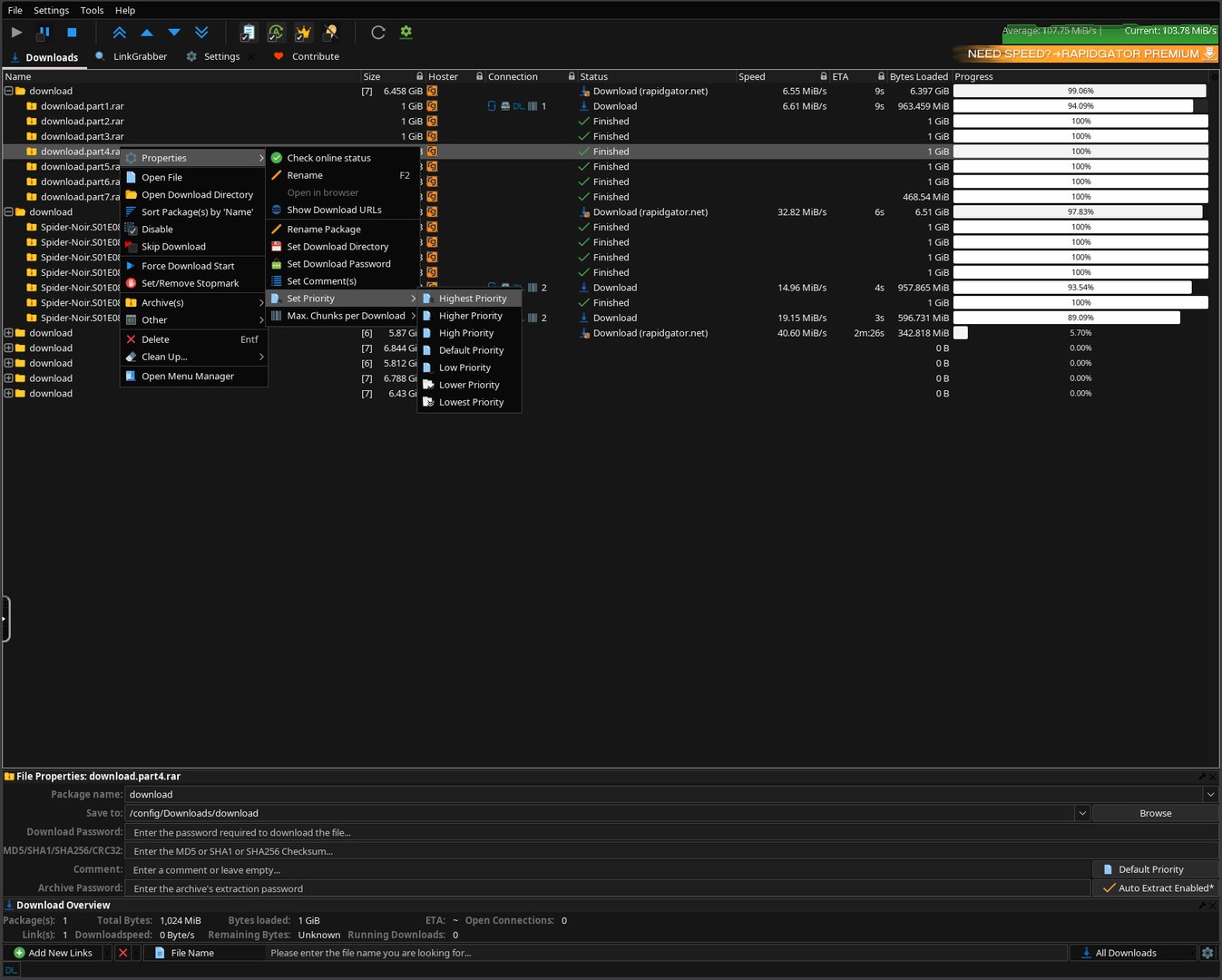
Download list in monochrome Carbon #161616: right-click menu, per-file priority, live speed/ETA.
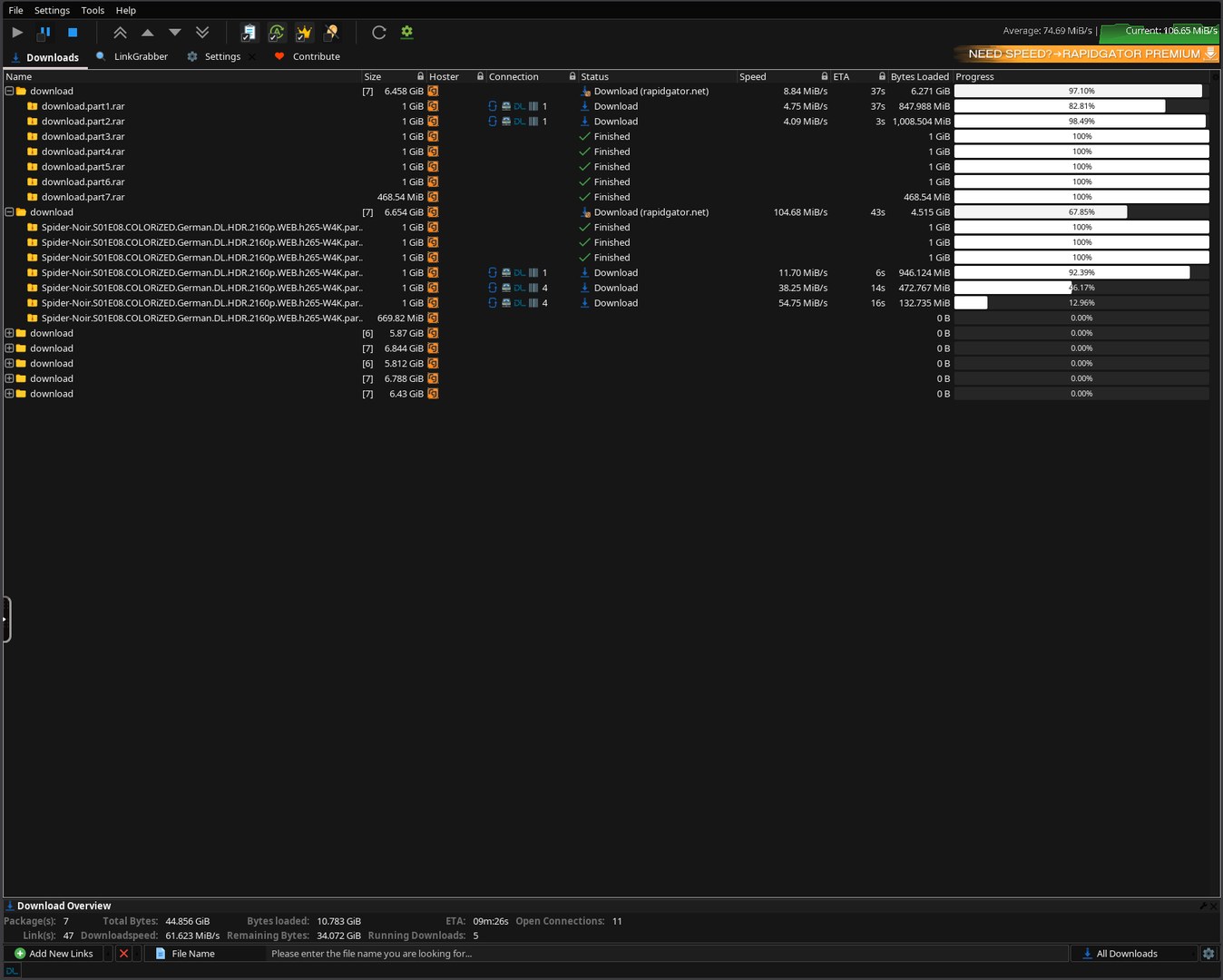
Multiple packages downloading: uniform dark rows, light progress bars, green speed graph.
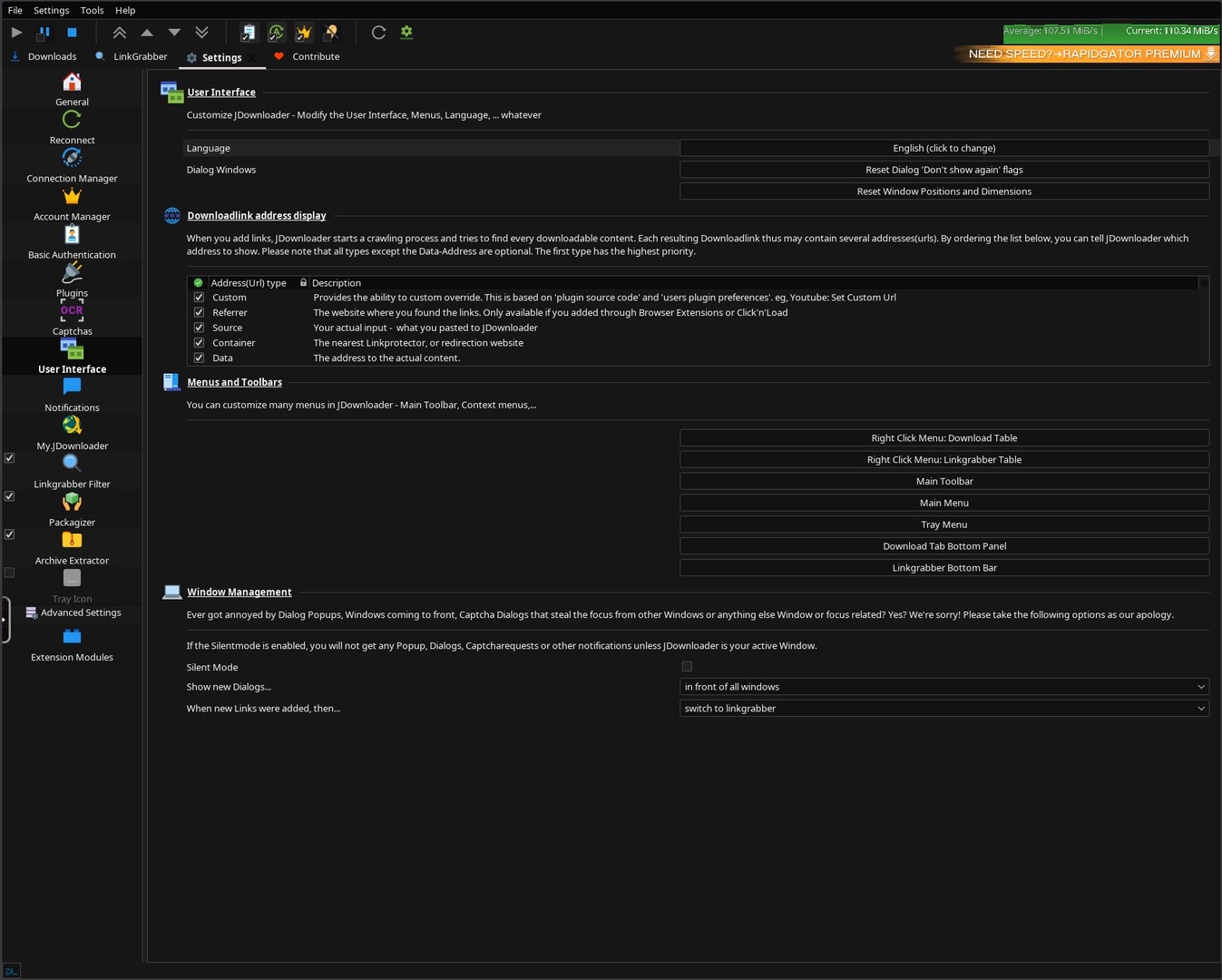
Settings → User Interface: fully dark, the same Carbon palette across the whole app.
3. Quick Start
Step 1: Install the template
In Unraid: Apps → search for JDownloader → click Install.
The Community Applications template is published from the
unraid-apps feed
(one feed for all of junkerderprovinz's apps). If the Template dropdown in Docker → Add
Container no longer accepts a URL on your Unraid version, drop the XML directly into the
templates-user folder via SSH (or WinSCP). Important: the filename must be
my-JDownloader.xml with the my- prefix and capital J; otherwise Unraid sees it as a
separate template and a Force Update will reset all customizations.
wget -O /boot/config/plugins/dockerMan/templates-user/my-JDownloader.xml \
    https://raw.githubusercontent.com/junkerderprovinz/unraid-apps/main/jdownloader/jdownloader.xml
Step 2: Adjust paths and start
The defaults work out of the box, but you may want to tweak:
- Config (
/config): defaults to/mnt/user/appdata/jdownloader - Downloads (
/downloads): defaults to/mnt/user/downloads; this is where JDownloader saves files - Theme: default
Dark(JD Plain Dark, Carbon #161616 palette); switch toLight, orJDDEFAULTfor the classic official JDownloader look, any time - WebUI Password: leave empty for LAN-only, set anything for exposure beyond the LAN
Click Apply.
⏳ First start: wait for the READY banner
On the first start (and after every image update) JDownloader installs/updates itself and applies the dark theme. The WebUI stays black for a few minutes. Open the container log and wait for this banner before you open the WebUI:
############################################################
 JDOWNLOADER IS READY  ->  open the WebUI now (HTTPS 3001)
############################################################
Do not restart the container while it installs. The banner is shown only once the GUI is up and the dark theme is fully applied, so when you see it, the UI is already dark and ready. (It self-heals JDownloader's first-run theme reset, then prints the banner.)
Step 3: Open the WebUI
Use https://<unraid-ip>:3001/ (this is what the template's WebUI button opens) and accept the self-signed certificate warning once. HTTPS is required for direct access: the Selkies web client needs a browser secure context, both for the WebCodecs video decoder it streams through and for seamless clipboard (copy on your PC, paste straight into JD). Opening http://<unraid-ip>:3000/ therefore stops at a "This application requires a secure connection (HTTPS)" error and never loads the desktop. Port 3000 exists for a reverse proxy that terminates TLS in front of the container and forwards plain HTTP to it.
The JDownloader GUI appears automatically once the install completes.
docker-compose (non-Unraid)
services:
  jdownloader:
    image: junkerderprovinz/jdownloader:latest
    container_name: jdownloader
    environment:
      - PUID=99
      - PGID=100
      - TZ=Europe/Vienna
      - JD_THEME=Dark
    volumes:
      - /mnt/user/appdata/jdownloader:/config
      - /mnt/user/downloads:/downloads
    ports:
      - 3000:3000
      - 3001:3001
    restart: unless-stopped
    shm_size: 1gb
shm_size: 1gb is required for smooth Selkies rendering.
4. Configuration
| Variable | Default | Description |
|---|---|---|
JD_THEME |
Dark |
UI theme, Dark = monochrome Carbon #161616, Light = FlatLaf light, JDDEFAULT = classic official JDownloader look (Synthetica). Default stays Dark; existing themes are unchanged. |
JD_SELFUPDATE |
true |
false disables JD's periodic self-update checks (opt-in "frozen appliance"). The same update channel delivers the hoster plugins, which go stale within weeks, so downloads may start failing. First install always uses the updater. |
JD_ENABLE_BROWSER |
false |
true enables JD's "solve captcha in browser" flow: reCAPTCHA/hCaptcha/Turnstile open in a bundled Firefox (with uBlock Origin) on the web desktop, solved with one click from the container's own IP (tokens are IP-bound); the profile persists in /config/.config/mozilla. Off by default, and no browser process runs. Only enable it if a hoster you use needs browser captchas (classic image captchas are auto-solved either way); enabling it runs a full browser (more resources + attack surface). |
JD_UI_SCALE |
(empty) | Optional scaling for the whole JDownloader UI, e.g. 1.5 or 2; empty keeps 1x. Renders the UI larger at full pixel density instead of browser zoom, which upscales the Selkies video stream and blurs it. It applies to every browser that opens the WebUI, so leave it empty if you use displays with different scaling. See Troubleshooting if text looks tiny or blurry. |
JD_COMPACT_TOOLBAR |
(empty) | true / 1 keeps JDownloader's stock ~32px toolbar row (icons with less vertical padding). Empty / false keeps this image's default: the speed-graph row is grown to 64px so the download graph has full height. |
PUID |
99 |
User ID, Unraid's nobody |
PGID |
100 |
Group ID, Unraid's users |
TZ |
Europe/Vienna |
Timezone |
CUSTOM_USER |
(empty) | WebUI login username; leave empty with PASSWORD for no login |
PASSWORD |
(empty) | WebUI password, set this if exposed beyond LAN |
UMASK |
000 |
File-creation mask. Keeps new files writable for other containers on the same shares |
Screen size and memory use
The desktop follows your browser window: Selkies resizes the screen to the size the browser reports, so there is no screen size to set and memory only grows with the window you actually use (about 500 MB at idle in a 1600x900 window). A 1600x1000 window on a laptop set to 200 % counts as 1600x1000. With HiDPI switched on in the Selkies sidebar the same window counts in physical pixels, 3200x2000.
| Port | Purpose | Volume | Purpose | |
|---|---|---|---|---|
3001 |
Selkies HTTPS (self-signed), default WebUI, needed for clipboard | /config |
Persistent JDownloader config, links, session | |
3000 |
Selkies HTTP (reverse-proxy only; direct access needs HTTPS) | /downloads |
Download destination |
Web file transfers: the Selkies sidebar's upload/download panel uses
FILE_MANAGER_PATH, which defaults to/config/Desktop, so anything you upload through the browser lands there, inside the persisted/configvolume, and survives a container update. PointFILE_MANAGER_PATHsomewhere else if you prefer (e.g. a folder under/downloads), but pick the directory deliberately: withoutPASSWORDset, anyone who can reach the WebUI can browse and download it.
Language: the UI is English by default. Change it any time in JDownloader's own language menu (top toolbar → the flag icon, or Settings → Language); your choice is saved and persists across restarts.
5. Customisation & Persistence
On the first start, JDownloader installs itself into /config/JDownloader/. All settings, link lists, accounts and download history live there and survive every docker pull and container update.
/config/
└── JDownloader/
    ├── cfg/
    │   └── laf/      # the Carbon #161616 colorfor* palette (re-applied every start)
    ├── libs/laf/     # JD's own STOCK FlatLaf (unpatched) — the dark chrome comes from the image, not from here
    ├── themes/flat/  # bundled flat icon set (re-seeded from the image every start)
    └── JDownloader.jar
The env-driven setting JD_THEME is re-applied on every start, so you can change it at any time via the Unraid template.
The base image also supports /config/custom-cont-init.d/ for your own init scripts, see the LinuxServer docs.
6. Troubleshooting
WebUI is black / desktop never appears
- Make sure
shm_sizeis at least512mb(Unraid template sets1gb) - Check the container log for Selkies startup errors
- Make sure you opened
https://<ip>:3001/and nothttp://<ip>:3000/; over plain HTTP the Selkies client aborts with "requires a secure connection (HTTPS)" and the desktop never appears - First start takes a few minutes: JDownloader installs itself + its dark theme; the screen stays black until done. Watch the container log for the
JDOWNLOADER IS READYbanner, then refresh. Don't restart the container. - First start only: JDownloader may ask once to install its design + a few extensions, click OK / Install now. Afterwards it stays dark with no prompts.
Can't paste into JD / seamless clipboard doesn't work
- Open the WebUI over HTTPS (
https://<ip>:3001/, the template's WebUI button). Browsers only allow the seamless clipboard API in a secure context; over plain HTTP it's blocked. - If prompted, allow the browser's clipboard permission (lock icon → site settings).
JDownloader GUI doesn't appear after 2 minutes
- Open the container log and look for
init-jdownloadermessages - If you see
JDownloader2.jar missing after installer run: the installer needs an internet connection on first start. Ensure the container has internet access. - Restart the container once; the installer retries automatically
Dark mode not active
- Verify
JD_THEME=Darkis set in your template - Check the container log for
[jdownloader-theme]lines - The theme is applied at container start, not live; restart after changing
JD_THEME
Text looks tiny at high resolution, or blurry when I zoom the browser
- This is how a streamed desktop works: Selkies sends the whole X display as one video stream, so zooming your browser upscales that video and blurs the text.
- JDownloader is a Java app and picks its scale once, when it starts. It cannot follow each browser's display scaling the way GTK or Qt apps can. So this image streams every browser at the size the browser reports (
SELKIES_USE_CSS_SCALING=true, DPI fixed at 96), which keeps JDownloader the same size on a 100 % desktop and on a 200 % laptop. On the laptop the text is a little softer, because the browser stretches the picture. - If you only use high-resolution displays and want sharp text, switch HiDPI on in the Selkies sidebar (it is remembered per browser and wins over the image default) and set
JD_UI_SCALEto your display scaling, for example2. Restart the container after changing it. JD_UI_SCALEapplies to every browser, so with displays at different scaling it will be too big on some or too small on others. Leave it empty then.
"Permission denied" on /downloads
- Check
PUID/PGID. On Unraid,99:100(nobody:users) matches share permissions. - Verify your
/downloadsshare has the right permissions: Docker → Edit → check the path
WebUI password not accepted
- Open in a private/incognito window once; your browser may have cached old credentials
7. Architecture
ghcr.io/linuxserver/baseimage-selkies:ubunturesolute   (s6-overlay v3 · Selkies · weekly LSIO updates)
      │
      ▼  cont-init.d/10-jdownloader-setup        (runs once, before the desktop starts)
      │     • writes JD's native Carbon #161616 colorfor* palette   → cfg/laf
      │     • seeds the bundled flat icon set                       → themes/flat
      │     • language · tray off · openbox kiosk (no title bar, dialogs not maximised)
      ▼
   svc-de  →  /defaults/autostart   (the JDownloader launcher loop)
      │     • FIRST install: silent HEADLESS pre-install (no GUI = no forced
      │       dialogs), then the GUI starts with the core already in place
      │     • java -jar JDownloader.jar     (the regular GUI launch)
      │     • re-applies the colorfor*/icons theme config before each launch
      │     • a -javaagent auto-confirms JD's forced install dialogs AND registers
      │       /opt/JDownloader/flatlaf-defaults as a FlatLaf custom-defaults source
      │       (official API) — the #161616 chrome; flatlaf.jar stays STOCK
      │     • theme auto-heal: restarts JD once if a self-update reset the theme
      │       (ground truth: the LAF actually applied inside the JVM, max 3/hour)
      │     • prints "JDOWNLOADER IS READY" only when the JVM confirms the dark LAF
      ▼
   JDownloader 2   (Java Swing GUI, streamed to your browser by Selkies)
      ▲
   svc-de/finish  →  SIGTERMs the JVM on stop so it flushes column layout / settings
8. Contributing / License
Pull requests welcome. Issues: https://github.com/junkerderprovinz/jdownloader/issues.
Licensing: dual:
- This wrapper repository (Dockerfile,
rootfs/, scripts, Unraid template, README and banner/icon artwork) is licensed under the GNU Affero General Public License v3.0 (AGPL-3.0). - JDownloader 2 itself retains its own license (see jdownloader.org/license). When you run or redistribute the resulting container image, you must comply with JDownloader's license as well.
# Run lints locally (same as CI)
docker run --rm -i hadolint/hadolint < Dockerfile
find rootfs -name '*.sh' | xargs shellcheck --severity=warning --shell=bash
find . -name '*.xml' | xargs xmllint --noout
Credits
- JDownloader 2, AppWork GmbH & the JDownloader team
- LinuxServer.io, for the excellent
baseimage-selkies - Selkies, for a modern, actively-developed browser desktop stack
- Icons8, the bundled "JD Plain" flat icon set uses JDownloader's Icons8 icons, redistributed verbatim under CC BY-ND 3.0
- Inspiration: jlesage and jaymoulin JDownloader containers, they paved the way
9. License
Copyright (C) 2026 Junker der Provinz.
This repository packages JDownloader as a container for Unraid. The packaging in this repository (Dockerfile, scripts, theme, web assets and everything else original here) is free software under the GNU Affero General Public License v3.0 (AGPL-3.0); see LICENSE. If you distribute it, or run a modified version as a network service, you must release your source under the same AGPL-3.0 terms and keep the existing copyright and attribution notices intact.
Scope. The AGPL applies to this repository's own code and assets. JDownloader itself is a separate project under its own license and name; this repository does not claim it. The banner, logo, theme and other branding original to this repository remain reserved: a fork must use its own branding and may not present itself as this project.
10. How AI is used here
One knight builds this, and AI is one of the tools I work with, the same way I work with an editor or a compiler. It helps me write code and documentation and it checks my work, and that saves me a good many evenings. It does not make the decisions, though. I read and understand everything before it ships, and if something here breaks, that is on me and not on the tool.
You do not have to take my word for it. The code is open and every release note is written by hand. The issue tracker shows how problems actually get handled, including the ones I got wrong the first time. If you find something that is not right, open an issue and I will look at it.
11. Support this project
Questions? Check the support thread. Bugs, ideas or feature requests? Please open a GitHub issue.
A one-knight job: I build it, keep it running, work through the issues and add what people ask for, until nothing is missing. It is free, with no accounts, no telemetry, no ads and no paid tier. No asterisk anywhere. Nothing readable ever leaves your own walls. Forged on evenings and weekends, with heart and stubbornness.
If it has earned a place on your server or computer, toss a coin to your knight: it helps cover the costs and keeps the project alive. It also makes this knight's heart beat a little faster. Three ways below, whichever suits you.
Install JDownloader on Unraid in a few clicks.
Find JDownloader in Community Apps on your Unraid server, review the template, and click Install. Unraid handles the Docker app or plugin setup from the published template.
Categories
Download Statistics
Related apps
Explore more like this
Explore allLinks
Details
junkerderprovinz/jdownloader:latestRuntime arguments
- Web UI
https://[IP]:[PORT:3001]/- Network
bridge- Shell
bash- Privileged
- false
- Extra Params
--restart=unless-stopped --shm-size=1gb
Template configuration
Plain HTTP WebUI. Browsers block seamless clipboard over HTTP — prefer HTTPS (3001).
- Target
- 3000
- Default
- 3000
- Value
- 3000
HTTPS WebUI (self-signed TLS) — the WebUI button opens this; required for seamless clipboard.
- Target
- 3001
- Default
- 3001
- Value
- 3001
Persistent JDownloader install, configs, and session data.
- Target
- /config
- Default
- /mnt/user/appdata/jdownloader
- Value
- /mnt/user/appdata/jdownloader
Download target directory.
- Target
- /downloads
- Default
- /mnt/user/downloads
- Value
- /mnt/user/downloads
Dark = monochrome Carbon #161616, Light = JD's light theme, JDDEFAULT = JDownloader's own classic look, jd-highlighter = borderless, freely-accented dark (pick the accent with JD_ACCENT below).
- Target
- JD_THEME
- Default
- Dark|Light|JDDEFAULT|jd-highlighter
- Value
- Dark
Accent colour for the jd-highlighter theme (any hex, e.g. #ffee00). Only applies when Theme is set to jd-highlighter. The accent lights up checkmarks, toggles, focus, the download progress bar and primary buttons; large fills stay neutral so text stays readable at any hue. Button/progress text is auto-contrasted (dark on a light accent, light on a dark accent).
- Target
- JD_ACCENT
- Default
- #ffee00
- Value
- #ffee00
true (default) = JDownloader keeps updating itself. false = frozen appliance: disables JD's periodic self-update checks. WARNING: the same update channel delivers the hoster plugins, which go stale within weeks - downloads may start failing. The first install always uses the updater.
- Target
- JD_SELFUPDATE
- Default
- true|false
- Value
- true
auto (default) = remembers your last choice, so an enabled browser survives container updates (recreates). Set true to enable JDownloader's 'solve captcha in browser' flow: reCAPTCHA/hCaptcha/Turnstile open in a bundled Firefox (with uBlock Origin) on the web desktop and are solved with one click, from the container's own IP (tokens are IP-bound). The Firefox profile persists in /config/.config/mozilla. Set false to force it off. Only enable it if a hoster you use needs browser captchas - classic image captchas are auto-solved either way, and enabling it runs a full browser (more resources + attack surface).
- Target
- JD_ENABLE_BROWSER
- Default
- auto|true|false
- Value
- auto
Largest virtual screen the container can serve, and the single biggest factor in its memory use: the X server reserves the whole framebuffer up front, about 4 bytes per pixel, no matter how big your browser window is. The full 15360x8640 is the default and keeps every resolution available; picking a smaller one trades that headroom for RAM (the bracketed figures are the measured X server memory for each; the application itself comes on top). Your browser window can be any size up to this; above it the picture is scaled to the window rather than cut off. To enter a size that is not listed, use the field below instead.
- Target
- MAX_RES
- Default
- 15360x8640 (full, ~565 MB)|7680x4320 (8K, ~185 MB)|5120x2880 (5K, ~115 MB)|3840x2160 (4K, ~90 MB)|3440x1440 (ultrawide, ~80 MB)|2560x1440 (1440p, ~75 MB)|1920x1080 (1080p, ~65 MB)
- Value
- 15360x8640 (full, ~565 MB)
Optional. Your own screen size as WIDTHxHEIGHT, for example 3440x1440 or 6016x3384. When this field has a value it overrides the dropdown above, so you are not limited to the presets. Leave it empty to use the dropdown. A value that is not a WIDTHxHEIGHT pair is ignored with a note in the container log, so a typo cannot stop the container from starting.
- Target
- MAX_RES_CUSTOM
Optional. Username for HTTP-basic-auth. Leave EMPTY with password for no login.
- Target
- CUSTOM_USER
Optional. Password for HTTP-basic-auth.
- Target
- PASSWORD
Container timezone.
- Target
- TZ
- Default
- Europe/Vienna|Africa/Abidjan|Africa/Accra|Africa/Addis_Ababa|Africa/Algiers|Africa/Asmera|Africa/Bamako|Africa/Bangui|Africa/Banjul|Africa/Bissau|Africa/Blantyre|Africa/Brazzaville|Africa/Bujumbura|Africa/Cairo|Africa/Casablanca|Africa/Ceuta|Africa/Conakry|Africa/Dakar|Africa/Dar_es_Salaam|Africa/Djibouti|Africa/Douala|Africa/El_Aaiun|Africa/Freetown|Africa/Gaborone|Africa/Harare|Africa/Johannesburg|Africa/Juba|Africa/Kampala|Africa/Khartoum|Africa/Kigali|Africa/Kinshasa|Africa/Lagos|Africa/Libreville|Africa/Lome|Africa/Luanda|Africa/Lubumbashi|Africa/Lusaka|Africa/Malabo|Africa/Maputo|Africa/Maseru|Africa/Mbabane|Africa/Mogadishu|Africa/Monrovia|Africa/Nairobi|Africa/Ndjamena|Africa/Niamey|Africa/Nouakchott|Africa/Ouagadougou|Africa/Porto-Novo|Africa/Sao_Tome|Africa/Tripoli|Africa/Tunis|Africa/Windhoek|America/Adak|America/Anchorage|America/Anguilla|America/Antigua|America/Araguaina|America/Argentina/La_Rioja|America/Argentina/Rio_Gallegos|America/Argentina/Salta|America/Argentina/San_Juan|America/Argentina/San_Luis|America/Argentina/Tucuman|America/Argentina/Ushuaia|America/Aruba|America/Asuncion|America/Bahia|America/Bahia_Banderas|America/Barbados|America/Belem|America/Belize|America/Blanc-Sablon|America/Boa_Vista|America/Bogota|America/Boise|America/Buenos_Aires|America/Cambridge_Bay|America/Campo_Grande|America/Cancun|America/Caracas|America/Catamarca|America/Cayenne|America/Cayman|America/Chicago|America/Chihuahua|America/Ciudad_Juarez|America/Coral_Harbour|America/Cordoba|America/Costa_Rica|America/Coyhaique|America/Creston|America/Cuiaba|America/Curacao|America/Danmarkshavn|America/Dawson|America/Dawson_Creek|America/Denver|America/Detroit|America/Dominica|America/Edmonton|America/Eirunepe|America/El_Salvador|America/Fort_Nelson|America/Fortaleza|America/Glace_Bay|America/Godthab|America/Goose_Bay|America/Grand_Turk|America/Grenada|America/Guadeloupe|America/Guatemala|America/Guayaquil|America/Guyana|America/Halifax|America/Havana|America/Hermosillo|America/Indiana/Knox|America/Indiana/Marengo|America/Indiana/Petersburg|America/Indiana/Tell_City|America/Indiana/Vevay|America/Indiana/Vincennes|America/Indiana/Winamac|America/Indianapolis|America/Inuvik|America/Iqaluit|America/Jamaica|America/Jujuy|America/Juneau|America/Kentucky/Monticello|America/Kralendijk|America/La_Paz|America/Lima|America/Los_Angeles|America/Louisville|America/Lower_Princes|America/Maceio|America/Managua|America/Manaus|America/Marigot|America/Martinique|America/Matamoros|America/Mazatlan|America/Mendoza|America/Menominee|America/Merida|America/Metlakatla|America/Mexico_City|America/Miquelon|America/Moncton|America/Monterrey|America/Montevideo|America/Montserrat|America/Nassau|America/New_York|America/Nome|America/Noronha|America/North_Dakota/Beulah|America/North_Dakota/Center|America/North_Dakota/New_Salem|America/Ojinaga|America/Panama|America/Paramaribo|America/Phoenix|America/Port-au-Prince|America/Port_of_Spain|America/Porto_Velho|America/Puerto_Rico|America/Punta_Arenas|America/Rankin_Inlet|America/Recife|America/Regina|America/Resolute|America/Rio_Branco|America/Santarem|America/Santiago|America/Santo_Domingo|America/Sao_Paulo|America/Scoresbysund|America/Sitka|America/St_Barthelemy|America/St_Johns|America/St_Kitts|America/St_Lucia|America/St_Thomas|America/St_Vincent|America/Swift_Current|America/Tegucigalpa|America/Thule|America/Tijuana|America/Toronto|America/Tortola|America/Vancouver|America/Whitehorse|America/Winnipeg|America/Yakutat|Antarctica/Casey|Antarctica/Davis|Antarctica/DumontDUrville|Antarctica/Macquarie|Antarctica/Mawson|Antarctica/McMurdo|Antarctica/Palmer|Antarctica/Rothera|Antarctica/Syowa|Antarctica/Troll|Antarctica/Vostok|Arctic/Longyearbyen|Asia/Aden|Asia/Almaty|Asia/Amman|Asia/Anadyr|Asia/Aqtau|Asia/Aqtobe|Asia/Ashgabat|Asia/Atyrau|Asia/Baghdad|Asia/Bahrain|Asia/Baku|Asia/Bangkok|Asia/Barnaul|Asia/Beirut|Asia/Bishkek|Asia/Brunei|Asia/Calcutta|Asia/Chita|Asia/Colombo|Asia/Damascus|Asia/Dhaka|Asia/Dili|Asia/Dubai|Asia/Dushanbe|Asia/Famagusta|Asia/Gaza|Asia/Hebron|Asia/Hong_Kong|Asia/Hovd|Asia/Irkutsk|Asia/Jakarta|Asia/Jayapura|Asia/Jerusalem|Asia/Kabul|Asia/Kamchatka|Asia/Karachi|Asia/Katmandu|Asia/Khandyga|Asia/Krasnoyarsk|Asia/Kuala_Lumpur|Asia/Kuching|Asia/Kuwait|Asia/Macau|Asia/Magadan|Asia/Makassar|Asia/Manila|Asia/Muscat|Asia/Nicosia|Asia/Novokuznetsk|Asia/Novosibirsk|Asia/Omsk|Asia/Oral|Asia/Phnom_Penh|Asia/Pontianak|Asia/Pyongyang|Asia/Qatar|Asia/Qostanay|Asia/Qyzylorda|Asia/Rangoon|Asia/Riyadh|Asia/Saigon|Asia/Sakhalin|Asia/Samarkand|Asia/Seoul|Asia/Shanghai|Asia/Singapore|Asia/Srednekolymsk|Asia/Taipei|Asia/Tashkent|Asia/Tbilisi|Asia/Tehran|Asia/Thimphu|Asia/Tokyo|Asia/Tomsk|Asia/Ulaanbaatar|Asia/Urumqi|Asia/Ust-Nera|Asia/Vientiane|Asia/Vladivostok|Asia/Yakutsk|Asia/Yekaterinburg|Asia/Yerevan|Atlantic/Azores|Atlantic/Bermuda|Atlantic/Canary|Atlantic/Cape_Verde|Atlantic/Faeroe|Atlantic/Madeira|Atlantic/Reykjavik|Atlantic/South_Georgia|Atlantic/St_Helena|Atlantic/Stanley|Australia/Adelaide|Australia/Brisbane|Australia/Broken_Hill|Australia/Darwin|Australia/Eucla|Australia/Hobart|Australia/Lindeman|Australia/Lord_Howe|Australia/Melbourne|Australia/Perth|Australia/Sydney|Europe/Amsterdam|Europe/Andorra|Europe/Astrakhan|Europe/Athens|Europe/Belgrade|Europe/Berlin|Europe/Bratislava|Europe/Brussels|Europe/Bucharest|Europe/Budapest|Europe/Busingen|Europe/Chisinau|Europe/Copenhagen|Europe/Dublin|Europe/Gibraltar|Europe/Guernsey|Europe/Helsinki|Europe/Isle_of_Man|Europe/Istanbul|Europe/Jersey|Europe/Kaliningrad|Europe/Kiev|Europe/Kirov|Europe/Lisbon|Europe/Ljubljana|Europe/London|Europe/Luxembourg|Europe/Madrid|Europe/Malta|Europe/Mariehamn|Europe/Minsk|Europe/Monaco|Europe/Moscow|Europe/Oslo|Europe/Paris|Europe/Podgorica|Europe/Prague|Europe/Riga|Europe/Rome|Europe/Samara|Europe/San_Marino|Europe/Sarajevo|Europe/Saratov|Europe/Simferopol|Europe/Skopje|Europe/Sofia|Europe/Stockholm|Europe/Tallinn|Europe/Tirane|Europe/Ulyanovsk|Europe/Vaduz|Europe/Vatican|Europe/Vilnius|Europe/Volgograd|Europe/Warsaw|Europe/Zagreb|Europe/Zurich|Indian/Antananarivo|Indian/Chagos|Indian/Christmas|Indian/Cocos|Indian/Comoro|Indian/Kerguelen|Indian/Mahe|Indian/Maldives|Indian/Mauritius|Indian/Mayotte|Indian/Reunion|Pacific/Apia|Pacific/Auckland|Pacific/Bougainville|Pacific/Chatham|Pacific/Easter|Pacific/Efate|Pacific/Enderbury|Pacific/Fakaofo|Pacific/Fiji|Pacific/Funafuti|Pacific/Galapagos|Pacific/Gambier|Pacific/Guadalcanal|Pacific/Guam|Pacific/Honolulu|Pacific/Kiritimati|Pacific/Kosrae|Pacific/Kwajalein|Pacific/Majuro|Pacific/Marquesas|Pacific/Midway|Pacific/Nauru|Pacific/Niue|Pacific/Norfolk|Pacific/Noumea|Pacific/Pago_Pago|Pacific/Palau|Pacific/Pitcairn|Pacific/Ponape|Pacific/Port_Moresby|Pacific/Rarotonga|Pacific/Saipan|Pacific/Tahiti|Pacific/Tarawa|Pacific/Tongatapu|Pacific/Truk|Pacific/Wake|Pacific/Wallis
- Value
- Europe/Vienna
User-ID JDownloader runs as. Default 99 (nobody on Unraid).
- Target
- PUID
- Default
- 99
- Value
- 99
Group-ID. Default 100 (users on Unraid).
- Target
- PGID
- Default
- 100
- Value
- 100
Permission mask for newly created files. The default 000 lets every container user read and write them, which is what you want when other containers touch the same shares. Set 022 or 077 for stricter permissions.
- Default
- 000|022|002|077
- Value
- 000
Optional HiDPI scaling for the whole JDownloader UI (e.g. 1.5 or 2). Leave empty for 1x. On a streamed Selkies desktop, zooming the browser upscales the video stream and blurs the text; setting JD_UI_SCALE instead renders the UI larger at full pixel density, so text stays crisp at the desktop's native resolution with the browser at 100%. Restart the container after changing it.
- Target
- JD_UI_SCALE