
All apps · 0 apps

imessage-archive
Docker app from crywolf203's Repository
Overview
Readme
View on GitHubiMessage Archive on Unraid
iMessage Archive creates local iPhone backups with libimobiledevice and reads Messages from those backups with ReagentX's imessage-exporter. This custom web app adds indexed search, bounded conversation views, dark mode, multi-format downloads, and resumable PDF jobs. It does not extract messages directly from a live iPhone and is not affiliated with Apple or iMazing.
Install
The template is templates/imessage-archive.xml, using the public Linux amd64 image ghcr.io/crywolf203/imessage-archive:latest. Search for imessage-archive in Apps after Community Applications has indexed the repository. Until the listing is visible, install the XML privately:
mkdir -p /boot/config/plugins/community.applications/private/crywolf203
curl --fail --location \
  https://raw.githubusercontent.com/crywolf203/unraid-templates/main/templates/imessage-archive.xml \
  --output /boot/config/plugins/community.applications/private/crywolf203/imessage-archive.xml
Refresh Apps and select the private template. Do not install a second instance if Compose already manages your existing archive.
Set a unique administrator password and session secret in the template before applying. Generate the secret in the Unraid terminal with openssl rand -hex 32. Web UI port 8087 maps to container port 8080. Open the Web UI and sign in with the configured administrator account.
Every variable explained
The complete README configuration reference lists every variable with its default, purpose, allowed values, and instructions for Unraid/Compose. It also explains first-time setup, exports/PDFs, saved Automation settings, retention cleanup, and common errors. Most users only need a username, administrator password, session secret, and suitable storage paths; leave the advanced performance defaults unchanged until a manual backup/export works.
FLASK_SECRET_KEY is a private key that signs browser login sessions. It is not your login password or iPhone backup encryption password. Generate it once, paste the full 64-character output into Session secret, and keep the same value when upgrading. You do not need to memorize it or enter it on the login page. The app can create a temporary key if empty, but that changes at restart and signs users out; the template intentionally requires a stable value. Changing it does not erase backups or messages. See the three separate secrets.
Use COOKIE_SECURE=0 for the default HTTP LAN URL. 1 requires HTTPS and does not itself enable TLS. Keep the viewer password blank unless another person needs access to existing private exports. For scheduling/webhook/retention changes after initial setup, use the web app's Automation and support section: saved UI settings override the matching container defaults.
Storage
| Container path | Default Unraid host path | Contents |
|---|---|---|
/data/backups |
/mnt/cache/appdata/imessage-archive/backups |
iPhone backups |
/data/config |
/mnt/cache/appdata/imessage-archive/config |
SQLite index, history and settings |
/var/lib/lockdown |
/mnt/cache/appdata/imessage-archive/lockdown |
Device pairing records |
/data/exports |
/mnt/user/iphone-message-archive/exports |
Exported messages, media and ZIP files |
/data/pdfs |
/mnt/user/iphone-message-archive/pdfs |
Generated PDFs |
Choose an array-backed private export share if the cache drive is small. /mnt/user does not force array-only placement; verify the share's storage settings. Backups may also need a larger storage path if a first full backup will exceed cache capacity.
For an existing installation, record the actual container mounts and reuse them:
docker inspect imessage-archive --format '{{range .Mounts}}{{println .Destination "->" .Source}}{{end}}'
Changing a mount does not move existing files. Preserve the existing .env for Compose, all data folders and pairing records. Stop the old container before switching management between Compose and the Unraid template. Do not allow two instances to write the same archive or compete for the same USB device.
USB and the first backup
The template uses privileged mode and a /dev/bus/usb bind mount for hotplug. This grants broad host access and should only be used on a trusted private server. Only one usbmuxd service should own the connected iPhone.
- Connect the unlocked iPhone with a data-capable USB cable.
- Accept Trust This Computer, enter the device passcode when requested, and select Pair device.
- Run preflight. Enable encrypted backups with a password you can retain securely.
- Start a backup. Use normal incremental backups after the initial complete backup.
- Export HTML to build the searchable library, then select a conversation for PDF/CSV/ZIP downloads.
Charging without a visible device may indicate a charging-only cable, a USB mapping problem or missing trust. MBErrorDomain/208 means the device is locked. A first backup can take hours. Wi-Fi operation requires existing pairing and a device visible to idevice_id -n -l; this template does not guarantee automatic Wi-Fi discovery.
Backup encryption applies to future backups, not to existing files or generated exports. Keep backups, exports, pairing records and settings out of public SMB shares. Never publish actual messages, backup passwords or pairing records in a support issue.
Performance and Compose proof
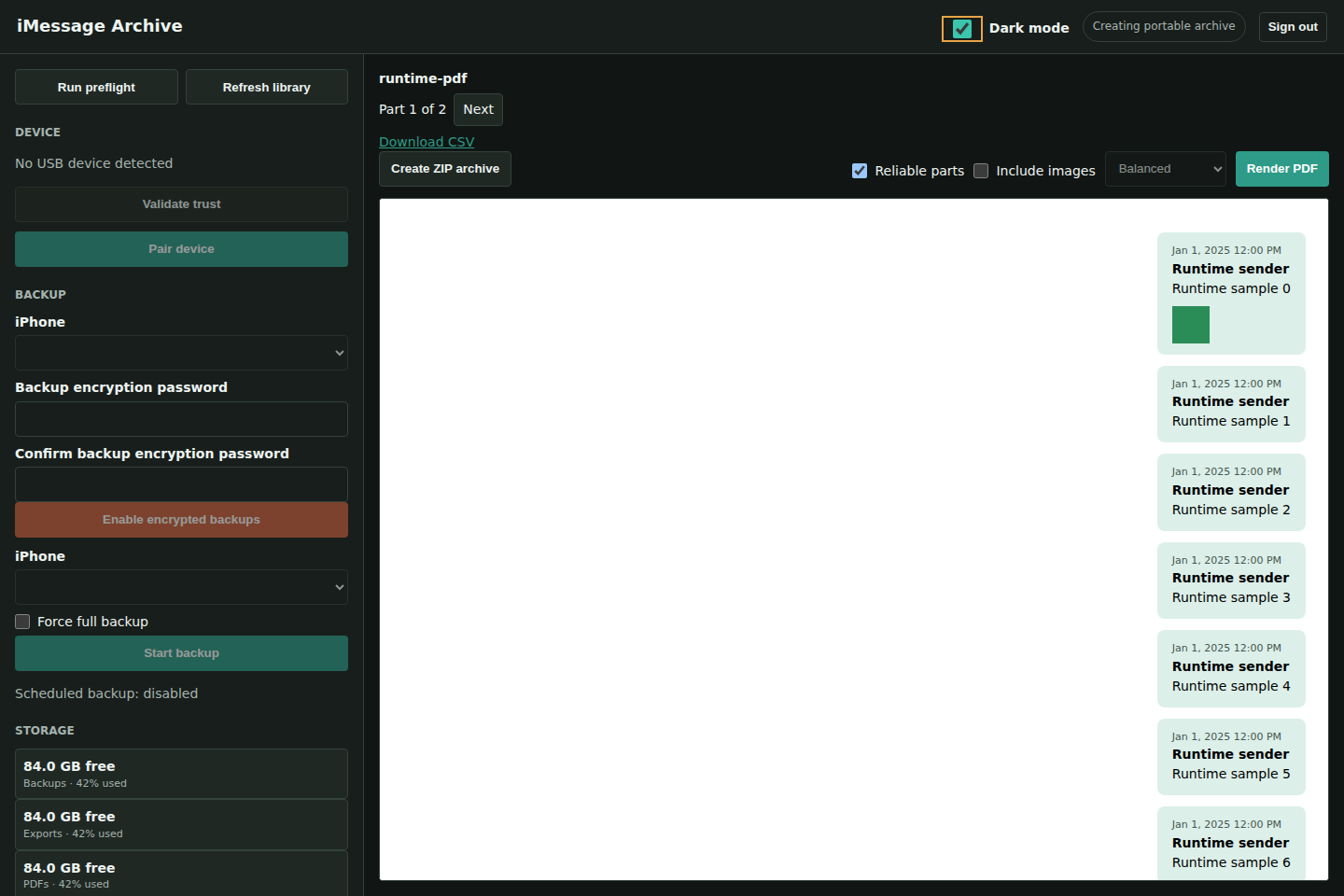
The browser loads bounded conversation parts, not an entire giant HTML thread. PDF jobs run on the server in background parts with progress, an estimated time remaining and cancellation. Use Fast images or text-only PDF for the quickest result. Reliable parts allows completed parts to be reused after interruption.
The Compose setup and verification guide shows exact installation commands. The Verify published image workflow starts that Compose file, checks healthy startup, search, real PDF/media conversions, CSV/ZIP and browser navigation, and uploads timing results and synthetic-data screenshots. The test uses disposable storage; it is not proof of physical pairing or an actual iPhone backup on every iOS release.
The October 4, 2026 Compose verification passed. This is its real app screenshot, using generated test messages only:
Community Applications publication
This repository already has an MIT license and ca_profile.xml. The template includes the public image, icon, canonical update URL, support/project links and setup requirements. The Community Apps submission flow validates/scans a new repository, but can stop an already enabled repository with an explicit "does not need to be submitted" notice. This repository is already enabled; do not submit a duplicate repository just to force a new app into the catalog.
The repository already supplies the live LRCGET listing. Adding this template to the registered repository is the normal path. Check the existing repository's status and use CA submission support if new templates remain unimported; a manual rescan control or an exact indexing ETA is not guaranteed. The template validation workflow checks its storage, port, security fields and defaults against the app's Compose files.
Publication and review are controlled by Community Applications. The presence of this XML in GitHub is not a claim that an Apps listing is live. Follow the current Unraid submission guide.
Support
Do not expose port 8087 directly to the internet. Use a private LAN, VPN, or authenticated HTTPS reverse proxy.
Media gallery
1 / 2Requirements
Categories
Related apps
Explore more like this
Explore allDetails
ghcr.io/crywolf203/imessage-archive:latestRuntime arguments
- Web UI
http://[IP]:[PORT:8080]/- Network
bridge- Shell
bash- Privileged
- true
Template configuration
Web interface port
- Target
- 8080
- Default
- 8087
- Value
- 8087
iPhone backups
- Target
- /data/backups
- Default
- /mnt/cache/appdata/imessage-archive/backups
- Value
- /mnt/cache/appdata/imessage-archive/backups
HTML, text, media and portable ZIP files. Keep this share private.
- Target
- /data/exports
- Default
- /mnt/user/iphone-message-archive/exports
- Value
- /mnt/user/iphone-message-archive/exports
Generated PDFs
- Target
- /data/pdfs
- Default
- /mnt/user/iphone-message-archive/pdfs
- Value
- /mnt/user/iphone-message-archive/pdfs
Search index, history, and schedules
- Target
- /data/config
- Default
- /mnt/cache/appdata/imessage-archive/config
- Value
- /mnt/cache/appdata/imessage-archive/config
Persisted iPhone trust records
- Target
- /var/lib/lockdown
- Default
- /mnt/cache/appdata/imessage-archive/lockdown
- Value
- /mnt/cache/appdata/imessage-archive/lockdown
USB bus bind mount for device hotplug; privileged mode grants device access.
- Target
- /dev/bus/usb
- Default
- /dev/bus/usb
- Value
- /dev/bus/usb
Container time zone
- Target
- TZ
- Default
- America/New_York
- Value
- America/New_York
Administrator username
- Target
- APP_USER
- Default
- admin
- Value
- admin
Use a long unique password
- Target
- APP_PASSWORD
Optional account that can browse and download only
- Target
- VIEWER_USER
- Default
- viewer
- Value
- viewer
Leave blank to disable the read-only account
- Target
- VIEWER_PASSWORD
Private login-session signing key, NOT a login or iPhone backup password. Generate once in the Unraid terminal with openssl rand -hex 32; paste the 64-character output and retain it across upgrades. See the README configuration guide.
- Target
- FLASK_SECRET_KEY
Use 1 only when the Web UI is served through HTTPS
- Target
- COOKIE_SECURE
- Default
- 0
- Value
- 0
Start the container USB service. Only one usbmuxd should own the phone; do not run competing backup containers.
- Target
- START_USBMUXD
- Default
- 1
- Value
- 1
Messages per viewer/PDF part; smaller parts reduce browser and PDF memory use.
- Target
- LIBRARY_CHUNK_MESSAGES
- Default
- 300
- Value
- 300
Concurrent PDF image conversions. Higher values need more RAM.
- Target
- PDF_IMAGE_WORKERS
- Default
- 2
- Value
- 2
Maximum seconds per Chromium render; successful parts are resumable.
- Target
- PDF_TIMEOUT_SECONDS
- Default
- 900
- Value
- 900