
All apps · 0 apps
Borg Backup UI
Plugin from Thorsten Steinberg
Overview
Readme
View on GitHubBorg Backup UI
An Unraid plugin that turns BorgBackup into a guided backup and restore workflow: configure jobs and repositories, browse archives, verify restores, review reports, and receive notifications from one web interface.
Borg Backup UI is built for Unraid users who want the reliability of BorgBackup without maintaining custom shell scripts for everyday operation. BorgBackup remains the backup engine; this project adds the Unraid-focused control layer around jobs, storage targets, schedules, restore workflows, checks, and support diagnostics.
Status: public beta, available through Unraid Community Apps. Start with non-critical data and verify a restore before relying on any backup setup. This project is not affiliated with BorgBackup or other Borg UI projects.
Community Apps listing | English manual | Deutsches Handbuch | Unraid support thread | Issues
Feature demo
A short walkthrough of backup jobs, exclusion rules, retention settings, archive browsing, file restores and restore verification.
4:48 minutes | English narration | Recorded with release 2026.09.13.1711.
https://github.com/user-attachments/assets/4cf24bb8-de2d-46b3-aa6c-34810e6b335d
Install
- Open Apps in the Unraid web interface.
- Install Python 3 for Unraid if it is not already installed.
- Search for Borg Backup UI and open its Community Apps listing.
- Review the public beta notice and install the plugin.
- Open Settings > Borg Backup UI, start the service, and complete the initial setup.
If the Apps tab is unavailable, follow the official Community Applications instructions.
Overview
- Guided job wizard for common Unraid backup workflows.
- Storage profiles for local paths, USB devices, SMB shares, SSH targets, and Hetzner Storage Box style repositories.
- Docker container and VM runtime handling during backup runs.
- Dashboard overview for backup runs, restore proof, storage data, and checks.
- Browse and Restore assistant with configurable safe restore target roots.
- Automated restore tests with structured reports and restore history.
- Notifications through Apprise profiles, Unraid notifications, and email.
- Import/export, support bundle, system health, and auditable migrations.
Feature Overview
Backup Jobs
- Create and edit jobs through a guided multi-step wizard.
- Choose backup type, source paths, repository target, retention, passphrase, schedule, and runtime behavior.
- Stop all Docker containers, selected containers, or all except selected containers before a backup, then restart them after the run.
- Stop selected VMs when a VM backup requires consistent runtime state.
- Review a flow preview before saving the job.
Storage and Repositories
- Manage storage targets and profiles for local, USB, SMB, SSH, and Storagebox style repositories.
- Run connection and repository checks from the UI.
- View repository size, compression, deduplication, and check state.
- Keep location grouping consistent across Dashboard, Jobs, History, Reports, Restore Tests, and Browse & Restore.
Restore and Verification
- Browse Borg archives and restore selected files or directories.
- Restrict restore targets to administrator-approved safe roots.
- Prevent unsafe backup and restore write operations from using the same repository at the same time.
- Track active restore runs and completed restore history.
- Configure and run automated restore tests for backup verification.
- Use restore test reports to verify repository accessibility, archive readability, metadata checks, sample restore, integrity comparison, and cleanup.
Monitoring and Notifications
- Dashboard overview for backup runs, restore verification, and growth/check state.
- Backup history and reports for operational review.
- Notification events for successful, warning, failed, skipped, and overdue backup runs.
- Restore test notifications for success, failure, and overdue tests.
- Notification channels are configured through Apprise profiles and can include providers such as ntfy, email-capable services, and other Apprise-supported targets.
Operations and Safety
- System health and migration status inside Settings.
- Structured migration state and JSONL audit logs.
- Support bundle creation for troubleshooting.
- Import/export flows for jobs, profiles, and secrets.
- Plugin packaging for Unraid with bundled BorgBackup runtime.
- Admin access recovery from the Unraid control page through a short-lived, one-time recovery link.
Requirements
- Unraid with a running array.
- Python 3.10 or newer.
- Recommended on Unraid:
Python 3 for Unraidfrom Community Applications. - Reachable storage targets for the selected backup locations.
BorgBackup is bundled with the plugin package. No pip-based runtime dependency installation is required for normal operation.
First Run
- Create the first administrator account.
- Confirm the main data directory in the setup wizard.
- Create or select a storage target and repository.
- Create the first backup job with the guided wizard.
- Run the first backup manually and review Dashboard, History, and Reports.
- Restore a small sample into a separate test folder and verify the result.
- Configure restore tests and notifications for ongoing verification.
For first tests, start with a small test folder or non-critical share. Do not begin with irreplaceable data until backup and restore behavior has been verified on your system.
Screenshots
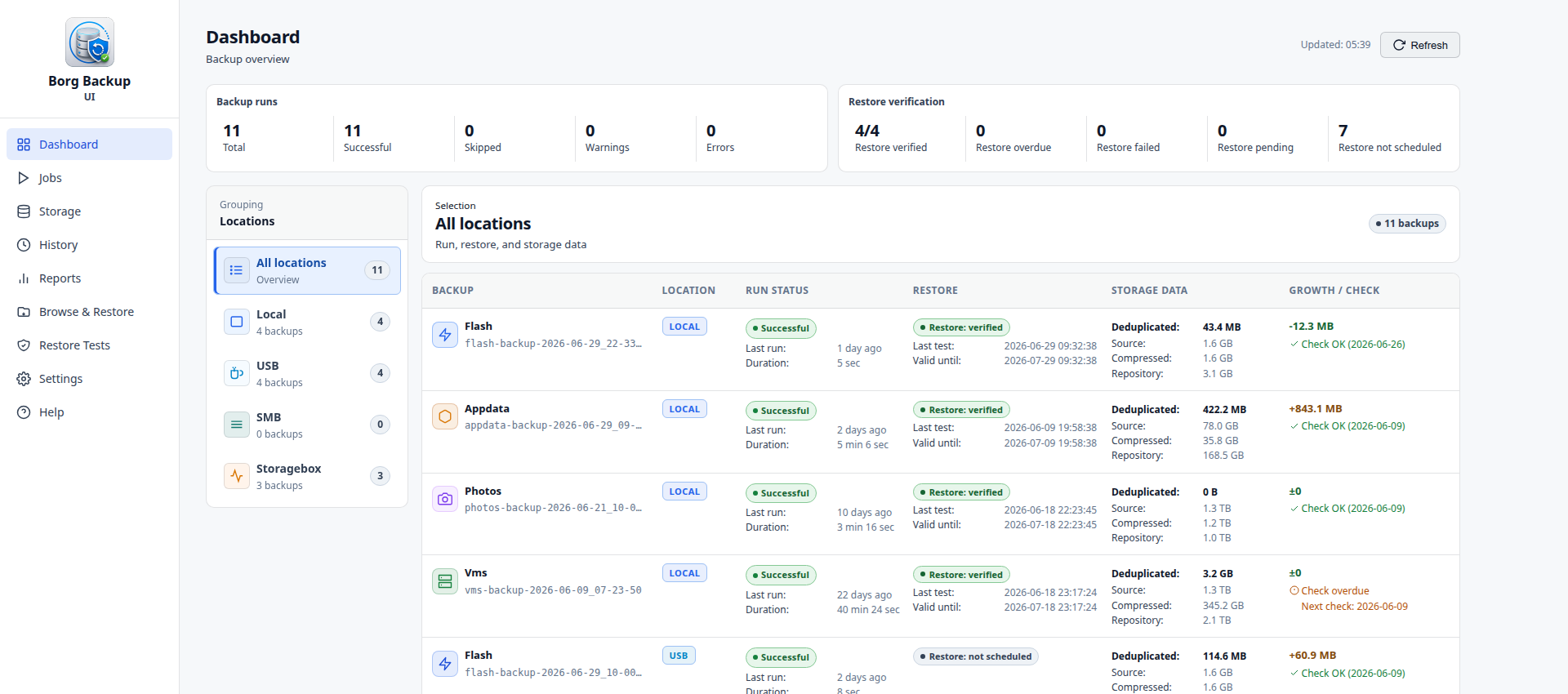
Dashboard
Backup status, restore verification, repository health, and recent activity in one overview.
Access Model
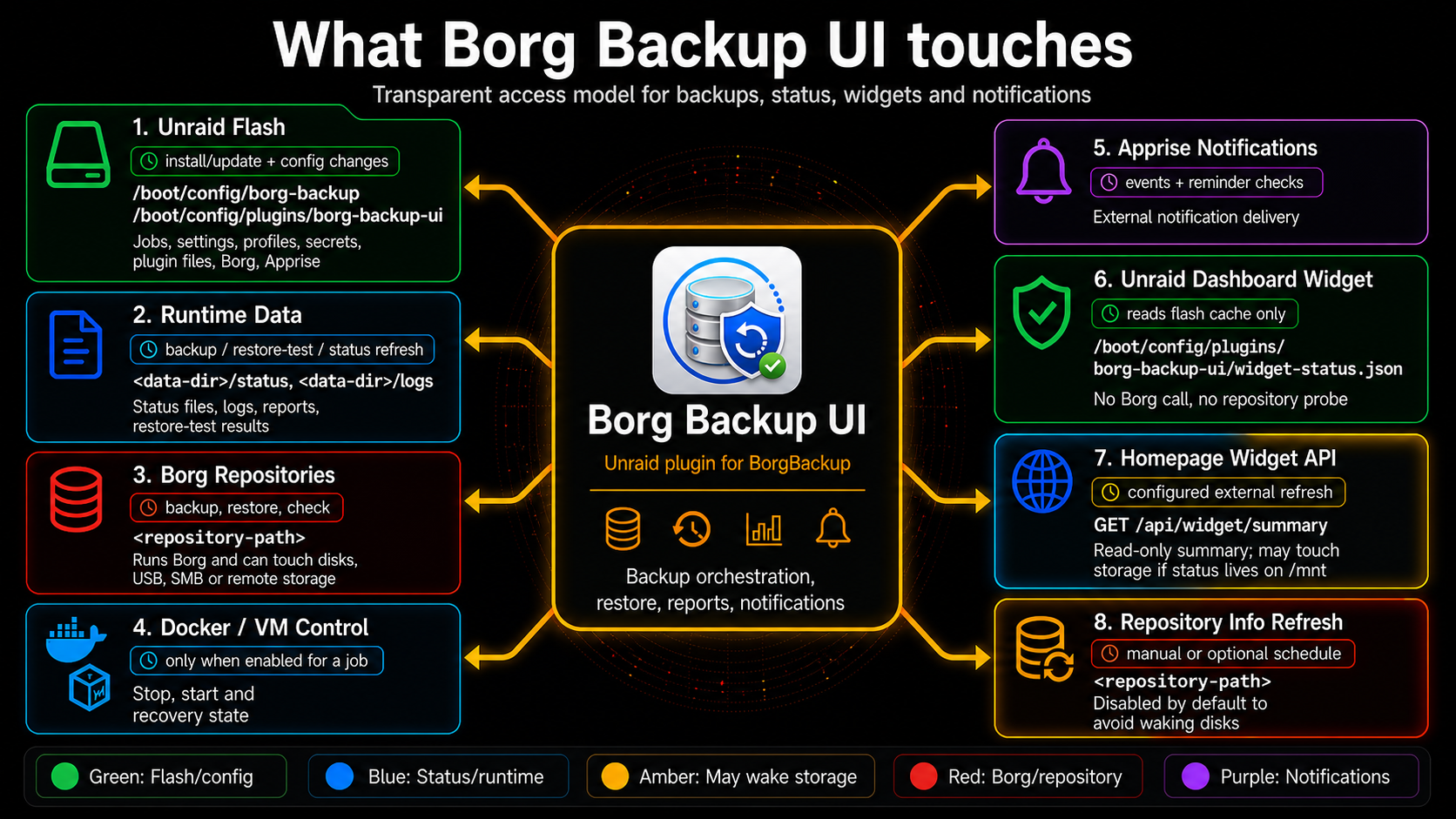
Transparent overview of what Borg Backup UI touches, when background activity can happen, and which operations may wake storage or access repositories.
Jobs
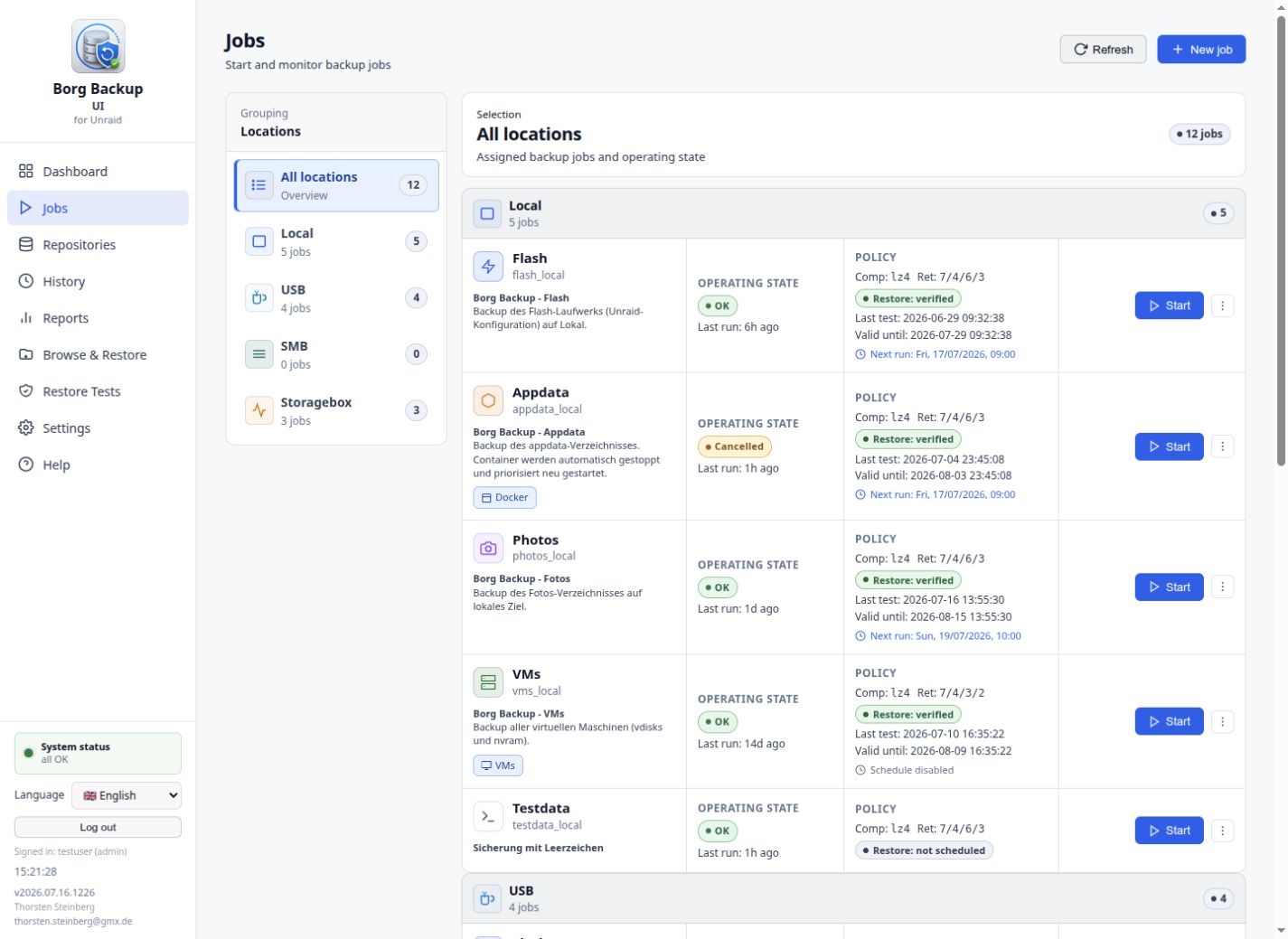
Grouped backup jobs with operational status, next run information, restore verification state, and manual start controls.
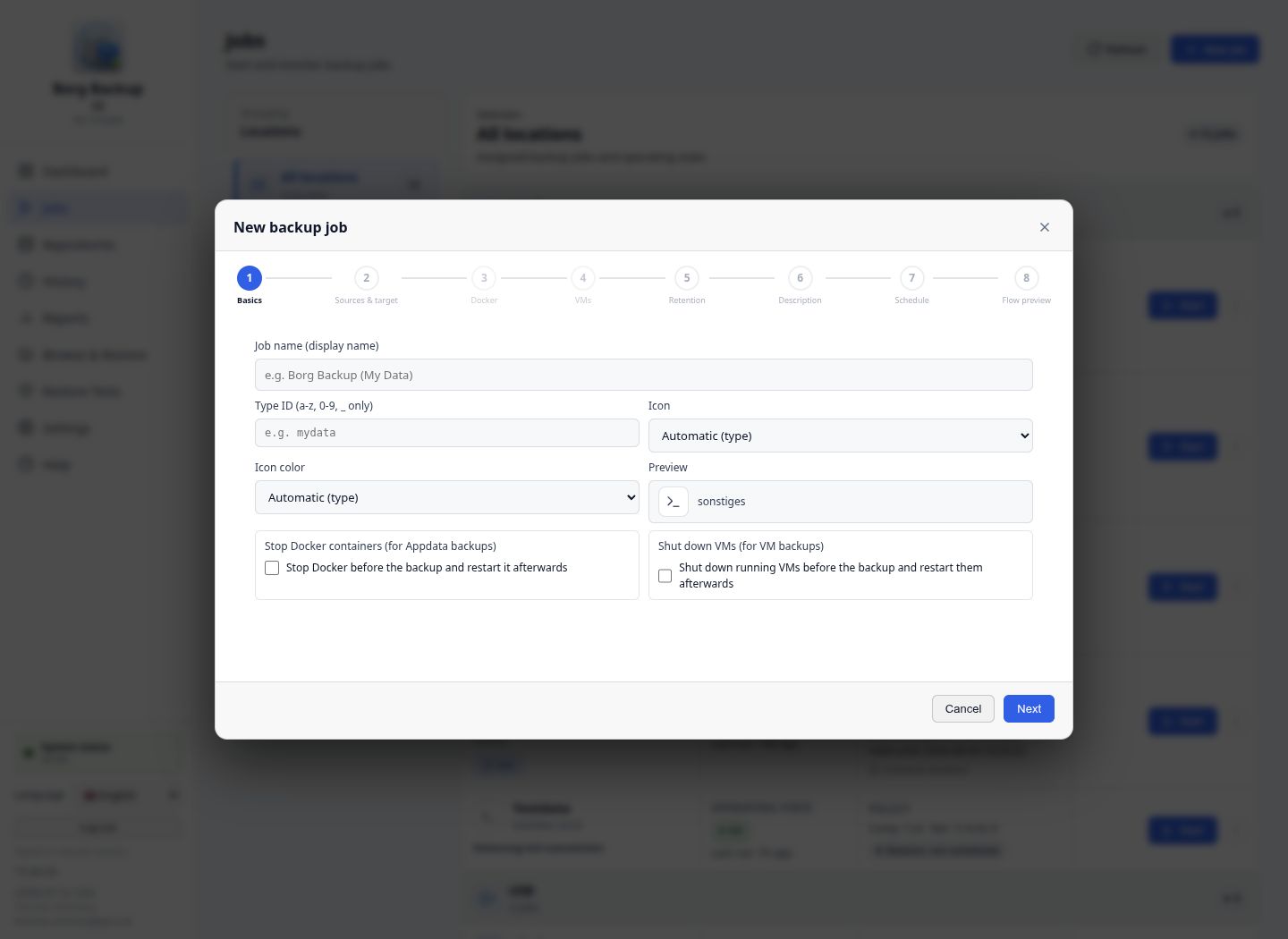
Job Wizard
A step-by-step workflow for sources, repositories, Docker/VM handling, retention, description, schedule, and flow preview.
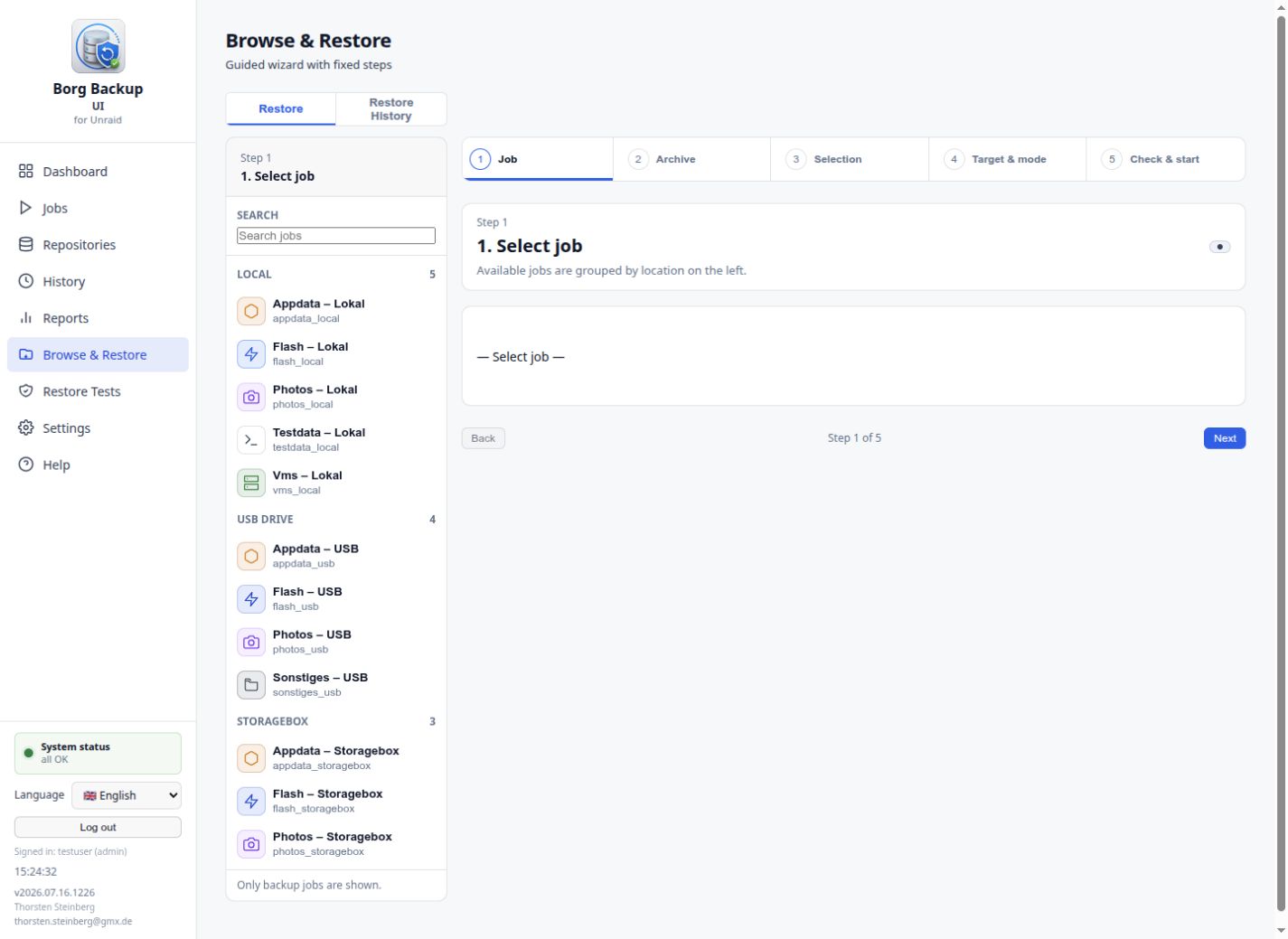
Browse and Restore
Browse archives, select content, precheck the restore target, and restore into administrator-approved paths.
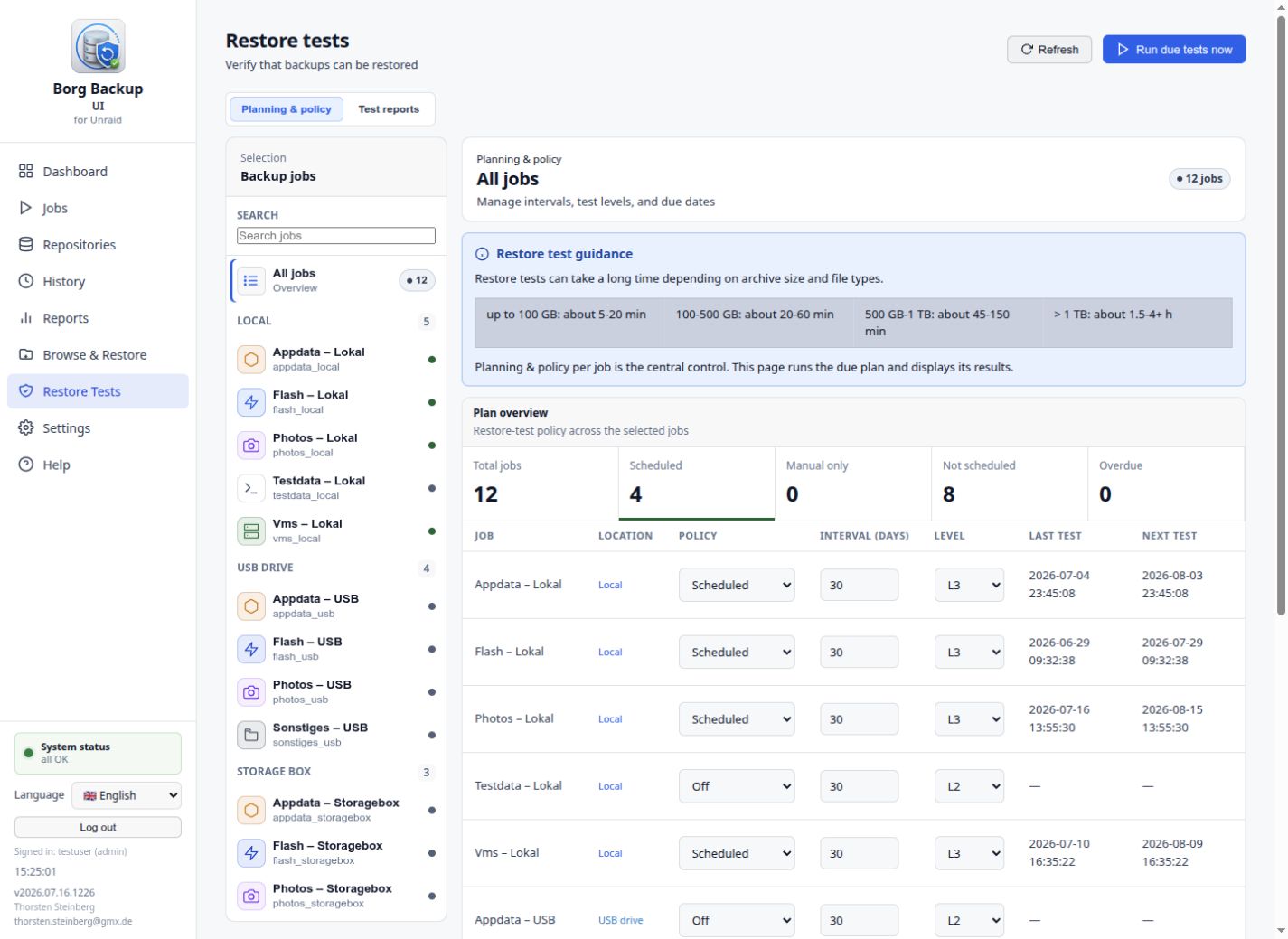
Restore Tests
Plan and review automated restore checks so backups are not only written, but also verified.
Data and Secrets
The plugin stores configuration below the Unraid flash configuration area and keeps runtime data below the configured data directory. Repository passphrases and profile secrets are stored in dedicated secret files and are excluded from normal logs, public artifacts, and support bundle output.
Backups are only useful when restores are proven. Borg Backup UI therefore treats restore tests and restore history as first-class operating data.
Support
Use the Unraid support thread for setup questions and community discussion. Use GitHub Issues for bugs, feature requests, and design discussions. When reporting runtime problems, include the generated support bundle where possible and remove private infrastructure details before sharing logs publicly.
License
- Project: MIT, see LICENSE
- Bundled BorgBackup: BSD-3-Clause, see runtime/licenses/borg/LICENSE
- Bundled Apprise notification runtime: BSD-2-Clause and permissive Python dependency licenses, see runtime/licenses/THIRD-PARTY-NOTICES.md
Media gallery
1 / 4Install Borg Backup UI on Unraid in a few clicks.
Find Borg Backup UI in Community Apps on your Unraid server, review the template, and click Install. Unraid handles the Docker app or plugin setup from the published template.
Categories
Download Statistics
Downloads by Month
Related apps
Explore more like this
Explore allLinks
Details
https://raw.githubusercontent.com/borgforge/borg-backup-ui/main/borg-backup-ui.plg