
All apps · 0 apps

actual-sync
Docker app from UnraidUser-2081337032's Repository
Overview
Readme
View on GitHub

Actual-sync
Automated bank synchronization service for Actual Budget with multi-server support, health monitoring, and comprehensive error handling











📚 Table of Contents
- About
- Features
- Quick Start
- Installation
- Configuration
- Usage
- Docker Deployment
- Monitoring & Observability
- Notifications
- Testing
- Security
- Troubleshooting
- Documentation
- Contributing
- License
- Acknowledgments
- Sponsor
🧠 About
Actual-sync is a production-ready Node.js service that automates bank transaction synchronization for Actual Budget servers. Built for reliability and ease of use, it eliminates the need for manual sync operations and ensures your financial data stays current across multiple budget instances.
What It Does
- Automates scheduled bank synchronization using cron expressions
- Manages multiple Actual Budget servers from a single service
- Handles network failures, rate limits, and API errors gracefully
- Monitors sync health with HTTP endpoints and Prometheus metrics
- Notifies you of sync results via Telegram, email, Slack, Discord, ntfy, or generic webhooks
- Tracks complete sync history in SQLite with CLI query tools
Why Actual-sync?
Manually syncing bank transactions is tedious and error-prone. Actual-sync runs unattended in Docker or as a system service, keeping your budgets up-to-date with zero intervention. Perfect for personal finance enthusiasts, multi-user households, and anyone running self-hosted Actual Budget instances.
Built for production with enforced test coverage (see the live tests and coverage badges above), comprehensive error handling, structured logging, and enterprise-grade monitoring capabilities.
📸 Dashboard Preview
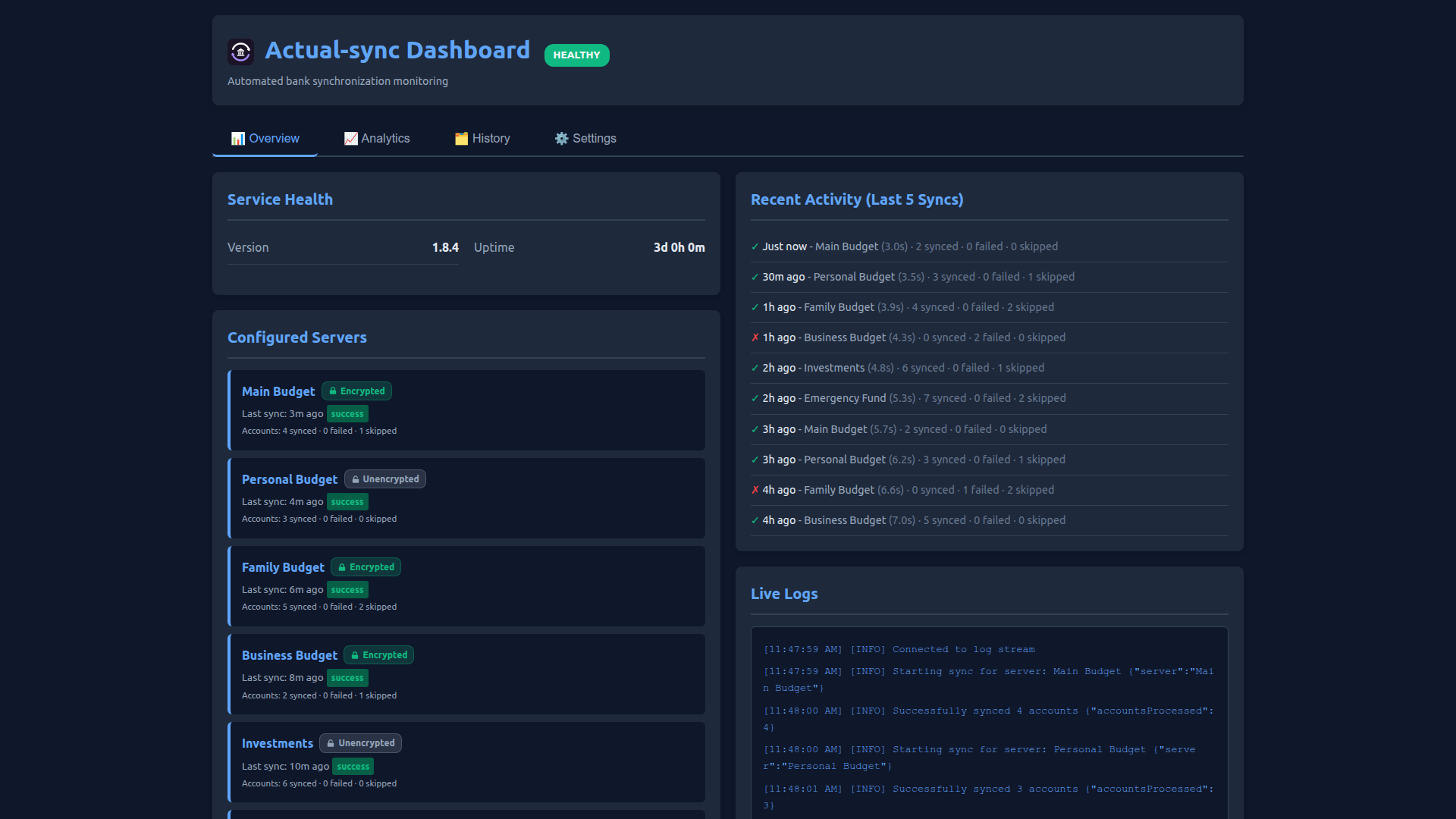
Modern Tabbed Interface with comprehensive monitoring and management:
📊 View More Screenshots
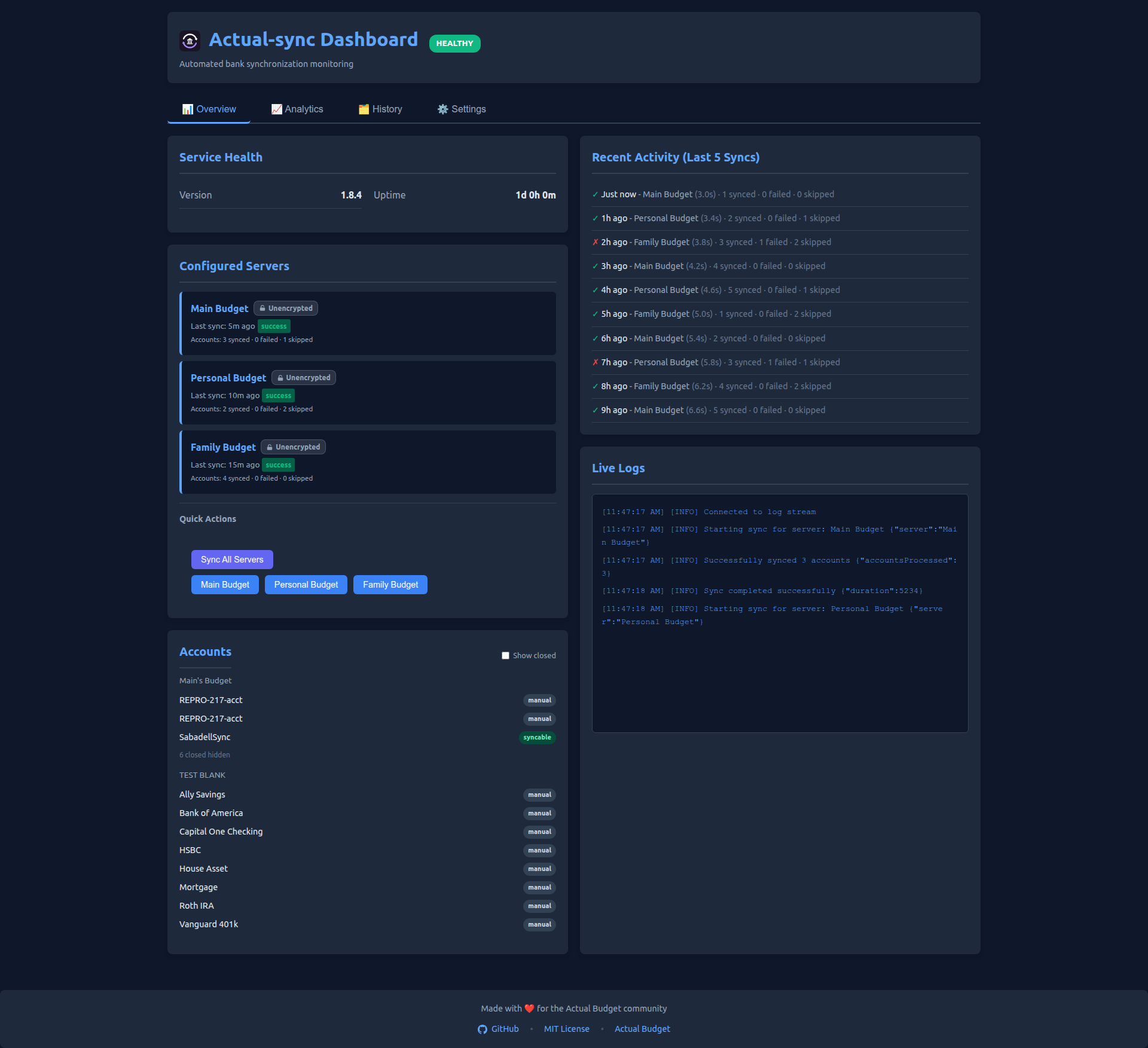
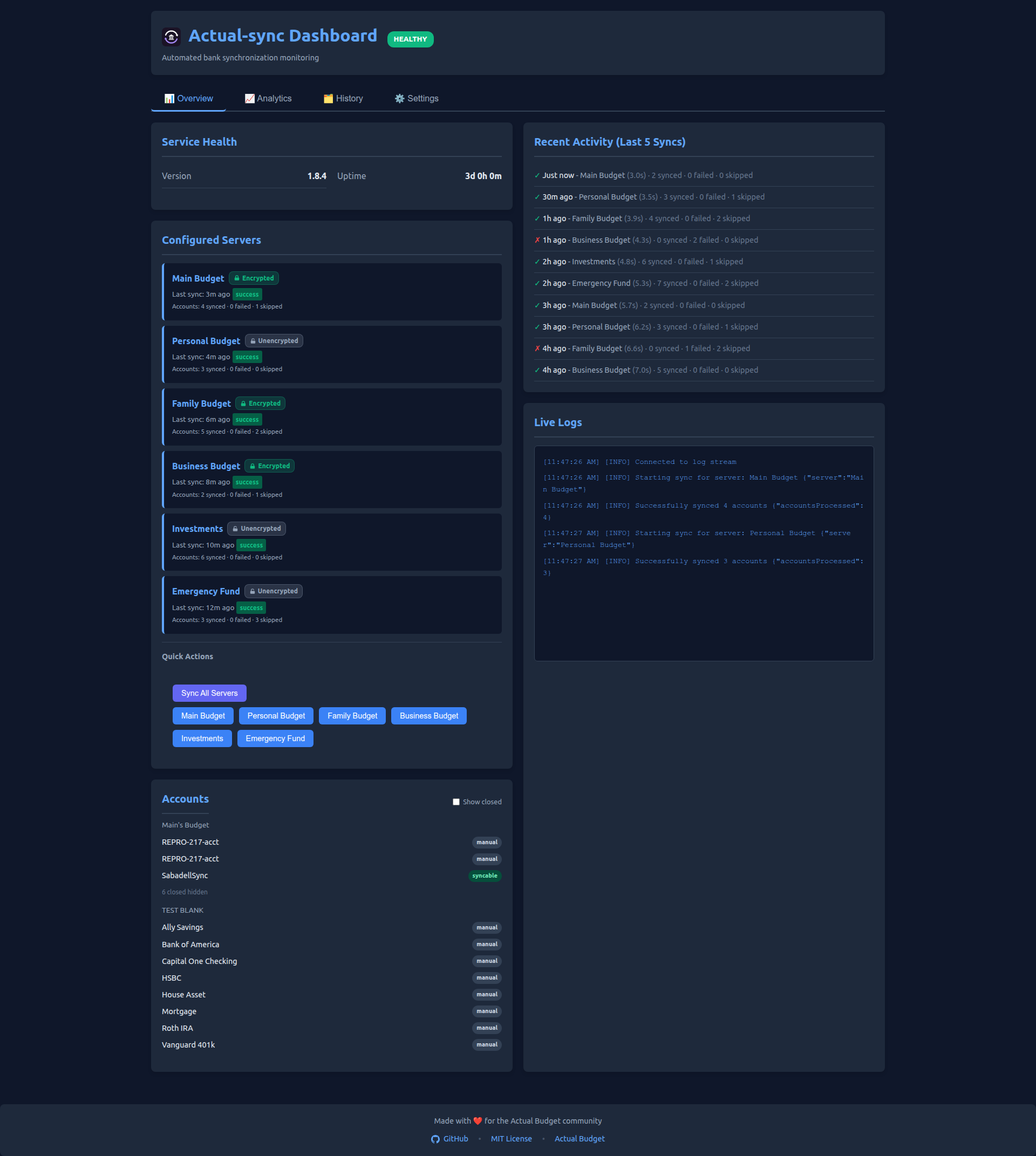
Overview Tab - 2-column layout with service health, server list, recent activity, and live logs:
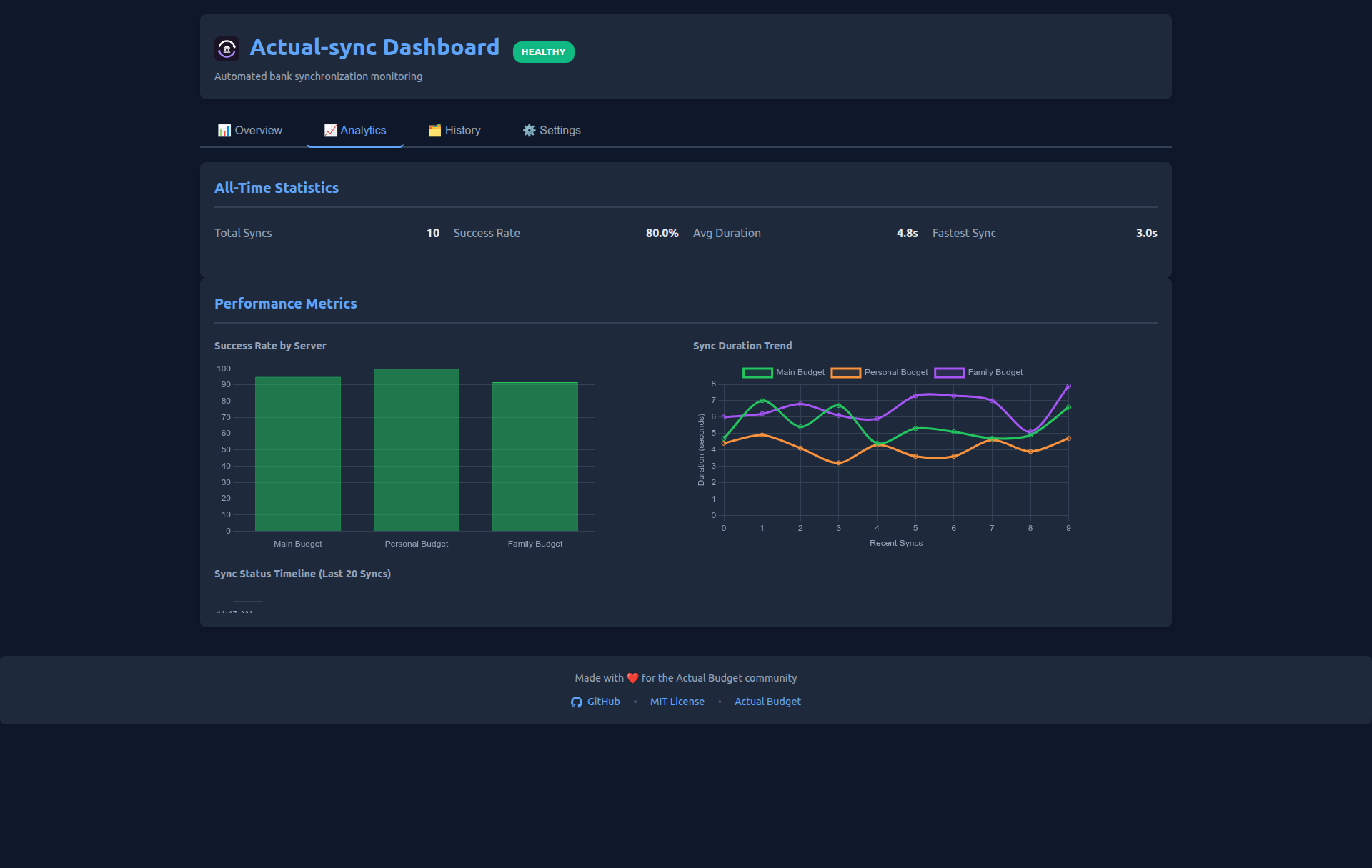
Analytics Tab - All-time statistics with interactive charts:
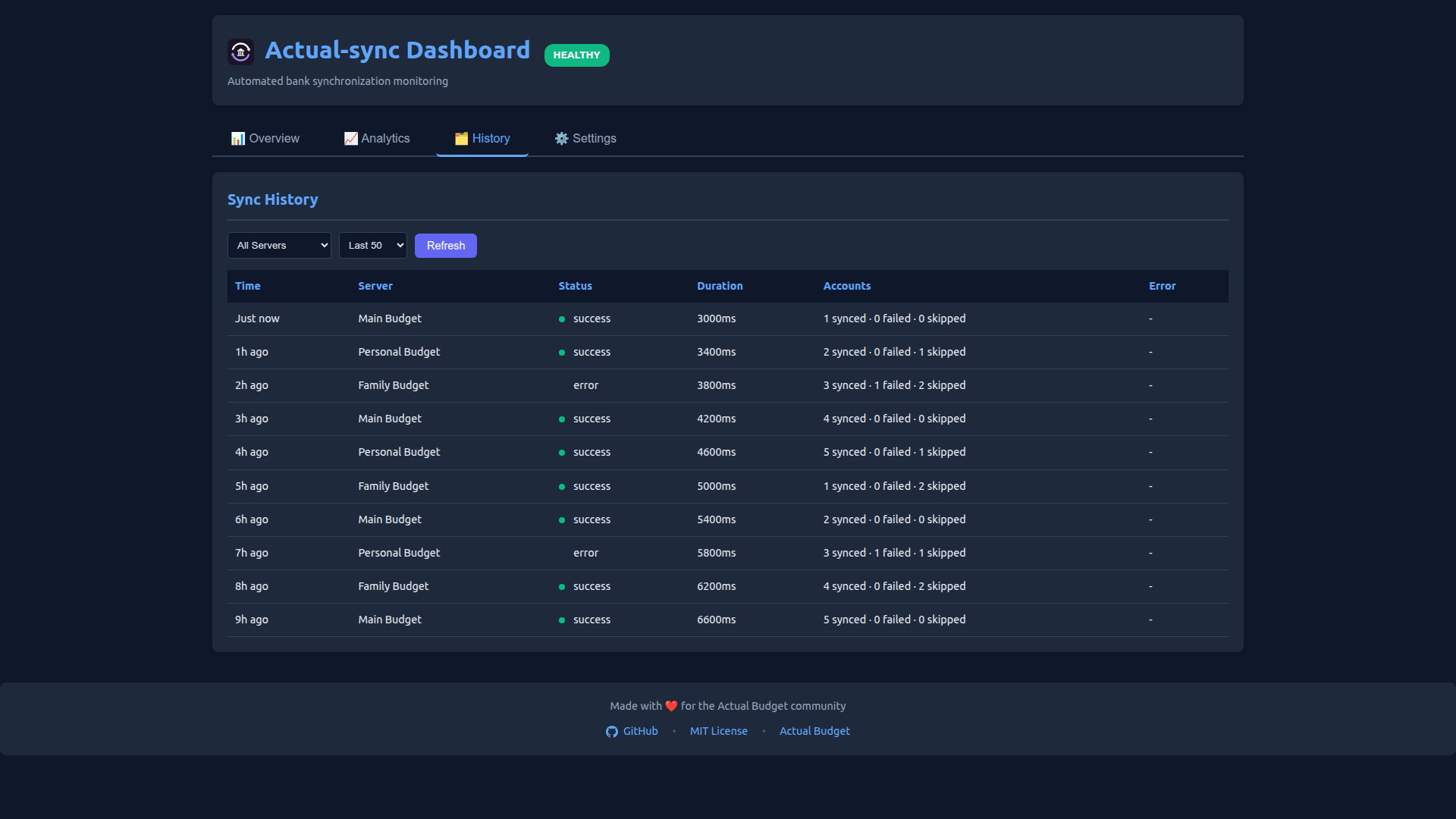
History Tab - Searchable sync history with filters:
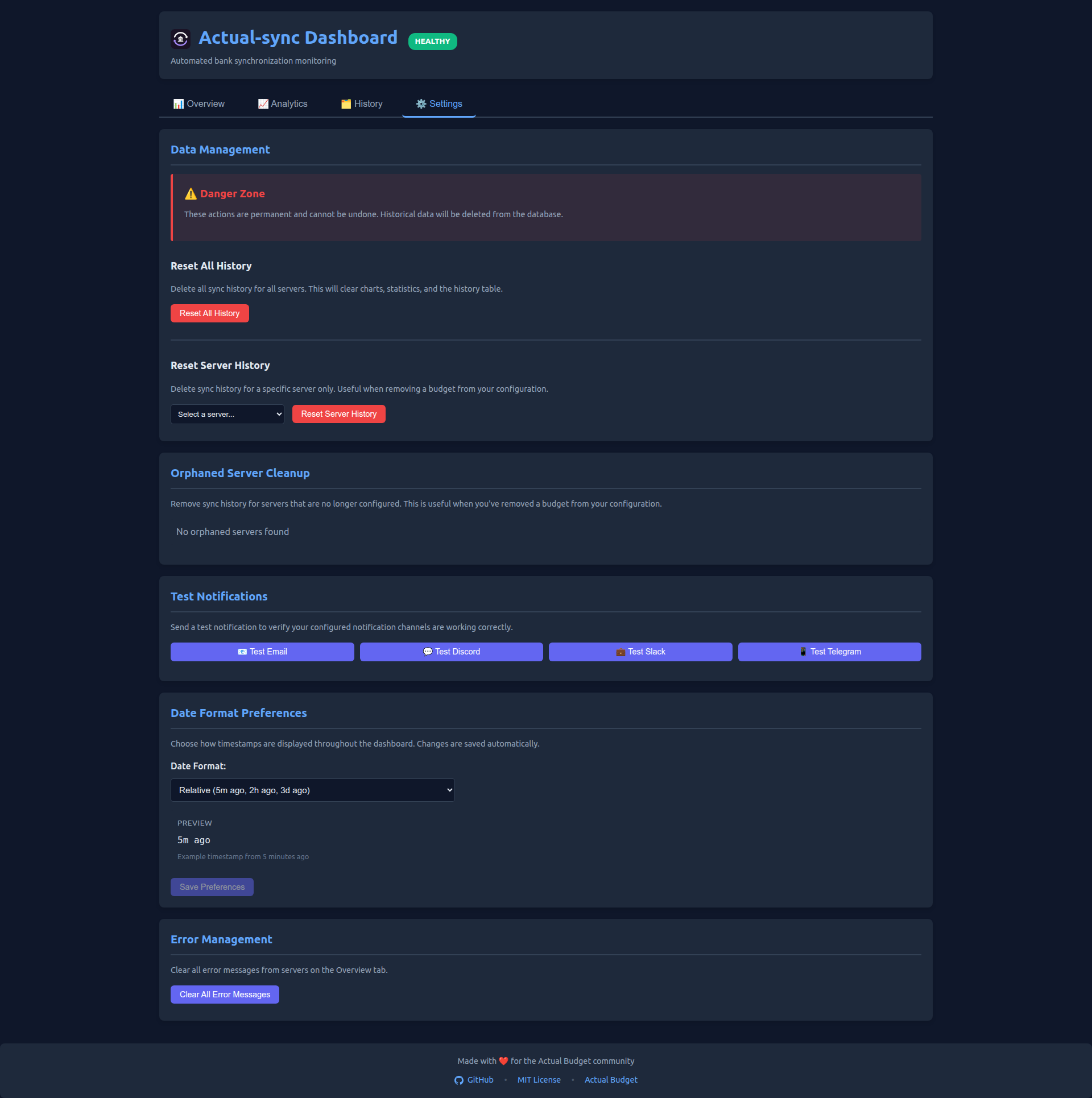
Settings Tab - Date format preferences and data management:
Multi-Server Support - Manage 6+ budget instances with encryption badges:
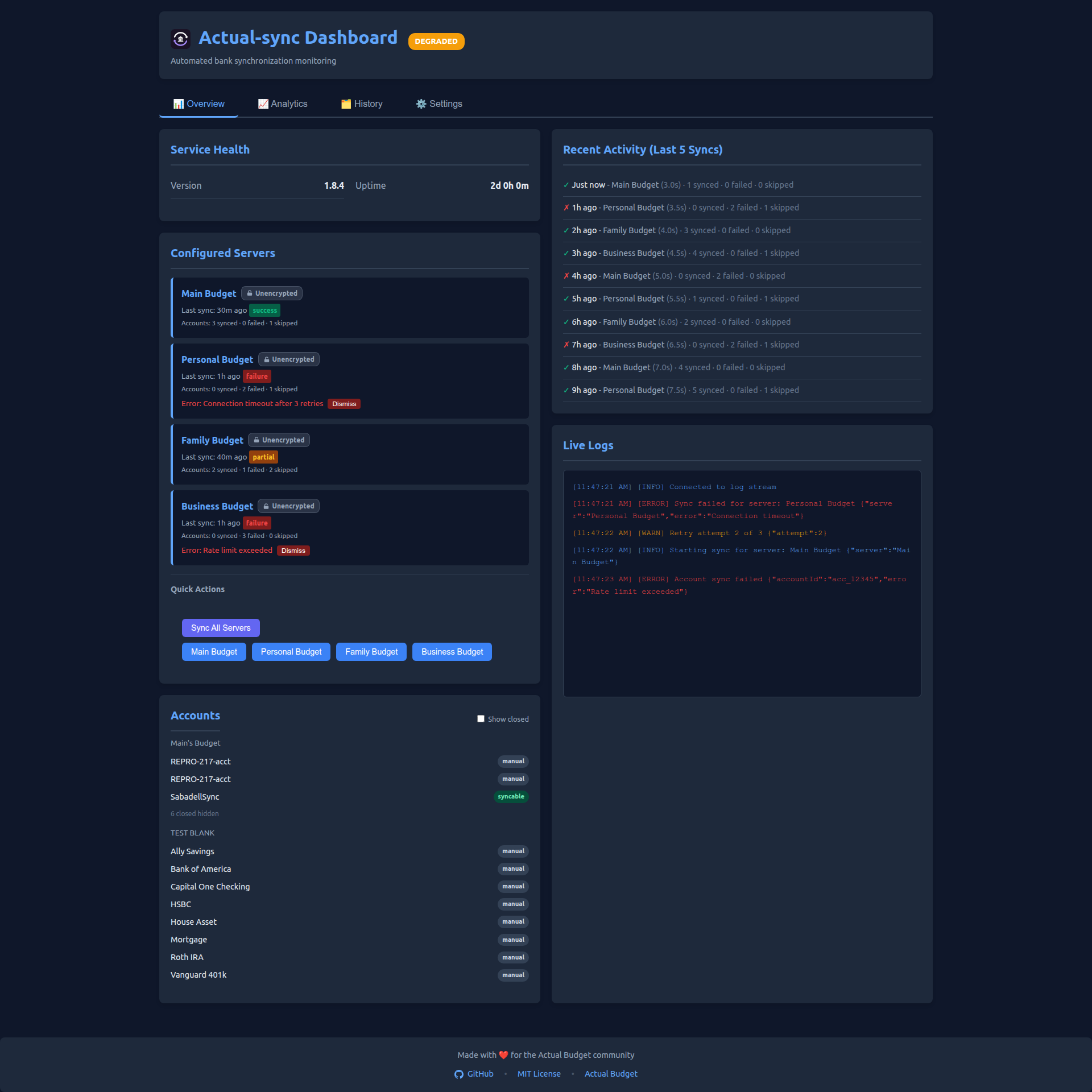
Error Handling - Clear visibility into partial failures and sync issues:
✨ Features
🎯 Core Capabilities
- ✅ Multi-Server Support - Manage unlimited Actual Budget instances with independent configurations
- ✅ Encrypted Budget Support - Full support for end-to-end encrypted (E2EE) budget files
- ✅ Flexible Scheduling - Global and per-server cron schedules with timezone support
- ✅ Intelligent Retry Logic - Exponential backoff with rate limit detection and handling
- ✅ Account Discovery - List all accessible bank accounts across servers
- ✅ Manual Sync Trigger - On-demand synchronization via CLI, dashboard or Telegram bot; inside the running service syncs run one at a time, so a manual sync waits for any sync already running (do not run
npm run syncwhile the service is running: it is a separate process) - ✅ Configuration Validation - Business rules (required fields, ranges, unique servers) and JSON-schema rules (types, ranges, formats, patterns, enums) both hard-fail at startup with clear, aggregated messages; unknown/typo'd keys warn.
CONFIG_STRICT=falsedowngrades the schema hard-fails to warnings during a migration
📊 Monitoring & Observability
- ✅ Modern Web Dashboard - Tabbed interface with Overview, Analytics, History, and Settings
- ✅ 2-Column Overview Layout - Service health, server list, recent activity, and live logs
- ✅ Sync Status Badges - Color-coded badges showing success/partial/failure for each server
- ✅ Interactive Charts - Success rates by server, duration trends, and sync timeline visualizations
- ✅ Date Format Preferences - 11 customizable date formats including 3-letter months (persisted in browser)
- ✅ Orphaned Server Cleanup - Identify and remove historical data for decommissioned budgets
- ✅ Health Check Endpoints - HTTP endpoints for monitoring (
/health,/metrics,/ready) - ✅ Prometheus Metrics - Comprehensive metrics export for Prometheus/Grafana dashboards
- ✅ Structured Logging - Pretty console + single-line JSON log files, correlation IDs, and automatic secret redaction (passwords/tokens never written to logs)
- ✅ Enhanced Logging System - Log rotation with compression, syslog support, performance tracking, per-server log levels
- ✅ Sync History Database - SQLite persistence with query interface and CLI tool (
npm run history) - ✅ Status Tracking - Real-time health status (HEALTHY/DEGRADED/UNHEALTHY/READY)
- ✅ WebSocket Streaming - Live log broadcast to connected dashboard clients with ring buffer; the stream uses the dashboard's auth and rejects foreign origins
🔔 Notifications & Alerts
- ✅ Interactive Telegram Bot - Real-time commands (
/status,/history,/errors,/sync) with notifications - ✅ Multi-Channel Alerts - Email (SMTP), Telegram, ntfy, and webhooks (Slack, Discord, and a generic JSON webhook for Gotify/Home Assistant/n8n/custom)
- ✅ Honest Account Reporting - Every notification shows which accounts synced, failed (with the error), or were skipped and why (closed / not bank-linked)
- ✅ Per-Channel Notification Mode -
notifyOnSuccess(always/errors_only/never) set globally, per channel, or per webhook, so an alert channel can skip routine successes - ✅ Smart Thresholds - Configurable failure detection (consecutive failures, failure rate) applied to failures
- ✅ Rate Limiting - Failure-notification spam prevention with configurable intervals
🛡️ Reliability & Security
- ✅ Comprehensive Testing - extensive Jest suite with enforced coverage thresholds (70% lines/functions/statements, 61% branches); live counts on the badges above
- ✅ Docker Support - Production-ready containerization (Alpine-based; live image size on the badge above)
- ✅ Security Best Practices - Non-root user, credential warnings, HTTPS enforcement
- ✅ Graceful Shutdown - Proper cleanup handlers (SIGTERM/SIGINT)
- ✅ Error Recovery - Automatic retry with exponential backoff and jitter
🚀 Developer Experience
- ✅ Zero External Dependencies - Custom structured logger, no bloated libraries
- ✅ Extensive Documentation - 19 comprehensive guides covering all aspects
- ✅ Example Configurations - Docker Compose, Kubernetes, Prometheus, alerting
- ✅ Migration Guides - Step-by-step upgrade paths from previous versions
🚀 Quick Start
Option 1: Docker (Recommended)
Get up and running in 2 minutes:
# Using Docker Hub
docker run -d \
  --name actual-sync \
  --restart unless-stopped \
  -v ./config:/app/config:ro \
  -v ./data:/app/data \
  -v ./logs:/app/logs \
  -p 3000:3000 \
  -e PUID=1001 -e PGID=1001 \
  -e TZ=America/New_York \
  agigante80/actual-sync:latest

# OR using GitHub Container Registry
docker run -d \
  --name actual-sync \
  --restart unless-stopped \
  -v ./config:/app/config:ro \
  -v ./data:/app/data \
  -v ./logs:/app/logs \
  -p 3000:3000 \
  -e PUID=1001 -e PGID=1001 \
  -e TZ=America/New_York \
  ghcr.io/agigante80/actual-sync:latest
Create config/config.json in your mounted directory and you're ready to go!
PUID / PGID: the container starts as root only to align its user to
PUID/PGID(default1001:1001) and fix ownership of thedataandlogsvolumes, then drops to that non-root user. Set these to match the owner of your mounted directories — on Unraid usePUID=99andPGID=100(nobody:users). Without this, a container whose volumes are owned by a different UID cannot write its database or logs.
See docs/DOCKER_DEPLOYMENT.md for complete Docker setup.
Option 2: NPM Installation
For development or manual setup:
# 1. Clone and install
git clone https://github.com/agigante80/Actual-sync.git
cd Actual-sync
npm install

# 2. Create configuration
cp config/config.example.json config/config.json

# 3. Edit configuration with your Actual Budget server details
nano config/config.json

# 4. Discover available accounts
npm run list-accounts

# 5. Test manual sync
npm run sync

# 6. Start scheduled service
npm start
Option 3: Unraid (Community Applications)

actual-sync is published in the Unraid Community Applications store: ca.unraid.net/apps/actual-sync.
Install it from the Apps tab (Community Applications):
- Open the Apps tab and search for
actual-sync. - Click Install and set the Config path.
- Single budget (simplest): fill in the Actual server URL / password / Sync ID template variables and start — no config file needed (Sync ID: Actual Budget → the budget → Settings → Advanced → "Sync ID"). Multiple budgets: leave those blank; on first start the container drops a
config.example.jsonin the Config folder and exits — fill it in, rename it toconfig.json, and restart (see Configuration). - Open the dashboard via the container's WebUI link (port
3000).
The Unraid template lives in unraid/actual-sync.xml.
Single-server via environment variables (any Docker host, not just Unraid): set
ACTUAL_SYNC_SERVER_URL,ACTUAL_SYNC_SERVER_PASSWORD, andACTUAL_SYNC_SERVER_SYNC_IDto run one budget with noconfig.json. See Configuration.
📦 Installation
Prerequisites
- Node.js 22+
- Actual Budget Server - Self-hosted instance with configured bank connections
- GoCardless/Nordigen - Open banking API credentials configured in Actual Budget
- Docker (optional) - For containerized deployment
Method 1: Docker (Recommended for Production)
Pull from Docker Hub or GitHub Container Registry:
# Option A: Docker Hub
docker pull agigante80/actual-sync:latest

# Option B: GitHub Container Registry
docker pull ghcr.io/agigante80/actual-sync:latest

# Run container
docker run -d \
  --name actual-sync \
  --restart unless-stopped \
  -v $(pwd)/config:/app/config:ro \
  -v $(pwd)/data:/app/data \
  -v $(pwd)/logs:/app/logs \
  -p 3000:3000 \
  -e PUID=1001 -e PGID=1001 \
  -e TZ=America/New_York \
  agigante80/actual-sync:latest
Docker Compose:
version: '3.8'
services:
  actual-sync:
    image: agigante80/actual-sync:latest  # or ghcr.io/agigante80/actual-sync:latest
    container_name: actual-sync
    restart: unless-stopped
    ports:
      - "3000:3000"
    volumes:
      - ./config:/app/config:ro
      - ./data:/app/data
      - ./logs:/app/logs
    environment:
      - PUID=1001          # set to 99 on Unraid (nobody)
      - PGID=1001          # set to 100 on Unraid (users)
      - TZ=America/New_York
      - NODE_ENV=production
See docs/DOCKER_DEPLOYMENT.md for advanced Docker configuration.
Method 2: NPM Installation (Recommended for Development)
# Clone repository
git clone https://github.com/agigante80/Actual-sync.git
cd Actual-sync

# Install dependencies
npm install

# Verify installation
npm test
npm run list-accounts --help
Method 3: System Service (Linux)
# Install as systemd service
sudo cp actual-sync.service /etc/systemd/system/
sudo systemctl daemon-reload
sudo systemctl enable actual-sync
sudo systemctl start actual-sync
⚙️ Configuration
Configuration is managed via config/config.json with JSON schema validation.
Basic Configuration
{
  "servers": [
    {
      "name": "Main",
      "url": "https://budget.example.com",
      "password": "your_secure_password",
      "syncId": "your_sync_id_from_actual",
      "dataDir": "/app/data/main",
      "encryptionPassword": "MyBudgetEncryptionKey"
    }
  ],
  "sync": {
    "maxRetries": 5,
    "baseRetryDelayMs": 3000,
    "schedule": "0 2 * * *"
  },
  "logging": {
    "level": "INFO",
    "format": "pretty",
    "logDir": "/app/logs"
  },
  "healthCheck": {
    "port": 3000,
    "host": "0.0.0.0"
  }
}
Configuration Notes:
encryptionPassword(optional): Required only if your budget file has end-to-end encryption (E2EE) enabled. This is separate from the server password.logDir: Set to/app/logsfor Docker deployments, or./logsfor local development. Set tonullto disable file logging and log only to console.
### Configuration Validation

```bash
# Validate configuration file
npm run validate-config

# Or manually
node -e "require('./src/lib/configLoader'); new (require('./src/lib/configLoader'))().load()"
See docs/CONFIG.md for complete configuration reference including:
- Advanced multi-server configurations
- Per-server schedule overrides
- Notification setup (Email, Telegram, Slack, Discord, ntfy, generic webhooks)
- Retry logic customization
- Timezone configuration
- Environment variable alternatives
🎮 Usage
NPM Scripts
| Script | Command | Description |
|---|---|---|
npm start |
node index.js |
Start scheduled sync service (background) |
npm run sync |
node index.js --force-run |
Run immediate sync for all servers (skip schedule wait) |
npm run sync -- --server "ServerName" |
node index.js --force-run --server "ServerName" |
Run immediate sync for specific server only |
npm run list-accounts |
node scripts/listAccounts.js |
List all configured bank accounts |
npm run history |
node scripts/viewHistory.js |
View sync history and statistics |
npm run validate-config |
node scripts/validateConfig.js |
Validate configuration file |
npm run screenshots |
node scripts/generateDashboardScreenshots.js |
Generate dashboard screenshots from the e2e fixture harness |
npm test |
jest |
Run test suite |
npm run test:watch |
jest --watch |
Run tests in watch mode |
npm run test:coverage |
jest --coverage |
Generate coverage report |
npm run test:e2e |
jest --config jest.e2e.config.js |
Run the browser E2E suite (see TESTING.md) |
Command Line Examples
List all accounts:
npm run list-accounts

# Output:
# Server: Main
# ✓ Connected successfully
#
# Accounts:
# 1. Chase Checking (ID: acct_123) - Last sync: 2025-12-07
# 2. Savings Account (ID: acct_456) - Last sync: 2025-12-06
# 3. Credit Card (ID: acct_789) - Last sync: 2025-12-07
Run sync for all servers:
npm run sync
Run sync for a specific server:
npm run sync -- --server "Main Budget"

# Example output:
# Starting sync for server: Main Budget
# ✅ Sync completed successfully
View sync history:
npm run history

# Options:
npm run history -- --server Main --days 7 --status failed
npm run history -- --stats
npm run history -- --errors
Telegram Bot Commands
If you've configured the Telegram bot, you can interact with the service:
/status- Show current sync status and health/history [count]- View recent sync history (default: last 5)/errors [count]- Show recent errors (default: last 5)/stats- Show sync statistics/servers- List configured servers/sync ServerName- Trigger manual sync for specific server/notify [always|errors|never]- Change notification preferences at runtime (the command'serrorsis the config'serrors_only)/help- Show all available commands/ping- Test bot connectivity/stats- Show sync statistics/help- List available commands
See docs/NOTIFICATIONS.md for Telegram bot setup.
🐳 Docker Deployment
Available Registries
Actual-sync is published to two registries:
- Docker Hub:
agigante80/actual-sync:latest - GitHub Container Registry:
ghcr.io/agigante80/actual-sync:latest
Both registries contain identical multi-platform images (amd64/arm64).
Docker Compose (Recommended)
version: '3.8'

services:
  actual-sync:
    image: agigante80/actual-sync:latest  # or ghcr.io/agigante80/actual-sync:latest
    container_name: actual-sync
    restart: unless-stopped

    ports:
      - "3000:3000"  # Health check endpoint

    volumes:
      - ./config:/app/config:ro      # Read-only config
      - ./data:/app/data              # Persistent data (SQLite)
      - ./logs:/app/logs              # Log files

    environment:
      - PUID=1001                     # Run-as UID (99 on Unraid)
      - PGID=1001                     # Run-as GID (100 on Unraid)
      - TZ=America/New_York           # Timezone for schedules
      - NODE_ENV=production

    healthcheck:
      test: ["CMD", "wget", "--quiet", "--tries=1", "--spider", "http://localhost:3000/health"]
      interval: 30s
      timeout: 10s
      retries: 3
      start_period: 40s

    networks:
      - actual-network

networks:
  actual-network:
    external: true
Deploy:
docker-compose up -d

# View logs
docker-compose logs -f actual-sync

# Check health
docker-compose ps
curl http://localhost:3000/health
See docs/DOCKER_DEPLOYMENT.md for Kubernetes deployment and advanced configurations.
📝 Logging
Actual-sync provides comprehensive logging with multiple output formats and destinations.
Log Configuration
Configure logging in config/config.json:
{
  "logging": {
    "level": "INFO",
    "format": "json",
    "logDir": "/app/logs",
    "rotation": {
      "enabled": true,
      "maxSize": "10M",
      "maxFiles": 10,
      "compress": "gzip"
    }
  }
}
Log Levels
ERROR: Critical failures requiring immediate attentionWARN: Warnings and retry attemptsINFO: Normal operations (recommended for production)DEBUG: Detailed tracing for troubleshooting
Log Formats
Pretty Format (Human-readable, for development):
2025-12-09T22:06:15.204Z [INFO] Starting sync for server: Vega II
2025-12-09T22:06:15.564Z [INFO] Connected to Actual server
2025-12-09T22:06:16.440Z [INFO] Accounts fetched successfully
JSON Format (Machine-readable, for production):
{"timestamp":"2025-12-09T22:06:15.204Z","level":"INFO","service":"actual-sync","message":"Starting sync for server: Vega II","server":"Vega II","correlationId":"9a313fa1-8901-4e3f-a167-5e3e1e8cbee3"}
Log Destinations
File Logging (Docker):
# Logs are written to /app/logs inside the container
# Mount this directory to persist logs on the host
docker run -v ./logs:/app/logs agigante80/actual-sync:latest

# View logs
tail -f ./logs/actual-sync-2025-12-09.log
Console Only (Disable file logging):
{
  "logging": {
    "level": "INFO",
    "format": "pretty",
    "logDir": null
  }
}
Docker Logs (Recommended for Docker deployments):
# View real-time logs
docker logs -f actual-sync

# View last 100 lines
docker logs --tail 100 actual-sync

# View logs since specific time
docker logs --since 2025-12-09T00:00:00 actual-sync
Log Rotation
When file logging is enabled, logs are automatically rotated to prevent disk space issues:
- Max Size: 10MB per file (configurable)
- Max Files: 10 files kept (configurable)
- Compression: Old logs compressed with gzip
- Daily Rotation: New file created each day
See docs/LOGGING.md for advanced logging configuration including syslog support and performance tracking.
📊 Monitoring & Observability
Web Dashboard
Access the interactive dashboard at http://localhost:3000/dashboard:

Dashboard Screenshots
Healthy System - Main Dashboard View
Real-time monitoring with success metrics, interactive charts, and live log streaming
Degraded System - Multiple Servers with Errors
Dashboard showing failure detection across multiple budget servers with detailed error tracking
Multi-Server Setup - 6 Budget Instances
Managing multiple budget instances with per-server status and consolidated metrics
Dashboard Capabilities:
- 📈 Real-time Charts - Success rates, duration trends, sync timelines
- 🖥️ System Status - Live uptime, statistics, and server health
- 🎮 Manual Controls - Trigger syncs for all servers or individual ones
- 📡 Live Logs - WebSocket-streamed logs with color-coding
- 📊 Metrics Visualization - Interactive Chart.js graphs
- 🔒 Authentication - Optional basic auth or token-based security
Quick Access:
# Default (no auth)
open http://localhost:3000/dashboard

# With authentication configured
curl -u admin:password http://localhost:3000/dashboard
Regenerating Screenshots:
When dashboard features change, regenerate screenshots:
# Start the service first
npm start

# In another terminal, generate screenshots
npm run screenshots
See docs/DASHBOARD.md for complete dashboard documentation including authentication setup, API endpoints, and reverse proxy configuration.
Health Check Endpoints
Actual-sync exposes HTTP endpoints for monitoring:
| Endpoint | Description | Response |
|---|---|---|
GET /health |
Basic alive check | 200 OK or 503 Service Unavailable |
GET /metrics |
Detailed sync statistics | JSON with per-server status |
GET /ready |
Kubernetes readiness probe | 200 OK when service is ready |
GET /dashboard |
Web dashboard UI | HTML dashboard interface |
WS /ws/logs |
Live log stream (dashboard auth, same-origin only) | JSON log records |
Example - Health Check:
curl http://localhost:3000/health

# Response (200 OK):
{
  "status": "HEALTHY",
  "uptime": 86400,
  "timestamp": "2025-12-07T14:32:10.123Z",
  "version": "1.4.0"
}
Prometheus Metrics
Actual-sync exports Prometheus metrics on port 3000:
curl http://localhost:3000/metrics/prometheus
Prometheus Configuration:
# prometheus.yml
scrape_configs:
  - job_name: 'actual-sync'
    static_configs:
      - targets: ['actual-sync:3000']
    scrape_interval: 30s
    metrics_path: /metrics/prometheus
See docs/PROMETHEUS.md and docs/HEALTH_CHECK.md for complete monitoring setup including Grafana dashboards.
🔔 Notifications
Actual-sync can send notifications on sync results — success, partial, or failure — via multiple channels. Each channel decides for itself which results are worth a message, so an alert channel can stay quiet on routine successes:
Supported Channels
- Email - SMTP (Gmail, SendGrid, custom)
- Telegram - Interactive bot with commands
- Slack - Webhook integration
- Discord - Webhook integration
- ntfy - Push notifications to an ntfy topic (priority + tags)
- Generic webhook - POSTs a documented JSON payload to any URL (works with Gotify, Home Assistant, n8n, Apprise, or custom endpoints)
Notification Mode (per channel)
notifyOnSuccess decides which sync results reach a channel. Set it globally under notifications, and override it per channel — or per individual webhook entry:
always(default) — notify on every syncerrors_only— notify on failures and partial syncs, stay silent on clean successesnever— turn the channel off entirely, failures included
"notifications": {
  "notifyOnSuccess": "errors_only",
  "email": { "notifyOnSuccess": "always" }
}
Test notifications from the dashboard always send, so you can still verify a muted channel.
Smart Thresholds
Failures only. Once a channel is set to notify on a failure, these decide whether that failure is worth alerting about — they do not apply to success or partial results:
- Consecutive Failures: Alert after N consecutive failed syncs (default: 3)
- Failure Rate: Alert when failure rate exceeds X% over Y minutes (default: 50% over 60 min)
Rate Limiting
Failures only, like thresholds. To quieten routine success notifications, use notifyOnSuccess: "errors_only" above — rate limiting will not do it:
- Minimum Interval: Don't send notifications more frequently than X minutes (default: 15)
- Maximum Per Hour: Don't send more than X notifications per hour (default: 4)
See docs/NOTIFICATIONS.md for complete notification setup guide including configuration examples for all channels.
🧪 Testing
Actual-sync has comprehensive test coverage to ensure reliability.
Run Tests
# Run all tests
npm test

# Watch mode (for development)
npm run test:watch

# Generate coverage report
npm run test:coverage
Test Coverage
--------------------|---------|----------|---------|---------|-------------------
File                | % Stmts | % Branch | % Funcs | % Lines | Uncovered Line #s
--------------------|---------|----------|---------|---------|-------------------
All files           |   ...   |   ...    |   ...   |   ...   |
--------------------|---------|----------|---------|---------|-------------------

Test Suites: all passing
Tests:       all passing      # live count + coverage are on the badges at the top
Time:        ~8 s
See docs/TESTING.md for complete testing guide including:
- Test structure and organization
- Writing new tests
- CI/CD integration
- Coverage thresholds
🔒 Security
Credential Management
DO:
- ✅ Store credentials in
config/config.json(git-ignored) - ✅ Use strong passwords (16+ characters, mixed complexity)
- ✅ Rotate credentials periodically (quarterly recommended)
- ✅ Use HTTPS for all Actual Budget server URLs
DON'T:
- ❌ Hardcode credentials in source files
- ❌ Commit
config/config.jsonto version control - ❌ Share credentials in public channels
- ❌ Use same password across multiple servers
Security Features
- Non-Root Container - Docker runs as
actualuser(UID 1001), not root - Read-Only Config - Mount config as read-only in Docker
- HTTPS Enforcement - Warnings for HTTP connections in production
- Rate Limiting - HTTP endpoints protected (60 req/min per IP), and dashboard logins lock out after 10 failures per IP in 15 minutes
- SQL Injection Protection - Parameterized queries throughout
- Input Validation - Startup business-logic validation, plus hard-fail JSON-schema validation (type/range/required/format/pattern/enum; unknown keys warn) for all config
Security Status
Dependency vulnerabilities are tracked live on the repository's Security tab (Dependabot alerts), so this README carries no static security score that could go stale. The codebase's standing practices:
- ✅ No hardcoded credentials
- ✅ SQL injection protection (parameterized queries throughout)
- ✅ Container security best practices (non-root user, read-only config)
- ✅ Startup config validation and automatic secret redaction in logs
See docs/SECURITY_AND_PRIVACY.md for details.
Vulnerability Reporting
Please report security vulnerabilities privately via GitHub's Report a vulnerability form (Security tab → Report a vulnerability). Do not open public GitHub issues for security vulnerabilities.
🐛 Troubleshooting
Common Issues
Configuration file not found
# Solution: Create from example
cp config/config.example.json config/config.json
Invalid configuration
# Solution: Validate configuration
npm run validate-config
Connection issues
# 1. Verify server URL is accessible
curl https://budget.example.com

# 2. Check credentials
npm run list-accounts

# 3. Check logs for detailed error messages
tail -f logs/actual-sync-*.log
Rate limit errors
Error: Rate limit exceeded (429)
Solutions:
- Increase
sync.baseRetryDelayMs(e.g., 5000) - Reduce sync frequency (e.g.,
"0 */12 * * *"for every 12 hours) - Check GoCardless/Nordigen API limits
Docker container exits immediately
# 1. Check logs
docker logs actual-sync

# 2. Verify volume mounts
docker inspect actual-sync | grep -A 10 Mounts

# 3. Run interactively to debug
docker run --rm -it \
  -v $(pwd)/config:/app/config:ro \
  actual-sync:latest \
  npm run validate-config
Debug Mode
Enable detailed logging for troubleshooting:
{
  "logging": {
    "level": "DEBUG",
    "format": "pretty"
  }
}
Getting Help
- Check Documentation - See docs/ for comprehensive guides
- View Logs - Check
logs/actual-sync-*.logfor error details - Run Diagnostics - Use
npm run list-accountsto test connectivity - GitHub Issues - Create issue with logs and configuration (redact credentials)
📚 Documentation
Comprehensive documentation is available in the docs/ directory:
Getting Started
- docs/README.md - Documentation index and quick links
- docs/CONFIG.md - Complete configuration reference
- docs/MIGRATION.md - Upgrade guide from previous versions
Architecture & Design
- docs/ARCHITECTURE.md - System design and components
- docs/CONFIG.md - Full configuration reference
Operations & Monitoring
- docs/DOCKER_DEPLOYMENT.md - Docker deployment guide
- docs/HEALTH_CHECK.md - Health check endpoints and monitoring
- docs/DASHBOARD.md - Web dashboard
- docs/PROMETHEUS.md - Prometheus metrics and Grafana dashboards
- docs/LOGGING.md - Structured logging guide
- docs/SYNC_HISTORY.md - Sync history database and CLI tool
Features & Configuration
- docs/NOTIFICATIONS.md - Notification setup (Email, Telegram, Slack, Discord, ntfy, generic webhooks)
- docs/MIGRATION.md - Env-var to config.json migration
- docs/TESTING.md - Testing guide and coverage
- docs/VERSIONING.md - Semantic versioning and release process
Security & Compliance
- docs/SECURITY_AND_PRIVACY.md - Security best practices
Development & Contributing
- CLAUDE.md - Developer & AI-agent guide (commands, architecture, conventions)
- docs/CI_CD.md - CI/CD pipeline and release process
- docs/UNRAID_CA_PUBLISHING.md - Publishing to Unraid Community Apps
🔄 Automated Dependency Updates
This project automatically monitors and updates dependencies to ensure compatibility with the latest Actual Budget releases:
How It Works
- Daily Checks - GitHub Actions workflow runs daily at 6:00 AM UTC
- Version Detection - Compares current
@actual-app/apiversion with npm registry - Automatic PRs - Creates pull request when new versions are available
- CI/CD Pipeline - Merging triggers automated build and release
- Docker Images - New images published to Docker Hub and GHCR
What You Get
- 🔔 GitHub notifications when updates are available
- 📝 Detailed PRs with version comparison and testing checklist
- 🚀 Automatic builds after merging (multi-platform: amd64/arm64)
- 📦 Tagged releases with semantic versioning
Update Your Deployment
When you see an update notification:
# Review the PR on GitHub
# After merge completes (~10 min), pull new image:
docker compose pull actual-sync
docker compose up -d actual-sync

# Verify updated version:
docker exec actual-sync-service node -e \
  "console.log(require('@actual-app/api/package.json').version)"
Why This Matters
Actual Budget releases include database migrations. Running an outdated API version against a newer server causes sync failures:
Error: out-of-sync-migrations
No budget file is open
Automated updates ensure your deployment stays compatible with your Actual Budget server version.
🤝 Contributing
We welcome contributions! Here's how to get started:
Development Setup
# 1. Fork and clone
git clone https://github.com/agigante80/Actual-sync.git
cd Actual-sync

# 2. Install dependencies
npm install

# 3. Create feature branch
git checkout -b feature/amazing-feature

# 4. Make changes and test
npm test
npm run test:coverage

# 5. Commit changes
git commit -m "feat: add amazing feature"

# 6. Push and create PR
git push origin feature/amazing-feature
Contribution Guidelines
- Code Style - Follow existing patterns, use ESLint
- Tests Required - All new features must have tests (keep the enforced coverage thresholds: 70% statements/functions/lines, 61% branches)
- Documentation - Update relevant docs in
docs/directory - Commit Messages - Use conventional commits (feat, fix, docs, chore, etc.)
- Pull Requests - Include description, tests, and documentation updates
See CLAUDE.md for developer and AI-agent guidelines (commands, architecture, conventions).
📄 License
This project is licensed under the MIT License - see the LICENSE file for details.
You are free to use, modify, and distribute this software for any purpose, including commercial use, as long as you include the original copyright notice and license.
🙏 Acknowledgments
Built With
- Actual Budget - The amazing open-source budgeting tool
- @actual-app/api - Official Actual Budget API client
- GoCardless/Nordigen - Open banking API provider
- better-sqlite3 - Synchronous SQLite library
- Jest - Delightful JavaScript testing framework
- Prometheus - Monitoring and alerting toolkit
Inspiration
- Actual Budget Community - For building an incredible open-source budgeting ecosystem
- Node-RED - For design inspiration on service orchestration
- Home Assistant - For monitoring and automation patterns
📞 Support
Get Help
- 📖 Documentation - docs/README.md
- 💬 GitHub Discussions - Ask questions
- 🐛 Bug Reports - Create issue
- 💡 Feature Requests - Create issue
- 🔐 Security Issues - Report a vulnerability (private)
Community
- Actual Budget Discord - Join server
- Reddit - r/ActualBudget
📊 Project Stats






Stars and the project's release/CI/license/Docker badges are in the badge row at the top of this README.
Sponsor
I build and maintain this in my own time. It is free, it stays free, and it gets maintained either way.
If it saved you some time and you feel like saying thanks, you can do that at github.com/sponsors/agigante80. Entirely optional, and nothing about the project changes either way.
Made with ❤️ for the Actual Budget community
Categories
Download Statistics
Total Downloads Over Time
Related apps
Explore more like this
Explore allDetails
ghcr.io/agigante80/actual-sync:latestRuntime arguments
- Web UI
http://[IP]:[PORT:3000]/dashboard- Network
bridge- Shell
sh- Privileged
- false
Template configuration
Health, dashboard and Prometheus endpoint (/health, /ready, /metrics, /dashboard).
- Target
- 3000
- Default
- 3000
- Value
- 3000
Directory containing config.json. config.json is validated against the project schema at startup: an INVALID config.json STOPS the container from starting (it will fail/restart in the logs), so fill in the seeded config.example.json correctly before renaming it to config.json. Wrong types, out-of-range values, and missing required fields are fatal; unknown or typo'd keys only warn. Check the container logs (or run 'npm run validate-config') if it will not start. Not needed for the single-budget env-var setup.
- Target
- /app/config
- Default
- /mnt/user/appdata/actual-sync/config
- Value
- /mnt/user/appdata/actual-sync/config
Persistent data: SQLite sync history and per-server Actual Budget data directories.
- Target
- /app/data
- Default
- /mnt/user/appdata/actual-sync/data
- Value
- /mnt/user/appdata/actual-sync/data
Rotated application log files.
- Target
- /app/logs
- Default
- /mnt/user/appdata/actual-sync/logs
- Value
- /mnt/user/appdata/actual-sync/logs
User ID the service runs as. On Unraid use 99 (nobody) so it can write the appdata directories.
- Default
- 99
- Value
- 99
Group ID the service runs as. On Unraid use 100 (users).
- Default
- 100
- Value
- 100
Container timezone used for scheduling and log timestamps, e.g. America/New_York.
- Target
- TZ
- Default
- Europe/Madrid
- Value
- Europe/Madrid
Node.js runtime environment. Leave as production unless debugging.
- Target
- NODE_ENV
- Default
- production
- Value
- production
Migration escape hatch: leave blank for normal operation (an invalid config.json stops the container). Set to false (or 0/no/off) to TEMPORARILY downgrade schema validation errors to warnings so the container starts while you fix config.json. Remove it once fixed - it does not relax the business-logic checks.
- Target
- CONFIG_STRICT
SINGLE-budget setup: your Actual Budget server URL, e.g. https://actual.example.com. Leave blank if you use a config.json for multiple budgets.
- Target
- ACTUAL_SYNC_SERVER_URL
SINGLE-budget setup: your Actual Budget server password. Leave blank if you use a config.json.
- Target
- ACTUAL_SYNC_SERVER_PASSWORD
SINGLE-budget setup: the budget Sync ID (Actual Budget → open the budget → Settings → Advanced → Sync ID). Leave blank if you use a config.json.
- Target
- ACTUAL_SYNC_SERVER_SYNC_ID
Optional display name for the single-budget setup (default: Default).
- Target
- ACTUAL_SYNC_SERVER_NAME
Optional: end-to-end encryption password, only if the budget is E2EE-encrypted.
- Target
- ACTUAL_SYNC_SERVER_ENCRYPTION_PASSWORD
Optional cron schedule for the single-budget setup, e.g. 0 2 * * *. Defaults to the global schedule.
- Target
- ACTUAL_SYNC_SERVER_SCHEDULE
Optional: data directory for the single-budget setup (default: data/name-slug, which lands in the mounted Data volume). Keep it under data/ so it persists; a bare path like 'foo' resolves to /app/foo and is NOT in the Data volume. Leave blank unless you need a specific path.
- Target
- ACTUAL_SYNC_SERVER_DATA_DIR