
All apps · 0 apps
Yuvomi
Docker app from yuvomi's Repository
Overview
Yuvomi is a private, self-hosted family planner - one calm home for everything your household needs to stay organized. No cloud accounts, no subscriptions, no tracking: your data lives on your server and nowhere else.
Independent modules - turn on what fits, ignore the rest:
- Dashboard - today's tasks, events, meals and reminders at a glance
- Tasks - shared to-dos with priorities, due dates and assignees
- Shopping - collaborative grocery lists, auto-sorted by category
- Meals & Recipes - weekly meal planner with a built-in recipe book
- Pantry - what's actually in the house, with storage places and best-before alerts
- Calendar - family calendar with recurring events and reminders
- Budget - income, expenses, accounts, subscriptions and loans, with shared costs split automatically
- Health - vitals, medications, lab results and activity, per household member
- Rewards - points on chores, a parent-approved catalogue and an auditable ledger
- Inventory - what you own, with warranties and deadlines (off by default)
- Housekeeping - chores, supplies and staff/session tracking
- Waste collection - pickup schedules per waste type, or a subscribed municipal ICS calendar (off by default)
- Documents - store and find important household files
- Notes, Contacts & Birthdays - everything else in one tidy place
Why Yuvomi:
Mobile-first PWA - install it on any phone, works offline
Light & dark mode, fast and polished (no bloated frameworks, no build step)
Optional sync - CalDAV / CardDAV, Apple and Google Calendar
OIDC single sign-on for households that already run an identity provider
Encrypted-at-rest storage (SQLCipher) with automated, scheduled backups
Multi-language, fully self-contained and MIT-licensed
Setup -
REQUIRED: Set a long random SESSION_SECRET.
RECOMMENDED: Set a strong DB_ENCRYPTION_KEY to encrypt the database at rest - without it the database and any synced calendar/contact credentials are stored unencrypted.
Generate either secret with: openssl rand -base64 48
After the container starts, open the WebUI - the first visit guides you through creating your admin account. (Headless setups can alternatively run node setup.js in the container console.) Then log in - pick the modules you want and invite your family.
Readme
View on GitHub
Yuvomi
The self-hosted family planner.
One home instead of many subscriptions.
Tasks, calendar, budget, meals, health and more for a family, a couple or just you, on a server you own. Out of the box, only a version check leaves it.




→ Take the tour on yuvomi.cloud · Install in minutes · Docs · Changelog
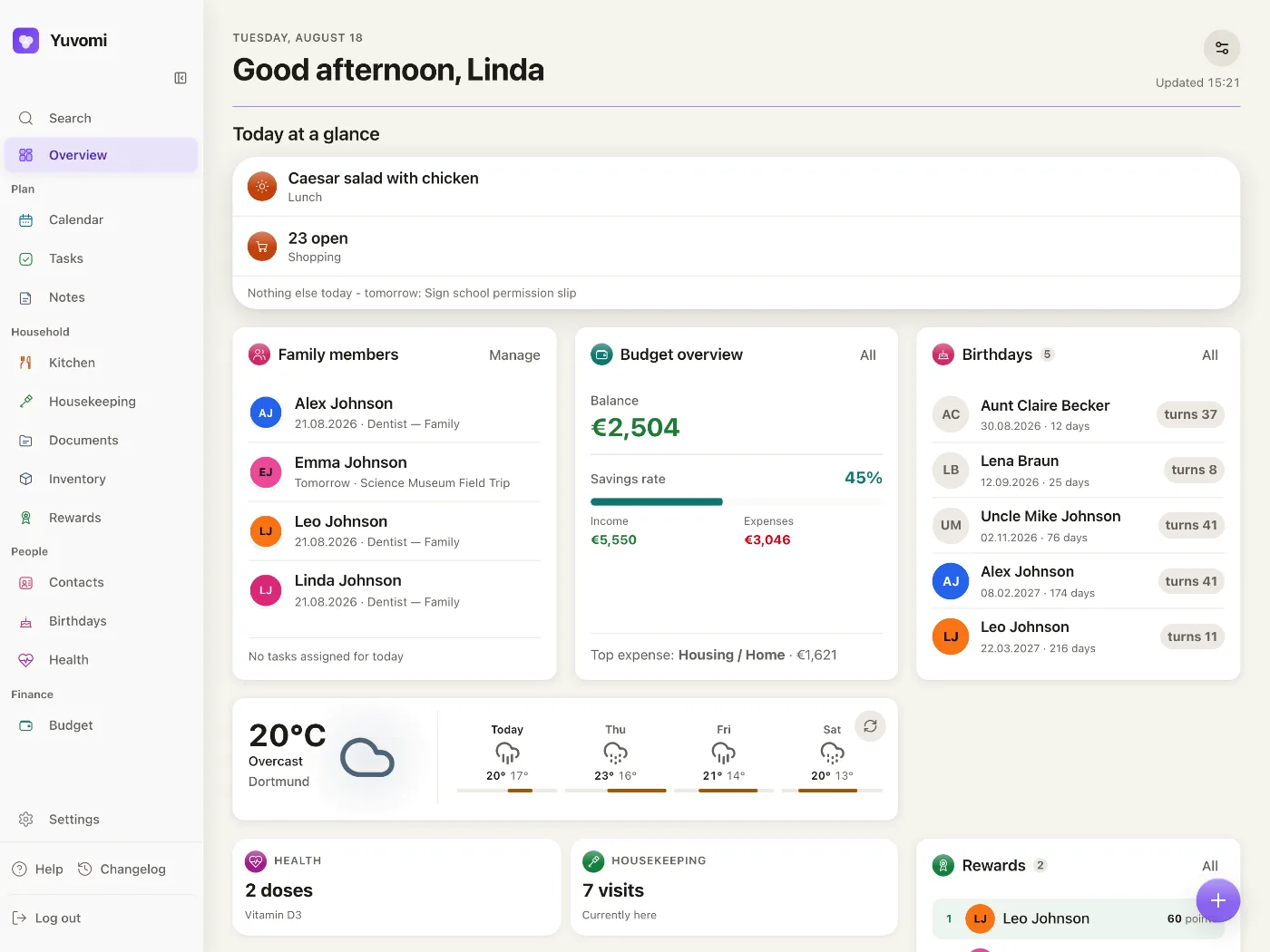
20 modules · 26 languages · 0 trackers · optional AES‑256 database encryption
Most households glue their life together from a dozen paid apps, each with its own account, its own subscription and its own copy of your data on someone else's server. Yuvomi puts all of it in one place that belongs to you, running as a container on any home server or NAS.
Many apps, one place
| Instead of juggling… | Yuvomi gives you |
|---|---|
| a to-do & task app | Tasks - Kanban, deadlines, recurring, multi-assignment |
| a family calendar app | Calendar - sync, subscriptions, per-event visibility |
| a meal planner & recipe app | Meals & Recipes - weekly planner with shopping export |
| a grocery-list app | Shopping - shared, aisle-organized lists |
| a budgeting & cost-splitting app | Budget - income, expenses, accounts, savings goals, shared costs with debt simplification |
| a document manager | Documents - searchable family files in folders |
The modules talk to each other
This is the part a folder full of separate apps cannot do:
- One import turns the week's meal plan into a shopping list. The next seven days come pre-selected, and every ingredient lands on the shared list, sorted by aisle.
- The last jar out of the pantry goes on the list with one tap. After the shop, one button books what you ticked off back into the pantry, with amount and unit.
- A ticked-off chore pays out. Points on a task go to whoever did it - the assignee, or the person picked when it is ticked off - and are spent in a reward catalog you control.
- A filed receipt hangs on the booking. Upload it once and it belongs to the transaction, the shared expense and the inventory item at the same time.
On the kitchen wall, in every pocket
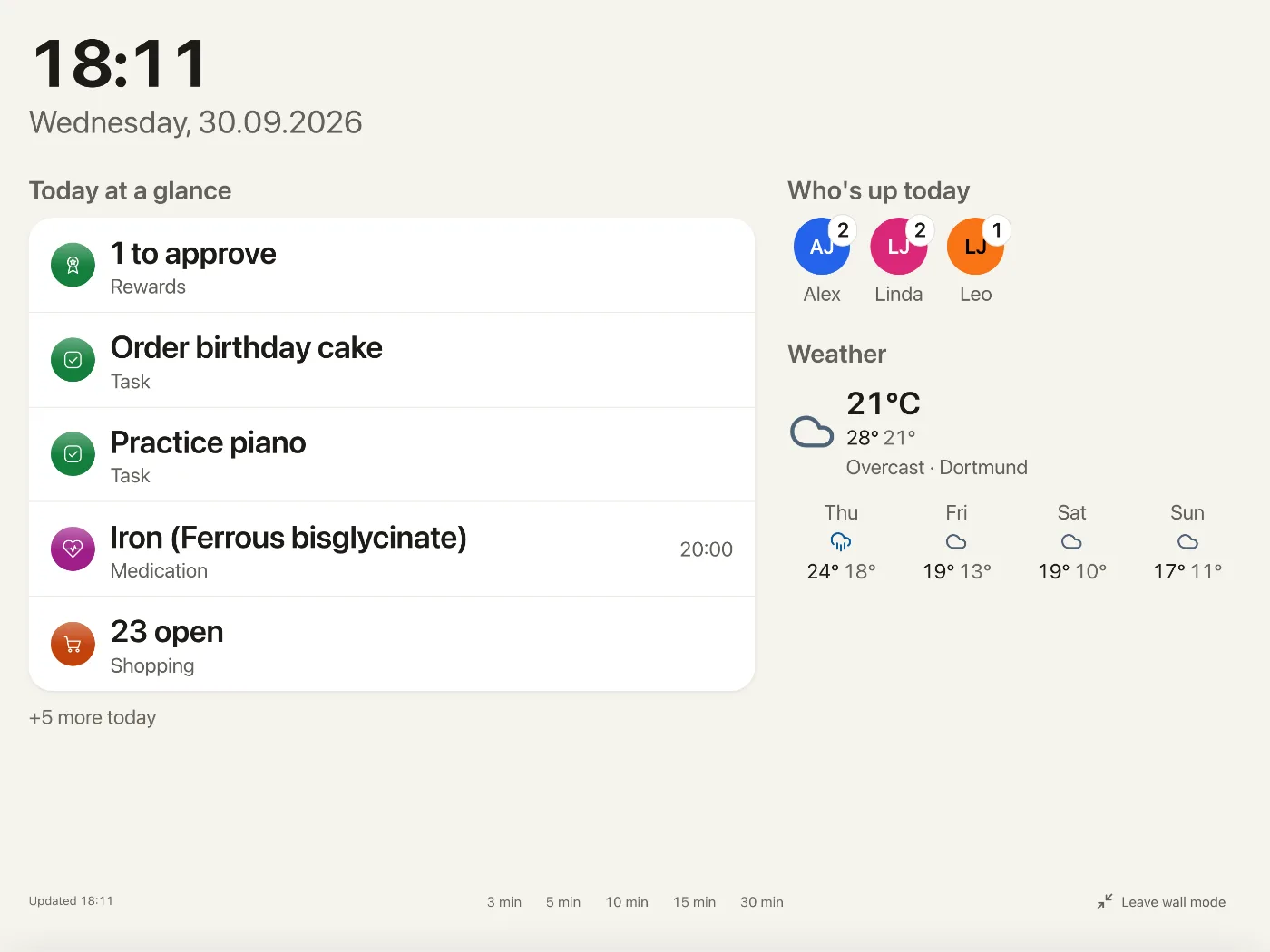
- The tablet on the kitchen wall shows today's plan and who is up in wall mode, readable across the room. It has an account of its own: tap a task, pick who did it, and the points go to them. When it sits idle, an Immich screensaver can show your own photos.
- The app on every phone goes on the home screen straight from the browser, no app store. Reminders arrive as push notifications even while it is closed (your server needs HTTPS for that), and the last shopping list you opened stays readable without signal.
- Every member joins by invite link and picks their own password; a child without a phone gets an account created directly. Per family role, each module is full, read only or not at all.
The twenty modules
Switch off what your household doesn't need, and it disappears from everyone's menu. Inventory, Waste collection and Schedule start switched off.
- Plan - Tasks · Calendar · Schedule · Notes
- Household - Meals · Recipes · Shopping · Pantry · Housekeeping · Waste collection · Documents · Inventory · Rewards
- People - Health · Contacts · Birthdays
- Finance - Budget
- Settings - Family · Reminders · API Tokens · Backup
Every module in one line
| Module | In one line |
|---|---|
| Tasks | Kanban board with deadlines, subtasks, recurring chores, comments and a history of who ticked off what. |
| Shopping | Shared lists sorted by aisle, with swipe gestures and an import from the meal plan. |
| Meals | Weekly drag-and-drop planner with a recipe sidebar and direct export to the shopping list. |
| Recipes | Create and scale recipes, fill meal slots, or mirror a Mealie or Tandoor instance read-only. |
| Pantry | Amounts, storage locations and best-before dates, with a reminder before something expires. |
| Calendar | Two-way Google and CalDAV sync, Outlook push, subscriptions, holidays and per-event visibility. |
| Documents | Searchable family files in folders, stored locally, on WebDAV or in Google Drive. |
| Inventory | What you own, with purchase price, warranty, linked receipts, a service log and recurring deadline reminders. Off by default. |
| Budget | Income, expenses, accounts, loans, subscriptions and shared expenses with debt simplification. |
| Housekeeping | Household staff: schedules, check-in/out, billing, chores and supply requests. |
| Waste collection | Pickup schedules per waste type, even "the last Friday", or a subscribed municipal ICS calendar. Off by default. |
| Rewards | Points from tasks, a parent-approved catalog, an auditable ledger and pocket money per child. |
| Health | Per-member vitals, medications, preventive care, labs, activity, cycle tracking, a fasting journal and a nutrition log, with trend charts. |
| Schedule | Rotating shifts and fixed weekly timetables, shown as an overlay in the calendar. Off by default. |
| Notes & Contacts | Markdown sticky notes with tappable checklists, plus contacts with CardDAV sync and vCard import/export. |
| Birthdays | Birthdays and optional name days, with calendar entries, ages and reminders. |
| Family | Member profiles with roles, and invite links where new members pick their own password. |
| Reminders | For tasks, events, medications, warranties, best-before dates, expiring documents and pickups - in-app, push, Gotify, ntfy, webhook or email. |
| API Tokens | Bearer tokens with an OpenAPI 3.1 spec and a built-in MCP endpoint for AI agents. |
| Backup | Manual and scheduled backups with optional WebDAV upload and pre-restore rollback; a backup from another installation restores right in the browser. |
Every module in full detail is in the spec; building your own drop-in module - with its own dashboard widgets, permissions and translations - is covered in the module guide.
Before you commit
What if this project stops? Nothing changes on your machine. It is MIT-licensed and self-hosted, and there is no server of ours anywhere in the path. The container you already pulled keeps running exactly as it does today, with or without us.
What if you want your data somewhere else? Everything lives in one SQLite file on your own disk, and copying it is the whole export, as long as documents are stored in the database. Scheduled backups write a restorable archive on top of that, and the documented API pulls anything out in whatever shape you need.
How safe is access from outside? Every account can add a second factor (TOTP, with recovery codes), and an admin can require it for the whole household; new members join through an invite link and pick their own password. With single sign-on through an OIDC provider, password login can be switched off for the household, and a lost phone is signed out from any of your other devices.
What does it cost? Nothing. Yuvomi is free and MIT-licensed. You provide the server; there is no subscription, no upsell and no paid tier.
Install
Pick your way in: Docker or Podman for full control, the guided setup wizard in your browser, or your NAS app store without a terminal.
- Image -
ghcr.io/ulsklyc/yuvomi:latest, about 500 MB, for amd64 and arm64 (Raspberry Pi 4/5). - Needs - 256 MB RAM and one port, 3000 by default.
- Encryption key - optional, but there is no way back: a lost or changed key never opens the database again, not by you and not by us. The guided setup and Umbrel generate one for you; with Compose, TrueNAS or Unraid you set it yourself, so write it down.
Requirements, network and your data
- Browsers - everything as designed from Chrome and Edge 117, Firefox 129 and Safari 17.5. Down to Chrome 87, Firefox 79 and Safari 14.1 (iOS 14.5) it still starts and scrolls, with a plainer look and some features missing (measured 21 September 2026).
- Writes - four volumes you own: data, backups, modules, documents.
- Outbound - out of the box, one update check against the GitHub releases API. Block it and nothing breaks, only the hint about a newer version stays away. Everything else reaches out only when you use or switch on a feature that needs it: opening the calendar settings loads the list of holiday countries from openholidaysapi.org, finding a logo for a subscription looks up the service's website, and weather, public holidays, exchange rates, calendar and contact sync, recipe mirrors, Immich, Paperless or Papra, push and notification channels, cloud storage and backup connect once you switch them on.
- Your LAN - calendar subscriptions, notification channels (webhook, Gotify, ntfy), WebDAV document storage, recipe mirrors and waste-collection feeds on private or internal addresses stay blocked until you opt in (how). Paperless and Papra are the exception: they may reach the LAN out of the box.
- Your data - one SQLite file at
/data/yuvomi.db, plus the folder, WebDAV or Drive if you moved documents there.
Docker or Podman
On Podman, fetch podman-compose.yml instead of docker-compose.yml and start it with
podman compose -f podman-compose.yml up -d; it carries the SELinux :Z volume labels that
RHEL, Fedora and CentOS Stream need.
curl -O https://raw.githubusercontent.com/ulsklyc/yuvomi/main/docker-compose.yml
curl -O https://raw.githubusercontent.com/ulsklyc/yuvomi/main/.env.example
cp .env.example .env
openssl rand -hex 32   # SESSION_SECRET
openssl rand -hex 32   # DB_ENCRYPTION_KEY
Now open
.envand replace bothREPLACE_WITH_…placeholders with the two values you just generated, in that order, and write the second one down: it is the database key, and nothing can recover it. With a placeholder left in, Yuvomi refuses to start. To run without encryption, clear theDB_ENCRYPTION_KEYline instead of filling it.
docker compose up -d
Open http://localhost:3000. The first visit walks you through creating your admin account. If the
page does not load, docker compose logs (on Podman, podman compose -f podman-compose.yml logs)
usually names the reason, and the
troubleshooting guide covers the common ones.
On Proxmox, the same steps run inside a small Debian LXC: see the Proxmox guide on yuvomi.cloud.
Guided setup
A setup wizard in your browser, in 26 languages. It detects Docker or Podman, sets up single sign-on and scheduled backups, prepares Yuvomi for an HTTPS reverse proxy (the certificate stays with your proxy), then starts the container and creates your admin account.
git clone https://github.com/ulsklyc/yuvomi.git && cd yuvomi
node tools/installer/install-server.js
Open http://localhost:8090 on the server itself; the wizard answers nowhere else. From another
device, open a tunnel first, ssh -L 8090:localhost:8090 user@server, then open the same address
there. Needs Node.js 22+ on the host; the container ships its own Node 24.
From your NAS app store
TrueNAS SCALE, Umbrel and Unraid all carry Yuvomi: search for it in the app catalog and install, no terminal required. New to containers? The installation guide covers engine setup, HTTPS, backups and troubleshooting step by step.
Before you go live: health data, Google Drive sharing and GDPR
Health is not a medical device. No diagnostic claims are made. Health data is sensitive, so enable database encryption (
DB_ENCRYPTION_KEY, SQLCipher).
External document storage needs its own backup. Database backups hold document metadata and links, not binaries stored in a local folder, on WebDAV, or in Google Drive; back up the selected target separately. Yuvomi visibility settings only control access through Yuvomi. Anyone with access to the connected
Yuvomi/DocumentsGoogle Drive folder can view all files stored there.
Self-hosting in a GDPR context? If you run Yuvomi in the EU/EEA and process other people's data, read privacy for self-hosters before going live. It covers third-country assessments for every external service, data-processing-agreement notes, log-retention guidance and a records-of-processing template.
Coming from Oikos, or seeing oikos in an app store? Same app, renamed.
Yuvomi was renamed from Oikos to avoid a trademark conflict with an unrelated product. Same code, same data, same maintainer.
- Old links (
github.com/ulsklyc/oikos) redirect here automatically. - The Docker image moved to
ghcr.io/ulsklyc/yuvomi; the oldghcr.io/ulsklyc/oikoskeeps working, so update at your convenience. - Existing data and settings are fully preserved on upgrade.
- Some catalog slugs keep the technical name
oikos(e.g. Unraidoikos-…) so existing installations upgrade seamlessly. Search for Yuvomi; an entry still shown as oikos is the same app.
Under the hood
- No build step - pure ES modules and plain CSS. No bundler, no transpiler, no framework, no runtime CDN.
- Apple HIG in the Liquid Glass language - the system font stack and Apple's type scale, capsule controls, inset-grouped lists and spring motion, verified for WCAG AA in light and dark.
- Privacy first - fully self-hosted, optional SQLCipher AES-256 database encryption, zero telemetry.
- Sign-in for a whole household - two-factor authentication, invite links, optional password reset by email and single sign-on with any OIDC provider; see how safe access from outside is.
- 26 languages with automatic detection. A separate household setting decides the language of entries Yuvomi creates itself, so an exported calendar speaks your household's language instead of English.


-F7DF1E?style=flat-square&logo=javascript&logoColor=black)




Documentation
- See it - Tour and screenshots on yuvomi.cloud · Install guide on yuvomi.cloud
- Run it - Installation · Security · Privacy for self-hosters · Notification webhooks · Immich screensaver
- Build on it - Spec & data model · Third-party modules · Contributing
- Follow the project - Changelog · Roadmap · Decisions · Scope · Backlog · Releasing
User guide (community-maintained): @Kyrodan writes a user documentation site in his own repository. It is not part of this project and can lag behind a release, so where it and the sources above disagree, the ones above are right.
One home for your household. Yours to keep.
Install it once. No account with us, no subscription,
and nothing of ours between your household and its data.
→ Install in minutes · Take the tour · Ask a question
MIT licensed, see LICENSE. More at yuvomi.cloud.
Media gallery
1 / 5Related apps
Explore more like this
Explore allDetails
ghcr.io/ulsklyc/yuvomi:latestRuntime arguments
- Web UI
http://[IP]:[PORT:3000]- Network
bridge- Shell
sh- Privileged
- false
Template configuration
Host port for the Yuvomi web interface.
- Target
- 3000
- Default
- 3000
- Value
- 3000
Database and stored app data (uploads, documents).
- Target
- /data
- Default
- /mnt/user/appdata/yuvomi/data
- Value
- /mnt/user/appdata/yuvomi/data
Destination folder for scheduled and manual database backups.
- Target
- /backups
- Default
- /mnt/user/appdata/yuvomi/backups
- Value
- /mnt/user/appdata/yuvomi/backups
Optional: drop-in folder for additional Yuvomi modules. Leave default if unused.
- Target
- /app/modules
- Default
- /mnt/user/appdata/yuvomi/modules
- Value
- /mnt/user/appdata/yuvomi/modules
Optional: host folder for local document storage. Only used when DOCUMENT_STORAGE_LOCAL_ENABLED=true. Leave default if unused.
- Target
- /documents
- Default
- /mnt/user/appdata/yuvomi/documents
- Value
- /mnt/user/appdata/yuvomi/documents
REQUIRED. A long random string used to sign sessions. Generate with: openssl rand -base64 48
RECOMMENDED. Strong key to encrypt the database at rest (SQLCipher). Leave empty for unencrypted SQLite. Cannot be changed later without re-encrypting. Generate with: openssl rand -base64 48
Container timezone, e.g. Europe/Berlin. Affects log timestamps and scheduled backups, and is the default for the household zone (reminders, the calendar day jobs call today, the exported calendar feed, events pushed to Google and Outlook). Since v2.34.0 the household zone can also be set inside the app under Settings, Account, Appearance, Region - that setting wins where both exist.
- Target
- TZ
- Default
- Europe/Berlin
- Value
- Europe/Berlin
Set to true only when serving Yuvomi over HTTPS behind a reverse proxy. Keep false for direct HTTP access on the LAN.
- Default
- false
- Value
- false
Use 1 behind one reverse proxy (Caddy/nginx/Traefik), or 'loopback' for direct (no proxy) access.
- Default
- loopback
- Value
- loopback
Path to the SQLite database inside the container. Keep default unless you know what you are doing. Legacy /data/oikos.db is auto-migrated on boot.
- Default
- /data/yuvomi.db
- Value
- /data/yuvomi.db
Directory inside the container where backup files are written. Must match the Backups path mapping above, otherwise backups fail with a permission error.
- Default
- /backups
- Value
- /backups
Optional. Latitude for the Open-Meteo weather widget (no API key required). Find coordinates on openstreetmap.org or Google Maps, e.g. 52.52.
Optional. Longitude for the Open-Meteo weather widget, e.g. 13.41.
Optional. Display name shown on the weather widget, e.g. Berlin.
Optional. Unit system for temperatures: metric (°C) or imperial (°F).
- Default
- metric
- Value
- metric
Optional (legacy). OpenWeatherMap API key to enable the weather widget. Prefer the keyless Open-Meteo variables above.
Optional (legacy). City for the OpenWeatherMap weather widget, e.g. Berlin.
Optional (legacy). Unit system for temperatures: metric (°C) or imperial (°F).
- Default
- metric
- Value
- metric
Optional (legacy). Fallback language for OpenWeatherMap descriptions when a member's app language is not offered, as an OpenWeatherMap code, e.g. en, de, zh_tw. Unknown codes fall back to English.
- Default
- en
- Value
- en
Optional. Google OAuth 2.0 client ID for Google Calendar sync.
Optional. Google OAuth 2.0 client secret for Google Calendar sync.
Optional. OAuth callback URL, e.g. https://your-domain.com/api/v1/calendar/google/callback
Optional Google Drive OAuth client ID override. Leave both Drive overrides empty to reuse Google Calendar credentials.
Optional Google Drive OAuth client secret override.
Google Drive Documents callback URL, e.g. https://your-domain.com/api/v1/documents/storage/google-drive/callback
Optional. Entra ID application (client) ID for the one-way Outlook calendar push via Microsoft Graph.
Optional. Entra ID client secret for the Outlook calendar push.
Optional. OAuth callback URL, e.g. https://your-domain.com/api/v1/calendar/outlook/callback
Optional. OIDC issuer URL, e.g. https://authentik.example.com/application/o/yuvomi/
Optional. OIDC client ID from your identity provider.
Optional. OIDC client secret from your identity provider.
Optional. OIDC callback URL, e.g. https://your-domain.com/api/v1/auth/oidc/callback
Optional. Set to true to allow account linking when your IdP omits the email_verified claim. Only enable if your IdP fully controls email verification and never issues unverified addresses (e.g. older Authentik without an explicit email_verified mapping).
Optional. Set to false so an SSO sign-in never creates a new account. Sign-in and account linking keep working, so an admin creates the account and the user signs in with SSO. Use this when your identity provider serves more people than this household.
- Default
- true
Optional. Set to false to make SSO the only way in: the login form, password login and password reset are switched off. Takes effect only once all four OIDC values are set AND an administrator is linked to the provider, so a fresh install can still create its first admin. Guests of shared expenses keep their password. Recovery: remove the value and restart.
- Default
- true
Optional. Apple CalDAV server URL (default: iCloud). Change only if using a custom CalDAV server.
- Default
- https://caldav.icloud.com
- Value
- https://caldav.icloud.com
Optional. Apple ID (email) for iCloud Calendar sync.
Optional. Apple app-specific password for iCloud Calendar sync (generate at appleid.apple.com).
Interval in minutes for calendar and contact sync (Google, Apple, CalDAV, CardDAV). Default: 15.
- Default
- 15
- Value
- 15
Maximum size of a single upload in megabytes (documents, calendar attachments, receipts). Default: 5, supported range 1-100. The request body is buffered in memory, so a very large value can take the container down on a small machine.
- Default
- 5
- Value
- 5
Optional. Enable automated database backups (default: true).
- Default
- true
- Value
- true
Optional. Cron schedule for automated backups (default: 2 AM daily).
- Default
- 0 2 * * *
- Value
- 0 2 * * *
Optional. Number of backups to retain (default: 7).
- Default
- 7
- Value
- 7
Optional. Set to true to enable automatic upload of backups to a WebDAV server after each local backup.
Optional. WebDAV server URL, e.g. https://cloud.example.com/remote.php/dav/files/username/
Optional. WebDAV username for authentication.
Optional. WebDAV password for authentication.
Optional. Remote directory path where backup files are stored. Leave empty to use the value from Settings, Household, Backup and restore (default: /yuvomi/backups/); any value here overrides that setting.
Optional. Number of remote backup files to keep. Leave empty to use the value from Settings, Household, Backup and restore (default: 7); any value here overrides that setting.
Optional. Store newly uploaded document files in the mounted /documents host folder instead of the database. Existing files are not migrated.
- Default
- false
- Value
- false
Optional. Container path for local document files. Keep default unless you mounted the documents folder elsewhere.
- Default
- /documents
- Value
- /documents
Optional. Set to true to store newly uploaded document files on WebDAV. Leave empty to decide under Settings, Modules, Documents, Document storage: any value here, false included, overrides that switch and locks it in the UI. Existing files are not migrated.
Optional. WebDAV server URL for document storage, e.g. https://cloud.example.com/remote.php/dav/files/username/
Optional. WebDAV username for document storage.
Optional. WebDAV password for document storage.
Optional. Remote base folder for document files. Leave empty to use the value from Settings, Modules, Documents, Document storage (default: yuvomi-documents); any value here overrides it and locks the field in the UI.
Optional. Set to true to allow WebDAV document storage on local/private network addresses (e.g. Nextcloud in the same Docker network). Only enable in controlled environments.
- Default
- false
- Value
- false
Optional. Set to true to allow ICS calendar subscriptions on http:// and local/private network addresses (e.g. a Sonarr/Radarr/Home Assistant feed in the same LAN). Lifts SSRF protection for ICS subscriptions. Only enable in controlled environments.
- Default
- false
- Value
- false
Optional. Set to true to allow recipe provider (Mealie/Tandoor) mirrors on local/private network addresses, including a base URL that is itself a private IP (e.g. self-hosted in the same Docker network). Lifts SSRF protection for recipe provider sync. Only enable in controlled environments.
- Default
- false
- Value
- false
Optional. Set to true to allow waste collection URL sources on http:// and local/private network addresses (e.g. a municipal waste calendar mirrored in the same Docker network). Lifts SSRF protection for waste collection URL sources. Only enable in controlled environments.
- Default
- false
- Value
- false
Optional. Set to true to allow notification channels (Webhook, Gotify, ntfy) on local/private network addresses (e.g. a Gotify container in the same Docker network or a Home Assistant webhook in the LAN). Lifts SSRF protection for notification delivery. Only enable in controlled environments.
- Default
- false
- Value
- false
Optional. Controls whether the document management connection (Paperless-ngx, Papra) may reach local/private network addresses. Defaults to TRUE, unlike the other private-network switches, because a DMS is normally self-hosted on the same LAN or Docker network. Set to false to enforce the same SSRF protection the other integrations have.
- Default
- true
- Value
- true
Optional. SMTP server hostname for outgoing email (password-reset links).
Optional. SMTP server port. Leave empty to set it under Settings, Household, Email (the server then uses 587, or 465 with ssl); any value here locks that field in the UI.
Optional. SMTP connection security: ssl, starttls, or none. Leave empty to set it under Settings, Household, Email (the server then uses starttls); any value here locks that field in the UI.
Optional. SMTP authentication username.
Optional. SMTP authentication password.
Optional. Sender email address for outgoing mail, e.g. yuvomi@example.com.
Optional. Sender display name for outgoing mail. Leave empty to set it under Settings, Household, Email (the server then uses Yuvomi); any value here locks that field in the UI.
Optional but required for password-reset emails to be sent. Absolute origin used to build reset links, e.g. https://yuvomi.example.com. The request Host header is never trusted as a fallback, to prevent reset-link poisoning.
Optional. Contact URI sent to push services, either a mailto: address or an https: origin, e.g. mailto:admin@example.com. Must be reachable from the internet: Apple rejects a localhost or .local subject with 403 BadJwtToken, which disables push on iPhone/iPad while Android keeps working. Falls back to the SMTP sender address, then BASE_URL, then a placeholder.
Optional. VAPID public key. Auto-generated on first use and stored in the database when left empty. Set together with the private key to keep existing device subscriptions valid across a redeployment. Generate with: npx web-push generate-vapid-keys
Optional. VAPID private key. Must be set together with the public key.
Optional. Fixer API key for live currency conversion in Budget → Subscriptions. Rates are cached for 12 hours; works without this key using the cached/manual rate.