
All apps · 0 apps
YT-Zero
Docker app from Pelski's Repository
Overview
Readme
View on GitHub
YT Zero
A self-hosted YouTube inbox for people who want subscriptions, not recommendations.






[!IMPORTANT] After a lot of thought, I’ve decided to step away from maintaining YT Zero.
The main reason is uncertainty around the legal side of how some of the underlying software and integrations are being used. I don’t want to continue developing and publicly distributing the project while I’m not fully comfortable with that uncertainty.
The current release will therefore be the second-to-last public release maintained by me. I plan to make 2026.09.10 the final one. For that release, I’ll try to address as many existing issues and fixes as reasonably possible, so the project is left in a solid and usable state rather than abandoned mid-way through ongoing work. I’ll also try to bring the tvOS app to a usable state, so that whoever takes over the project has a working foundation to continue from instead of having to start that part from scratch.
That said, I don’t want YT Zero to disappear. If someone from the community would like to take responsibility for the project and continue its development, you have my full blessing to do so. I'm glad that the project will live on under a new maintainer.
There is also a chance that I may revisit the idea in the future using only clearly supported and official paths, such as RSS and the official YouTube API. At the moment, however, I have no plans to do so. That would also mean changing some of the original assumptions behind YT Zero, and it would no longer be quite the same project I originally wanted to build.
If that ever changes or you want to know what else I'll be releasing in the future, you can follow me here on GitHub/pelski or X.com/@m_pelski.
Thank you to everyone who contributed code, testing, translations, research, bug reports, ideas, discussions, and feedback. The project became much better than anything I could have built alone. Thank you and I am incredibly grateful to each and every one of you ❤️
Special thanks to:
- @Taruvi
- @baldemar-wuda
- @xtrandom
- @famousbart
- @DennaGherlyn
- @techtareffic-cloud
- @shinji257
- @Zan1456
- @cerede2000
- @Green-Kite
- An anonymous person I corresponded with over email, with whom I had many interesting conversations not only about the project
Your work, testing, ideas and time genuinely shaped YT Zero. And thank you to everyone who used it, opened an issue, submitted a contribution, recommended it to someone else, or simply followed the project.
It has been a genuinely interesting project to build, and I’m glad it found a community around it.
Take care of it, and thanks for watching.
Fix embedded player and get more!
Companion extensions are already available for Firefox and Chrome/Chromium: YT Zero Enhance upgrades playback with reliable controls, shortcuts, chapters, SponsorBlock, picture-in-picture and more. See the browser extension guide to get started.
It reads public YouTube RSS feeds, stores everything in your own SQLite or PostgreSQL database, and gives you a calm place to sort, schedule, watch, archive, and revisit videos from creators you already follow. With the optional yt-dlp integration it can even download those videos and play them from disk, in its own player.
PostgreSQL deployments can run multiple HTTP replicas with one nominated background worker. See the clustered deployment configuration for worker, shared-storage, and load-balancer requirements. SQLite deployments remain single-instance.
If the problem is "YouTube is good at surfacing more, not better," YT Zero is the opposite: a quiet inbox, your own rules, and a player built around intentional watching.
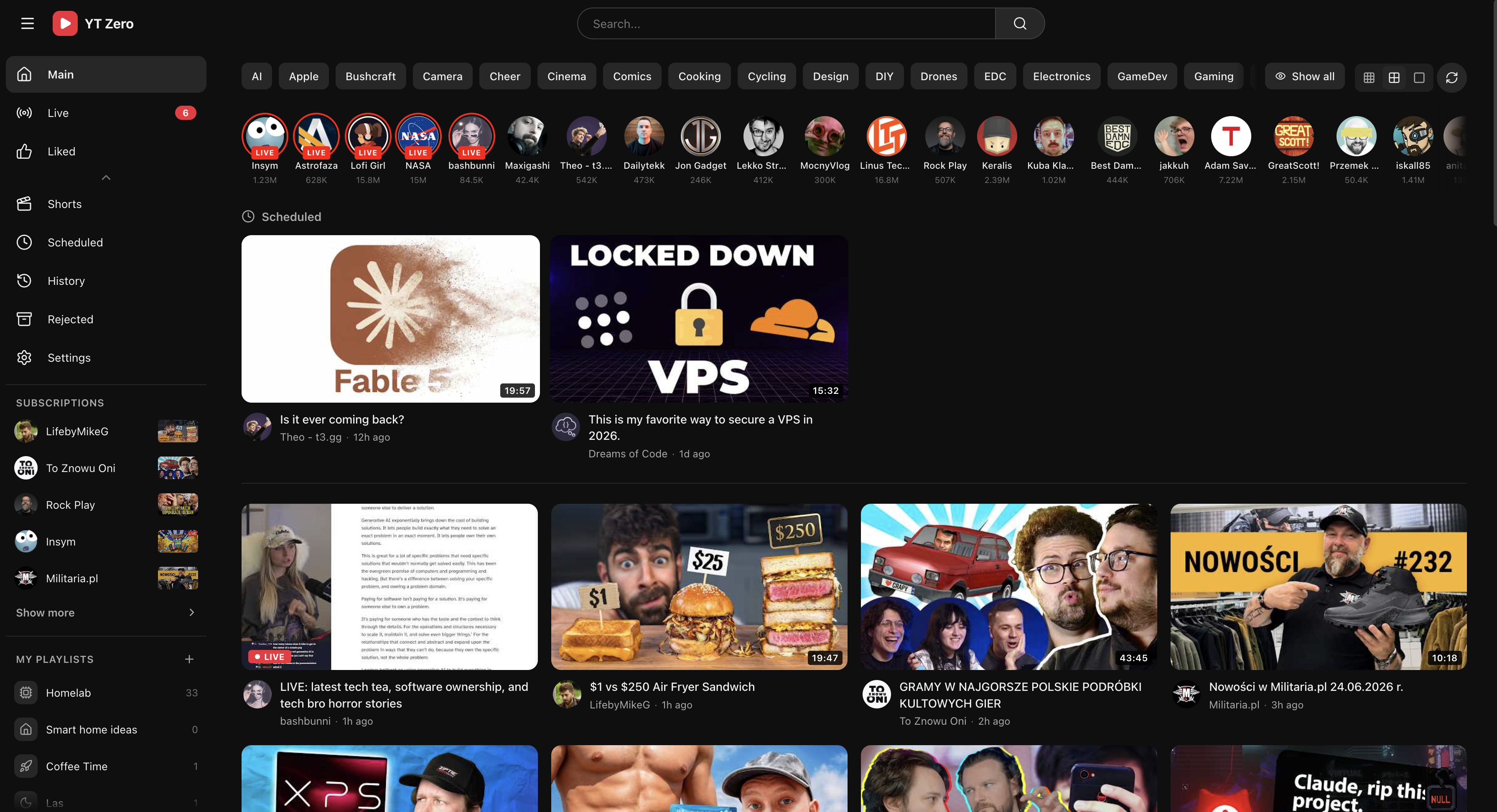
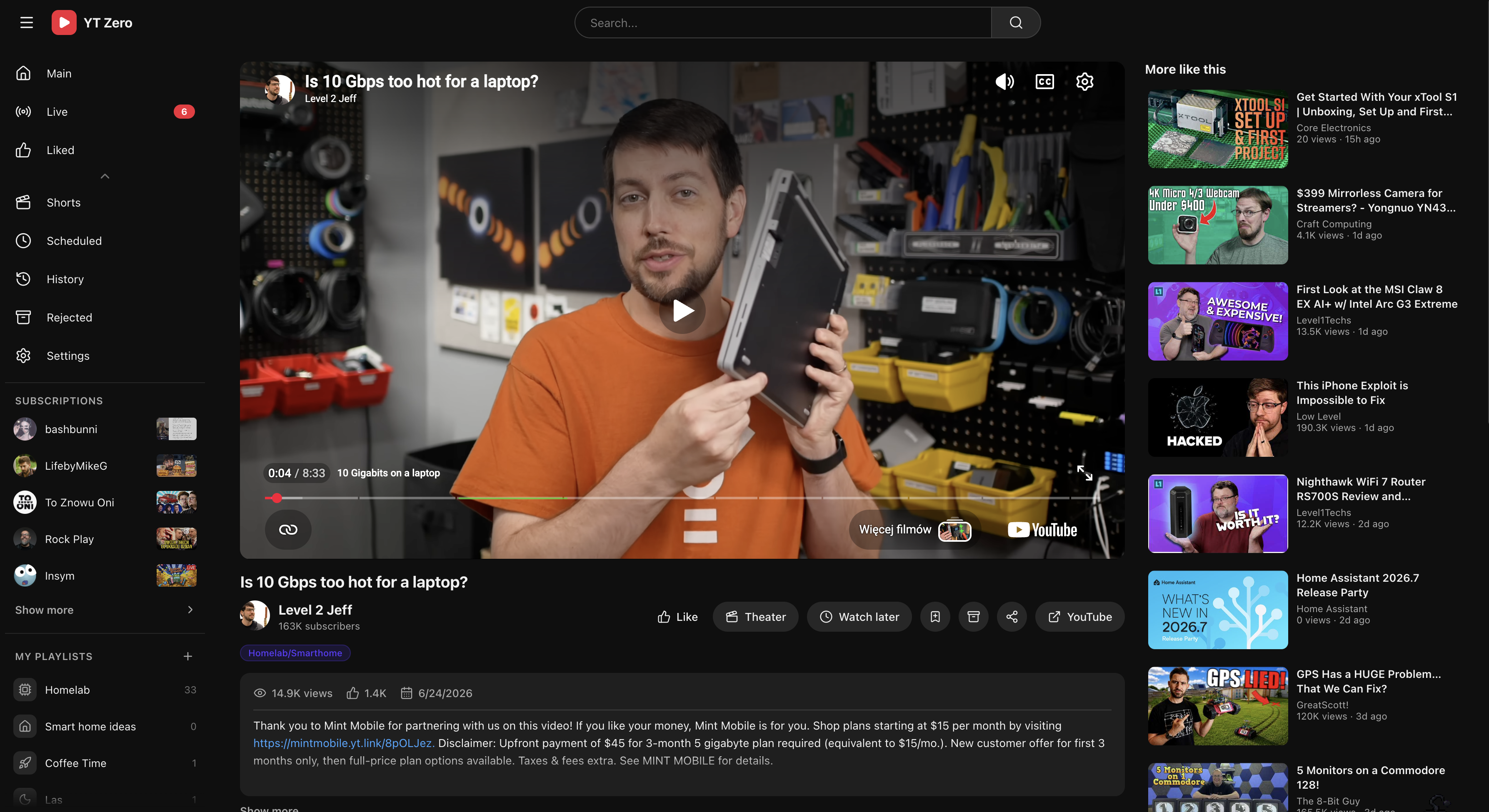
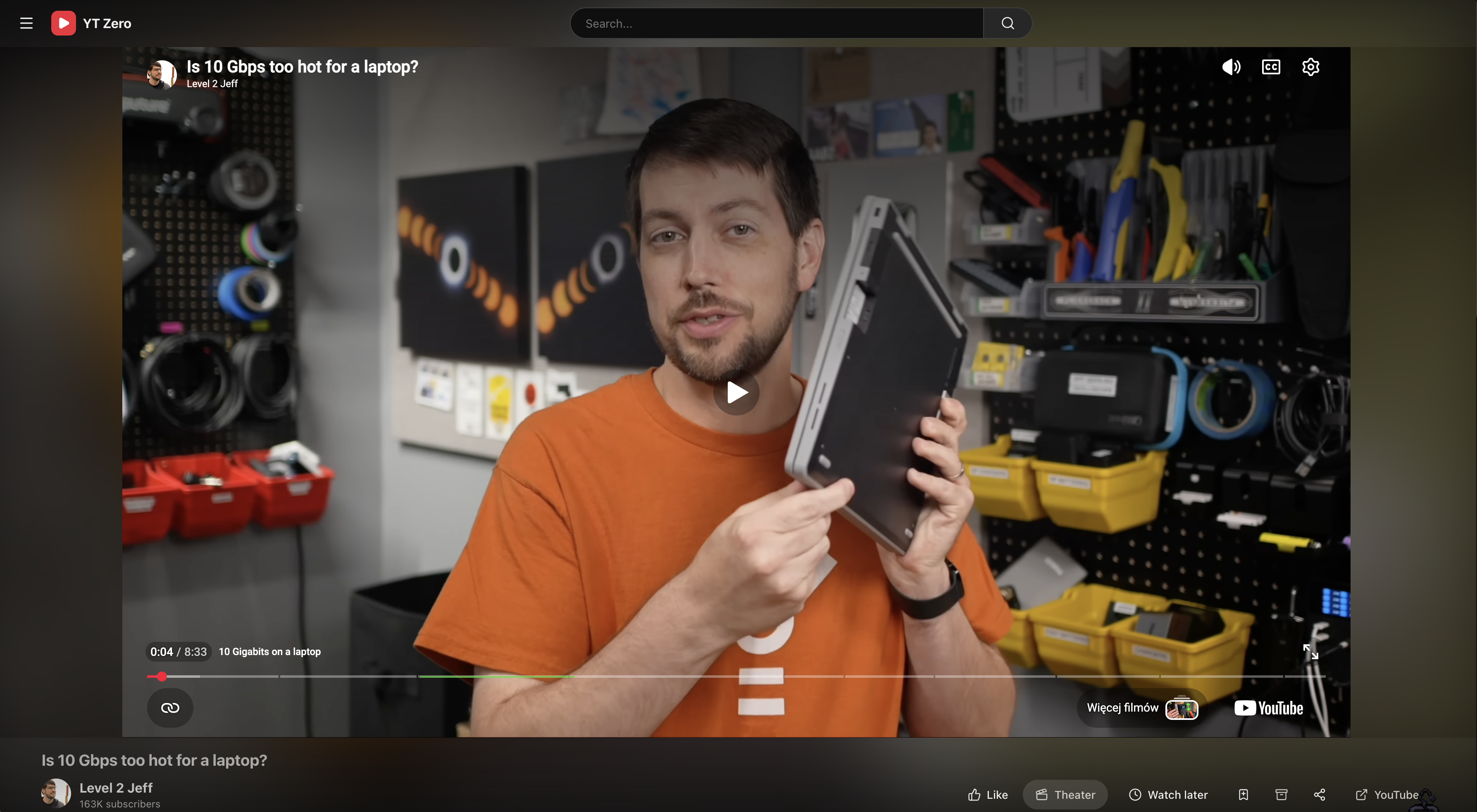
| Standard player | Theater player |
|---|---|
 |
 |
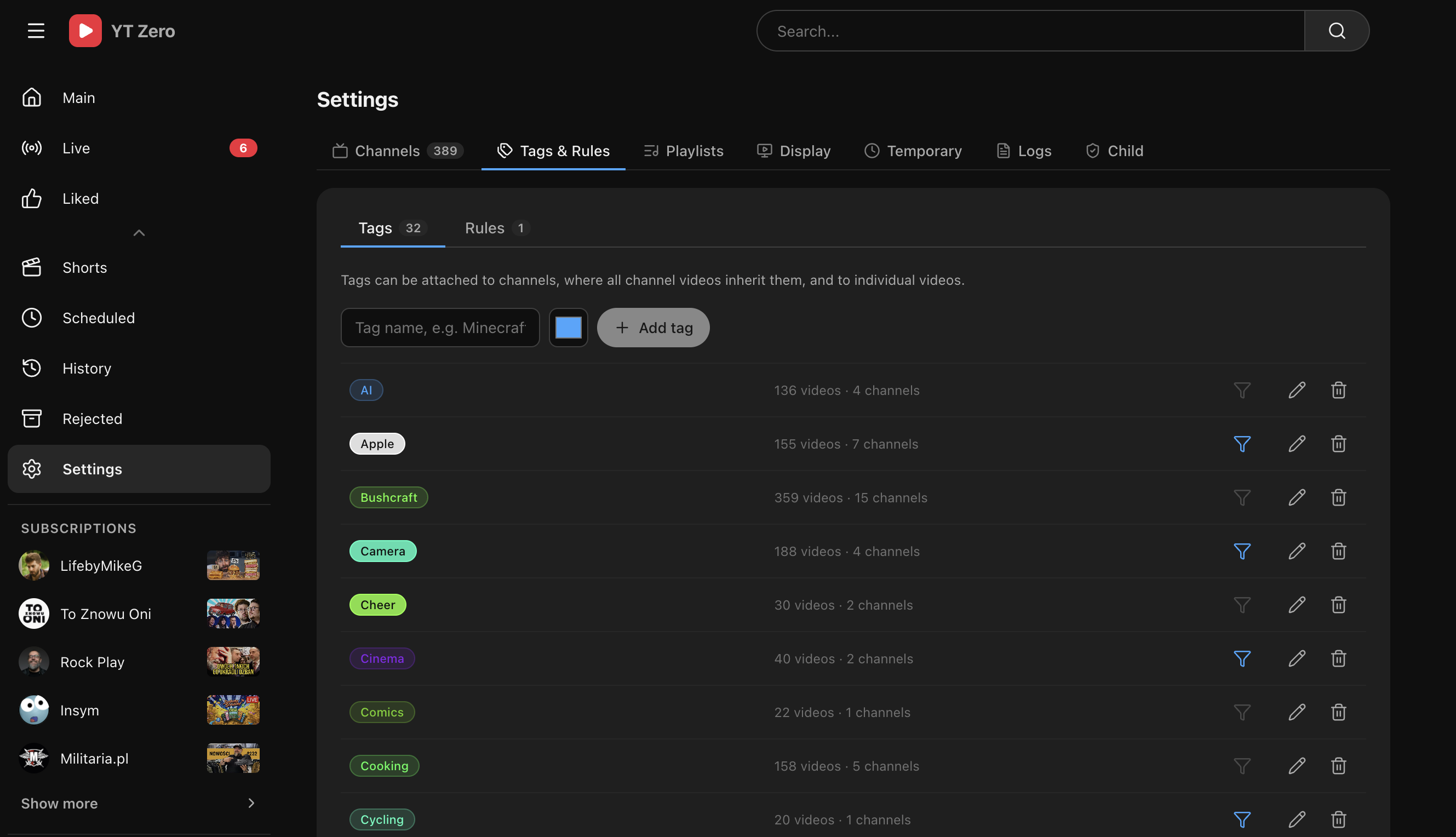
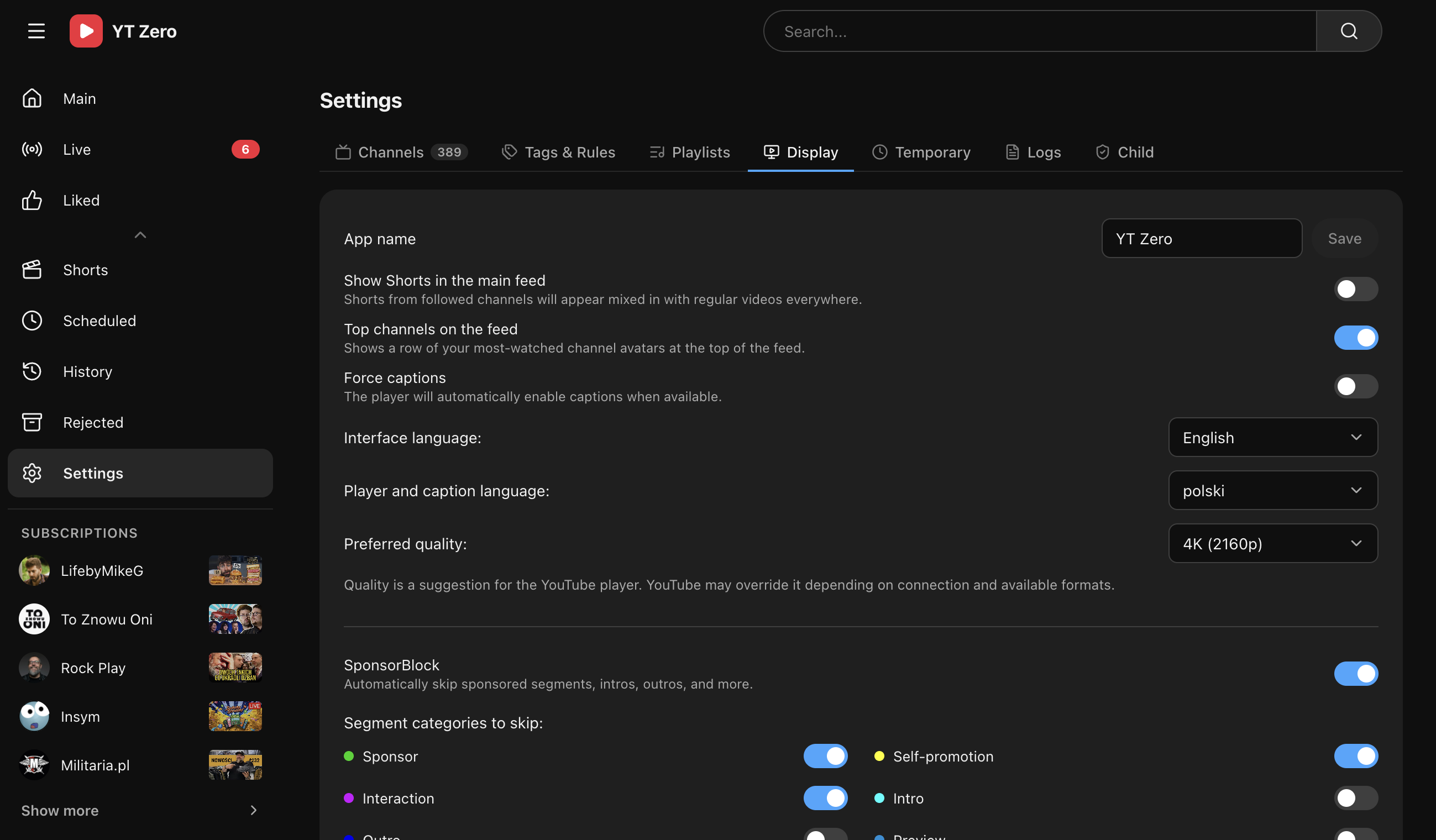
| Tags and rules | Display settings |
|---|---|
 |
 |
Why it exists
YouTube is excellent at keeping attention and bad at staying out of the way. If all you want is:
- your subscriptions in one place
- a clean watch queue
- no forced sign-in
- no API setup
- no recommendation loop
then the default YouTube experience keeps adding noise around the thing you actually came for.
YT Zero removes that layer. It keeps subscriptions, watch progress, playlists, tags, and playback controls. It drops the account dependency and the recommendation machinery.
What makes it useful
- Focused inbox — all new videos from followed channels in one chronological feed.
- No Google dependency — works without a Google account or YouTube Data API key.
- Local-first state — subscriptions, progress, history, playlists, tags, and rules are stored in your own SQLite or PostgreSQL database.
- Built for triage — schedule videos for later, archive the ones you will not watch, and come back on your terms.
- Organized watching — use tags, inherited channel tags, rules, and local playlists to shape your own feed.
- Real playback controls — theater view, captions, quality, display settings, and optional SponsorBlock support.
- Audio-only background playback — switch a video or active livestream to a compact audio player that can keep playing from the lock screen on supported mobile browsers.
- Direct video streaming — play YouTube video and audio on demand in the built-in player, with seeking and no offline file or background download. Supports available H.264/AAC formats within your selected quality limit.
- Downloads & local playback — the optional yt-dlp plugin fetches videos to disk and plays them in YT Zero's own player: instant seeking, no embeds, no buffering, works offline.
- TubeArchivist source — connect an existing TubeArchivist archive and let its videos appear directly in the normal feed, with protected local playback, archived comments and subtitles, and watched-status synchronization.
- Works for households — profiles, authentication modes, child profiles with watch-time limits, and child lock make one install usable by more than one person.
- Pulse — understand actual viewing time by profile, channel, tag, hour, weekday, and content type without sending analytics outside your server.
Features
- Subscription inbox — all new videos from followed channels in one feed.
- Channel import — add channels manually, import OPML, NewPipe subscription JSON, or
subscriptions.csvfrom Google Takeout. - Live and upcoming streams — dedicated live view with automatic status refresh, plus a per-profile option to keep live and Upcoming entries out of the main feed.
- Watch later buckets — schedule videos for Today, Tonight, Tomorrow, Tomorrow evening, or Weekend.
- Archive flow — reject videos, restore them later, and keep the main feed clean.
- History and progress — record watched videos and resume partially watched ones.
- Incognito mode — stop history, progress, and viewing-insight writes for the current browser tab.
- Tags & rules — tag videos and channels, inherit channel tags to videos, and automate sorting with rules.
- User playlists — local playlists with icons, manual additions, and rules.
- Profiles — multiple isolated profiles on one install, each with its own state.
- Pulse — an optional, default-hidden sidebar view with combined and per-profile viewing patterns, favorite channels and tags, activity hours, content mix, and time saved by SponsorBlock.
- Authentication — none, shared login, per-profile login, OIDC, or proxy headers, with password and passkey support. Per-profile logins derive from profile names; an administrator can generate or reset a one-time temporary password for one profile at a time, and each profile can replace it after signing in.
- Public sharing — optional, default-off bearer links for individual videos, personal playlists, and followed YouTube playlists, with per-link local-media access and a separate read-only
/share/*surface. Public links bypass normal sign-in; read the security and proxy guide before enabling or exposing them. - Child lock — PIN-protect household settings while leaving each profile's own tags and playlists editable.
- Child profiles — daily watch-time limits, parent-approved extensions, subscribed-content-only mode, optional Shorts/live blocking, downloaded-videos-only mode, reduced settings access, and a parent activity panel with immediate stop/unlock controls.
- Downloads (yt-dlp) — an optional plugin for scheduled, manual, playlist-wide, and rule-based downloads. It plays local files in a built-in player, supports metadata and subtitle sidecars, shows live progress, and cleans up with retention rules and a storage cap.
- TubeArchivist Integration — an optional, default-disabled plugin that treats TubeArchivist as a headless source for the existing feed rather than adding a separate library page. Catalog items are deduplicated by YouTube ID and protected media is streamed through YT Zero without exposing the TubeArchivist token.
- Shorts tab & player — a followed-channels-only vertical Shorts feed with format-native cards and a full-screen swipe player.
- SponsorBlock — optionally skip sponsored segments, intros, outros, and more.
- DeArrow — optionally replace clickbait titles and thumbnails with community-created alternatives from the DeArrow project. Hover or focus a video card to reveal the control that switches between the DeArrow and original versions; library metadata stays intact.
- Comments and list continuation — optionally load comments on demand and continue through whichever list opened the player, automatically or after confirmation.
- Playback and display controls — theater view, captions, quality, display customization, and optional auto-fullscreen when a phone rotates to landscape.
- Audio mode — switch regular videos and active livestreams to an audio-only player with Media Session controls, background playback, seeking, volume control, and per-profile browser persistence. It uses yt-dlp directly and does not require downloads to be enabled.
- Internationalization — complete UI catalogues for English (
en), Polish (pl), German (de), French (fr), Spanish (es), Brazilian Portuguese (pt-BR), Russian (ru), Japanese (ja), and Hungarian (hu). Language is selected per profile. See the localization guide for native names, locale behavior, and contribution notes.
See the full list with screens in the Features wiki page.
Downloads & offline playback (yt-dlp)
The YT-DLP Integration plugin (disabled by default) uses yt-dlp to keep local copies of the videos you actually plan to watch — and plays them in YT Zero's own player instead of the YouTube embed:
- Automatic downloads — videos you schedule for later are fetched ahead of time; optionally every fresh upload from followed channels.
- Watch your way — when a video isn't downloaded yet, choose: play from YouTube now, or wait for a priority download and watch locally. Either can be the default.
- A real player — instant seeking, chapter and SponsorBlock markers on the seek bar, keyboard shortcuts, picture-in-picture, Media Session — with the same progress tracking as the embedded player.
- Smart retention — keep files for N days or retain them in a profile until manually deleted; optionally drop watched files, protect liked and pinned videos, and cap total shared disk usage. The storage cap can still evict unprotected downloads retained by a profile.
- Household-aware — one download serves every profile, and child profiles can be limited to downloaded videos only.
The Docker image and native installer bundle yt-dlp, ffmpeg, and Deno. Deno is
the JavaScript runtime yt-dlp uses to solve YouTube's extraction challenges;
manual installations must provide Deno 2.3 or newer on PATH. YT Zero checks
available Deno executables in PATH order and passes a supported executable
directly to yt-dlp, so an older installation cannot shadow a working one.
Administrators
can update yt-dlp from the UI and choose stable or nightly releases plus an
automatic-update interval. Details and the full settings reference:
YT-DLP Integration.
Audio mode
Use the audio/video control on the watch page to replace the video player with a compact audio-only player. On supported mobile browsers, including iOS Safari, playback can continue while YT Zero is in the background or the screen is locked. Media Session integration provides system play/pause and seeking controls where the browser supports them.
Audio mode supports regular public videos and active public livestreams. It requires yt-dlp to be available on the YT Zero server, but the downloads plugin does not need to be enabled and no media file is kept on disk. The choice is remembered in that browser for the active profile, so continuous playback can remain in audio mode across videos. Upcoming, private, members-only, unavailable, child-profile, and Watch Together playback is excluded.
Implementation details, browser behavior, privacy, limitations, and troubleshooting are covered in Audio mode.
TubeArchivist Integration
The optional TubeArchivist Integration plugin is disabled by default. It connects an existing TubeArchivist instance to YT Zero as a source behind the normal feed—there is no separate TubeArchivist page:
- archived videos enter the existing feed, search, channel pages, playlists, history, and recommendations;
- duplicate YouTube IDs remain one video, while the local archive becomes an additional playback source;
- YT Zero proxies TubeArchivist media with authenticated HTTP Range requests, so the browser can seek without receiving the API token;
- archived comments, thumbnails, and subtitles use the existing watch-page and local-player UI;
- cards identify media already available in TubeArchivist, and watched or unwatched changes synchronize in both directions through a durable queue.
Configure it under Settings → Plugins → TubeArchivist with the server URL and API token. The YT Zero server/container must be able to reach that address; the browser does not need direct TubeArchivist access. Full setup, data flow, security, backup behavior, troubleshooting, and limitations: TubeArchivist Integration.
How it works
YT Zero does not scrape your account or sync with YouTube through a private API. It watches public channel feeds, fetches the metadata needed to build your local library, and serves that library back as a quieter interface. With the yt-dlp plugin enabled, it additionally downloads the video files themselves — everything else stays the same.
That means:
- easy self-hosting
- no API quota headaches
- local ownership of your app state
- a product that stays narrow on purpose
Quick start
YT Zero can run as a regular Docker container, an Unraid Community App, a native systemd service, in its own Proxmox LXC, or on a cloud platform.
One-click cloud deploy





Render provisions a persistent /data disk. DigitalOcean provisions PostgreSQL
for application state, but App Platform has no persistent filesystem, so
downloads, avatars, logs, and caches are ephemeral there. Heroku has the same
file limitation and provisions PostgreSQL. Koyeb requires a volume mounted at
/data to be added manually after the initial deployment.
See Cloud Deployment
before choosing a provider.
One-click deployments force the shared-password login. Set the required
YTZERO_AUTH_PASSWORD secret in the provider's environment-variable form; an
unset or empty value keeps the deployment locked and emits an error in its logs.
| Method | Best for | How it runs |
|---|---|---|
| Docker Compose | Most servers and NAS systems | Published multi-architecture GHCR image |
| Unraid | Unraid users who prefer DockerMan / Community Apps | The same GHCR image with persistent appdata |
| Proxmox VE | Homelabs managed from a PVE host | Unprivileged Debian LXC, without Docker inside |
| Debian / Ubuntu | LXC, VM or bare-metal Linux | Native Bun application managed by systemd |
| Cloud | Render, Railway, DigitalOcean, Koyeb, Heroku, Fly.io, Zeabur, Kubernetes and Docker PaaS | One-click templates or repository manifests |
Docker
Run with the published GHCR image:
services:
  ytzero:
    image: ghcr.io/pelski/ytzero:latest
    container_name: ytzero
    ports:
      - "3001:3001"
    volumes:
      - ./data:/data
    restart: unless-stopped
docker compose up -d
Unraid
YT Zero is available in Community Applications:
YT-Zero on Unraid Community Apps.
Open Apps, search for YT-Zero, install, review the
/mnt/user/appdata/ytzero data path and port 3001, then apply it.
Alternatively, load the bundled template manually from an Unraid terminal:
curl -fsSL https://raw.githubusercontent.com/Pelski/ytzero/main/templates/ytzero.xml \
  -o /boot/config/plugins/dockerMan/templates-user/my-ytzero.xml
then reload Docker → Add Container and select the ytzero template.
Proxmox VE
On the Proxmox host — creates an unprivileged Debian LXC and installs YT Zero natively inside it:
bash -c "$(curl -fsSL https://raw.githubusercontent.com/Pelski/ytzero/main/scripts/proxmox-lxc.sh)"
Debian / Ubuntu (LXC, VM, bare metal)
As root — installs Bun, ffmpeg and yt-dlp, and runs YT Zero as a systemd service. Re-run it to update:
bash -c "$(curl -fsSL https://raw.githubusercontent.com/Pelski/ytzero/main/scripts/install.sh)"
Open http://localhost:3001. The app starts empty — add channels from Settings → Channels.
Full instructions (Proxmox and installer options, Unraid, local development, production-like start) are in Installation.
The native and Proxmox commands require a release that includes the packaged
ytzero-YYYY.MM.N.tar.gz asset (for example,
ytzero-2026.08.1.tar.gz). Older tags without that asset are Docker/local
only.
Documentation
Full documentation lives in the Wiki:
- Installation — Docker, Unraid, Proxmox, native Linux, and local development.
- Cloud Deployment — one-click buttons and guides for hosted platforms.
- Configuration — environment variables.
- Features — everything the app does, with screens.
- Settings — current navigation, sections, and administrator-only access.
- Importing Subscriptions — OPML and Google Takeout.
- Profiles — multi-account profiles.
- Authentication — login methods and setup.
- Child Lock — PIN-protecting settings.
- Browser Extensions — recommended companion extension and redirect helpers.
- YT-DLP Integration — downloads, offline playback, and retention.
- Audio mode — background audio playback for regular videos and active livestreams.
- TubeArchivist Integration — use an existing archive in the normal feed and local player.
- Backup & Updates — keeping your data safe.
- How It Works — what is fetched and stored.
- Privacy & License — external requests, optional integrations, and licensing.
- Development — tech stack and repository layout.
Browser extensions
For the best browser experience, use YT Zero Enhance, the recommended companion extension for YT Zero. It connects to your self-hosted instance, redirects supported links, enhances the embedded player with YT Zero-style controls and profile settings, and adds reliable keyboard shortcuts, chapters, SponsorBlock segments, picture-in-picture, fullscreen, theatre mode, and frame capture. It supports Chromium-based browsers, Firefox, and Safari; see its repository for current installation options.
If you only want automatic redirects, YTZero Redirect is a lightweight Firefox and Chrome extension by @pekempy. Set your YT Zero address once, then YouTube video, Shorts, playlist, channel, and handle URLs automatically open on your self-hosted YT Zero instance — with no telemetry or data collection.
Tech stack
| Layer | Stack |
|---|---|
| Backend | Bun, Hono |
| Frontend | React, Vite, TypeScript |
| Storage | SQLite by default, PostgreSQL optional |
| Downloads | yt-dlp + Deno + ffmpeg (optional plugin, bundled in Docker/native installs) |
| Archive integration | TubeArchivist API and protected media proxy (optional plugin) |
| Runtime | Docker/Unraid, a Proxmox LXC or Debian/Ubuntu host via systemd, or local Bun |
Privacy & license
YT Zero does not require a Google account or a YouTube Data API key, and stores app data in your own SQLite or PostgreSQL database. It still connects to YouTube to fetch RSS feeds, metadata, thumbnails, pages, and embedded videos. With the YT-DLP Integration plugin enabled it also downloads video files from YouTube via yt-dlp; those files are stored locally and removed by the plugin's retention rules.
With the optional TubeArchivist plugin enabled, the YT Zero server connects to the administrator-configured TubeArchivist origin to synchronize metadata, load archive comments, proxy thumbnails/subtitles/media, and optionally send watched completion. The API token remains server-side and is excluded from portable backups.
The optional DeArrow integration fetches community-created replacement titles and thumbnails from DeArrow/SponsorBlock services. It is disabled by default, never overwrites metadata stored in the local library, and can be enabled separately for titles and thumbnails. Replacement-title lookups send the first four characters of the video's SHA-256 hash; thumbnail requests include the YouTube video ID. Branding lookup results are cached in memory for 15 minutes, and failures fall back to the original title and thumbnail. DeArrow/SponsorBlock data is provided under CC BY-NC-SA 4.0.
YouTube is a trademark of Google LLC. This project is not affiliated with, endorsed by, or associated with YouTube or Google LLC.
Licensed under the GNU Affero General Public License v3.0 only (AGPL-3.0-only). See LICENSE. More in Privacy & License.
Mentions
- XDA Developers — This self-hosted YouTube frontend strips out recommendations and gives you back your feed (July 2026)
Thanks
YT Zero is better because of the people who contribute translations, testing, research, ideas, and code. Special thanks to:
| Contributor | Contributions |
|---|---|
 @Green-Kite @Green-Kite |
German language support and wiki updates. |
 @Zan1456 @Zan1456 |
Hungarian language support. |
 @cerede2000 @cerede2000 |
French translation and major contributions to audio mode through implementation, research, detailed issue reports, and continued testing. |
 @baldemar-wuda @baldemar-wuda |
Extensive testing, thoughtful suggestions, and bug reports. |
 @Taruvi @Taruvi |
Issue support, hands-on testing, and feature ideas. |
Development note
AI-assisted coding tools have been used selectively to support development tasks such as code exploration, prototyping, and review. Project direction, architectural decisions, validation, and responsibility for the final code remain with the maintainers.
Media gallery
1 / 3Requirements
Categories
Related apps
Explore more like this
Explore allDetails
ghcr.io/pelski/ytzero:latestRuntime arguments
- Web UI
http://[IP]:[PORT:3001]/- Network
bridge- Shell
bash- Privileged
- false
Template configuration
Port exposed for the YT Zero web interface.
- Target
- 3001
- Default
- 3001
Database, image cache, avatars, logs and downloaded videos. Back up this directory.
- Target
- /data
- Default
- /mnt/user/appdata/ytzero
How often to poll channel RSS feeds for new videos.
- Target
- REFRESH_INTERVAL_MINUTES
- Default
- 5
Hard per-channel cooldown for automatic feed polling.
- Target
- ADAPTIVE_REFRESH_MIN_MINUTES
- Default
- 10
Longest automatic interval before an infrequent channel becomes due.
- Target
- ADAPTIVE_REFRESH_MAX_MINUTES
- Default
- 720
Polling interval until a channel has enough upload history.
- Target
- ADAPTIVE_REFRESH_UNKNOWN_MINUTES
- Default
- 120
Delay between Community Post scheduler passes; one eligible channel is synchronized per pass.
- Target
- POSTS_SYNC_INTERVAL_MINUTES
- Default
- 10
How long a channel's persisted Community Posts remain fresh before another background fetch.
- Target
- POSTS_SYNC_MAX_AGE_MINUTES
- Default
- 360
Maximum video age considered by automatic Shorts and duration metadata backfills.
- Target
- VIDEO_MAINTENANCE_MAX_AGE_DAYS
- Default
- 90
HTTP idle timeout. Manual synchronization can take longer than Bun's default.
- Target
- IDLE_TIMEOUT_SECONDS
- Default
- 120
Initial automatic-update default for the bundled yt-dlp binary (1 means daily). Administrators can later change the schedule and release channel in the UI.
- Target
- YTDLP_AUTO_UPDATE
- Default
- 1
External URL, for example https://ytzero.example.com. Needed for OIDC and passkeys behind a reverse proxy.
- Target
- APP_URL