

WooSarr
OfficialDocker app from WooSarr's Repository
Overview
Readme
View on GitHub
WooSarr
Automatically grants and removes Plex library access based on Discord roles.

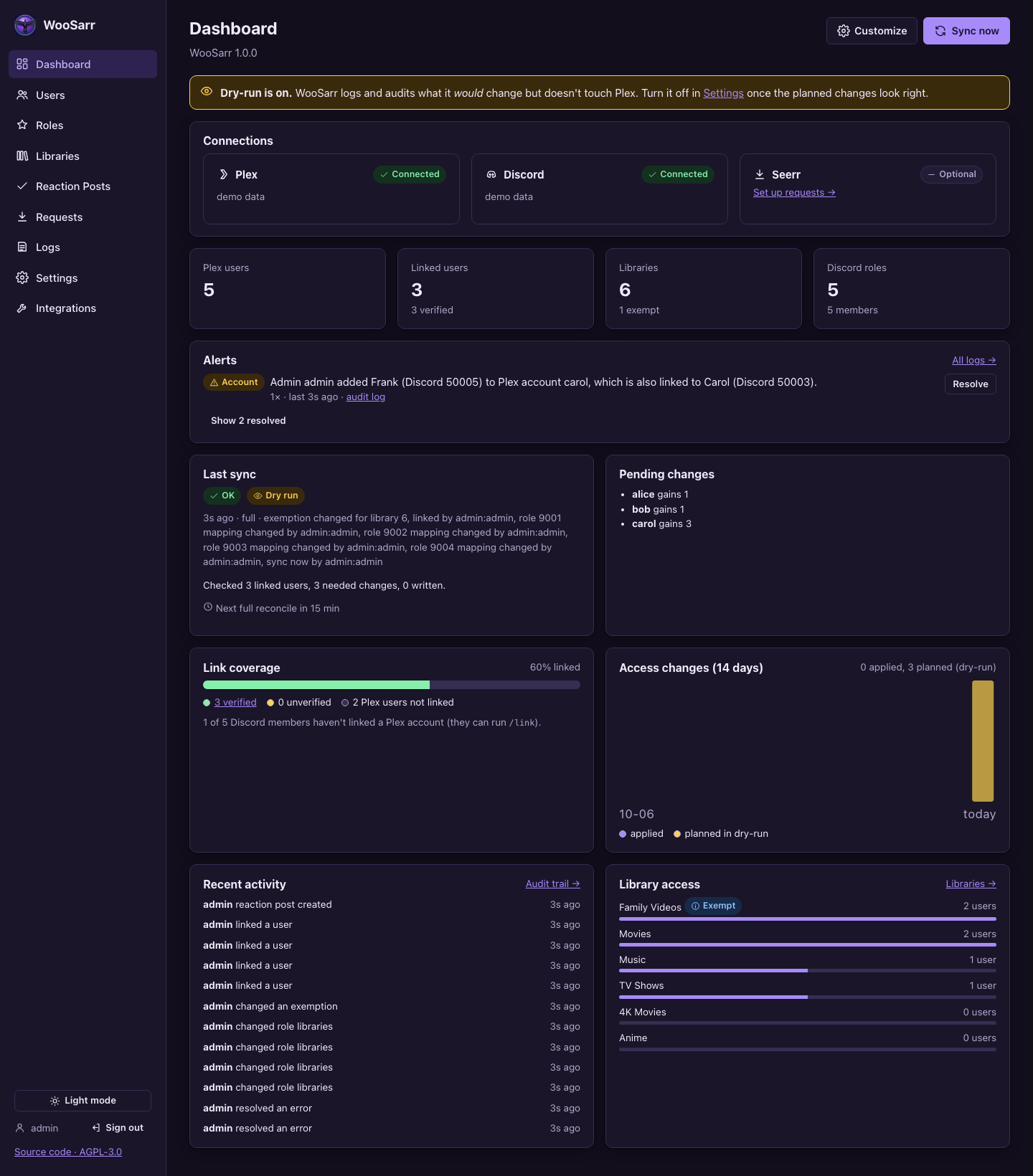
- Discord roles → Plex libraries. Map each role to libraries; members get the union of all their roles. Grants are additive: a library stays if any role, manual grant or exemption keeps it.
- Only linked users are managed. Members link themselves with
/link: Sign in with Plex (verified; the one-time token is invalidated straight away) or by typing their Plex username (unverified, can be limited to chosen roles). - Shared Plex accounts. Several Discord members can share one Plex account (a family); it gets the libraries all their roles give.
- Starts in dry-run. See exactly what would change before anything does; impact previews before every role, removal or settings change.
- Exemptions and manual grants. Exempt libraries are never touched by roles; admins can grant or remove libraries per user.
- Discord bot:
/link,/unlink,/invite(send a Plex invite with the member's role libraries),/help, reaction posts (react to get a role) and link-status roles (Verified / Unverified / Linked). - Requests through Seerr: members request movies and shows with
/request(name configurable) as their own Seerr user, and hear back when it's available (docs/requests.md). - Alerts: warnings, errors and account events (someone trying to link an account that isn't theirs, takeovers, new family members) on the dashboard until resolved; a full audit trail of every change.
- Web UI on port 31337: customizable dashboard, light/dark themes, colour-vision palettes, live logs.
- Admin sign-in with a password or OpenID Connect single sign-on: Okta, Microsoft Entra ID, Google, ADFS or any OIDC provider (docs/sso.md).
- One Docker container (
linux/amd64,linux/arm64) with an Unraid template and a Compose file.
Status: in use on a real Plex server and Discord server; installing from the Unraid template works. Still to do: the Community Applications listing (until then, install from the template as below). See docs/action-plan.md.
Screenshots
 |
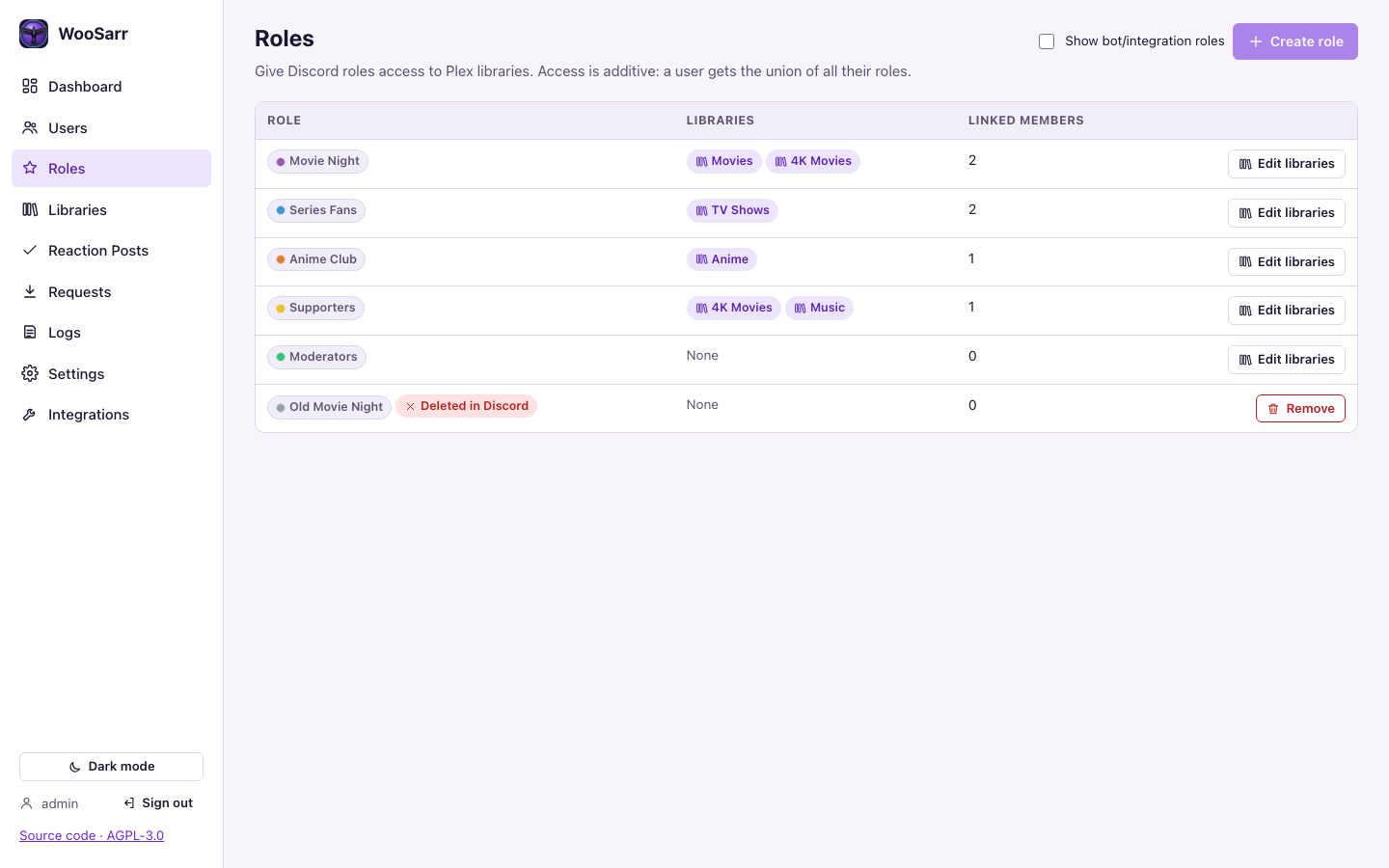 |
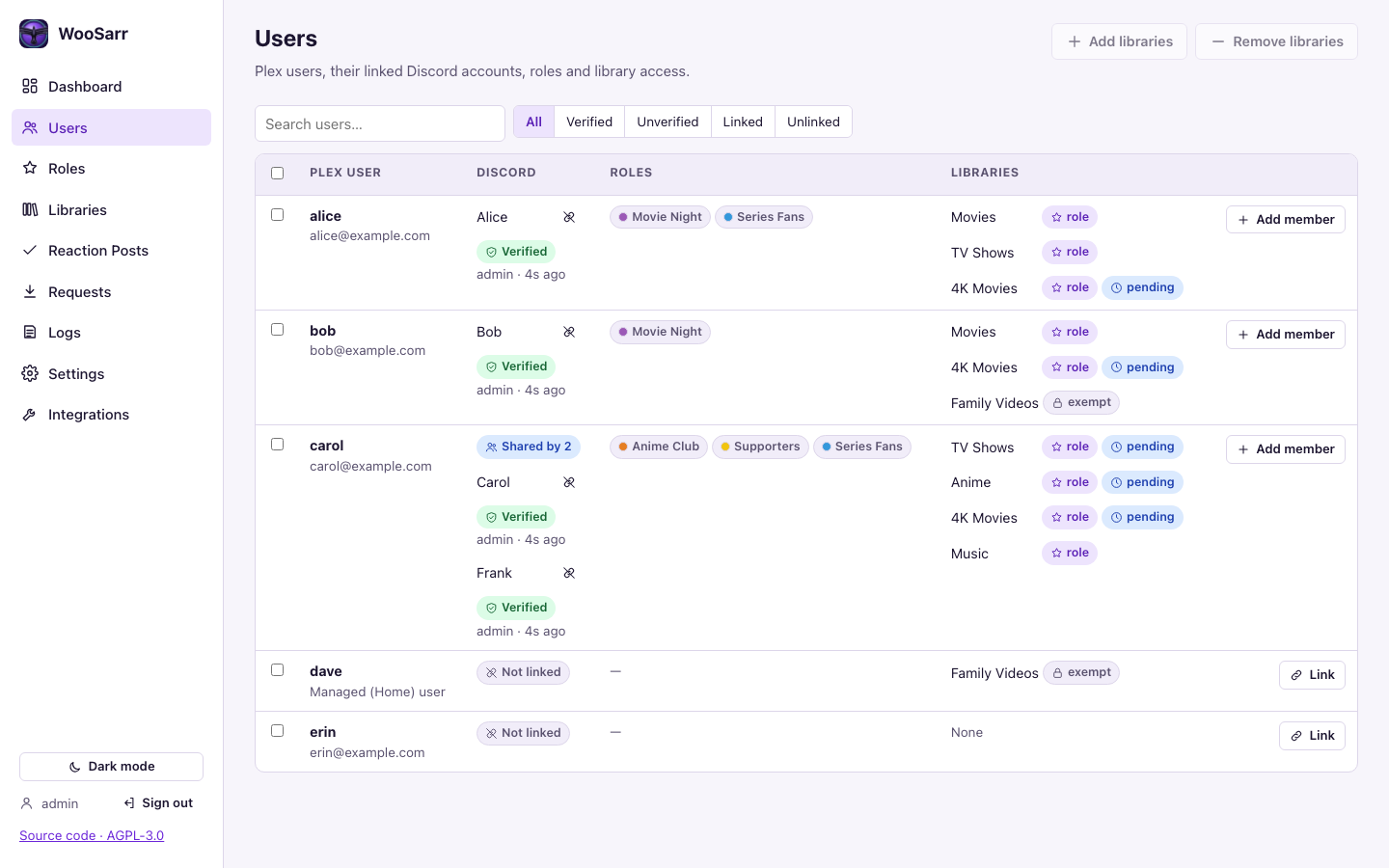
| Users: linked members (one account shared by two), roles, and why each library is there | Roles: which libraries each Discord role grants |
 |
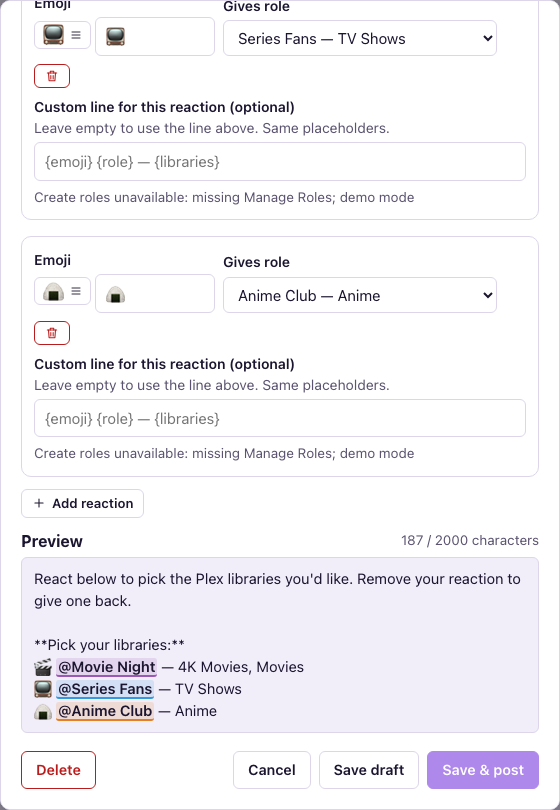 |
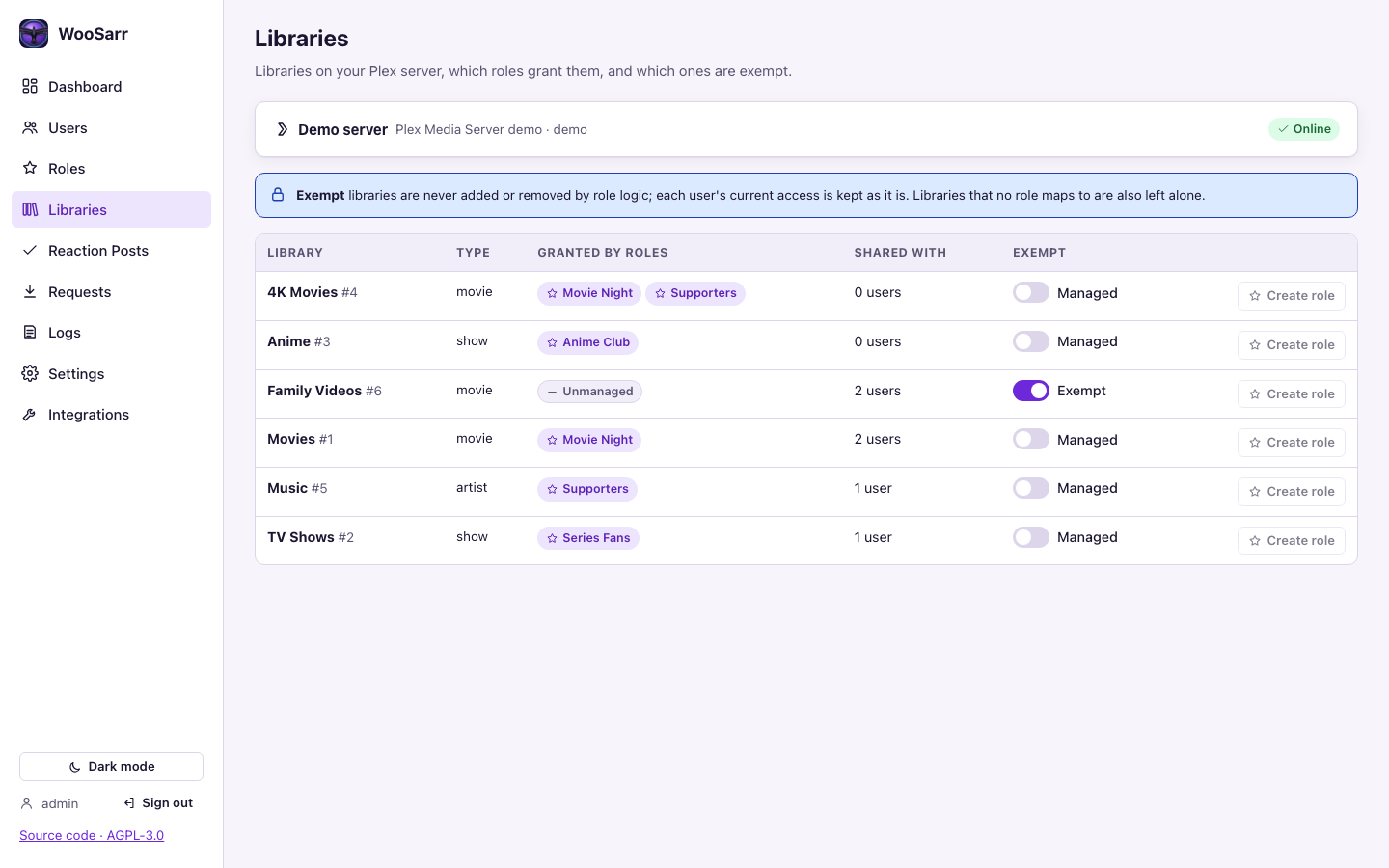
| Libraries: exemptions and the roles that grant each one | Reaction posts: react to get a role, with a live preview |
 |
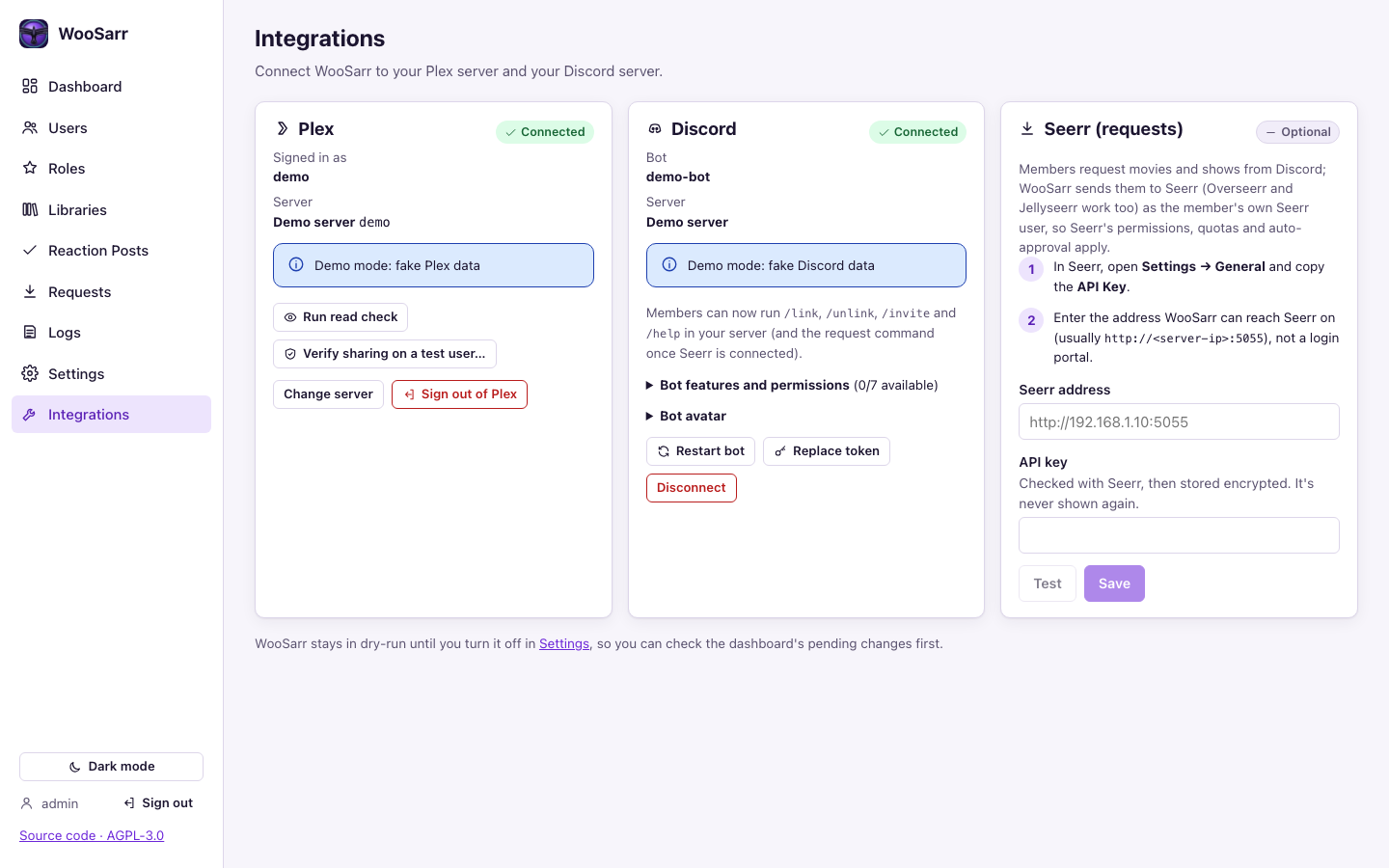 |
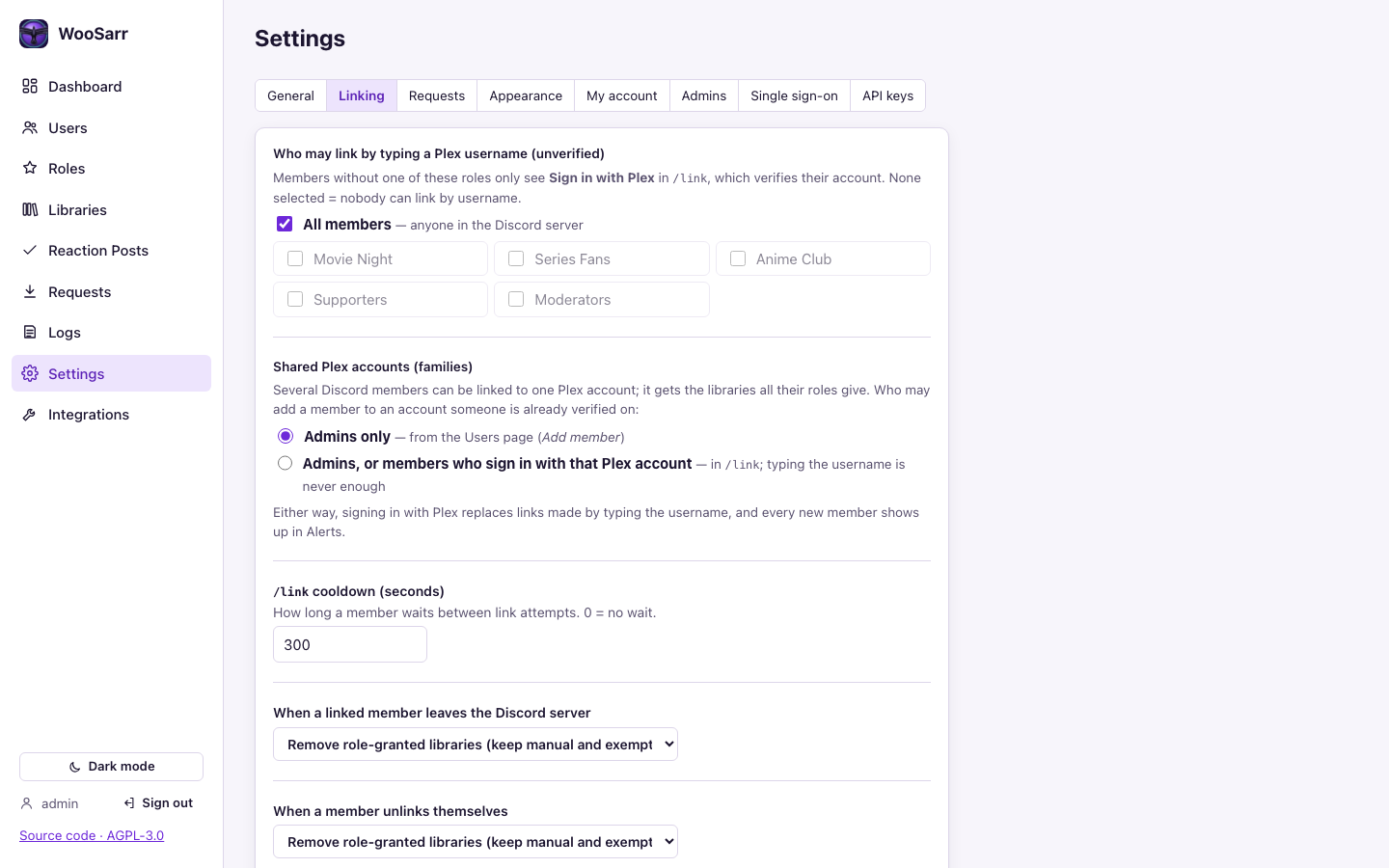
| Settings → Linking: who may link how, shared accounts, leave and unlink rules | Integrations: connect Plex, Discord and Seerr |
All screenshots use WooSarr's demo mode (a fake Plex server and Discord guild); make screenshots regenerates them.
Install
Unraid
- Copy
unraid/woosarr.xmlto/boot/config/plugins/dockerMan/templates-user/my-woosarr.xml. - Docker tab → Add Container → choose woosarr → Apply.
- Open the WebUI. Details: docs/unraid-notes.md.
Prefer Compose (the Docker Compose Manager plugin today, built into Unraid 8)? Use compose.yaml with WOOSARR_CONFIG=/mnt/user/appdata/woosarr; see Unraid notes → Docker Compose.
Docker Compose
curl -fsSLO https://raw.githubusercontent.com/WoosArr/woosarr/main/compose.yaml
docker compose up -d
docker compose logs woosarr   # the first-run setup code
Data goes to ./config next to the file. Change the folder, host port, PUID/PGID or log level by editing compose.yaml or with a .env file beside it, for example:
WOOSARR_CONFIG=/srv/appdata/woosarr
WOOSARR_HOST_PORT=31337
PUID=1000
PGID=1000
Update with docker compose pull && docker compose up -d.
Docker
docker run -d --name woosarr \
  -p 31337:31337 \
  -v /path/to/appdata/woosarr:/config \
  -e PUID=99 -e PGID=100 \
  --security-opt no-new-privileges:true \
  ghcr.io/woosarr/woosarr:latest
Images are published for linux/amd64 and linux/arm64.
First run
Find the setup code in the container log (Unraid: Docker tab → WooSarr icon → Logs; Compose:
docker compose logs woosarr):================================================================ WooSarr first-run setup code: 1a2b-3c4d-5e6fOpen
http://<host>:31337, enter the code and create the first admin account (password ≥ 12 characters).Integrations page: connect Plex and Discord.
Roles page: choose which libraries each Discord role grants. Libraries page: exempt any library that roles should never touch.
Dashboard: check Pending changes. When they look right, turn off dry-run in Settings → General.
How access is decided, the Discord commands, troubleshooting, backups and all settings: docs/admin-guide.md. Bot permissions per feature: docs/discord-notes.md.
HTTPS and reverse proxies
Port 31337 is plain HTTP. On anything other than a trusted home network, put WooSarr behind a reverse proxy with TLS (Nginx Proxy Manager, SWAG, Caddy, Traefik…), and tell WooSarr to trust the proxy's forwarded headers so session cookies are marked Secure:
-e WOOSARR_FORWARDED_ALLOW_IPS=172.18.0.2   # your proxy's IP as seen by the container
# or, if that's awkward:
-e WOOSARR_COOKIE_SECURE=always
Caddy example:
woosarr.example.com {
    reverse_proxy woosarr:31337
}
Don't expose port 31337 directly to the internet.
Logs and troubleshooting
Dashboard → Alerts: open warnings, errors and account events, grouped, with Resolve.
Logs page: live application log and the audit trail of every access change.
Without a browser session, create a read API key (Settings → API keys) and:
curl -H "Authorization: Bearer wsk_…" "http://<host>:31337/api/v1/logs?level=WARNING&limit=200"
curl -H "Authorization: Bearer wsk_…" -o woosarr.log "http://<host>:31337/api/v1/logs/file"
curl -H "Authorization: Bearer wsk_…" -o alerts.log "http://<host>:31337/api/v1/logs/file?name=alerts"
Log files live in
/config/logs:woosarr.log(everything, 5 MB × 6 files) andalerts.log(warnings and errors only, 2 MB × 3 files, so they're kept much longer).Set the log level to DEBUG in Settings → General (or
WOOSARR_LOG_LEVEL=DEBUG). Secrets are always redacted.Forgot the admin password:
python -m woosarr.admin reset-password <user> --generatein the container console.
Backups
Back up /config (the database, logs and secrets/master.key). The master key decrypts the stored Plex and Discord tokens; keep a copy somewhere other than the database backup, or supply it with WOOSARR_MASTER_KEY_FILE. See docs/admin-guide.md#backup-and-restore-p12-03.
FAQ
Will WooSarr remove libraries I shared by hand? Only libraries that a role manages. Libraries no role maps to, and exempt libraries, are left exactly as they are.
A user lost a role but still has the library. Another role, a manual grant or an exemption still gives it; the Users page shows each library's source.
Someone linked the wrong Plex account. Unlink them on the Users page. A Plex sign-in (verified) link replaces a typed-username (unverified) claim, and every attempt to link an account someone else holds shows up in Alerts. You can limit typed-username linking to chosen roles, or ignore unverified links entirely (Settings → Linking and General).
Our family shares one Plex login but has several Discord accounts. Link them all to the same Plex account: an admin uses Add member on the Users page, or (if Settings → Linking → Shared Plex accounts allows it) each member signs in with Plex in /link. The account gets the libraries all their roles give.
A reaction post won't publish. The bot needs View Channels, Send Messages, Add Reactions and Read Message History in that channel (channel permission overrides win over server roles). The post is saved anyway; a toast and the Alerts widget say which permission is missing. Integrations → Discord → Bot features and permissions shows what the bot can do.
Does WooSarr store Plex passwords or user tokens? No. /link sign-ins (arriving with the Discord bot) use a one-time token that is invalidated straight after reading the username. Only the server owner's Plex token and the bot token are stored, encrypted.
Another bot already has /request. Both work; Discord shows each with its bot's name. Rename WooSarr's in Settings → Requests or hide the other bot's under Server Settings → Integrations (docs/requests.md).
Can I try it without connecting anything? Yes: WOOSARR_DEMO=true uses a fake Plex server and Discord data. Don't use it on a real install.
Documentation
| Doc | For |
|---|---|
| Admin guide | How access is decided, Discord commands, shared accounts, dashboard and alerts, troubleshooting, backups, environment variables |
| Discord notes | Bot setup, permissions per feature, /link, /unlink, /invite, reaction posts, link-status roles, bot avatar |
| Requests | /request through Seerr: setup, who may request, public or private, diagnostics |
| Single sign-on | OIDC providers for admin sign-in |
| Plex notes | How WooSarr talks to Plex and what was verified on a real server |
| Unraid notes | The Unraid template |
| Threat model | What's protected and how |
| Changelog | What changed |
Develop
make install   # backend venv + frontend deps
make check     # lint + tests (backend and frontend) + UI build + contrast check
make demo      # run on http://localhost:31337 with fake Plex/Discord data
make e2e       # Playwright UI tests
make screenshots  # regenerate docs/images from the demo backend
Security notes: docs/threat-model.md.
Releases
Pushes to main and version tags (v1.2.3) run CI (lint, tests, UI tests, audits, secret scan), smoke-test the image (also through compose.yaml) and secret-scan it, then publish linux/amd64 and linux/arm64 images to GitHub Container Registry.
License
GNU Affero General Public License v3.0 (AGPL-3.0-only). You can use, change and share WooSarr freely; if you distribute a modified version, or let others use one over a network, you must make its source code available under the same licence.
Versions published before 2026-10-19 (including v0.1.0) were released under the MIT licence.
Media gallery
1 / 5Requirements
Categories
Related apps
Explore more like this
Explore allDetails
ghcr.io/woosarr/woosarr:latestRuntime arguments
- Web UI
http://[IP]:[PORT:31337]/- Network
bridge- Shell
sh- Privileged
- false
- Extra Params
--health-start-period=20s --security-opt no-new-privileges:true
Template configuration
Web interface port
- Target
- 31337
- Default
- 31337
- Value
- 31337
Database, logs and encrypted secrets. Back this up.
- Target
- /config
- Default
- /mnt/user/appdata/woosarr
- Value
- /mnt/user/appdata/woosarr
User id for file ownership
- Default
- 99
- Value
- 99
Group id for file ownership
- Default
- 100
- Value
- 100
Verbosity of the logs shown in the UI and at /api/v1/logs. DEBUG for troubleshooting.
- Target
- WOOSARR_LOG_LEVEL
- Default
- INFO|DEBUG|WARNING|ERROR
- Value
- INFO