

willmyshowfit
Docker app from Stoatworks Labs' Repository
Overview
Readme
View on GitHubAI-assisted project. This codebase was created with Claude (Anthropic), directed and reviewed by a human author. Every figure in it comes from published vendor documentation and is cited on the device that uses it, and a test fails the build if anything claims to be
documentedwithout a citation. But none of it has been verified against hardware, and no show has ever been built from a topology this tool proposed, so treat a "fits" as a shortlist, not a purchase order. See The honest bit.
Will my show fit?
Live at willmyshowfit.com, with nothing to install.
Describe a show (screens, layers, sources, destinations) and find out which video switchers will actually take it. That means more than "does the input count add up": it checks whether there's a physical plug of the right type and capability for every signal, whether the layer budget covers the layers, and whether the canvas fits the chassis. Then it proposes a wiring topology for each switcher that fits.
Nothing is uploaded. There's no backend to upload it to.
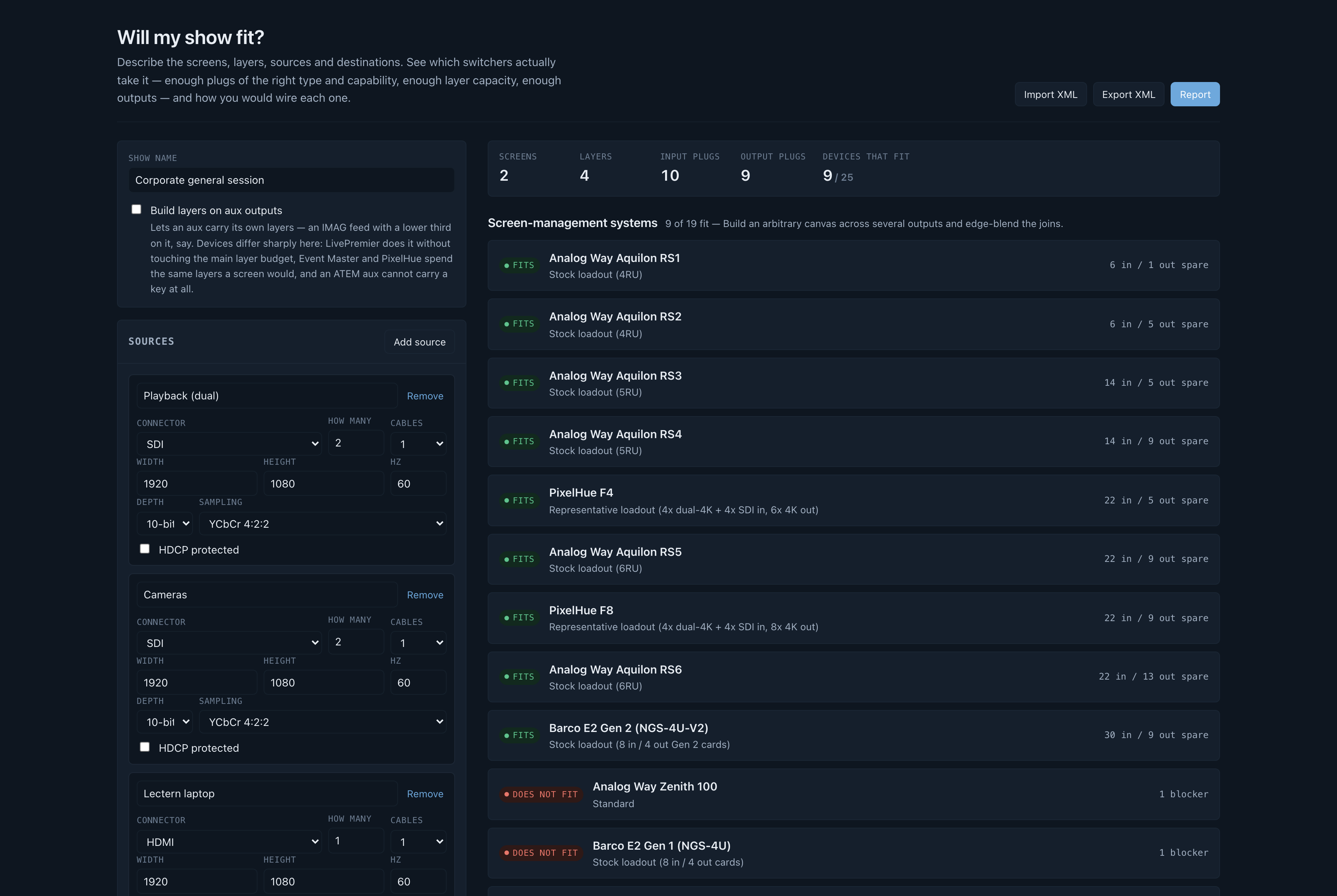
A corporate general session (two screens, four layers, ten input plugs) checked against the device library: nine fit, with the spare inputs and outputs each would have, and the blocker on the ones that don't. The screenshot is from when the library had twenty-five switchers. It has thirty-seven now, and the same nine fit.
What it checks
Plugs, as a matching rather than a count. Twelve inputs and twelve sources isn't an answer: four SDI cameras and two SDI plugs is a "no", and a count will never spot it. Every signal is matched to a specific connector, respecting capability. A 4K60 source doesn't go into an HDMI 1.4a plug, 4:4:4 doesn't go down SDI, and a DisplayPort link budget is checked as well as its pixel clock.
The plugs that aren't what they look like. A Midra 4K output is an HDMI socket and a 12G-SDI socket carrying the same picture: that's one output, not two. Its inputs 1 and 2 are HDMI or 3G-SDI, so pick one. Counting the sockets on the back panel overstates that chassis by a third.
The wide-screen layer penalty. Analog Way quotes its layer counts "depending on the screens setup", and this is what that phrase is hiding: a LivePremier scaling engine spans four output links, so a layer on a screen wider than four outputs takes a second layer link and costs twice. It's a cliff at five outputs, not a slope. Going from a four-output blend to a five-output one doubles that screen's entire layer bill, which is how a show runs out of chassis when the headline layer count looked like plenty.
Layer capacity in each vendor's own arithmetic. Analog Way charges a 4K mixing layer twice what it charges a DL/2K one. Barco's ladder is 4K : DL : 2K = 1 : 2 : 4. PixelHue budgets layers per output card, so an F8 advertising sixteen 4K layers still can't put three on a screen that lives on one card. None of these are modelled or derived; they're each vendor's published numbers, cited.
Card capacity, which isn't the connector count. This is the limit that catches people out. A Barco Event Master Gen 1 card has four connectors and takes exactly one 4K60 signal between them (Barco's own words are "1 4K60p or 4 HD"), so a single 4K60 source eats the whole card and strands its other three sockets. An E2 Gen 1 shows 32 input connectors and has eight 4K60 inputs. An E2 Gen 2 shows twelve HDMI 2.0 inputs and can carry 4K60 on eight of them, because they sit on cards rated two apiece.
The backplane, separately. The chassis caps below the sum of its cards: an E2 Gen 1 has four output cards rated one 4K60 each and is still limited to three 4K outputs. Both limits are modelled, and a multi-cable 4K60 counts as one signal, not as its cables.
Canvas and throughput. Barco's live effects canvas in megapixels, with the PGM-only trade-off offered when the show only fits that way. Analog Way's program throughput figure.
Dual- and quad-cable signals. A 4K60 feed on two cables is two half-rate signals, which is why it fits plugs that 4K60 doesn't.
Passive adapters, where one actually works (HDMI↔DVI-D is the same TMDS signalling), and it says so in the patch list rather than pretending the plug matched.
Layers on aux
It's a global toggle. Off, every aux is a plain scaled feed. On, auxes can carry their own layers, and the devices go very different ways:
| Analog Way LivePremier | Free. Documented outright: layers on aux use adjacent unused outputs, not the main layer budget. |
| Barco Event Master, PixelHue | Charged at the same rate as an on-screen layer. |
| Blackmagic ATEM | Impossible. An aux is a clean routed bus; keys live on an M/E. |
That last row is why the toggle exists: it turns a "which is cheapest" list into a "which can do this at all" list.
Screen-management systems vs vision mixers
The database holds both, in two separate sections, because they answer different questions. A presentation switcher builds an arbitrary canvas across several outputs and edge-blends the joins. A vision mixer doesn't: every output is one raster, and layers are keyers over a program bus. A 7680×2160 blend isn't "too big" for an ATEM the way it's too big for a Midra. It's the wrong shape, and the tool says so in those words.
They're in here because a lot of the shows people reach for a presentation switcher to solve turn out to be one screen, one raster and two keys.
Devices
Analog Way: Midra 4K (QuickVu, QuickMatrix, Pulse, Eikos, each mode checked separately), Alta 4K (Zenith 100/200), LivePremier (Aquilon RS alpha, RS1–RS6), and the two discontinued lines that are still all over the rental market: Midra pre-4K (QuickVu 3G, QuickMatriX, Pulse², SmartMatriX², Saphyr, Eikos²) and LiveCore (NeXtage 08/16 - 4K, Ascender 16/32/48 - 4K, SmartMatriX Ultra). Barco: S3 standalone, E2 Gen 1, E2 Gen 2, ENCORE3. PixelHue: F4, F8. Roland: V-160HD, VR-400UHD, V-600UHD. Blackmagic Design: ATEM 1/2/4 M/E Constellation 4K.
Card-based chassis are profiled against their stock loadout and, where the chassis misses, searched for a card loadout that would take the show (see below).
The older lines show up two things the current ones don't. A pre-4K Midra has no edge blending at all (soft edge arrived with Midra 4K), so a screen there has to fit on one output, which is a different answer from "you've run out of plugs" and is reported as one. And the whole Midra platform is a 165 MHz single-link machine: 1080p60 and 1920x1200 fit, and 2560x1600 and anything 4K don't, in any mode. LiveCore stops at 4K30; to check a 4K60 display against one, describe it as a destination fed by four cables and the tool sizes the quadrants.
Filtering, and trimming the report
Switchers shown sits above the verdict list: pick by brand or by model, with a one-click "only what fits". It's the same selection the report uses, so narrowing the list to two brands while you compare carries through rather than having to be done twice.
The full report is every selected switcher with a wiring topology under each one that fits, which is right when you're choosing a machine and far too much when you're sending three pages to a client who's already chosen. So the report page carries the same switcher picker plus five sections you can drop: the input list, output list, screen breakdown, wiring topology and the source-document links. The example show goes from about 30,000 characters to about 5,600.
Three things stay in whatever you choose. A trimmed report prints a line saying so ("showing 9 of 37 switchers … and it leaves out the source documents"), because otherwise a matrix of nine machines reads as the whole field to whoever receives it. The caveat stays, because a report that says what fits has to say what that rests on. And every report is signed at the foot: generated by willmyshowfit.com, a free tool from Stoatworks Labs, with the build version and the line saying it isn't a product of any manufacturer it names.
Custom card loadouts
When a modular chassis doesn't fit as it ships, "doesn't fit" is only half an answer. The question anyone specifying a build actually has is whether a different set of cards would take it, so the tool searches for one and shows the smallest arrangement that does, with the wiring topology that follows from it.
Loadouts are enumerated in increasing card count, so the first feasible one is minimal by construction. Among equals, fewer distinct card types wins (four identical cards are easier to order and swap on site than four different ones), then the tightest fit. The chosen loadout goes through exactly the same evaluation as a stock profile, so there's no second, looser idea of "fits".
The search is capability-aware rather than a plug count, in both directions:
- Five 1080p60 HDMI sources get one 8-plug HDMI 1.4 card, not two 4-plug HDMI 2.0 ones, because the cheaper card carries the format.
- One HDMI source gets a 4-connector HDMI card, not the 6-connector multi-format card that happens to have an HDMI plug on it.
- Six 2560x1600 outputs on an E2 Gen 1 get two Gen 2 HDMI 2.0 cards rather than three Gen 1 ones, because a Gen 1 card has only two connectors fast enough (see below) while a Gen 2 card has four.
Slot-position rules aren't modelled. Some vendors need particular cards in particular slots, and Barco's Tri-combo cards are capped at 2x 4K60 despite having six connectors, so a proposal is a starting point to check against the vendor's own slot diagram, not an order form.
The four connectors on a card are not always equal
Barco's Gen 1 HDMI output card has four connectors, and the top two run to 297 MPix/s while the bottom two stop at 165. So an E2 Gen 1's eight HDMI outputs are really four that carry 2560x1600 and four that don't, and a show wanting six of them needs a different card, not just a spare slot.
The chassis spec sheets only quote the 297 figure. The per-connector split is published on a different sheet entirely, for a different product, because of course it is. This tool had the optimistic reading until a loadout test disagreed with it.
Import, export and reports
XML in and out, in this tool's own format: attributes a person can read and hand-edit, with the round trip pinned by tests. A bad file imports as far as it can and lists what it couldn't read, rather than throwing away forty good entries over one typo.
Reports as a printable page (browser "save as PDF") or a standalone HTML file, carrying the input list, output list, screen breakdown, compatibility matrix, per-device wiring topology, and every citation behind the verdict.
The honest bit
Every figure here comes from published vendor documentation and is cited on the device that uses it. None of it has been verified against hardware. No show has been built from a topology this tool proposed. Vendors revise spec sheets without notice, several of the relevant numbers are published as ranges or with conditions, and a few contradict themselves: Barco's E2 Gen 1 sheet copies its Aux text into the Mixers row, and PixelHue's F8 sheet disagrees with itself about the output slot count. Both are recorded in the data rather than smoothed over.
Figures that couldn't be sourced are marked unverified and say so in the UI, and a test fails the
build if anything claims to be documented without a citation. Treat a "fits" as a shortlist, not
a purchase order.
Development
npm install
npm run dev
npm test
npm run build && npm run serve:dist
npm run preview doesn't apply public/_headers, so use serve:dist to test the CSP properly.
See AGENTS.md for the architecture and for what's verified and what's assumed.
Trademarks and affiliation
Not affiliated with, endorsed by, or a product of Analog Way, Barco, PixelHue, Roland or Blackmagic Design. All product names, logos and brands are the property of their respective owners and are used here only to identify the equipment being described.
Run your own copy
Will My Show Fit? is a static page, so hosting it yourself is one container serving the built files — the same files the hosted copy serves, running somewhere that still works when the venue has no internet.
Docker. The image is built by this repo's docker.yml workflow on every
push and published as ghcr.io/stoatworks-labs/willmyshowfit:
docker run -d --name willmyshowfit --restart unless-stopped -p 8537:80 ghcr.io/stoatworks-labs/willmyshowfit:latest
Or docker compose up -d with the docker-compose.yml
in this repo, which maps the same port. Either way it is then at
http://localhost:8537/.
Unraid. Search Community Applications for Will My Show Fit? — the template is
templates/willmyshowfit.xml
in stoatworks-unraid, which is what the CA feed reads.
Stoatworks Burrow lists it under Self-hosted, with the compose file a click away.
The Dockerfile, docker-compose.yml, docker/ and the workflow are
generated from fleet.json in stoatworks-unraid. Change them there and
regenerate rather than editing them here.
This project is built on other people's work — see ATTRIBUTIONS.md.
Licence
MIT — see LICENSE.
Categories
Related apps
Explore more like this
Explore allDetails
ghcr.io/stoatworks-labs/willmyshowfit:latestRuntime arguments
- Web UI
http://[IP]:[PORT:80]/- Network
bridge- Shell
sh- Privileged
- false
Template configuration
Host port for the web interface.
- Target
- 80
- Default
- 8537
- Value
- 8537