
All apps · 0 apps

whats-up-docker
Docker app from AlexGreenUK's Repository
Overview
What's up Docker? (aka WUD) WEBUI Included
Gets you notified when new versions of your Docker containers are available and lets you react the way you want.
Depending what you want to do you might have to add your own variables. By default I have included MQTT.
Good Integration With
- Home-Assistant
- Prometheus
- Grafana
Many Supported Triggers
Send notifications using Smtp, Apprise, IFTTT, Slack, Pushover...
Automatically update your docker containers or your docker-compose stack.
Integrate with third-party systems using Kafka, Mqtt, Http Webhooks...
Many supported registries
- Azure Container Registry
- AWS Elastic Container Registry
- Google Container Registry
- Github Container Registry
- Docker Hub (public & private repositories)
Readme
View on GitHub
What's Up Docker? (WUD)
Keep your containers up-to-date across any orchestrator, automatically and effortlessly.













📖 Documentation • 🚀 Quick Start • ⚙️ Configuration • 🔔 Triggers • 📦 Registries • 🛠️ Contributing • 💬 Issues & Support
💡 About WUD
WUD (What's Up Docker?) is a lightweight, proactive container update monitoring and automation tool. It continuously scans your container environments, detects image updates across public and private registries, performs semantic version analysis, and alerts you via your favorite notification channels—or triggers automatic container updates seamlessly.
flowchart LR
W["🔍 <b>WATCHERS</b><br/>Discover running containers<br/><i>Docker, Swarm, Kubernetes, Compose, Nomad...</i>"]
WUD{{"⚡ <b>WUD ENGINE</b><br/>Compare versions & digests"}}
R["📦 <b>REGISTRIES</b><br/>Inspect tags & manifests<br/><i>Docker Hub, GHCR, Private OCI</i>"]
T["🚀 <b>TRIGGERS</b><br/>Notify & Auto-Update<br/><i>Discord, Slack, Compose, MQTT</i>"]
W -->|"Scan"| WUD
WUD <-->|"Inspect"| R
WUD -->|"Execute"| T
✨ Features
- 🔍 Multi-Orchestrator Engine
Monitor standalone Docker daemons, remote Docker engines over TLS, Docker Compose setups, Docker Swarm clusters, native Kubernetes clusters (Deployments, StatefulSets, DaemonSets, CronJobs), or HashiCorp Nomad clusters. - 📦 Multi-Registry Integration
Zero-config & authenticated support for Docker Hub, GitHub Container Registry (GHCR), AWS ECR, Google GCR/GAR, Azure ACR, Quay, GitLab, Gitea, Forgejo, Codeberg, LinuxServer (LSCR), and any custom/self-hosted OCI registry. - 🔔 30+ Notification & Automation Triggers
Discord, Matrix, Mattermost, Zulip, Telegram, Slack, Signal, WhatsApp, Bark, Prowl, Home Assistant, Gotify, Ntfy, Pushover, Apprise, Webhooks, Kafka, AMQP/RabbitMQ, NATS, Opsgenie, PagerDuty, Uptime Kuma, GitHub Actions, GitLab CI, SMTP email, shell scripts, and native Docker / Compose / Nomad auto-updaters. - 🔄 Automated Container Updates
Automatically pull new images and recreate containers on demand (Docker, Docker Compose, Nomad). - ⚡ Registry Webhooks: Registry push notifications, including GitLab Self-Managed, immediately check matching watched images while preserving existing labels and trigger policies.
- 🏷️ SemVer & Tag Filtering
Flexible versioning strategies: targetsemver(major, minor, patch), match custom regular expressions, pin versions, or define include/exclude tag rules. - 🖥️ Interactive Web UI & REST API
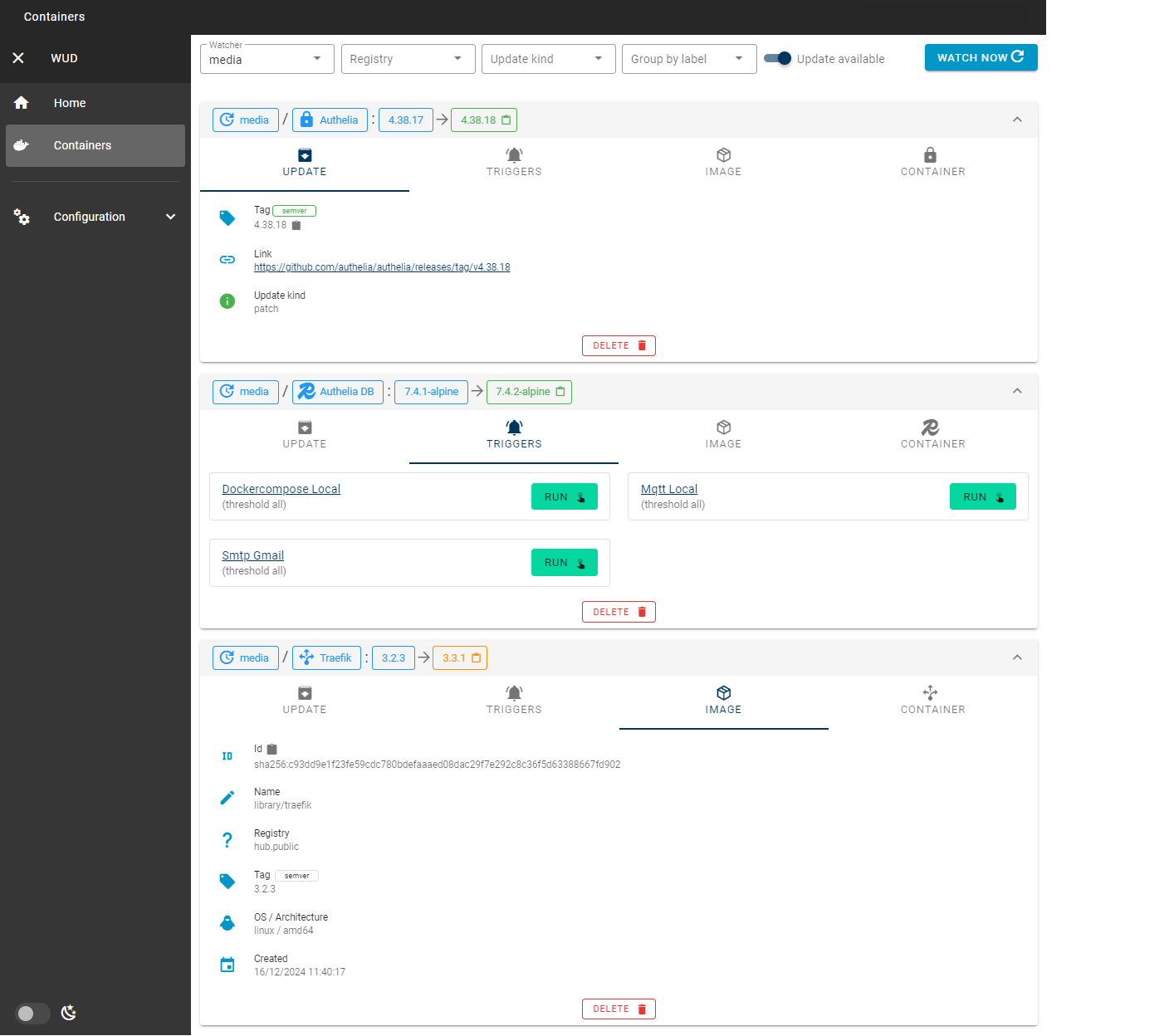
Clean, responsive web dashboard to inspect container statuses, trigger manual update checks, and query data via a full-featured REST API. - 📊 Prometheus & Grafana Ready
Built-in Prometheus/metricsendpoint and pre-built Grafana dashboards for observability. - 🔒 Enterprise-Grade Authentication & RBAC
Role-Based Access Control (admin,rw,ro), database-backed user management, personal API tokens, and single sign-on with OpenID Connect (OIDC) (Keycloak, Authentik, Authelia, etc.) or local accounts.
⚡ Quick Start
1. Run with Docker
docker run -d \
  --name wud \
  -p 3000:3000 \
  -e WUD_AUTH_ADMIN_USER="admin" \
  -e WUD_AUTH_ADMIN_PASSWORD="MySecurePassword123" \
  -v /var/run/docker.sock:/var/run/docker.sock \
  getwud/wud:latest
2. Run with Docker Compose
services:
  whatsupdocker:
    image: getwud/wud:latest
    container_name: wud
    ports:
      - "3000:3000"
    environment:
      - WUD_AUTH_ADMIN_USER=admin
      - WUD_AUTH_ADMIN_PASSWORD=MySecurePassword123
    volumes:
      - /var/run/docker.sock:/var/run/docker.sock
    restart: unless-stopped
🌐 Access the Web UI: Open
http://localhost:3000in your browser (login withadmin/MySecurePassword123).
3. Run in One-Shot CLI Mode (CI/CD & Cron)
WUD can also run as a stateless, headless CLI tool without starting the web server or creating a database file:
# Run a single scan and print container status as JSON
docker run --rm \
  -v /var/run/docker.sock:/var/run/docker.sock \
  -e WUD_RUN_MODE=oneshot \
  getwud/wud:latest watch

# Gate CI/CD pipelines: exit with code 1 if at least one update is available
docker run --rm \
  -v /var/run/docker.sock:/var/run/docker.sock \
  -e WUD_RUN_MODE=oneshot \
  getwud/wud:latest watch --update-available --fail-on-update
📖 Check the full One-Shot Headless Mode Documentation for flags, NDJSON output, and cron examples.
🧩 Supported Integrations
🔍 Watchers & Orchestrators
| Environment | Supported Workloads | Configuration Guide |
|---|---|---|
| Docker | Local socket, Remote TCP over TLS, Docker Compose | Built-in (Active by default) |
| Docker Swarm | Services, Stacks, Replicated & Global workloads | Socket / Remote TCP over TLS |
| Kubernetes | Deployments, StatefulSets, DaemonSets, CronJobs | In-cluster RBAC / Kubeconfig |
| Nomad | Jobs (service, batch, system), Task Groups |
HTTP API / ACL Token |
📦 Registries
| Registry | Description | Authentication |
|---|---|---|
| Docker Hub | Public and private Docker Hub images | Anonymous / Token / Password |
| Docker Hardened Images (DHI) | Docker Hardened Images (dhi.io) |
Token / Password |
| GitHub (GHCR) | GitHub Container Registry packages | Personal Access Token |
| AWS ECR | Amazon Elastic Container Registry | AWS IAM Keys / IAM Roles |
| Google GCR / Artifact Registry | GCP Container & Artifact Registry | Service Account Key (JSON) |
| Azure ACR | Azure Container Registry | Service Principal / Admin Secret |
| GitLab Registry | GitLab Container Registry | Deploy Token / PAT |
| Quay.io | Red Hat Quay | Robot Account / OAuth Token |
| Self-Hosted / OCI | Harbor, Nexus, Artifactory, Gitea, Forgejo, Codeberg | Basic Auth / Bearer Token |
🔔 Triggers & Notifications
| Category | Supported Channels |
|---|---|
| Chat & Messaging | Discord, Matrix, Mattermost, Signal, Telegram, Slack, Rocket.Chat, WhatsApp, Zulip |
| Push Notifications & Alerting | Bark, Gotify, IFTTT, Ntfy, Opsgenie, PagerDuty, Prowl, Pushover, Apprise |
| Auto-Update & Orchestration | Docker Container, Docker Compose, HashiCorp Nomad |
| IoT & Message Queues | AMQP (RabbitMQ), Apache Kafka, MQTT (Home Assistant auto-discovery), NATS |
| Automation & Custom | GitHub Actions, GitLab CI, Home Assistant (Webhook), HTTP Webhooks, Shell Command Execution, SMTP Email, Uptime Kuma |
🏷️ Configuration via Labels & Annotations
WUD can be configured globally through environment variables or granularly per container/workload using Docker labels or Kubernetes annotations:
Docker & Compose (Labels)
services:
  my-app:
    image: myorg/myapp:1.2.0
    labels:
      # Only consider semver minor and patch updates (e.g. 1.2.1, 1.3.0, but not 2.0.0)
      - "wud.tag.include=^1\\.\\d+\\.\\d+$"
      - "wud.tag.transform=^v(.*)$$ => $$1"

      # Send update notifications to a specific Discord webhook
      - "wud.trigger.discord.mywebhook.enabled=true"

      # Automatically recreate this container when an update is available
      - "wud.trigger.docker.myupdater.enabled=true"
Kubernetes (Annotations)
apiVersion: apps/v1
kind: Deployment
metadata:
  name: my-app
  namespace: default
  annotations:
    # Explicitly watch this workload
    getwud.app/watch: "true"

    # Only consider semver minor and patch updates
    getwud.app/tag.include: "^1\\.\\d+\\.\\d+$"
    getwud.app/tag.transform: "^v(.*)$ => $1"

    # Custom display icon in WUD UI
    getwud.app/display.icon: "mdi:kubernetes"
Explore all configuration options in the Configuration Hub.
📚 Documentation
For complete setup guides, advanced configurations, tutorials, and API references, check out our official documentation:
- 🚀 Getting Started & Tutorials
- ⚙️ Configuration Reference
- 🔍 Docker Watcher & TLS
- 📦 Registry Authentication
- 🔔 Triggers & Automation Setup
- 📊 Prometheus & Grafana Monitoring
- 🔌 REST API Reference
- ❓ Frequently Asked Questions (FAQ)
💖 Supporting WUD
WUD is free and open-source software built and maintained with passion. If WUD saves you time or helps keep your homelab and production containers running up-to-date, please consider supporting its ongoing development:
Your support helps cover domain name renewals (getwud.app), AI developer tooling subscriptions, and rewards the time spent maintaining registry integrations and building new features. Thank you!
📄 License
This project is open-source software licensed under the MIT License.
Categories
Download Statistics
Total Downloads Over Time
Related apps
Explore more like this
Explore allLinks
Details
fmartinou/whats-up-dockerRuntime arguments
- Web UI
http://[IP]:[PORT:3000]- Network
bridge- Shell
sh- Privileged
- false
Template configuration
- Target
- 3000
- Default
- 3000
- Value
- 3000
- Target
- /store
- Default
- /mnt/user/appdata/whats-up-docker
- Value
- /mnt/user/appdata/whats-up-docker
Example: mqtt://127.0.0.1:1883
- Target
- WUD_TRIGGER_MQTT_mqtt_URL
- Target
- WUD_TRIGGER_MQTT_mqtt_USER
- Target
- WUD_TRIGGER_MQTT_mqtt_PASSWORD
If you want to enabled Home Assistant Auto Discovery set this to True
- Target
- WUD_TRIGGER_MQTT_HA_HASS_ENABLED
- Default
- false
- Value
- false
- Target
- WUD_TRIGGER_MQTT_HA_HASS_PREFIX
- Default
- homeassistant
- Value
- homeassistant
- Default
- /var/run/docker.sock
- Value
- /var/run/docker.sock