
All apps · 0 apps

Weight-Tracker
Docker app from Yusseiin's Repository
Overview
A self-hosted mobile-first weight tracking application. Log your daily weight, track water consumption, monitor activity type and sleep quality, and visualize your progress with interactive charts.
Features:
- Weight tracking with activity type and sleep quality
- Water consumption tracking
- Interactive progress charts with time filters
- Multi-user support with admin and user roles
- Customizable date formats and chart colors
- Customizable activity
Readme
View on GitHub

Weight Tracker
A self-hosted mobile-first weight tracking application to log your weight, water consumption, steps, blood pressure, medications, and fitness progress



Features • Screenshots • Installation • Configuration • Development
Screenshots
|
|
|
|
|
|
|
|
Features
Core Tracking
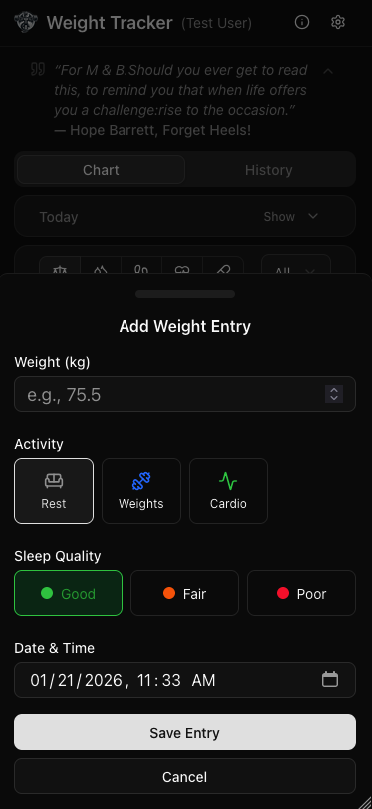
- Weight Tracking: Log your daily weight with activity type and sleep quality
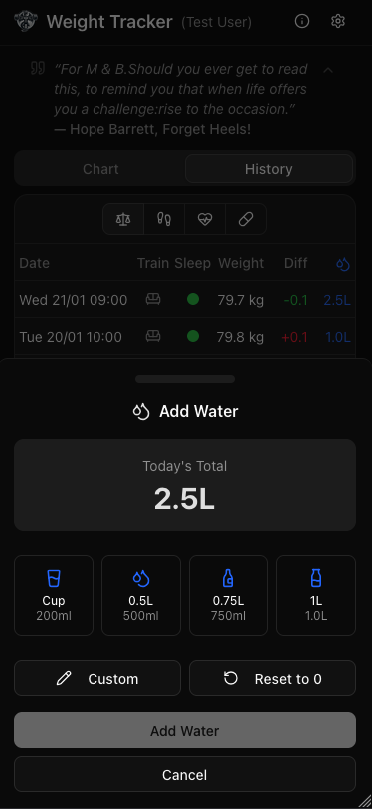
- Water Consumption: Track daily water intake with quick-add buttons (Cup 200ml/8oz, 0.5L/17oz, 1L/34oz), custom amount input, and reset functionality
- Activity Logging: Track activity type with each entry - includes 3 default activities (Rest, Weights, Cardio)
- Sleep Quality: Record sleep quality (Good, Fair, Poor) with color indicators alongside weight
- Today Recap: Quick summary card showing today's weight, water, steps, blood pressure, and medications at a glance
Optional Tracking Features
Enable/disable these features in Settings → Features:
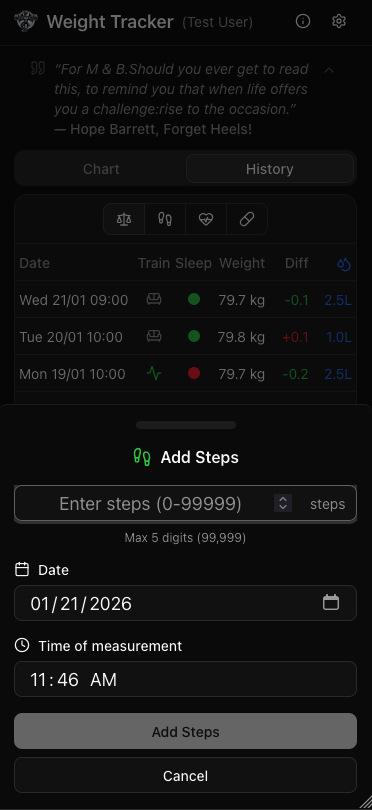
- Steps Tracking: Log daily step count with optional daily goal. One entry per day with timestamp for when steps were recorded
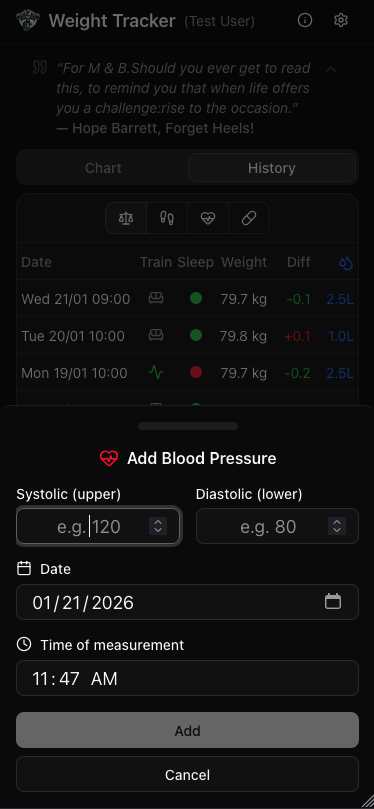
- Blood Pressure: Track systolic/diastolic readings multiple times per day with timestamps. View history and trends
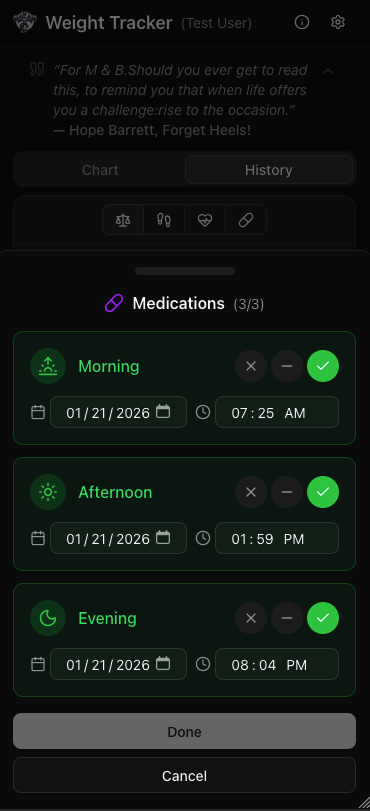
- Medication Tracking: Configure custom medications with flexible scheduling options:
- Tracking Modes: Boolean (taken/not taken) or Dosage (track specific amounts)
- Scheduling: Daily, specific days of week, or every N days (interval-based)
- Dosage Support: Set expected dose with unit (mg, ml, pills, etc.) and quick-select preset buttons
- Reminder Banner: Shows due medications at top of screen with expected doses
- Dose Warnings: Visual highlighting when recorded dose differs from expected (amber color in dialogs and history table)
- Compact UI: Medications shown as buttons that expand to reveal date/time and dose options
- Injection Tracking: Track injection schedules and log when injections are administered (supports up to 15 injections)
- Photo Attachments: Attach photos to any entry type (weight, steps, pressure, medication, injection)
- Camera capture and gallery picker on mobile and desktop
- Client-side image compression (max 1200x1200, JPEG quality 0.8) to save storage
- Photos displayed in history table via camera icon with popover preview
- Photos stored at
/config/photos/{userId}/and persist across Docker restarts
Custom Activities
- Activity Manager: Create, edit, delete, and reorder up to 12 custom activities
- Icon Picker: Choose from 50+ Lucide icons organized by category with search functionality
- Color Customization: Select from multiple Tailwind color options for each activity
- Usage Protection: Cannot delete activities that are being used by existing entries
- Reordering: Move activities up/down to customize the order they appear
Data Visualization
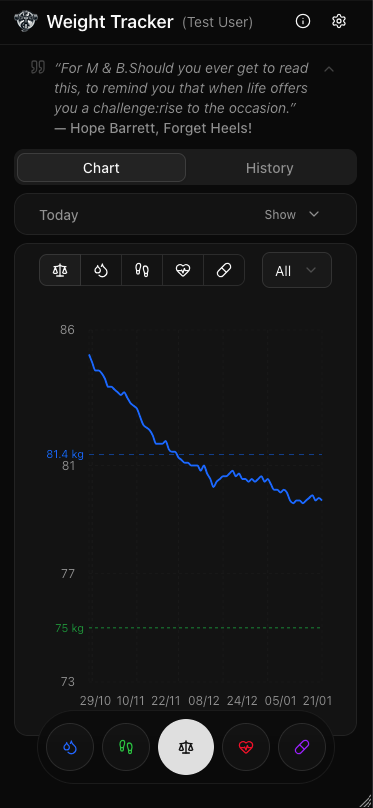
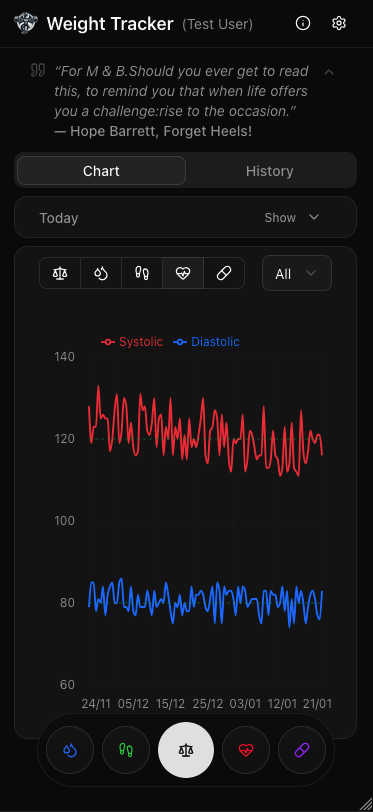
- Progress Chart: Interactive line chart with Recharts showing weight trends
- Multi-Graph Support: Choose which data to display on the chart (weight, water, steps, blood pressure, etc.) with the ability to show multiple metrics on a single graph
- Time Filters: View data for All time, 1 Month, 3 Months, or 6 Months
- Chart Statistics: Display average, min, and max weight in the selected period
- Target Weight Line: Optional reference line showing your goal weight
- Customizable Colors: Choose from 5 chart colors (Primary, Blue, Green, Orange, Purple)
History & Entries
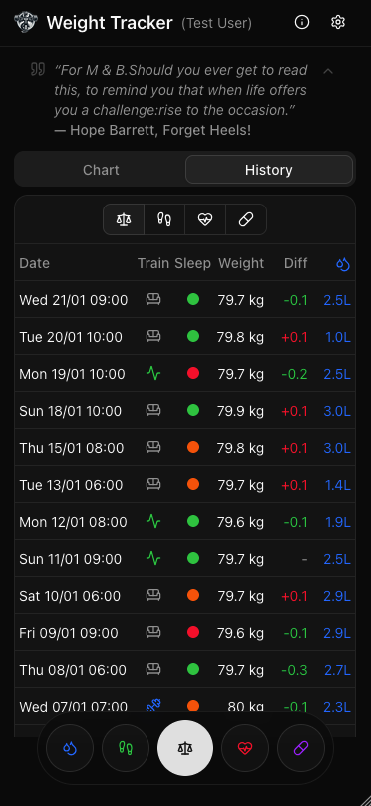
- History Table: Compact table view of all entries with weight, activity icon, sleep indicator, water, and weight difference
- Click-to-Edit: Tap any entry in the history to edit or delete it
- Water Entry Editing: Edit water entries directly from the history table
- Weight Difference: Automatic calculation showing change from previous entry
Customization
- Date Format Options: 9 preset formats (EU, US, ISO, etc.) plus custom pattern support
- Time Format: Choose 24h (HH:mm), 12h (hh:mm a), or hide time
- Locale Support: English, Italian, German, French, Spanish
- Weekday Display: Optional weekday in date formatting
- Separate Formatters: Different date formats for table, chart tooltip, and chart axis
- Unit Preferences: Weight (kg/lb) and water (ml/oz) unit selection
User Management
- Multi-user Support: Each user has their own data stored separately
- User Roles: Admin and regular user roles with different permissions
- Admin Features: Create, edit, and delete users from the settings popup
- Password Management: Users can change their own password
- Nickname Management: Users can change their display nickname
- Secure Password Storage: Passwords are hashed using bcrypt (automatic migration from plain-text)
UI/UX
- Mobile-First Design: Responsive UI with bottom drawer on mobile, dialog on desktop
- Floating Action Buttons: Quick access to add weight (bottom right) and water (bottom left) on mobile, plus optional steps, blood pressure, and medication buttons when features are enabled
- Dark Mode: Automatic theme switching based on system preference
- Toast Notifications: Success and error feedback using Sonner
- Changelog Dialog: View version history and release notes with color-coded changes
Data Storage
- Offline-Ready Data: JSON file storage for easy backup and portability
- Docker Ready: Configurable data path for container deployments
Tech Stack
- Framework: Next.js 16 with App Router
- UI: shadcn/ui components with Tailwind CSS
- Charts: Recharts
- Forms: React Hook Form + Zod validation
- Icons: Lucide React
- Notifications: Sonner toast
Getting Started
Prerequisites
- Node.js 18+
- pnpm (recommended) or npm
Installation
# Clone the repository
git clone https://github.com/yourusername/weight-tracker.git
cd weight-tracker/nextjserision

# Install dependencies
pnpm install

# Start development server (with local config directory)
pnpm dev:test

# Generate fake test data for the admin user account
pnpm generate-fake-data
Open http://localhost:3000 in your browser.
Default Login
- Username:
admin - Password:
changeme
Configuration
User Management
Admin users can manage users directly from the settings popup (gear icon in header):
- Create new users with username, password, nickname, and role
- Edit existing users (change nickname and role)
- Delete users (except yourself)
Users are stored in /config/users/users.json (or CONFIG_PATH/users/users.json):
[
  {
    "username": "admin",
    "password": "",
    "nickname": "Administrator",
    "role": "admin",
    "createdAt": "2024-01-01T00:00:00.000Z"
  },
  {
    "username": "john",
    "password": "",
    "nickname": "John Doe",
    "role": "user",
    "createdAt": "2024-01-01T00:00:00.000Z"
  }
]
Data Structure
Each user gets their own data files in separate folders inside the config directory:
/config/                        # Default path (configurable via CONFIG_PATH)
├── users/
│   └── users.json              # User credentials and roles
├── entries/
│   └── {username}.json         # Weight entries per user
├── settings/
│   └── {username}.json         # Settings per user
├── water/
│   └── {username}.json         # Water consumption per user
├── steps/
│   └── {username}.json         # Daily steps per user
├── pressure/
│   └── {username}.json         # Blood pressure readings per user
├── medications/
│   └── {username}.json         # Medication tracking per user
└── photos/
    └── {username}/             # Photo attachments per user
        └── {entryType}-{entryId}.jpg

### Environment Variables

| Variable | Description | Default |
|----------|-------------|---------|
| `CONFIG_PATH` | Directory for storing JSON data files | `/config` |
| `TZ` | Timezone used to decide the current day for daily totals (water, steps, pressure, medications). Use an [IANA name](https://en.wikipedia.org/wiki/List_of_tz_database_time_zones), e.g. `America/Los_Angeles`. Leave as `UTC` and your daily totals reset at midnight UTC. | `UTC` |
| `PUID` | User ID for file permissions (Unraid) | `1000` |
| `PGID` | Group ID for file permissions (Unraid) | `1000` |
| `API_KEY` | Secret key for API authentication (enables HA integration) | (disabled) |

> **Set `TZ` to your local timezone.** Daily metrics (water, steps, blood pressure, medications, injections) are bucketed by calendar day using the container's clock. Without `TZ`, the container runs on UTC, so — for example — in California (UTC-7/8) your daily water total appears to "reset" at 4–5 PM. Setting `TZ=America/Los_Angeles` makes the day roll over at your local midnight instead.

## Docker Deployment

### Using Pre-built Image

```bash
docker pull yusseiin/weighttracker:latest
Docker Run
docker run -d \
  --name weight-tracker \
  -p 3000:3000 \
  -v /path/to/config:/config \
  -e TZ=America/Los_Angeles \
  -e PUID=1000 \
  -e PGID=1000 \
  yusseiin/weighttracker:latest
Docker Compose
services:
  weight-tracker:
    image: yusseiin/weighttracker:latest
    container_name: weight-tracker
    ports:
      - "3000:3000"
    volumes:
      - /path/to/config:/config
    environment:
      - TZ=America/Los_Angeles
      - PUID=1000
      - PGID=1000
    restart: unless-stopped
Build from Source
# Clone the repository
git clone https://github.com/yourusername/weight-tracker.git
cd weight-tracker/nextjserision

# Build the Docker image
docker build --build-arg NEXT_PUBLIC_VERSION=1.0.0 -t weight-tracker .

# Run
docker run -d -p 3000:3000 -v /path/to/config:/config weight-tracker
Unraid Deployment
Manual Installation
- Go to Docker tab → Add Container
- Fill in the following:
- Name:
weight-tracker - Repository:
yusseiin/weighttracker:latest - Network Type: Bridge
- Port Mapping: Container Port
3000→ Host Port3000 - Volume Mapping: Container Path
/config→ Host Path/mnt/user/appdata/weight-tracker - PUID:
99(or your user ID) - PGID:
100(or your group ID)
- Name:
Unraid Template Variables
| Variable | Container Path | Host Path | Description |
|---|---|---|---|
| Config | /config |
/mnt/user/appdata/weight-tracker |
Data storage |
| Port | 3000 |
3000 |
Web UI port |
| TZ | - | America/Los_Angeles |
Timezone for daily totals (add as a Variable, default UTC) |
| PUID | - | 99 |
User ID |
| PGID | - | 100 |
Group ID |
Project Structure
nextjserision/
├── app/
│   ├── api/
│   │   ├── auth/               # Authentication endpoints
│   │   │   ├── login/          # Login endpoint
│   │   │   ├── logout/         # Logout endpoint
│   │   │   ├── me/             # Get current user
│   │   │   ├── change-password/ # Change password
│   │   │   └── change-nickname/ # Change nickname
│   │   ├── entries/            # Weight entries CRUD
│   │   ├── settings/           # User settings
│   │   ├── users/              # User management (admin only)
│   │   ├── water/              # Water tracking
│   │   ├── steps/              # Steps tracking
│   │   ├── pressure/           # Blood pressure tracking
│   │   └── medications/        # Medication tracking
│   ├── login/                  # Login page
│   ├── settings/               # Settings page
│   ├── layout.tsx              # Root layout
│   └── page.tsx                # Main dashboard
├── /config/                    # Data storage (Docker volume mount)
│   ├── users/                  # User credentials folder
│   ├── entries/                # Weight entries folder
│   ├── settings/               # Settings folder
│   ├── water/                  # Water consumption folder
│   ├── steps/                  # Daily steps folder
│   ├── pressure/               # Blood pressure readings folder
│   └── medications/            # Medication tracking folder
├── components/
│   ├── ui/                     # shadcn components
│   ├── weight-chart.tsx        # Chart component
│   ├── weight-tracker.tsx      # Main tracker with tabs
│   ├── entries-table.tsx       # History table view
│   ├── today-recap.tsx         # Today's weight and water summary
│   ├── add-entry-dialog.tsx    # Add entry form (drawer/dialog)
│   ├── edit-entry-dialog.tsx   # Edit/delete entry
│   ├── add-water-dialog.tsx    # Add water form (drawer/dialog)
│   ├── add-steps-dialog.tsx    # Add steps form (drawer/dialog)
│   ├── edit-steps-dialog.tsx   # Edit/delete steps entry
│   ├── add-pressure-dialog.tsx # Add blood pressure (drawer/dialog)
│   ├── edit-pressure-dialog.tsx # Edit/delete pressure entry
│   ├── add-medication-dialog.tsx # Track medications taken
│   ├── edit-medication-dialog.tsx # Edit medication entry
│   ├── medication-manager.tsx  # Custom medication presets
│   ├── settings-page.tsx       # Full settings page
│   ├── settings-popup.tsx      # Settings popup in header
│   ├── activity-manager.tsx    # Custom activity CRUD
│   ├── icon-picker.tsx         # Icon selection with search
│   ├── dynamic-icon.tsx        # Render Lucide icon by name
│   ├── changelog-dialog.tsx    # Version history display
│   ├── change-password-dialog.tsx  # Password change form
│   └── user-management-dialog.tsx  # Admin user management
├── hooks/
│   ├── use-mobile.ts           # Mobile detection
│   ├── use-weight-entries.ts   # Weight data management hook
│   ├── use-water.ts            # Water data management hook
│   ├── use-steps.ts            # Steps data management hook
│   ├── use-pressure.ts         # Blood pressure data management hook
│   └── use-medications.ts      # Medication data management hook
├── lib/
│   ├── auth.ts                 # Authentication utilities
│   ├── data.ts                 # Data storage utilities
│   ├── water.ts                # Water storage utilities
│   ├── steps.ts                # Steps storage utilities
│   ├── pressure.ts             # Blood pressure storage utilities
│   ├── medication.ts           # Medication storage utilities
│   ├── icons.ts                # Curated icon list with categories
│   ├── date-utils.ts           # Date formatting utilities
│   ├── water-utils.ts          # Water unit conversion utilities
│   ├── types.ts                # TypeScript types
│   └── utils.ts                # Utility functions
└── middleware.ts               # Route protection
API Endpoints
Authentication
| Method | Endpoint | Description |
|---|---|---|
| POST | /api/auth/login |
Login with username/password |
| POST | /api/auth/logout |
Clear session |
| GET | /api/auth/me |
Get current user |
| POST | /api/auth/change-password |
Change password |
| POST | /api/auth/change-nickname |
Change display nickname |
Entries
| Method | Endpoint | Description |
|---|---|---|
| GET | /api/entries |
List all entries |
| POST | /api/entries |
Create new entry |
| DELETE | /api/entries/[id] |
Delete entry |
| PATCH | /api/entries/[id] |
Update entry |
Settings
| Method | Endpoint | Description |
|---|---|---|
| GET | /api/settings |
Get user settings |
| PUT | /api/settings |
Update settings |
Water
Units: water is always stored in milliliters (ml), but the API accepts an
optional unit of "ml" or "oz". If you omit it, ml is used, so existing
integrations keep working unchanged.
- Writes (
POST/PATCH): passunitin the JSON body. With"unit": "oz"theamountyou send is interpreted as ounces and converted to ml for you. - Reads (
GET): pass?unit=ozto get amounts back in ounces (rounded to 2 decimals). Without it, amounts are returned in ml. - An invalid unit returns
400withUnit must be "ml" or "oz".
| Method | Endpoint | Description | Example usage |
|---|---|---|---|
| GET | /api/water |
Get today's water (or ?date=YYYY-MM-DD, ?all=true for daily totals, ?entries=true for individual entries). Add ?unit=oz for ounces. |
/api/water?unit=oz |
| POST | /api/water |
Add water to today's total. Optional date/timestamp logs it as a past entry. |
{ "amount": 500 } or { "amount": 16.9, "unit": "oz" } |
| PATCH | /api/water |
Set a date's total (date + amount), or update one entry by id. |
{ "date": "2026-09-17", "amount": 64, "unit": "oz" } |
| DELETE | /api/water |
Reset today's water to 0, or delete one entry with ?id=.... |
/api/water?id=water-123-abc |
Both of these log the same amount:
curl -X POST http://localhost:3000/api/water \
  -H "Content-Type: application/json" -H "X-API-Key: YOUR_KEY" \
  -d '{ "amount": 500 }'

curl -X POST http://localhost:3000/api/water \
  -H "Content-Type: application/json" -H "X-API-Key: YOUR_KEY" \
  -d '{ "amount": 16.9, "unit": "oz" }'
Users (Admin Only)
| Method | Endpoint | Description |
|---|---|---|
| GET | /api/users |
List all users |
| POST | /api/users |
Create new user |
| PATCH | /api/users/[username] |
Update user |
| DELETE | /api/users/[username] |
Delete user |
Steps
| Method | Endpoint | Description |
|---|---|---|
| GET | /api/steps |
Get today's steps (or ?date=YYYY-MM-DD or ?all=true for all entries) |
| POST | /api/steps |
Create/update today's steps |
| PATCH | /api/steps |
Update steps for specific date |
| DELETE | /api/steps |
Delete steps entry |
Blood Pressure
| Method | Endpoint | Description |
|---|---|---|
| GET | /api/pressure |
Get all pressure entries (or ?date=YYYY-MM-DD for specific day) |
| POST | /api/pressure |
Create new pressure entry |
| PATCH | /api/pressure |
Update pressure entry by ID |
| DELETE | /api/pressure |
Delete pressure entry by ID |
Body fields: systolic, diastolic, plus optional date, timestamp, notes and map.
MAP (mean arterial pressure): when Settings → Optional Features → Show estimated MAP is
on, each reading carries a map value. If you omit map, the server estimates it as
(systolic + 2 × diastolic) / 3, rounded to a whole mmHg; send map yourself (30–300) to
store a measured value instead. Turning the setting on fills in map for existing readings.
Medications
| Method | Endpoint | Description |
|---|---|---|
| GET | /api/medications |
Get all medication entries (or ?date=YYYY-MM-DD for specific day) |
| POST | /api/medications |
Create new medication entry |
| PATCH | /api/medications |
Update medication entry by ID |
| DELETE | /api/medications |
Delete medication entry by ID |
Injections
| Method | Endpoint | Description |
|---|---|---|
| GET | /api/injections |
Get today's injections (or ?date=YYYY-MM-DD, ?all=true for every entry, ?last=true for the most recent one) |
| POST | /api/injections |
Create new injection entry |
| PATCH | /api/injections |
Update injection entry by ID (id in the body) |
| DELETE | /api/injections?id=... |
Delete injection entry by ID |
Body fields: medicationId, dose, siteId, plus optional date, timestamp and notes.
dose is expressed in that medication's own unit (e.g. mg, units), configured per
medication under Settings -> Injection Settings, so there is no global unit conversion here.
Export (CSV)
| Method | Endpoint | Description | Example usage |
|---|---|---|---|
| GET | /api/export |
Download one data set as a CSV file. | /api/export?type=pressure&from=2026-01-01&to=2026-01-31 |
Query parameters:
type(required) — one ofweight,water,steps,pressure,medications,injections,body-measurements. Each type is its own CSV.from/to(optional) —YYYY-MM-DD, inclusive. Omit either one for an open-ended range, or both to export everything.
The response is text/csv with a Content-Disposition filename such as
weighttracker_pressure_2026-01-01_2026-01-31.csv. IDs are resolved to their labels
(activity, medication, injection site, measurement preset) and values use your configured
units, so the header reads e.g. weight_kg, amount_oz or Chest (cm). The pressure file
also has a map column when Show estimated MAP is on. Files include a
UTF-8 BOM and CRLF line endings so Excel opens them correctly.
The same export is available in the app under Settings -> Export Data, where you can tick several data sets and download them together.
curl -L -H "X-API-Key: YOUR_KEY" \
  "http://localhost:3000/api/export?type=pressure&from=2026-01-01&to=2026-01-31" \
  -o pressure.csv
Body Measurements
Units: measurements are always stored in centimeters (cm), but the API accepts an
optional unit of "cm" or "in". If you omit it, cm is used, so existing
integrations keep working unchanged.
- Writes (
POST/PATCH): passunitin the JSON body. With"unit": "in"the values you send are interpreted as inches and converted to cm for you. - Reads (
GET): pass?unit=into get values back in inches (rounded to 2 decimals). - An invalid unit returns
400withUnit must be "cm" or "in". - Values are capped at 500 cm after conversion, so the limit is identical in either unit.
| Method | Endpoint | Description | Example usage |
|---|---|---|---|
| GET | /api/body-measurements |
List all entries. Add ?unit=in for inches. |
/api/body-measurements?unit=in |
| POST | /api/body-measurements |
Create an entry (timestamp + measurements required, notes optional). |
{ "timestamp": "2026-09-17T09:00:00.000Z", "measurements": { "chest": 101.6 } } |
| PATCH | /api/body-measurements |
Update an entry by id (in the body). |
{ "id": "bm-...", "measurements": { "chest": 40 }, "unit": "in" } |
| DELETE | /api/body-measurements?id=... |
Delete an entry by ID. | /api/body-measurements?id=bm-... |
The keys inside measurements are body-measurement preset IDs, which you configure under
Settings -> Body Measurements. The defaults are neck, shoulders, chest, bicep_l,
bicep_r, waist, thigh_l, thigh_r, calf_l, calf_r. Sending an unknown key returns
400.
Both of these record the same chest measurement:
curl -X POST http://localhost:3000/api/body-measurements \
  -H "Content-Type: application/json" -H "X-API-Key: YOUR_KEY" \
  -d '{ "timestamp": "2026-09-17T09:00:00.000Z", "measurements": { "chest": 101.6 } }'

curl -X POST http://localhost:3000/api/body-measurements \
  -H "Content-Type: application/json" -H "X-API-Key: YOUR_KEY" \
  -d '{ "timestamp": "2026-09-17T09:00:00.000Z", "measurements": { "chest": 40 }, "unit": "in" }'
Home Assistant Integration
Weight Tracker supports API key authentication for integration with Home Assistant REST sensors and automations.
Setup
- Generate a secure API key (e.g., using
openssl rand -hex 32) - Add environment variables to your Docker configuration:
environment:
  - API_KEY=your-secret-api-key-here
The API accepts authentication via:
Authorization: Bearer YOUR_API_KEYheaderX-API-Key: YOUR_API_KEYheader
For multi-user setups, specify which user's data to access:
X-API-User: usernameheader (optional, defaults to first admin user)
Multi-User Example
# Get admin's weight entries (default)
curl -H "Authorization: Bearer YOUR_API_KEY" http://YOUR_SERVER:3000/api/entries

# Get marco's weight entries
curl -H "Authorization: Bearer YOUR_API_KEY" -H "X-API-User: marco" http://YOUR_SERVER:3000/api/entries

# Get giulia's water data
curl -H "Authorization: Bearer YOUR_API_KEY" -H "X-API-User: giulia" http://YOUR_SERVER:3000/api/water
REST Sensors
Add these sensors to your Home Assistant configuration.yaml:
rest:
  - resource: http://YOUR_SERVER:3000/api/entries
    scan_interval: 3600
    headers:
      Authorization: "Bearer YOUR_API_KEY"
    sensor:
      - name: "Weight Tracker - Latest Weight"
        value_template: "{{ value_json.data[0].weight if value_json.data else 'unknown' }}"
        unit_of_measurement: "kg"
        json_attributes_path: "$.data[0]"
        json_attributes:
          - timestamp
          - training
          - sleep

  - resource: http://YOUR_SERVER:3000/api/water
    scan_interval: 300
    headers:
      Authorization: "Bearer YOUR_API_KEY"
    sensor:
      - name: "Weight Tracker - Today Water"
        value_template: "{{ value_json.data.amount if value_json.data else 0 }}"
        unit_of_measurement: "ml"
Multi-User Sensors
To track multiple users, add the X-API-User header:
rest:
  # Marco's weight
  - resource: http://YOUR_SERVER:3000/api/entries
    scan_interval: 3600
    headers:
      Authorization: "Bearer YOUR_API_KEY"
      X-API-User: "marco"
    sensor:
      - name: "Marco - Latest Weight"
        value_template: "{{ value_json.data[0].weight if value_json.data else 'unknown' }}"
        unit_of_measurement: "kg"

  # Giulia's weight
  - resource: http://YOUR_SERVER:3000/api/entries
    scan_interval: 3600
    headers:
      Authorization: "Bearer YOUR_API_KEY"
      X-API-User: "giulia"
    sensor:
      - name: "Giulia - Latest Weight"
        value_template: "{{ value_json.data[0].weight if value_json.data else 'unknown' }}"
        unit_of_measurement: "kg"
REST Commands
Add water via Home Assistant:
rest_command:
  weight_tracker_add_water:
    url: http://YOUR_SERVER:3000/api/water
    method: POST
    headers:
      Authorization: "Bearer YOUR_API_KEY"
      Content-Type: "application/json"
    payload: '{"amount": {{ amount }}}'

  weight_tracker_add_weight:
    url: http://YOUR_SERVER:3000/api/entries
    method: POST
    headers:
      Authorization: "Bearer YOUR_API_KEY"
      Content-Type: "application/json"
    payload: '{"weight": {{ weight }}, "training": "{{ training }}", "sleep": {{ sleep }}}'
Use in automations or scripts:
# Add water (amount in ml)
service: rest_command.weight_tracker_add_water
data:
  amount: 250

# Add weight entry
service: rest_command.weight_tracker_add_weight
data:
  weight: 75.5        # Weight in kg or lb (based on your settings)
  training: "rest"    # Activity ID: "rest", "weights", "cardio", or custom activity ID
  sleep: 0            # Sleep quality: 0=Good, 1=Fair, 2=Poor
Example Automation - Water Reminder
automation:
  - alias: "Water Reminder"
    trigger:
      - platform: time_pattern
        hours: "/2"
    condition:
      - condition: template
        value_template: "{{ states('sensor.weight_tracker_today_water') | int < 2000 }}"
      - condition: time
        after: "09:00:00"
        before: "21:00:00"
    action:
      - service: notify.mobile_app_your_phone
        data:
          title: "Drink Water!"
          message: "You've only had {{ states('sensor.weight_tracker_today_water') }}ml today. Goal: 2000ml"
Security Notes
- Use a strong, randomly generated API key
- The API key provides full access to the configured user's data
- Consider using HTTPS (via reverse proxy) for production deployments
- Keep your API key secret and don't commit it to version control
Data Models
User
{
  username: string;
  password: string;
  nickname: string;
  role: 'admin' | 'user';
  createdAt: string;          // ISO 8601
}
Weight Entry
{
  id: string;
  author: string;
  weight: number;
  training: string;           // Activity ID (e.g., 'rest', 'weights', 'cardio', or custom ID)
  sleep: 0 | 1 | 2;           // 0=Good, 1=Fair, 2=Poor
  timestamp: string;          // ISO 8601
}
Water Entry
{
  id: string;
  author: string;
  date: string;             // YYYY-MM-DD (one per day)
  amount: number;           // Total ml for the day
  updatedAt: string;        // ISO 8601
}
Custom Activity
{
  id: string;                 // Unique identifier (e.g., 'rest', 'weights', 'swimming')
  label: string;              // Display name (e.g., 'Swimming')
  icon: string;               // Lucide icon name (e.g., 'Waves')
  color: string;              // Tailwind color class (e.g., 'text-cyan-500')
}
Steps Entry
{
  id: string;
  author: string;
  date: string;               // YYYY-MM-DD (one entry per day)
  steps: number;              // Max 99999 (5 digits)
  timestamp: string;          // ISO 8601 - time of measurement
  updatedAt: string;          // ISO 8601
}
Blood Pressure Entry
{
  id: string;
  author: string;
  date: string;               // YYYY-MM-DD
  systolic: number;           // Upper value (e.g., 120)
  diastolic: number;          // Lower value (e.g., 80)
  timestamp: string;          // ISO 8601 - time of measurement
  updatedAt: string;          // ISO 8601
}
Medication Preset
{
  id: string;                 // Unique identifier (e.g., 'morning', 'med_abc123')
  label: string;              // User-defined name (e.g., 'Morning pill')
  icon: string;               // Lucide icon name (e.g., 'Sunrise', 'Pill')
  color: string;              // Tailwind color class (e.g., 'text-purple-500')
  trackingMode: 'boolean' | 'dosage';  // How to track this medication
  unit?: string;              // Unit for dosage mode (e.g., 'mg', 'ml', 'pills')
  schedule?: {
    type: 'daily' | 'weekly' | 'interval';  // Schedule type
    daysOfWeek?: number[];    // For 'weekly': 0=Sunday, 1=Monday, etc.
    intervalDays?: number;    // For 'interval': every N days
    startDate?: string;       // For 'interval': YYYY-MM-DD when counting starts
    expectedDose?: number;    // Expected dosage amount
  };
}
Medication Entry
{
  id: string;
  author: string;
  date: string;               // YYYY-MM-DD
  medicationId: string;       // References MedicationPreset.id
  taken: boolean;             // Whether the medication was taken
  dose?: number;              // Actual dose taken (for dosage mode)
  timestamp: string;          // ISO 8601 - time when marked
  updatedAt: string;          // ISO 8601
}
User Settings
{
  userId: string;
  unit: 'kg' | 'lb';
  waterUnit: 'ml' | 'oz';
  targetWeight: number | null;
  chartColor: 'primary' | 'blue' | 'green' | 'orange' | 'purple';
  activities: CustomActivity[];  // User's custom activities (max 12)
  waterPresets: WaterPreset[];   // Custom water presets (max 6)
  medicationPresets: MedicationPreset[]; // Custom medication presets (max 8)
  goals: {
    dailyWaterGoal: number | null;    // Daily water goal in ml
    weeklyWeightGoal: number | null;  // Weekly weight change in kg
    monthlyWeightGoal: number | null; // Monthly weight change in kg
    weekStartsOn: 0 | 1 | 2 | 3 | 4 | 5 | 6; // Week start day (0 = Sunday)
    dailyStepsGoal: number | null;    // Daily steps goal
  };
  features: {
    stepsEnabled: boolean;      // Show steps tracking button
    pressureEnabled: boolean;   // Show blood pressure tracking button
    medicationEnabled: boolean; // Show medication tracking button
  };
  dateFormat: {
    dateFormat: string;       // 'dd/MM/yyyy', 'MM/dd/yyyy', etc.
    customDateFormat?: string; // For custom patterns
    timeFormat: string;       // 'HH:mm', 'hh:mm a', 'none'
    locale: string;           // 'en', 'it', 'de', 'fr', 'es'
    showWeekday: boolean;
  };
  createdAt: string;
  updatedAt: string;
}
Default Medication Presets
New users start with these 3 default medication presets (all use boolean tracking mode with daily schedule):
| ID | Label | Icon | Color | Tracking Mode |
|---|---|---|---|---|
morning |
Morning | Sunrise | text-orange-500 |
boolean |
afternoon |
Afternoon | Sun | text-yellow-500 |
boolean |
evening |
Evening | Moon | text-indigo-500 |
boolean |
Example Dosage Mode Preset
{
  "id": "med_abc123",
  "label": "Aspirin",
  "icon": "Pill",
  "color": "text-purple-500",
  "trackingMode": "dosage",
  "unit": "mg",
  "schedule": {
    "type": "daily",
    "expectedDose": 100
  }
}
Default Activities
New users start with these 3 default activities:
| ID | Label | Icon | Color |
|---|---|---|---|
rest |
Rest | Sofa | text-muted-foreground |
weights |
Weights | Dumbbell | text-blue-500 |
cardio |
Cardio | Activity | text-green-500 |
Available Icon Categories
The icon picker includes 50+ icons organized by category:
| Category | Icons |
|---|---|
| Fitness | Dumbbell, Activity, Bike, Timer, Trophy, Target, Flame, Zap |
| Sports | Waves, Mountain, Footprints, PersonStanding |
| Rest | Sofa, Moon, Coffee, Bed, Armchair |
| Health | Heart, HeartPulse, Pill, Stethoscope, Apple, Salad |
| General | Star, Circle, Square, Plus, Check, X |
Activity Color Options
| Color Class | Description |
|---|---|
text-muted-foreground |
Muted gray (default) |
text-blue-500 |
Blue |
text-green-500 |
Green |
text-red-500 |
Red |
text-orange-500 |
Orange |
text-purple-500 |
Purple |
text-cyan-500 |
Cyan |
text-pink-500 |
Pink |
text-yellow-500 |
Yellow |
Chart Color Options
| Value | Description |
|---|---|
primary |
Default theme color (adapts to light/dark mode) |
blue |
Blue (#0066FF) - Default for new users |
green |
Green (#22C55E) |
orange |
Orange (#F97316) |
purple |
Purple (#A855F7) |
Date Format Options
| Preset | Example | Description |
|---|---|---|
dd/MM/yyyy |
06/01/2025 | European format |
MM/dd/yyyy |
01/06/2025 | US format |
yyyy-MM-dd |
2025-01-06 | ISO format |
dd MMM yyyy |
06 Jan 2025 | Month name |
EEE dd/MM |
Mon 06/01 | Weekday with date |
EEE.dd/MM |
Mon.06/01 | Weekday.date |
custom |
User-defined | Custom pattern |
Date Format Tokens
When using custom date format, these tokens are available (date-fns format):
| Token | Example | Description |
|---|---|---|
dd |
06 | Day of month (2 digits) |
d |
6 | Day of month |
MM |
01 | Month (2 digits) |
MMM |
Jan | Month abbreviation |
MMMM |
January | Full month name |
yyyy |
2025 | Full year |
yy |
25 | 2-digit year |
EEE |
Mon | Weekday abbreviation |
EEEE |
Monday | Full weekday name |
HH |
14 | Hour 24h (2 digits) |
hh |
02 | Hour 12h (2 digits) |
mm |
30 | Minutes (2 digits) |
a |
PM | AM/PM |
Supported Locales
| Code | Language | Weekday Example |
|---|---|---|
en |
English | Mon, Tue, Wed |
it |
Italian | Lun, Mar, Mer |
de |
German | Mo, Di, Mi |
fr |
French | Lun, Mar, Mer |
es |
Spanish | Lun, Mar, Mié |
Development
# Generate fake data for the 'admin' user account in the './config' folder.
pnpm generate-fake-data

# Run development server (uses local './config' folder)
pnpm dev:test

# Build for production
pnpm build

# Start production server
pnpm start

# Type checking
pnpm tsc --noEmit
Generating Mock Data
Run pnpm generate-fake-data to populate 90 days of sample entries (weight,
water, steps, blood pressure, medications, and enabled settings) into the
admin user account. Test the application by logging in with the default
admin credentials (password: changeme).
Tip: you can also generate fake data for other user accounts with:
pnpm generate-fake-data <USERNAME>
You will still need to create this user account in the admin settings in order to see this test data.
License
MIT
Categories
Download Statistics
Total Downloads Over Time
Related apps
Explore more like this
Explore allLinks
Details
yusseiin/weighttracker:latestRuntime arguments
- Web UI
http://[IP]:[PORT:3000]- Network
bridge- Shell
sh- Privileged
- false
Template configuration
Web interface port
- Target
- 3000
- Default
- 3000
- Value
- 3000
Path to store application data (users, weight entries, settings)
- Target
- /config
- Default
- /mnt/user/appdata/weighttracker
- Value
- /mnt/user/appdata/weighttracker
Timezone like Europe/Rome
User ID for file permissions (99 = nobody on Unraid)
- Default
- 99
- Value
- 99
Group ID for file permissions (100 = users on Unraid)
- Default
- 100
- Value
- 100
Secret key for API authentication. Enables Home Assistant integration. Use X-API-User header to specify user. Generate with: openssl rand -hex 32