
All apps · 0 apps
webmc
Docker app from knex666's Repository
Overview
A simple web-based file manager for managing your files in Midnight Commander style. It provides a user-friendly interface to navigate and manipulate files on your server, making it easier to manage your data without needing to use the command line.
Readme
View on GitHubWebMC
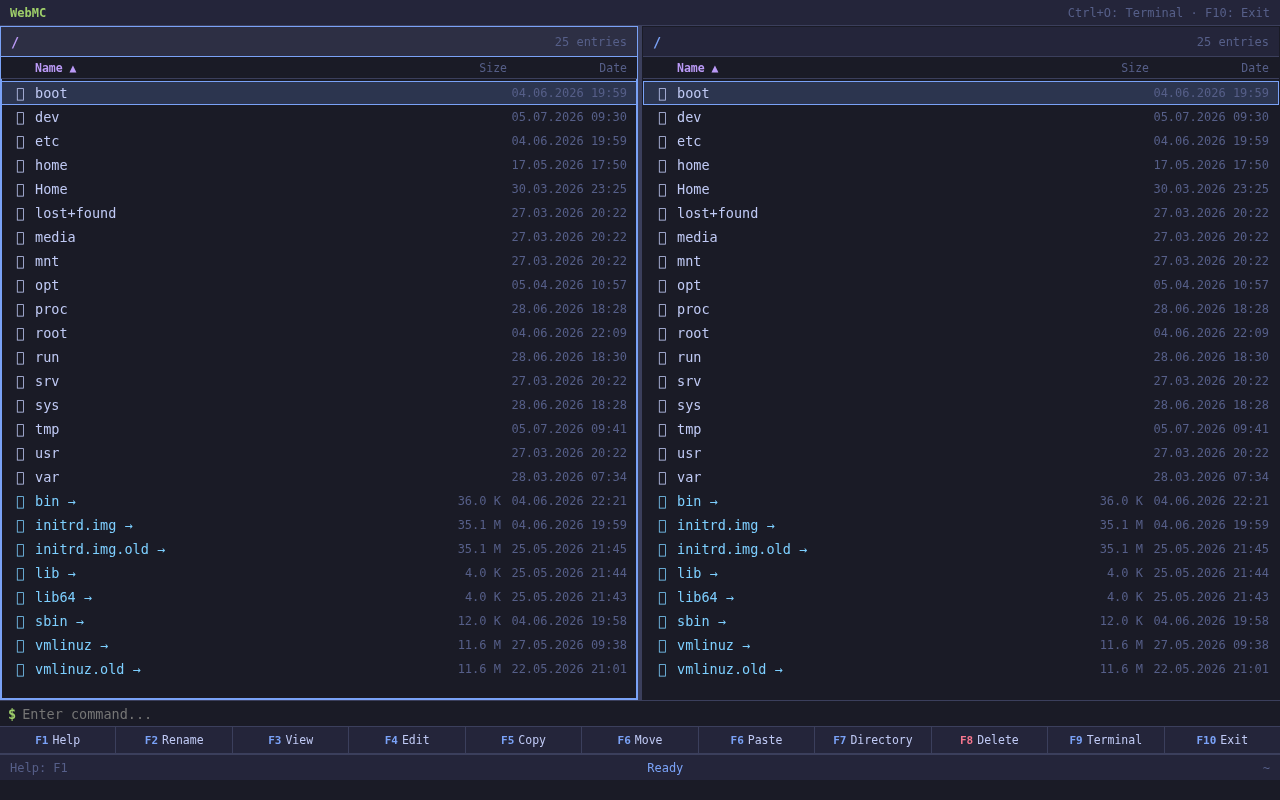
A web-based file manager inspired by Midnight Commander.
Runs on any machine with Node.js — no dependencies, no npm install needed.
Features
- Dual-panel layout — browse two directories side by side
- Keyboard-driven — full F1–F10, arrow keys, and command-line interface
- Built-in Terminal — execute shell commands directly in the browser
- Inline Editor — edit text files with save support (Ctrl+Enter to save)
- File Operations — copy, move, rename, delete, create directories
- Marking — select multiple files for batch operations
- Drag & Drop Upload — drag files from your desktop into the browser
- Download — single files or multi-file archives (.tar.gz)
- Search — find files by glob patterns (e.g.
*.txt) - Context Menu — right-click for quick actions
- PWA Ready — can be installed as a progressive web app
- Docker Support — ready-to-run container image
- i18n — English and German UI (configurable)
Quick Start
node server.js
Then open http://localhost:4500 in your browser.
Usage
node server.js [port] [--left <path>] [--right <path>]

Examples:
  node server.js                    # port 4500, panels: / and /
  node server.js 8080              # port 8080
  node server.js --left /home --right /tmp
  node server.js 8080 --left /etc --right /var/log
Configuration
Edit config.json in the project root:
{
  "port": 4500,
  "leftPanel": "/",
  "rightPanel": "/",
  "language": "en"
}
port— HTTP server port (default: 4500)leftPanel— default left panel pathrightPanel— default right panel pathlanguage— UI language:"en"(English) or"de"(German)
Command-line arguments override config.json values.
The language is loaded from config on startup. Changing the value requires a server restart.
Keyboard Shortcuts
| Key | Action |
|---|---|
| F1 | Help |
| F2 | Rename |
| F3 | View file |
| F4 | Edit file |
| F5 | Copy |
| F6 | Move |
| F7 | New directory |
| F8 | Delete |
| F9 | Terminal |
| F10 | Exit |
| Tab | Switch panel |
| ↑/↓ | Move cursor |
| PgUp/PgDn | Page up/down |
| Home/End | Beginning/End |
| Ins | Toggle mark |
| + | Mark all |
| \ | Invert selection |
| Ctrl+O | Terminal |
| Ctrl+R | Search |
| Ctrl+L | Refresh |
| Ctrl+\ | Invert selection |
| Alt+Enter | Open in other panel |
| : | Open command line |
Docker
docker build -t webmc .
docker run -p 4500:4500 \
  -v /:/mnt:ro \
  -e CONFIG='{"port":4500,"leftPanel":"/mnt","language":"en"}' \
  webmc
License
MIT — do what you want with it.
Categories
Download Statistics
5,510
Total Downloads
Related apps
Explore more like this
Explore allLinks
Details
Repository
knex666/webmc:latestLast Updated2026-09-05
First Seen2026-05-20
Runtime arguments
- Web UI
http://[IP]:[PORT:4500]/- Network
bridge- Shell
sh- Privileged
- false
Template configuration
mountPathrw
- Target
- /mnt/Unraid
- Value
- /mnt/user/
PortPorttcp
- Target
- 4500
- Value
- 4500
WEBMC_LEFTVariable
- Value
- /mnt/Unraid
WEBMC_RIGHTVariable
- Value
- /mnt/Unraid