
All apps · 0 apps

weblinked
Docker app from Stoatworks Labs' Repository
Overview
Readme
View on GitHubWebLinked
AI-assisted project. This codebase was created with Claude (Anthropic), directed and reviewed by a human author. NDI is verified end to end including alpha, DeckLink against a real Duo 2 with colour confirmed by an SDI loopback capture, and Syphon against Resolume Arena. OMT and AJA have never been tested against a receiver or a card. All three platforms now run: Windows x86_64 and Linux were exercised on real systems in August 2026, NDI included, on both. Frame-rate performance is verified on macOS and Linux only — the Windows machine available for testing is a two-vCPU VM with no GPU, so nothing here claims a rate for a real Windows PC. Status, honestly says which is which, and docs/04-verification.md records exactly what was measured and how.
A URL in. SDI and video-over-IP out.
WebLinked renders a web page offscreen at a broadcast raster and frame rate, then sends it to Blackmagic DeckLink and AJA cards over SDI, to the network as NDI and OMT, and fullscreen to a GPU-attached display. Point it at a scoreboard, a lower-third, a countdown clock, a dashboard or a whole HTML playback page, and it becomes a source your vision mixer can cut to — or a feed for a projector or LED processor.
Small on purpose: one binary, no service to install, no framework in the browser. It is driven from a control page, over HTTP, or over OSC from Companion or a show-control system.
weblinked --url https://example.com/scoreboard --format 1080p50 --ndi=Scoreboard

# A keyed graphic: alpha over NDI, and key + fill out of a DeckLink
weblinked --url https://example.com/lower-third --alpha --ndi=LowerThird --key --decklink=0

# Fullscreen on the second display, alongside SDI
weblinked --url https://example.com/wall --screen=1 --decklink=0

# An overlay for Resolume, with the page's alpha intact (macOS)
weblinked --url https://example.com/lower-third --syphon=LowerThird

# Several at once, each with its own browser, clock, raster and outputs
weblinked --config show.json
A 75-second tour of the real app, driven over its own HTTP control API. NDI is picked up
by a separate receiver (tools/ndi_probe), and the SDI output is a real DeckLink Duo 2 —
the panel names the sub-device it opened, and both outputs run off the same clock. See
docs/04-verification.md for what is verified and what is not.
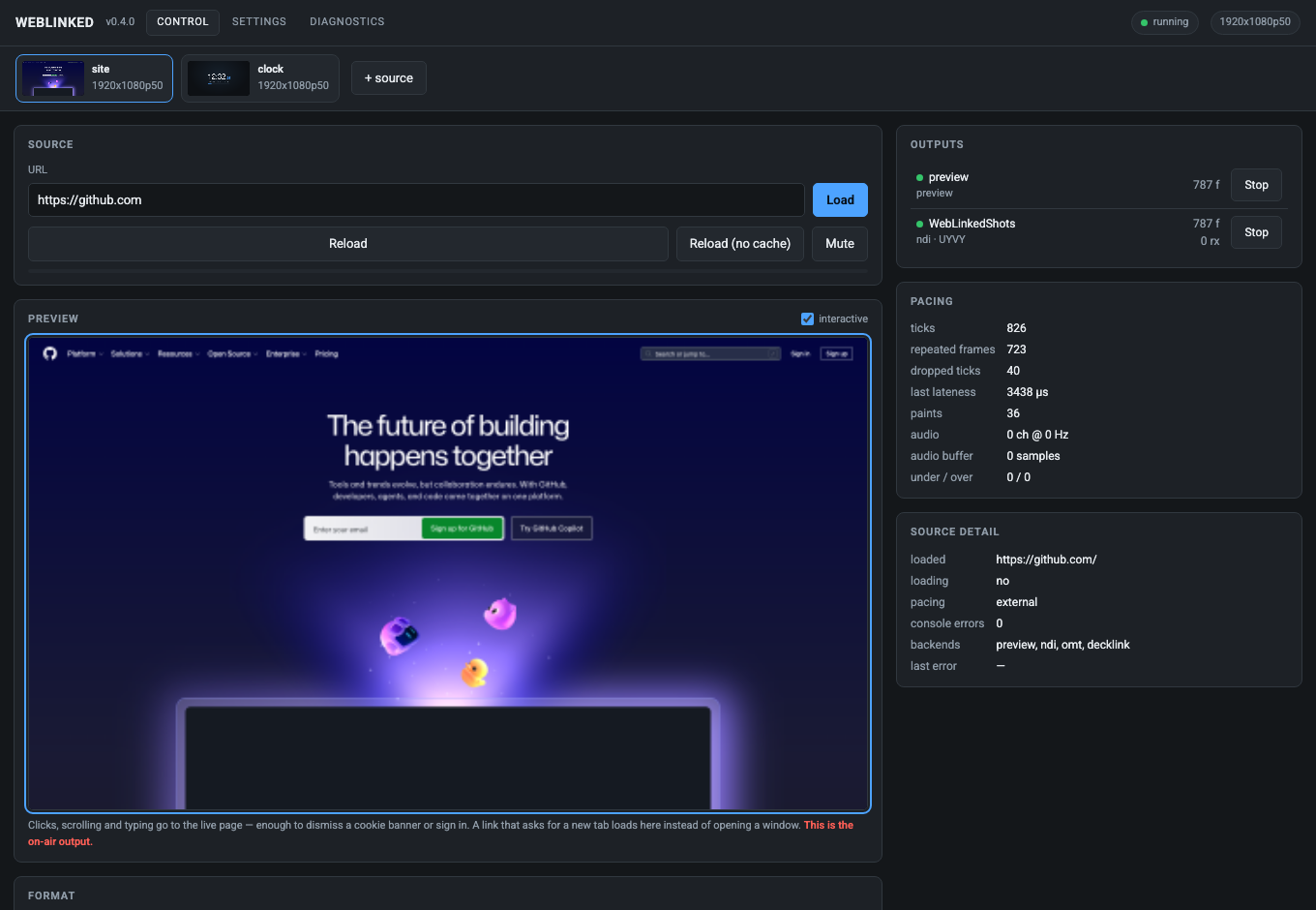
The control page, driving two sources. It is the whole UI — WebLinked serves it over HTTP and any browser on the network can reach it. The strip along the top carries a live thumbnail per source and only appears when there is more than one, so a single-source launch looks exactly as it always did. The preview is fed by the same frame pipeline as the SDI and NDI outputs, so if the preview is right, the outputs are right.
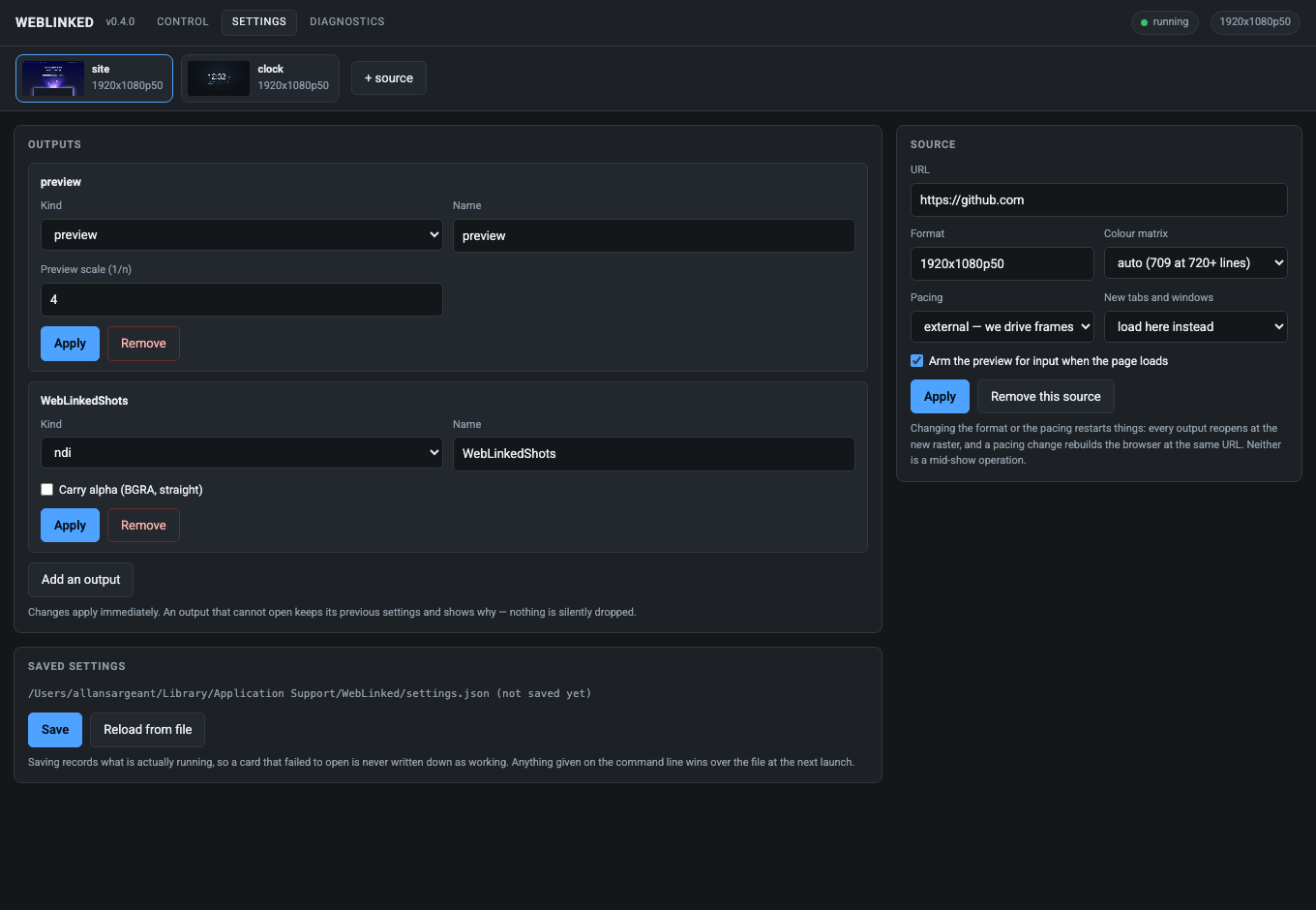
| Settings | Diagnostics |
|---|---|
 |
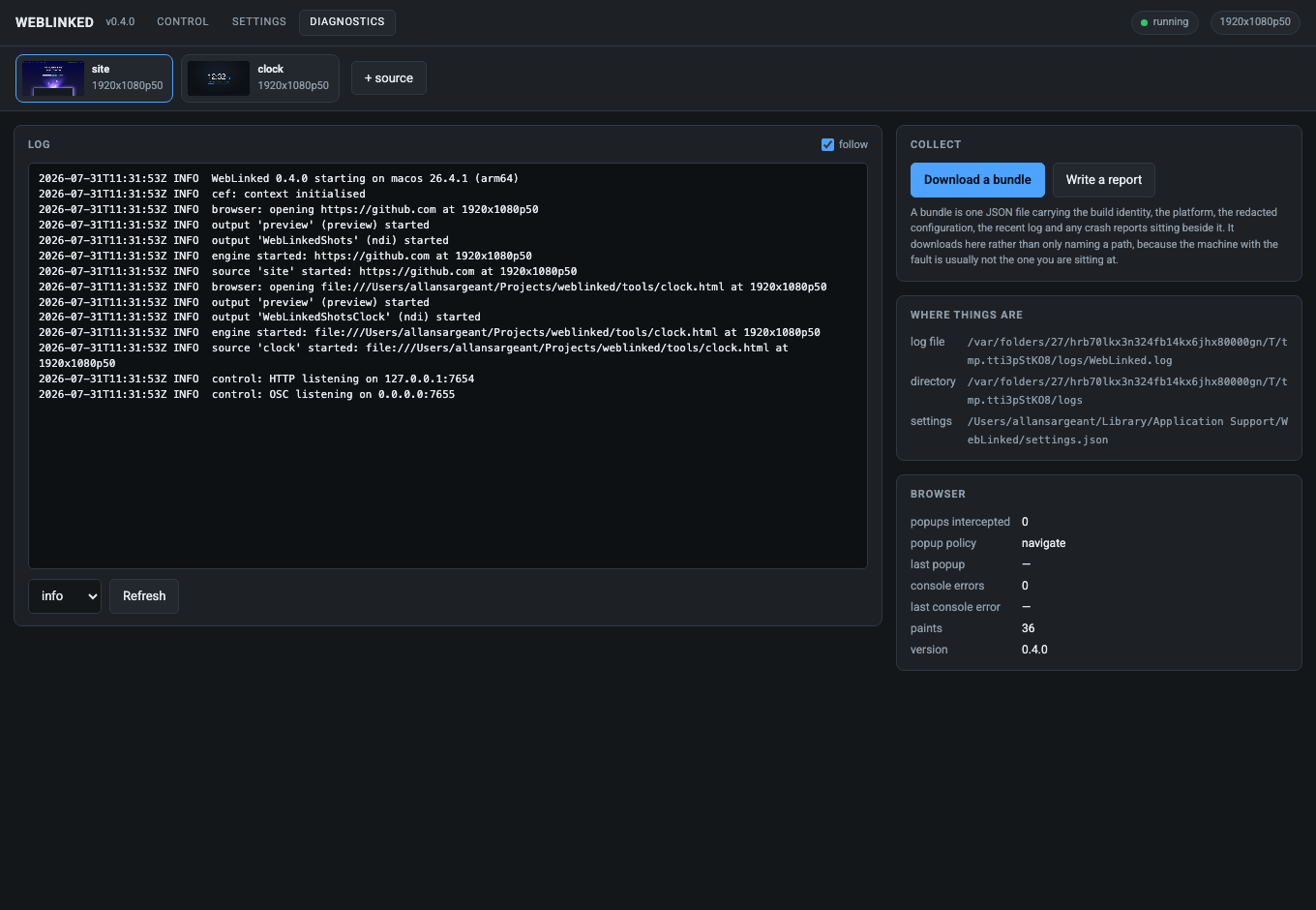 |
| Outputs, with only the fields each backend has. Saved to a file the next launch reads back. | The live log at a level you can change while the fault is happening, and a bundle that downloads. |
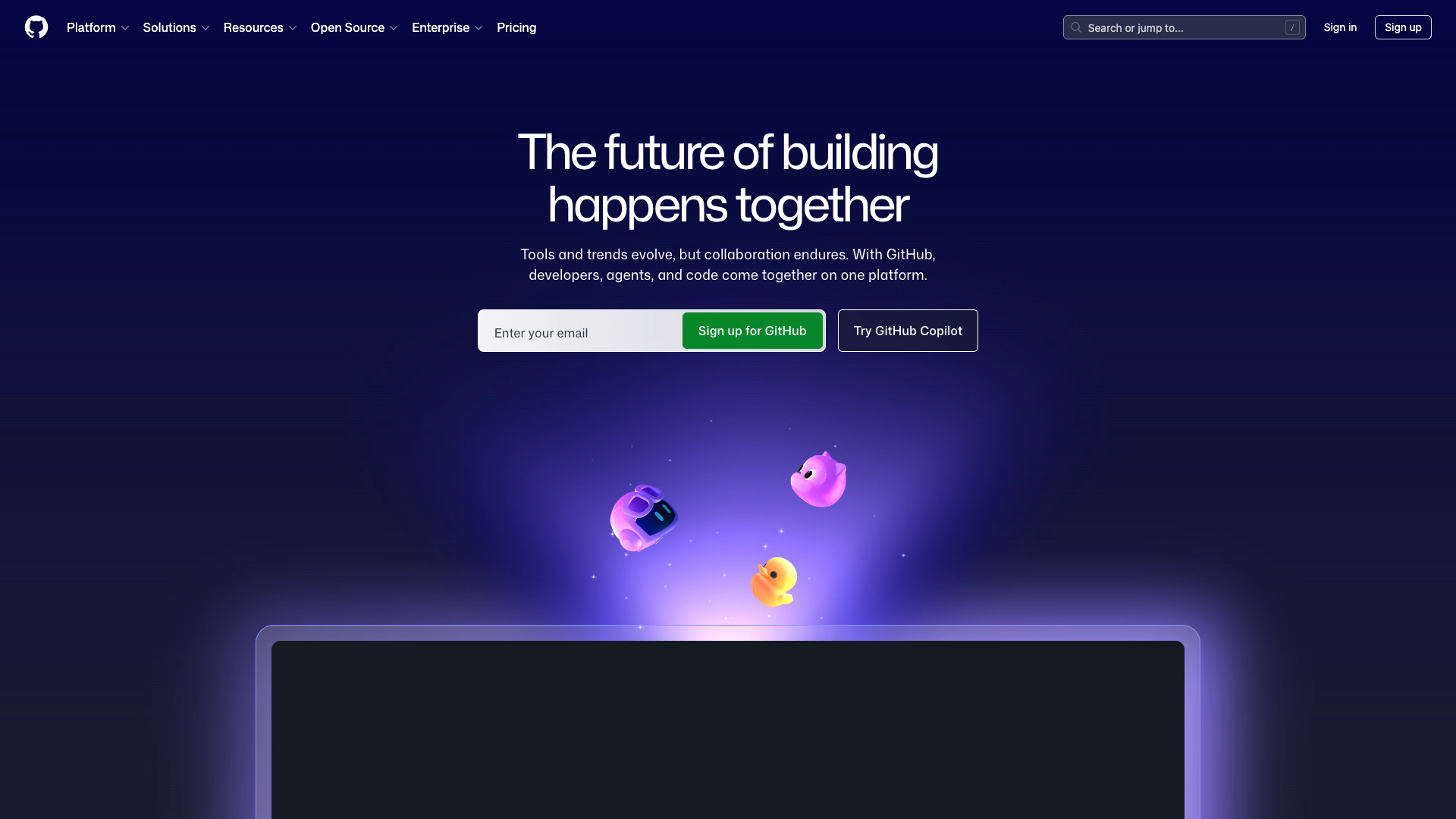
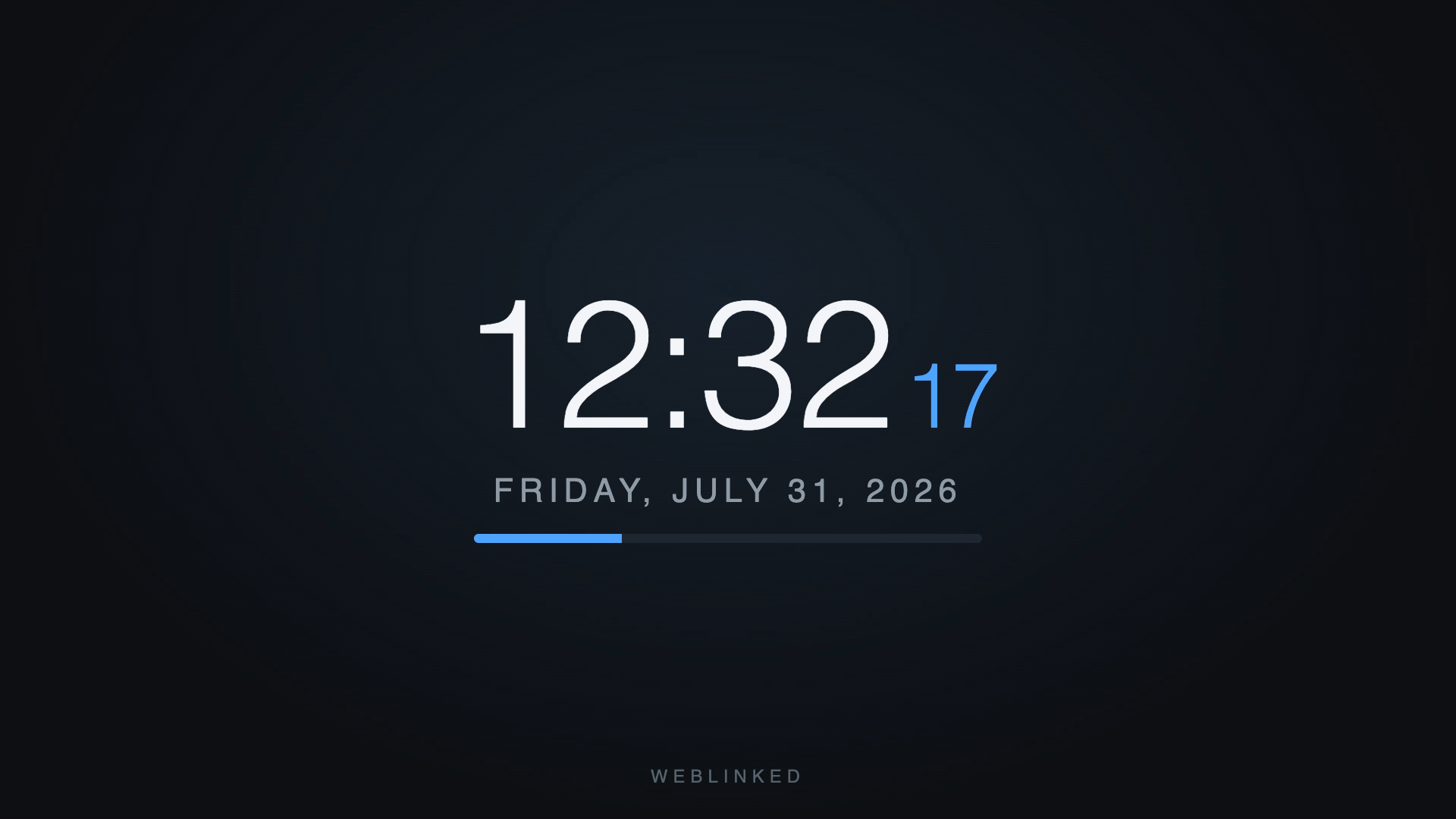
Both images below are real 1920×1080 frames received over NDI by a separate
receiver (tools/ndi_probe), converted back to RGB — not screenshots of a
browser. They are what a vision mixer would have seen.
| A live page | A time-of-day clock |
|---|---|
 |
 |
source site |
source clock |
Both were on the network at the same time, from the one process that served the control page above — which is what the two chips in its strip are.
tools/clock.html ships with the repo. It is a useful thing to point at a feed:
a clock is the quickest way to see at a glance whether a signal is live, and its
sub-second progress bar makes dropped frames visible to the naked eye.
Regenerate all five with tools/screenshots.sh.
Download
v1.2.0 — prebuilt for macOS, Windows and Linux. Pick your platform:
macOS — Apple Silicon
| Build | Download | Size |
|---|---|---|
| Apple Silicon · .dmg disk image | weblinked-engine-1.2.0-macos-arm64.dmg |
141 MB |
| Apple Silicon · .pkg installer | weblinked-engine-1.2.0-macos-arm64.pkg |
141 MB |
Windows — x64
| Build | Download | Size |
|---|---|---|
| x64 · .exe installer | weblinked-engine-1.2.0-windows-x86_64-setup.exe |
135 MB |
| x64 · .zip archive | weblinked-engine-1.2.0-windows-x86_64.zip |
182 MB |
Linux — x64
| Build | Download | Size |
|---|---|---|
| x64 · .tar.gz archive | weblinked-engine-1.2.0-linux-x86_64.tar.gz |
356 MB |
All builds, checksums and release notes: github.com/stoatworks-labs/weblinked/releases.
macOS builds are signed and notarised and open normally. The Windows builds are unsigned, so SmartScreen warns once.
What it does
Renders any URL through Chromium (CEF), offscreen, at the exact raster and rate you ask for — 1080p50, 720p59.94, 1080i25, 2160p30, or an arbitrary raster like
3840x600p60for an LED strip.Carries the page's audio — WebAudio,
<video>, anything Chromium plays — as 48 kHz float, embedded in SDI or sent alongside the IP video.Outputs to seven kinds of destination at once: DeckLink, AJA, NDI, OMT, a fullscreen GPU display, a Syphon source other applications on the same machine can pick up, and RTMP/SRT to a streaming server. Every output takes the same frame, so what NDI sees is what SDI sees.
Straight into a VJ application (
--syphonon macOS,--spouton Windows). The page appears as a source in Resolume Arena, VDMX, TouchDesigner or anything else that speaks either protocol — on the same machine, over shared memory, with the page's own alpha intact so an HTML overlay lands on a layer already keyed. Verified against Arena 7.27.1, which identifies it as premultiplied without being told; the Spout backend is verified against its own receiver rather than against a real Spout application.Fullscreen on a display (
--screen), for a projector, a confidence monitor or an LED processor fed from a GPU head. Not a second browser window — it puts the frames the engine already produced straight onto the glass with Metal (Direct3D on Windows, EGL on Linux), which is why it stays consistent with the SDI and NDI outputs. Paced by the display, so a 50 Hz page on a 60 Hz monitor repeats frames instead of tearing, and it fits, fills or stretches to a head whose shape does not match the raster.Straight to a Linux display (
--kms), with no X server, no compositor and no GPU — the kernel's own display interface, drawn by the CPU. For small boards driving a screen and nothing else.--rotateturns the picture for a screen hung on its side, and a page that is not changing costs almost nothing.Frame-accurate pacing. The engine's clock drives Chromium one frame at a time (
SendExternalBeginFrame) rather than letting the browser paint on its own timer, so 50 ticks a second means 50 paints a second.Alpha, properly, and measured on the wire in both directions. NDI and OMT carry the page's transparency, and a DeckLink can output key + fill on separate SDI connectors (or key internally over its own input). Chromium composites premultiplied and every destination here expects straight alpha, so WebLinked un-premultiplies — without that, soft edges, drop shadows and fades all render too dark on a keyer.
A background colour, per output. The same page can leave twice: as a key down an SDI keyer or an NDI feed with alpha, and composited over flat green for a switcher that only has a chroma keyer. The colour is chosen per output and toggles against transparent from the settings page, so one browser paint feeds both. Changing it does not restart the output.
An interactive preview. The control page's preview forwards clicks, scrolling and typing to the live page, which is the only practical way to dismiss a cookie banner, close a modal or sign in on a machine whose browser you cannot otherwise reach. On by default (
--no-interactiveturns it off), and always outlined when armed, because it is the on-air output. A link that asks for a new tab loads in place rather than opening a window — a windowless browser cannot own one.A settings page. Add, edit, remove, start and stop outputs from the browser, with only the fields each backend actually has; change raster, colour matrix and pacing; and save the lot to a file the next launch reads back. Anything given on the command line still wins over the file.
Diagnostics in the app. The live log with the level changeable while the fault is happening, a crash report on demand, and a one-file diagnostics bundle that downloads rather than naming a path on a machine you are not sitting at.
Live control: change the URL, reload, run JavaScript in the page, change raster, or stop and start an output mid-show, from the control page, HTTP, or OSC.
Several sources in one process, as tabs. Each is an independent pipeline — its own browser, clock, raster and outputs — and they share nothing but Chromium's process. A page that hangs, a card that will not open or a raster change on one source cannot touch the others. Add one with
+ tabon the control page, or start a whole show at once with--config show.json. Every tab routes to its own outputs, so one can be going to SDI as key + fill while another goes out over NDI. The tab bar carries a live thumbnail per source; HTTP verbs take?source=<id>and OSC takes/weblinked/source/<id>/<verb>. Leave the id off and the request goes to the first source, so everything that drove a single-source WebLinked still does.How many a machine can carry is a property of that machine, not a setting. Three 1080p sources drop frames on an M4 Max; three at 720p25 do not. Measure it where the show will run — docs/04-verification.md has the numbers and the method.
A menu-bar / system-tray icon on macOS, Windows and Linux, for a machine where WebLinked should live beside the clock rather than in a terminal. It carries the source count, opens the control page, copies its address and quits cleanly.
--no-trayturns it off.
What it does not do
- No compositing, no layers, no playlist. Each source renders one page. If you need two graphics in one picture, that is what the page is for; if you need two pictures, that is what a second source is for.
- No capture or input. Output only.
- No genlock. The engine's clock is a software clock; an SDI card's own scheduled playback absorbs the difference. See docs/01-architecture.md for where that boundary sits and what it costs.
Status, honestly
| Backend | State |
|---|---|
| NDI | Verified end to end, including alpha. A real receiver confirms raster, rate, pixel format, colour and audio. |
| Preview | Verified, and interactive — it is the control page's confidence monitor. |
| Several sources | Verified: three at once on three rasters, each confirmed by a separate receiver, with one retargeted and a fourth added and removed mid-run without disturbing the others. Frame rates are a capacity question — see below. |
| Settings + diagnostics pages | Verified against a running instance: outputs added, renamed and removed, settings saved and read back after a restart, the log and bundle served. |
| Screen (fullscreen GPU) | Verified on this Mac, across two displays: picture, all three scaling modes, live add and remove, and pacing measured against the display's own refresh — a 50 Hz source on a 60 Hz head presents at 60.1/s, a ratio of 1.199 against a theoretical 1.200. No projector. Linux verified too: a 1920x1080 window under X11/EGL on software GL, checked by screenshotting it against the source page rather than by reading counters. Windows verified on a software renderer only: on first contact it showed nothing but black while its counters reported frames presented; v1.0.5 fixed that, checked by reading the desktop back (tools/screen_probe_win.cpp) on the lab VM's Microsoft Basic Render Driver. No real Windows GPU has run the fixed code. |
| KMS (Linux, no X) | Verified on a virtual display, not a real one: all four rotations and letterboxing, read back from the scanout by ffmpeg's kmsgrab, running inside the BirdDog PLAY's own Debian 10 rootfs. No real display controller or monitor yet, and no measurement of the copy's cost on a slow CPU. |
| Menu bar / tray icon | Verified on all three platforms, by using it. macOS: icon photographed, menu opened, clean shutdown. Windows x86_64: icon confirmed present-then-absent by pixel diff, menu opened, Copy control address checked against the clipboard, Quit shut down in order. Linux: registered with KDE Plasma's own StatusNotifierWatcher, menu read over dbusmenu, Quit clean. Not verified: the icon's pixels on a healthy KDE desktop, and the Explorer-restart re-add path on Windows. |
| OMT | Compiles against libomt.h 1.0.0.16. Never tested against an OMT receiver. |
| DeckLink | Verified against a real card, on two card profiles (DeckLink Duo 2): output, pre-roll and buffer level, with colour confirmed by SDI loopback captures at 1080p50 and 1080p25 — identical sampled values in a full-duplex and a half-duplex profile. Key + fill is measured to the extent one card allows: the fill carries straight alpha. The key channel itself, the internal-keying composite and audio over SDI are still unmeasured, and a keyed 1080p50 is beyond what this card will carry. |
| AJA | Compiles against libajantv2 18.1. Never run against a card. Off by default. |
| Container image | Builds from this repository, runs the unit suite as a build step, and is smoke-tested headless in CI on every build before it is pushed: running, ticking, painting, the right version, a correctly sized preview frame. No NDI receiver has seen output from the image, because libndi is not in it. See docker/README.md. |
| Shared surface (Syphon / Spout) | Syphon verified against Resolume Arena 7.27.1: it lists the source, loads it on a layer at 1920x1080 and labels it premultiplied unaided. Colour, alpha and orientation are exact through a receiver linking Arena's own Syphon framework. Spout is verified only through a harness — the real backend and SDK, its pixels checked by a Spout receiver, but no real Spout application was involved and the shipped Windows binary's own --spout output has not been driven. |
Read docs/04-verification.md before trusting any of this on air. It records exactly what was measured, how, and what was not.
Verified on macOS 26.4 / Apple Silicon, and — since August 2026 — on Windows 11 x86_64 and Ubuntu 24.04 as well. On both of those the unit suite passes (115 tests, 26191 checks), the control API, OSC, mDNS and the tray work, and NDI was received and decoded by an independent receiver on another machine. Two things that run there are still unproven: DeckLink and AJA (no cards in either machine), and Windows frame-rate performance — that machine has two vCPUs and no GPU driver. Since v1.1.0 it publishes about 50 frames/s at 1080p50 (50.2/s over three one-minute runs, no held frames); no Windows PC with a GPU has been measured. See docs/02-building.md and §32–34 of docs/04-verification.md.
Quick start
git clone https://github.com/stoatworks-labs/weblinked
cd weblinked
cmake -S . -B build -G Ninja -DCMAKE_BUILD_TYPE=Release
cmake --build build
CMake downloads the CEF binary distribution on first configure (~125 MB) and
caches it in third_party/cef. Nothing else is required to build: the NDI and
OMT backends resolve their libraries at run time, and the SDI SDKs are optional.
Then:
./build/Release/WebLinked.app/Contents/MacOS/WebLinked \
  --url https://example.com/graphic.html \
  --format 1080p50 \
  --ndi=Graphic
WebLinked opens no window of its own. It is a render host and a control server: the UI is the control page it serves, which you open in a browser, drive over HTTP or OSC, or reach from its own menu-bar / system-tray icon, which opens the page for you and quits the process cleanly. That icon is a platform status item, not a window — which is why there is still no GUI toolkit anywhere in this project.
Started with no arguments — by a double-click, say — it hands the control page to
your default browser once the server is listening, so it does not look like
nothing happened. A command line is assumed to know what it wants and gets no
browser unless you add --open; --no-open suppresses it either way.
--help lists every option and reports which backends this build contains.
One download. Up to v0.7.1 there were two — a desktop app that wrapped the engine in a separate tray launcher, and the engine only. The engine now puts its own icon in the menu bar, so the wrapper was retired in v1.0.0 and there is just the one thing to install.
Run it in Docker
For a server with no display and no card: a URL in, NDI out, headless.
docker run -d --name weblinked --network host \
  -v /path/to/ndi/lib:/opt/ndi/lib:ro \
  -e WEBLINKED_BIND=100.64.0.5 -e WEBLINKED_TOKEN=change-me \
  ghcr.io/stoatworks-labs/weblinked:edge \
  --url 'https://grafana.example/public-dashboards/abc123' \
  --format 1080p50 --ndi=Grafana
ghcr.io/stoatworks-labs/weblinked—:edgefollowsmain,:X.Y.Zis a release,:sha-xxxxxxxone commit. It used to be published asghcr.io/stoatworks-labs/weblinked-docker, which no longer updates: its:edgeis frozen at a build of WebLinked as of 22 August 2026 (just after v1.0.1). Move to the new name.- Bring your own NDI runtime.
libndi.so.6is not in the image and cannot be — mount it at/opt/ndi/lib. Without it everything runs and the NDI output reports itself unavailable. - Host networking is required for NDI discovery, and puts the control port on
every interface the server has. Keep it on a tailnet, bind it there, and set a
token:
POST /api/scriptruns arbitrary JavaScript in the page. - NDI, OMT, the preview and HTTP/OSC control only. No SDI, screen, KMS, Syphon, Spout or RTMP/SRT output, and no mDNS advertisement — find it by address.
Everything else — the environment variables, Compose, Grafana, building the image yourself and what is verified — is in docker/README.md.
Control
The control page is served at http://127.0.0.1:7654/, so a phone on the same
network is a remote panel.
It finds itself
Started with --bind 0.0.0.0, WebLinked advertises its control API over mDNS
as _weblinked._tcp, so rookery,
the Companion module and anything else can list it instead of asking for an
address. --name "Stage Left" sets what shows up; without it the name is the
host and the control port.
The advertisement carries the OSC port and prefix, which nothing in the HTTP API reports — a controller that has to guess them looks perfectly connected and silently drops every cue, because OSC has no replies.
An instance on the default loopback bind does not advertise, on purpose:
nothing off its machine could reach the address it would publish. --no-mdns
turns it off entirely, for networks where multicast is filtered.
# What is on the network right now
dns-sd -B _weblinked._tcp          # macOS
avahi-browse -r _weblinked._tcp    # Linux
curl -X POST -d '{"url":"https://example.com/next"}' http://127.0.0.1:7654/api/url
curl -X POST -d '{"ignore_cache":true}'              http://127.0.0.1:7654/api/reload
curl -X POST -d '{"name":"Graphic","enabled":false}' http://127.0.0.1:7654/api/output
# Click at the centre of the page, in normalised coordinates
curl -X POST -d '{"type":"down","nx":0.5,"ny":0.5}'  http://127.0.0.1:7654/api/input

# With several sources, ?source= picks one; without it you get the first
curl http://127.0.0.1:7654/api/sources
curl -X POST -d '{"url":"https://example.com/next"}' \
     'http://127.0.0.1:7654/api/url?source=lower-third'
Over OSC, on port 7655 — the shape a Companion button sends:
/weblinked/url          "https://example.com/next"
/weblinked/reload       1
/weblinked/output/Graphic  0
/weblinked/script       "showLowerThird('Anna Kowalski')"

# One feed by name, when several are running
/weblinked/source/lower-third/url  "https://example.com/next"
/weblinked/script is the useful one: a graphic that already exposes a function
can be driven without any integration work at all.
Full reference: docs/03-control-api.md.
The control surface has no authentication by default and binds to loopback.
If you bind it to a network interface, set --token, and understand that anyone
who can reach the port can change what is on air.
Requirements
- NDI: the NDI runtime or SDK installed. Not redistributable, so WebLinked loads it at run time; without it the NDI output reports itself unavailable and everything else keeps working.
- OMT:
libomtandlibvmxbeside the binary, from the OMT releases. Published for Windows x64/arm64 and macOS arm64 only — there is no Linux binary. - DeckLink: Desktop Video installed, plus the DeckLink SDK at build time
(
-DDECKLINK_SDK_DIR=...). - AJA: libajantv2 18.x at build
time (
-DNTV2_DIR=... -DNTV2_BUILD_DIR=...) and-DWEBLINKED_WITH_AJA=ON.
Documentation
- docs/00-overview.md — what this is and who it is for
- docs/01-architecture.md — the pipeline, and the decisions that shaped it
- docs/02-building.md — building on each platform, and the macOS bundle traps
- docs/03-control-api.md — HTTP and OSC reference
- docs/04-verification.md — what has actually been proven, and how to reproduce it
- docs/diagnostics.md — logs, crash reports, bundles
- docs/05-settings.md — the settings page and the file it writes
- docs/06-ndi-distribution.md — why NDI is loaded at run time, what the licence permits, and the attribution every project owes
- docker/README.md — the headless container image: NDI out, no display, no card
- AGENTS.md — orientation for an AI assistant or a new contributor
Control it from Companion
companion-module-weblinked is a Bitfocus Companion connection module for this app.
Navigate, reload, run JavaScript in the page, mute, change format, and enable or disable any output — plus the pacing and receiver numbers that say whether the graphic is actually going out.
It uses the HTTP API rather than OSC, because OSC here has no feedback path: a button could act but never light. If you only need to fire buttons, the generic OSC module works fine — see docs/03-control-api.md.
It is not in the official Companion module store — install it via Settings → Developer modules path.
This project is built on other people's work — see ATTRIBUTIONS.md.
Licence
MIT — see LICENSE.
Third-party components keep their own licences. third_party/omt/libomt.h is MIT
(Open Media Transport contributors). The CEF binary distribution, the NDI SDK,
the DeckLink SDK and libajantv2 are each obtained separately under their own
terms; none of them are redistributed here.
NDI® is a registered trademark of Vizrt NDI AB. See https://ndi.video. The NDI runtime is loaded at run time and is not redistributed here — see docs/06-ndi-distribution.md for why, and for what the licence does and does not permit. NDI Tools are not redistributed either; get them from https://ndi.video/tools.
This project is not affiliated with or endorsed by Vizrt, Blackmagic Design, or AJA Video Systems.
Review it before you trust it with a show — Status, honestly is the list of what has and has not been measured.
Requirements
Categories
Related apps
Explore more like this
Explore allDetails
ghcr.io/stoatworks-labs/weblinked:edgeRuntime arguments
- Web UI
http://[IP]:7654/- Network
host- Shell
sh- Privileged
- false
Template configuration
The page to render. For Grafana, use a public dashboard link and add &kiosk to drop the surrounding UI — an offscreen browser cannot be typed into, so the page must need no login.
- Target
- WEBLINKED_URL
- Default
- https://example.com
- Value
- https://example.com
Raster and exact frame rate, for example 1080p50, 720p59.94 or 1920x1080i25. Rates are exact rationals: 59.94 is 60000/1001, not 59.94.
- Target
- WEBLINKED_FORMAT
- Default
- 1080p50
- Value
- 1080p50
The name this appears as on the network. Leave empty to disable the NDI output entirely.
- Target
- WEBLINKED_NDI_NAME
- Default
- WebLinked
- Value
- WebLinked
A directory on the host containing libndi.so.6 from the NDI SDK for Linux, which you download and licence yourself. Mounted read-only. If this is empty the container still starts and the NDI output reports itself unavailable.
- Target
- /opt/ndi/lib
- Default
- /mnt/user/appdata/weblinked/ndi
- Value
- /mnt/user/appdata/weblinked/ndi
Persists cookies and site storage across restarts. Two containers must never share one directory — Chromium locks it, and the second to start will fail.
- Target
- /cache
- Default
- /mnt/user/appdata/weblinked/cache
- Value
- /mnt/user/appdata/weblinked/cache
Tells WebLinked to use the mounted cache directory. Clear this to keep cookies and storage in memory instead, discarded on restart.
- Target
- WEBLINKED_CACHE
- Default
- /cache
- Value
- /cache
HTTP port for the control page and API. On host networking this binds the host directly, so it must not collide with anything else on this server.
- Target
- WEBLINKED_PORT
- Default
- 7654
- Value
- 7654
UDP port the OSC receiver listens on, for Companion or a show-control system.
- Target
- WEBLINKED_OSC_PORT
- Default
- 7655
- Value
- 7655
Which address the control API listens on. Host networking means the default, 0.0.0.0, is every interface this server has — including the one facing your LAN. Set this to your Tailscale address (100.x.y.z) to make it reachable only through the tailnet. Enabling this container's Tailscale toggle gives it its own address to use here.
- Target
- WEBLINKED_BIND
- Default
- 0.0.0.0
- Value
- 0.0.0.0
If set, every HTTP request must carry this token. The API is otherwise unauthenticated, and POST /api/script runs arbitrary JavaScript in the page — set this even on a private network.
- Target
- WEBLINKED_TOKEN
Set to true to send BGRA with the page's alpha channel intact, for a keyed graphic or an overlay. Leave false for a full-frame source such as a dashboard.
- Target
- WEBLINKED_ALPHA
- Default
- false
- Value
- false
Set to true to ignore the page's audio entirely. A dashboard has none, so this costs nothing either way.
- Target
- WEBLINKED_NO_AUDIO
- Default
- false
- Value
- false