
All apps · 0 apps
WebDataStudio
Docker app from gilde's Repository
Overview
Readme
View on GitHub

A database studio that runs in your browser. One container, nine engines, no install.
Documentation · Dokumentation (Deutsch) · Container image · Changelog
Run it
docker run -d -p 8080:8080 -v wds-data:/data \
  -e WDS_CONN_LOCAL="postgres://app:pw@db:5432/shop" \
  ghcr.io/fgilde/webdatastudio
Open http://localhost:8080. Without WDS_USER and WDS_PASSWORD there is no login screen —
the app opens straight into the studio.
From a home-server app store
| Store | How |
|---|---|
| CasaOS | App Store → Add source with https://github.com/fgilde/WebDataStudio/releases/download/store/casaos-appstore.zip |
| Umbrel | App Store → ⋯ → Community app stores with https://github.com/fgilde/WebDataStudio |
| Unraid | Community Applications, or copy templates/webdatastudio.xml into /boot/config/plugins/dockerMan/templates-user/ |
| Cosmos | Market → ServApps |
| Proxmox VE | bash -c "$(curl -fsSL https://raw.githubusercontent.com/fgilde/WebDataStudio/master/deploy/proxmox/webdatastudio.sh)" on the host: an unprivileged Debian container, the studio as a systemd service, and a generated password. install.sh is the half that runs inside and works on any Debian machine |
Those packages set WDS_USER and WDS_PASSWORD, so the studio they install has a login screen.
 In .NET Aspire
var db = builder.AddPostgres("db").AddDatabase("shop");

builder.AddContainer("studio", "ghcr.io/fgilde/webdatastudio")
       .WithHttpEndpoint(port: 8080, targetPort: 8080)
       .WithEnvironment("WDS_CONN_SHOP", db.Resource.ConnectionStringExpression)
       .WithVolume("wds-data", "/data");
Every connection string you can express as an environment variable is attached at startup, so a studio for your development stack is one resource in the app host.
 Or with Nextended.Aspire.Hosting.WebDataStudio,
which wires the databases of your stack into the studio for you:
Or with Nextended.Aspire.Hosting.WebDataStudio,
which wires the databases of your stack into the studio for you:
builder.AddPostgres("pg").AddDatabase("shop").WithWebDataStudio();
builder.AddSqlServer("sql").AddDatabase("orders").WithWebDataStudio();
Both databases land in one studio; a second studioName gives you a second studio.
Engines
PostgreSQL · MySQL and MariaDB · Microsoft SQL Server · SQLite · Oracle · DuckDB · ClickHouse · MongoDB · Redis · object storage (S3-compatible, Azure Blob, Google Cloud Storage, a folder) · OData services
Each driver declares what it can do, and the UI hides what an engine does not support instead of offering a button that fails.
The two that have no SQL still browse. The data tab asks the driver for the page: a MongoDB collection
is read with find().sort().skip().limit() and your column filter is translated into the query, while
a Redis database, key prefix or single key is read as the table it makes — the keys with their types,
their expiry and their size, or a hash as field and value.
What it does
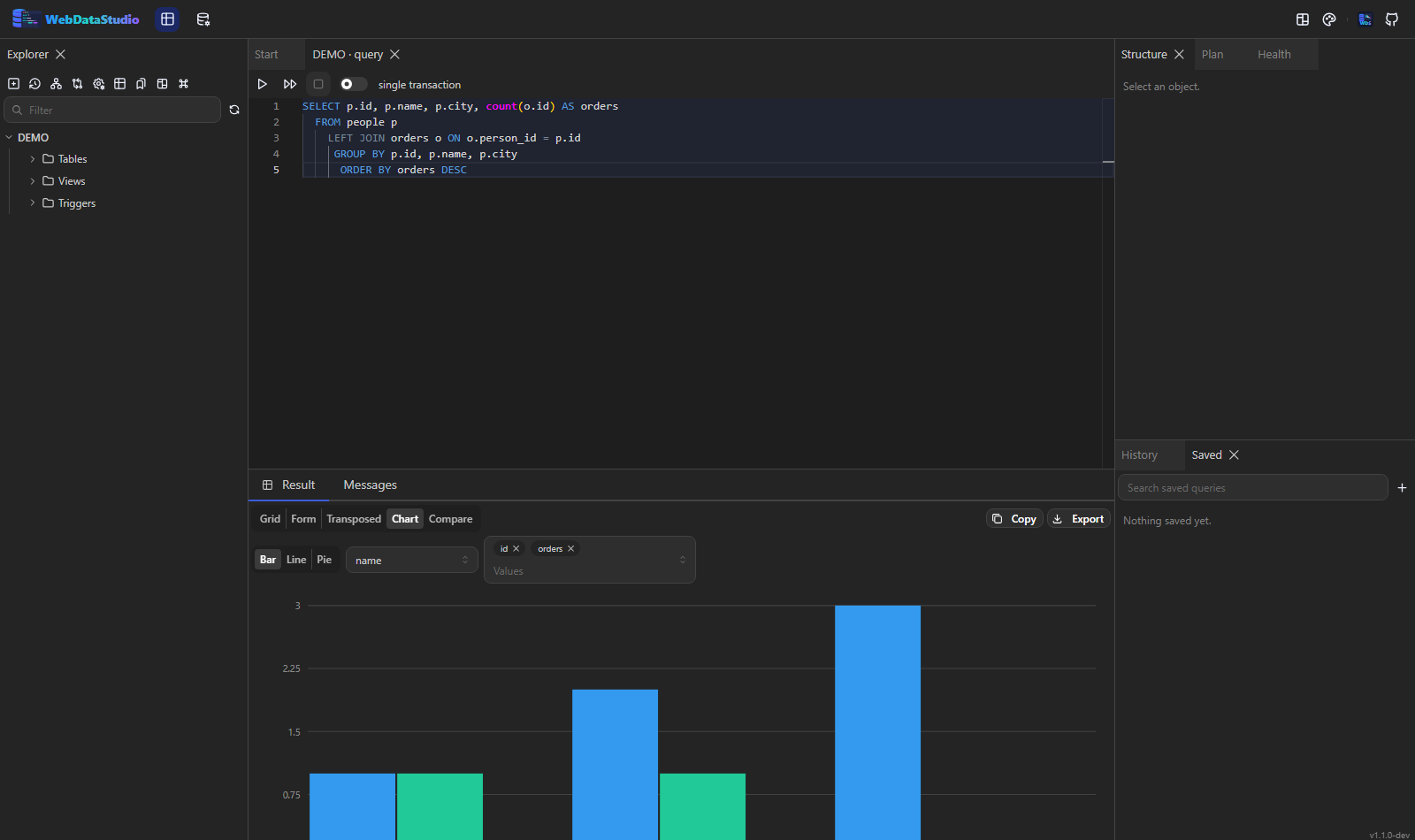
- Query editor — Monaco with dialect-aware highlighting, schema-aware completion, formatting, the statement under the cursor highlighted, run selection with F5, bind parameters, snippets, saved queries with folders, and history that survives a restart.
- Results — a virtualised grid for hundreds of thousands of rows, grouping, a form view, a
transposed view, charts, a map for geography, and a comparison between two results. Every
per-column filter reads a small language:
^starts,$ends,~hasn't,>10,NULL,LAST MONTH, a space for AND and a comma for OR. - Archives — a result kept as a file the studio holds on to, reopened as a grid later, and scripted back out as inserts. NDJSON, so anything can read it.
- Editing — spreadsheet-style cell editing with a change-script preview before anything runs, foreign-key lookups, bulk updates, insert and delete, one step of undo, and generated test rows that respect the columns' types and foreign keys.
- Export and import — CSV, TSV, Excel, JSON, NDJSON, XML, YAML, Markdown, HTML, SQL inserts, SQL schema and Parquet, streamed rather than buffered; import from CSV, Excel, JSON and SQL with a column mapping; table-to-table copy across engines.
- Schema — a table designer, index and constraint management, view, procedure and trigger
editing, and a migration script preview for every change. Per object: statistics, privileges,
dependencies, its
CREATEstatement, row-level security policies, and the partitions of a partitioned table. - Following the data — a column borrowed from the table a foreign key points at, shown next to the id; a perspective panel that opens one row into everything related to it, as deep as you care to look; and a table followed on a timer, with the rows that are new since the last read tinted.
- Object storage — S3, Azure Blob, Google Cloud Storage or a folder as a connection: containers and prefixes in the tree, an object previewed, a Parquet, CSV or JSON file — or a whole prefix — queried as a table through DuckDB, and a file turned into a real table in the database next to it.
- A dashboard — the statements somebody asks for every morning, side by side and running themselves: a number, a table, a bar per row. Each tile goes through the same endpoint, row cap, masking and audit line as a query tab.
- What a row looked like before — read from what the database itself kept: a system-versioned table on SQL Server, system versioning on MariaDB, flashback on Oracle. With what changed between the versions, and nothing invented where an engine keeps none.
- A seatbelt for the editor — hold a transaction open across statements: run the
UPDATE, look at what it did while nobody else can see it, then commit or roll it back. Plus "keep going on error" for the script of a hundred inserts, a pivot over the rows on screen, and the plan of a statement held against the plan of its previous run. - Schema changes, previewed — a table designer, and editors for the objects a designer never
covered: a view's
SELECT, a procedure's or trigger's source, a sequence including the restart after an import wrote its own ids, schemas, and the description the database itself keeps. Every one of them shows the statement — with what depends on the object — before anything runs. - Documents — what is actually inside a JSON or JSONB column: which paths exist, how often, with
which types and an example, plus the
SELECTthat flattens them into columns in this engine's own spelling. - MongoDB and Redis in the same grid — a collection paged, sorted and filtered by the server with
a
find, nested values kept as JSON in their cell and a field the sample never saw marked as such; a key space as its keys with type, TTL, length and memory, and a key as field and value, member and score, or index and value. Read-only, and it names the command that writes instead. - Data quality — rules about the rows rather than the catalogue: has a value, no duplicates, in a range, points at a row that exists, is recent, or a condition of your own. Each one counts the rows that break it, a failing rule joins the health findings and the alert webhook, every run is kept so a rule says "worse by 7" rather than only today's count, and the rules a deployment owns live in the repository as JSON.
- Profiling — what a table actually holds, counted in one statement: rows, empty values, distinct values, smallest and largest per column. Plus the columns whose values look like an email address, an IBAN, a card number or a street address, which is how a column nobody named helpfully gets masked — and one click turns any of it into a data quality rule.
- A way back — a statement that takes every row reads the table into an archive first, and a suggested index can be measured rather than trusted: created, the plan asked again, dropped.
- Reports — a saved query with a connection is a form: its bind parameters are the boxes, the link carries the values and runs by itself, and the answer downloads as a CSV. Reading only.
- Notes — what somebody worked out about a table, kept next to the table: a name, a date and a sentence, with no DDL right and no migration.
- A development subset — rows from one table, the rows they point at, and what is about people replaced, written as one SQL script that loads into an empty database. Keys are never touched and the same value always becomes the same pseudonym, so the tables still agree with each other.
- Analysis — estimated and actual execution plans with a cost heat map, an index advisor that
writes the
CREATE INDEXfor you, a deep analyze for missing, unused and duplicate indexes, table statistics, slow queries and server metrics. - Comparison — schema and data diffs between two connections, with a sync script in a diff editor.
- Administration — maintenance commands, sessions, databases, users and privileges, server logs, scheduled jobs, a captured minute of what the server runs and what the index advisor makes of it, how much every table grew since the studio last looked, a dashboard that draws its numbers over half an hour rather than only the last reading, and backup and restore through the engines' own tools with the format and flags they offer.
- Who may, and who did — accounts in the environment, or a sign-in with the identity provider you already have (Entra, Keycloak, Auth0, Okta) with its groups mapped to the studio's roles; and an audit trail of every statement, export and refused request, readable by an admin.
- Diagrams — an ER diagram per schema with automatic layout, a table picker, and PNG and SVG export.
- The shell — a command palette on Ctrl+K, keyboard shortcuts with a help overlay and a new binding for any command, preferences that live in the workspace, dockable panels, saved layout presets, deep links to an object, and 21 themes.
- For agents — an optional assistant, and the studio itself as an MCP server with the same rules a person gets.
docs/features.md lists every feature with its status and the engines it
applies to; a test fails the build if that list falls behind.
Environment variables
| Variable | Meaning |
|---|---|
WDS_CONNECTIONS |
JSON array of connection objects, applied at startup |
WDS_CONN_<NAME> |
one connection as a URL, e.g. postgres://user:pw@host:5432/db, or a provider connection string |
WDS_CONN_<NAME>_ENGINE |
the engine for a WDS_CONN_<NAME> that holds a provider connection string instead of a URL |
WDS_CONN_<NAME>_READONLY, _GROUP, _COLOR |
per-connection flags for the variable of the same name |
WDS_USER, WDS_PASSWORD |
when both are set, a login screen guards the app; otherwise anonymous |
WDS_TITLE |
a name for this studio, shown in the header and the browser tab; unset shows nothing |
WDS_THEME |
the theme the studio comes up in, by id (ocean, aspire, nord, …); a person who picks another keeps their choice |
WDS_SECRET_KEY |
AES key (base64, 32 bytes) for stored connection secrets; generated into /data/.key if absent |
DB_PATH |
application SQLite database, default /data/webdatastudio.db; local storage only, never a network share |
WDS_QUERY_TIMEOUT_SECONDS |
default statement timeout, default 300 |
WDS_MAX_ROWS |
default fetch cap per result, default 1000 |
WDS_MAX_SESSIONS |
open sessions per connection, default 8 |
WDS_IDLE_TIMEOUT_SECONDS |
how long an unused session stays open, default 300 |
WDS_READONLY |
when true, every connection is read-only regardless of its own flag |
ASPNETCORE_URLS |
listen address, default http://0.0.0.0:8080 |
Everything optional is off until it is configured, one group at a time:
| Variables | What they turn on |
|---|---|
WDS_USERS |
several accounts, each with a role and the connections it may see |
WDS_OIDC_AUTHORITY, WDS_OIDC_CLIENT_ID, WDS_OIDC_CLIENT_SECRET |
sign in with an identity provider instead |
WDS_OIDC_ADMINS, WDS_OIDC_EDITORS, WDS_OIDC_VIEWERS, WDS_OIDC_DEFAULT_ROLE |
which of its groups get which studio role |
WDS_AUDIT, WDS_AUDIT_DAYS |
who did what through this studio, and for how long that is kept |
WDS_MASK_EXTRA, WDS_MASK_NEVER, WDS_MASK_DEFAULT |
which columns are masked before they leave the server |
WDS_ASSIST_ENDPOINT, WDS_ASSIST_KEY, WDS_ASSIST_MODEL, WDS_ASSIST_TOOLS |
the optional assistant |
WDS_MCP_ENABLED, WDS_MCP_PATH, WDS_MCP_KEY, WDS_MCP_ALLOW_WRITE, WDS_MCP_TOOLS |
the studio as an MCP server |
WDS_SHARE_ENABLED, WDS_SHARE_PUBLIC, WDS_SHARE_TTL_HOURS, WDS_SHARE_MAX_ROWS |
a result shared as a link |
WDS_ARCHIVE_DIR, WDS_ARCHIVE_MAX_ROWS |
where kept results are written, and how big one gets |
WDS_SCHEDULE_FILE, WDS_SCHEDULE_OUTPUT_DIR |
queries the studio runs on a schedule and writes as files |
WDS_SAVED_QUERIES_DIR, WDS_SEED_SQL |
queries and data that ship with the stack |
WDS_SCHEMA_SNAPSHOT_DIR |
schema snapshots on start, and the drift since the last one |
WDS_ALERT_WEBHOOK, WDS_ALERT_INTERVAL_MINUTES, WDS_ALERT_MIN_SEVERITY, WDS_ALERT_CONNECTIONS |
new health findings posted to a webhook |
OTEL_EXPORTER_OTLP_ENDPOINT, OTEL_SERVICE_NAME |
the studio's own traces and metrics |
docs/guide/environment.md is the complete table, with what each one
does and what happens when it is absent.
WDS_CONNECTIONS entry shape:
[{
  "name": "prod-pg",
  "engine": "postgresql",
  "connectionString": "Host=db;Port=5432;Database=shop;Username=app;Password=secret",
  "readOnly": true,
  "color": "#e03131",
  "group": "Production"
}]
URL schemes map to engines: postgres, postgresql, mysql, mariadb, sqlserver, mssql,
sqlite, oracle, duckdb, clickhouse, mongodb, redis, and s3, azblob, gs, file
for object storage.
A WDS_CONN_<NAME> may also carry the provider's own connection string — the form an orchestrator
already has. Say which engine it is:
WDS_CONN_SHOP="Host=db;Port=5432;Username=app;Password=pw;Database=shop"
WDS_CONN_SHOP_ENGINE=postgresql
Connections defined in the environment are re-read on every start, are read-only in the UI, and
carry a badge. Connections added in the UI live in /data with their passwords encrypted at rest.
Desktop
Prefer a local binary to a container? Each release ships a self-contained build for Windows, macOS and Linux. It starts the same server and opens the studio in a window of its own — no address bar, an icon in the task bar — using a Chromium that is already installed, and a plain browser tab when there is none:
./webdatastudio                        # http://localhost:8080, in its own window
WDS_APP_WINDOW=false ./webdatastudio   # a normal browser tab instead
Downloads are on the releases page.
A studio that is already running can also be installed straight from the browser — Install WebDataStudio in Chrome's or Edge's address bar — which gives the same window without downloading anything. Nothing is cached either way: the studio reads live databases.
Develop
# API on :5000
ASPNETCORE_URLS=http://localhost:5000 DB_PATH=/tmp/wds.db dotnet run --project src/WebDataStudio.Server

# SPA on :5173, proxying /api to :5000
cd web && npm install && npm run dev
Tests:
dotnet test                       # server, including live databases through Testcontainers
cd web && npx vitest run          # SPA units
cd web && npm run smoke           # browser check against a running server
Licence
MIT.
Categories
Related apps
Explore more like this
Explore allDetails
ghcr.io/fgilde/webdatastudio:latestRuntime arguments
- Web UI
http://[IP]:[PORT:8080]- Network
bridge- Shell
sh- Privileged
- false
Template configuration
Port of the web interface.
- Target
- 8080
- Default
- 8095
- Value
- 8095
Saved connections, query history, layouts and the studio's own database.
- Target
- /data
- Default
- /mnt/user/appdata/webdatastudio
- Value
- /mnt/user/appdata/webdatastudio
Admin user name. Together with the password below this turns on the login screen.
- Target
- WDS_USER
- Default
- admin
- Value
- admin
Admin password. Leave it empty only if an open studio on this network is what you want.
- Target
- WDS_PASSWORD
Name shown in the header and the browser tab.
- Target
- WDS_TITLE
- Default
- WebDataStudio
- Value
- WebDataStudio
Set to true to make every connection read-only, enforced in the driver.
- Target
- WDS_READONLY
Time zone.
- Target
- TZ
- Default
- Europe/Berlin
- Value
- Europe/Berlin