
All apps · 0 apps

Wanderer
Docker app from grtgbln's Repository
Overview
This is the web component.
Readme
View on GitHub
The trail catalogue that makes your GPS data searchable





wanderer is a self-hosted trail database. You can upload your recorded tracks or create new ones and add various metadata to build an easily searchable catalogue.
Core Features
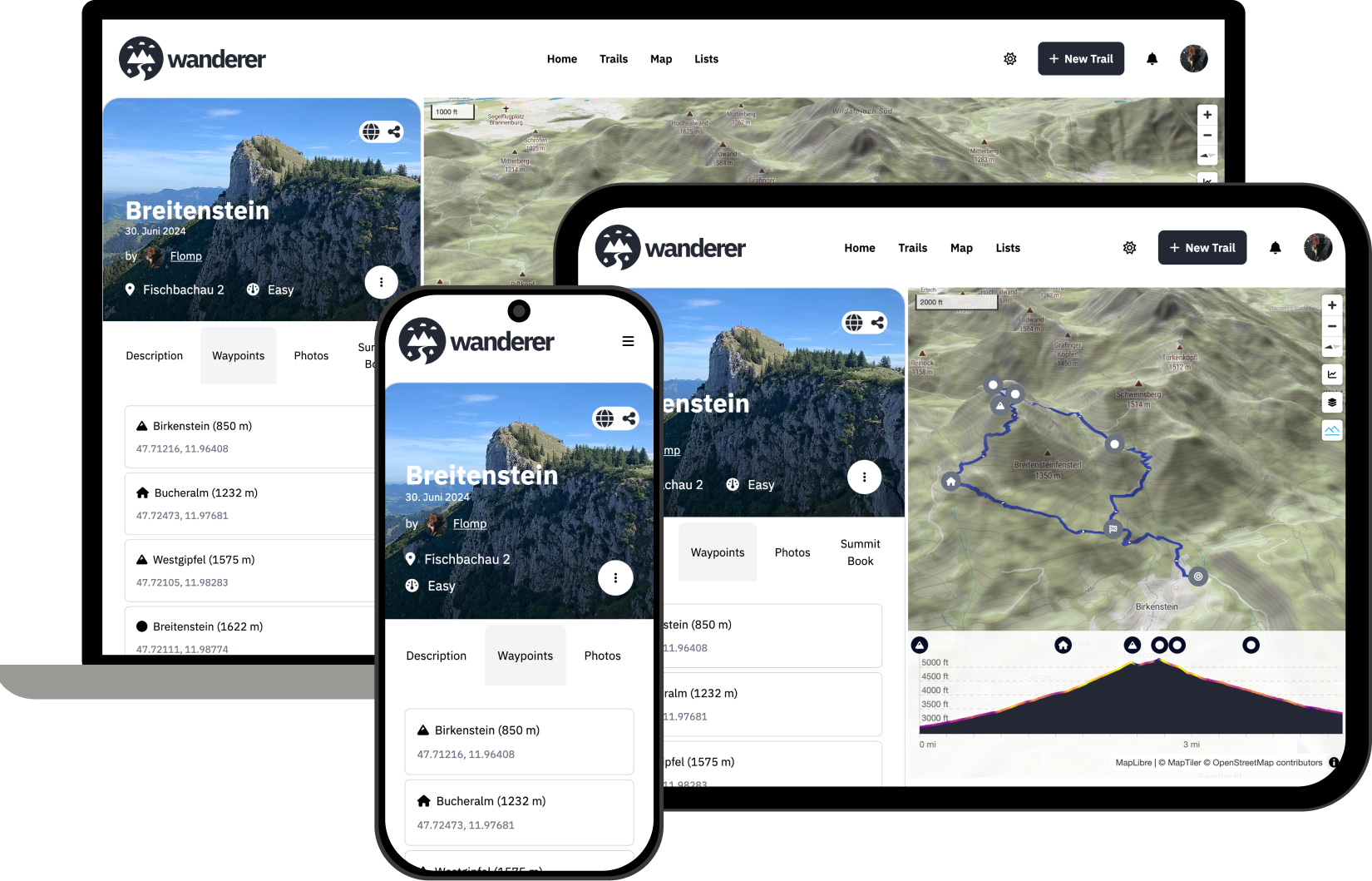
- Manage your trails
- Plan new routes
- Extensive map integration and visualization
- Share trails with other people and explore theirs
- Advanced filter and search functionality
- Create custom lists to organize your trails further
Getting started
The recommended and quickest way to install wanderer is using docker compose. The setup script downloads the docker-compose.yml and fills in freshly generated secrets:
# create docker-compose.yml with fresh secrets
/bin/bash -c "$(curl -fsSL https://wanderer.to/setup.sh)"

# launch via docker compose
docker compose up -d
The first startup can take up to 90 seconds after which you can access the frontend at localhost:3000.
ℹ️ if you are not hosting wanderer at http://localhost:3000 make sure to change ORIGIN variable. Otherwise you will run into CORS errors.
⚠️ if you download the
docker-compose.ymlyourself instead, replaceMEILI_MASTER_KEY,POCKETBASE_ENCRYPTION_KEYandPOCKETBASE_PROXY_SECRETbefore starting. See the manual setup guide.
You can also run wanderer on bare-metal. Check out the documentation for a detailed how-to guide.
Support wanderer
If you like wanderer and would like to give something back you can donate over here. If you prefer to support the development with a regular contribution you can donate via Liberapay.
Documentation
Please check the website for the complete documentation.
Contributing
Help is welcome at any time. If you are not sure where you can start check the roadmap for features in the backlog. If you would like to contribute a translation, you can do so here.
License
This project is licensed under the AGPLv3 License. See the LICENSE file for the full license text.
Media gallery
Requirements
Requires a separate Wanderer - Database container and a separate Meilisearch container.
Download Statistics
Total Downloads Over Time
Related apps
Explore more like this
Explore allDetails
flomp/wanderer-web:latestRuntime arguments
- Web UI
http://[IP]:[PORT:3000]/- Network
bridge- Privileged
- false
Template configuration
Container Port: 3000
- Target
- 3000
- Default
- 3000
- Value
- 3000
URL of the Meilisearch instance
- Target
- MEILI_URL
- Default
- http://meilisearch:7700
- Value
- http://meilisearch:7700
Master key for the Meilisearch instance
- Target
- MEILI_MASTER_KEY
URL of the Wanderer - Database instance
- Target
- PUBLIC_POCKETBASE_URL
- Default
- http://wanderer-db:8090
- Value
- http://wanderer-db:8090
Disable the ability to sign up
- Target
- PUBLIC_DISABLE_SIGNUP
- Default
- false|true
Path to uploaded files
- Target
- /app/uploads
- Default
- /mnt/user/appdata/wanderer/uploads
- Value
- /mnt/user/appdata/wanderer/uploads
Origin of the web app
- Target
- ORIGIN
- Default
- http://localhost:3000
- Value
- http://localhost:3000
Maximum size of the body
- Target
- BODY_SIZE_LIMIT
- Default
- Infinity
- Value
- Infinity
Path to uploaded files
- Target
- UPLOAD_FOLDER
- Default
- /app/uploads
- Value
- /app/uploads
User to upload files
- Target
- UPLOAD_USER
Password to upload files
- Target
- UPLOAD_PASSWORD
URL of the Valhalla instance
- Target
- PUBLIC_VALHALLA_URL
- Default
- https://valhalla1.openstreetmap.de
- Value
- https://valhalla1.openstreetmap.de
URL of the Nominatim instance
- Target
- PUBLIC_NOMINATIM_URL
- Default
- https://nominatim.openstreetmap.org
- Value
- https://nominatim.openstreetmap.org