
VynodeArr
Docker app from Vynode's Repository
Overview
Readme
View on GitHub
VynodeArr
Movies and television, managed together.




VynodeArr is a self-hosted media-management application that runs Radarr and Sonarr behind a unified interface and secure gateway. These long-running open-source projects provide the dedicated movie and television engines; VynodeArr brings their library management, discovery, monitoring, acquisition, activity, and administration workflows into one consistent experience and account system.
Product tour
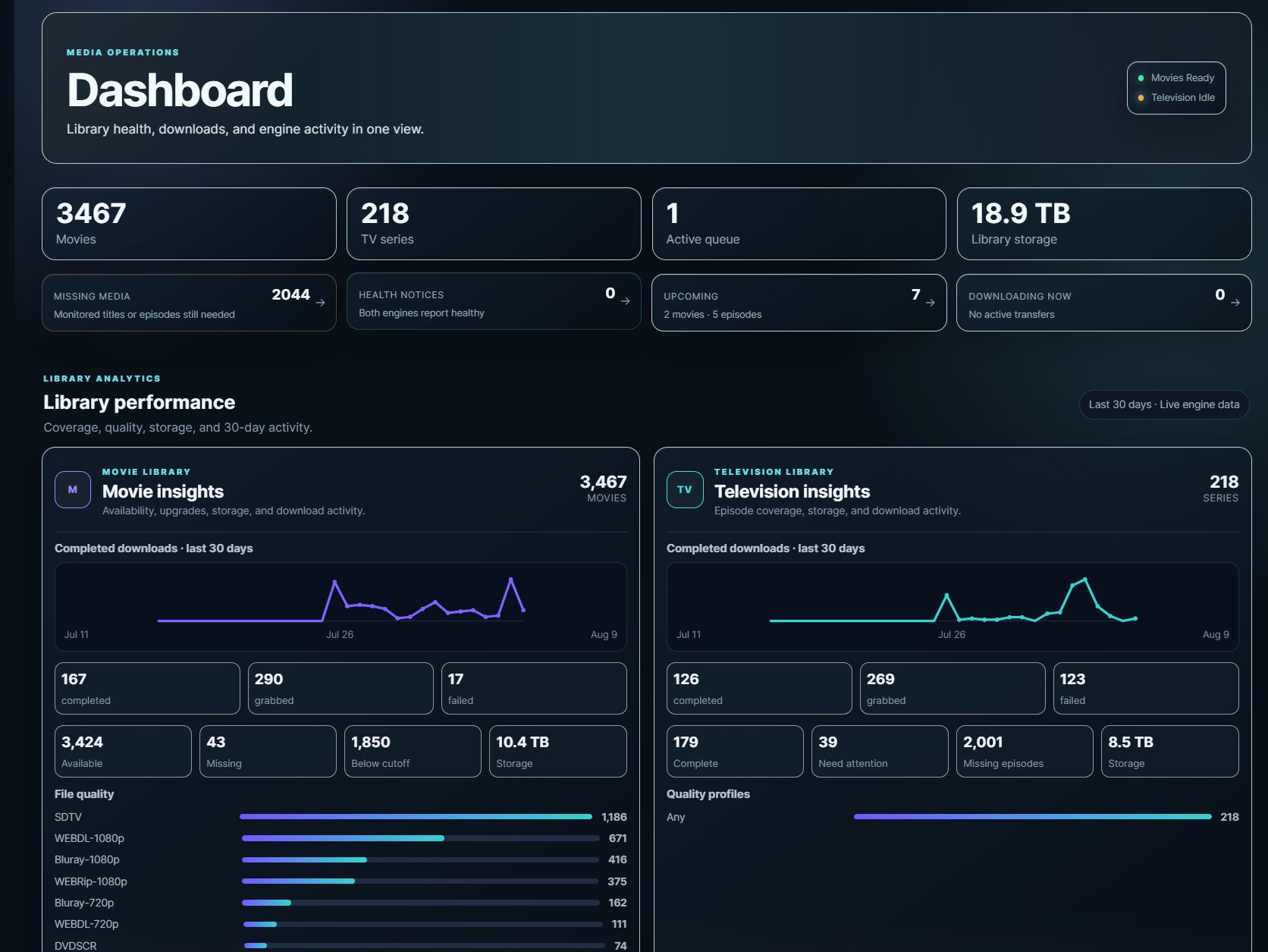 Dashboard — library health, downloads, storage, and engine activity. |
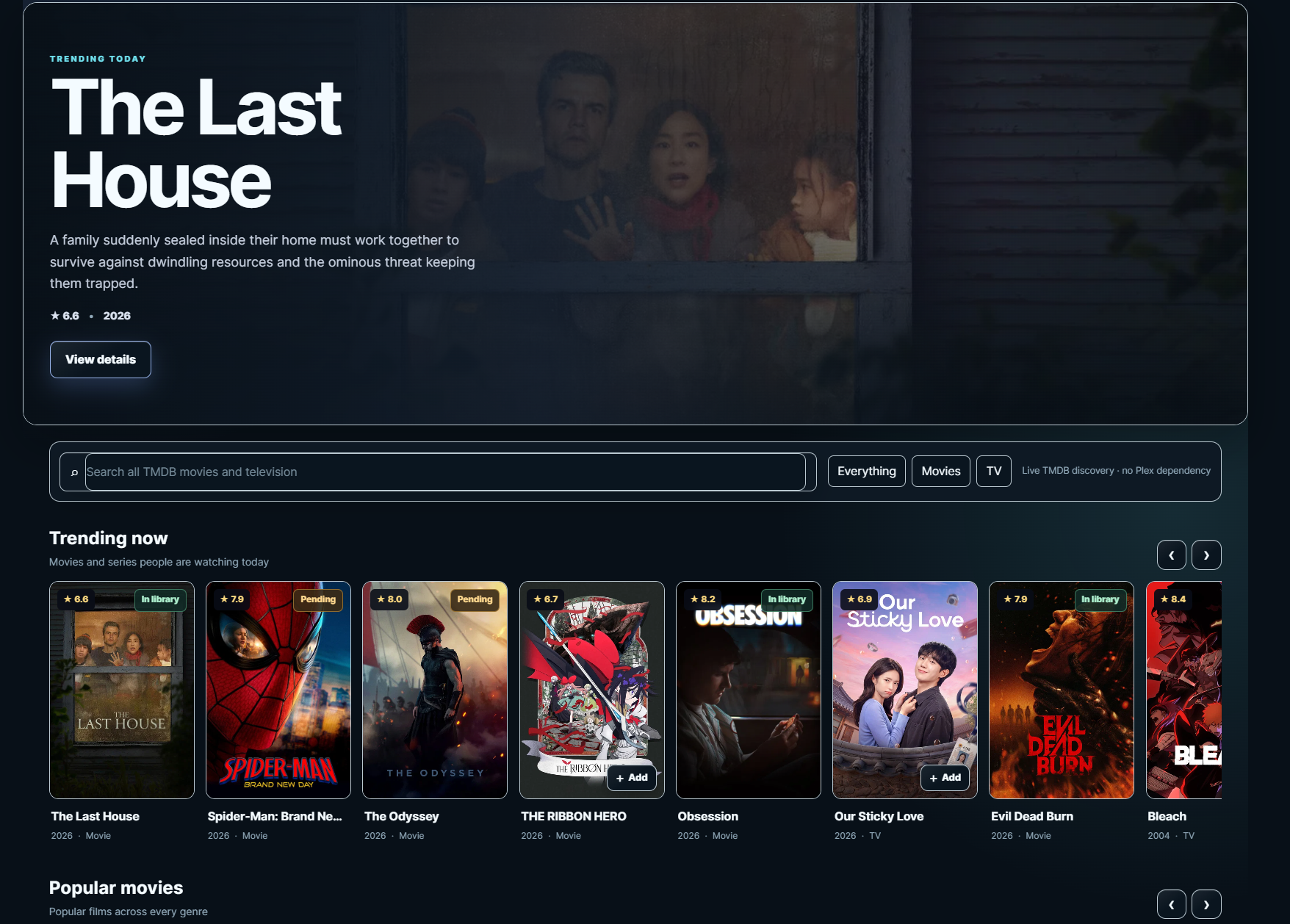 Discover — search TMDB and browse current movies and television. |
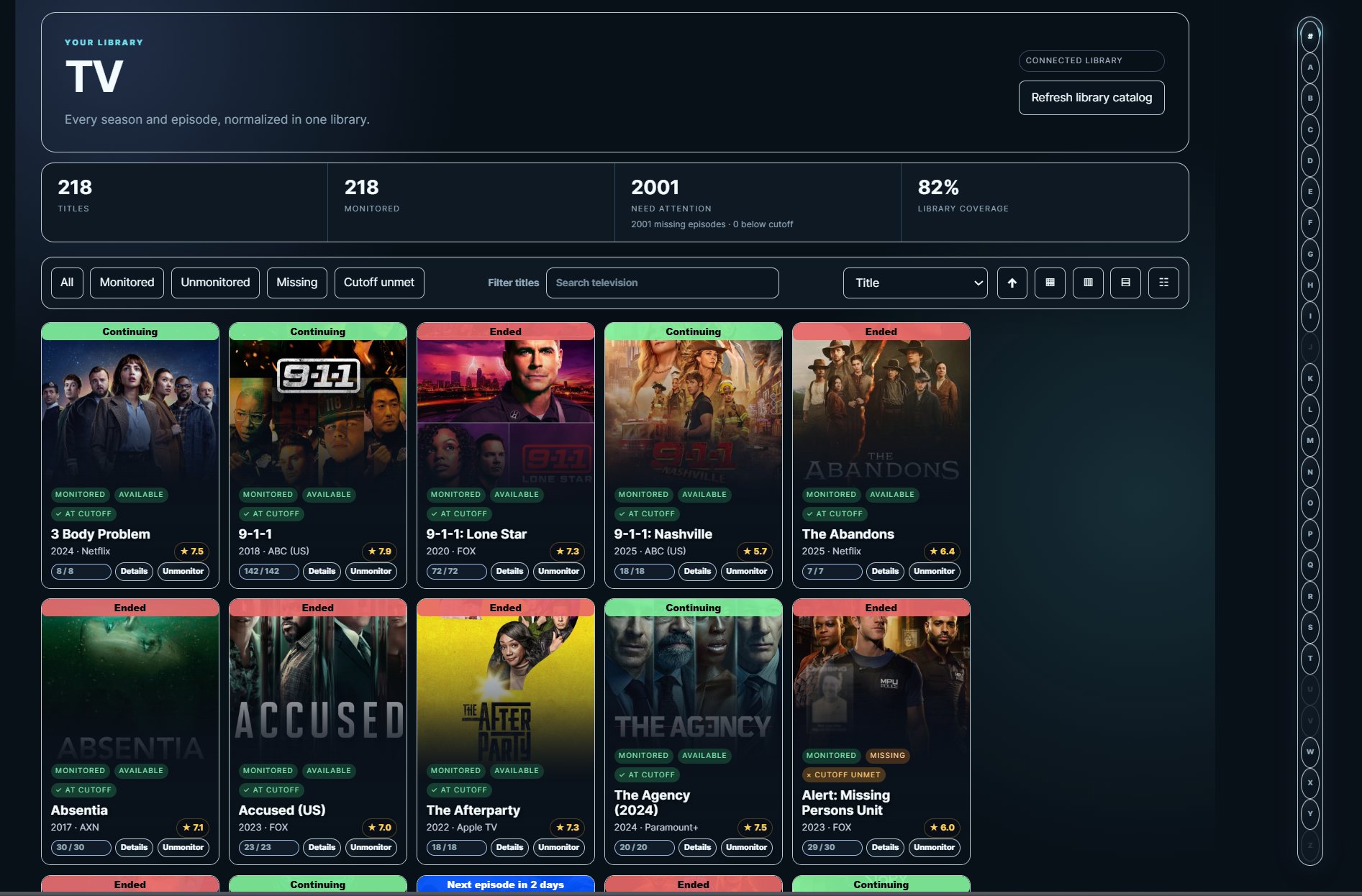 Television library — filter, sort, and manage every series in one view. |
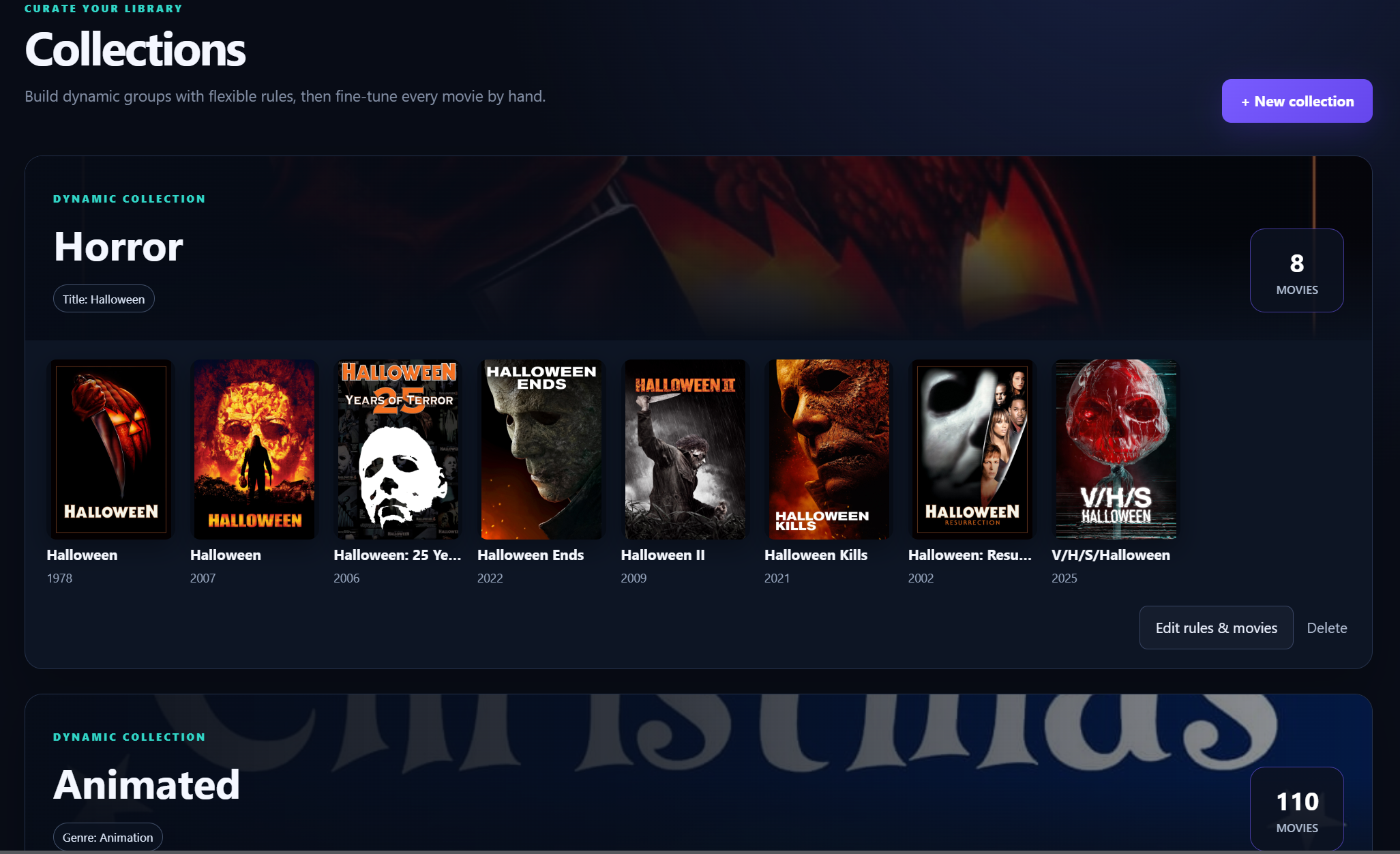 Collections — build curated and rule-driven media collections. |
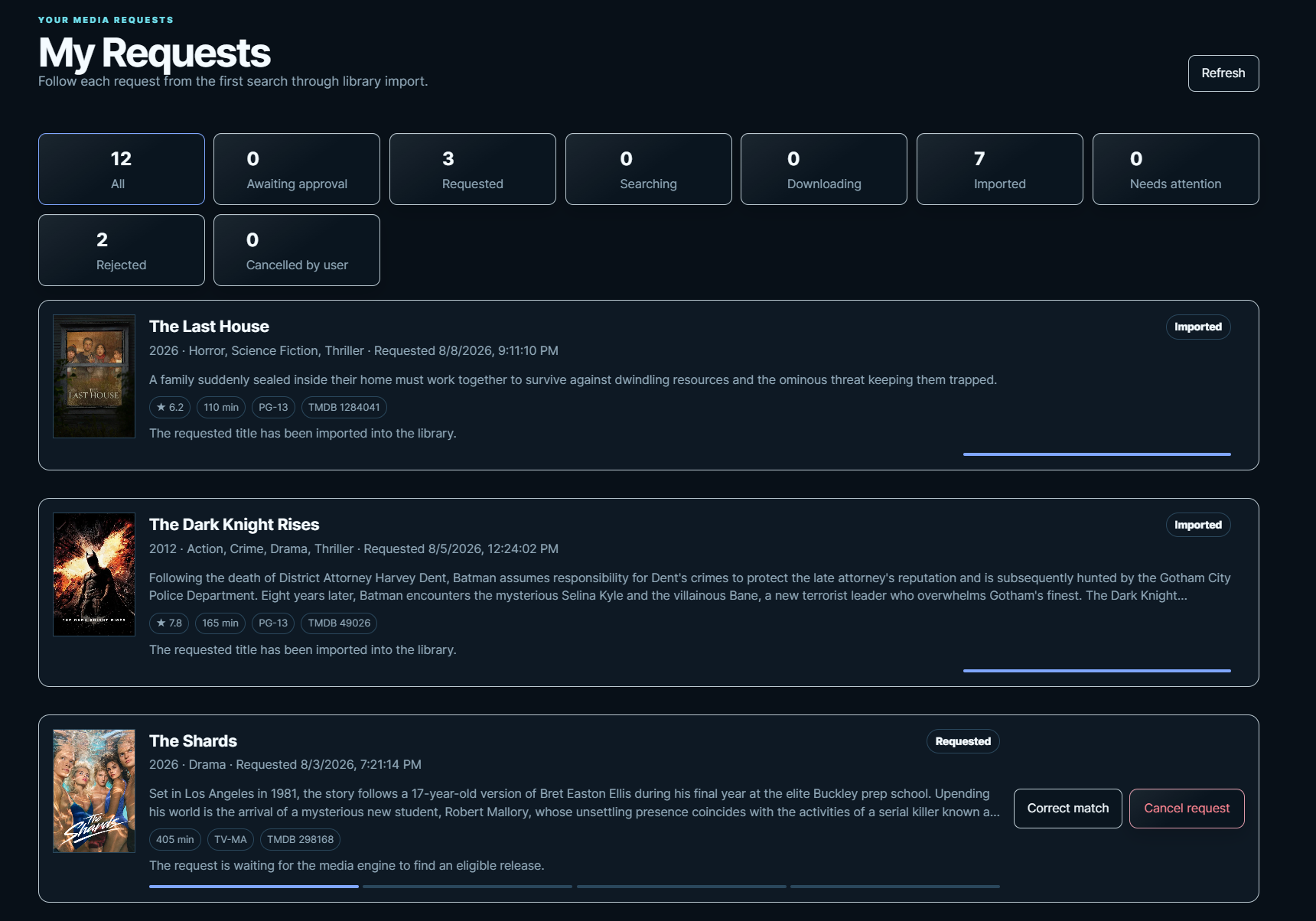 My Requests — follow each request through approval, download, and import. |
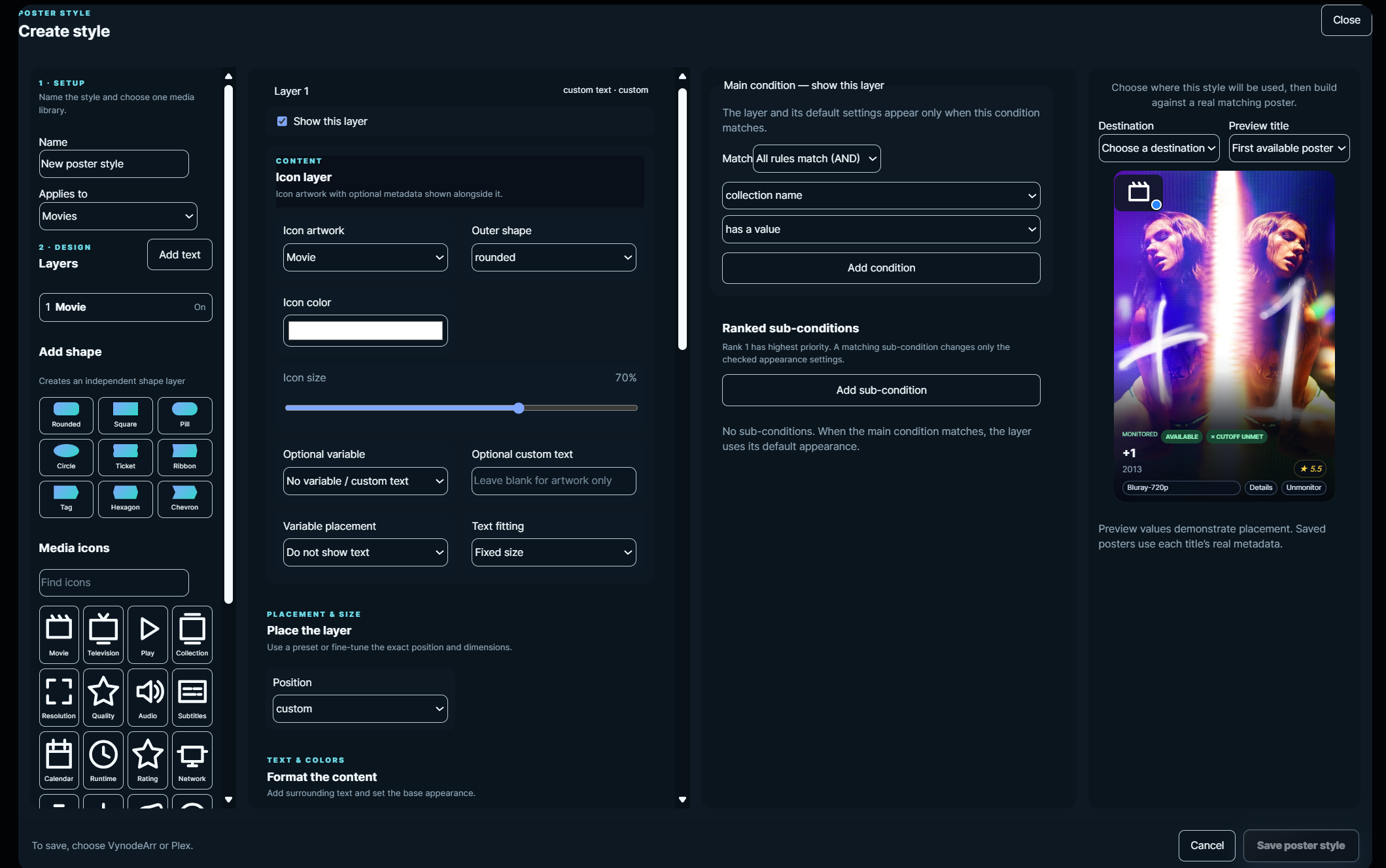 Poster overlay studio — create reusable, conditional artwork styles with a live preview. |
Watch the current VynodeArr walkthrough (MP4)
Current release
Version 2.0.49 is the current stable release and is published as the
latest image. Administrators can use the bundled media engines, connect one
existing external movie and television engine, or manage multiple independent
external instances. Each instance keeps its credentials, settings,
destinations, requests, searches, queues, profiles, providers, history,
calendar, and wanted-media workflows isolated.
This release consolidates repeated React loading and error presentation into shared typed components and utilities across the application. Existing page behavior, actions, fallback messages, and engine workflows remain unchanged, while route code is smaller and error handling is consistent.
New installations can follow the in-app Setup Center to configure engines, storage and destinations, quality preferences, indexers, download clients, optional integrations, and a final health check in a clear order. On phones, the setup sections use one compact selector, and the Movies and Television toolbars keep engine, status, search, sort, view, and bulk actions organized without overflowing the viewport.
Reeltrack and compatible mixed-media lists remain unified while showing clear Movies and Television sections. Plex synchronization is additive: scheduled runs add missing members and trailers without rebuilding collections or discarding artwork. Original posters are retained for restoration, overlays continue onto real media when placeholders are replaced, and targeted trailer repair can recover failed or missing local extras. New list imports remain inactive until their destination and artwork settings are deliberately applied.
The administrator Validation Center checks engine connectivity, storage, acquisition providers, scheduled automation, credentials, notifications, and application data after startup, updates, and restores. It provides guided fixes plus guarded re-synchronization and managed connection repair.
How library data stays current
VynodeArr keeps a durable SQLite projected catalog of the Movie and Television engines. Opening either library reads that local verified projection, so normal navigation, server-side search, filtering, sorting, and progressive pages do not repeatedly ask an engine to return every title. All existing library cards, filters, details, actions, artwork, request attribution, and poster overlays continue to use the same engine-backed data and permissions.
Changes made through VynodeArr reconcile only the affected title. Managed native engine webhooks, engine import history, and mounted-library filesystem changes enter a restart-safe, deduplicated background queue for targeted reconciliation, while a full integrity sweep runs every six hours to recover changes made directly in an engine or on disk. Administrators can also use Sync now on a library page for immediate recovery. If an engine is temporarily unavailable, VynodeArr retains the last good projection instead of emptying the library.
The following optional environment values control this behavior:
VYNODEARR_SYNC_INTERVAL_MSchanges the full integrity interval.VYNODEARR_LIBRARY_WATCH_ENABLED=falsedisables mounted-library monitoring.VYNODEARR_MOVIE_LIBRARY_PATHandVYNODEARR_TV_LIBRARY_PATHoverride the watched container paths (normally/moviesand/tv).
Administrators can use System → Performance to review application memory, catalog and event health, artwork queues, and the most expensive API routes. Library page size, event-worker concurrency, artwork concurrency, and the full integrity interval can be adjusted there without restarting the application.
The Download Decision Center explains why returned releases were selected, accepted, or rejected using native engine evidence for quality, custom formats, preferred words, size, age, seeders, and upgrade eligibility. Candidate history is filterable, mobile friendly, retained across restarts, and included with optional application backup history.
Administrators can also download a portable, password-encrypted VynodeArr application backup containing accounts, permissions, requests, notification configuration and templates, protected credentials, collections, and application settings. Recovery includes a contents preview, explicit confirmation, and an automatic encrypted pre-restore safety archive. Native Movies and Television backups remain separate so both application and engine state can be recovered intentionally.
Discord, Telegram, and Gotify delivery includes a visual template builder with friendly title and message fields, reusable event tokens, live previews, and an optional validated JSON editor for provider-specific payloads. Discord supports custom accent colors and Gotify supports adjustable priority, while credentials and Telegram chat routing stay protected by the server.
Pushover delivery adds protected application and user keys, optional device targeting, Silent through Emergency priorities, emergency retry controls, message expiration, custom sounds, and optional Sonarr-compatible end-to-end encryption. It shares the same category routing, visual templates, testing, delivery history, retry, backup, restore, validation, and audit workflows.
The responsive builder is a full desktop dialog and a compact mobile bottom sheet with sticky actions, internal scrolling, and safe-area support. Its preview remains completely visible at phone widths, including when advanced JSON is enabled.
Notifications and administrator user requests now provide explicit individual and bulk mark-read controls. Read state synchronizes across both surfaces while preserving durable history. Releases selected through Movie interactive search also enter Search Activity, generate a grabbed notification, and continue through Queue and History reconciliation toward import.
Collections can also be viewed by requester. Administrators can select Everything, saved Collections, or an individual user, while regular users see only their own requested and saved Movies and Television. Existing library titles can be added to a personal collection without creating another download request, and request attribution remains synchronized with corrected matches. User collection owners can keep their shelf private, share it with the household or selected users, sort and search it, review completion and storage statistics, run permission-aware bulk library actions, inspect the full request-to-import timeline, and transfer matching titles through JSON or CSV. Requester attribution also follows matching media through Queue, History, Wanted, and download decisions.
The desktop activity drawer provides a wider, overflow-safe settings workspace with an explicit close action and responsive channel rows. Movie organization also keeps engine-known files visible when a folder must move first, then recalculates and applies the active filename format immediately after that move without requiring a separate refresh and second rename operation.
The global notification center provides a durable Inbox and History for request decisions, downloads, imports, engine health, security, and automatic searches. Operational alerts are deduplicated, remain available after reading, and resolve in place when the underlying issue clears.
Users can choose notification categories, minimum severity, and UTC quiet hours. Administrators can define defaults and configure encrypted external delivery through Discord webhooks, Telegram, or Gotify. Each channel supports category routing, masked credentials, test delivery, failure history, and manual retry. External provider outages never interrupt media operations or the in-app activity center.
Administrators also have a persistent Search Activity center inside the notification bell for Movie and Television automatic searches. It shows the real path from queued and searching through grabbed, downloading, and imported, with posters, engine status, bulk-search counts, and direct links to Queue and title details.
Search Activity follows matching engine Queue and History records through download completion and confirmed library import. Completed commands continue reconciling for delayed results, and searches initiated by user requests remain visible to administrators. Request notifications also remain as readable history after approval or rejection while sidebar badges count only decisions that still require action.
Automatic-search activity covers new library additions, Discover requests, whole-show, season, episode, Wanted, and Search All Missing workflows. Native Movie and Television add options are preserved so monitoring scope and immediate searches reach the correct engine. On phones, Search Activity becomes a compact bottom sheet without removing stages or actions.
Phone-sized movie and television details now keep artwork, title information, and controls aligned without clipping. All title actions remain available through a compact horizontal rail, while television season and episode controls expand only when requested.
Discover now uses official TMDB company and network logos for studio and network browsing. Genre cards use stable custom artwork and color treatments instead of changing whenever a different title becomes popular.
Discover identifies existing library titles by authoritative TMDB, TVDB, and IMDb identifiers, preventing alternate titles or localized names from appearing available to request when they are already managed.
Administrators now have a dedicated Library Health subpage under Service Settings. It reports identity, duplicate, metadata, artwork, storage, monitoring, missing-media, and quality-cutoff findings, then routes each finding to the existing title, Wanted, or Root Folders workflow that can resolve it. Diagnostics remain available independently from engine media-management settings and clearly explain when the connected engine cannot provide them.
The authenticated interface remains optimized for phone-sized displays without removing desktop capabilities or information. Navigation, settings sections, media libraries, detail views, queue controls, forms, and dialogs use touch-friendly responsive layouts with safe-area support.
The Calendar now shows the complete month without horizontal scrolling on a phone. Compact date cells preserve Movie and TV activity through event counts and color-coded dots, while the selected-day agenda retains posters and full event details.
Real-device refinements keep detail modals inside the phone viewport, preserve 2:3 request and Wanted poster artwork, prevent library-card actions from overlapping, and keep the navigation rail independently scrollable. History can be narrowed to Movies or Television, while mobile headings and request-status cards retain consistent spacing and alignment.
A global notification bell keeps request activity visible from every page. Administrators are alerted when a request needs approval, while users receive updates when their requests are approved, declined, fail, or finish importing.
Unread notification state is stored per account and survives application restarts. The bell includes a live unread count, a scrollable desktop and mobile-safe activity panel, direct links to the relevant request page, and a Mark all read action. Sidebar badges remain synchronized: User Requests shows the live number awaiting approval, while My Requests shows unread status updates.
Request-limit denials remain visible inside the Discover request modal so users can understand why a title was not submitted.
Requests cancelled by their user now appear as Cancelled by user rather than rejected in both personal and administrator history. A cancellation is removed from the user's request-allowance usage immediately, allowing another request whenever it brings the user below their configured threshold. Existing self-cancelled history is recognized automatically.
Administrators can choose per User account whether Discover requests are added automatically or require approval. Approval-required requests remain in VynodeArr and do not reach the Movie or TV engine until an administrator approves them.
The administrator-only User Requests page provides per-user request history, search plus user, status, and media filters, and controls to approve and add or decline pending titles with a required reason. Both administrator and user request pages display posters, overviews, ratings, genres, runtime, certification, and authoritative external IDs.
Administrators can also set independent daily, weekly, or monthly request allowances for each User account, including separate Movie and TV limits and a maximum number of pending requests. Limits can be changed, disabled, or left unlimited at any time, are enforced by the server, and show users their remaining allowance in Discover and My Requests.
The new administrator-only System Audit view makes security-sensitive and operational activity reviewable in one place. It supports search and category or administrator filtering across request decisions, account and access changes, configuration, engines, backups, security, jobs, collections, media, synchronization, exports, and guide-template operations.
Pending requests can be corrected by selecting an authoritative TMDB match or cancelled before approval, downloading, or importing begins. Approval, ownership, CSRF protection, current folder/profile configuration, and live eligibility are validated by the server, while failures are explained without exposing administrative engine or download-client details.
Discover requests resolve movie and television engine records using authoritative TMDB and TVDB identifiers rather than title text or search-result order. Users granted Discover access can correct a movie selection before submitting the request by reviewing and choosing the intended TMDB record.
Page permissions are enforced in both the interface and API. Unavailable navigation is hidden, direct links are rejected, live library updates are filtered, and changes apply to sessions that are already signed in. A User granted Calendar access can browse monitored movie releases and television air dates without receiving access to administrator-only engine-management APIs. Correcting a pending Discover request does not grant permission to alter existing library items.
The Queue page now shows separate live totals for the Movie and TV engines, along with the combined queue count. This release also continues the React and TypeScript migration for Discover details and requests, background import monitoring, and library-import review while retaining the existing workflows.
The release has been validated with the complete automated test suite,
TypeScript checking, production builds, bundle-budget checks, branding checks,
Docker Compose parsing, and deployment validation.
Existing installations can update with the
ghcr.io/minerport/vynodearr-unified:latest image while retaining their
persistent /config mapping.
See the changelog for the detailed list of changes.
Why VynodeArr
| One place for your media | Familiar control without the clutter | Built for real libraries |
|---|---|---|
| Browse movies, shows, seasons, episodes, wanted items, queue, history, and calendar from one sidebar. | Use guided forms for folders, profiles, indexers, clients, imports, backups, and service settings. | Bulk-edit large libraries, import in the background, monitor at every level, and keep movie and TV preferences independent. |
Feature tour
Rich movie and television libraries
- Poster, information-card, compact-grid, and detailed-list layouts remembered independently for movies and television
- Engine-backed sorting by title, release date, rating, content rating, duration, date added, library size, availability, completion, and attention
- Artwork-backed detail pages with monitoring, search, refresh, edit, and location controls
- An administrator-only Poster Overlay Studio for reusable metadata badges and selected-title or whole-library VynodeArr poster styling. Assignments are reversible and preserve original artwork as a fallback. Administrators can securely validate a Plex server and discover its movie and television libraries, review TMDB/TVDB/IMDb matches, and compare current Plex posters with rendered results. Administrators can apply one reviewed poster at a time after typed confirmation; VynodeArr captures and integrity-checks the original artwork first and provides an immediate audited restore action.
- Movie filters for title, year, genre, and collection
- Show, season, and episode monitoring with color-coded availability
- Bulk profile, root-folder, availability, refresh, and removal actions
- Native Movie and Television Import Lists with guided provider setup, testing, enable/disable controls, manual synchronization, editing, and removal
Managed Reeltrack trailer collections
Administrators can import Reeltrack lists and optionally turn each imported
list into a managed Plex trailer collection. VynodeArr periodically refreshes
the source list, downloads official YouTube trailers through yt-dlp, asks Plex
to scan the selected library, and keeps the Plex collection limited to managed
placeholders for titles that are not yet present as real media. When a title is
removed from Reeltrack or the real Plex item appears, VynodeArr removes its
owned trailer folder and removes the placeholder from the managed collection.
VynodeArr creates each placeholder directly beneath the configured /movies
root using a normal title folder and places only the downloaded trailer inside
it. VynodeArr derives the Plex-visible root from the location reported by the
selected Plex library, including installations where Plex uses a different
container path for the same storage. The same synchronization also registers
every missing TMDB-backed title with the appropriate VynodeArr Movie or
Television engine using its configured root folder and quality profile; these
entries are monitored without forcing an immediate search. When real media arrives, VynodeArr removes only its
managed trailer file and removes the title folder only when it is empty, so a
real movie file is never deleted. Each list stores its own collection name,
Plex library, update interval, last and next run, reconciliation summary, and
actionable error state. Each synchronization processes every missing title and
reports any trailer failures that still need attention.
Each imported list can independently apply a custom Plex collection poster and an overlay to its managed titles. The shared artwork editor provides uploaded, solid, linear-gradient, and radial-gradient backgrounds; optional four-title poster collages; editable metadata text, shapes, and icons; theatrical presets; conditions; drag and resize; grouping; and layer ordering. VynodeArr renders an exact server preview, applies designs during synchronization, and retains the first original Plex artwork for safe per-list restoration.
Personal interface presentation
- Ten color themes that remain independent from layout and surface treatment
- Glass, Solid, OLED, and High Contrast interface styles
- Comfortable and compact information density
- System-aware, reduced, or full motion
- Uniform themed cards, controls, dialogs, borders, backgrounds, and scrollbars
- Viewport-safe modals that return you to the same position on the originating page
- Automatic per-installation encryption keys for saved engine credentials
- Administrator-controlled credential-key rotation under System → Security
Search, acquire, and follow progress
- Automatic and interactive search for movies, shows, seasons, and individual episodes
- Release results with quality, size, source, status, and rejection reasons
- Wanted views grouped by show and season
- Sortable, filterable queue with separate Movie/TV engine totals, download-client status, and bulk actions
- A personal My Requests page showing requested, searching, downloading, imported, failed, and rejected states from the live engines
- Pending-request correction by authoritative TMDB ID and safe cancellation before downloading or importing starts
- Unified calendar, history, health, and scheduled-task views
User access controls
Administrators manage local accounts under Account Settings → Users. Each User account can be granted any combination of:
- Dashboard — view system and library summaries
- Discover — browse and request movies or television series
- Movies — view the movie library and movie details
- TV — view shows, seasons, episodes, and series details
- Calendar — view upcoming movie and episode dates
Granting Discover access also exposes My Requests, where the user can track their own requests and correct or cancel only those that remain eligible. For each User, administrators can choose automatic approval or administrator approval and optionally enforce daily, weekly, or monthly total, Movie, TV, and pending-request limits. Blank allowance fields are unlimited, and limits can be updated or disabled from the same account editor.
Dashboard, Movies, TV, and Calendar remain view-only for User accounts. Actions that alter libraries, monitoring, files, engine configuration, providers, activity, or system settings remain administrator-only. My Account is always available so every signed-in user can maintain their own profile, password, sessions, and interface preferences.
Flexible collections
Build hand-picked collections or combine smart rules such as title, year, decade, genre, monitoring state, file availability, and an existing movie collection. Preview matches, keep earlier selections while trying new rules, and remove individual movies before saving.
Administration without configuration files
- First-run administrator creation and secure local accounts
- Administrator and configurable User roles, active sessions, encrypted credentials, and engine-key controls
- Visual root-folder browser, quality profiles, indexers, and download clients
- Review, customize, compare, and apply TRaSH guide templates independently for Movies and TV
- Movie and television settings kept separate where their behavior differs
- Backup creation, download, upload, and restore from the VynodeArr interface
- Searchable and filterable System Audit history for administrative, request, security, configuration, engine, backup, job, collection, and media activity
- Post-update and recovery validation for engine connections, storage, providers, automation, credentials, notifications, and application data, with guided fixes and guarded safe repairs
- Download Decision Center evidence explaining accepted, rejected, and selected releases using engine-native rejection reasons and ranking metrics
- Actionable health issues with direct links to the setting that needs attention
Install
| Platform | Best for | Start here |
|---|---|---|
| Unraid | Always-on media servers | Use the Community Apps template or templates/vynodearr.xml |
| Docker Compose | Linux, NAS, and Docker hosts | Follow the Docker instructions below |
| Windows 10/11 x64 | Desktop installation or a Windows host | Download the Windows archive from the latest release |
Unraid
The container image is:
ghcr.io/minerport/vynodearr-unified:latest
- Install VynodeArr from Community Apps, or import
templates/vynodearr.xml. - Keep
/configmapped to a persistent appdata folder. - Map writable movie, television, and download folders.
- Open the WebUI on port
8686. - Create the first administrator.
- Confirm root folders, then add indexers and download clients under Service Settings.
| Container path | Purpose | Example Unraid path |
|---|---|---|
/config |
Accounts, settings, databases, and backups | /mnt/user/appdata/vynodearr |
/movies |
Movie library | /mnt/user/media/movies |
/tv |
Television library | /mnt/user/media/tv |
/downloads |
Shared completed-download data | /mnt/user/downloads |
8686 |
VynodeArr WebUI and compatibility gateway | Required |
Keep
/configwhen updating or recreating the container. It contains the application state and both service databases.
For normal Unraid HTTP access, leave VYNODEARR_SECURE_COOKIES=false. Enable secure cookies only when VynodeArr is always accessed over HTTPS.
Docker
The supported release image is self-contained. It includes VynodeArr and its installation-managed movie and television engines, so a normal Docker install does not need to clone this repository or build three separate containers.
Recommended Docker Compose installation
Create a new folder and save the following as compose.yaml. Replace the three
host paths with folders on your Docker host before starting it.
services:
  vynodearr:
    image: ghcr.io/minerport/vynodearr-unified:latest
    container_name: vynodearr
    restart: unless-stopped
    ports:
      - "8686:8686"
    environment:
      TZ: America/New_York
      VYNODEARR_SECURE_COOKIES: "false"
      VYNODEARR_DOWNLOAD_CLIENT_REMOTE_PATH: /downloads
    volumes:
      - /srv/vynodearr/config:/config
      - /srv/media:/media
      - /srv/downloads:/downloads
Then run:
docker compose pull
docker compose up -d
Open http://localhost:8686. From another computer,
replace localhost with the Docker host's IP address or hostname.
| Container path | Required | Purpose |
|---|---|---|
/config |
Yes | Persistent accounts, VynodeArr state, backups, and both bundled-engine databases |
/media |
Recommended | A parent folder containing movie and television library folders |
/downloads |
Yes for downloading | Completed downloads visible to VynodeArr and its engines |
/movies |
No | Legacy single movie-library mapping |
/tv |
No | Legacy single television-library mapping |
Keep /config mapped to persistent storage and back it up. Updating or
recreating the container is safe when this folder is retained. Do not map the
same physical library through both /media and a legacy path unless you are
performing a controlled path migration.
For Docker Desktop on Windows, volume sources may use forward-slash paths such
as D:/Docker/VynodeArr:/config, D:/Media:/media, and
D:/Downloads:/downloads. Ensure Docker Desktop is permitted to access those
drives.
After first sign-in:
- Open Service Settings → Root Folders.
- Review the folders detected beneath
/media. - Assign each library folder, or a deeper subfolder, to Movies or Television.
- Set the default movie and television destinations used for new requests.
- Add an indexer and download client, then run the health check.
If the download client reports completed files under a different container
path, set VYNODEARR_DOWNLOAD_CLIENT_REMOTE_PATH to that reported path. The
same completed-download host folder must be mounted at /downloads in
VynodeArr so files can be imported.
Docker run installation
The equivalent Linux command is:
docker pull ghcr.io/minerport/vynodearr-unified:latest
docker run -d \
  --name vynodearr \
  --restart unless-stopped \
  -p 8686:8686 \
  -e TZ=America/New_York \
  -e VYNODEARR_SECURE_COOKIES=false \
  -e VYNODEARR_DOWNLOAD_CLIENT_REMOTE_PATH=/downloads \
  -v /srv/vynodearr/config:/config \
  -v /srv/media:/media \
  -v /srv/downloads:/downloads \
  ghcr.io/minerport/vynodearr-unified:latest
Useful commands:
docker logs -f vynodearr
docker stop vynodearr
docker start vynodearr
VynodeArr writes timestamped, component-labeled lifecycle, connection, synchronization, and management events to the container log. External Radarr and Sonarr connections are identified by media domain and instance name, so connection loss, recovery, validation, and VynodeArr-triggered changes remain clear without copying or exposing the external application's own logs. API keys, tokens, credentials, cookies, and passwords are redacted.
The default info level is recommended for normal use. Set
VYNODEARR_LOG_LEVEL=debug temporarily for additional request activity, or set
VYNODEARR_LOG_FORMAT=json when forwarding logs to a structured collector.
Both options are available under Show more settings in the Unraid template.
Building the development stack from source
The repository's root compose.yaml is a contributor and local-development
stack. It builds VynodeArr from source and runs separate Radarr and Sonarr
containers. Use it only when developing or testing repository changes:
git clone https://github.com/minerport/VynodeArr-Unified.git
cd VynodeArr-Unified
cp .env.example .env
sh scripts/docker-preflight.sh
docker compose up --build -d
To expose an existing parent media folder to all three development containers,
set VYNODEARR_MEDIA_PATH in .env and include compose.media.yaml:
VYNODEARR_MEDIA_PATH=/srv/media
sh scripts/docker-preflight.sh --media
docker compose -f compose.yaml -f compose.media.yaml up --build -d
Credential encryption and master-key rotation
When neither VYNODEARR_MASTER_KEY nor VYNODEARR_MASTER_KEY_FILE is
configured, VynodeArr generates a unique cryptographically random master key
on first run. It is retained as master-key inside the persistent
VYNODEARR_DATA_DIR (normally /config/vynodearr in the container). Keep the
/config mapping to retain access to encrypted movie-engine, television-engine, and discovery
credentials.
Administrators can open System → Security and choose Rotate master key. VynodeArr re-encrypts the existing credential vault and persists the new key; this does not change the API keys configured inside either media engine. An interrupted rotation is completed automatically on the next startup.
Installations that explicitly provide VYNODEARR_MASTER_KEY or
VYNODEARR_MASTER_KEY_FILE remain externally managed. For those installations,
the in-app rotation control is disabled so a container restart cannot restore
an older environment value over an app-generated replacement.
Engine authentication on Docker networks
Bundled movie and television engines require API-key authentication from every address by default. This includes VynodeArr, request applications, and other containers sharing the Docker network. VynodeArr continues using the generated engine API keys automatically.
Administrators can review or change each engine independently under Account Settings → Media Engines → Require engine authentication. Keep the switch enabled unless the Docker network is trusted and isolated. When it is disabled, local-address rules may treat other containers as local and allow them to reach that engine without authentication.
Windows
Docker Desktop with Linux containers is required.
- Download
VynodeArr-Windows-x64-<version>.zipfrom the latest release. - Extract it to a permanent folder.
- Run
Start-VynodeArr.ps1. - Open http://localhost:8686.
- Create the first administrator and complete the same guided setup.
Run Stop-VynodeArr.ps1 to stop VynodeArr without removing its data.
First-run checklist
- Open Service Settings → Root Folders and confirm the movie and television locations.
- Review the quality profiles for each library.
- Optionally review recommended settings under Service Settings → Guide Templates.
- Add at least one indexer and download client.
- Ensure the same completed-download folder is visible to VynodeArr and the download client.
- Add or import media and choose monitoring behavior.
- Open Health from the dashboard to resolve any remaining setup issues.
Multiple external movie and television engines
Multi-engine mode is optional. A normal bundled-engine or single external-engine installation continues to work without additional configuration.
- Open Service Settings → Engine Management as an administrator.
- Add each external Radarr-compatible movie or Sonarr-compatible television instance with a unique friendly name, server URL, and API key.
- Test each connection before saving. Credentials are encrypted independently.
- Restart the VynodeArr container when prompted so the private gateway loads the complete instance registry. Saved connections remain available during the restart.
- Open Service Settings → Root Folders and create destinations for the matching instance. A destination, root folder, profile, and tags always belong to one engine instance.
- Choose one default destination per media type and engine where appropriate.
- If Plex is connected, associate each destination with the Plex library that sees the same media path. VynodeArr prevents one Plex library from being assigned ambiguously across different engine instances.
- Review profiles, providers, selection rules, and guide templates using the engine selector at the top of each page.
- Use All engines on library and activity pages for a combined view, or select one named instance to inspect and manage it independently.
Connection validation and synchronization retain every movie or television title returned by the configured engines; library page sizes only control how many stored titles are displayed per request. Large Radarr responses use an expanded bounded transport allowance and exclude local-cover payloads, while an isolated malformed movie record is skipped without rejecting the valid connection or the rest of its library.
When adding or requesting a title, VynodeArr carries the chosen destination and engine through approval, search, grab, queue, import, history, and notification links. Two instances may have the same native numeric title ID without being treated as the same record. If one instance is offline, its error remains isolated and records from healthy instances continue to appear.
Before removing an instance, move or remove its destinations and confirm that no pending requests rely on it. Existing single-engine settings are retained as the default instance during migration. To roll back, remove only the newly added instances and continue using the original default instance; no media files are moved by this configuration change.
Connect Seerr or another request application
Use the VynodeArr server address and port 8686 for both services:
| Service | URL base |
|---|---|
| Movies | /movies |
| Television | /tv |
Administrators can reveal or generate the individual API keys under Account Settings → Engines. Regenerating a key requires updating every external application that uses it.
Updates, backups, and removal
- On Unraid, update the container to pull the newest image.
- Never remove the persistent
/configmapping during an update. - Administrators can use System → Updates to review official movie and television engine releases. VynodeArr blocks prereleases, downgrades, unexpected archives, unhealthy connections, and unsafe storage states before preparing a candidate.
- Engine candidates are built through a separate GitHub Actions workflow using
exact reviewed versions. The complete container must pass verification and a
health smoke test, is published only under an isolated
engine-candidate-*tag, and never replaceslatest. Keep the displayed rollback image until post-update validation succeeds. - Download an encrypted VynodeArr application backup from System → Backups before uninstalling. It protects accounts, permissions, requests, notification channels and templates, saved credentials, collections, and application settings. Keep its password separately; it cannot be recovered.
- Create and download both native engine backups from the same page. A new installation can inspect and restore the application archive, then upload the Movies and Television backups to their matching sections.
- Library media remains in
/moviesand/tv; it is not stored inside the application container.
Restore existing movie and TV engine backups
Native backups from an existing installation can be restored through System → Backups:
- Upload the native movie-engine backup with Upload & restore under Movies backups.
- Wait for the Movies engine to restart and reconnect.
- Upload the native TV-engine backup under Television backups.
- Wait for the TV engine to restart and reconnect.
The backups are restored separately and must be uploaded to their matching
sections. Supported uploads are .zip, .db, and .xml files up to 500 MB.
Restoring an engine backup replaces only that engine's configuration. Restore
accounts and application-level settings from the separate encrypted VynodeArr
application archive; it deliberately excludes active login sessions and media
files, and requires an application restart after recovery.
After restoring, verify root folders and download paths because paths from the old installation must also exist inside the new container or be remapped. See Backup and Restore for the complete migration and verification procedure.
Troubleshooting
I am signed out immediately after login
Update to the latest image and use VYNODEARR_SECURE_COOKIES=false when accessing VynodeArr over HTTP. Clear cookies for the server address before signing in again.
A service or integration is unhealthy
Open Health from the dashboard. Movie and television issues are separated and link directly to the applicable root-folder, indexer, download-client, quality-profile, storage, or advanced setting.
A download completed but cannot be imported
The download client and VynodeArr must see the completed folder through compatible container paths. Confirm that /downloads maps to the host folder used by the client, and review remote path mappings when the applications use different paths.
A local service cannot be reached
Inside a container, localhost refers to that container, not the Unraid host. Use the host LAN address or a shared Docker network address and make sure the target service listens on that interface.
Artwork is missing
Run Refresh & scan for the affected title and check Health for connectivity or storage issues. Artwork is served through the authenticated VynodeArr gateway.
Development
Copy-Item .env.example .env
docker compose up --build -d
The development interface opens at http://localhost:4310.
Run the full verification suite:
npm run verify
More documentation:
- Changelog
- Architecture
- Authentication and accounts
- Backup and restore
- Using guide templates
- Management gateway
- Interaction parity
- Packaging and licensing
License and acknowledgements
VynodeArr's own source code is licensed under the Apache License 2.0. That license badge applies only to VynodeArr code; it does not relicense bundled or separately distributed components.
The Unraid image includes executable distributions of
Radarr and
Sonarr, which remain licensed under the
GNU General Public License version 3 and retain their own copyrights, licenses,
and corresponding-source links. VynodeArr is grateful to both projects and
their contributors for the years of work behind its movie and television
engines. See OPEN_SOURCE_NOTICES and
THIRD_PARTY_NOTICES for component versions, source
links, and additional notices.
Media gallery
1 / 7Categories
Related apps
Explore more like this
Explore allDetails
ghcr.io/minerport/vynodearr-unified:latestRuntime arguments
- Network
bridge- Shell
sh- Privileged
- false
Template configuration
Host port used to open the VynodeArr web interface and compatibility APIs.
- Target
- 8686
- Default
- 8686
- Value
- 8686
Persistent VynodeArr accounts, settings, backups, and isolated engine databases. Back up this folder before removal.
- Target
- /config
- Default
- /mnt/user/appdata/vynodearr
- Value
- /mnt/user/appdata/vynodearr
Recommended for multiple libraries beneath one parent share. Example host path: /mnt/user/media. VynodeArr scans only direct child folders such as /media/movies, /media/movies-4k, /media/tv, or /media/anime-tv and lets you assign each one to Movies or Television under Service Settings. Leave blank to use only the legacy /movies and /tv mappings.
- Target
- /media
Backward-compatible movie mapping for existing installations or a simple single-library setup. Leave blank when /media exposes this library as a child folder.
- Target
- /movies
Backward-compatible television mapping for existing installations or a simple single-library setup. Leave blank when /media exposes this library as a child folder.
- Target
- /tv
Completed-download share accessible to VynodeArr and your download client. Keep this container path as /downloads.
- Target
- /downloads
- Default
- /mnt/user/downloads/complete
- Value
- /mnt/user/downloads/complete
Container path reported by the download client for completed files, for example /data/complete. VynodeArr maps it to /downloads.
- Target
- VYNODEARR_DOWNLOAD_CLIENT_REMOTE_PATH
- Default
- /data/complete
- Value
- /data/complete
IANA timezone used for schedules and displayed dates, for example America/New_York.
- Target
- TZ
- Default
- America/New_York
- Value
- America/New_York
Optional token for Discover during first start. It can be added or replaced later under Service Settings.
- Target
- TMDB_API_READ_TOKEN
Set to true only when every browser connection reaches VynodeArr through HTTPS.
- Target
- VYNODEARR_SECURE_COOKIES
- Default
- false
- Value
- false
Controls VynodeArr container detail: error, warn, info, or debug. Use debug temporarily when troubleshooting.
- Target
- VYNODEARR_LOG_LEVEL
- Default
- info
- Value
- info
Use pretty for readable Unraid and Docker logs, or json for structured log collectors.
- Target
- VYNODEARR_LOG_FORMAT
- Default
- pretty
- Value
- pretty