

vpn-sentinel-client
Docker app from VPNSentinel's Repository
Overview
Readme
View on GitHub
VPN Sentinel
License: MIT
GitHub release
 Python
Server pulls
Client pulls
Real-time VPN monitoring with DNS leak detection, traffic light status indicators, and instant Telegram notifications. Know immediately when your VPN fails.
Table of Contents
- Overview
- Key Features
- Architecture
- Quick Start
- Dashboard
- Prometheus
- Telegram Integration
- Configuration
- Deployment Scenarios
- Development
- Testing
- Troubleshooting
- Contributing
- License
Overview
VPN Sentinel is a distributed monitoring system designed to continuously verify VPN connections are working correctly. It detects silent VPN failures, DNS leaks, and IP address exposure before they become security incidents.
The Problem
- Silent VPN Failures: VPN connections can drop without warning, exposing your real IP address
- DNS Leaks: DNS queries bypass VPN protection, revealing your location to ISPs and websites
- No Built-in Monitoring: Most VPN clients lack health monitoring or alerting capabilities
- Delayed Detection: You only discover VPN issues after sensitive data has been exposed
The Solution
VPN Sentinel provides continuous, automated verification with:
- Traffic Light Status System: Instant visual status for each client (Green/Yellow/Red)
- VPN Bypass Detection: Critical alerts when client IP matches server IP
- DNS Leak Detection: Automatic detection of DNS queries bypassing VPN tunnel
- Real-time Notifications: Instant Telegram alerts for connection issues
- Web Dashboard: Modern responsive interface for monitoring all clients
- Multi-client Support: Monitor unlimited VPN clients from a single server
Key Features
Security Monitoring
- VPN Bypass Detection: Critical red alerts when VPN is not routing traffic
- DNS Leak Testing: Detects when DNS queries expose your location
- IP Geolocation Verification: Ensures traffic exits from expected VPN server locations
- Provider Validation: Confirms your traffic routes through VPN provider networks
Real-time Alerting
- Telegram Bot Integration: Instant notifications for all connection events
- Multi-channel alerts (optional): The same alerts also go to ntfy, Gotify, Discord, email and 100+ other services through Apprise
- Secrets from files: the API key, Telegram credentials, metrics token and Apprise URLs can each be read from a file (
*_FILE, Docker secrets), see Secret Management - Token redaction: Telegram bot tokens are replaced with
[REDACTED]in error logs and on the dashboard logs page - Priority-Based Alerts: Critical (red), warning (yellow), and info (green) message types
- Rich Notifications: Detailed status with IP, location, provider, and DNS information
- Connection History: Tracks IP changes and connection events
Modern Dashboard
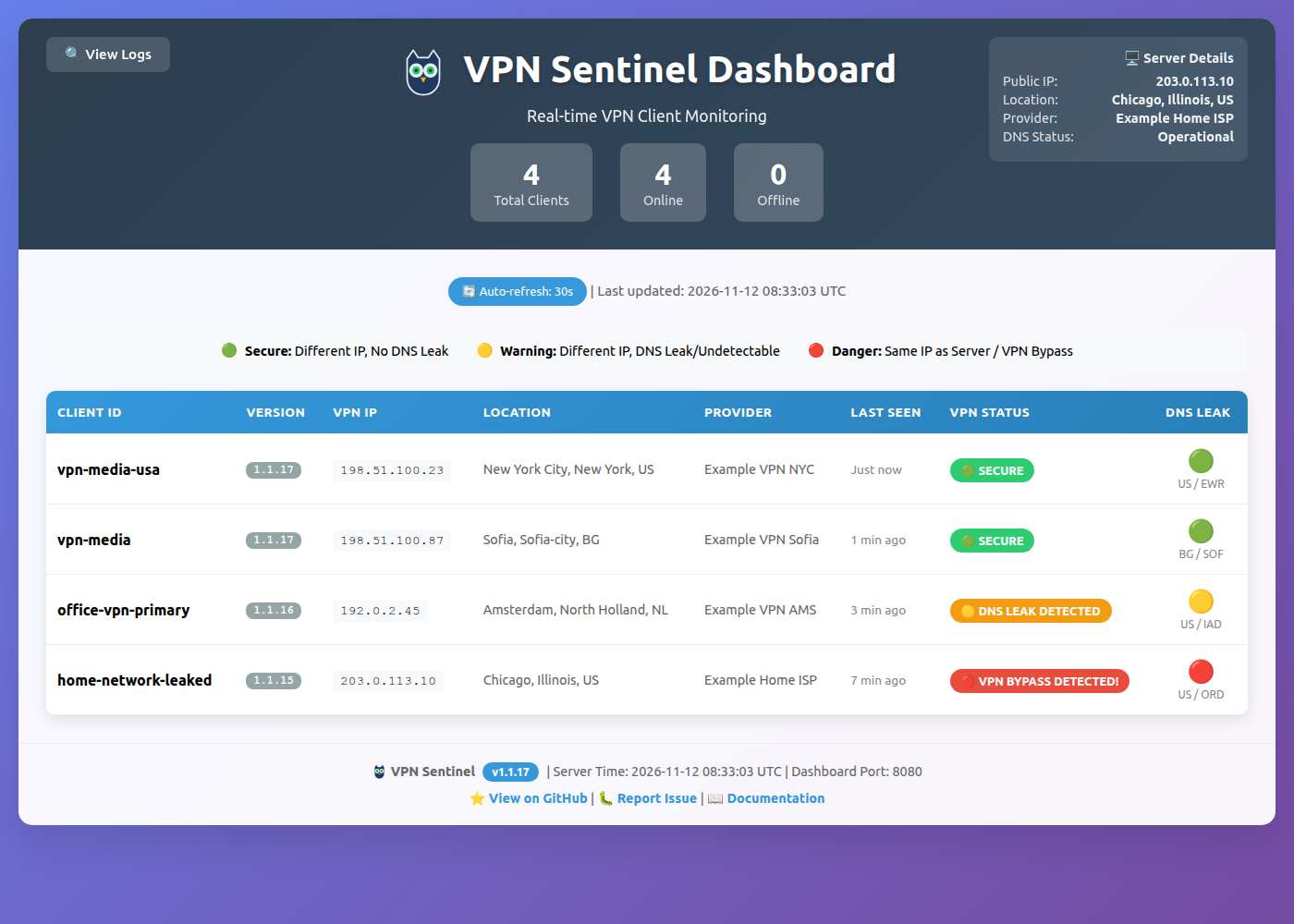
- Traffic Light Status Indicators: Green (secure), Yellow (DNS issues), Red (VPN bypass)
- Server Information: View server's public IP, location, and DNS status
- Client Table: Comprehensive table with all connected clients
- Real-time Log Viewer: Built-in logs viewer with syntax highlighting and auto-refresh
- Auto-refresh: Updates every 30 seconds (10s for logs)
- Hardened pages: every displayed value is HTML-encoded, and dashboard responses send a Content-Security-Policy with a per-request nonce,
X-Content-Type-Options: nosniff,X-Frame-Options: DENYandReferrer-Policy: no-referrer(see Dashboard Pages) - Responsive Design: Works on mobile, tablet, and desktop
- Last Seen Timestamps: "Just now", "5 min ago", "2h ago" format
Operational Excellence
- Structured Logging: Unified log format across all components with timestamps and component tags
- Component-based Filtering: Easy log filtering by component (api, dashboard, health, telegram, security)
- HTTP Access Logs: All Flask endpoints log requests in standardized format with status codes
- Prometheus metrics:
/metricson the health port, optionally protected by a bearer token (see Prometheus) - Real-time Monitoring: Dashboard logs viewer with color-coded severity levels
- Auto-detection: Intelligent log file location detection across different deployment scenarios
Flexible Architecture
- Network Isolation: Client runs inside VPN network, server on host network
- VPN Provider Agnostic: Works with OpenVPN, WireGuard, or any VPN solution
- Docker Native: Containerized deployment with Docker Compose
- Multi-process Design: Optional dedicated health monitoring service
- Scalable: Single server monitors multiple distributed clients
Architecture
VPN Sentinel uses a client-server architecture with network isolation to ensure accurate monitoring.
Network Flow Diagram
┌────────────────────────────────────────────────────────────┐
│                     VPN Container                          │
│  ┌────────────────┐           ┌──────────────────────────┐ │
│  │  VPN Client    │           │  VPN Sentinel Client     │ │
│  │  (OpenVPN/WG)  │◄─────────►│  - Monitors connection   │ │
│  │                │           │  - Checks public IP      │ │
│  │  tun0/wg0      │           │  - DNS leak testing      │ │
│  └────────────────┘           │  - Sends keepalives      │ │
│                                └─────────────────────────┘ │
└──────────────────────────────────────┬─────────────────────┘
                                       |
                                       | HTTP/HTTPS
                                       | (via VPN tunnel)
                                       |
                                       v
                            ┌──────────────────────┐
                            │   INTERNET/CLOUD     │
                            │                      │
                            │  Public APIs:        │
                            │  - ipinfo.io         │
                            │  - DNS leak tests    │
                            └──────────┬───────────┘
                                       |
                                       | Reaches server
                                       | via public internet
                                       v
┌──────────────────────────────────────────────────────────┐
│                     Host Network                         │
│  ┌────────────────────────────────────────────────────┐  │
│  │           VPN Sentinel Server                      │  │
│  │                                                    │  │
│  │  ┌─────────────┐  ┌──────────────┐  ┌────────────┐ │  │
│  │  │   API       │  │  Dashboard   │  │  Telegram  │ │  │
│  │  │ Port 5000   │  │  Port 8080   │  │    Bot     │ │  │
│  │  │             │  │              │  │            │ │  │
│  │  │ - Keepalive │  │ - Web UI     │  │ - Alerts   │ │  │
│  │  │ - Status    │  │ - Traffic    │  │ - Status   │ │  │
│  │  │ - Health    │  │   lights     │  │ - History  │ │  │
│  │  └─────────────┘  └──────────────┘  └────────────┘ │  │
│  └────────────────────────────────────────────────────┘  │
└──────────────────────────────────────────────────────────┘
           ^                    ^                    ^
           |                    |                    |
      API Access          Web Browser         Telegram App
How It Works
- VPN Sentinel Client runs inside the VPN container's network namespace
- All client traffic (including monitoring) flows through the VPN tunnel
- Client reaches internet via VPN, checks its public IP and DNS
- Client sends keepalive to server with connection status (via internet, not Docker network)
- Server receives data on host network, validates VPN is working correctly
- Server compares IPs: If client IP == server IP, VPN is bypassed (RED alert)
- Server sends notifications via Telegram for any issues
- Dashboard displays real-time status with traffic light indicators
Traffic Light Status System
| Status | Color | Condition | Meaning |
|---|---|---|---|
| Secure | 🟢 Green | Client IP != Server IP DNS location matches VPN |
VPN working correctly |
| DNS Leak | 🟡 Yellow | DNS location != VPN country | DNS queries bypassing VPN |
| DNS Unknown | 🟡 Yellow | Cannot determine DNS location | DNS status unverifiable |
| VPN Bypass | 🔴 Red | Client IP == Server IP | CRITICAL: VPN not routing traffic! |
Component Details
VPN Sentinel Client
- Deployment: Inside VPN container using
network_mode: service:vpn-container - Language: Bash + Python
- Functions:
- Periodic health checks (configurable interval)
- Public IP detection via ipinfo.io
- DNS leak testing
- Geolocation verification
- Keepalive transmission to server
VPN Sentinel Server
- Deployment: Host network (requires internet access)
- Language: Python 3.11+ with Flask
- Services:
- API Server (port 5000): Receives client keepalives
- Health Server (port 8081): Health check endpoint
- Dashboard (port 8080): Web interface
- Telegram Bot: Notification delivery
- Features:
- Multi-client status tracking
- Server IP caching (reduces API calls)
- Rate limiting and security middleware
- Auto-cleanup of stale clients, with a Telegram alert for each client that goes silent
- Structured HTTP Access Logs: All Flask endpoints (API, Dashboard, Health) log requests with unified format:
2025-11-14T17:23:45Z INFO [api] 🌐 127.0.0.1 "GET /api/v1/health HTTP/1.1" 200 2025-11-14T17:23:45Z INFO [dashboard] 🌐 127.0.0.1 "GET /dashboard HTTP/1.1" 200 2025-11-14T17:23:45Z INFO [health] 🌐 127.0.0.1 "GET /health HTTP/1.1" 200 - Component-based Logging: Each server component (api, dashboard, health, telegram, security, etc.) uses consistent prefixes for easy filtering
- Real-time Log Viewer: Built-in dashboard endpoint (
/logs) with syntax highlighting and auto-refresh
Quick Start
1. Clone Repository
git clone https://github.com/agigante80/VPNSentinel.git
cd VPNSentinel
2. Configure Environment
cp .env.example .env
# Edit .env with your settings
Minimum Required Configuration:
# VPN provider and account (used by the gluetun container)
VPN_SERVICE_PROVIDER=privatevpn
VPN_USER=your_vpn_username_here
VPN_PASSWORD=your_vpn_password_here

# API Key for client-server authentication (generate with: openssl rand -hex 32)
VPN_SENTINEL_API_KEY=your-secure-api-key-here

# Telegram (optional but recommended; alerts are enabled when both are set)
TELEGRAM_BOT_TOKEN=your-telegram-bot-token
TELEGRAM_CHAT_ID=your-chat-id
3. Start with Docker Compose
# All-in-one deployment: server + gluetun VPN + client (the client runs inside the VPN's network)
docker compose up -d

# Or server only (if clients are remote)
docker compose up -d vpn-sentinel-server
4. Verify Deployment
# Container status. With a working VPN configuration, vpn-client (gluetun) and
# vpn-sentinel-server report "healthy". If vpn-client stays unhealthy, check your
# VPN_* settings and its logs: the client runs inside its network and cannot report without it.
docker compose ps

# Server health (port 8081 is internal, so run the check inside the container)
docker compose exec vpn-sentinel-server wget -qO- http://127.0.0.1:8081/health

# Dashboard: open http://localhost:18080/dashboard in your browser
curl -s -o /dev/null -w "%{http_code}\n" http://localhost:18080/dashboard

# Check logs
docker logs vpn-sentinel-server
docker logs vpn-sentinel-client
Dashboard
Access the web dashboard at: http://server-ip:8080/dashboard
Features
- Server Status Box: Shows server's public IP, location, provider, and DNS status
- Statistics Cards: Total clients, online count, offline count
- Client Table: Detailed information for each monitored client
- Client ID
- VPN IP address
- Location (City, Region, Country)
- Provider/ISP
- Last seen time
- VPN status (traffic light)
- DNS leak status
- 📋 Logs Viewer: Real-time server logs with syntax highlighting
- Access via "🔍 View Logs" button in dashboard header
- Auto-refreshes every 10 seconds
- Color-coded log levels (ERROR=red, WARN=yellow, INFO=cyan, DEBUG=gray)
- Shows last 2000 lines with file statistics
- Auto-detects log files from multiple locations
- Auto-scrolls to bottom for latest entries
Status Indicators
| Indicator | Meaning |
|---|---|
| 🟢 VPN Working | Connection secure, DNS not leaking |
| 🟡 DNS Leak Detected | VPN working but DNS queries leaking |
| 🟡 DNS Undetectable | Cannot verify DNS status |
| 🔴 VPN Bypass Detected! | CRITICAL - VPN not routing traffic |
Configuration
# Dashboard port (default: 8080)
VPN_SENTINEL_SERVER_DASHBOARD_PORT=8080

# Enable/disable dashboard
VPN_SENTINEL_SERVER_WEB_DASHBOARD_ENABLED=true

# Auto-refresh interval (seconds)
# Note: Currently hardcoded to 30 seconds in HTML
Reverse Proxy Example (Nginx)
server {
    listen 80;
    server_name vpn-monitor.example.com;

    location / {
        proxy_pass http://localhost:8080;
        proxy_set_header Host $host;
        proxy_set_header X-Real-IP $remote_addr;
        proxy_set_header X-Forwarded-For $proxy_add_x_forwarded_for;
    }
}
Prometheus
The health app (port 8081) serves Prometheus metrics at GET /metrics, in text exposition format 0.0.4. The endpoint is public like /health unless you set VPN_SENTINEL_METRICS_TOKEN, in which case it requires Authorization: Bearer <token> (see below). It exposes client IDs as labels and never any IP address or geolocation. Set VPN_SENTINEL_METRICS_ENABLED=false to turn it off (it then returns 404).
To protect the endpoint, set VPN_SENTINEL_METRICS_TOKEN (a bad VPN_SENTINEL_METRICS_TOKEN_FILE stops the server at startup). Prometheus sends the token natively:
scrape_configs:
  - job_name: vpn-sentinel
    authorization:
      credentials_file: /etc/prometheus/vpn_sentinel_metrics_token
    static_configs:
      - targets: ["vpn-sentinel-server:8081"]
VPN_SENTINEL_METRICS_ENABLED is read on every request, unlike the dashboard toggle (read once at startup), so it takes effect without a restart in tests or when the process environment changes.
| Metric | Meaning |
|---|---|
vpn_sentinel_up |
1 while the server runs |
vpn_sentinel_clients{status} |
Clients per status (green, yellow, red), all three always present |
vpn_sentinel_client_status{client_id} |
0 green, 1 yellow, 2 red |
vpn_sentinel_client_last_keepalive_timestamp_seconds{client_id} |
Unix time of the last keepalive |
vpn_sentinel_server_ip_known |
1 when the cached server public IP is a real address (one ipaddress.ip_address() accepts) |
Status is computed from the server IP cached by the first keepalive; a scrape never starts a lookup. While the server IP is unknown (not fetched yet, or the lookup failed) no vpn_sentinel_client_status sample is emitted and all vpn_sentinel_clients gauges are 0. Alert on vpn_sentinel_server_ip_known == 0 to catch that blind spot. Series disappear when a client is evicted.
scrape_configs:
  - job_name: vpn-sentinel
    static_configs:
      - targets: ["vpn-sentinel-server:8081"]
    # When the health listener uses TLS (shared TLS context, #130):
    # scheme: https
    # tls_config:
    #   ca_file: /etc/prometheus/vpn-sentinel-ca.pem
Telegram Integration
Receive instant notifications for all VPN events.
Setup Instructions
Create a Bot
# Message @BotFather on Telegram
/newbot
# Follow instructions, save the token
Get Your Chat ID
# Message your bot, then visit:
https://api.telegram.org/bot<YOUR_TOKEN>/getUpdates
# Find "chat":{"id": YOUR_CHAT_ID}
Configure VPN Sentinel
TELEGRAM_BOT_TOKEN=123456:ABC-DEF1234ghIkl-zyx57W2v1u123ew11
TELEGRAM_CHAT_ID=123456789
VPN_SENTINEL_TELEGRAM_ENABLED=true
Notification Types
Connected Notification
✅ VPN Connected!

Client: home-office-vpn
VPN IP: 91.203.5.146
Location: London, ENG, GB
Provider: M247 Ltd
DNS: No leaks detected
Status: 🟢 VPN Working
DNS Leak Warning
⚠️ DNS Leak Detected!

Client: media-server-vpn
VPN IP: 185.200.118.50
Location: Amsterdam, NH, NL
DNS Location: US
Status: 🟡 DNS Leak Detected
VPN Bypass Alert (Critical)
🚨 VPN BYPASS DETECTED!

Client: home-office-vpn
Client IP: 203.0.113.10
Server IP: 203.0.113.10
Location: Madrid, MD, ES

⚠️ WARNING: VPN is NOT routing traffic!
This is a critical security issue.
Bot Commands
/ping- Check the server is alive and count the connected clients/status- Show current status of all clients/help- Display available commands
Configuration
Environment Variables
Server Configuration
| Variable | Default | Description |
|---|---|---|
VPN_SENTINEL_API_KEY |
(required) | API key for client authentication. Or set VPN_SENTINEL_API_KEY_FILE to a file path (Docker secret); setting both, or an unreadable or empty file, stops the server |
VPN_SENTINEL_API_PATH |
/api/v1 |
API path prefix (must match client configuration) |
VPN_SENTINEL_SERVER_API_PORT |
5000 |
API server port |
VPN_SENTINEL_SERVER_HEALTH_PORT |
8081 |
Health check port |
VPN_SENTINEL_SERVER_DASHBOARD_PORT |
8080 |
Web dashboard port |
VPN_SENTINEL_SERVER_WEB_DASHBOARD_ENABLED |
true |
Enable/disable web dashboard |
VPN_SENTINEL_METRICS_ENABLED |
true |
Enable/disable the Prometheus /metrics endpoint on the health port (false returns 404) |
VPN_SENTINEL_METRICS_TOKEN (or VPN_SENTINEL_METRICS_TOKEN_FILE) |
empty | Optional bearer token for /metrics; when set, requests without Authorization: Bearer <token> get 401. Generate one with openssl rand -hex 32: the health port has no rate limit, so use at least 32 random characters |
VPN_SENTINEL_SERVER_ALLOWED_IPS |
(empty) | Comma-separated IP allowlist for API access (empty = allow all) |
VPN_SENTINEL_CLIENT_TIMEOUT_MINUTES |
30 |
Minutes of client inactivity before removing from dashboard |
VPN_SENTINEL_TELEGRAM_ENABLED |
(auto) | Telegram notifications: true (require credentials), false (disable), unset (auto-enable if credentials present) |
TELEGRAM_BOT_TOKEN |
- | Telegram bot token (required if VPN_SENTINEL_TELEGRAM_ENABLED=true). TELEGRAM_BOT_TOKEN_FILE reads it from a file instead |
TELEGRAM_CHAT_ID |
- | Telegram chat ID (required if VPN_SENTINEL_TELEGRAM_ENABLED=true). TELEGRAM_CHAT_ID_FILE reads it from a file instead |
VPN_SENTINEL_APPRISE_URLS (or VPN_SENTINEL_APPRISE_URLS_FILE) |
empty (disabled) | Optional extra alert targets (ntfy, Gotify, Discord, email, ...) as Apprise URLs, comma or space separated. The URLs contain tokens, so treat them as a secret. The server image includes Apprise |
VPN_SENTINEL_TLS_CERT_PATH |
(empty) | Path to TLS certificate file (enables HTTPS). Must be set together with the key: the server exits with code 2 if only one is set or a file is missing, unreadable or mismatched. A shared .env that sets only this for the client CA bundle will stop the server |
VPN_SENTINEL_TLS_KEY_PATH |
(empty) | Path to TLS private key file (enables HTTPS). Required together with the certificate path (exit code 2 otherwise) |
VPN_SENTINEL_LOG_FILE |
/tmp/vpn-sentinel-server.log |
Log file path. Set to "" to disable file logging (stdout only) |
VPN_SENTINEL_LOG_MAX_SIZE |
10485760 |
Maximum log file size in bytes (10 MB) before rotation |
VPN_SENTINEL_LOG_MAX_BACKUPS |
5 |
Number of rotated backup files to keep (total ~60 MB max) |
VPN_SENTINEL_MONITOR_INTERVAL |
30 |
Server health monitor polling interval (seconds) |
VERSION |
1.0.0-dev |
Application version string (injected at build time) |
COMMIT_HASH |
(auto-detected) | Git commit hash for versioning |
ENVIRONMENT |
production |
Runtime environment: production, development, testing |
Client Configuration
| Variable | Default | Description |
|---|---|---|
VPN_SENTINEL_URL |
http://your-server-url:5000 |
Base URL of the VPN Sentinel server |
VPN_SENTINEL_API_PATH |
/api/v1 |
API path prefix (must match server configuration) |
VPN_SENTINEL_API_KEY |
(required) | API key (must match server). Or set VPN_SENTINEL_API_KEY_FILE to a file path (Docker secret); the client exits with code 2 if the file is unusable |
VPN_SENTINEL_CLIENT_ID |
(auto-generated) | Unique client identifier (format: vpn-monitor-{12-random-digits}) |
VPN_SENTINEL_INTERVAL |
300 |
Keepalive send interval in seconds (default: 5 minutes) |
VPN_SENTINEL_TIMEOUT |
30 |
HTTP request timeout in seconds |
VPN_SENTINEL_GEOLOCATION_SERVICE |
auto |
Geolocation provider: auto, ipinfo.io, ip-api.com, or ipwhois.app |
VPN_SENTINEL_DEBUG |
false |
Enable debug logging |
VPN_SENTINEL_TLS_CERT_PATH |
(empty) | Path to client TLS certificate file |
VPN_SENTINEL_ALLOW_INSECURE |
false |
Allow insecure TLS connections (development only) |
VPN_SENTINEL_HEALTH_MONITOR |
true |
Enable the client-side health monitor sidecar |
VPN_SENTINEL_HEALTH_PORT |
8082 |
Health monitor HTTP port |
VPN_SENTINEL_HEALTH_PIDFILE |
/tmp/vpn-sentinel-health-monitor.pid |
PID file for the health monitor process |
Example Configurations
Development client:
export VPN_SENTINEL_URL="http://localhost:5000"
export VPN_SENTINEL_CLIENT_ID="dev-laptop"
export VPN_SENTINEL_INTERVAL="60"
export VPN_SENTINEL_DEBUG="true"
export VPN_SENTINEL_GEOLOCATION_SERVICE="ipinfo.io"
Production server:
export VPN_SENTINEL_SERVER_API_PORT="5000"
export VPN_SENTINEL_SERVER_HEALTH_PORT="8081"
export VPN_SENTINEL_SERVER_DASHBOARD_PORT="8080"
export VPN_SENTINEL_API_KEY="$(openssl rand -hex 32)"
export VPN_SENTINEL_TLS_CERT_PATH="/certs/server.crt"
export VPN_SENTINEL_TLS_KEY_PATH="/certs/server.key"
export TELEGRAM_BOT_TOKEN="your-bot-token"
export TELEGRAM_CHAT_ID="your-chat-id"
Secure HTTPS client:
export VPN_SENTINEL_URL="https://vpn-sentinel.example.com:5000"
export VPN_SENTINEL_CLIENT_ID="office-vpn-primary"
export VPN_SENTINEL_API_KEY="matching-server-api-key"
export VPN_SENTINEL_TLS_CERT_PATH="/certs/client.crt"
Configuration Notes
Telegram Notification Behavior
The VPN_SENTINEL_TELEGRAM_ENABLED variable supports 3 states:
true(Explicit Enable)- Requires both
TELEGRAM_BOT_TOKENandTELEGRAM_CHAT_IDto be set - Server exits with error if credentials are missing
- Use when you want to ensure Telegram is always active
- Requires both
false(Explicit Disable)- Disables Telegram even if credentials are present
- Use in testing or when temporarily disabling notifications
Unset or any other value (Auto-Detect)
- Automatically enables if both credentials are present
- Silently disables if credentials are missing
- Recommended for most deployments
Example configurations:
# Auto-detect (recommended)
TELEGRAM_BOT_TOKEN=your_token
TELEGRAM_CHAT_ID=your_chat_id
# VPN_SENTINEL_TELEGRAM_ENABLED not set - will auto-enable

# Explicit enable (validates credentials)
VPN_SENTINEL_TELEGRAM_ENABLED=true
TELEGRAM_BOT_TOKEN=your_token
TELEGRAM_CHAT_ID=your_chat_id

# Explicit disable
VPN_SENTINEL_TELEGRAM_ENABLED=false
Logging Configuration
VPN Sentinel uses structured logging with consistent formatting across all components:
YYYY-MM-DDTHH:MM:SSZ LEVEL [component] 🌐 message
Log Components:
[api]- API server requests and keepalive processing[dashboard]- Dashboard web requests[health]- Health check endpoint requests[telegram]- Telegram bot messages and commands[security]- Security middleware, rate limiting, authentication[server]- Server startup, configuration, lifecycle[server_info]- Server geolocation and IP detection[vpn-info]- Client VPN connection information[cleanup]- Stale client cleanup operations
Log File Configuration:
File logging is enabled by default! Logs are written to both stdout and file:
- 📄 Default file:
/tmp/vpn-sentinel-server.log - 🖥️ Stdout: Visible via
docker logs vpn-sentinel-server
Customizing Log Location:
# Custom log file location
VPN_SENTINEL_LOG_FILE=/app/logs/server.log

# Docker Compose example with persistent logs
services:
  vpn-sentinel-server:
    image: agigante80/vpn-sentinel-server:latest
    volumes:
      - ./logs:/app/logs  # Mount logs directory for persistence
    environment:
      - VPN_SENTINEL_LOG_FILE=/app/logs/server.log

# Disable file logging (stdout only)
VPN_SENTINEL_LOG_FILE=""
Features:
- ✅ Dual output: stdout + file (both always in sync)
- ✅ Automatic log rotation prevents unlimited disk growth
- Default: 10 MB per file, 5 backup files (60 MB total max)
- Customize:
VPN_SENTINEL_LOG_MAX_SIZEandVPN_SENTINEL_LOG_MAX_BACKUPS
- ✅ Dashboard "🔍 View Logs" button shows file contents with syntax highlighting
- ✅ Log directory is created automatically if it doesn't exist
- ✅ Graceful handling of file write errors (continues logging to stdout)
- ✅ Works out-of-the-box with no configuration needed
Log Rotation Behavior: When the log file reaches 10 MB, it's automatically rotated:
vpn-sentinel-server.log       ← Current log (newest)
vpn-sentinel-server.log.1     ← Previous rotation
vpn-sentinel-server.log.2
vpn-sentinel-server.log.3
vpn-sentinel-server.log.4
vpn-sentinel-server.log.5     ← Oldest backup
Oldest logs are deleted when max backups is reached, keeping disk usage bounded.
Viewing Logs:
- Dashboard: Click "🔍 View Logs" button for real-time viewing with auto-refresh
- CLI (Docker):
docker logs -f vpn-sentinel-server - CLI (File):
tail -f /tmp/vpn-sentinel-server.log - Filter by component:
grep '\[api\]' /tmp/vpn-sentinel-server.log
Client ID Format
When VPN_SENTINEL_CLIENT_ID is not set, the system auto-generates a unique identifier in the format vpn-monitor-{12-random-digits} (e.g., vpn-monitor-847261950382). For production deployments, it's recommended to set meaningful client IDs like office-vpn-primary or home-synology-vpn.
Security Best Practices
Use Strong API Keys
# Generate secure random key
openssl rand -hex 32
Restrict Network Access
- Firewall rules to limit server access
- Use HTTPS for production deployments
- Consider VPN or private network for server
Rotate Credentials
- Periodically change API keys
- Update Telegram bot tokens if compromised
Monitor Logs
docker logs -f vpn-sentinel-server | grep -E "(WARN|ERROR)"
Deployment Scenarios
Install on Unraid: see Unraid for the Community Applications templates in unraid/.
Scenario 1: All-in-One (Server + Client + VPN)
Use Case: Single-host deployment with local VPN client
cd deployments/all-in-one
cp .env.example .env
# Edit .env
docker compose up -d
Components:
- VPN Sentinel Server (host network)
- VPN Sentinel Client (VPN network)
- VPN Client container (your VPN provider)
Scenario 2: Distributed (Central Server + Remote Clients)
Use Case: Monitor multiple remote VPN clients from central server
Server Deployment:
cd deployments/server-central
cp .env.example .env
# Edit .env with public-facing URL
docker compose up -d
Client Deployment (on each remote host):
cd deployments/client-with-vpn
cp .env.example .env
# Edit .env with server URL
docker compose up -d
Scenario 3: Existing VPN Integration
Use Case: Add monitoring to existing VPN setup
services:
  my-existing-vpn:
    image: my-vpn-provider:latest
    # ... existing configuration

  vpn-sentinel-client:
    image: agigante80/vpn-sentinel-client:latest
    network_mode: service:my-existing-vpn  # Share VPN network
    environment:
      VPN_SENTINEL_URL: http://monitoring-server:5000
      VPN_SENTINEL_API_KEY: ${VPN_SENTINEL_API_KEY}
      VPN_SENTINEL_CLIENT_ID: my-vpn-client
Development
Build from Source
# Build server image
docker build -t vpn-sentinel-server:latest -f src/vpn_sentinel/server/Dockerfile .

# Build client image
docker build -t vpn-sentinel-client:latest -f src/vpn_sentinel/client/Dockerfile .
Local Development Setup
# Create virtual environment
python3 -m venv .venv
source .venv/bin/activate

# Install dependencies
pip install -e .
pip install -r tests/requirements.txt

# Install pre-commit hooks
pip install pre-commit
pre-commit install
Run Tests
# Run all tests (unit + integration + coverage + cleanup)
./tests/run_tests.sh --all

# Run specific test categories
./tests/run_tests.sh                 # unit tests (the default; there is no --unit flag)
./tests/run_tests.sh --integration   # integration tests (needs a running server)

# Run with coverage
./tests/run_tests.sh --coverage
Code Quality
# Run linters
pre-commit run --all-files

# Type checking
mypy src/vpn_sentinel/

# Security scanning
bandit -r src/vpn_sentinel/
Testing
Test Structure
tests/
├── unit/                    # Unit tests with mocks
│   ├── test_api_routes.py
│   ├── test_telegram.py
│   └── ...
├── integration/             # Integration tests
│   ├── test_dashboard.py
│   ├── test_client_keepalive.py
│   └── ...
└── fixtures/                # Test data and helpers
    ├── sample_data.py
    └── dummy_server.py
Running Tests
# Quick test run
pytest tests/unit

# Full integration tests (requires Docker)
pytest tests/integration

# With coverage report
pytest --cov=vpn_sentinel.common --cov-report=html

# View coverage
open htmlcov/index.html
Test Coverage
Current coverage: 125 unit tests, 116 integration tests
Key areas:
- API routes and keepalive logic
- Dashboard rendering and status determination
- Telegram notification formatting
- Client health monitoring
- Security middleware and rate limiting
Troubleshooting
Client Not Connecting
Symptoms: No keepalives received, client offline in dashboard
Solutions:
Check client logs:
docker logs vpn-sentinel-clientVerify API key matches:
# On client
echo $VPN_SENTINEL_API_KEY
# On server
docker exec vpn-sentinel-server env | grep API_KEY
Test network connectivity:
docker exec vpn-sentinel-client curl -I http://server:5000/healthCheck server is reachable:
curl http://server-ip:5000/health
VPN Bypass Warnings (False Positives)
Symptoms: Red status even though VPN is working
Causes:
- Server and client both behind same NAT/firewall
- Server running on same network as VPN exit point
- Testing locally with server on same machine
Solutions:
- Deploy server on separate network/host
- Use public server with different IP
- Adjust monitoring logic if false positives persist
Dashboard Not Loading
Symptoms: 404 or blank page
Solutions:
Verify dashboard is enabled:
docker exec vpn-sentinel-server env | grep DASHBOARD_ENABLEDCheck port mapping:
docker ps | grep sentinel-server
# Should show: 0.0.0.0:8080->8080/tcp
Check server logs:
docker logs vpn-sentinel-server | grep dashboard
Telegram Notifications Not Working
Symptoms: No messages received
Solutions:
Verify bot token and chat ID:
curl "https://api.telegram.org/bot<TOKEN>/getMe"Test bot manually:
curl -X POST "https://api.telegram.org/bot<TOKEN>/sendMessage" \
  -d "chat_id=<CHAT_ID>&text=Test"
Check server logs:
docker logs vpn-sentinel-server | grep -i telegramEnsure
VPN_SENTINEL_TELEGRAM_ENABLED=true
Contributing
Contributions are welcome! Please follow these guidelines:
Development Workflow
- Fork the repository
- Create a feature branch:
git checkout -b feature/my-feature - Make your changes
- Test thoroughly:
./tests/run_tests.sh --all - Commit with clear messages
- Push to your fork
- Submit a pull request
Coding Standards
- Follow PEP 8 for Python code
- Use type hints where possible
- Add docstrings to functions
- Write tests for new features
- Update documentation
Commit Message Format
type(scope): brief description

Detailed explanation of changes...

- Bullet points for key changes
- Reference issues: Fixes #123
Types: feat, fix, docs, style, refactor, test, chore
Pull Request Guidelines
- Describe the problem your PR solves
- Include screenshots for UI changes
- List breaking changes clearly
- Ensure CI passes
- Update CHANGELOG.md
License
This project is licensed under the MIT License.
Copyright (c) 2024 VPN Sentinel Contributors
Permission is hereby granted, free of charge, to any person obtaining a copy of this software and associated documentation files (the "Software"), to deal in the Software without restriction, including without limitation the rights to use, copy, modify, merge, publish, distribute, sublicense, and/or sell copies of the Software, and to permit persons to whom the Software is furnished to do so, subject to the following conditions:
The above copyright notice and this permission notice shall be included in all copies or substantial portions of the Software.
THE SOFTWARE IS PROVIDED "AS IS", WITHOUT WARRANTY OF ANY KIND, EXPRESS OR IMPLIED, INCLUDING BUT NOT LIMITED TO THE WARRANTIES OF MERCHANTABILITY, FITNESS FOR A PARTICULAR PURPOSE AND NONINFRINGEMENT. IN NO EVENT SHALL THE AUTHORS OR COPYRIGHT HOLDERS BE LIABLE FOR ANY CLAIM, DAMAGES OR OTHER LIABILITY, WHETHER IN AN ACTION OF CONTRACT, TORT OR OTHERWISE, ARISING FROM, OUT OF OR IN CONNECTION WITH THE SOFTWARE OR THE USE OR OTHER DEALINGS IN THE SOFTWARE.
Full License: MIT License
Acknowledgments
- Flask - Web framework
- Docker - Containerization platform
- ipinfo.io - IP geolocation API
- Telegram - Notification platform
Support
- Issues: GitHub Issues
- Discussions: GitHub Discussions
- Documentation: docs/
Made with ❤️ for privacy and security
Sponsor
I build and maintain this in my own time. It is free, it stays free, and it gets maintained either way.
If it saved you some time and you feel like saying thanks, you can do that at github.com/sponsors/agigante80. Entirely optional, and nothing about the project changes either way.
Requirements
Categories
Download Statistics
Related apps
Explore more like this
Explore allDetails
agigante80/vpn-sentinel-client:latestRuntime arguments
- Network
none- Shell
sh- Privileged
- false
- Extra Params
--network=container:gluetun
Template configuration
Required. URL of the VPNSentinel server API: http://HOST:PORT with the Unraid host and the server's mapped API port. The VPN container's FIREWALL_OUTBOUND_SUBNETS must include the LAN subnet of HOST.
- Target
- VPN_SENTINEL_URL
Must equal the server's API key.
- Target
- VPN_SENTINEL_API_KEY
Optional name shown on the dashboard, kebab-case, for example office-vpn-primary. Generated when empty.
- Target
- VPN_SENTINEL_CLIENT_ID
API path prefix. Must match the server.
- Target
- VPN_SENTINEL_API_PATH
- Default
- /api/v1
- Value
- /api/v1
Timezone for log timestamps, for example Europe/Rome.
- Target
- TZ
- Default
- UTC
- Value
- UTC