

VOZ_CRON
Plugin from Lucas Carvalho (VozDeOuro), based on User Scripts by Andrew Zawadzki (Squid)
Overview
Readme
View on GitHubVOZ_CRON
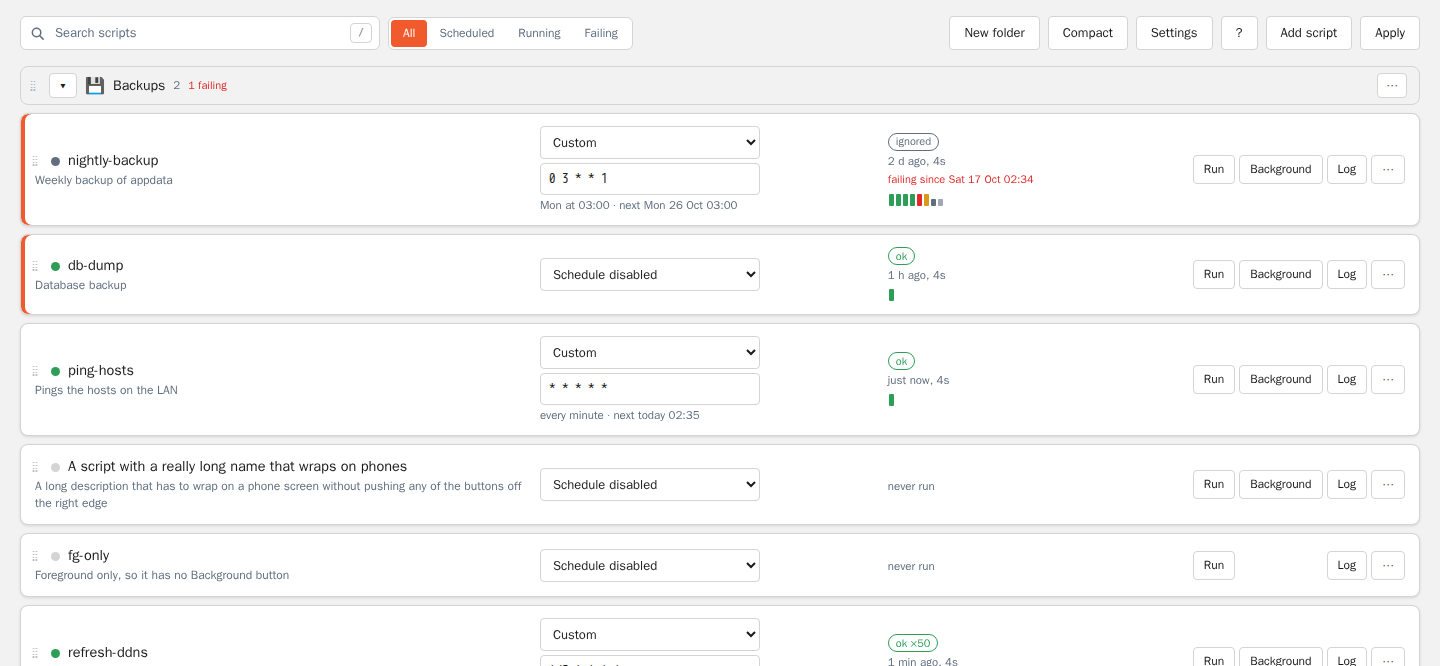
Run and schedule your own scripts on Unraid, with run history, live logs and failure notifications. Built for Unraid 7.3.3 and newer (Unraid refuses to install it on older versions).
Install
Plugins → Install Plugin →
https://raw.githubusercontent.com/VozDeOuro/voz.cron/master/plugins/voz.cron.plg
The page is Settings → VOZ_CRON (/Settings/VozCron). Data lives in /boot/config/plugins/voz.cron.
Moving from User Scripts
VOZ_CRON has its own plugin id (voz.cron), so it installs next to User Scripts (user.scripts, Squid's plugin or
this project's releases before 2026.10.13) instead of over it. The first install:
- Copies
/boot/config/plugins/user.scriptsinto/boot/config/plugins/voz.cron:scripts/, andconfig.json,layout.json,settings.json,history/when present. Without aconfig.json(Squid's plugin) the schedules are read from itsschedule.jsonandcustomSchedule.cron. Unsynced run history is copied from/tmp/user.scripts. A history folder inside the old flash folder moves to the new one; a pool path is kept. Nothing in/boot/config/plugins/user.scriptsis changed or deleted. - Retires User Scripts so no script is scheduled twice (
handover.sh). It does not run User Scripts' own remove step, because that deletes/tmp/user.scripts(and, in this project's older releases, itscustomSchedule.cron). Instead it removes/var/log/plugins/user.scripts.plg(so its cron file is no longer loaded), its/etc/cron.*/user.script.start.*.shwrappers and its package (its page and array start/stop hooks), and moves/boot/config/plugins/user.scripts.plgto/boot/config/plugins-removedso it is not reinstalled at boot. No process is stopped: a script User Scripts started keeps running until it ends;/tmp/user.scriptsis left alone. If the import fails, User Scripts is left installed and nothing is retired.
The import happens once (when /boot/config/plugins/voz.cron/config.json does not exist yet); changes made later in
User Scripts are not merged in. If User Scripts is installed again while VOZ_CRON is installed, the next VOZ_CRON
install or update retires it again.
Rollback: remove VOZ_CRON, then reinstall User Scripts (Plugins → Previous Apps, or its .plg URL). Its folder is
exactly as it was on the day VOZ_CRON was installed.
What is different
Responsive UI with search, Running/Failing/Scheduled filters, keyboard shortcuts (press ?), live log tail, run history and sparkline of the last 20 runs. Times are shown in the server's timezone. Folders: create, rename, give an icon, collapse; drag scripts and folders to reorder, or use "Move to…" and Alt+↑/↓. Stored in /boot/config/plugins/voz.cron/layout.json. Custom cron schedules run exactly as Unraid's crond (dcron) reads them, and the page says when an expression would be misread (for weekday range ending in 7) instead of saving it. Abort and timeout stop the whole process group. Per-script notifications: on failure or every run, alert after N failures, reminders, recovery notices, and a "Send test notification" button. Exit-code rules per script, e.g. 0=ok 1=warn 137=ignore *=fail: warnings notify once and remind, ignored codes stay quiet. Overlap control: skip, queue one, or run in parallel; "looks stuck" alert. History lives in RAM synced to flash hourly and on status changes.
Known limitations
- Scripts run as root with a clean environment (PATH, HOME=/root, TZ, and LANG, which defaults to C.UTF-8).
~/.bashrcis not sourced; source it in the script if you need it. - Tools that called User Scripts' entry points (
startScript.sh,backgroundScript.sh,exec.php,startCustom.php,helpers.php), such as FolderView Plus "run user script" actions, do not work with VOZ_CRON.
Development
bin/tt unit [--filter X]  # PHPUnit on PHP 8.4, in Docker on the Unraid test box (ssh host from $TT_HOST, default `tower`; see bin/tt)
bin/tt runner             # tests/runner.sh integration test
bin/tt all                # both, plus node tests for the UI helpers (tests/js)
bin/tt ui                 # Playwright UI specs against a PHP harness (tests/ui)
bin/release               # build, stamp the .plg, tag and publish a GitHub release (not run automatically)
Credits
VOZ_CRON is a fork of User Scripts by Andrew Zawadzki (Squid). Thanks to Squid for the original plugin that this one builds on.
- VOZ_CRON by Lucas Carvalho (VozDeOuro) — https://github.com/VozDeOuro
- Based on User Scripts by Andrew Zawadzki (Squid) — https://github.com/Squidly271/user.scripts
Categories
Download Statistics
Downloads by Month
Related apps
Explore more like this
Explore allDetails
https://raw.githubusercontent.com/VozDeOuro/voz.cron/master/plugins/voz.cron.plg