

Vigilant-Vole
Docker app from Ferdinand99's Repository
Overview
Readme
View on GitHub
A lightweight, self-hosted uptime monitor built in Rust. Single binary. Single Docker container. One volume. Inspired by Uptime Kuma, built for a smaller footprint — and a few things Kuma doesn't do.





Contents
- Features
- Screenshots
- Vigilant Vole vs Uptime Kuma
- Quick start
- Unraid
- Linux (systemd)
- Proxmox VE (LXC)
- Configuration
- Monitor types
- Notifications
- Status pages and badges
- Remote agents
- Docker label discovery
- REST API
- Config as code
- Translations
- Migrating from Uptime Kuma
- Prometheus and Grafana
- Backup and restore · Upgrading
- Security
- Building from source
- Architecture
- Roadmap
- License
✨ Features
Monitoring
- 30 monitor types — HTTP(S), HTTP keyword, HTTP JSON query (JSONPath), TCP port, ICMP ping, Tailscale ping, DNS (9 record types, custom resolver), push/heartbeat, Docker container, WebSocket, domain expiry (RDAP), NTP, Steam game server, game server (Minecraft Java and Bedrock, Satisfactory, FiveM/RedM, Mumble), TLS handshake, SMTP, Redis, PostgreSQL, MySQL/MariaDB, MQTT, Kafka, RabbitMQ, gRPC health, gRPC keyword, RADIUS, SNMP (v1/v2c/v3), SQL Server, MongoDB, real browser, and groups
- Real-browser checks — load a page in a headless Chromium (browserless, chromedp/headless-shell) over the DevTools protocol: status, text or CSS selector, JavaScript errors, desktop or mobile viewport, and a screenshot of the last failure. The browser runs as its own container, so this image stays small — see docs/real-browser.md
- TLS certificate and domain expiry warnings, configurable per monitor
- Groups and tags — nest monitors under group monitors (status = worst child), colour-coded tags with values, search and filters, clone, and bulk actions: select monitors (or every one matching a filter) to pause, resume, delete or edit them together — remote agents, check interval and timing, notification channels and tags — also via
POST /api/v1/monitors/bulk - Maintenance windows — manual, one-off, daily, weekly, every N days, days of the month (including “last day”) or a cron expression (any time zone, across midnight and DST changes); monitors record maintenance and stay quiet
AI assistants
- MCP server — connect your own Claude Code, Claude Desktop or any MCP client (
POST /mcp, Streamable HTTP, or thevigilant-vole mcpstdio bridge) with an API token: a read token to ask what's down and why, a write token to pause monitors, post incident updates or start maintenance. Vigilant Vole never calls an AI itself; secrets are masked and nothing can delete data — see docs/mcp.md
Alerting
- 40 notification providers, plus Apprise for 90+ more services — see Notifications
- Smart alerting — retries with a separate retry interval, upside-down mode, reminders every N down checks, escalation channels after N minutes down, flap detection, and recovery messages that say how long it was down
- Multi-location remote agents — run checks from other networks and only alert when agents confirm the outage
Sharing
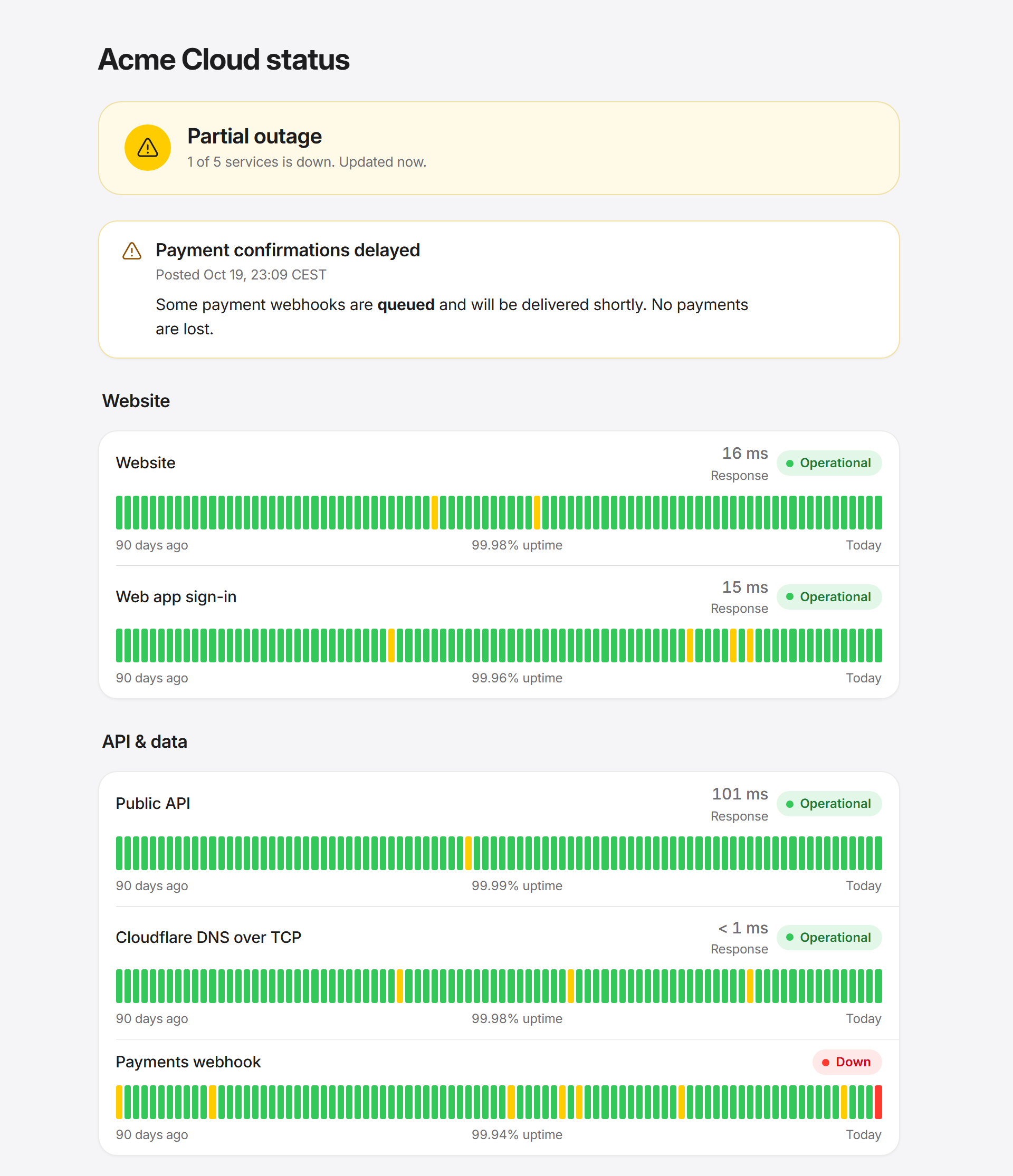
- Status pages — Apple-style public pages with sections, 90-day uptime bars, incidents (Markdown, pinned) with a status timeline of updates (investigating → identified → monitoring → resolved) and an Atom feed per page, scheduled maintenance, light/dark/auto theme, custom CSS, custom domains, logo and icon, password protection, built-in cookie-free analytics, embeddable JSON
- SVG badges — status, uptime, response time and certificate expiry
Operating it
- REST API with an in-app reference and OpenAPI 3.1 document
- Config as code — the whole setup as one YAML/JSON file: export, dry-run, merge or replace, GitOps on start
- Docker label auto-discovery — label a container, get a monitor
- Uptime Kuma importer — reads
kuma.db(1.23 and 2.x) or Kuma's JSON backup - Prometheus
/metricswith Kuma-compatible metric names, so existing Grafana dashboards work - Backup and restore — consistent database snapshot download, restore on next start
- Multi-user with roles (admin, editor, viewer), TOTP 2FA with recovery codes, API tokens (read/write, expiring)
- Data retention with daily rollups — long-range uptime survives deleting old heartbeats
- 26 interface languages, chosen per user: English, Norwegian (bokmål), Arabic, Chinese (Simplified and Traditional), Czech, Danish, Dutch, Finnish, French, German, Hebrew, Hungarian, Italian, Japanese, Korean, Persian, Polish, Portuguese (Brazil and Portugal), Romanian, Russian, Spanish, Swedish, Turkish and Ukrainian. All but English and Norwegian are marked beta; help improve a translation. Plural rules (including few/many and Arabic's six forms), number, digit and date formats follow each language, and Arabic, Hebrew and Persian run right-to-left
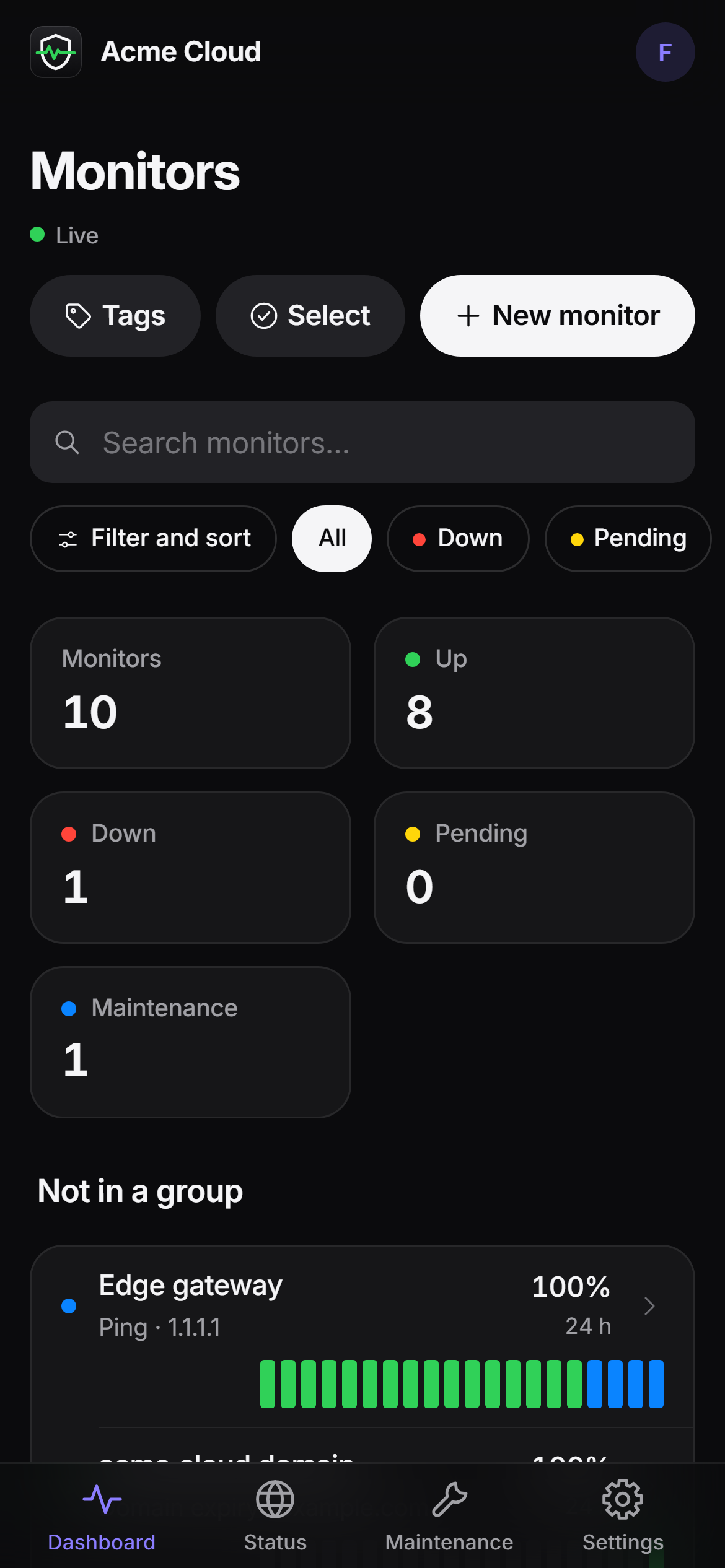
- Live dashboard over Server-Sent Events, Apple-style UI in light and dark, works on a phone, installable as a PWA
- Tiny — one ~38 MB static binary, ~20 MB compressed image, a few MB of RAM idle
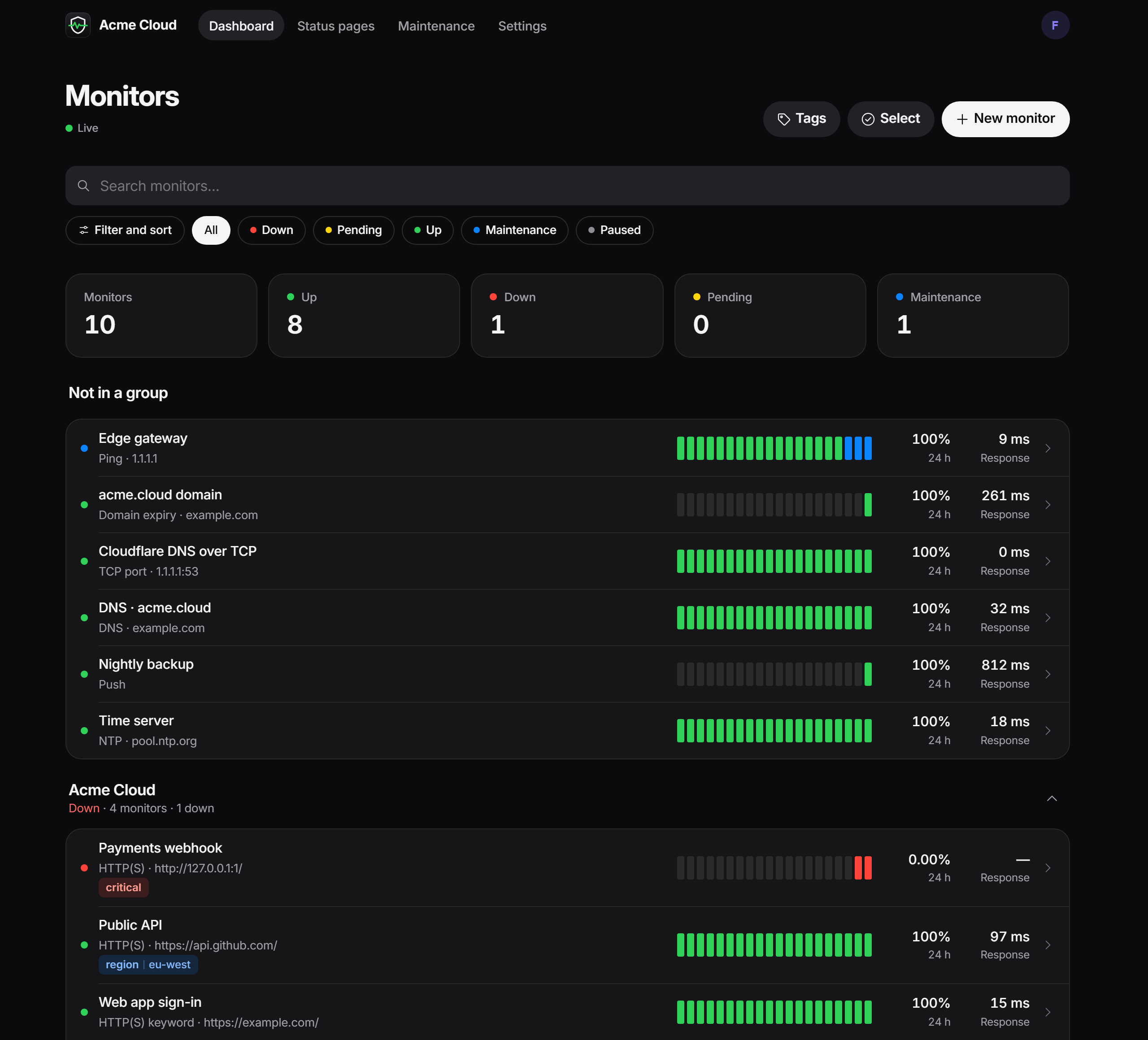
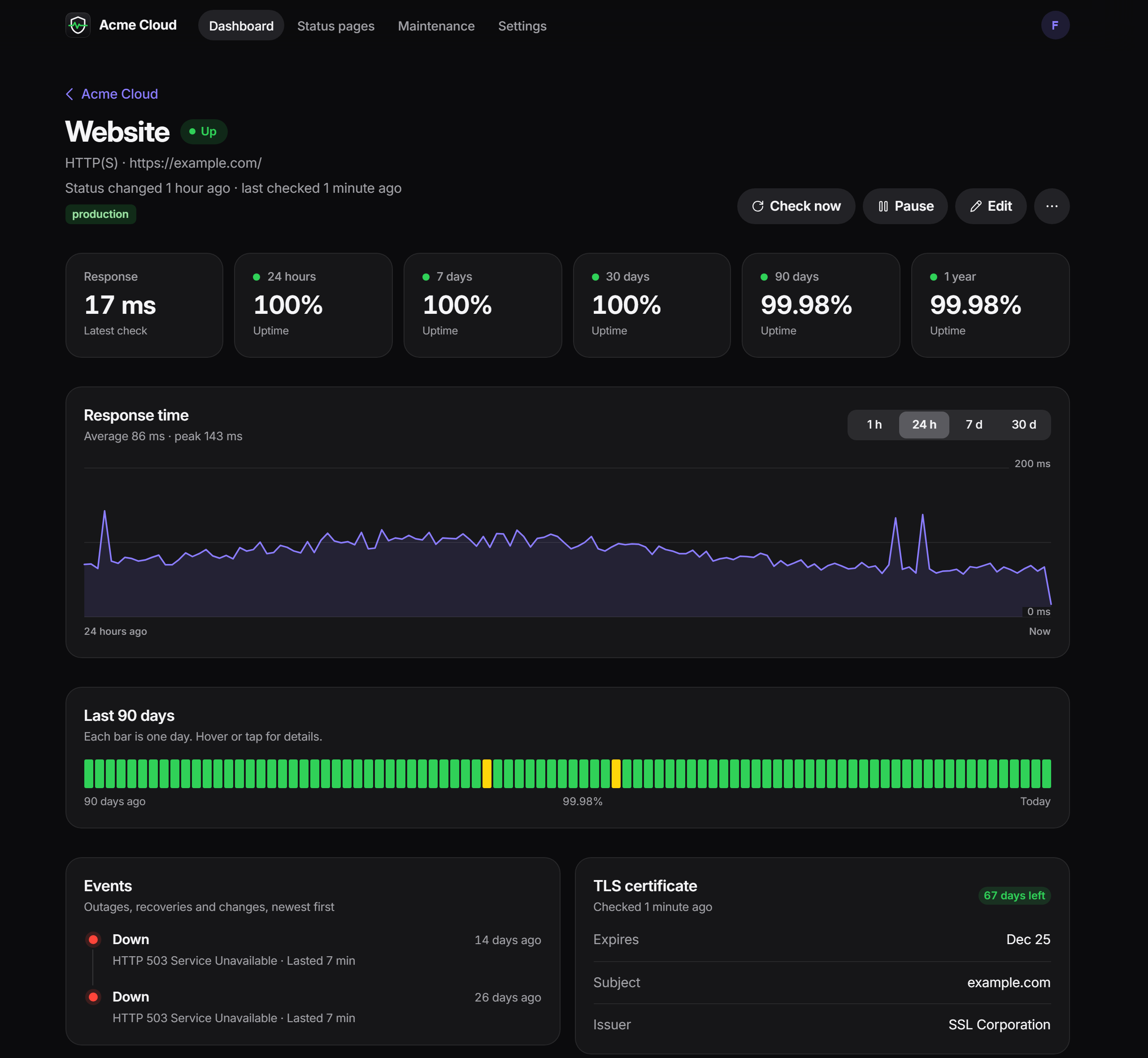
📸 Screenshots
 |
 |
 |
🆚 Vigilant Vole vs Uptime Kuma
Uptime Kuma is an excellent, mature project with a big community — Vigilant Vole borrows a lot of its ideas. Here's an honest comparison against Kuma 1.23 / 2.0:
| Vigilant Vole | Uptime Kuma | |
|---|---|---|
| Runtime | One static Rust binary, server-rendered HTML (Askama + htmx) | Node.js + Vue SPA |
| Docker image | ~20 MB compressed (~70 MB on disk) | Hundreds of MB |
| Idle memory | A few MB | Typically 100 MB+ |
| Database | SQLite (bundled) | SQLite, or MariaDB/MySQL in 2.0 ✅ |
| HTTP(S), keyword, JSON query, TCP, ping, DNS, push, Docker, Steam, groups, WebSocket | ✅ | ✅ |
| Domain expiry (RDAP), NTP monitors | ✅ | NTP ❌ · domain expiry varies by version |
| Database monitors: PostgreSQL, MySQL/MariaDB, Redis | ✅ | ✅ |
| Database monitors: SQL Server, MongoDB | ✅ | ✅ |
| MQTT, Kafka, RabbitMQ, gRPC health checks, RADIUS, SNMP v1/v2c, SMTP, TLS handshake | ✅ | ✅ (no TLS-handshake type) |
| gRPC keyword calls (any unary method, JSON request, text in the JSON answer) | ✅ .proto or server reflection; metadata is sent |
✅ pasted .proto only |
| SNMPv3 | ✅ every security level: MD5, SHA-1, SHA-2 authentication; DES, AES-128/192/256 privacy | ✅ noAuthNoPriv only |
| Tailscale ping | ✅ through the host's mounted tailscaled socket |
✅ via the tailscale CLI (not in the Docker image) |
| Game servers | ✅ a curated set: Valve/Source games (A2S, Steam type), Minecraft Java and Bedrock, Satisfactory, FiveM/RedM, Mumble | ✅ ~360 games via GameDig |
| Real-browser (headless Chrome) monitor | ✅ via a remote browser (CDP) | ✅ (built-in Chromium or a remote browser) |
| HTTP auth | Basic, OAuth2 client credentials, mTLS ✅ | Basic, NTLM, mTLS, OAuth2 client credentials ✅ |
| Notification providers | 40 native + Apprise (90+ services) | 90+ native ✅ |
| Reminders (resend while down) | ✅ | ✅ |
| Escalation channels after N minutes | ✅ | ❌ |
| Flap detection | ✅ | ❌ |
| Multi-location checks / outage confirmation | ✅ remote agents | ❌ |
| Status pages, custom domains, badges | ✅ | ✅ |
| Status page logo upload, analytics, password protection | ✅ incl. built-in, cookie-free analytics | Logo and analytics ✅ · password protection ❌ |
| Incidents | Multiple per page, pinned, history, update timeline, Atom feed | One active incident per page |
| Status page subscribers | ✅ email (double opt-in) and webhook | ❌ |
| Maintenance windows | ✅ manual, once, daily, weekly, every N days, days of the month, cron | ✅ the same |
| Multiple users with roles | ✅ admin / editor / viewer | ❌ single user |
| 2FA (TOTP) | ✅ + recovery codes | ✅ |
| REST API | ✅ full CRUD + OpenAPI | ❌ (socket.io; API keys for metrics only) |
| Config as code / GitOps | ✅ YAML/JSON, dry-run, merge/replace | ❌ |
| Docker label auto-discovery | ✅ built in | ❌ (third-party AutoKuma) |
| Prometheus metrics | ✅ (Kuma-compatible names + more) | ✅ |
| Long-range uptime after retention | ✅ daily rollups | ✅ aggregate tables in 2.0 |
| Import from the other one | ✅ reads kuma.db |
– |
| MCP server for AI assistants (read/write tokens) | ✅ | ❌ |
| Interface languages | 26 (English, Norwegian, and 24 beta languages incl. ar, he, fa, ja, ko, zh, ru, uk) | ~50 languages ✅ |
| Built-in Cloudflare Tunnel | ❌ | ✅ |
If you need a language outside the 26 above, or real-browser checks without running a separate browser container, Kuma is the better fit today.
🚀 Quick start
Requires Docker. Clone the repo, then:
git clone https://github.com/Ferdinand99/Vigilant-Vole.git
cd Vigilant-Vole
docker compose up -d
Open http://localhost:3001 — you'll land on a one-time setup wizard to create the admin account, then the dashboard.
docker-compose.yml (abridged — the file in the repo has commented extras: Docker socket, config file, a remote agent):
services:
  vigilant-vole:
    build: .
    image: vigilant-vole:latest
    container_name: vigilant-vole
    restart: unless-stopped
    ports:
      - "3001:3001"
    volumes:
      - ./data:/data
    environment:
      - DATA_DIR=/data
      # - VV_TRUST_PROXY=1   # behind a reverse proxy
    cap_add:
      - NET_RAW # raw ICMP fallback for ping monitors
Everything persistent — the SQLite database, the session key and automatic pre-migration backups — lives under ./data. Deleting that folder resets the app to a blank slate.
The app runs as the unprivileged user
vole— uid/gid 1000 by default, or whatever you set withPUID/PGID(Unraid:99/100). On start, the container hands/datato that user, picks up the group of a mounted Docker socket, and then drops root, so new folders and data from older root-run images just work. Settinguser:/--userinstead skips all of that: the folder must then already be writable, and socket access needsgroup_add.
Ping monitors work without root: the binary uses unprivileged ICMP sockets (enabled by Docker by default) and falls back to raw sockets.
🐳 Unraid
The easy way: install Vigilant-Vole from Community Applications (template in Ferdinand99/unraid-templates); it already sets everything below. By hand:
- Add the container via the Docker tab (or copy
deploy/unraid-template.xmlinto/boot/config/plugins/dockerMan/templates-user/) - Map a port: container
3001→ any host port - Map a path: container
/data→/mnt/user/appdata/vigilant-vole - Variables
PUID=99andPGID=100(Unraid'snobody:users, matching appdata permissions); optionally Extra Parameters--cap-add=NET_RAW - Optional, for Docker monitors and discovery: map
/var/run/docker.sock→/var/run/docker.sock(read-only); the container joins the socket's group by itself - Start the container and open the WebUI
For backups, Settings → Backup downloads a consistent snapshot; copying /mnt/user/appdata/vigilant-vole while the container is stopped works too.
🐧 Linux (systemd)
No Docker needed: every release has static binaries for x86_64 and aarch64. On Debian, Ubuntu or any other Linux with systemd, as root:
bash -c "$(curl -fsSL https://raw.githubusercontent.com/Ferdinand99/Vigilant-Vole/main/deploy/install.sh)"
It asks whether this machine should run the server (web UI, database; the default) or a remote agent that runs checks for another Vigilant Vole server; for an agent it then asks for the server URL, the vva_… token (hidden) and a name. The script downloads the latest release, checks it against SHA256SUMS, creates the vigilant-vole user and starts vigilant-vole.service (sandboxed, with only CAP_NET_RAW for ping) or vigilant-vole-agent.service, then prints the URL. Running it again is safe. Options go after --; --server or --agent skip the question (without a terminal it installs the server):
bash -c "$(curl -fsSL https://raw.githubusercontent.com/Ferdinand99/Vigilant-Vole/main/deploy/install.sh)" -- update               # new release for the server and/or agent, data and settings kept
bash -c "$(curl -fsSL https://raw.githubusercontent.com/Ferdinand99/Vigilant-Vole/main/deploy/install.sh)" -- --server --port 8080 --version v0.3.0
bash -c "$(curl -fsSL https://raw.githubusercontent.com/Ferdinand99/Vigilant-Vole/main/deploy/install.sh)" -- uninstall            # keeps data; add --purge to delete it
| Path | |
|---|---|
/opt/vigilant-vole/vigilant-vole |
binary (also /usr/local/bin/vigilant-vole) |
/var/lib/vigilant-vole |
data: database, session key, backups |
/etc/vigilant-vole/vigilant-vole.env |
settings (PORT, VV_* …); systemctl restart vigilant-vole after editing |
A remote agent without questions (token in the environment, so it stays out of ps):
export VV_AGENT_TOKEN=vva_xxxxxxxxxxxxxxxx
bash -c "$(curl -fsSL https://raw.githubusercontent.com/Ferdinand99/Vigilant-Vole/main/deploy/install.sh)" -- --agent --server https://status.example.com --name Frankfurt
Reverse proxy, backups, Docker socket access and doing it by hand: docs/install-linux.md.
🧰 Proxmox VE (LXC)
A community-scripts-style script creates an unprivileged Debian 13 container (1 CPU, 512 MB RAM, 2 GB disk; amd64 and arm64) with Vigilant Vole in it. In the Proxmox VE shell:
export COMMUNITY_SCRIPTS_URL="https://raw.githubusercontent.com/Ferdinand99/Vigilant-Vole/main/deploy/proxmox"
bash -c "$(curl -fsSL "$COMMUNITY_SCRIPTS_URL/ct/vigilant-vole.sh")"
It first asks whether the container runs the server or a remote agent (an agent container gets 256 MB RAM and a 1 GB disk by default and asks for the server URL and token). For the server, open http://<container-ip>:3001 when it's done; an agent shows up on its server under Settings → Remote agents. Unattended: var_mode=agent var_agent_server=https://status.example.com var_agent_token=vva_… mode=default bash -c "$(curl …)". To update, run update in the container's console. Paths are the same as above (data /var/lib/vigilant-vole, settings /etc/vigilant-vole/vigilant-vole.env), and ping monitors work in the unprivileged container. The scripts live in deploy/proxmox/ and use the community-scripts engine; they're meant for submission to community-scripts once the project meets their requirements.
🔧 Configuration
Process settings come from environment variables; everything else (monitors, channels, users, site name, time zone, retention, …) is configured in the web UI, through the API, or as config as code. With Docker, set them on the container; with the Linux or Proxmox install, they go in /etc/vigilant-vole/vigilant-vole.env (then systemctl restart vigilant-vole).
| Variable | Default | Description |
|---|---|---|
DATA_DIR |
./data (/data in the image, /var/lib/vigilant-vole for Linux/Proxmox installs) |
Database, session key and backups |
PORT |
3001 |
HTTP port (listens on 0.0.0.0) |
PUID / PGID |
1000 / 1000 |
Docker image only: user and group id the app runs as (the container starts as root only to set these and fix /data ownership). Unraid: 99 / 100 |
VV_TRUST_PROXY |
off | 1/true: trust X-Forwarded-Proto, X-Forwarded-Host, X-Forwarded-For / X-Real-IP from a reverse proxy (secure cookies, client IPs for login rate limiting, generated URLs). Only enable when the proxy is the only way in. |
VV_SETUP_TOKEN |
– | When set, the first-run setup page only opens as /setup?token=<value>, so nobody else can claim a fresh instance. Ignored once an admin exists |
VV_CONFIG_FILE |
– | Path to a YAML/JSON config document merged into the database on every start |
VV_MAX_CONCURRENT_CHECKS |
64 |
Checks allowed to run at the same time |
DOCKER_HOST |
local socket | Docker endpoint used when a Docker monitor or discovery leaves the host empty |
RUST_LOG |
info |
Log filter, e.g. info,vigilant_vole=debug |
VV_AGENT_SERVER |
– | Agent mode: server URL (same as --server) |
VV_AGENT_TOKEN |
– | Agent mode: agent token (same as --token) |
VV_AGENT_NAME |
hostname | Agent mode: display name (same as --name) |
VV_AGENT_CONCURRENCY |
16 |
Agent mode: parallel checks (same as --concurrency) |
TZ isn't needed: the display time zone is a setting (Settings → General, detected during setup), and logs are in UTC.
Command line:
vigilant-vole [serve]                                    # web server (default)
vigilant-vole agent --server <URL> --token <TOKEN> …     # remote probe agent
vigilant-vole --version
Settings → General (admins): site name, public base URL (used in notification links, push URLs, agent snippets and status page subscriptions — set it!), time zone, language, heartbeat retention (default 90 days), public badges.
📡 Monitor types
| Type | Target | Checks |
|---|---|---|
| HTTP(S) | URL | Status code (200-399 by default, e.g. 200-299,301,2xx), method, headers, body (JSON/form/raw), basic auth, OAuth2 client credentials, mTLS client certificates, proxy (HTTP/SOCKS5), redirects, ignore TLS errors, TLS certificate expiry |
| HTTP(S) keyword | URL | Response contains (or doesn't contain) a case-sensitive keyword; shows a snippet on failure |
| HTTP(S) JSON query | URL | RFC 9535 JSONPath compared with ==, !=, contains, <, <=, >, >= |
| TCP port | host:port |
Connection succeeds |
| Ping | host or IP | ICMP echo (IPv4/IPv6), round-trip time |
| Tailscale ping | peer name, MagicDNS name or Tailscale IP, [?type=tsmp|icmp] |
Asks the local tailscaled to ping the peer at the Tailscale layer (mount its socket — guide); shows the route (direct or DERP relay) and latency, and why it failed (peer offline, Tailscale logged out) |
| DNS | hostname | A, AAAA, CNAME, MX, NS, TXT, SOA, SRV, CAA; custom resolver; optional expected value |
| Push | – | Your job calls GET/POST /api/push/<token>?status=up&msg=OK&ping=; down if nothing arrives within the interval (+10%) |
| Docker container | container name/id | Running, and healthy if it has a healthcheck (local socket, unix://, tcp://) |
| WebSocket | ws:// / wss:// URL |
Handshake succeeds |
| Domain expiry | domain | Registration expiry via RDAP (IANA bootstrap) |
| NTP | host[:port] |
SNTP response, reports clock offset |
| Steam game server | host:port |
A2S_INFO query; players and map in the message |
| Game server | minecraft|bedrock|satisfactory|fivem|mumble://host[:port] |
The game's own status query: Minecraft Java Server List Ping (port 25565; without a port the _minecraft._tcp SRV record is tried first), Minecraft Bedrock RakNet ping (19132), Satisfactory Lightweight Query (7777; with an API token also the player count from its HTTPS API), FiveM/RedM info.json + dynamic.json (30120), Mumble UDP ping (64738). Version, players and server name/MOTD in the message; optional text the name must contain. Response time is the protocol's round trip. Valve/Source games use the Steam type |
| TLS handshake | host[:port] |
Handshake and certificate for any service that speaks TLS from the first byte (HTTPS, IMAPS, LDAPS, …); certificate expiry warnings |
| SMTP | host[:port] |
Greeting and EHLO; port 465 uses implicit TLS, other ports are upgraded with STARTTLS when offered, and the certificate is checked |
| Redis | redis[s]://host[:port][/db] |
AUTH (password or ACL user), SELECT, PING; shows the server version |
| PostgreSQL | postgres://host[:port]/db[?sslmode=…] |
Login (cleartext, MD5 or SCRAM-SHA-256) and SELECT 1; TLS when the server offers it. sslmode works like libpq's: disable, prefer (default), require, verify-ca, verify-full — only the verify-* modes check the certificate |
| MySQL / MariaDB | mysql://host[:port][/db][?sslmode=…] |
Server greeting; with a user name also the login (mysql_native_password, caching_sha2_password) and a ping. sslmode as for PostgreSQL (MySQL's VERIFY_IDENTITY etc. work too) |
| MQTT | mqtt[s]://host[:port][/topic] |
Connect with optional login; with a topic (wildcards +/# allowed) it subscribes, and with a keyword waits for a matching message |
| Kafka | kafka[s]://host[:port][/topic] |
Broker answers (ApiVersions, Metadata); with a topic, that it exists and every partition has a leader. Nothing is produced or created |
| RabbitMQ | amqp[s]://host[:port][/vhost] |
AMQP 0-9-1 greeting; with a user name, login and opening the virtual host |
| gRPC | grpc[s]://host[:port][/service] |
Standard grpc.health.v1.Health/Check over HTTP/2; up only when SERVING |
| gRPC keyword | grpc[s]://host[:port]/package.Service/Method |
Calls one unary method with a JSON request body and optional metadata; the message types come from a pasted .proto (well-known google/protobuf imports work) or, when that is empty, from the server's reflection service (v1, falling back to v1alpha). The answer is rendered as JSON (camelCase field names, enum names, 64-bit numbers as strings) and must contain the keyword (or must not, inverted); no keyword = any OK answer. A non-OK gRPC status is down. Answers are capped at 64 KiB; grpcs:// checks the certificate unless TLS errors are ignored |
| RADIUS | radius://host[:port] |
Access-Request with a user name and password (or Status-Server without), verified with the shared secret |
| SNMP | snmp://host[:port][/oid][?version=1|2c|3] |
GET of one OID; v1/v2c with the community string, v3 with a user name and, for authNoPriv/authPriv, an authentication password (MD5, SHA-1, SHA-224/256/384/512) and a privacy password (DES, AES-128/192/256); optional text the value must contain |
| SQL Server | sqlserver://host[:port][/db][?encrypt=…] |
TDS pre-login (server version); with a user name also a SQL Server login and SELECT 1. Encrypted when the server can (TLS inside TDS, or TDS 8.0 with encrypt=strict); encrypt=false encrypts only the login, disable never; the certificate is checked with encrypt=true&trustServerCertificate=false. No Windows authentication |
| MongoDB | mongodb://host[:port][,host2…][/db][?tls=true&replicaSet=…] or mongodb+srv://… |
hello (role and replica set), buildInfo; with a user name SCRAM-SHA-256/SCRAM-SHA-1; then ping. With replicaSet a set without a primary is down; with TLS the certificate is checked unless tlsAllowInvalidCertificates=true |
| Real browser | URL | Loads the page in a remote headless Chromium over the DevTools protocol (set one up under Settings → Remote browsers — guide): main document status (200-399 by default), optional text or CSS selector (or their absence), optionally fails on uncaught JavaScript errors; waits for load or network idle; desktop (1280×800) or mobile (390×844) viewport; optional headers and basic auth. Each check gets a fresh browser context; a failure saves a screenshot to the monitor page. Response time is request start → load. Not run by remote agents |
| Group | – | Worst status of its children (down > pending > up) |
Every type has interval (10 s – 24 h), timeout, retries, retry interval, upside-down mode, tags, description and per-monitor notification channels.
🔔 Notifications
Under Settings → Notifications, add channels and click Send test. Mark a channel default to attach it to new monitors; on each monitor choose which channels alert normally and which only escalate.
| Category | Providers |
|---|---|
| Chat | Discord (rich embeds), Slack (Block Kit), Microsoft Teams (Adaptive Cards), Google Chat, Mattermost, Rocket.Chat, Matrix, Webex, Feishu/Lark, DingTalk, Zulip, Nextcloud Talk |
| Messaging | Telegram, Signal (signal-cli REST API), Threema Gateway, WhatsApp (WAHA, Evolution API), SMS via Twilio, ClickSend or 46elks |
| Push | ntfy, Pushover, Gotify, Pushbullet, Bark, Gorush |
| SMTP (STARTTLS / TLS / none, HTML + text), SendGrid, Brevo | |
| Incident management | PagerDuty and Opsgenie (open and close), SIGNL4, Squadcast, Grafana OnCall, GoAlert, Splunk On-Call, Keep |
| Anything else | Webhook (custom method, headers and {{placeholder}} body template), Apprise (90+ services through an Apprise API server), Home Assistant (any notify service) |
Events: down, up (with downtime), reminder, escalation, certificate expiring, domain expiring, maintenance start/end, flapping. Alerts fire on settled transitions only — a monitor in its retry grace period stays pending and quiet. Secrets are never sent back to the browser in full.
📊 Status pages and badges
Status pages → New page. Each page has sections of monitors (drag to reorder), an overall status banner, 90-day uptime bars, optional response times and tags, incidents (Markdown, severity, pinned, history, a timeline of updates, and an Atom feed at /status/<slug>/feed.xml), the maintenance windows you attach, a theme (auto/light/dark), custom CSS, footer text, and an auto-refresh interval.
Logo and browser icon: upload PNG, JPEG, WebP or ICO (up to 1 MB; SVG is refused) in the page's Settings tab. Files are checked by content, kept in the database (backups stay one file) and served at
/status/<slug>/logoand/faviconPassword protection: give a page a password and visitors get an unlock form; the unlock lasts 30 days in that browser (a signed,
HttpOnlycookie for that page only) and changing or removing the password signs everyone out. While locked, the live refresh, the JSON and badges of monitors that are only on protected pages stay private. Signed-in users skip the lockSubscribers (Subscribers tab): let visitors subscribe to incidents, incident updates and maintenance by email (double opt-in: nothing is sent until they click the confirmation link; sent through an SMTP channel you pick) or by webhook (a JSON POST; only public addresses on port 80, 443 or above 1024 are accepted, never through a proxy, redirects are not followed). A webhook gets nothing until an editor approves it in the Subscribers tab; it then receives a
subscribedmessage with its unsubscribe link, then every announcement. Subscriptions need the Public URL (Settings → General) or the page's custom domain: links in mails and webhooks always point there, never at whatever address a visitor used, and without either the page offers no sign-up (the tab says so). Every mail has an unsubscribe link andList-Unsubscribe/ one-clickList-Unsubscribe-Postheaders, each subscriber gets their own message, the form answers the same whether or not an address is known, and sign-ups are rate-limited per address (per /64 for IPv6), per target and per page (100 an hour), with at most 10 webhooks per host. Unconfirmed email sign-ups expire after three days, unapproved webhooks after 14; subscribers who keep failing are dropped; only a hash of each link token is stored. The form follows a page's password lock. A page that becomes password protected keeps notifying the subscribers who already confirmed (they opted in); remove them in the tab if they shouldn't hear about it any moreAnalytics (Analytics tab): built-in, cookie-free counts of views, unique visitors and referring sites with a 30-day chart — no IP addresses are stored, unique visitors use a hash whose salt changes daily, bots and signed-in users don't count. Optionally add Plausible, Umami, Matomo or Google Analytics; its script loads on that page only and the page's CSP allows exactly that provider
Public at
/status/<slug>, or at/on a custom domain (point the domain at Vigilant Vole / your reverse proxy and set it on the page)GET /api/status-page/<slug>returns the page as JSON (CORS enabled) for embeddingStatus pages can be framed; the admin UI can't
Badges: /api/badge/<monitor id>/<status|uptime|ping|cert-exp>?duration=24h|7d|30d&style=flat|flat-square&label=…

Badges are public for monitors on a published status page without a password, or for every monitor when Public badges is on (Settings → General).
🌍 Remote agents
Run the same binary in agent mode on other hosts/locations. Agents fetch the monitors marked Check from remote agents too, run them, and report back. With Confirm outages with agents, a local failure only becomes down (and alerts) when the agents agree — otherwise the monitor stays pending with "Local check failed; 2/3 remote agents report up".
- Settings → Remote agents → New agent (copy the
vva_…token, shown once) - Start it anywhere with outbound access to the server:
docker run -d --name vigilant-vole-agent --restart unless-stopped \
  -e VV_AGENT_TOKEN=vva_xxxxxxxxxxxxxxxx \
  vigilant-vole:latest agent --server https://status.example.com --name Frankfurt
Or as a systemd service with the Linux installer or in a Proxmox container (both ask "server or remote agent?"), with Compose (see the commented service in docker-compose.yml), or the plain binary: VV_AGENT_TOKEN=vva_… vigilant-vole agent --server … (prefer the environment variable over --token, which other users on the host can see in ps). Use --once to test. Full guide: docs/remote-agents.md.
📦 Docker label discovery
Mount the Docker socket (or a socket proxy), switch on Settings → Integrations → Docker discovery, and label your containers:
services:
  payments:
    image: ghcr.io/acme/payments:latest
    labels:
      vigilant.enable: "true"
      vigilant.name: "Payments API"
      vigilant.type: "http"                       # default: docker (running + healthy)
      vigilant.target: "http://payments:8080/health"
      vigilant.interval: "30"
      vigilant.group: "Production"
      vigilant.tags: "prod,team:payments"
      vigilant.notify: "Ops Discord"
Labels: enable (required), name, type, target, interval, retries, timeout, keyword, group, tags, notify, description. Removed containers pause their monitor; monitors you made by hand are never touched. Full reference and socket permissions: docs/docker-discovery.md.
🔌 REST API
The browsable reference is at /api-docs in the app, /api/v1/openapi.json is the OpenAPI 3.1 version, and /api-docs.md (or /llms.txt) is the whole API as one Markdown document for AI assistants — Copy for AI on the reference page copies it. Create a token under Settings → API tokens (read = viewer, write = your role; expiry 30/90/365 days or never):
curl -H "Authorization: Bearer vv_…" https://status.example.com/api/v1/monitors?status=down

curl -H "Authorization: Bearer vv_…" -H "Content-Type: application/json" \
     -X POST https://status.example.com/api/v1/monitors \
     -d '{"name": "Website", "monitor_type": "http", "target": "https://example.com", "tags": ["production"]}'

curl -H "Authorization: Bearer vv_…" -X POST https://status.example.com/api/v1/monitors/7/pause
Covers monitors (CRUD, pause/resume, check now, heartbeats, uptime, events, tags), tags, notification channels (+ test), status pages, sections and incidents, maintenance, settings and config. More in docs/api.md.
📝 Config as code
Export everything (except history and users) as YAML or JSON from Settings → Backup or GET /api/v1/config, keep it in git, and apply it back with a dry-run plan first:
version: 1
tags:
  - name: production
    color: green
notification_channels:
  - name: Ops Discord
    kind: discord
    default: true
    config:
      url: "••••••"            # masked secrets keep the stored value
monitors:
  - name: Website
    monitor_type: http
    target: https://example.com
    interval_seconds: 30
    retries: 2
    tags: [production]
    notifications: [Ops Discord]
status_pages:
  - slug: acme
    title: Acme status
    sections:
      - name: Services
        monitors: [Website]
curl -X POST -H "Authorization: Bearer vv_…" -H "Content-Type: application/yaml" \
     --data-binary @vigilant.yml "https://status.example.com/api/v1/config?dry_run=1"
Merge (default) creates and updates; replace also deletes what the document leaves out (requires confirm=1). Set VV_CONFIG_FILE=/config/vigilant.yml to merge a mounted file on every start. Full schema: docs/config-as-code.md.
🌐 Translations
The interface comes in English, Norwegian (bokmål), Arabic, Chinese (Simplified and Traditional), Czech, Danish, Dutch, Finnish, French, German, Hebrew, Hungarian, Italian, Japanese, Korean, Persian, Polish, Portuguese (Brazil and Portugal), Romanian, Russian, Spanish, Swedish, Turkish and Ukrainian. Everyone picks their own language under Settings → Security, admins set the default under Settings → General, and public status pages follow the visitor's Accept-Language. Every language except English and Norwegian is labelled beta until native speakers have reviewed it; all of them cover 100 % of the strings. Arabic, Hebrew and Persian switch the whole layout to right-to-left (numbers, URLs, code and product names stay left-to-right), and Persian uses Persian digits.
Found a clumsy phrase, or want to add a language? Strings live in plain files, one per language, so a fix is a one-line change: see Helping with translations.
🔁 Migrating from Uptime Kuma
Settings → Backup → Move from Uptime Kuma: upload Kuma's kuma.db (1.23 or 2.x; stop Kuma first) or a Kuma JSON backup, review the plan, apply. Monitors, groups, tags, notifications, status pages and maintenance windows come over; push tokens are kept, so only the host in your push URLs changes. Unsupported monitor types and providers are listed with the reason. Importing twice updates instead of duplicating. Details: docs/migrating-from-uptime-kuma.md.
📈 Prometheus and Grafana
Switch on Settings → Integrations → Prometheus, create a read API token, and scrape /metrics with it as a Bearer token or basic-auth password:
scrape_configs:
  - job_name: vigilant-vole
    scheme: https
    authorization:
      credentials: vv_xxxxxxxxxxxxxxxx
    static_configs:
      - targets: ["status.example.com"]
You get vigilant_* metrics (status, response time, 24h/30d uptime ratio, certificate and domain days left, check-duration histogram, notification and agent health, discovery) and Kuma's monitor_status, monitor_response_time, monitor_cert_days_remaining and monitor_cert_is_valid with Kuma's labels — existing Kuma Grafana dashboards work unchanged. Reference: docs/metrics.md.
💾 Backup and restore
- Settings → Backup → Database backup downloads a consistent SQLite snapshot (
VACUUM INTO) while monitoring keeps running. It contains everything — history, users, tokens and secrets — so store it like a password. - Restore on next start: upload a backup; it's validated now and swapped in at the next restart. The current database is moved to
data/backups/. - Config export/import (above) for the readable, history-free version.
- Before applying database migrations on upgrade, a snapshot is written to
data/backups/automatically. - Manual: stop the container and copy the
data/folder (Linux/Proxmox installs: stopvigilant-voleand copy/var/lib/vigilant-vole).
Upgrading (Docker, Linux installer, Proxmox, Unraid), where the automatic backups are, how to roll back to an older version, and a five-minute restore drill: docs/upgrading.md. Every release's database is kept as a test fixture, and CI upgrades each one with the current code.
🔒 Security
- Put it behind HTTPS. Run a reverse proxy (Caddy, Traefik, nginx) in front and set
VV_TRUST_PROXY=1so session cookies getSecureand the login rate limiter sees real client IPs. Don't set it if clients can reach the app directly. - Set the public base URL in Settings → General so links in notifications, push URLs and agent snippets are right. Status page subscriptions and browser-based MCP clients need it (or, for subscriptions, the page's custom domain); behind a reverse proxy,
X-Forwarded-Host/-Protoonly count withVV_TRUST_PROXY. - Roles: viewer (read-only), editor (monitors, status pages, maintenance, notifications, tags), admin (users, settings, tokens, agents, backup, integrations). Give people the least they need.
- 2FA: Settings → Security → turn on TOTP; keep the recovery codes.
- API tokens are stored as SHA-256 hashes, can expire, and only work under
/api/and/metrics. Preferreadtokens for dashboards and scrapers. - Passwords are hashed with Argon2; login attempts are throttled with exponential backoff per IP and per user (counted before the password check, so parallel bursts can't get extra guesses); sessions are
HttpOnly,SameSite=Laxsigned cookies that end after 30 days idle and at most 30 days after login; state-changing browser requests are CSRF-checked; the admin UI can't be framed. - A strict Content-Security-Policy (
script-src 'self', no inline scripts oreval) applies to every page; public status pages differ only in allowing embedding (plus, on a page with third-party analytics, exactly that provider's origin). - Live dashboard streams re-check the account before every update and end after an hour, so signing out everywhere, disabling a user or changing their role takes effect on open tabs too.
- Saved monitor passwords (HTTP basic auth) are never sent back to the browser; they're kept on save only while the target host and proxy stay the same.
- Complete the setup wizard right after first start — until the first admin exists, anyone who can reach the page can create it. Set
VV_SETUP_TOKENto require a secret in the setup URL (/setup?token=…) when the instance is reachable by others before you get to it. - Mounting
docker.sockgives the container control over Docker; prefer a read-only socket proxy (docs). - A mounted
tailscaled.sock(Tailscale ping monitors) gives the unprivileged app read access to the tailnet's status; running the container as root, or as Tailscale's operator, would give it control of Tailscale (docs). - Agent tokens can read the configuration (including credentials) of monitors that run on agents; rotate them if a host is compromised.
🔨 Building from source
No local Rust install required — everything can be built inside Docker (BuildKit caches the cargo registry and target dir between builds):
docker build -t vigilant-vole:latest .
For local development with cargo installed (Rust 1.99+):
cargo run                     # server on http://localhost:3001, data in ./data
cargo run -- agent --help     # agent mode
cargo test                    # the whole workspace (vigilant-vole, vole-kit, vole-kit-build, kit-demo)
cargo clippy --workspace --all-targets
Templates, static assets, migrations and translations (templates/, kit/templates/, static/, migrations/, kit/migrations/, locales/, kit/locales/) are compiled into the binary, so rebuild after editing them. TLS everywhere is rustls (aws-lc-rs); there's no OpenSSL dependency, and the release build is a static musl binary in the image.
The binaries attached to releases come from the Dockerfile's builder stage (.github/workflows/release-binaries.yml). The same locally:
docker build --target builder -t vigilant-vole-builder .
id=$(docker create vigilant-vole-builder) && docker cp "$id":/usr/local/bin/vigilant-vole . && docker rm "$id"
deploy/package-release.sh ./vigilant-vole x86_64-unknown-linux-musl v0.3.0 dist   # -> dist/vigilant-vole-x86_64-unknown-linux-musl.tar.gz
🧩 Architecture
kit/                     # vole-kit: the shared product kit (auth, i18n engine, db, HTTP, docs, MCP, notifications, design system)
├── src/                 # see docs/vole-kit.md; sign-in, users, tokens, Security and API docs pages in auth/pages/
├── templates/           # shared layouts, macros and pages (copied into templates/kit/ at build time)
├── migrations/          # the core tables: users, api_tokens, settings
├── locales/             # the kit's core interface strings, one file per language
└── kit-build/           # vole-kit-build: the build.rs helper that makes the kit's templates available
examples/kit-demo/       # a second, tiny product on vole-kit (tests that the kit stands on its own)
src/
├── main.rs              # CLI: `serve` (default) or `agent`
├── server.rs            # startup: migrations, scheduler, background jobs, HTTP listener, graceful shutdown
├── config.rs            # env var config (DATA_DIR, PORT)
├── api/                 # axum handlers + askama pages
│   ├── v1/              # JSON REST API, /api-docs + OpenAPI, backup page
│   ├── monitors/ …      # dashboard, monitors, tags, SSE events
│   ├── status_pages.rs, public_status.rs, badges.rs, maintenance.rs
│   ├── notifications.rs, agents.rs, metrics.rs, push.rs
│   └── auth.rs, users.rs, settings.rs, tokens.rs
├── auth/                # sessions, CSRF, login rate limit, TOTP, API tokens, roles
├── db/                  # SQLite (rusqlite + deadpool), migrations, queries, daily rollups
├── monitor/             # scheduler, pure alerting state machine, retention, engine metrics
│   └── checkers/        # http, tcp, ping, tailscale, dns, docker, websocket, domain (RDAP), ntp, steam, game_server, tls, smtp, redis, postgres, mysql, mqtt, kafka, rabbitmq, grpc, grpc_keyword, radius, snmp, sqlserver, mongodb, real_browser (CDP)
├── notification/        # 40 providers behind one schema-driven registry
├── agent/               # remote probe agent + its wire protocol
├── discovery.rs         # Docker label discovery
├── maintenance.rs       # maintenance window evaluation
├── config_io.rs         # config as code: export, plan, import, restore
├── kuma_import.rs       # Uptime Kuma importer
└── i18n/                # tests of the translations (the engine is vole-kit's); strings in locales/<code>.toml + kit/locales/<code>.toml
templates/               # Askama HTML templates (compiled in)
static/                  # CSS, htmx, app.js, icons, fonts (embedded; the design system by vole-kit)
migrations/              # SQL schema, run once each on startup
locales/                 # Vigilant Vole's interface strings, one file per language (+ glossary/ per language)
A Scheduler runs one tokio task per active monitor under a global concurrency limit. Every observation — local checks, push requests, missed-push timeouts, agent results, group recomputes — goes through one pure state machine (monitor::alerting) that decides the status to record and the notifications and events to emit, so all sources follow the same rules. Updates are broadcast to /events, which pushes fresh dashboard fragments to connected browsers over SSE. An hourly job rolls heartbeats up into daily stats and prunes old ones.
🧭 Roadmap
Done:
- Public status pages, custom domains, incidents, badges
- Incident update timeline, Atom feed and status page subscribers (email, webhook)
- Maintenance windows
- TLS certificate and domain expiry checks
- Push/heartbeat monitors
- Multi-user, roles, 2FA, API tokens
- Tags and monitor groups
- Monitor pause/resume, clone, bulk actions
- 30 monitor types, 40 notification providers + Apprise
- Real-browser monitors with failure screenshots (external headless Chromium)
- Escalation, reminders, flap detection
- Remote agents with outage confirmation
- REST API + OpenAPI, config as code, backup/restore
- Uptime Kuma importer, Prometheus metrics
- Docker label discovery
- Static Linux binaries (x86_64, aarch64), systemd installer and a Proxmox LXC script
- Multi-arch images (amd64, arm64) on GHCR, automated releases
- MCP server for AI assistants, "Copy for AI" API reference
- 26 UI languages (24 beta), including right-to-left (ar, he, fa) and CJK (ja, ko, zh-CN, zh-TW)
Ideas, not promises:
- More monitor types: more game servers (TeamSpeak 3, Quake 3, Terraria/TShock, DayZ)
- MariaDB/PostgreSQL as an alternative storage backend
- More interface languages (contributions welcome — see
locales/) - NTLM HTTP authentication
📄 License
Requirements
Categories
Related apps
Explore more like this
Explore allDetails
ghcr.io/ferdinand99/vigilant-vole:latestRuntime arguments
- Web UI
http://[IP]:[PORT:3001]/- Network
bridge- Shell
sh- Privileged
- false
- Extra Params
--cap-add=NET_RAW
Template configuration
Web interface, API, status pages and /metrics.
- Target
- 3001
- Default
- 3001
- Value
- 3001
SQLite database, session key and backups. Ownership is set to PUID:PGID on every start.
- Target
- /data
- Default
- /mnt/user/appdata/vigilant-vole
- Value
- /mnt/user/appdata/vigilant-vole
User id the app runs as (Unraid: 99 = nobody).
- Default
- 99
- Value
- 99
Group id the app runs as (Unraid: 100 = users).
- Default
- 100
- Value
- 100
Only needed for Docker container monitors and label auto-discovery. Leave empty to disable.
- Target
- /var/run/docker.sock
Set to 1 when the WebUI is only reachable through a reverse proxy (SWAG, Nginx Proxy Manager, Traefik) that sets X-Forwarded-* headers.
- Default
- 0
- Value
- 0
Optional path (inside the container, e.g. /data/vigilant.yml) to a YAML/JSON config file merged into the database on every start.
Log level filter.
- Default
- info
- Value
- info