
All apps · 0 apps

video2x-webgui
Docker app from sognix's Repository
Overview
Web interface for Video2X: AI upscaling (Real-ESRGAN, Real-CUGAN, Anime4K/libplacebo) and frame interpolation (RIFE) of videos on your GPUs. Every Video2X option in the browser, batch processing of whole folders, one queue per GPU (a free GPU takes the next batch file), preview clips, live progress and per-job logs.
GPU setup (without it, Video2X falls back to the CPU and is extremely slow):
- NVIDIA: install the Nvidia-Driver plugin, then add "--gpus all" to Extra Parameters (advanced view).
- Intel/AMD: set the "Intel/AMD GPU" device to /dev/dri.
Both can be used together. Tested on RTX 3090 and RTX 5060 Ti.
The web UI has no login: anyone who can reach the port can upload, start jobs and delete logs. Keep it on your LAN or behind a reverse proxy with authentication.
Unofficial, not affiliated with the Video2X project.
Readme
View on GitHubvideo2x-webGUI
A web interface for Video2X — AI upscaling
(Real-ESRGAN, Real-CUGAN, Anime4K/libplacebo) and frame interpolation (RIFE) of
videos on your GPUs — packaged as a linuxserver.io-style Docker container, so it
drops into Unraid or any other Docker host.
Video2X's desktop GUI only exists for Windows; on Linux there's just the command line. This project puts a browser UI on top of the CLI, queues work across several GPUs, and runs whole folders unattended.
Unofficial — not affiliated with, endorsed by, or supported by K4YT3X or the Video2X project.
Features
- Every Video2X option in the browser — processor, model, scale, noise level, encoder settings. Only model/scale/noise combinations that actually work are offered.
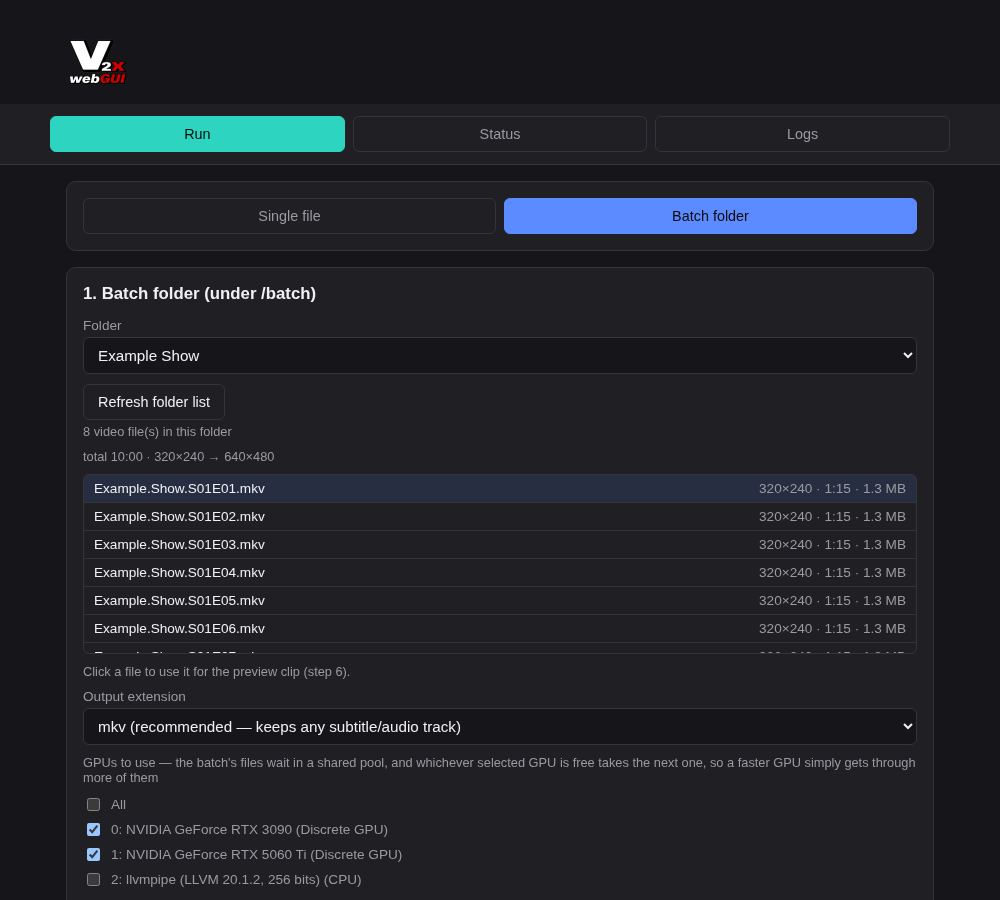
- Batch folders — point it at a folder and every video in it gets processed.
Outputs go into a matching folder (
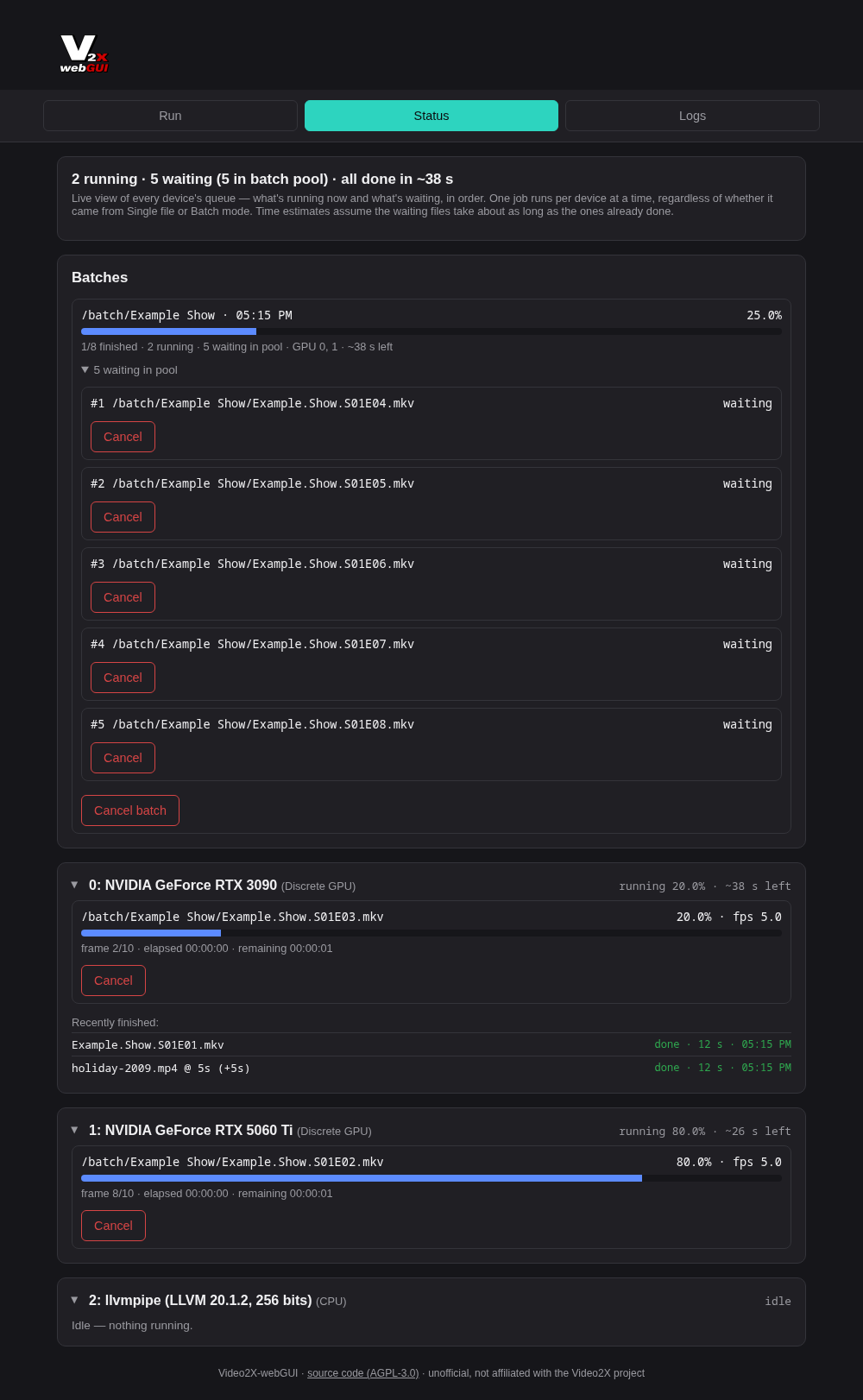
/batch/Show/x.mkv→/videos/output/Show/x.mkv), finished inputs are moved todone/, so an interrupted batch simply continues where it stopped. - Multiple GPUs — each GPU runs one job at a time. Batch files wait in a shared pool and whichever GPU is free takes the next one, so a faster card simply does more of them. Single jobs you start meanwhile run next on their GPU.
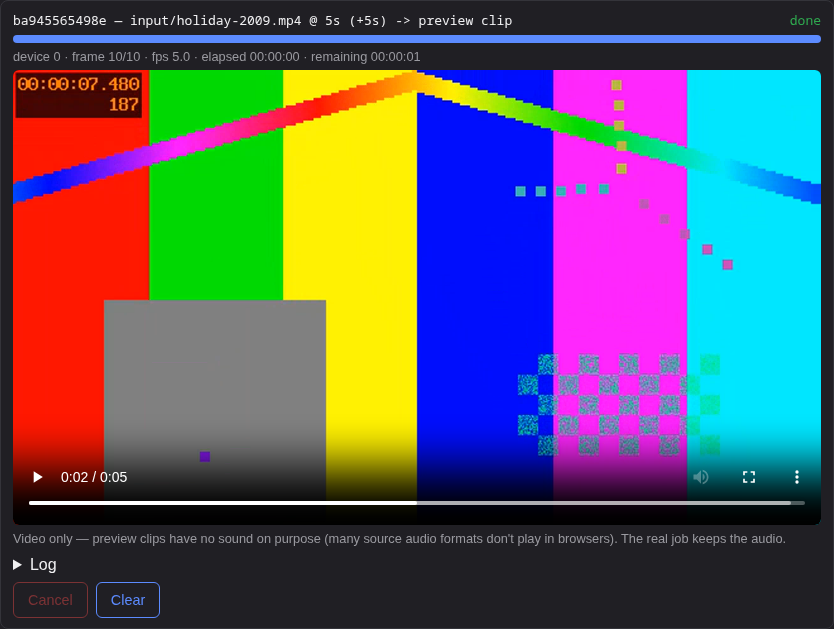
- Preview clips — render a few seconds with the current settings and watch them right in the browser before committing hours to a whole season.
- Status page — live progress per GPU and per batch, time estimates, cancel anything, running/waiting counts in the tab title and browser notifications when a job or batch is done.
- Video info — resolution, frame rate, duration and the resulting output size, for single files and whole folders.
- Logs — one log file per job (with the exact command used), readable and deletable in the UI.
| Batch mode | Preview clip |
|---|---|
 |
 |
Requirements
- An x86-64 (amd64) Docker host.
- A Vulkan-capable GPU:
- NVIDIA (best tested): current driver and the
NVIDIA Container Toolkit
on the host; the container gets the GPUs via
--gpus all. - Intel / AMD (untested): pass
/dev/driinto the container; the image includes Mesa's Vulkan drivers. Integrated GPUs, if they work, are far slower than a dedicated card. - Without any GPU, Mesa's software renderer (
llvmpipe) still works — fine for trying the UI, far too slow for real work.
- NVIDIA (best tested): current driver and the
NVIDIA Container Toolkit
on the host; the container gets the GPUs via
Tested on
- NVIDIA GeForce RTX 3090 and RTX 5060 Ti, on Unraid with the Nvidia-Driver plugin
- Mesa's software renderer (
llvmpipe), for the automated build test
Other GPUs should work wherever Video2X itself works, but I can't test them. GPU-specific problems are almost always Video2X or driver issues — please report those to the Video2X project.
Quick start
Unraid
Search for video2x-webgui in Community Applications. Until it's listed there, add the
template by hand: save
unraid/video2x-webgui.xml as
/boot/config/plugins/dockerMan/templates-user/my-video2x-webgui.xml on your server, then
pick it under Docker → Add Container → Template.
The template sets PUID=99, PGID=100 and UMASK=000, but no GPU, so it starts on any
server. Add your GPU by hand, otherwise Video2X runs on the CPU (extremely slow):
- NVIDIA: install the Nvidia-Driver plugin, then add
--gpus allto Extra Parameters (advanced view). - Intel/AMD: set the Intel/AMD GPU device to
/dev/dri.
Both can be used together.
Docker Compose
services:
  video2x-webgui:
    image: ghcr.io/sognix/video2x-webgui:latest
    container_name: video2x-webgui
    environment:
      - PUID=1000
      - PGID=1000
    volumes:
      - ./config:/config
      - ./videos:/videos
      - ./batch:/batch
      - ./logs:/logs
    ports:
      - 3000:3000
    deploy:
      resources:
        reservations:
          devices:
            - driver: nvidia
              count: all
              capabilities: [gpu]
    restart: unless-stopped
The same file is in docker-compose.yml. For Intel/AMD, replace
the deploy: block with devices: ["/dev/dri:/dev/dri"].
docker run
docker run -d \
  --name video2x-webgui \
  --gpus all \
  -p 3000:3000 \
  -e PUID=1000 -e PGID=1000 \
  -v /path/to/config:/config \
  -v /path/to/videos:/videos \
  -v /path/to/batch:/batch \
  -v /path/to/logs:/logs \
  ghcr.io/sognix/video2x-webgui:latest
Then open http://<host>:3000.
Usage
- Single file: upload a video (lands in
/videos/input) or copy it there, pick processor and GPU, start. The result goes to/videos/output. - Batch: put a folder of videos under
/batch, switch to Batch folder, pick the folder and the GPUs to use, start. Non-video files in the folder are ignored. - Try settings first: open 6. Preview clip, render a few seconds and compare.
- Watch progress on the Status tab, read or clean up job logs on the Logs tab.
Configuration
| Volume | Purpose |
|---|---|
/config |
Persistent settings (e.g. the self-signed HTTPS certificate) |
/videos |
input/ for single files, output/ for all results |
/batch |
Folders to process in batch mode (finished inputs are moved to <folder>/done/) |
/logs |
One log file per job |
| Port | Purpose |
|---|---|
3000 |
HTTP |
3001 |
HTTPS with a self-signed certificate |
| Variable | Default | Purpose |
|---|---|---|
PUID / PGID |
911 |
User/group the app runs as — set them to the owner of your media folders (Unraid: 99 / 100) |
UMASK |
022 |
Permissions of created files/folders. 022: only the container user may modify them. On Unraid use 000, otherwise SMB users can't move or delete the results |
CUSTOM_PORT / CUSTOM_HTTPS_PORT |
3000 / 3001 |
Change the listening ports |
SOURCE_URL |
this repository | Link to the source code in the page footer — point it at your fork if you run a modified version for others (AGPL-3.0) |
Browser notifications need a secure page: https:// with a certificate the browser
trusts (easiest via a reverse proxy) or localhost. The job counts in the tab title work
everywhere.
Security
The web UI has no login. Anyone who can reach the port can upload files, start and cancel jobs and delete logs. Run it only on a trusted network, or put it behind a reverse proxy with authentication (e.g. Authelia, Authentik, or basic auth in nginx/Traefik/Caddy). Don't expose it to the internet as-is.
To report a vulnerability, see SECURITY.md.
Known limitations
- amd64 only — Video2X only ships an x86-64 Linux build.
- Hardware decoding (
hwaccel) is unreliable in Video2X itself (upstream issue), so it's off by default. It rarely matters: the upscaling runs on the GPU either way. - NVENC encoding (
h264_nvenc/hevc_nvenc) currently fails with apts < dtsmuxing error in Video2X; use a CPU encoder such aslibx264/libx265. - Only the models bundled with Video2X are available. Supported combinations:
- RIFE:
rife-v4.6,rife-v4.25,rife-v4.25-lite,rife-v4.26 - Real-ESRGAN:
realesr-animevideov3(2x/3x/4x);realesrgan-plus-animeandrealesrgan-plus(4x only) - Real-CUGAN:
models-nose(2x, noise 0);models-pro(2x/3x, noise 0 or 3);models-se(2x any noise, 3x/4x noise 0 or 3) - libplacebo: all 7 bundled shaders, any resolution
- RIFE:
- The job list lives in memory: a container restart forgets queued jobs (finished
files, logs and the
done/folders stay).
Documentation
docs/architecture.md— how the image, queueing, preview clips and logs workdocs/api.md— the HTTP API behind the UICONTRIBUTING.md— building and running it yourselfCHANGELOG.md— what changed in each release
Support
This is a hobby project, maintained in spare time. Bug reports with the details the
issue template asks for are very welcome and get looked at; feature requests too, but
without any promise. For problems with Video2X itself (models, output quality,
crashes of the video2x binary), please check the
Video2X repository first.
License
Copyright (C) 2026 sognix — AGPL-3.0-or-later, see LICENSE.
The image bundles Video2X (AGPL-3.0), FFmpeg from
Ubuntu (GPL-2.0-or-later) and the linuxserver.io base image; see NOTICE.md
for all third-party components and their licenses.
Install video2x-webgui on Unraid in a few clicks.
Find video2x-webgui in Community Apps on your Unraid server, review the template, and click Install. Unraid handles the Docker app or plugin setup from the published template.
Requirements
Categories
Related apps
Explore more like this
Explore allDetails
ghcr.io/sognix/video2x-webgui:latestRuntime arguments
- Web UI
http://[IP]:[PORT:3000]/- Network
bridge- Shell
bash- Privileged
- false
Template configuration
Web interface
- Target
- 3000
- Default
- 3000
- Value
- 3000
Web interface with a self-signed certificate. Needed for browser notifications unless you use a reverse proxy.
- Target
- 3001
- Default
- 3001
- Value
- 3001
Single files: uploads land in input/, all results (single and batch) go to output/
- Target
- /videos
- Default
- /mnt/user/video2x/videos/
- Value
- /mnt/user/video2x/videos/
Folders to process in batch mode. Finished inputs are moved to folder/done/
- Target
- /batch
- Default
- /mnt/user/video2x/batch/
- Value
- /mnt/user/video2x/batch/
One log file per job
- Target
- /logs
- Default
- /mnt/user/appdata/video2x-webgui/logs/
- Value
- /mnt/user/appdata/video2x-webgui/logs/
Persistent settings (self-signed HTTPS certificate)
- Target
- /config
- Default
- /mnt/user/appdata/video2x-webgui/config/
- Value
- /mnt/user/appdata/video2x-webgui/config/
Only needed for Intel/AMD GPUs: set to /dev/dri. Leave empty if the server has none, otherwise the container won't start. NVIDIA GPUs instead need --gpus all in Extra Parameters; both can be combined.
- Target
- /dev/dri
- Default
- /dev/dri
User the app runs as (99 = nobody)
- Default
- 99
- Value
- 99
Group the app runs as (100 = users)
- Default
- 100
- Value
- 100
Permissions of created files. 000 lets SMB users move and delete the results
- Default
- 000
- Value
- 000