

VehicleVault
Docker app from TeeCodeDev's Repository
Overview
VehicleVault is a modern, privacy-first, self-hosted vehicle lifecycle, fuel, maintenance, digital glovebox, and TCO (Total Cost of Ownership) platform. Built with a responsive React PWA, Node.js TypeScript API, Tesseract OCR receipt scanner, and Model Context Protocol (MCP) server for AI assistants.
Key Features:
- Fleet & Garage Management: Multi-vehicle profiles (cars, motorcycles, trailers, vans) with cover photos, specifications, and telemetry.
- Dutch RDW Open Data: 1-click license plate autofill and automated background APK expiry monitoring with alert notifications.
- Quick-Log Fueling & OCR Scanner: Fast mobile PWA fueling interface with built-in Tesseract OCR for automatic receipt parsing (liters, €/L, total cost).
- Digital Glovebox & Documents: Secure vault for registrations, insurance green cards, APK reports, garage invoices, and user manuals with category filters.
- Dual-Trigger Maintenance Engine: Track distance and time service intervals with parts vs. labor cost split and DIY savings indicator.
- Dynamic TCO & Tank Analytics: Operational vs. asset TCO with purchase price toggle, tank range metrics, fuel price evolution, and gas station comparisons.
- Digital Service Dossier: Generate downloadable, clean PDF service booklets suitable for vehicle sales or insurance archives.
- Offline Mode & PWA: Offline caching with an offline fuel queue that automatically synchronizes when connectivity is restored.
- AI Integration (MCP): Built-in Model Context Protocol (MCP) server for Claude Desktop, Antigravity, and AI agents via stdio or authenticated HTTP/SSE.
- Multi-Language: Full Dutch (NL) and English (EN) interface switchable in settings.
Initial Setup:
Open the web interface at [inline]http://[IP]:[PORT:3001]/[/inline]. The first user registered will automatically be granted Administrator privileges.
Readme
View on GitHub
VehicleVault
Self-Hosted Vehicle Lifecycle, Fuel, AI Maintenance Scanner, Digital Glovebox, and TCO Platform










VehicleVault is a privacy-first, self-hosted vehicle lifecycle, fueling, maintenance, tire management, trip logging, and Total Cost of Ownership (TCO) platform. Built with React 19, a Node.js 24 TypeScript REST API, a multimodal AI Vision & OCR pipeline (capable of scanning fuel receipts and translating foreign maintenance invoices), a bidirectional Home Assistant integration, and a Model Context Protocol (MCP) Server enabling AI agents (such as Claude Desktop or Antigravity) to query and log vehicle telemetry.
📖 Read the Documentation & Wiki
📸 Screenshots
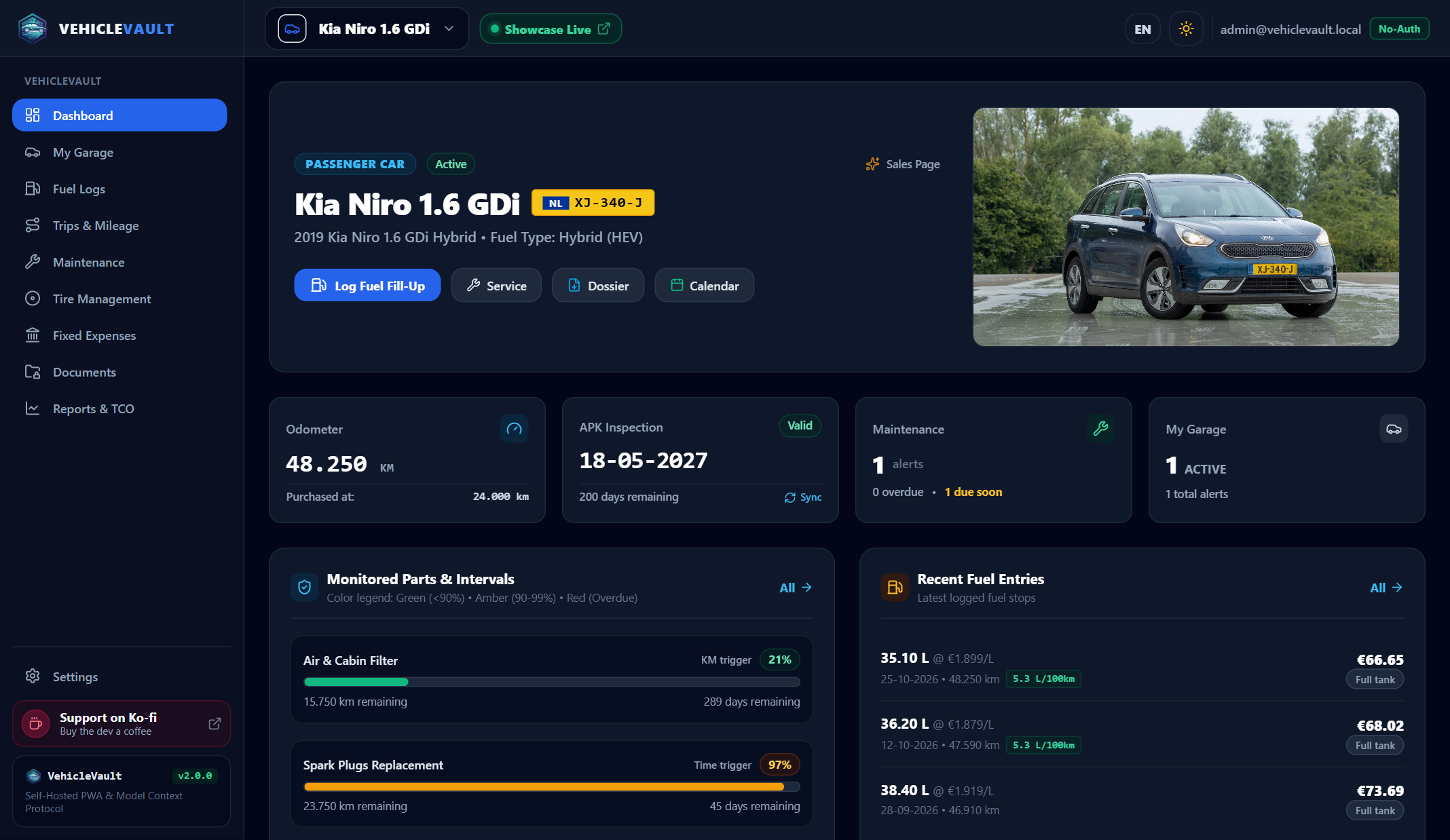
Fleet Dashboard & TCO Analytics
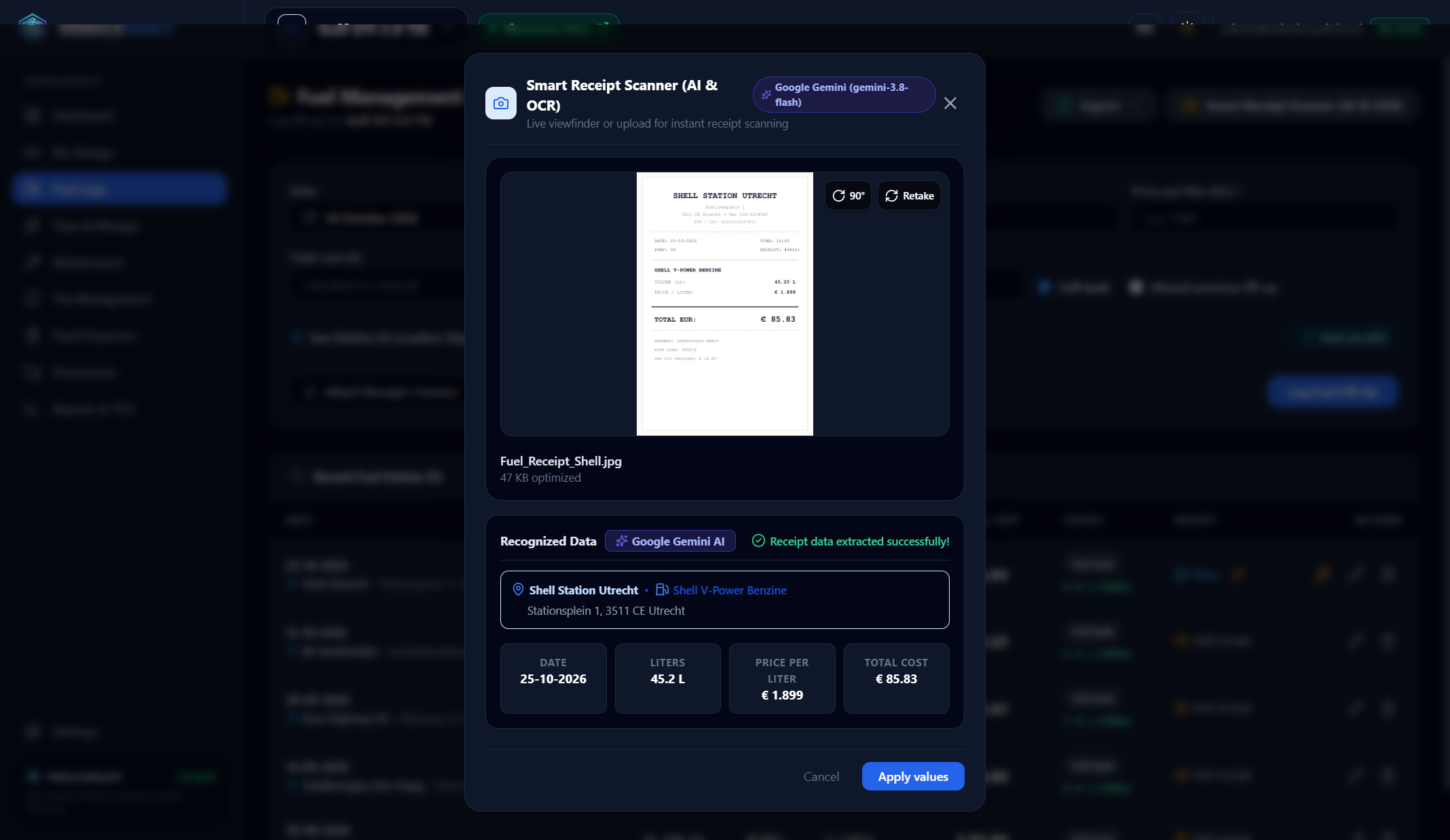
AI Vision Receipt & Invoice Scanner (Google Gemini & OpenAI Vision)
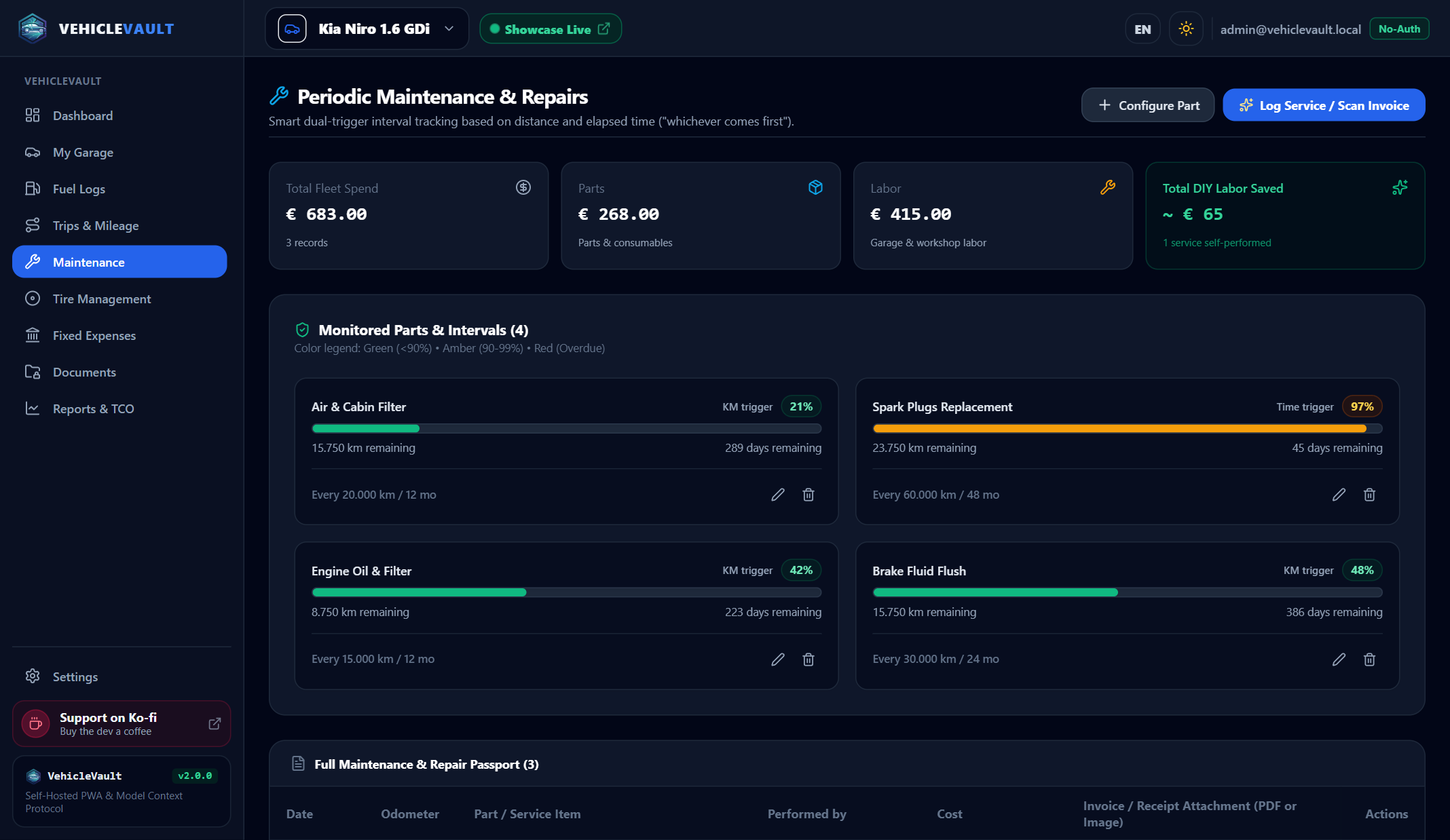
Dual-Trigger Maintenance Engine (Distance & Time Intervals)
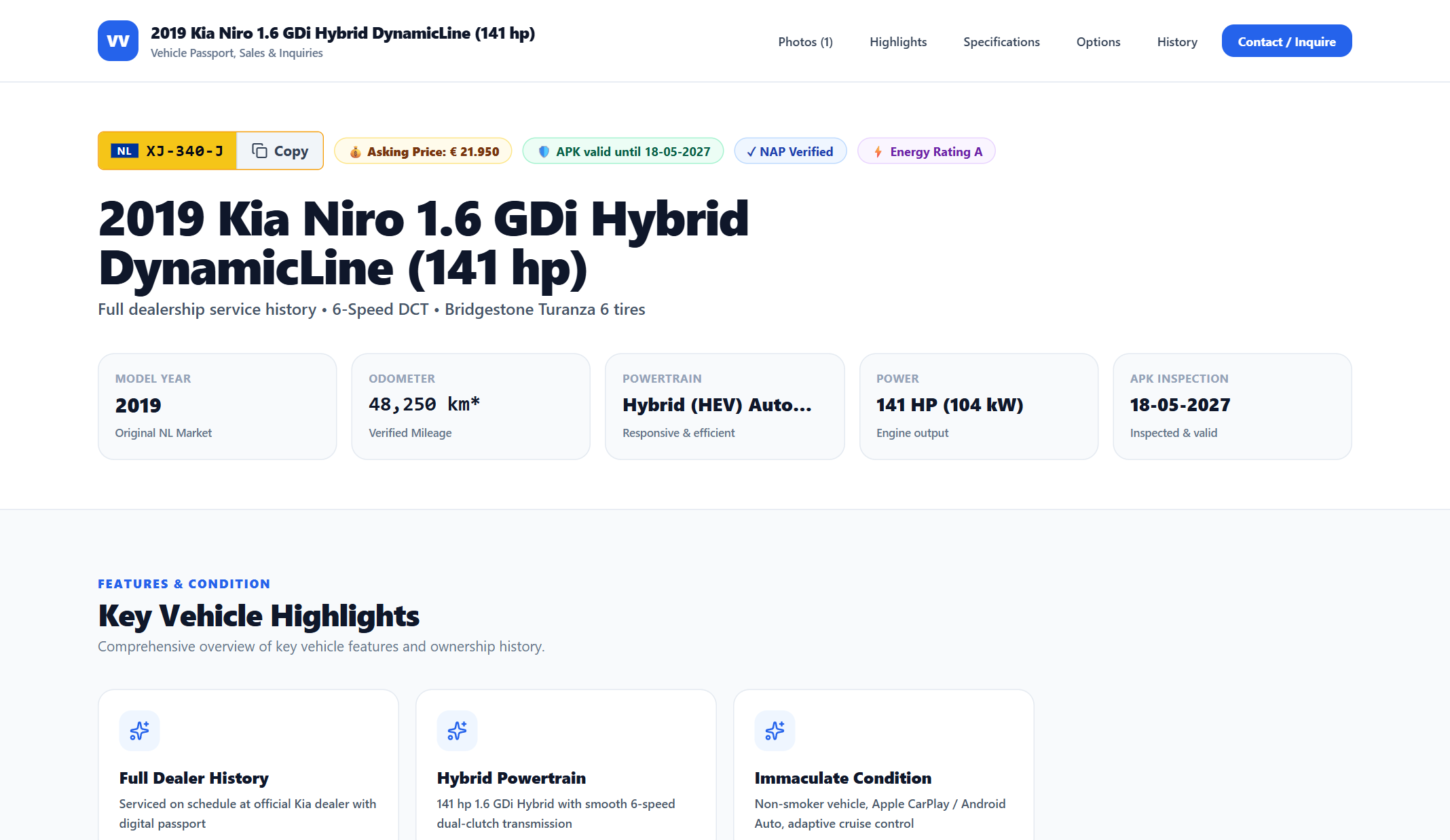
Public Sales Showcase & Standalone Website Dossier Export
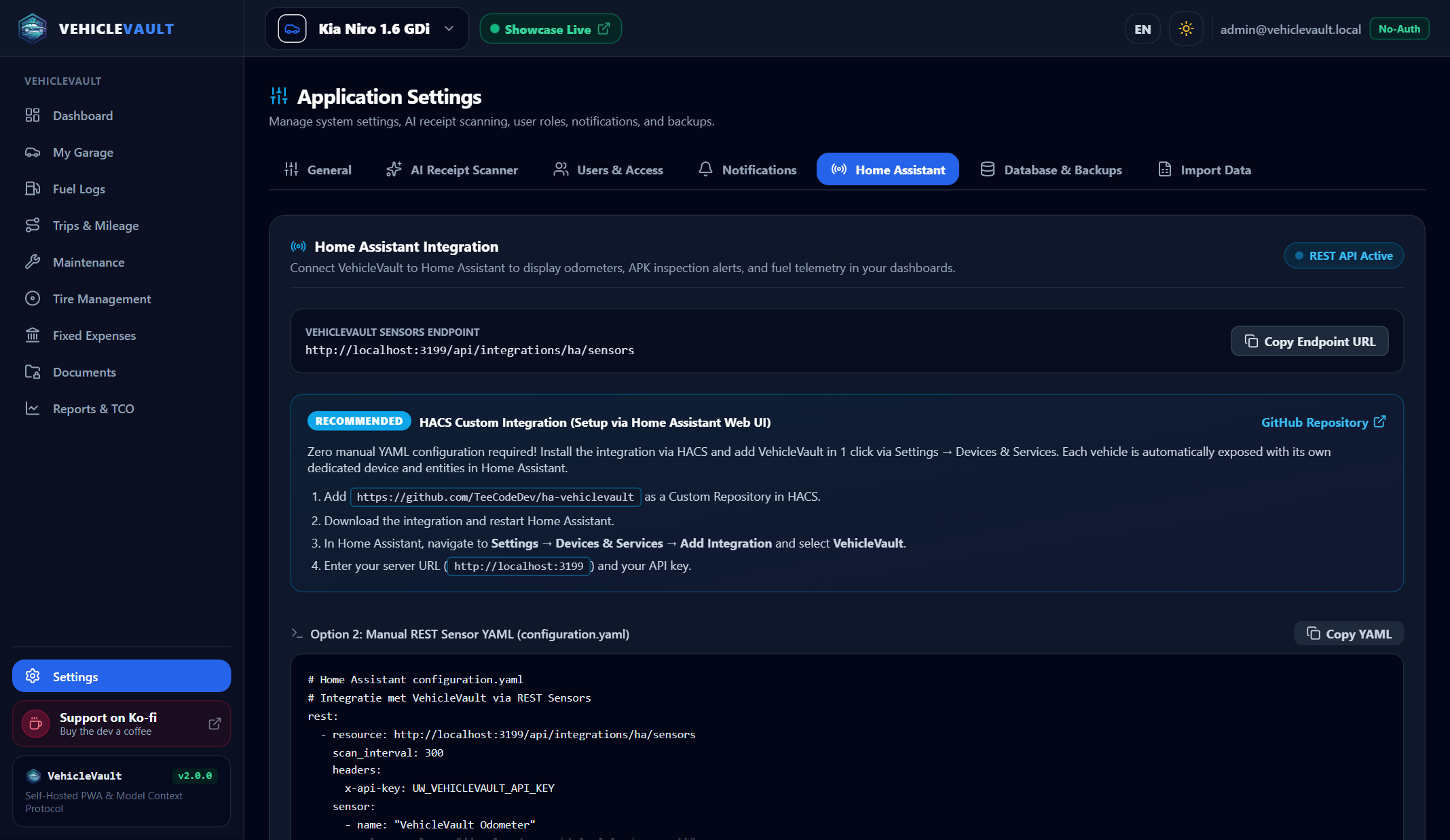
Home Assistant REST Sensors & Lovelace Telemetry
✨ Features
🚘 Fleet & Multi-Country Vehicle Management
- Multi-Type Support: Passenger Cars, Motorcycles, Commercial Vans, and Trailers.
- Multi-Country License Plates: Authentic license plate badges and localized inspection terminology for NL (APK), BE (Autokeuring), DE (TÜV/HU), and EU/International.
- Dutch RDW Open Data Integration:
- One-click auto-fill for Dutch license plates via the official RDW Open Data API (
m9d7-ebf2&8ys7-d773). - Automatically imports Make, Model, Fuel/Hybrid classification (HEV/PHEV/EV), Year, Registration date (
datum_tenaamstelling), and APK expiration date. - Background sync of APK inspection dates with automatic alert badges for due soon (< 30 days) and overdue statuses.
- One-click auto-fill for Dutch license plates via the official RDW Open Data API (
- Ownership & TCO Baseline: Track purchase date, initial purchase odometer (
Aankoopstand), and purchase price. Driven kilometers since purchase are calculated automatically, and pre-ownership historical maintenance records are excluded from your personal TCO. - Visual Multi-Photo Gallery: Upload and categorize exterior, interior, detail, and wear-and-tear photos with custom captions and primary cover photo synchronization.
🛠️ Dual-Trigger Maintenance Engine & AI Invoice Translator
- Smart AI Invoice Scanner & Translator: Upload local or foreign (e.g. German, French, English) garage invoices (PDF or photo). Powered by Google Gemini or OpenAI Vision, VehicleVault automatically:
- Extracts and translates the service title, notes, and every individual part and labor line item into the user's configured language (
NLorEN). - Reconciles net vs. gross VAT/MwSt amounts into accurate Parts and Labor cost totals.
- Extracts the performing Garage Name & Address with a clickable Google Maps link in the service passport.
- Automatically copies and indexes the uploaded invoice into the Digital Glovebox (
Documenten).
- Extracts and translates the service title, notes, and every individual part and labor line item into the user's configured language (
- Extracted Parts Details Modal: View all translated invoice line items, quantities, original foreign text, and cost breakdowns in a dedicated modal.
- Multi-Interval Reset Checkboxes: Link and reset multiple maintenance intervals simultaneously from a single major service invoice (e.g. Engine Oil + Brake Fluid + Cabin Filter + General Inspection), with automatic AI interval detection.
- Pre-Ownership History Support: Log historical maintenance invoices from before you bought the vehicle to build a complete service passport without inflating your personal TCO metrics.
- Dual-Trigger Health Bars: Distance (km) and Time (months) intervals with color-coded progress bars: Green (<90%) ➔ Amber (90–99%) ➔ Red (Overdue).
- DIY Savings Benchmark: Flag self-performed maintenance to track accumulated workshop labor savings across your fleet.
- Complete PDF Service Dossier: Generates a publication-ready vector PDF dossier (
DD-MM-YYYYformatted) including optional Current Tires & Tread Depths and merging all attached.pdfand image invoices as full-size separate attachment pages (pdf-lib).
⛽ Fueling, EV Charging & AI Vision Receipt Scanner
- Fast Mobile PWA UI: Optimized for quick logging directly at the fuel pump or EV charging station, including offline queue support.
- AI Vision Receipt Scanner: Powered by Google Gemini or OpenAI Vision with local Tesseract OCR fallback. Automatically detects Date, Liters/kWh, Unit Price (€/L), Total Cost (€), Gas Station Name, and Address.
- Existing Fill-Up Re-Scan: Re-read and populate data from previously uploaded receipts on existing fuel entries at any time.
- PHEV & EV Support: Dedicated logging for electric vehicles and plug-in hybrids tracking kWh charged and electricity rates (€/kWh).
- Nearby Gas Station GPS: Built-in GPS geolocation and OpenStreetMap Overpass search discovering nearby fuel stations with real-time distance calculations.
- Excel & CSV Exports: Export fuel logs and consumption metrics to formatted
.xlsxworkbooks or UTF-8 BOM CSV files.
🛞 Tire Set Management & Safety Limit Alerts
- Seasonal Tire Sets: Manage Summer, Winter, and All-Season (
4-Seizoenen) tire sets. - Dynamic Live Mileage: Automatically calculates live kilometers driven on mounted tires based on the vehicle's current odometer, while allowing manual edits to both historical mileage and mounting odometer.
- Safety Tread Depth Alerts: Track tread depth per wheel (
LV,RV,LA,RAin mm) on an interactive 4-wheel chassis diagram with warnings (< 3.0 mm / < 4.0 mm winter) and legal APK rejection alerts (< 1.6 mm). - Technical Specifications: Dedicated fields for Brand, Model, Tire Size (
205/60), Rim Size (16"), Load/Speed Index (92V), DOT code, and storage location.
🚗 Trip Logging & Belastingdienst Fiscal Dossier
- Fiscal Trip Registration: Compliant with Dutch Tax Authority (Belastingdienst) requirements.
- Classification & Return Trips: Track Business, Commute, and Private trips with 1-click return trip generation.
- Multi-Format Exports: 1-click export to semicolon-delimited CSV, styled Excel (
.xlsx) workbooks with formulas, and landscape A4 PDF fiscal dossiers. - Import: bring in an existing registration from the Belastingdienst sheet (
.xlsx/.csv) with a preview, duplicate detection and support for files that cover several cars.
💸 Recurring Expenses & True TCO Analytics
- Recurring Fixed Costs (
Vaste Lasten): Track monthly, quarterly, or annual road tax (motorrijtuigenbelasting), insurance, roadside assistance, and subscriptions. - True TCO Analytics: Computes Total Cost of Ownership per kilometer and per month, with interactive toggles for fixed expenses and vehicle purchase price, plus fuel price history (cheapest/most expensive fill-ups).
📁 Digital Glovebox (Digitale Handschoenenkast)
- Centralized Document Vault: Drag-and-drop upload for PDF and image documents (registration cards, insurance green cards, APK inspection reports, manuals, and automatically synced maintenance invoices).
- In-App Preview & Expiry Alerts: Built-in document viewer modal and automated notifications when documents with an expiration date are approaching expiry (< 30 days).
🌐 Public Sales Showcase & Standalone Website Export
- Public Vehicle Passport: Shareable, mobile-responsive sales showcase page (
/showcase/:slug) with pricing, vehicle highlights, RDW specifications, verified maintenance history, tire status, and 1-click WhatsApp/Phone/Email contact. - 1-Click Standalone Website ZIP: Exports a complete, static HTML5/CSS3/JavaScript website with all optimized photos, ready to host on GitHub Pages, Cloudflare Pages, Netlify, or any webserver without a backend.
🏠 Home Assistant & Calendar Integration
- REST Sensor Telemetry: Exposes active vehicle telemetry (
/api/ha/sensors) formatted for Home Assistantrestsensors and HACS integration. - Automated Odometer Webhook: Push live vehicle odometer readings from Home Assistant (e.g. via Kia UVO / Hyundai Bluelink, Tesla, BMW, VW WeConnect, or OBD2) directly to
POST /api/ha/odometer. - RFC 5545
.icsCalendar Feed: Export APK and maintenance deadlines to Apple Calendar, Google Calendar, Outlook, or Nextcloud.
🤖 Model Context Protocol (MCP) Server
- AI Assistant Integration: Connect Claude Desktop, Antigravity, or custom autonomous agents to your VehicleVault instance.
- Stdio & HTTP Transports: Supports local command-line stdio execution or secure HTTP REST calls with hashed API keys (
vkv_...). - Available MCP Tools:
list_vehicles,get_vehicle_summary,log_fuel_entry,log_service_entry,check_maintenance_alerts.
👥 Multi-User Roles, Vehicle Sharing & Modular UI
- Role-Based Access Control:
Admin(full system access),User(standard vehicle owner), andDriver(simplified mobile-friendly interface for fuel and trip logging). - Vehicle Sharing: Share specific vehicles with household members or co-drivers with
EditororViewerpermissions. - Modular Navigation: Enable or disable individual platform modules in Settings to tailor the interface to your needs.
- Single Sign-On (SSO): Optional reverse-proxy header authentication (Authelia, Authentik, Pangolin, Cloudflare Access, Traefik).
- Passkeys: Sign in with fingerprint, face or device PIN (WebAuthn) next to your password, with one-time recovery codes. Needs a domain name and HTTPS; see the security wiki page.
🔔 Push & Email Notifications
- Automated Alerts: Dispatches reminders when APK inspections, maintenance intervals, or vehicle documents are approaching expiry (< 30d, < 7d).
- Multiple Providers: Native support for Pushover, Ntfy, Gotify, Custom Webhooks (Discord, Slack, Telegram, Home Assistant), and SMTP Email.
💾 1-Click Database & File Backup / Restore
- Consistent Backups: Creates a complete ZIP archive of
vehiclevault.db(using safe SQLite WAL checkpoints) and all uploaded receipts, invoices, photos, and documents. - Safe Restore: 1-click restore with automatic
.baksafety fallbacks.
🚀 Quick Start with Docker (Dockhand, Portainer, Dockge, Compose)
The fastest way to deploy VehicleVault is using the pre-built multi-arch image (linux/amd64 & linux/arm64) from GitHub Container Registry (ghcr.io/teecodedev/vehiclevault:latest). No local Dockerfile or git clone is required!
1. Create docker-compose.yml (or paste into Dockhand / Portainer / Dockge)
services:
  vehiclevault:
    image: ghcr.io/teecodedev/vehiclevault:latest
    # container_name: vehiclevault # (Optional: omit to prevent container naming conflicts in Dockhand/Portainer)
    restart: unless-stopped
    ports:
      - "${PORT:-3084}:3084"
    environment:
      - NODE_ENV=production
      - DATA_DIR=/data
      - JWT_SECRET=${JWT_SECRET:-change_this_to_a_random_secure_secret_in_production}
      - JWT_REFRESH_SECRET=${JWT_REFRESH_SECRET:-change_this_to_another_random_secure_secret}
    volumes:
      - ./data:/data
2. Launch the Stack
docker compose up -d
Visit http://localhost:3084 in your browser.
The first account registered automatically receives Administrator rights.
All persistent files (SQLite database, vehicle photos, receipt scans, documents, and invoices) are stored in ./data.
🛠 Tech Stack
| Layer | Technology | Purpose |
|---|---|---|
| Frontend | React 19, TypeScript, Vite, Tailwind CSS | Responsive SaaS & mobile PWA interface with dark/light theme |
| Backend API | Node.js 24 LTS, TypeScript, Express | Modular REST API with Zod validation, rate limiting, and Helmet headers |
| Database | SQLite 3 with WAL Mode (node:sqlite) |
Embedded, zero-configuration database stored in /data/vehiclevault.db |
| Visualizations | Recharts | Interactive SVG charts for TCO, fuel trends, and monthly spend |
| AI Vision & OCR | Google Gemini, OpenAI Vision, Tesseract.js | Multimodal AI receipt & foreign invoice scanning + translation |
| PDF & Excel | PDFKit, pdf-lib, ExcelJS | Vector PDF dossiers with merged PDF invoice attachments & Excel workbooks |
| MCP Protocol | @modelcontextprotocol/sdk |
Official SDK exposing vehicle telemetry tools to AI agents |
🤖 Model Context Protocol (MCP) Setup
Add VehicleVault to your claude_desktop_config.json:
{
  "mcpServers": {
    "vehiclevault": {
      "command": "node",
      "args": ["/absolute/path/to/VehicleVault/server/dist/mcp/stdio.js"],
      "env": {
        "DATA_DIR": "/absolute/path/to/VehicleVault/data"
      }
    }
  }
}
Or connect via HTTP using an API key created in Settings ➔ API-sleutels:
curl -H "X-API-Key: vkv_YOUR_KEY" http://localhost:3001/api/mcp/tools
💻 Local Development & Testing
# 1. Install workspace dependencies
npm install

# 2. Run automated test suite (73/73 tests passing)
npm test

# 3. Build both client and server
npm run build

# 4. Start production server
npm start
For hot-reloading during development:
npm run dev:all
🛡️ Security & Privacy
- Zero Telemetry / Self-Contained: No tracking, analytics, or third-party cookies.
- JWT & HTTP-Only Cookies: Persistent access tokens paired with
SameSite=Laxsecure refresh cookies. - Hashed Secrets: Passwords hashed with bcrypt; API keys, tokens and passkey recovery codes hashed with SHA-256.
- Passkeys (WebAuthn): Verified with the maintained
@simplewebauthn/serverlibrary; only public keys are stored. - Path Traversal Protection: All file upload and download endpoints strictly sanitize paths with
path.basename. - Health Checks: Diagnostic endpoint available at
/healthz.
☕ Support the Project
If VehicleVault helps you manage your vehicles, track your fuel expenses, or streamline your vehicle maintenance, consider supporting development on Ko-fi!

📄 License
VehicleVault is open-source software licensed under the MIT License.
Categories
Related apps
Explore more like this
Explore allDetails
ghcr.io/teecodedev/vehiclevault:latestRuntime arguments
- Web UI
http://[IP]:[PORT:3001]/- Network
bridge- Shell
sh- Privileged
- false
Template configuration
The port for the VehicleVault web interface (internal container port is 3001).
- Target
- 3001
- Default
- 3001
Storage path for SQLite database (vehiclevault.db), uploaded vehicle photos, receipt scans, documents, and invoices.
- Target
- /data
- Default
- /mnt/user/appdata/vehiclevault
Secret key used to sign access tokens (JWT). Leave blank for auto-generated default, or generate a random 32-character string.
- Target
- JWT_SECRET
Secret key used to sign refresh tokens. Leave blank for auto-generated default, or generate a random 32-character string.
- Target
- JWT_REFRESH_SECRET
Set to true to disable login screens (ideal when using Pangolin, Authelia, Authentik, or private network).
- Target
- DISABLE_AUTH
- Default
- false
- Value
- false
Node environment mode.
- Target
- NODE_ENV
- Default
- production
Optional Google Gemini API key for high-speed AI fuel receipt scanning.
- Target
- GEMINI_API_KEY
Optional OpenAI API key for GPT-4o-mini receipt scanning.
- Target
- OPENAI_API_KEY