

Vector
Docker app from coreylane's Repository
Vector is a high-performance, end-to-end (agent & aggregator) observability data pipeline that puts you in control of your observability data.
Overview
Readme
View on GitHub


Quickstart • Docs • Guides • Integrations • Chat • Download • Container Images
What is Vector?
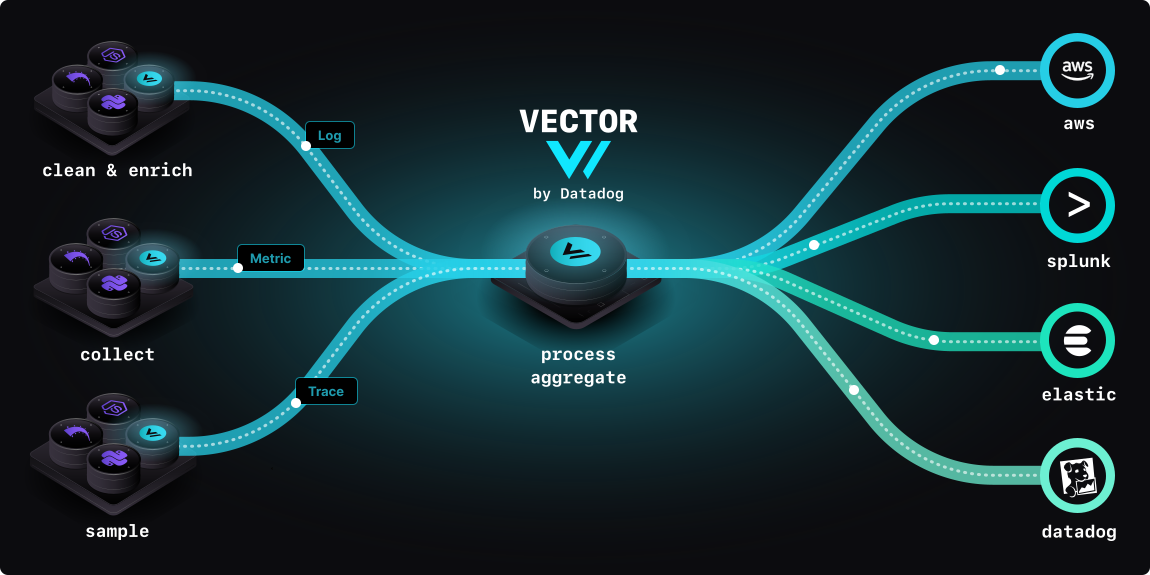
Vector is a high-performance, end-to-end (agent & aggregator) observability data pipeline that puts you in control of your observability data. Collect, transform, and route all your logs and metrics to any vendors you want today and any other vendors you may want tomorrow. Vector enables dramatic cost reduction, novel data enrichment, and data security where you need it, not where it is most convenient for your vendors. Vector is 100% open source. The complete source code and all features are publicly available.
To get started, follow our quickstart guide or install Vector.
Vector is maintained by Datadog's Community Open Source Engineering team.
Principles
- Reliable - Built in Rust, Vector's primary design goal is reliability.
- End-to-end - Deploys as an agent or aggregator. Vector is a complete platform.
- Unified - Stable support for logs and metrics in one pipeline. Trace support is available in selected components, including the OpenTelemetry source. When building a trace pipeline, check each component's supported event types and limitations.
Use cases
- Reduce total observability costs.
- Transition vendors without disrupting workflows.
- Enhance data quality and improve insights.
- Consolidate agents and eliminate agent fatigue.
- Improve overall observability performance and reliability.
Community
- Vector powers observability pipelines at Atlassian, Riot Games, Comcast, FanDuel, Zerodha, Timescale, Quad9, OpenAI, Anthropic, and many more.
- Contributors
Documentation
All user documentation is available at vector.dev/docs.
To build and verify a pipeline:
- Develop a configuration and transform events with VRL.
- Validate the configuration with
vector validate. - Test transform behavior with
vector test. - Inspect a running pipeline with
vector topandvector tap.
Other Resources:
Testing and benchmarks
The Vector test harness contains functional checks and performance workloads, with documented configurations, environments, and results. When evaluating Vector, benchmark a representative pipeline and verify the records delivered to its destination. Performance depends on the workload, configuration, hardware, and software versions.
Developed with ❤️ by Datadog - Security Policy - Privacy Policy
Categories
Download Statistics
Total Downloads Over Time
Related apps
Explore more like this
Explore allLinks
Details
timberio/vector:latest-alpineRuntime arguments
- Network
bridge- Shell
sh- Privileged
- false
Template configuration
Put vector.yaml in this directory. The image has no default configuration.
- Target
- /etc/vector
- Default
- /mnt/user/appdata/vector/config
- Value
- /mnt/user/appdata/vector/config
The data_dir of Vector: disk buffers and source checkpoints.
- Target
- /var/lib/vector
- Default
- /mnt/user/appdata/vector/data
- Value
- /mnt/user/appdata/vector/data
Needed only for the docker_logs source. Remove it if you do not collect container logs.
- Target
- /var/run/docker.sock
- Default
- /var/run/docker.sock
- Value
- /var/run/docker.sock
Path of the configuration file in the container. Separate several files with commas. For a TOML file, use /etc/vector/vector.toml.
- Default
- /etc/vector/vector.yaml
- Value
- /etc/vector/vector.yaml