
All apps · 0 apps

Vault
Plugin from Ruaan Deysel
Overview
Readme
View on GitHubVault



Vault is a backup and restore daemon for Unraid servers. It protects Docker containers, libvirt VMs, ZFS datasets, folders, and plugins by backing them up to pluggable storage destinations — local disk, SFTP, SMB, NFS, WebDAV, or S3-compatible object storage. Vault ships with a REST API, an MCP server for AI assistants, WebSocket progress streaming, and an integrated web UI built with Svelte 5.
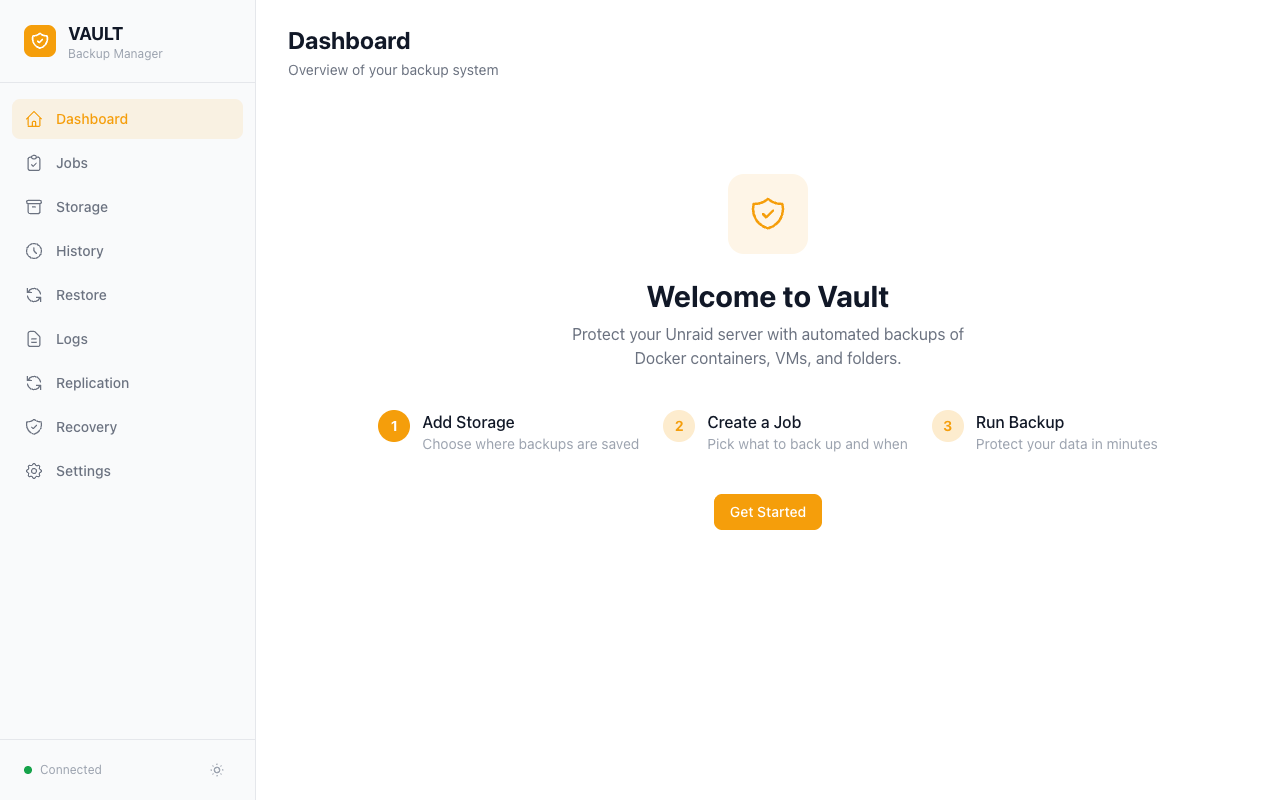
Features
Backup sources
- Docker containers — image, XML template, and every mapped appdata volume; per-container path exclusions
- libvirt VMs — live snapshot or cold mode, with NVRAM preservation
- ZFS datasets — native
zfs send/receivewith snapshot management - Folders and plugins — any path on the host, plus all installed Unraid plugins
- Stale-item detection — flags items that disappear from the host so jobs stay clean
Storage destinations
- Local, SFTP, SMB, NFS, WebDAV, and S3-compatible (AWS S3, Backblaze B2, MinIO, Cloudflare R2, Wasabi, MEGA, IDrive E2)
- Bandwidth throttling per remote destination
- Test-connection and storage-health probes
- Scan + import for backups produced by other Vault instances or AppData Backup
Backup strategy
- Full, incremental, and differential chains
- Simple-count retention or Long-Term Retention / LTR (
keep_latest/daily/weekly/monthly/yearly) - AES-256-GCM encryption with per-passphrase key derivation
- Content-defined deduplication (Keyed-FastCDC + per-destination dedup repo) with
vault dedup gc/repairCLI helpers - Per-run SHA-256 verification and on-demand restore-point verify
- Per-job notifications (success/failure) via Discord webhook
Scheduling
- Cron, hourly/daily/weekly/monthly/yearly presets, plus "first/last day of month"
- No-progress stall watchdog per job (cancels only after ~2h of zero bytes moved); no fixed total-job time cap, so long backups that keep transferring are never killed
- Cancellation propagated end-to-end (file I/O, traversal, engine handlers)
Web UI
- Dashboard, Jobs, Restore, Storage, History, Replication, Recovery, Logs, Settings
- Live WebSocket progress streaming and runner queue visibility
- Light/dark themes with mobile-responsive layout
- Recovery plan that explains how to rebuild from scratch
Integration
- REST API at
/api/v1with token-based auth for non-loopback callers - MCP server (streamable HTTP + stdio) for Claude Desktop, Claude Code, and other AI tooling
- Home Assistant custom integration:
ha-vault - Hybrid SQLite snapshot (RAM working DB + persistent snapshot + USB shadow) survives reboots
- Diagnostics bundle export (redacted) for support requests
Installation
Unraid Community Applications
Search for Vault in the Unraid Community Applications store and click Install.
Manual Install
Paste this URL into Plugins > Install Plugin in the Unraid web UI:
https://raw.githubusercontent.com/ruaan-deysel/vault/main/plugin/vault.plg
Quick Start
- Add Storage — Go to the Storage page and configure a backup destination (local, SFTP, SMB, NFS, WebDAV, or S3)
- Create a Job — Go to the Jobs page, pick what to back up, choose a schedule, and set retention
- Run Backup — Click Run Now or wait for the schedule
- Monitor — Watch live progress on the Dashboard or check the History page for results
Documentation
| Document | Description |
|---|---|
| Getting Started | Visual walkthrough of the web UI with screenshots |
| Backup Jobs | Job options, scheduling, retention, restore |
| Storage Destinations | Per-backend configuration with provider notes |
| Anomaly Detection | Drift/reliability/capacity alerts + baseline learning |
| API Reference | Full REST API endpoint reference |
| MCP Integration | Model Context Protocol server for AI tools |
| Architecture | Project structure, build commands, deployment |
| Contributing | Contribution guidelines and development setup |
| Changelog | Release notes by version |
Home Assistant users: use the ready-to-use custom integration at ha-vault.
Requirements
- Unraid 7.0 or newer
Support and Feedback
- Bug reports: open a bug report
- Enhancement requests: request an improvement
- Questions and support: use the Unraid forum support thread
License
Vault is licensed under the GNU Affero General Public License v3.0. It is a third-party community plugin for Unraid OS.
Download Statistics
Downloads by Month
Related apps
Explore more like this
Explore allLinks
Details
https://raw.githubusercontent.com/ruaan-deysel/vault/main/plugin/vault.plg