

vacuula
OfficialDocker app from Desadius Vacuula's Repository
Overview
Readme
View on GitHub
Vacuula


Vacuula is made as an all-in-one solution to repair and control your broken Neato Robot vacuum.
- Gen1 - No wifi
- Gen2 - BotVac Connected ❌ (not yet, on the todo ⏱️)
- Gen3 - D3 ✅ D4 ✅ D5 ✅ D6 ✅ D7 ✅
- Gen4 - D800 ✅ D8 ✅ D9 ✅ D10 ✅
Your robot not listed here? Get in touch!
¹Sadly we were not able to fit the OG BotVac Connected into the initial release, sorry about this, support for this robot is in the works and here very soon!
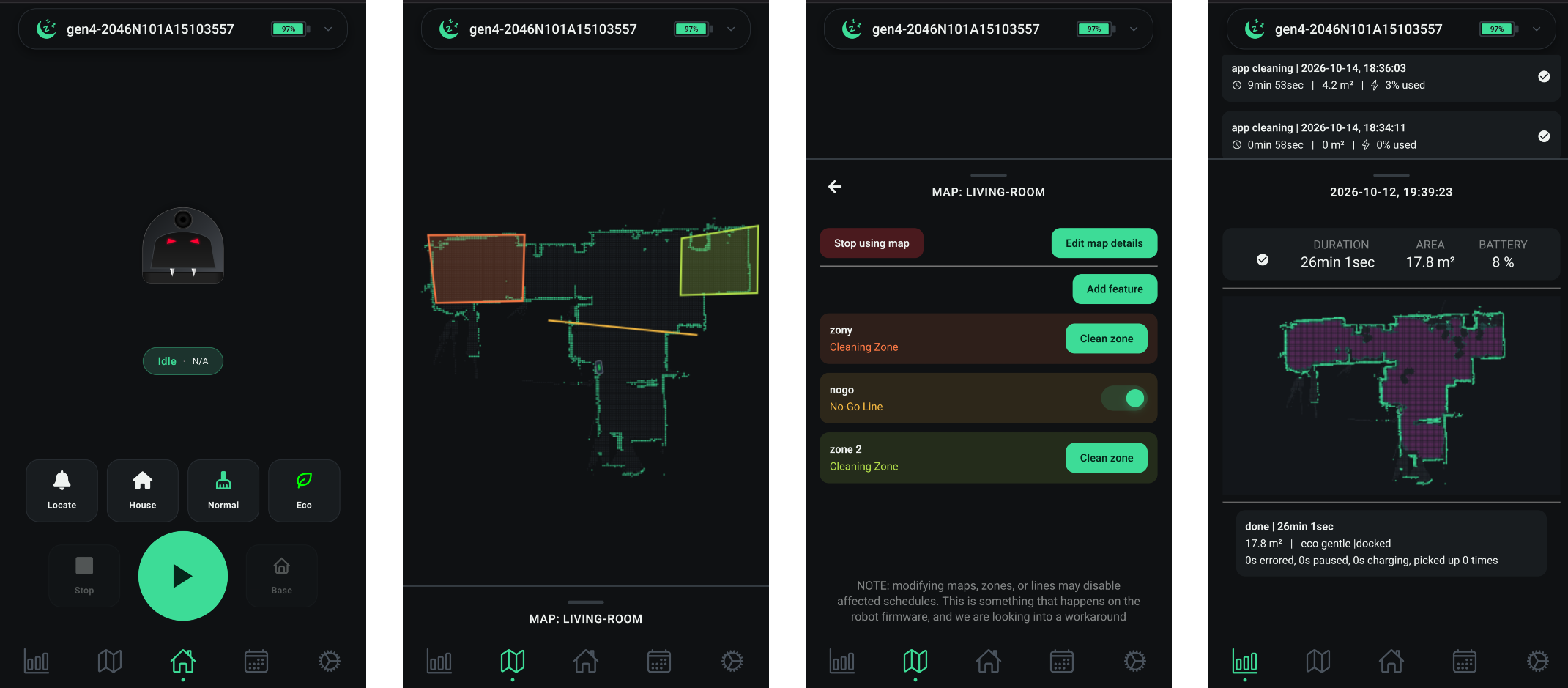
| Feature | Status | Feature | Status | |
|---|---|---|---|---|
| Setup/Status | ✅ | Notifications | 🚧 | |
| Maps | ✅ | Home Assistant Entity | 🚧 | |
| Historical runs | ✅ | Drag to clean "here" | 🚧 | |
| Schedule | ✅ | Custom sounds | 🚧 | |
| Settings | ✅ | QoL improvements | 🚧 | |
| Zones/NoGo Lines | ✅ | "Next day" Schedule | 🚧 | |
| MultiZones | Gen4 ✅ Gen2/Gen3 🚧 |
[!NOTE] Do you have a Gen4 robot that is in "rainbow mode"? Different colors flashing and the robot does not start? Contact us in the discord. There we can help you repair your robot!
Repair my robot!
For the repair there are two parts
- Set up a server (we are looking into a community server, however, that is not done in time for initial release, so you will need to set a server up)
- Configure the robot
Set up server
Since the server needs to always be on to work properly, you need some dedicated hardware for it. If you do not already have something to run the server on, please read about hardware in the FAQ.
There are many ways to set this server up. If you are using Home Assistant, we recommend using the App Store repo we made, if not using Home Assistant, then Docker Compose is recommended. We provide you with a couple of ways to set up the server
- Docker Compose (see below)
- As an App in Home Assistant
- LXC/standalone

Docker Compose
- Install Docker
- This is probably the hardest part for anyone unfamiliar with self-hosting, so we have started writing a guide in the FAQ
- Download
docker-compose.yamlor runwget https://github.com/vacuula/vacuula/releases/latest/download/docker-compose.yamlto download and save the file - Run
docker compose up -d
- The server is configured by environment variables
- To see logs do
docker compose logs vacuula - To stop vacuula
docker compose down - To start vacuula
docker compose up -d - To update vacuula
docker compose pull - To permanently remove stored data
docker volume rm vacuula-dataVacuula needs to be stopped first
Configure the robot
We have made an easy to use installer to set your robot up!
Download the latest version for your OS here
| Windows | Linux | Mac (M1 and newer) | Mac (Intel-based) |
|---|---|---|---|
| Win 10, Win 11 | Yes (need dialout) | 13.7.8, 15.4 | |
| Gen3, Gen4 | Gen3, Gen4 | (Gen4 will not work) | Gen3 (Gen4 does not work) |
- Download by clicking the os link, table shows tested/verified systems
- Linux: run
sudo usermod -aG dialout $USERto give your user dialout, then reboot your computer!
Source code is available at https://github.com/vacuula/installer
If you have a more exotic setup and cannot run this installer in any way - get in touch and we will figure something out!
Configure server
Ports used by default
| Port | Option | Used by |
|---|---|---|
| 8050 | VACUULA_PORT | Server, Webapp, Installer. (HTTP, reverse proxy for HTTPS) |
| 335 | GEN3_PORT | Gen3 robots, D3-D7 |
| 3443 | GEN4_PORT | Gen4 robots, D8-D10 |
The installer instructs the robot what port it should connect to. If you want to use HTTPS for the Webapp, please put the Webapp (default port 80) behind a reverse proxy. Other ports cannot be reverse provied.
Configuration
| Option | Default | Info |
|---|---|---|
| GEN3_PORT | 335 | Default port the Gen3 robots will connect to the server on |
| GEN4_PORT | 3443 | Default port the Gen4 robots will connect to the server on |
| VACUULA_PORT | 8050 | Default port that you can reach the webapp/api on |
| GEN3_ENABLED | True | If server should support for Gen3 robots |
| GEN4_ENABLED | True | If server should support for Gen4 robots |
| MDNS_ENABLED | True | If server should run MDNS for auto-discovering |
| TZ | Etc/UTC | If timezone of computer cannot get fetched, please set this to the correct timezone for schedules to work correctly |
| HOST_IP | 0.0.0.0 | What IP the Vacuula server hosts to, useful if you have multiple IP addresses |
| LOG_LEVEL | info | debug |
Platform architecture
We have currently only tested and verified on ARM 64-bit and x86 64-bit. However, we want the server to support at least ARM 32-bit and possibly x86 32-bit as well. We are looking into what we can do to make sure these platforms are also supported. The main reason behind wanting to support them is that the server can run on older SBCs.
Categories
Related apps
Explore more like this
Explore allDetails
ghcr.io/vacuula/vacuula:betaRuntime arguments
- Web UI
http://[IP]:[PORT:8088]/- Network
bridge- Shell
sh- Privileged
- false
- Extra Params
--restart unless-stopped --log-driver json-file --log-opt max-size=10m --log-opt max-file=3
Template configuration
Host port for the web app and installer. Change the host port here if 8088 is occupied; keep the internal VACUULA_PORT at 8088.
- Target
- 8088
- Default
- 8088
- Value
- 8088
Direct Gen3 robot connection. Keep host and container ports at 335. Do not route this port through an HTTP reverse proxy.
- Target
- 335
- Default
- 335
- Value
- 335
Persistent database, maps, robot certificate and private key. Preserve and back up this folder when recreating the container.
- Target
- /server/data
- Default
- /mnt/user/appdata/vacuula
- Value
- /mnt/user/appdata/vacuula
IANA timezone used for cleaning schedules. Change for your location, e.g. Europe/London.
- Target
- TZ
- Default
- Europe/Prague
- Value
- Europe/Prague
Internal listener. Keep at 8088 to match the Web UI port mapping target.
- Target
- VACUULA_PORT
- Default
- 8088
- Value
- 8088
Internal robot listener and port reported to the installer. Must match the direct host port 335.
- Target
- GEN3_PORT
- Default
- 335
- Value
- 335
Enable Neato D3-D7 support.
- Target
- GEN3_ENABLED
- Default
- True
- Value
- True
Disabled. This template does not publish the Gen4 port and is intended for D3-D7.
- Target
- GEN4_ENABLED
- Default
- False
- Value
- False
Disabled for bridge networking. Enter the Unraid LAN URL manually in the installer.
- Target
- MDNS_ENABLED
- Default
- False
- Value
- False
Listen on interfaces inside the container. Keep 0.0.0.0 with bridge networking; do not enter the Unraid LAN IP here.
- Target
- HOST_IP
- Default
- 0.0.0.0
- Value
- 0.0.0.0