
All apps · 0 apps

Uptime-Kuma-API
Docker app from jmztaylor's Repository
Overview
A REST API wrapper for Uptime Kuma using Uptime-Kuma-API
Readme
View on GitHubUptime-Kuma-Web-API
A REST API wrapper for Uptime Kuma using Uptime-Kuma-API
EndPoints:
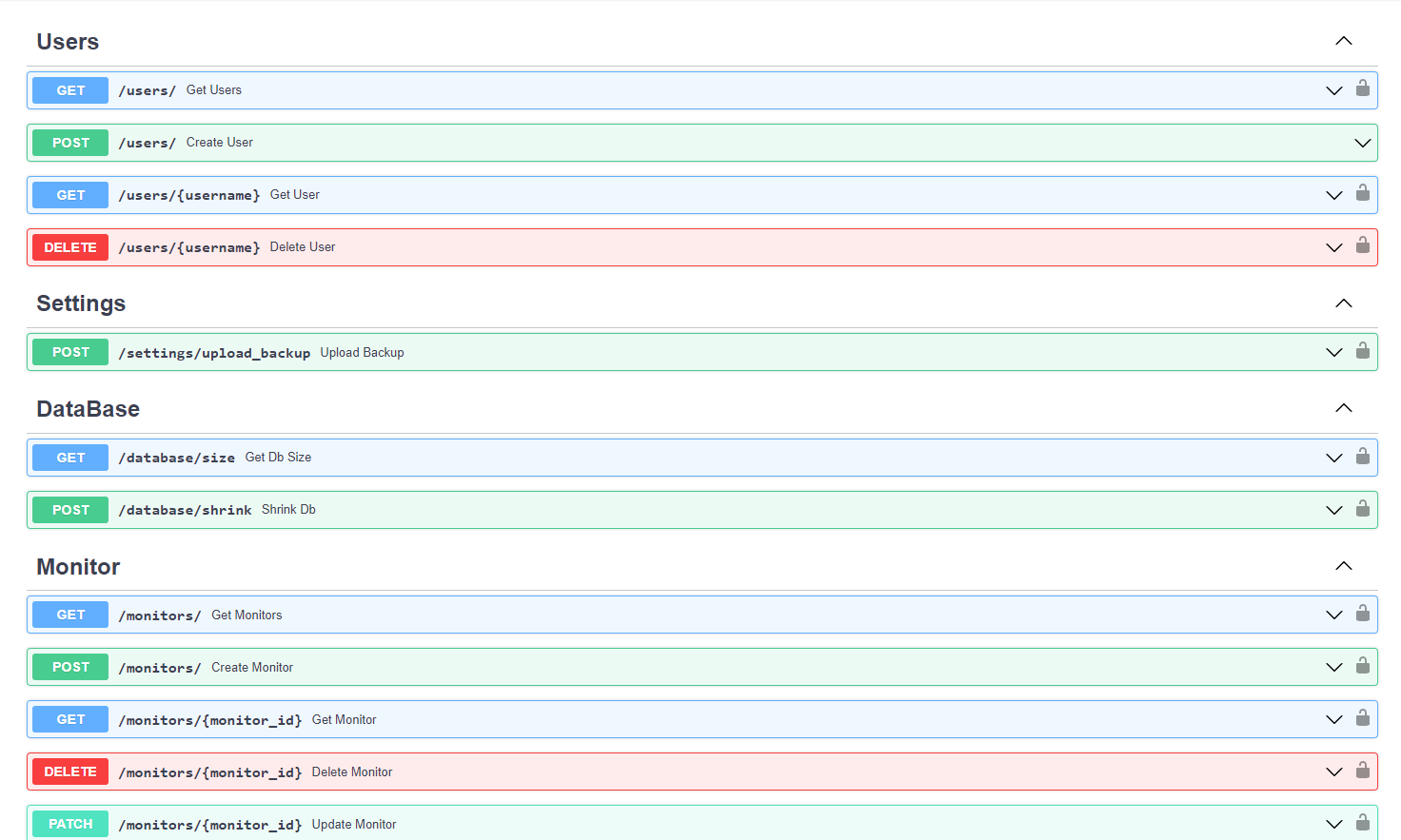
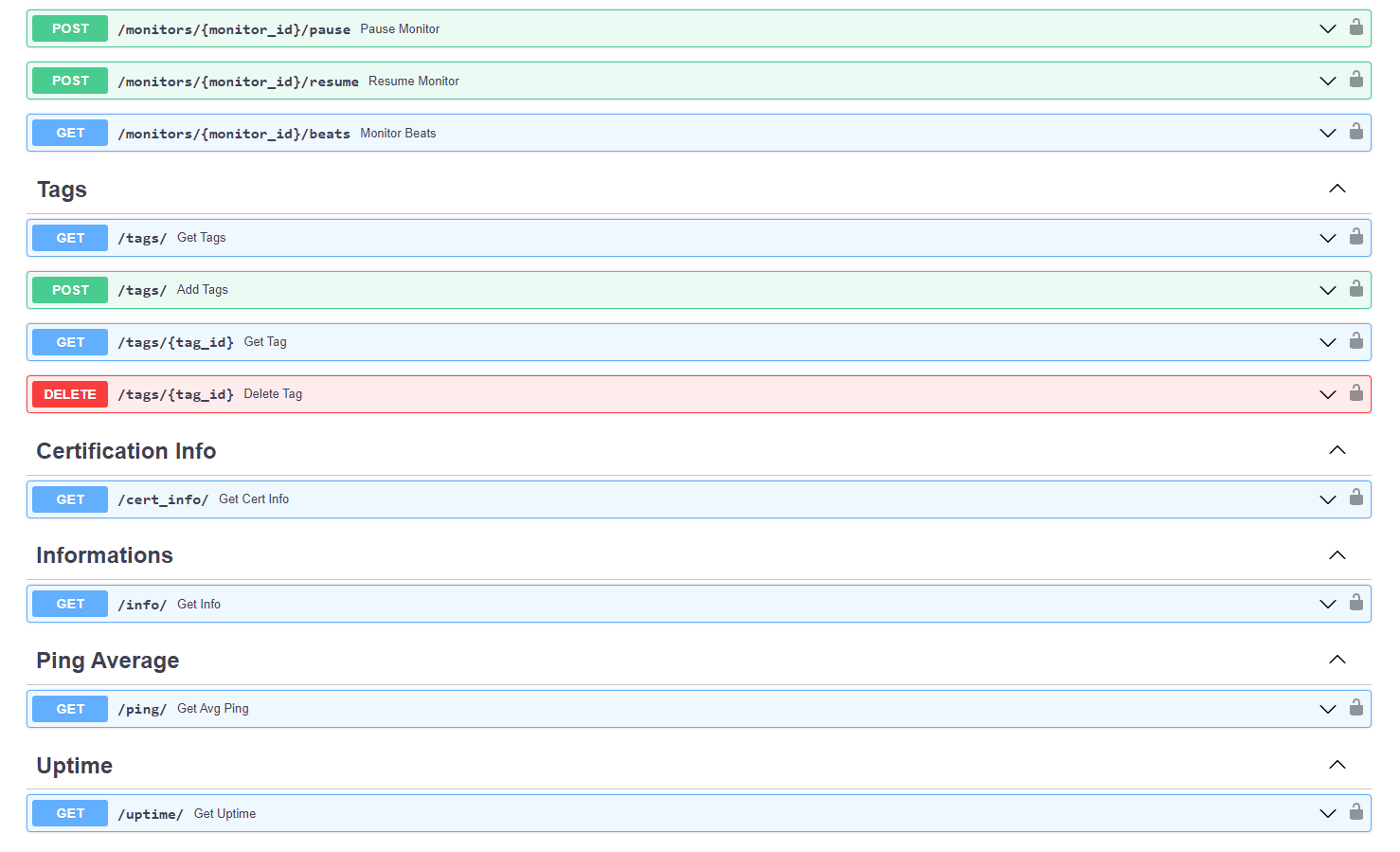
How to use it:
Environment Variables :
Required
You have to define these ENV VARS in order to connect to your KUMA server.
KUMA_SERVER: The URL of your Uptime Kuma instance. ex: https://uptime.example.com
KUMA_USERNAME: The username of your Uptime Kuma user
KUMA_PASSWORD: The password of your Uptime Kuma user
ADMIN_PASSWORD: An admin password to access the API
Optional
Additional configuration variables available
ACCESS_TOKEN_EXPIRATION: Minutes the access token should be valid. Defaults to 8 days.
SECRET_KEY: A secret value to encode JWTs with
Note:
You have to define your ADMIN_PASSWORD or you wont be able to connect to your rest api.
You will connect with those credentials:
username = admin
password = <ADMIN_PASSWORD>
Features:
- Multi user Kuma api ( without privilege YET!!) with a small SQLite db
- Easy to use REST API with most of the Uptime-Kuma features
- Swagger Docs
- Dockerized UptimeKuma_RestAPI Image
- Multi-architecture support (amd64, arm64)
Example :
You can simply create a docker compose file like this :
version: "3.9"
services:
  kuma:
    container_name: uptime-kuma
    image: louislam/uptime-kuma:latest
    ports:
      - "3001:3001"
    restart: always
    volumes:
      - uptime-kuma:/app/data

  api:
    container_name: backend
    image: medaziz11/uptimekuma_restapi
    volumes:
      - api:/db
    restart: always
    environment:
      - KUMA_SERVER=http://kuma:3001
      - KUMA_USERNAME=test
      - KUMA_PASSWORD=123test.
      - ADMIN_PASSWORD=admin
    depends_on:
      - kuma
    ports:
      - "8000:8000"

volumes:
  uptime-kuma:
  api:
In order for the example to work: You have to run kuma first then create your kuma username and password then re-run the compose file.
Example CURL Script:
    TOKEN=$(curl -X -L 'POST' -H 'Content-Type: application/x-www-form-urlencoded' --data 'username=admin&password=admin' http://127.0.0.1:8000/login/access-token/ | jq -r ".access_token")

    curl -L -H 'Accept: application/json' -H "Authorization: Bearer ${TOKEN}" http://127.0.0.1:8000/monitors/
Categories
Download Statistics
1,678,132
Total Downloads
3,733
This Month
9,110
Avg / Month
Total Downloads Over Time
Loading chart...
Related apps
Explore more like this
Explore allLinks
Details
Repository
medaziz11/uptimekuma_restapiLast Updated2025-05-07
First Seen2023-03-06
Runtime arguments
- Web UI
http://[IP]:[PORT:8000]/- Network
bridge- Shell
sh- Privileged
- false
Template configuration
KUMA_SERVERVariable
- Value
- https://[SERVER_IP]:3001
KUMA_USERNAMEVariable
KUMA_PASSWORDVariable
ADMIN_PASSWORDVariable
Host Path 1Pathrw
- Target
- /db
- Value
- /mnt/user/appdata/uptime_kuma_api
Host Port 1Porttcp
- Target
- 8000
- Value
- 8000