
All apps · 0 apps

Unspin
Plugin from kaedinger
Overview
Readme
View on GitHubUnspin - Rudimentary Hot-File Tiering for Unraid
Automatically promotes your most-accessed files to faster storage using a lightweight C++ daemon that watches file access. The main goal is to have fewer disk spin-ups (hence the name), but we'll take the faster access, too ;-)






How It Works
Unspin runs unspind, a daemon that uses Linux's fanotify interface to receive a FAN_* events every time a file is opened or read. It applies three simple promotion rules:
| Rule | Condition | Example use case |
|---|---|---|
| Small file | size ≤ threshold AND total reads ≥ min |
Promote a config file on first access |
| Large file - short window | reads ≥ N within last M minutes |
Streaming video (100 reads in 5 min) |
| Large file - long window | reads ≥ N within last H hours |
Frequently opened PDF (3 times in 24 h) |
A file meets rules 2 or 3 if either window threshold is satisfied.
Why these rules? Based just on the developer's use cases: Under ideal circumstances we would cache everything - but we don't have the space, we only have 512 GB. Thus, we have to select: we can't have a huge Linux ISO using up precious space if it's just held open for a few bytes of torrent upload. But of course that changes if it is being constantly read, or on a regular basis. A song played only once does not need to be promoted, but if we play it every day, it should be. You'll have to play around with the rule settings to best match your own use cases.
Make sure this does what you want! There's a dry-run mode; use it!
Promotion timing
Promotion is always deferred until all open handles on the file are closed. Unlinking the source while a reader (SMB, NFS, local process) still holds an fd would cause the client to lose the file - shfs does not redirect to the cache copy mid-stream. By waiting for close, the next open transparently picks up the promoted copy.
There's no explicit cold demotion - for now we rely on Unraid's mover or CA's Mover Tuning.
Features
- Event-driven - reacts to each file read in real time via fanotify on the underlying array disk mounts, no polling or cron schedule
- Two-tier rule set - separate thresholds for small files (first-access promotion) and large files (streaming/periodic use detection)
- Deferred promotion - promotion waits until all open handles are closed, so readers never lose their file mid-stream
- Per-share cache pool routing - destinations follow each share's own
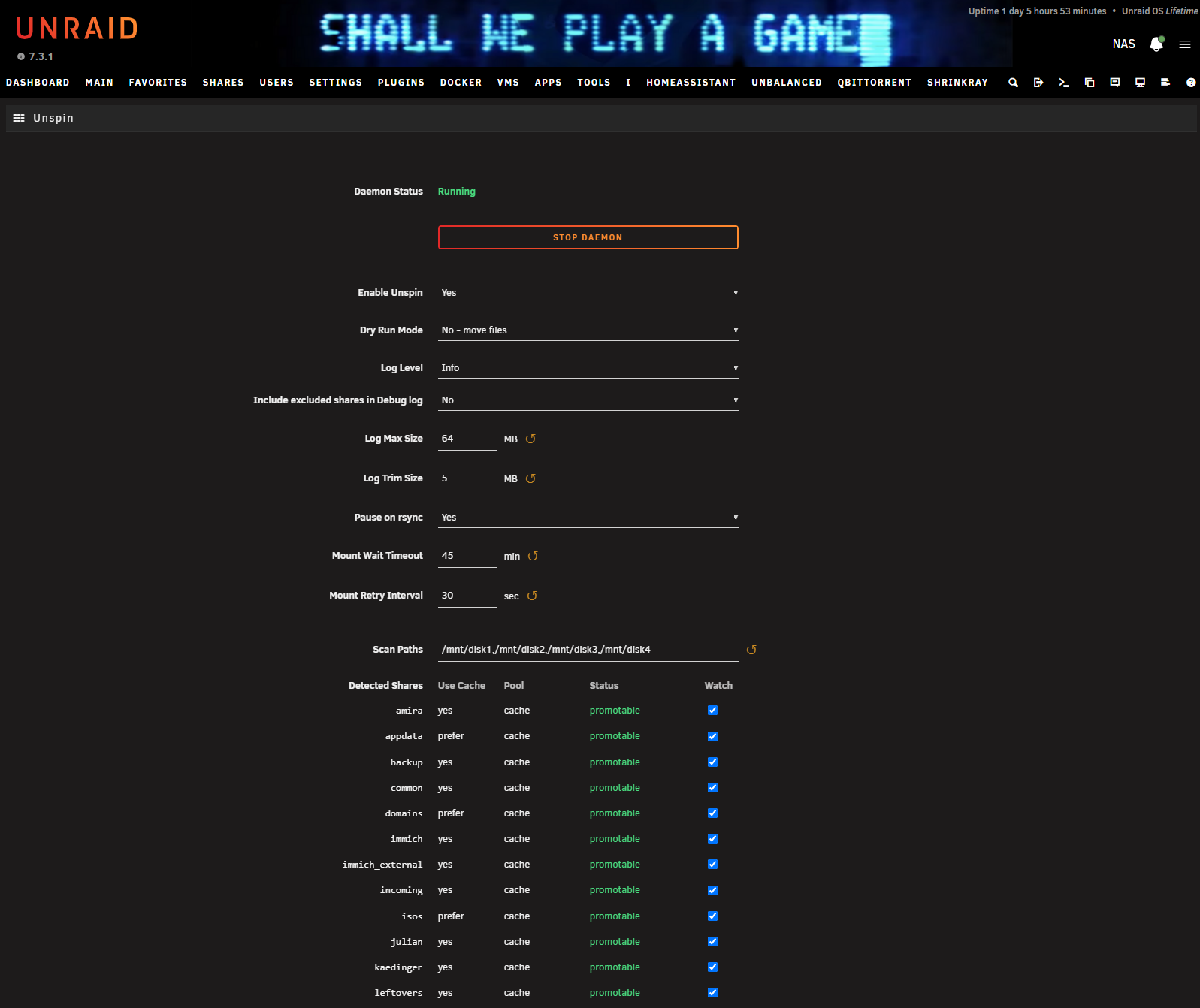
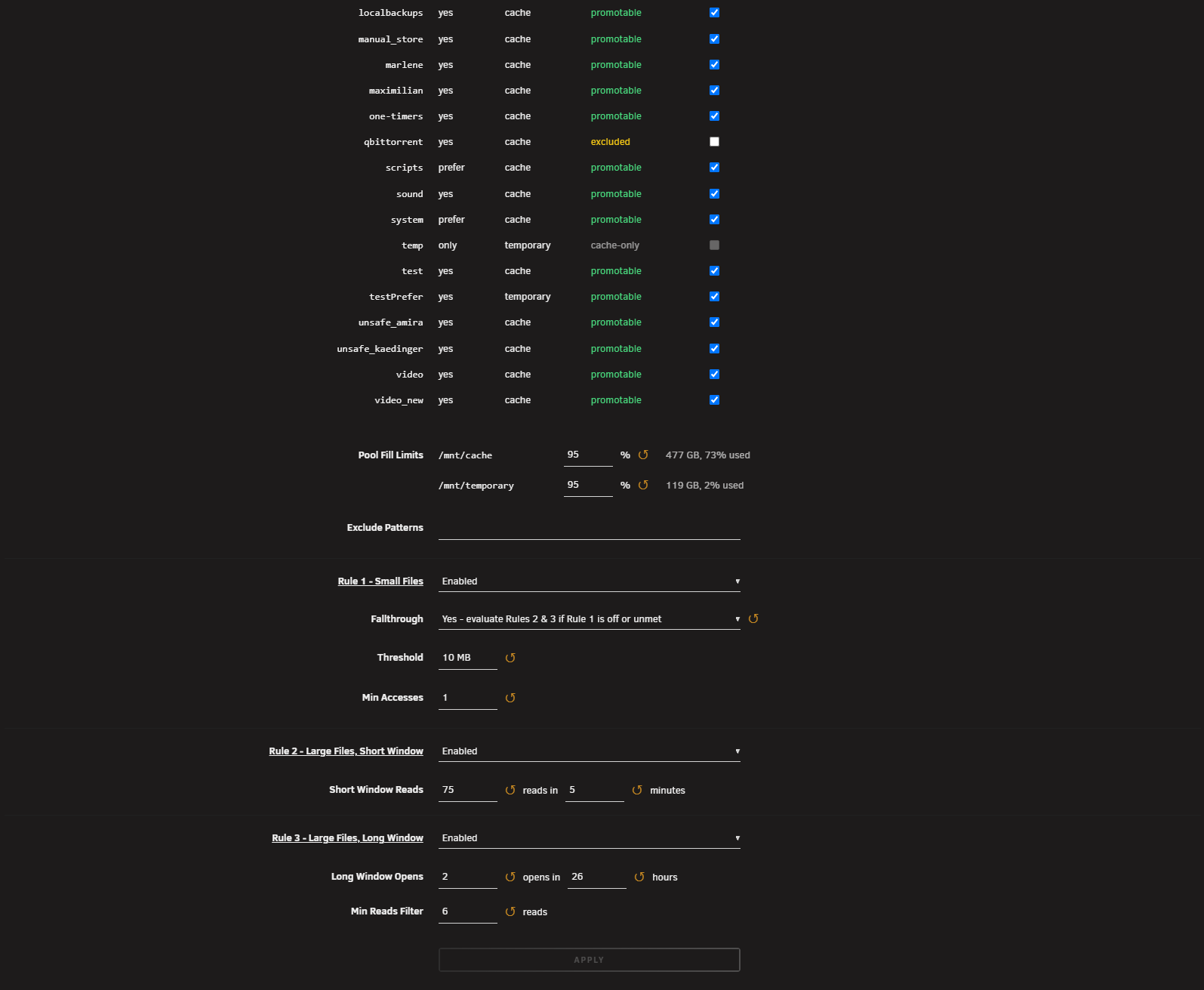
shareCachePoolsetting in Unraid, so different shares can promote to different pools (e.g./mnt/cachefor some,/mnt/nvmefor others). Shares withUse Cache: Nooronlyare skipped automatically; shares withyesorpreferare eligible. - Detected Shares table - the settings page lists every share with its current routing and a per-share Watch toggle to opt individual shares out without changing Unraid's settings
- Mover/rsync-aware - Unraid's mover is always detected and pauses Unspin; other tools that move files via
rsync(e.g. Unbalanced, or Mover Tuning) can optionally pause it too viaPAUSE_ON_RSYNC- if you use Mover Tuning, make sure this is enabled! - Mount-wait on boot - waits for slow-mounting arrays/pools before watching a scan path; posts an Unraid notification if it has to wait, and another if the wait times out
- ZFS array disk support - a top-level share on a ZFS-formatted array disk becomes its own dataset mount under the hood; Unspin detects and watches those automatically, both at startup and as new ones appear, so ZFS array disks work the same as XFS/Btrfs
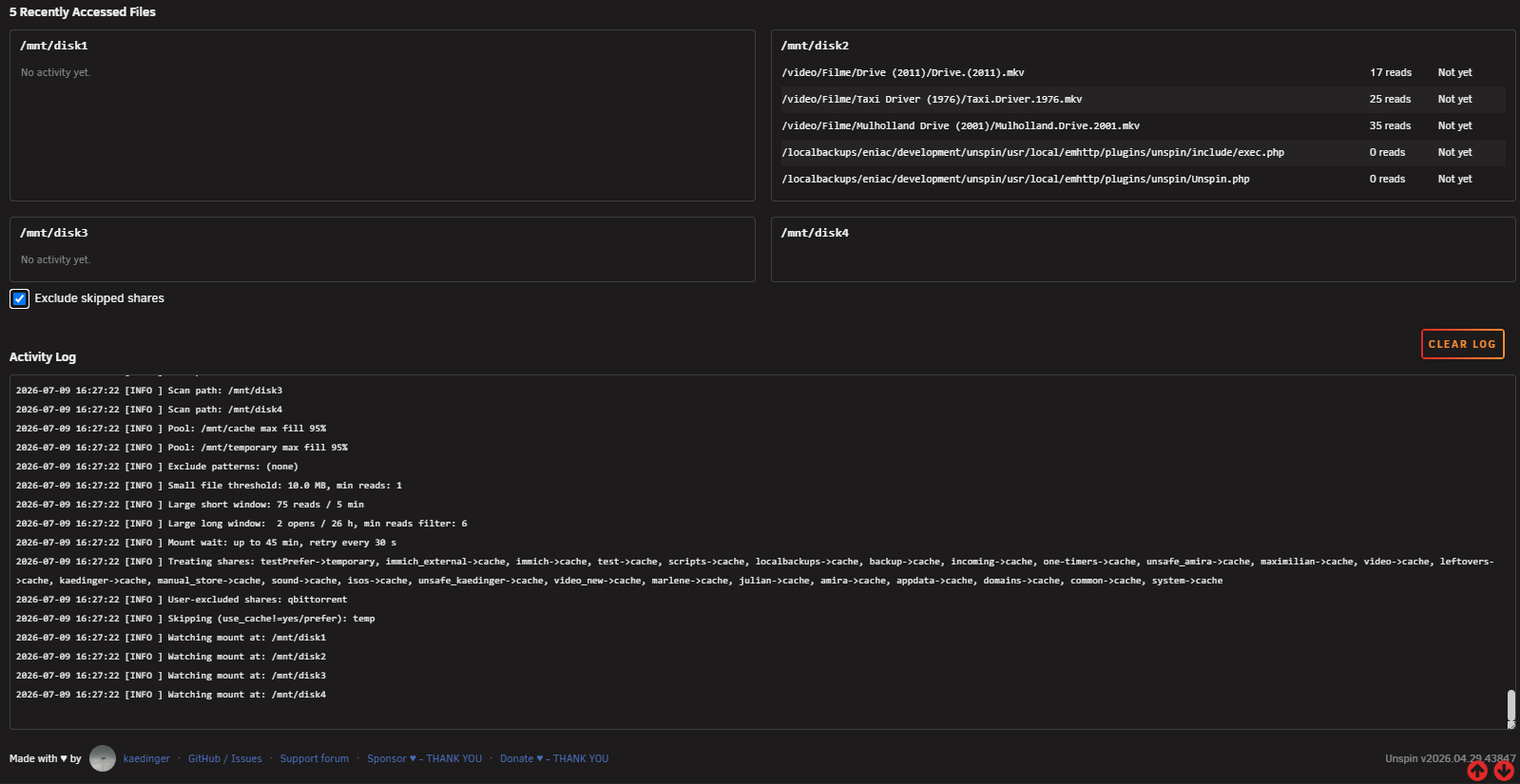
- Recently Accessed Files panel - on debug logging, the settings page shows the last 5 accessed files per disk (read count, promoted state) plus skipped-share hits, scraped from the log itself
- Per-pool fill guard - each pool gets its own fill % threshold; promotion to that pool stops once it's exceeded
- Dry-run mode - logs every decision without moving anything
- Exclude patterns - skip any path substring
- Rule toggles - each rule can be individually enabled or disabled from the settings page
- Pause / unpause - stackable pause locks via
rc.unspin pause <name>/unpause <name>/toggle; daemon only resumes when all locks are released (useful for backup tool access) - Live log viewer - auto-refreshing tail of the last 200 lines in the settings page
Installation
Via Community Applications (recommended)
- Install the Community Applications plugin
- Search for Unspin
- Click Install
Manual
plugin install https://raw.githubusercontent.com/kaedinger/unspin/main/unspin.plg
Project Structure
unspin/
├── unspin.plg                          # Plugin manifest (install/remove)
├── src/
│   └── unspind.cpp                     # C++ fanotify daemon (compiled by CI)
├── etc/
│   └── rc.d/
│       └── rc.unspin                   # Service init script (start/stop/restart/status)
└── usr/
    └── local/
        ├── emhttp/plugins/unspin/
        │   ├── Unspin.page             # Unraid page registration
        │   ├── Unspin.php              # Settings UI (render)
        │   ├── include/
        │   │   ├── exec.php            # POST action handler (save/start/stop/etc.)
        │   │   ├── cfg.php             # Shared config/share-parsing helpers
        │   │   └── log_scan.php        # Shared log-tail/scan helpers
        │   └── unspin.cfg.default      # Default config
        └── sbin/
            └── unspind                 # Compiled daemon binary (built by CI)
Configuration Reference
| Key | Default | Description |
|---|---|---|
SERVICE |
disabled |
enabled to start daemon automatically |
SCAN_PATHS |
/mnt/disk1,/mnt/disk2 |
Comma-separated array disk mount points to watch |
EXCLUDED_SHARES |
(empty) | Comma-separated share names to skip even when shareUseCache is yes or prefer. Managed by the Detected Shares table on the settings page. |
MAX_FILL_PERCENT_<pool> |
80 |
One entry per pool referenced by a watched share, e.g. MAX_FILL_PERCENT_cache=80. Promotion to that pool stops once its fill exceeds the threshold. |
SMALL_FILE_THRESHOLD |
10 MB |
Files at or below this size use the small-file rule |
SMALL_MIN_ACCESSES |
1 |
Total reads required to promote a small file |
LARGE_SHORT_MIN_ACCESSES |
100 |
Reads required within the short window |
LARGE_SHORT_WINDOW_MINS |
5 |
Duration of the short window (minutes) |
LARGE_LONG_MIN_ACCESSES |
3 |
Opens required within the long window |
LARGE_LONG_WINDOW_HOURS |
24 |
Duration of the long window (hours) |
EXCLUDE_PATTERNS |
/nevercachethis,/orthis |
Comma-separated path substrings to skip |
RULE1_ENABLED |
yes |
Enable small-file rule |
RULE1_FALLTHROUGH |
no |
Also evaluate large-file rules for small files when rule 1 is off or unmet |
RULE2_ENABLED |
yes |
Enable large-file short-window rule |
RULE3_ENABLED |
yes |
Enable large-file long-window rule |
RULE3_MIN_READS |
5 |
Thumbnail filter: skip opens with fewer reads than this (0 = disabled) |
PAUSE_ON_RSYNC |
yes |
Also pause while any rsync process is running (covers tools like Unbalanced or Mover Tuning's rsync-based transfers). Unraid's mover itself is always detected regardless of this setting. |
DRY_RUN |
yes |
Log promotion decisions without moving files |
LOG_LEVEL |
info |
info or debug |
LOG_EXCLUDED_SHARES |
no |
On debug logging, also log skipped-share accesses (off by default so a noisy excluded share doesn't crowd out other shares' history) |
LOG_MAX_SIZE_MB |
64 |
Log is trimmed once it exceeds this size |
LOG_TRIM_SIZE_MB |
5 |
Size the log is trimmed down to (whole lines kept) |
MOUNT_WAIT_TIMEOUT_MINS |
45 |
Max minutes to wait for each scan path to mount at boot (0 = don't wait) |
MOUNT_RETRY_INTERVAL_SECS |
30 |
Seconds between mount re-checks while waiting |
Service Control
/etc/rc.d/rc.unspin start
/etc/rc.d/rc.unspin stop
/etc/rc.d/rc.unspin restart
/etc/rc.d/rc.unspin status
/etc/rc.d/rc.unspin pause <name>    # add a pause lock (name required)
/etc/rc.d/rc.unspin unpause <name>  # release a pause lock
/etc/rc.d/rc.unspin toggle [name]   # if paused: clear all locks; if running: pause with <name>
Pause locks stack - the daemon only resumes when all locks are released. Names must contain only letters, digits, dots, hyphens, and underscores.
rc.unspin pause borgbackup      # paused (1 lock)
rc.unspin pause rsnapshot       # still paused (2 locks)
rc.unspin unpause borgbackup    # still paused (1 lock)
rc.unspin unpause rsnapshot     # resumed (0 locks)
Remote pause from backup scripts
Wrap your backup jobs with pause / unpause over SSH so Unspin doesn't count (or promote) files while they're being read by the backup tool:
ssh root@nas /etc/rc.d/rc.unspin pause borgbackup
borg create ssh://root@nas/mnt/disk1/backups::daily /data
ssh root@nas /etc/rc.d/rc.unspin unpause borgbackup
Because locks stack, multiple backup tools can pause independently without interfering with each other.
The daemon also accepts signals directly (no stacking):
kill -HUP    $(cat /var/run/unspind.pid)   # reload config
kill -TERM   $(cat /var/run/unspind.pid)   # graceful stop
kill -USR1   $(cat /var/run/unspind.pid)   # pause
kill -USR2   $(cat /var/run/unspind.pid)   # unpause
kill -RTMIN  $(cat /var/run/unspind.pid)   # toggle pause
Daemon CLI
# Normal run (reads /boot/config/plugins/unspin/unspin.cfg)
/usr/local/sbin/unspind

# Dry run - no files moved
/usr/local/sbin/unspind --dry-run

# Verbose output
/usr/local/sbin/unspind --debug

# Custom config
/usr/local/sbin/unspind --config /path/to/unspin.cfg
How Files Are Moved
When a file qualifies for promotion, Unspin
- looks up the share's
shareCachePoolfrom/boot/config/shares/<share>.cfgand rebases the file path onto that pool (e.g. for sharemediawithshareCachePool=cache,/mnt/disk1/media/foo.mkv->/mnt/cache/media/foo.mkv), - copies data using
sendfile(zero-copy kernel transfer), - removes the source with
unlinkonly after the copy succeeds
If the copy fails, the source is left untouched and the partial destination is deleted.
Screenshots
Requirements
- Unraid 7.0+ (probably even earlier, but I tested it with 7.2.3 onwards)
- Linux kernel 2.6.37+ with fanotify support (all Unraid kernels qualify)
- No external dependencies
License
GPLv2. Contributions welcome - open an issue or PR on GitHub.
AI slop included? / History
Claude has been mainly used to simplify refactoring, restructuring, commenting & documenting, cleaning up etc. It wrote the first version of this Readme. It also helped immensely setting up the general structure of an Unraid plugin and with getting the settings page right. BUT: Every functional code line has been human written at some point by meticulously reordering bits on an old hard drive using a VERY small magnet. Jokes aside, this one started as a batch script a few years ago on my old Ubuntu machine Gregory (RIP), then turned into a C++ daemon for a proprietary project I did for a German car company (where it was called Hotfile and already using fanotify). As I started using Unraid this year and wanted to give something back to its fantastic community, I turned it into this plugin.
Media gallery
1 / 3Categories
Download Statistics
Downloads by Month
Related apps
Explore more like this
Explore allDetails
https://github.com/kaedinger/unspin/releases/latest/download/unspin.plg