
All apps · 0 apps

Unraid Themer
Plugin from benjaminmue
Overview
Readme
View on GitHubUnraid Themer
🧪 Beta. This is a beta release — testing and contributing are very welcome. Found a glitch or have an idea? Open an issue or start a discussion. Thanks for helping shape it.
A generic theming plugin for the Unraid 7 webGUI. Pick a theme (or build your own), flip it on, and the whole interface restyles — the classic Dynamix pages and the new Vue web-components — through Unraid's own CSS custom properties. Swap the UI icons for open-source icon sets, or override individual icons.
A modern, minimal successor in spirit to the discontinued Theme Engine, wrapped in a theme + icon system instead of a raw CSS textarea.
🤖 Built with AI. This plugin was written largely by an AI assistant (Claude Code / Anthropic), directed, reviewed and tested on real hardware by @benjaminmue. It runs on his own Unraid 7.3 server. Read the code before trusting it on yours — issues and PRs welcome.
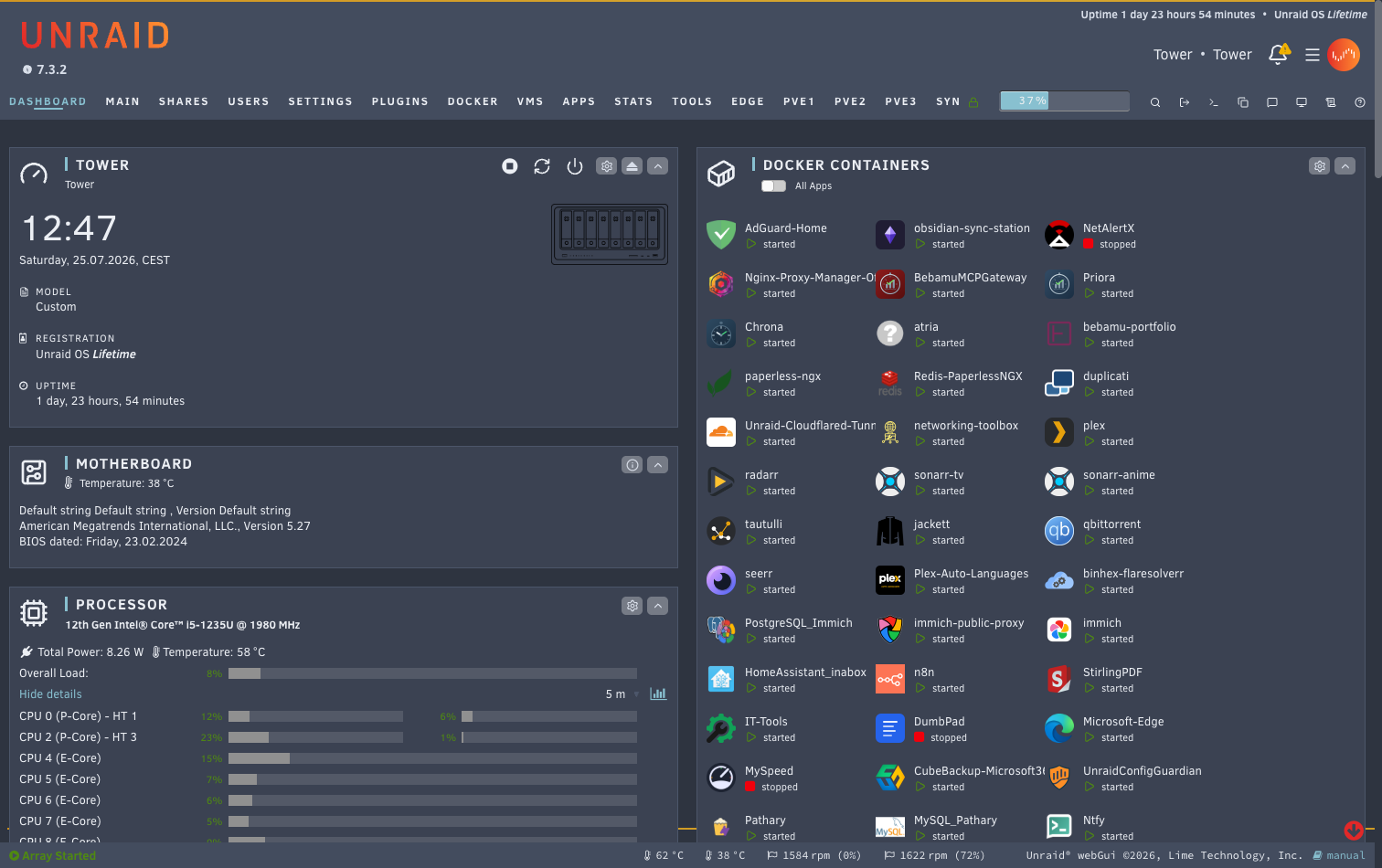
Features
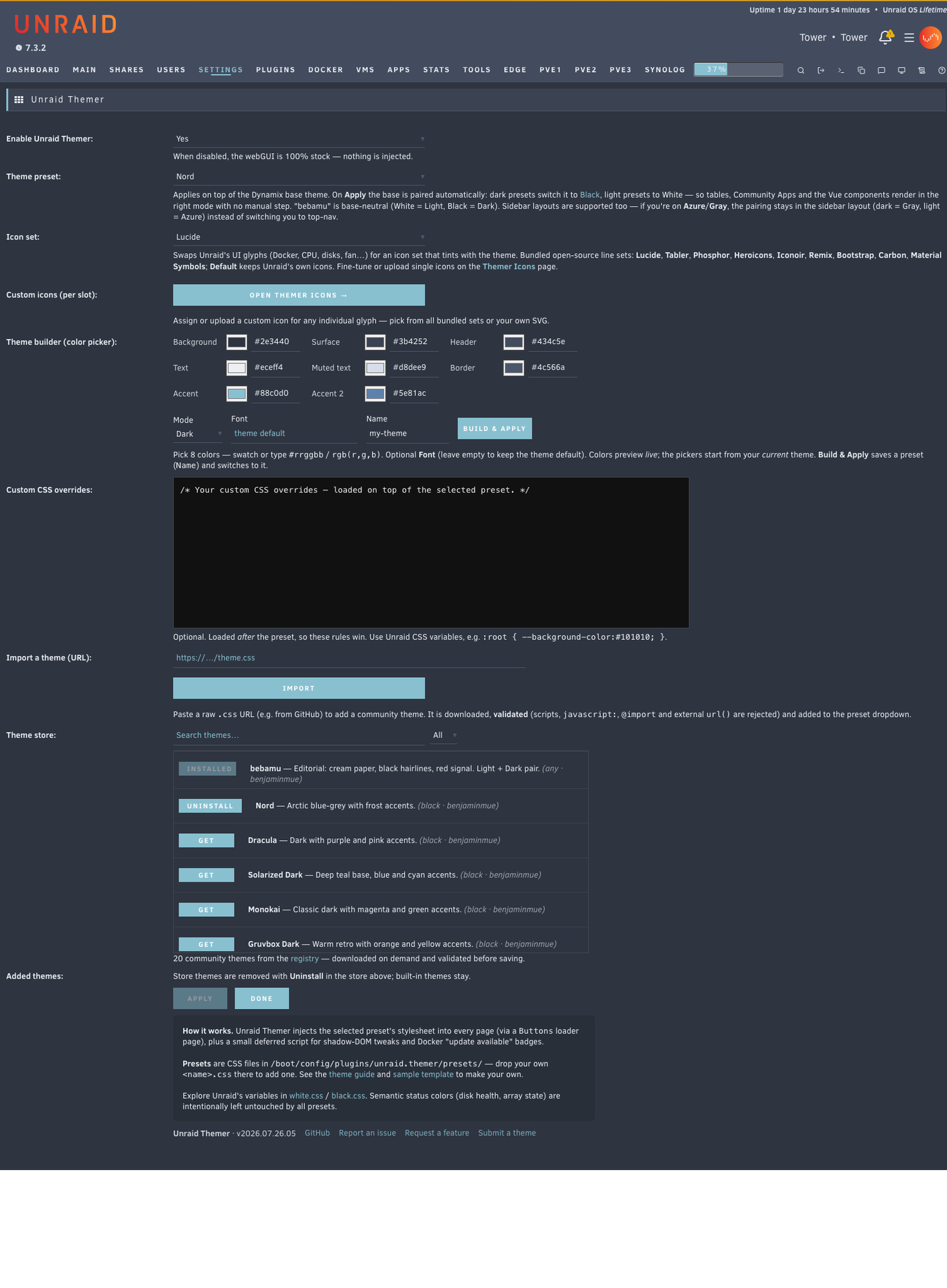
- Themes — bundled presets plus a built-in theme store you can browse and download from on demand. 19+ community themes and counting. Every theme shows its palette as a colour strip, so you see what you are getting before you download it.
- Icon sets — swap Unraid's UI glyphs for 9 open-source line sets (Lucide, Tabler, Phosphor, Heroicons, Iconoir, Remix, Bootstrap, Carbon, Material Symbols) that tint with the theme. Or set any individual icon from a grid picker, an SVG URL, or your own uploaded SVG.
- Theme builder — build your own theme from 8 colors (swatch or hex/rgb), with an optional bundled webfont (Inter, Roboto, Source Sans 3, JetBrains Mono, Nunito, Comic Neue), previewed live and saved as a preset. A live WCAG contrast readout covers the pairs that carry text, and the button label colour is chosen for you so it stays readable on any accent.
- Background image — set a background behind the whole UI, by URL (cached locally, CSP-safe) or a file on the server (Unraid's file picker), with a dim slider for legibility.
- Custom logo — replace the Unraid wordmark in the header with your own logo, by URL or a file on the server.
- Whole-UI coverage — classic Dynamix pages, the Vue header (bell, menu, toolbar), Community Apps, tables, dashboard and the Settings icons.
- Sidebar layouts — Azure / Gray are supported; the base pairing keeps you in your layout family.
- Non-destructive — disable it and the webGUI is 100% stock. Semantic status colors (disk health, array state) are deliberately left untouched.
- Self-contained — one
.plg, no external runtime dependencies.
Install
Plugins → Install Plugin, paste:
https://github.com/benjaminmue/unraid-themer/raw/refs/heads/main/unraid-themer.plg
Then open Settings → Utilities → Unraid Themer, set Enable to Yes, pick a theme, Apply, and hard-reload the browser (Cmd/Ctrl+Shift+R).
Beta channel
New features land on the beta branch first. The branch a .plg is built from is
its update channel, so an installed beta keeps updating from beta and never crosses
over to stable:
https://github.com/benjaminmue/unraid-themer/raw/refs/heads/beta/unraid-themer.plg
Install it the same way; it replaces the stable build in place. Your settings live
on the flash drive and survive the switch in both directions — to go back, install
the main URL above again. Beta versions carry a bNN suffix.
Themes
Bundled and store themes appear in the Theme preset dropdown; the Theme store downloads more on demand (search + light/dark filter, validated before saving). On Apply the plugin pairs the Dynamix base (dark themes → Black/Gray, light → White/ Azure) so the Vue components and Community Apps render in the right mode.
Make your own: see THEMES.md and the annotated
themes/_template.css. It's mostly 8 colors. Submit one with
a PR to themes/ — a GitHub Action validates every theme before it can be
listed in the store.
Screenshots
The Unraid Themer settings page — enable it, pick a preset, build your own from 8 colors, or browse the built-in theme store:
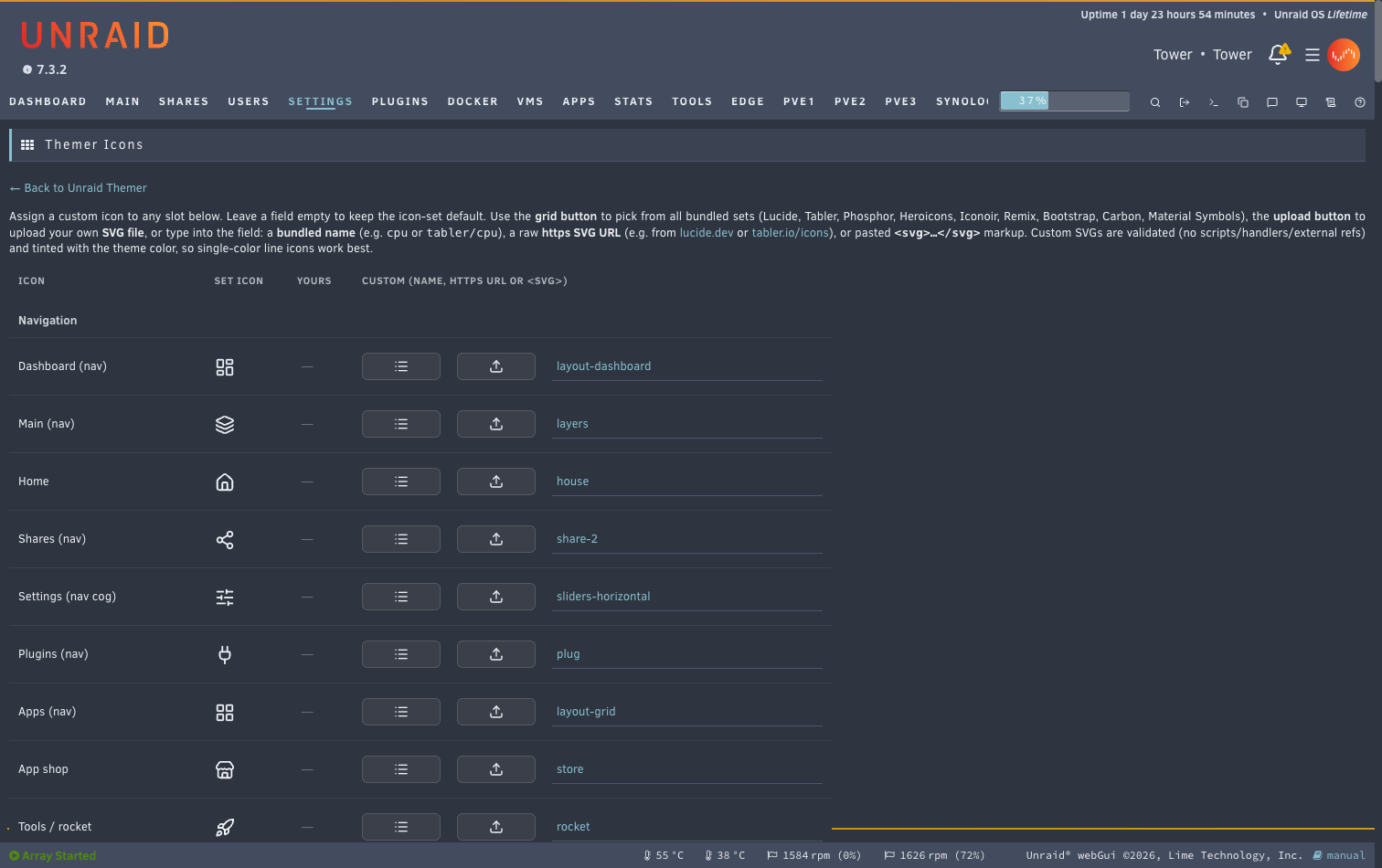
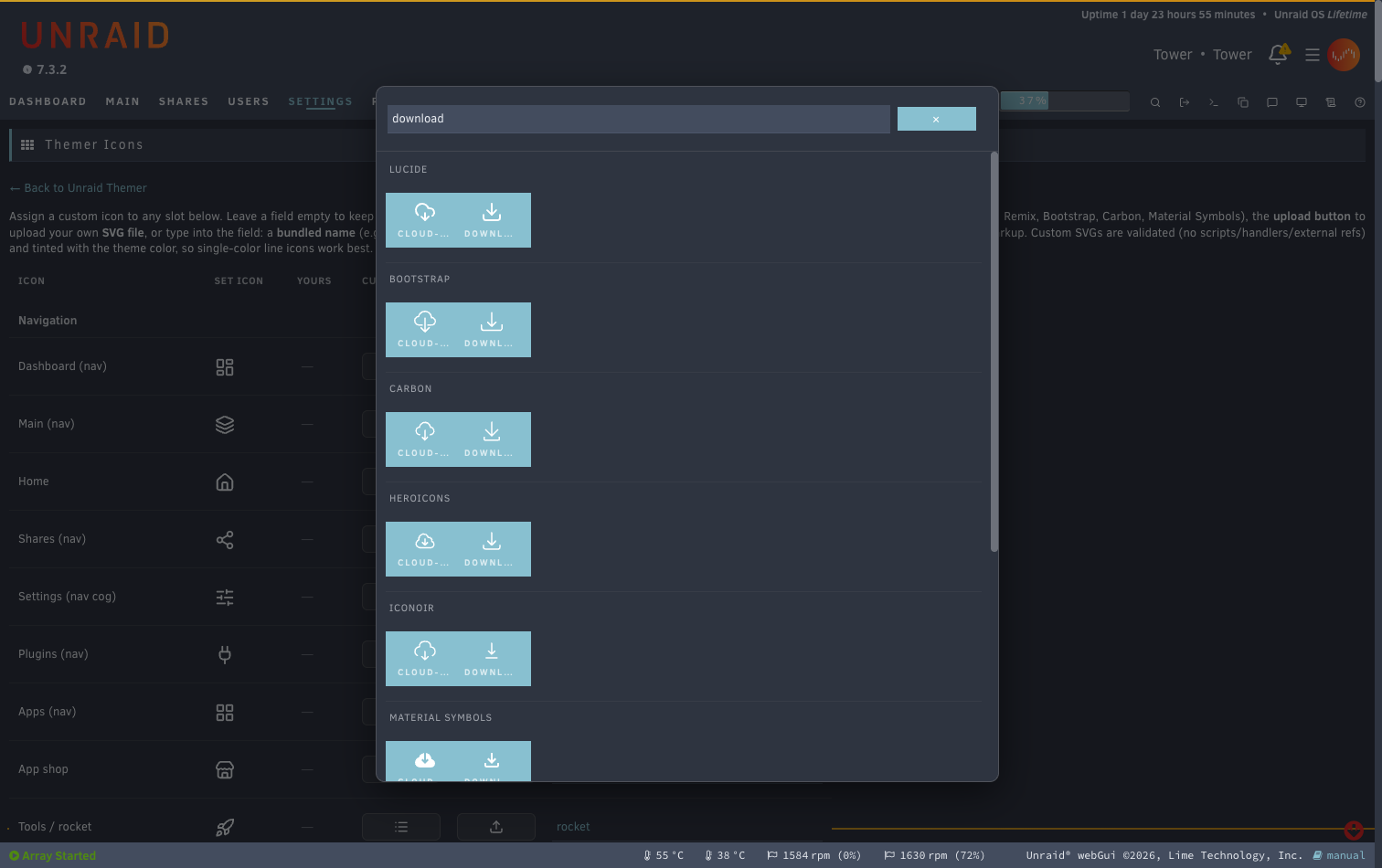
The Themer Icons page overrides any individual glyph, and the grid picker pulls from every bundled icon set at once:
Icons
Icon set swaps every UI glyph for one open-source set. For finer control, the Themer Icons page lists every slot with a live preview — pick from a searchable grid of all bundled sets, paste an SVG URL, or upload your own SVG (all validated).
How it works
Unraid 7 has no global CSS hook, but a .page with Menu="Buttons" runs inside
<head> on every page. Unraid Themer uses that to inject the active theme + icon set
- your overrides, only when enabled. Themes restyle via
:rootcustom-property overrides, which inherit through the open shadow DOM of the Vue web-components, so the new UI recolors too.js/themer.jshandles what CSS can't (the Vue header bell/menu icon swap, a Docker "update available" badge, dashboard chart colors). Config lives on the flash and is mirrored to the RAM webroot on boot, so it survives reboots.
Development
The .plg is fully self-contained and generated from the source tree:
plugin/usr/local/emhttp/plugins/unraid.themer/   # every embedded file
scripts/gen_iconsets.py                           # build the alt icon sets
scripts/gen_themes.py                             # build community themes
python3 build.py                                  # regenerate unraid-themer.plg
Edit source, run python3 build.py, commit the regenerated .plg.
Credits & prior art
This plugin was inspired by two prior community projects, which showed what's possible and how to hook into the webGUI:
- WuSiYu/unraid-custom-css — the
CSS-injection mechanism (a
Menu="Buttons".pagerunning in<head>). - Skitals/unraid-theme-engine (discontinued) — the theme-engine / plugin structure.
Thanks to both authors. Classic palettes come from their respective communities: Nord, Dracula, Solarized, Monokai, Gruvbox, Everforest, Kanagawa, Catppuccin, Tokyo Night, One Dark, Ayu.
Icon set licenses
The bundled icon sets are open source, each under its own license:
- Lucide (ISC); Tabler, Phosphor, Heroicons, Iconoir, Bootstrap Icons (MIT); Remix Icon, Carbon, Material Symbols (Apache-2.0).
Bundled fonts
Optional webfonts you can pick in the theme builder, served locally:
- Inter, Source Sans 3, JetBrains Mono, Nunito, Comic Neue — SIL Open Font License
- Roboto — Apache-2.0
Comic Neue is a free, OFL-licensed Comic-Sans-alike (the proprietary Comic Sans MS can't be bundled); the font stack falls back to a locally installed Comic Sans MS if present.
The plugin's own code is MIT. Icon glyphs and fonts remain under their respective licenses.
License
MIT — see LICENSE.
Media gallery
1 / 3Install Unraid Themer on Unraid in a few clicks.
Find Unraid Themer in Community Apps on your Unraid server, review the template, and click Install. Unraid handles the Docker app or plugin setup from the published template.
Categories
Download Statistics
Downloads by Month
Related apps
Explore more like this
Explore allDetails
https://github.com/benjaminmue/unraid-themer/raw/refs/heads/main/unraid-themer.plg