
All apps · 0 apps

unraid-stats
Docker app from XeXSolutions' Repository
Overview
Readme
View on GitHubUnraid Server Statistics Viewer
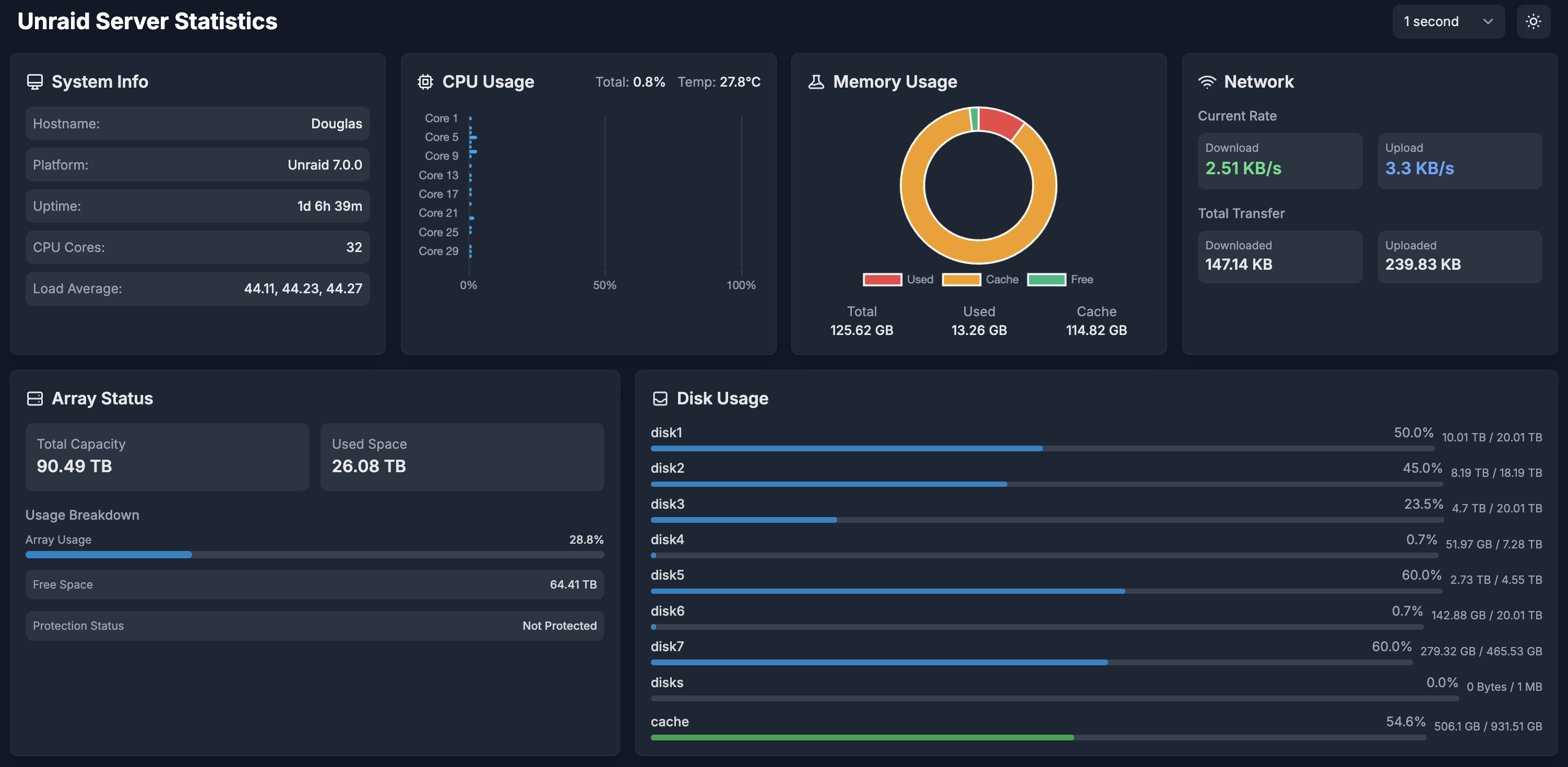
A lightweight, real-time system monitoring dashboard for Unraid servers. This application provides a clean, modern interface to view essential server statistics including CPU usage, memory utilization, network activity, and disk usage.
Features
🖥️ Real-time System Monitoring
- CPU usage per core with temperature
- Memory usage with cache statistics
- Network transfer rates and total usage
- Array status and disk usage
🎨 Modern UI
- Clean, responsive design
- Dark/Light mode support
- Configurable refresh rates
- Mobile-friendly interface
📊 Interactive Charts
- CPU usage bar chart
- Memory usage doughnut chart
- Real-time updates
Installation
Using Docker
- Install the container from Unraid's Apps page or use the following Docker command:
docker run -d \
  --name=unraid-stats \
  -p 8085:8085 \
  -v /proc:/host/proc:ro \
  -v /sys:/host/sys:ro \
  -v /var/local/emhttp:/host/var/local/emhttp:ro \
  -v /var/run/mdstat:/var/run/mdstat:ro \
  -v /mnt:/host/mnt:ro \
  --restart unless-stopped \
  xexsolutions/unraid-stats
Unraid Template
The container is available in Community Applications (CA) for easy installation.
Usage
- Access the dashboard at
http://your-server-ip:8085 - Select your preferred refresh rate from the dropdown menu
- Toggle between dark and light modes using the theme button
Development
To build and run locally:
git clone https://github.com/XeXSolutions/unraid-stats.git
cd unraid-stats
go build
./unraid-stats
Contributing
Contributions are welcome! Please feel free to submit a Pull Request.
License
This project is licensed under the MIT License - see the LICENSE file for details.
Support
If you encounter any issues or have suggestions, please open an issue on GitHub.
Acknowledgments
- Built with Go for backend services
- Frontend using Tailwind CSS and Chart.js
- Designed specifically for Unraid servers
Categories
Download Statistics
Related apps
Explore more like this
Explore allDetails
ghcr.io/xexsolutions/unraid-stats:latestRuntime arguments
- Web UI
http://[IP]:[PORT:8085]/- Network
bridge- Shell
sh- Privileged
- true
Template configuration
Web Interface Port
- Target
- 8085
- Default
- 8085
- Value
- 8085
System information path
- Target
- /host/proc
- Default
- /proc
- Value
- /proc
System information path
- Target
- /host/sys
- Default
- /sys
- Value
- /sys
Unraid configuration path
- Target
- /host/var/local/emhttp
- Default
- /var/local/emhttp
- Value
- /var/local/emhttp
Array status path
- Target
- /var/run/mdstat
- Default
- /var/run/mdstat
- Value
- /var/run/mdstat
Array command socket
- Target
- /var/run/mdcmd.socket
- Default
- /var/run/mdcmd.socket
- Value
- /var/run/mdcmd.socket
Mount points path
- Target
- /host/mnt
- Default
- /mnt
- Value
- /mnt
Disk identification path
- Target
- /host/dev/disk/by-id
- Default
- /dev/disk/by-id
- Value
- /dev/disk/by-id