
All apps · 0 apps

Unraid Modern App Store
Plugin from ghzgod
Overview
Readme
View on GitHubUnraid Modern App Store
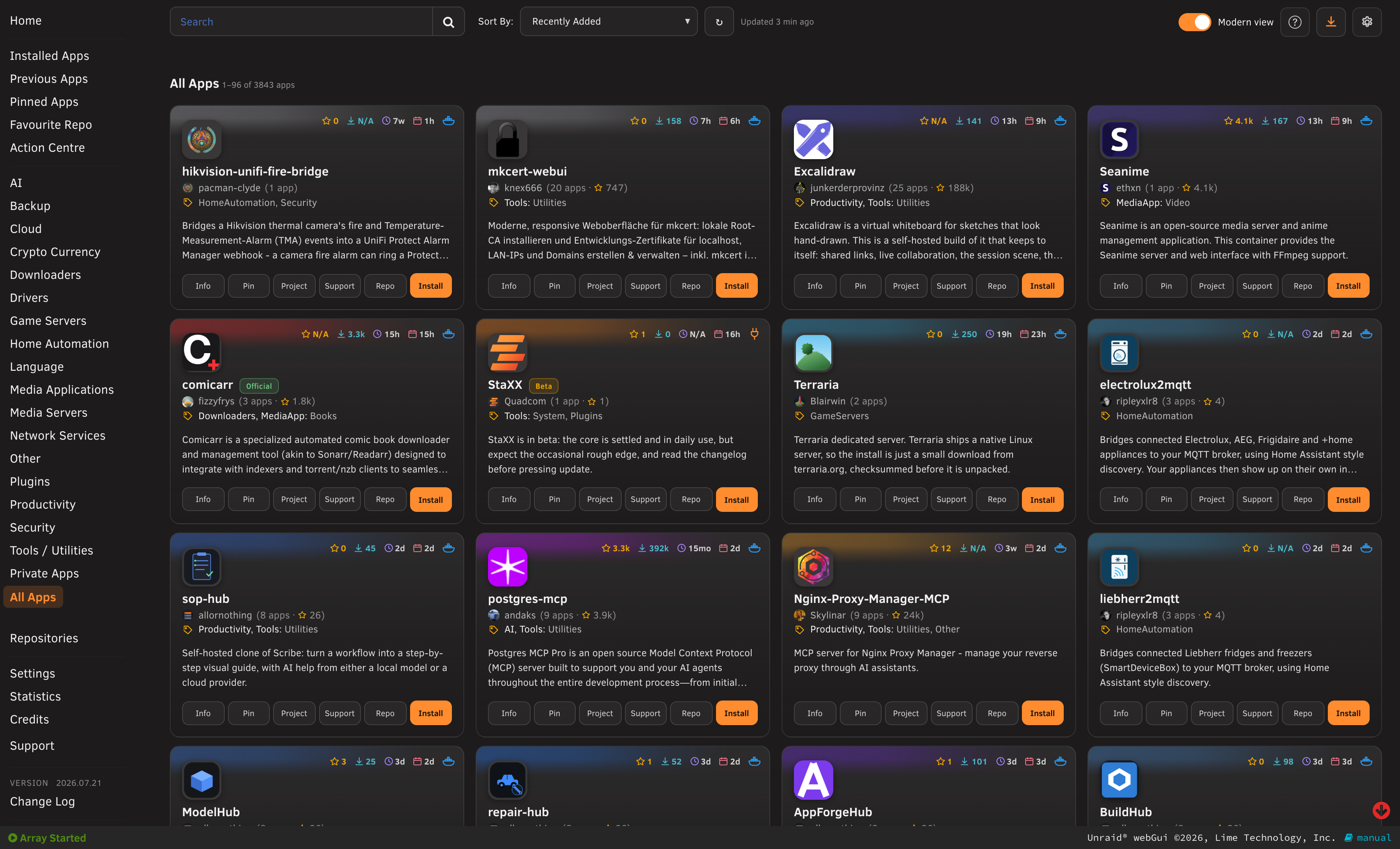
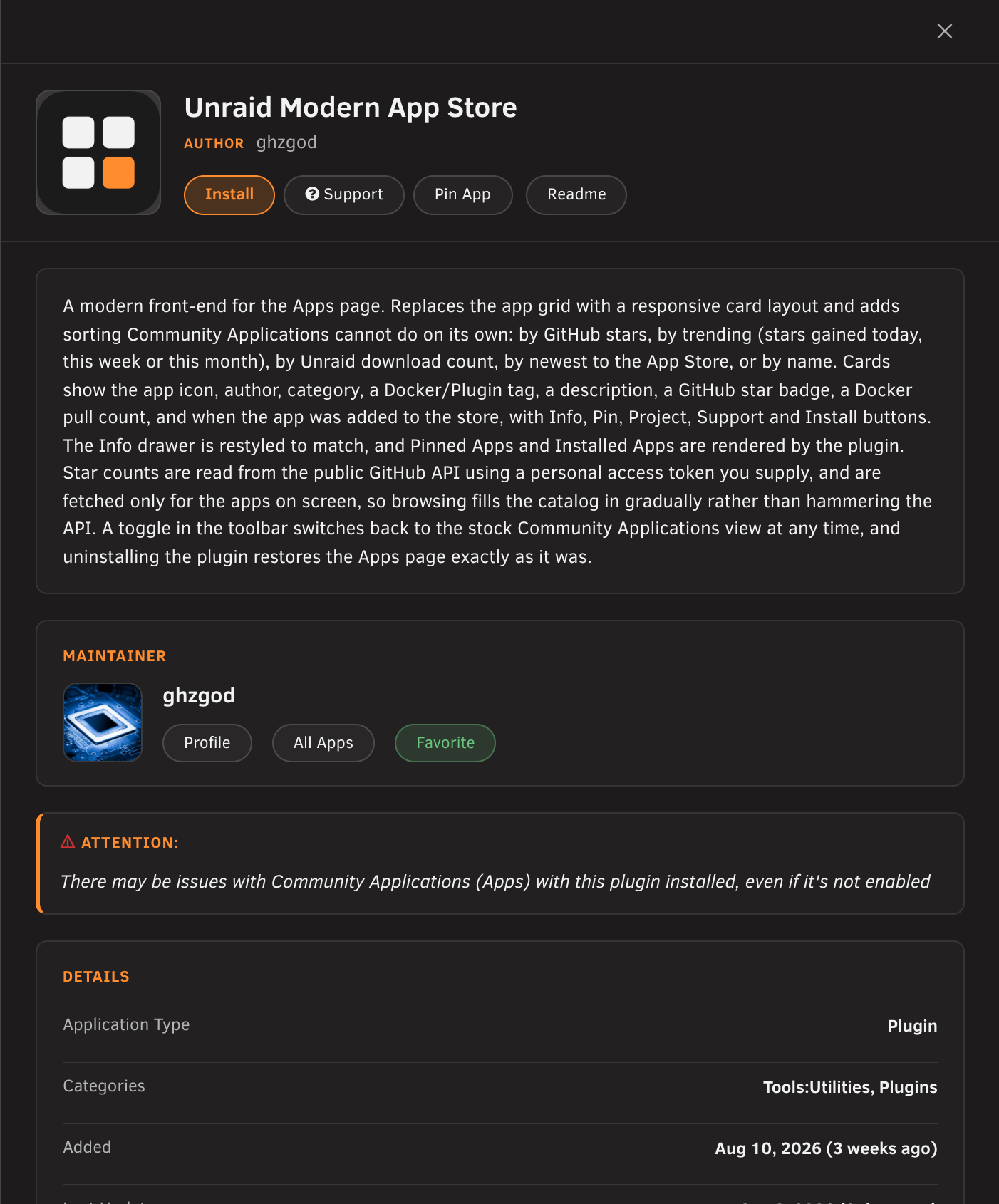
A modern front-end for the Unraid Apps page. It replaces Community Applications' grid with a responsive card layout and adds the sorting CA cannot do on its own: GitHub stars, trending (stars gained today / this week / this month / this year / all time), Unraid downloads, newest to the App Store, or name.
It never modifies Community Applications. Everything is layered on top and scoped to this plugin's own markup, so switching the view off, or uninstalling, returns the Apps page to stock.
Screenshots
Requirements
Unraid 6.12 or newer with the Community Applications plugin installed.
A GitHub personal access token (free) for star counts. Use a classic token (
ghp_...) with no scopes; it only reads public data. Without one the grid still works, minus the star badges.A fine-grained token (
github_pat_...) works for star counts but not for star dates: GitHub refuses those tokens the stargazers endpoint, and the two "this year" trending sorts are built from them. Every other sort, including both "all time" ones, works with either kind. The plugin detects this and says so on its settings page rather than leaving the sort mysteriously empty.
Install
Plugins → Install Plugin, paste:
https://raw.githubusercontent.com/ghzgod/unraid-modern-appstore/main/modern.appstore.plg
Then set your token at Settings → Utilities → Unraid Modern App Store.
What you get
- A card grid with the app icon, maintainer, categories and a three-line description. The strip across the top of each card is tinted in the app's own icon colour and carries the app's facts: GitHub stars, Docker pulls, last update and the date it was added to the store, each with its own colour. Unraid, Official, Beta, Privileged and Not compatible apps are flagged beside the name, and incompatible apps can be hidden from Settings.
- Maintainer standing beside every maintainer's name: how many templates they publish and the GitHub stars across them.
- Pull counts are dropped for apps built on an official base image (nginx, redis, postgres), where the figure belongs to the base image rather than the app.
- Sorting that works across the whole catalog, with real pagination, search and category filtering.
- Pinned Apps and Installed Apps rendered by the plugin.
- A restyled Info drawer, with the description, details and maintainer as one column of cards, and a built-in screenshot lightbox. The maintainer's own drawer lists their apps as the same cards the store uses.
- A Modern view toggle in the toolbar to hand the page back to Community Applications at any time.
- Cards per row is a setting (2 to 6, default 3). A narrower window shows as many as fit.
How the trending windows work
All five trending sorts rank by GitHub stars and differ only in the window they measure.
| Sort | Ranks by |
|---|---|
| Trending (today / this week / this month) | Stars gained in the last 1, 7 or 30 days |
| Trending (this year) | Stars gained in the last 365 days |
| Trending (all time) | Every star the repo has ever gained |
| Trending % (today / this week / this month) | That gain over the star count at the window's start |
| Trending % (this year) | The year's gain over the star count a year ago |
| Trending % (all time) | Lifetime rate: total stars over the repo's age in years |
The day, week and month windows come from the plugin's own daily star snapshots. The year window cannot: a new install has no year-old snapshot and would take a year to grow one, so the year-ago baseline is instead binary-searched out of the repo's stargazer list (roughly four requests for a 1,000-star repo, ten for a 40,000-star one) and cached for 30 days. Repos created inside the window need no request at all, since every star they have is that year's.
"Trending % (all time)" is a rate rather than a percentage on purpose. The other percent sorts divide by the star count at the window's start, and at a repo's creation that is zero, so the lifetime average (stars per year of age) is used instead. It separates a project that gained 5,000 stars in two years from one that took twelve to gain 20,000.
Two limits worth knowing: the stargazer list holds only current stargazers, so a star since removed is invisible and the year's gain reads slightly high; and GitHub stops paginating stargazers past 40,000, so repos above that fall back to the snapshot history.
How star data is gathered
Stars come from the public GitHub API, keyed to each app's project repository. They are fetched for the apps currently on screen, so browsing fills the catalog in gradually; an app is only re-checked if it has never been tried or its last attempt is over a week old. The refresh icon offers a rescan of the current page, or a full catalog scan (limited to once every three days).
Community Applications publishes most project links as ca.unraid.net/cdn/... redirectors, so the plugin resolves each one to its real destination and caches the result. That resolution is only for counting stars: the card's Project and Support buttons open the template's link exactly as the maintainer published it, the same as Community Applications does. Apps whose project link is a plain homepage rather than a repository have no star count, because there is no repository to count.
What it writes
Only its own two directories:
/usr/local/emhttp/plugins/modern.appstore//boot/config/plugins/modern.appstore/(settings, the star database and its history)
Both are removed on uninstall. It never writes to any Community Applications path.
Licence
MIT
Install Unraid Modern App Store on Unraid in a few clicks.
Find Unraid Modern App Store in Community Apps on your Unraid server, review the template, and click Install. Unraid handles the Docker app or plugin setup from the published template.
Categories
Download Statistics
Downloads by Month
Related apps
Explore more like this
Explore allDetails
https://raw.githubusercontent.com/ghzgod/unraid-modern-appstore/main/modern.appstore.plg