
All apps · 0 apps
Unraid Kubernetes
Plugin from Donnie Dice
Overview
Readme
View on GitHubUnraid Kubernetes
Native Unraid plugin for installing, adopting, managing, and observing a k3d/K3S cluster without running a separate web server.
It integrates cluster operations directly into Unraid while keeping application deployment separate. Use the built-in interface for host-level cluster lifecycle and visibility, then deploy workloads with Kubernetes manifests, Helm, or your preferred GitOps tooling.
Preview
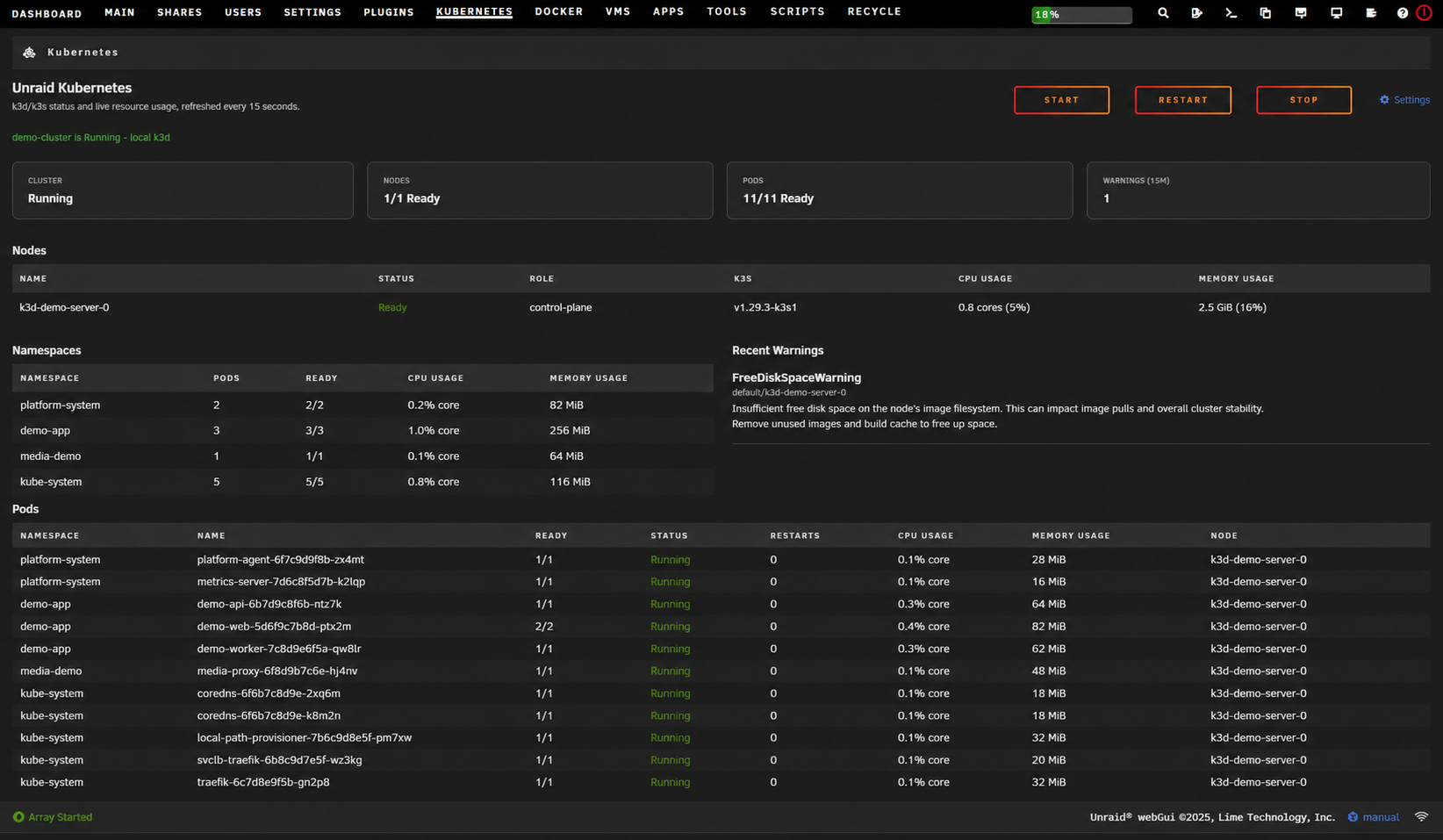
Cluster Overview
The dedicated Kubernetes page summarizes cluster health, nodes, namespaces, pods, warnings, and guarded lifecycle actions.
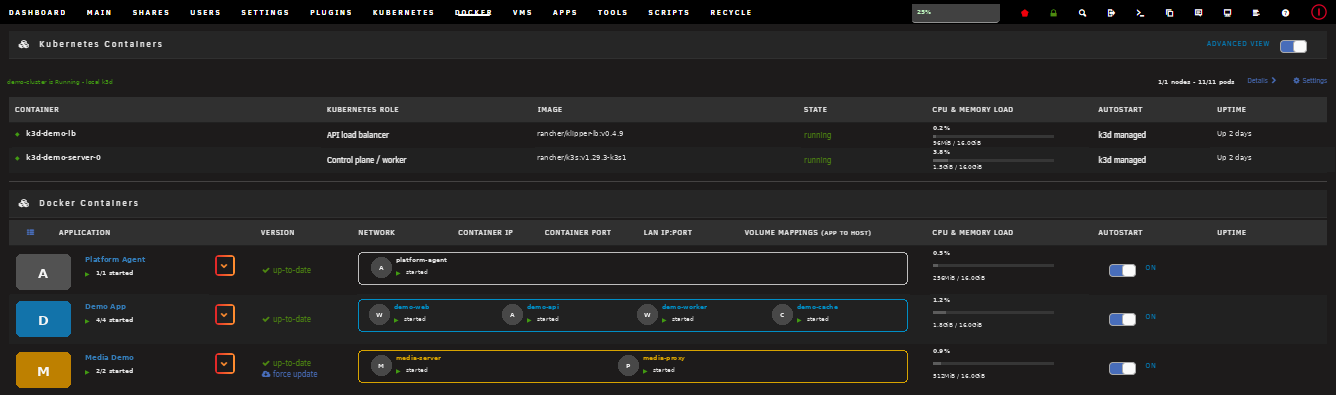
Docker Integration
k3d runtime containers are grouped above the standard Docker container list so their Kubernetes roles and state remain visible without presenting them as editable Unraid templates.
Dashboard Widget
The compact dashboard tile provides at-a-glance cluster, node, and pod health with quick links to details and lifecycle controls.

How It Installs
This is an Unraid plugin, not a Docker template. Install the .plg from
Plugins, or from a Community Apps entry published as a plugin. Installation
does four things:
https://raw.githubusercontent.com/DonnieDice/unraid-kubernetes/main/plugin/unraid.kubernetes.plg
- Downloads and verifies a pinned k3d binary.
- Installs the Kubernetes page, dashboard tile, Docker-page summary, and lifecycle service into Unraid's native webGUI.
- Creates or adopts persistent cluster configuration under appdata.
- Starts k3d, which creates a K3S server container and load-balancer container in Unraid's Docker daemon.
After installation:
- Plugins shows the installed plugin and updates.
- Kubernetes shows cluster health, workloads, lifecycle, and settings.
- Dashboard offers a movable Kubernetes health tile.
- Docker shows the Kubernetes runtime above the regular container list.
- Settings includes a Kubernetes button for configuration and project help.
The generated k3d containers are moved into the Kubernetes runtime section and hidden from the regular Docker container table. They are not normal Unraid template containers. Do not recreate them through Docker Edit. k3d owns their labels, mounts, command line, and network. Change cluster settings through the Kubernetes settings page and deploy applications through Kubernetes manifests, Helm charts, or your preferred GitOps tooling.
Removing the plugin stops the cluster but preserves its datastore, token, kubeconfig, and local-path storage for deliberate recovery or deletion.
Interfaces
- Dedicated Kubernetes page with cluster, node, pod, namespace, and warning status.
- Movable Kubernetes dashboard tile using Unraid's native
$mytilesAPI. - Tile-width-aware Dashboard layout that follows Unraid's native sortable column placement.
- Compact Kubernetes summary and k3d runtime-container list at the top of the Docker page.
- Guarded start, stop, and restart controls through Unraid's CSRF-protected PHP webGUI.
- Native editable plugin settings without exposing Kubernetes credentials.
- Configurable 5, 10, 15, 30, or 60-second status and runtime-usage refresh, with a 15-second default.
The plugin renders through Unraid's existing nginx/PHP webGUI. It does not install nginx, Apache, or another UI container.
Responsibilities
The plugin owns the Unraid host substrate:
- A pinned k3d binary.
- Persistent host settings.
- Cluster startup and shutdown integration.
- Safe creation of a new single-server cluster.
- Adoption of an existing cluster without rewriting its configuration or datastore.
- Read-only Kubernetes status collection.
The status backend supports two provider modes:
k3d: installs and manages a local cluster in Unraid Docker.external: monitors a direct or VM-hosted K3S cluster through a protected kubeconfig and hostkubectl; lifecycle controls are intentionally disabled.
This lets the same Unraid UI remain in place if a local experimental cluster later moves to a multi-machine K3S control plane.
Application manifests and GitOps remain in separate infrastructure or application repositories. Installing this plugin does not deploy application workloads.
Persistent Paths
Plugin settings are stored at:
/boot/config/plugins/unraid.kubernetes/settings.cfg
New installations default to:
/mnt/user/appdata/unraid-kubernetes
Existing configuration and data files are never overwritten.
Project
GitHub Issues is the project's only support and bug-report channel. Community Applications accepts issue trackers as plugin support destinations.
GitLab is the development and CI/CD source of truth. Successful changes flow to GitHub as the downstream public mirror used for distribution and releases.
Development
Run validation and build the Slackware package:
./tools/test.sh
./tools/build.sh
Artifacts are written to dist/. A release pipeline renders the .plg
manifest after the package checksum is known.
When changing VERSION, also update RELEASE_EPOCH to the release timestamp.
Unraid uses packaged file modification times to invalidate browser assets.
Security
- Kubernetes credentials never pass through the browser.
- The status endpoint invokes only fixed Docker and kubectl commands.
- Lifecycle actions are allowlisted and protected by Unraid's global CSRF middleware.
- Runtime settings are validated before use by root-privileged scripts.
Categories
Download Statistics
Downloads by Month
Related apps
Explore more like this
Explore allDetails
https://raw.githubusercontent.com/DonnieDice/unraid-kubernetes/main/plugin/unraid.kubernetes.plg