
All apps · 0 apps

unmove
Docker app from Yusseiin's Repository
Overview
Readme
View on GitHub

UnMove
A self-hosted web application to organize your media library by identifying files using TVDB or TMDB and moving them with proper naming conventions



Features • Screenshots • Installation • Configuration • Development
Features
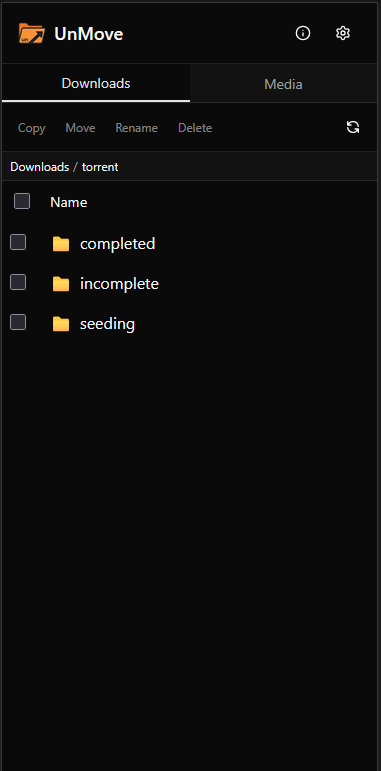
- File Browser - Browse your downloads folder with parsed information (title, year, season, episode)
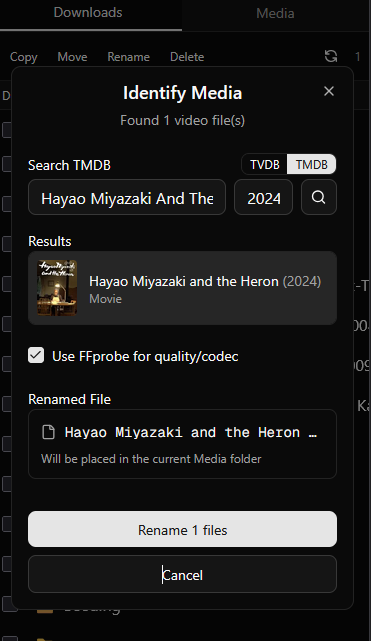
- TVDB & TMDB Integration - Search and identify movies/TV shows using TVDB or TMDB APIs
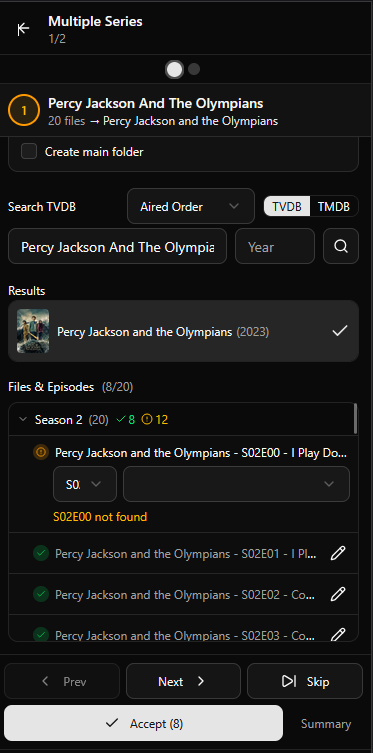
- Auto-Match - Automatically matches files to search results based on filename similarity
- Batch Processing - Identify and move multiple files at once
- Multiple TV Series - Handle episodes from different series in a single workflow
- Smart Renaming - Automatically renames files following media server conventions (Plex/Jellyfin/Emby compatible)
- Plex Integration - Trigger Plex library refresh directly from the app after moving files
- Configurable Paths - Set custom download and media library paths
Screenshots
Installation
Docker (Recommended - Instant Moves)
For instant file moves (no copy+delete), mount downloads and media under the same parent directory:
docker run -d \
  --name unmove \
  -p 3000:3000 \
  -e PUID=99 \
  -e PGID=100 \
  -v /mnt/user:/data \
  -v /path/to/config:/config \
  -e DOWNLOAD_PATH=/data/downloads \
  -e MEDIA_PATH=/data/media \
  yusseiin/unmove:latest
Why? When downloads and media are on the same Docker volume, moving files is instant (just a rename). With separate volumes, Docker must copy the file then delete it.
Docker Compose (Recommended - Instant Moves)
version: "3.8"
services:
  unmove:
    image: yusseiin/unmove:latest
    container_name: unmove
    ports:
      - "3000:3000"
    environment:
      - PUID=99
      - PGID=100
      - DOWNLOAD_PATH=/data/downloads
      - MEDIA_PATH=/data/media
      # Optional: Plex integration
      - PLEX_URL=http://192.168.1.100:32400
      - PLEX_TOKEN=your-plex-token
    volumes:
      - /mnt/user:/data          # Single mount for instant moves
      - /path/to/config:/config
    restart: unless-stopped
Docker (Legacy - Separate Volumes)
If you prefer separate volume mounts (moves will copy+delete instead of instant):
docker run -d \
  --name unmove \
  -p 3000:3000 \
  -e PUID=99 \
  -e PGID=100 \
  -v /path/to/downloads:/downloads \
  -v /path/to/media:/media \
  -v /path/to/config:/config \
  -e DOWNLOAD_PATH=/downloads \
  -e MEDIA_PATH=/media \
  yusseiin/unmove:latest
Unraid
Available in Community Applications. Search for "unmove" or install manually using the Docker Hub image yusseiin/unmove:latest.
For instant moves on Unraid, use the recommended configuration that mounts /mnt/user as a single volume.
⚠️ Important Note about Instant Moves on Unraid
Even with a single Docker volume mount, instant moves will only work if both the downloads and media folders are on the same physical disk. Unraid's
/mnt/useris a virtual filesystem (shfs/fuse) that spans multiple disks. If your downloads are ondisk1and media is ondisk2, the system must copy+delete the file regardless of the Docker configuration.To ensure instant moves:
- Configure both shares (downloads and media) to use the same disk in Unraid's share settings, OR
- Mount a specific disk directly:
-v /mnt/disk1:/datainstead of/mnt/user:/dataIf your files are on different physical disks, the application will automatically fall back to copy+delete (which is slower but works correctly).
Configuration
Environment Variables
| Variable | Default | Description |
|---|---|---|
PUID |
99 | User ID for file permissions |
PGID |
100 | Group ID for file permissions |
DOWNLOAD_PATH |
/data/downloads |
Path to downloads inside container |
MEDIA_PATH |
/data/media |
Path to media library inside container |
PLEX_URL |
- | Plex server URL (e.g., http://192.168.1.100:32400) |
PLEX_TOKEN |
- | Plex authentication token (how to get it) |
Volumes
Recommended (Instant Moves):
| Container Path | Description |
|---|---|
/data |
Parent directory containing both downloads and media (enables instant moves) |
/config |
Configuration storage |
With DOWNLOAD_PATH=/data/downloads and MEDIA_PATH=/data/media
Legacy (Separate Volumes):
| Container Path | Description |
|---|---|
/downloads |
Your downloads folder (source) |
/media |
Your media library (destination) |
/config |
Configuration storage |
With DOWNLOAD_PATH=/downloads and MEDIA_PATH=/media
API Keys
You can use either TVDB, TMDB, or both as metadata providers. Configure your preferred provider in the application settings.
TVDB API Key
- Create a free account at thetvdb.com
- Go to API Information and generate an API key
- Set the
TVDB_API_KEYenvironment variable
TMDB API Key
- Create a free account at themoviedb.org
- Go to API Settings and request an API key
- Set the
TMDB_API_KEYenvironment variable
Plex Integration
UnMove can trigger Plex library refreshes after moving files, so Plex immediately picks up your newly organized media.
Setup
- Get your Plex authentication token (instructions)
- Set the environment variables:
PLEX_URL: Your Plex server URL (e.g.,http://192.168.1.100:32400)PLEX_TOKEN: Your Plex authentication token
Usage
Once configured, click the Plex icon in the top navigation bar to:
- View all your Plex library sections
- Refresh individual libraries or all libraries at once
Application Settings
Settings are accessible via the gear icon in the top-right corner of the interface and are stored in /config/unmove-config.json.
| Setting | Default | Description |
|---|---|---|
| Language | en |
Interface language and folder naming. Options: en (English), it (Italian). Affects season folder names (e.g., "Season 01" vs "Stagione 01") |
| Series Metadata Provider | tvdb |
Metadata provider for TV series. Options: tvdb (TVDB), tmdb (TMDB). Can be switched per-search in the identify dialogs |
| Movies Metadata Provider | tmdb |
Metadata provider for movies. Options: tvdb (TVDB), tmdb (TMDB). Can be switched per-search in the identify dialogs |
| Series Base Folders | [] |
List of base folders for TV series. Each folder has a name and preserveQualityInfo setting to keep quality/encoding info in filenames |
| Movies Base Folders | [] |
List of base folders for movies. Each folder has a name and preserveQualityInfo setting to keep quality/encoding info in filenames |
| Movie Folder Structure | name |
How movie files are organized. Options: name (Movie Name (Year)/Movie.mkv), year (Year/Movie.mkv), or none (Movie.mkv directly in base folder) |
| Default Destination | "" |
Base folder pre-selected as destination when identifying (defaultSeriesBaseFolder / defaultMoviesBaseFolder). Empty means the media root |
| Ignored Files and Folders | ["sample"] |
Names skipped while scanning (excludePatterns). A pattern without wildcards matches anywhere in the name, a pattern with * or ? is matched against the whole name (e.g. *.nfo). Always case-insensitive. A path you select explicitly is still scanned |
| Hide Ignored in Browser | false |
Also hide ignored files and folders in the two file panes (hideExcludedInBrowser). Off by default so they can still be inspected or deleted |
Example unmove-config.json
{
  "language": "en",
  "seriesMetadataProvider": "tvdb",
  "moviesMetadataProvider": "tmdb",
  "seriesBaseFolders": [
    { "name": "TV Series", "preserveQualityInfo": true },
    { "name": "Anime", "preserveQualityInfo": false }
  ],
  "moviesBaseFolders": [
    { "name": "Movies", "preserveQualityInfo": false },
    { "name": "4K Movies", "preserveQualityInfo": true }
  ],
  "movieFolderStructure": "name",
  "defaultSeriesBaseFolder": "Anime",
  "defaultMoviesBaseFolder": "Movies",
  "excludePatterns": ["sample", "*.nfo"],
  "hideExcludedInBrowser": false
}
Naming Examples
TV Series with preserveQualityInfo: true on the folder:
/media/TV Series/Breaking Bad (2008)/Season 01/Breaking Bad - S01E01 - Pilot [1080p.x264].mkv
TV Series with preserveQualityInfo: false on the folder:
/media/Anime/Naruto (2002)/Season 01/Naruto - S01E01 - Enter Naruto Uzumaki.mkv
Movies with preserveQualityInfo: true and movieFolderStructure: "name":
/media/4K Movies/Avatar - The Way of Water (2022)/Avatar - The Way of Water (2022) [2160p.x265].mkv
Movies with preserveQualityInfo: false and movieFolderStructure: "year":
/media/Movies/2022/Avatar - The Way of Water (2022).mkv
Movies with movieFolderStructure: "none" (no subfolder):
/media/Movies/Avatar - The Way of Water (2022).mkv
Usage
- Open the web interface at
http://your-server:3000 - Click the gear icon and select your preference
- Browse your downloads folder
- Select files to identify
- Use "Identify" for single files or "Batch Identify" for multiple files
- Review the matches and move files to your media library
Development
Prerequisites
- Node.js 22+
- pnpm
Setup
# Clone the repository
git clone https://github.com/yusseiin/unmove.git
cd unmove

# Install dependencies
pnpm install

# Set environment variables
cp .env.example .env.local
# Edit .env.local with your paths

# Run development server
pnpm dev
Open http://localhost:3000 to view the app.
Building
# Build for production
pnpm build

# Start production server
pnpm start
Docker Build
docker build --build-arg NEXT_PUBLIC_VERSION=0.0.1 -t unmove .
Tech Stack
- Next.js 16 - React framework
- React 19 - UI library
- Tailwind CSS - Styling
- shadcn/ui - UI components
- TVDB API - Media database
- TMDB API - Media database
Contributing
Contributions are welcome! Please feel free to submit a Pull Request.
License
This project is licensed under the MIT License - see the LICENSE file for details.
Support
- Issues: GitHub Issues
- Discussions: GitHub Discussions
Acknowledgments
Categories
Download Statistics
Related apps
Explore more like this
Explore allLinks
Details
yusseiin/unmove:latestRuntime arguments
- Web UI
http://[IP]:[PORT:3000]- Network
bridge- Shell
sh- Privileged
- false
Template configuration
Web interface port
- Target
- 3000
- Default
- 3213
- Value
- 3213
Parent directory containing downloads and media folders. Using a single mount enables INSTANT file moves instead of copy+delete.
- Target
- /data
- Default
- /mnt/user
- Value
- /mnt/user
Path to store application config
- Target
- /config
- Default
- /mnt/user/appdata/unmove
- Value
- /mnt/user/appdata/unmove
Path to downloads folder inside container (relative to Data Path /data/)
- Default
- /data/downloads
- Value
- /data/downloads
Path to media folder inside container (relative to Data Path /data/)
- Default
- /data/media
- Value
- /data/media
Internal config path (don't change)
- Default
- /config
- Value
- /config
Your TVDB API key (get one at https://thetvdb.com/api-information)
- Target
- TVDB_API_KEY
Your TMDB API key (get one at https://developer.themoviedb.org/docs/getting-started)
- Target
- TMDB_API_KEY
Your Plex server URL (e.g., http://192.168.1.100:32400)
- Target
- PLEX_URL
Your Plex authentication token (see https://support.plex.tv/articles/204059436-finding-an-authentication-token-x-plex-token/)
- Target
- PLEX_TOKEN
User ID for file permissions (99 = nobody on Unraid)
- Default
- 99
- Value
- 99
Group ID for file permissions (100 = users on Unraid)
- Default
- 100
- Value
- 100