
All apps · 0 apps

unmanic
Docker app from Josh.5's Repository
Overview
Unmanic is a simple tool for optimising your file library with a highly customisable plugin system.
Remove the complexity of automatically converting your file library.
Simply point Unmanic at your library and let it manage it for you.
- Manage multiple independent libraries of any media file type with a large range of plugins.
- Simple to configure - don't waste your time with hours of setup. Just get the job done with Unmanic.
- Support for VAAPI/QSV/NVIDIA NVENC for hardware accelerated encoding.
- Schedule file scans at set intervals.
- Configure inotify file monitors for your libraries.
- Link with other installations to share in distributed processing of tasks. These other installations may be on:
- This same Unraid server
- A LAN connected PC (including across subnets)
- A Internet connected PC behind a basic auth proxy
- Linux, MacOS, Windows
- x86, Armv7, Arm64
- Toggle this Docker Container template editor to "Advanced View".
- In the "Extra Parameters" field, add "--cpus='1'".
This value depends on the number of cores available to the container. To limit to 50%, set this value to 0.5 * n cores. If you have 2 cores available to this container, "--cpus='.5'" will equal 25% of that available CPU resources. To limit the CPU cores available to the continer, use "CPU Pinning"
- Toggle this Docker Container template editor to "Advanced View".
- In the "Extra Parameters" field, add "--memory='1g'".
Unmanic can use on average around 100Mib - 500 Mib of RAM for various Disk IO tasks.
Even though limiting RAM is unnecessary as Unmanic should not ever need more that 1GB RAM it is good practice to do so.
Note: If you set your Cache Directory path to a tmpfs or RAM, limiting your memory allocation will affect the available RAM for the cache volume.
- Install the Nvidia-Driver plugin.
- Toggle this Docker Container template editor to "Advanced View".
- In the "Extra Parameters" field, add "--runtime=nvidia".
- Expand the template "Show more settings..." section.
- In the "NVIDIA_VISIBLE_DEVICES" variable, copy your GPU UUID (can be found in the Unraid Nvidia Plugin)
- Install the Intel-GPU-TOP plugin.
- Toggle this Docker Container template editor to "Advanced View".
- In the "Extra Parameters" field, add "--device=/dev/dri".
- Install the Radeon-TOP plugin.
- Toggle this Docker Container template editor to "Advanced View".
- In the "Extra Parameters" field, add "--device=/dev/dri".
Readme
View on GitHubUnmanic - Library Optimiser













Unmanic is a simple tool for optimising your file library. You can use it to convert your files into a single, uniform format, manage file movements based on timestamps, or execute custom commands against a file based on its file size.
Simply configure Unmanic pointing it at your library and let it automatically manage that library for you.
Unmanic provides you with the following main functions:
- A scheduler built in to scan your whole library for files that do not conform to your configured file presets. Files found requiring processing are then queued.
- A file/directory monitor. When a file is modified, or a new file is added in your library, Unmanic is able to again test that against your configured file presets. Like the first function, if this file requires processing, it is added to a queue for processing.
- A handler to manage running multiple file manipulation tasks at a time.
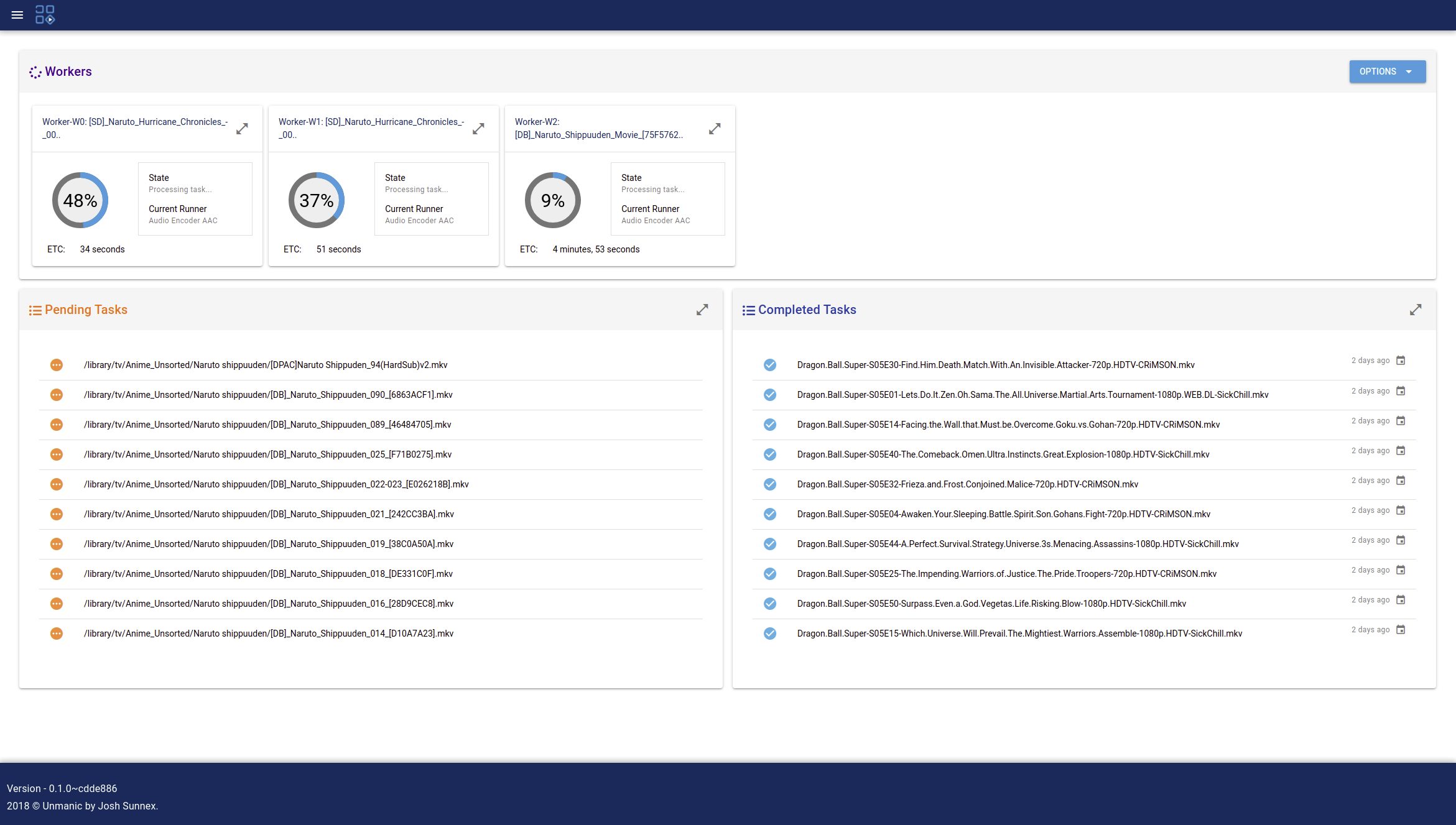
- A Web UI to easily configure, manage and monitor the progress of your library optimisation.
You choose how you want your library to be.
Some examples of how you may use Unmanic:
- Transcode video or audio files into a uniform format using FFmpeg.
- Identify (and remove if desired) commercials in DVR recordings shortly after they have completed being recorded.
- Move files from one location to another after a configured period of time.
- Automatically execute FileBot rename files in your library as they are added.
- Compress files older than a specified age.
- Run any custom command against files matching a certain extension or above a configured file size.
Table Of Contents
Dependencies
- Python 3.x (Install)
- To install requirements run 'python3 -m pip install -r requirements.txt' from the project root
Since Unmanic can be used for running any commands, you will need to ensure that the required dependencies for those commands are also installed on your system.
Screen-shots
Dashboard:
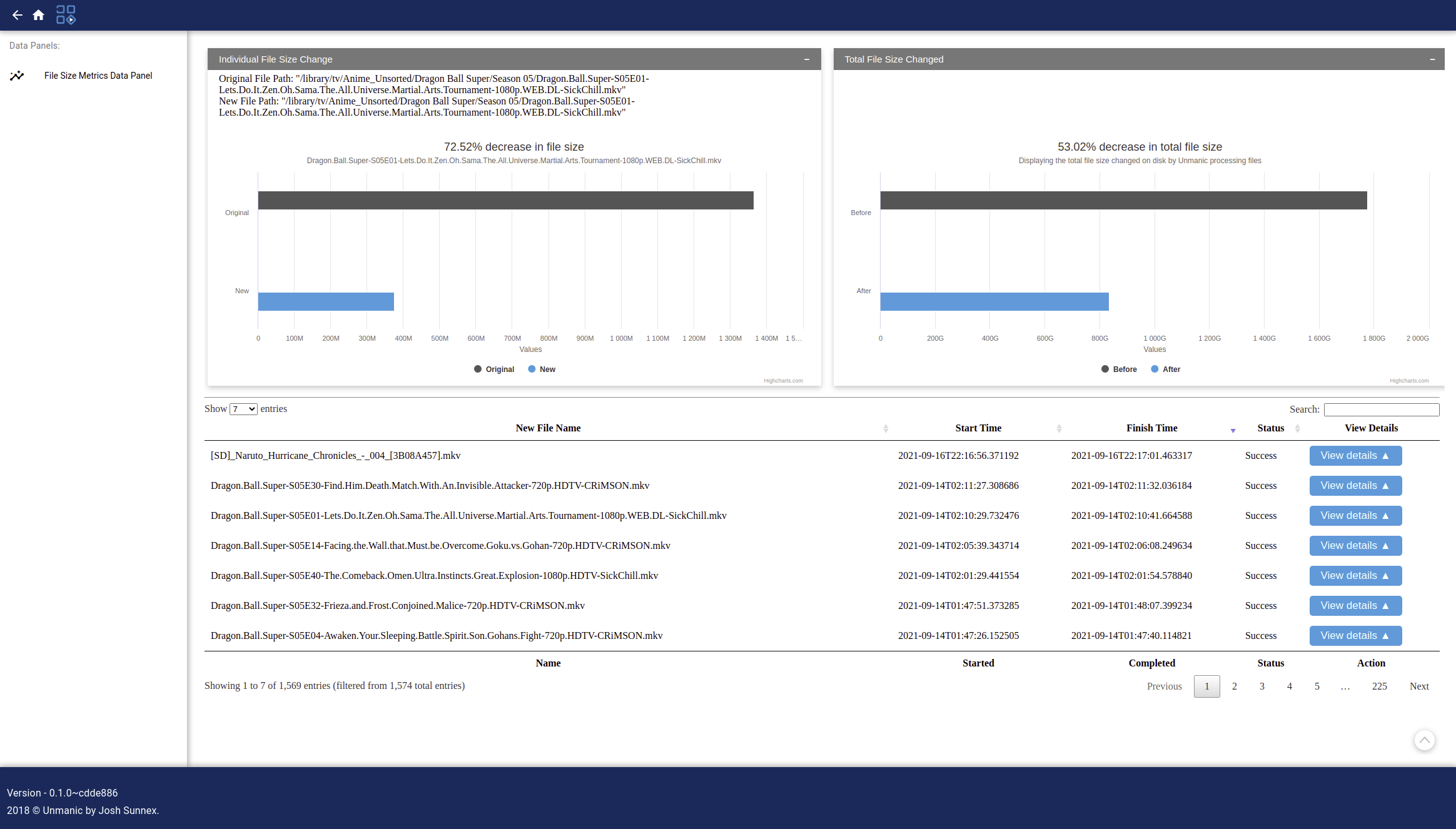
File metrics:
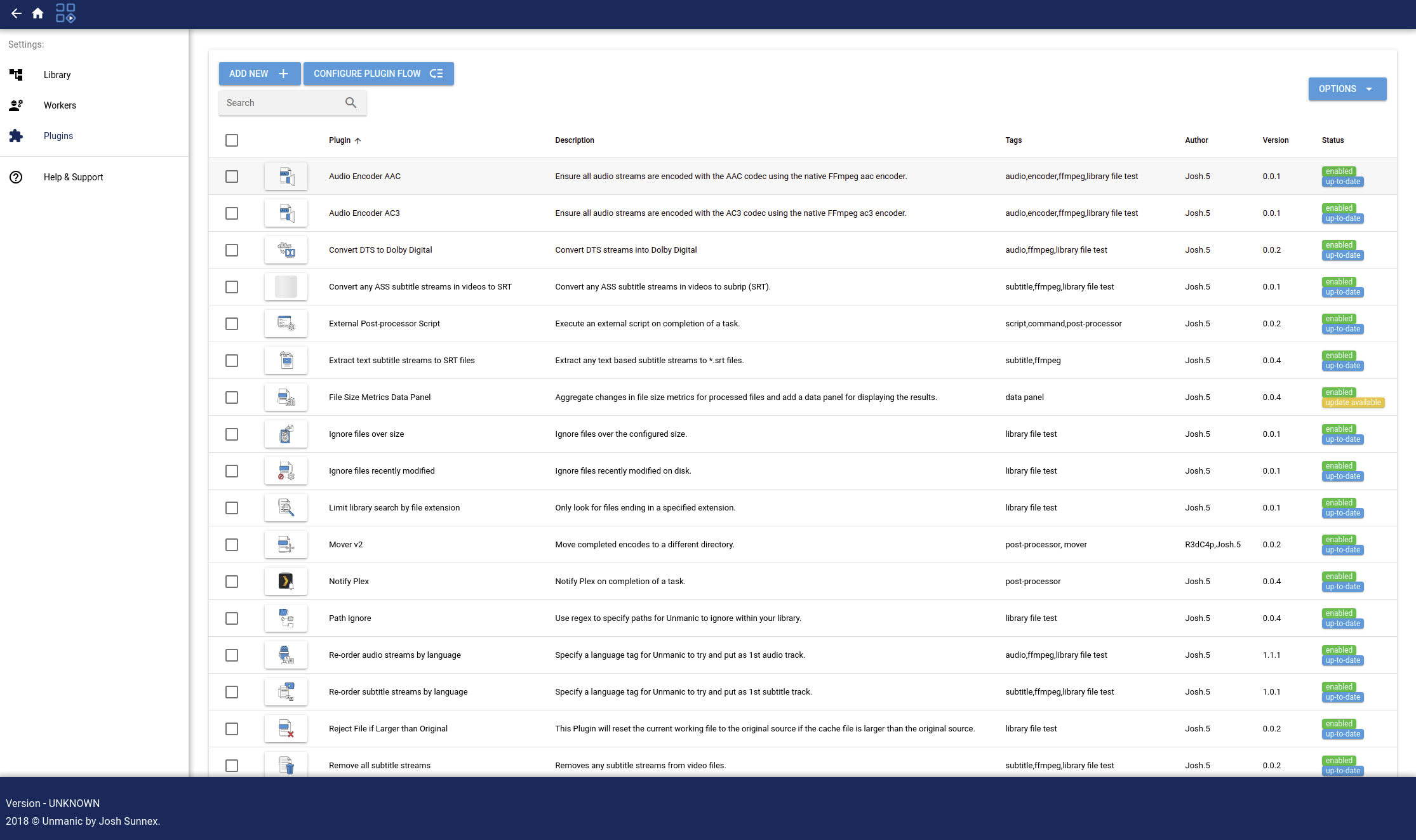
Installed plugins:
Install and Run
For up-to-date installation instructions, follow the Unmanic documentation.
To run from source:
- Install the Python dependencies listed above then run:
- Run:
# Ensure the submodules are checked out git submodule update --init --recursive # Build and install the project into your home directory python3 ./setup.py install --user # Run Unmanic unmanic - Open your web browser and navigate to http://localhost:8888/
License and Contribution
This projected is licensed under the GPL version 3.
Copyright (C) Josh Sunnex - All Rights Reserved
Permission is hereby granted, free of charge, to any person obtaining a copy of this software and associated documentation files (the "Software"), to deal in the Software without restriction, including without limitation the rights to use, copy, modify, merge, publish, distribute, sublicense, and/or sell copies of the Software, and to permit persons to whom the Software is furnished to do so, subject to the following conditions:
The above copyright notice and this permission notice shall be included in all copies or substantial portions of the Software.
This project contains libraries imported from external authors. Please refer to the source of these libraries for more information on their respective licenses.
See CONTRIBUTING.md to learn how to contribute to Unmanic.
Requirements
**Nvidia-Driver plugin** (optional - required for nVidia Support)
**Intel-GPU-TOP plugin** (optional - required for Intel Support)
**Radeon-TOP plugin** (optional - required for AMD Support)
Categories
Download Statistics
Total Downloads Over Time
Related apps
Explore more like this
Explore allLinks
Details
josh5/unmanic:latestRuntime arguments
- Web UI
http://[IP]:[PORT:8888]/- Network
bridge- Shell
bash- Privileged
- false
Template configuration
- Target
- 8888
- Default
- 8888
- Value
- 8888
Location where all container configuration is stored.
- Target
- /config
- Default
- /mnt/user/appdata/unmanic
- Value
- /mnt/user/appdata/unmanic
Location where task files are temporarily stored while workers are carrying out jobs on them.
- Target
- /tmp/unmanic
- Target
- /library/movies
- Target
- /library/tv
- Target
- /library/music
- Target
- /library/pictures
- Default
- 99
- Value
- 99
- Default
- 100
- Value
- 100
The UUID of the NVIDIA GPU that you wish to use within this container. Set to 'all' to use all available NVIDIA GPUs.
- Target
- NVIDIA_VISIBLE_DEVICES
- Default
- all
- Value
- all
For description, join the conversation at https://streamingtech.co.nz/discord
- Target
- NVIDIA_PATCH_VERSION