
All apps · 0 apps

UniFi-Voucher-Site
Docker app from grtgbln's Repository
Overview
Readme
View on GitHubUniFi Voucher Site
UniFi Voucher Site is a web-based platform for generating and managing UniFi network guest vouchers



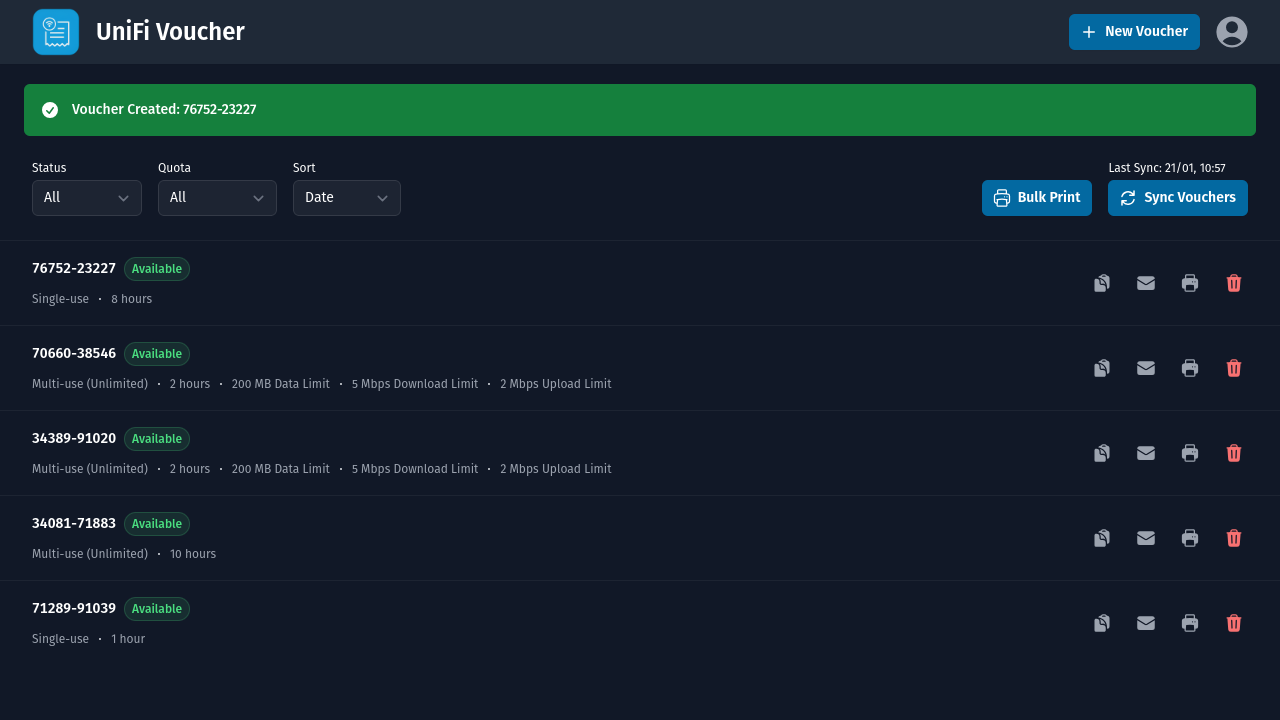
Upgrading from 7.x to 8.x? Please take a look at the migration guide
Features
- Voucher Management: Create, view, and manage vouchers with customizable options for expiration, data limits, and speeds.
- OIDC Support: Integrates OpenID Connect for secure user authentication and single sign-on (SSO).
- Web and API Services: Access the service via a web interface or integrate with other systems using a REST API.
- Docker Support: Easily deploy using Docker, with customizable environment settings.
- Home Assistant App: Seamlessly integrate with Home Assistant for centralized management.
- Receipt Printing: Supports printing vouchers with 80mm thermal printers. Via compatible PDFs and/or ESC/POS enabled network printers.
- Bulk Printing: Export/print multiple Vouchers in one go.
- Email Functionality: Automatically send vouchers via SMTP.
- Localized Email/Print Templates Fully localized templates, with support for multiple languages.
- Scan to Connect QR Codes Quickly connect users via a phone's camera. (Available within Email and Print Layouts)
Structure
- Node.js
- ExpressJS
- EJS
- Node UniFi
- TailwindCSS
- NodeMailer
- PDFKit
- Node Thermal Printer
- QRCode
Version Compatibility
| UniFi Voucher Site | Cloud Gateways | Cloud Key | UniFi Network Server | UniFi OS Server | UniFi OS | UniFi Network |
|---|---|---|---|---|---|---|
| ≥ 8.x | ✔️ | ✔️ | ✖️ | ✔️ | v4.2.8+ | v9.1.119+ |
| ≤ 7.x | ✔️ | ✔️ | ✔️ | ✔️ | - | v5.4.9+ |
Note: Running the Legacy UniFi Network Server but want to upgrade to 8.x? Follow the official guide to migrate to UniFi OS Server: https://help.ui.com/hc/en-us/articles/34210126298775-Self-Hosting-UniFi
Prerequisites
- UniFi OS v4.2.8+
- UniFi Network v9.1.119+ (Cloud Gateways, Cloud Key, or UniFi OS software)
- UniFi Access Point (AP)
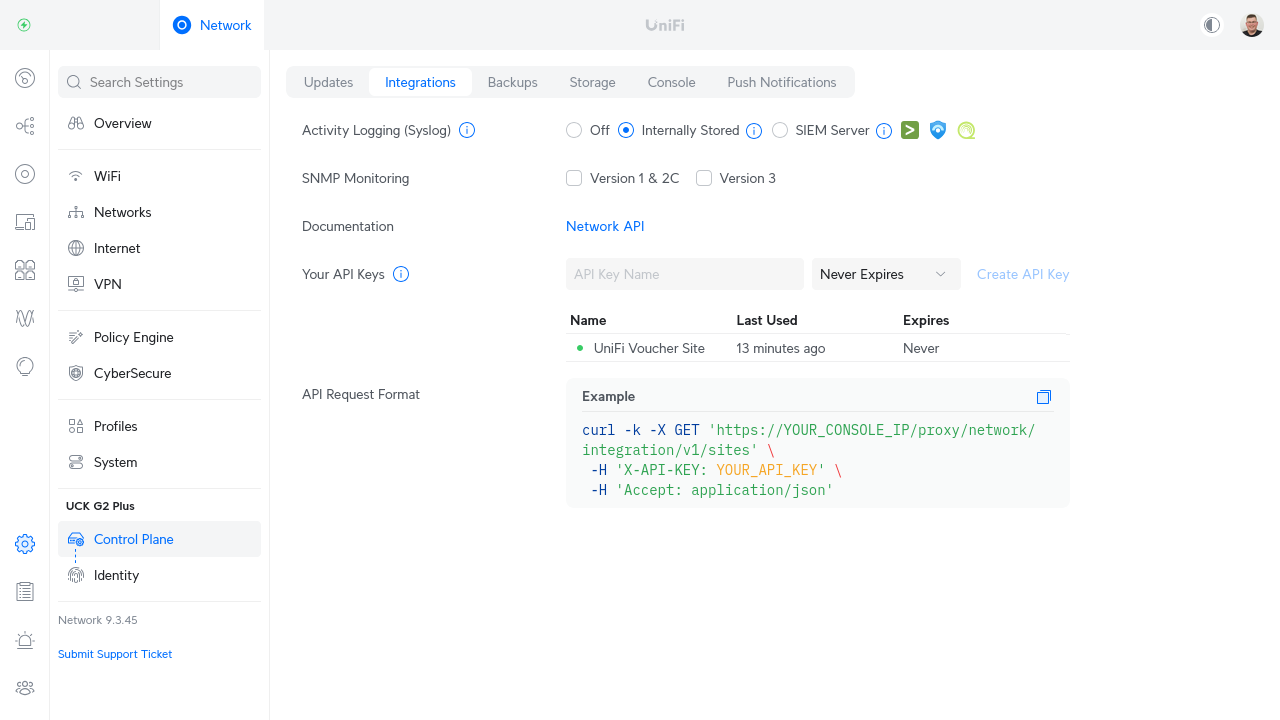
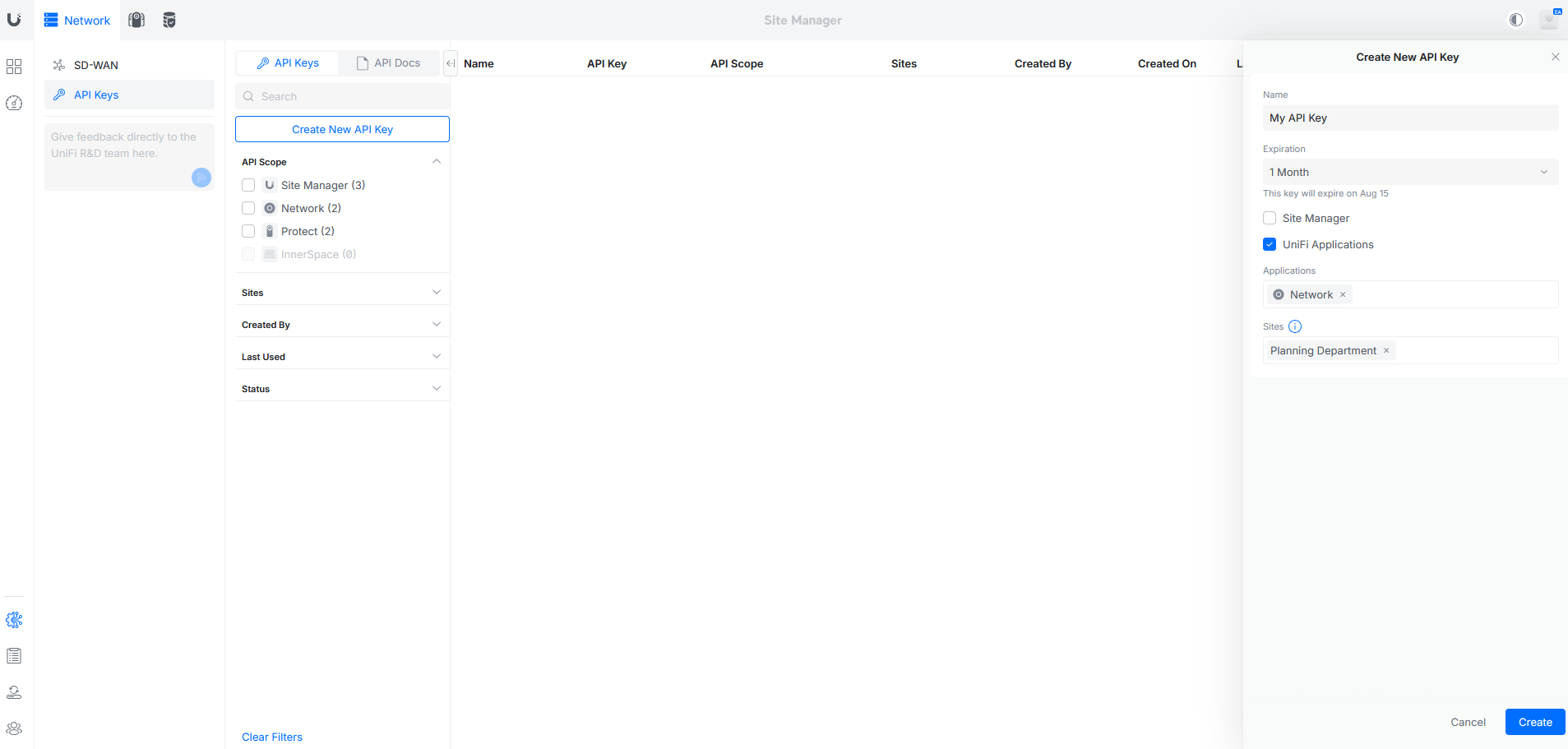
- UniFi Local Network API Key or Site Manager API Key
Note: These API Keys are not interchangeable. A Site Manager API Key cannot be used for the Local Network API and vice versa. The minimum required permissions for the Site Manager API Key is the 'UniFi Applications' and 'Network Application' permission along with the specific site as shown in the 2nd picture below.
Local Network API Key Creation:
Site Manager API Key Creation:
Follow this guide to set up the Hotspot Portal, then continue with the installation below
Ensure voucher authentication is enabled within the Hotspot Portal
Installation
Docker
You can easily run UniFi Voucher Site using Docker. We provide two release tracks to ensure you have flexibility in how you manage your deployments:
- Master Branch: The
latestDocker tag is always built from themasterbranch. This tag contains the most recent changes, but may also include experimental or less stable features. - Tag-based Versions: For production environments, we recommend using tag-based versions. These tags correspond to specific, stable releases of the application. To use a tag-based version, simply replace
latestwith the desired version number.
Below is an example docker-compose.yml file that can help you get started:
services:
  unifi-voucher-site:
    image: glenndehaan/unifi-voucher-site:latest
    ports:
      - "3000:3000"
    environment:
      # The IP address to your UniFi OS Console
      UNIFI_IP: '192.168.1.1'
      # The port of your UniFi OS Console, this could be 443 or 8443
      UNIFI_PORT: 443
      # The API Key created on the integrations tab within UniFi OS
      UNIFI_TOKEN: ''
      # The UniFi Site ID
      UNIFI_SITE_ID: 'default'
      # Set to true if using UniFi's Site Manager instead of local IP
      UNIFI_SITE_MANAGER: 'false'
      # The console id of the site if using Unifi's Site Manager instead of local IP
      UNIFI_SITE_MANAGER_CONSOLE_ID: ''
      # The UniFi SSID where guests need to connect to (Used within templating and 'Scan to Connect')
      UNIFI_SSID: ''
      # The UniFi SSID WPA/WPA2/WPA3 Password (Can be ignored for 'Open' networks) (Used within templating and 'Scan to Connect')
      UNIFI_SSID_PASSWORD: ''
      # Toggle to enable/disable internal authentication
      AUTH_INTERNAL_ENABLED: 'true'
      # The password used to log in to the voucher portal Web UI
      AUTH_INTERNAL_PASSWORD: '0000'
      # The Bearer token used for the API
      AUTH_INTERNAL_BEARER_TOKEN: '00000000-0000-0000-0000-000000000000'
      # Toggle to enable/disable OIDC authentication
      AUTH_OIDC_ENABLED: 'false'
      # OIDC issuer base url provided by oauth provider. Example: https://auth.example.com/.well-known/openid-configuration
      AUTH_OIDC_ISSUER_BASE_URL: ''
      # OIDC UniFi Voucher base url (This application). Example: https://voucher.example.com
      AUTH_OIDC_APP_BASE_URL: ''
      # OIDC client id provided by oauth provider
      AUTH_OIDC_CLIENT_ID: ''
      # OIDC client secret provided by oauth provider
      AUTH_OIDC_CLIENT_SECRET: ''
      # Skips the internal login page, and redirects to the OIDC auth flow
      AUTH_OIDC_REDIRECT_LOGIN: 'false'
      # In environments with multiple organizations sharing a single UniFi Controller instance, it may be desirable to limit users to only manage vouchers associated with their own organization.
      # This restriction is based on the domain (including subdomains and TLDs) of the users email address.
      AUTH_OIDC_RESTRICT_VISIBILITY: 'false'
      # Disables the login/authentication for the portal and API
      AUTH_DISABLE: 'false'
      # Voucher Types, format: expiration in minutes (required),single-use or multi-use vouchers value - '0' is for multi-use (unlimited) - '1' is for single-use - 'N' is for multi-use (Nx) (optional),upload speed limit in kbps (optional),download speed limit in kbps (optional),data transfer limit in MB (optional)
      # To skip a parameter just but nothing in between the comma's
      # After a voucher type add a semicolon, after the semicolon you can start a new voucher type
      VOUCHER_TYPES: '480,1,,,;'
      # Allow users to create custom vouchers types within the UI
      VOUCHER_CUSTOM: 'true'
      # Force users to provide a note within the UI
      VOUCHER_NOTE_REQUIRED: 'false'
      # Enable/disable the Web UI
      SERVICE_WEB: 'true'
      # Enable/disable the API
      SERVICE_API: 'false'
      # Enable/disable the printers and setup available printers, currently supported: pdf,escpos ip (Example: pdf,192.168.1.10)
      PRINTERS: ''
      # Set the layout to print (full, slim_qr, slim)
      PRINTERS_LAYOUT: 'full'
      # SMTP Mail from email address (optional)
      SMTP_FROM: ''
      # SMTP Mail server hostname/ip (optional)
      SMTP_HOST: ''
      # SMTP Mail server port (optional)
      SMTP_PORT: ''
      # SMTP Mail use TLS? (optional)
      SMTP_SECURE: 'false'
      # SMTP Mail username (optional)
      SMTP_USERNAME: ''
      # SMTP Mail password (optional)
      SMTP_PASSWORD: ''
      # Enable/disable the kiosk page on /kiosk
      KIOSK_ENABLED: 'false'
      # Kiosk Voucher Types, format: expiration in minutes (required),single-use or multi-use vouchers value - '0' is for multi-use (unlimited) - '1' is for single-use - 'N' is for multi-use (Nx) (optional),upload speed limit in kbps (optional),download speed limit in kbps (optional),data transfer limit in MB (optional)
      # To skip a parameter just but nothing in between the comma's
      # After a voucher type add a semicolon, after the semicolon you can start a new voucher type
      KIOSK_VOUCHER_TYPES: '480,1,,,;'
      # Enable/disable the requirement for a guest to enter their name before generating a voucher
      KIOSK_NAME_REQUIRED: 'false'
      # Sets the Kiosk timeout in seconds (Returns the user back to the starting page after inactivity)
      KIOSK_TIMEOUT: '60'
      # Enable/disable an override to redirect to the Kiosk on the / url (Also enables a link from the Kiosk back to the Admin UI)
      KIOSK_HOMEPAGE: 'false'
      # Enable/disable the email voucher button (Requires SMTP to be setup)
      KIOSK_EMAIL: 'false'
      # Enable/disable a printer for Kiosk Vouchers (this automatically prints vouchers), currently supported: escpos ip (Example: 192.168.1.10)
      KIOSK_PRINTER: ''
      # Specifies the IP address to bind to (such as :: in IPv6 environments)
      BIND_ADDRESS: '0.0.0.0'
      # Sets the application Log Level (Valid Options: error|warn|info|debug|trace)
      LOG_LEVEL: 'info'
      # Sets the default translation for dropdowns
      TRANSLATION_DEFAULT: 'en'
      # Hides languages from the UI, example: en,nl,de
      TRANSLATION_HIDDEN_LANGUAGES: ''
      # Enables/disables translation debugging, when enabled only translation keys are shown
      TRANSLATION_DEBUG: 'false'
      # Enables/disables an automated task to clean up expired vouchers from UniFi
      TASK_CLEANUP_EXPIRED: 'false'
      # Enables/disables an automated task to clean up unused vouchers from UniFi
      TASK_CLEANUP_UNUSED: 'false'
      # Specifies the amount of days to wait before removing the unused vouchers
      TASK_CLEANUP_UNUSED_DAYS: '1'
    # Optional volume mapping to override assets
    volumes:
      - ./branding:/kiosk
Configuration Options
By default, UniFi Voucher Site is configured using environment variables. However, you can optionally provide a configuration file named options.json instead. When using a config file, it will override environment variable settings.
To use a config file, mount it into the container at:
/data/options.json
The structure of the file should use lowercase versions of the environment variable names.
Example options.json:
{
  "unifi_ip": "192.168.1.1",
  "unifi_port": 443,
  "unifi_token": "",
  "unifi_site_id": "default",
  "unifi_site_manager": false,
  "unifi_site_manager_console_id": "",
  "unifi_ssid": "",
  "unifi_ssid_password": "",
  "auth_internal_enabled": true,
  "auth_internal_password": "0000",
  "auth_internal_bearer_token": "00000000-0000-0000-0000-000000000000",
  "auth_oidc_enabled": false,
  "auth_oidc_issuer_base_url": "",
  "auth_oidc_app_base_url": "",
  "auth_oidc_client_id": "",
  "auth_oidc_client_secret": "",
  "auth_oidc_redirect_login": false,
  "auth_oidc_restrict_visibility": false,
  "auth_disable": false,
  "voucher_types": "480,1,,,;",
  "voucher_custom": true,
  "voucher_note_required": false,
  "service_web": true,
  "service_api": false,
  "printers": "",
  "printers_layout": "full",
  "smtp_from": "",
  "smtp_host": "",
  "smtp_port": "",
  "smtp_secure": false,
  "smtp_username": "",
  "smtp_password": "",
  "kiosk_enabled": false,
  "kiosk_voucher_types": "480,1,,,;",
  "kiosk_name_required": false,
  "kiosk_timeout": 60,
  "kiosk_homepage": false,
  "kiosk_email": false,
  "kiosk_printer": "",
  "bind_address": "0.0.0.0",
  "log_level": "info",
  "translation_default": "en",
  "translation_hidden_languages": "",
  "translation_debug": false,
  "task_cleanup_expired": false,
  "task_cleanup_unused": false,
  "task_cleanup_unused_days": 1
}
Note: Booleans (
true/false) and numbers should be actual JSON types, not strings.
Below is an example docker-compose.yml file that can help you get started:
services:
  unifi-voucher-site:
    image: glenndehaan/unifi-voucher-site:latest
    ports:
      - "3000:3000"
    volumes:
      - ./branding:/kiosk
      - ./options.json:/data/options.json
If both environment variables and
options.jsonare provided, values fromoptions.jsonwill take precedence.
Home Assistant App
For users of Home Assistant, we provide a dedicated app to seamlessly integrate the UniFi Voucher Site with your Home Assistant instance. This app simplifies the setup process and allows you to manage UniFi vouchers directly from your Home Assistant dashboard.

Manual Installation
To install the UniFi Voucher Site app for Home Assistant, follow these steps:
- Open the Supervisor panel in your Home Assistant instance.
- Navigate to the "App Store."
- Add our repository to the list of repositories by clicking the three dots in the upper-right corner, then selecting "Repositories," and entering the URL of our repository:
https://github.com/glenndehaan/ha-addons. - Once the repository is added, you will find the "UniFi Voucher Site" app in the app store. Click on it.
- Click "Install" and wait for the installation to complete.
Development
- Install Node.js 22.0 or higher.
- Run
npm ciin the root folder - Run
npm start&npm run tailwindin the root folder
Then open up your favorite browser and go to http://localhost:3000/
Services
The project consists of two main services: Web and API.
Web Service
The Web service is a user interface accessible through a web browser. It provides functionality for generating, viewing, and managing vouchers within the UniFi system.
API Service
The API service allows programmatic access to voucher-related functionalities. It is designed for developers who wish to integrate voucher management into their applications or automate voucher generation processes. Below are the details of the different endpoints available in the API:
Endpoints
/api- Method: GET
- Description: Retrieves information about the API and its endpoints.
- Access: Open
- Response Example:
{ "error": null, "data": { "message": "OK", "endpoints": [ { "method": "GET", "endpoint": "/api" }, { "method": "GET", "endpoint": "/api/types" }, { "method": "GET", "endpoint": "/api/languages" }, { "method": "GET", "endpoint": "/api/vouchers" }, { "method": "POST", "endpoint": "/api/voucher" } ] } }/api/types- Method: GET
- Description: Retrieves a list of available voucher types supported by the system.
- Response Format: JSON
- Access: Open
- Response Example:
{ "error": null, "data": { "message": "OK", "types": [ { "expiration": "480", "usage": "0", "raw": "480,0,,," } ] } }/api/languages- Method: GET
- Description: Retrieves a list of available languages supported by the system.
- Response Format: JSON
- Access: Open
- Response Example:
{ "error": null, "data": { "message": "OK", "languages": [ { "code": "en", "name": "English" }, { "code": "de", "name": "German" }, { "code": "nl", "name": "Dutch" }, { "code": "pl", "name": "Polish" } ] } }/api/vouchers- Method: GET
- Description: Retrieves a list of available vouchers.
- Response Format: JSON
- Access: Protected by Bearer Token
- Response Example:
{
  "error": null,
  "data": {
    "message": "OK",
    "vouchers": [
      {
        "id": "67bded6766f89f2a7ba6731f",
        "code": "15695-53133",
        "note": "Test",
        "type": "multi",
        "duration": 60,
        "data_limit": "200",
        "download_limit": "5000",
        "upload_limit": "2000"
      },
      {
        "id": "67bdecd166f89f2a7ba67317",
        "code": "03004-59449",
        "note": null,
        "type": "single",
        "duration": 480,
        "data_limit": null,
        "download_limit": null,
        "upload_limit": null
      }
    ],
    "updated": 1712934667937
  }
}
This endpoint is protected by a security mechanism. To access it, users need to include a bearer token in the request authorization header. The token must match the value of the
AUTH_INTERNAL_BEARER_TOKENenvironment variable. Without this token, access to the endpoint will be denied./api/voucherMethod: POST
Description: Generates a voucher of the specified type. Optionally sends an email.
Response Format: JSON
Access: Protected by Bearer Token
Body:
Generate Voucher:
{
  "type": "480,0,,,"
}
Generate Voucher and Provide note:
{
  "type": "480,0,,,",
  "note": "This is a note"
}
Generate Voucher and Send Email (Warning: Email module needs to be setup!):
{
  "type": "480,0,,,",
  "email": {
    "language": "en",
    "address": "user@example.com"
  }
}
Response Example:
{
  "error": null,
  "data": {
    "message": "OK",
    "voucher": {
      "id": "67bdf77b66f89f2a7ba678f7",
      "code": "02791-97992"
    },
    "email": {
      "status": "SENT",
      "address": "user@example.com"
    }
  }
}
This endpoint is protected by a security mechanism. To access it, users need to include a bearer token in the request authorization header. The token must match the value of the
AUTH_INTERNAL_BEARER_TOKENenvironment variable. Without this token, access to the endpoint will be denied.
Authentication
The UniFi Voucher Site provides three options for authenticating access to the web service.
Note that these options only affect the web service; the API service uses a different authentication method, which is explained above.
1. Internal Authentication (Default)
By default, the UniFi Voucher Site uses an internal authentication method. You can set the password for this internal authentication using the AUTH_INTERNAL_PASSWORD environment variable.
AUTH_INTERNAL_PASSWORD: '0000'
To enable/disable internal authentication use the
AUTH_INTERNAL_ENABLEDenvironment variable
2. OpenID Connect (OIDC) Authentication
The UniFi Voucher Site allows seamless integration with OpenID Connect (OIDC), enabling users to authenticate through their preferred identity provider (IdP). Configuration is easy using environment variables to align with your existing OIDC provider.
Required Configuration
To enable OIDC authentication, set the following environment variables in your application’s environment:
AUTH_OIDC_ENABLED: Toggle to enable/disable OIDC authentication. Set this value totrueto enable OIDC authentication. (Default:false)AUTH_OIDC_ISSUER_BASE_URL: The base URL of your OIDC provider. This is typically the URL where the well-known OIDC configuration is hosted (e.g.,https://auth.example.com/.well-known/openid-configuration).AUTH_OIDC_APP_BASE_URL: The base URL of your UniFi Voucher Site application. This should be the public URL where the site is accessible to users (e.g.,https://voucher.example.com).AUTH_OIDC_CLIENT_ID: The client ID registered with your OIDC provider. This value is specific to the OIDC client created for the UniFi Voucher Site.AUTH_OIDC_CLIENT_SECRET: The client secret associated with your OIDC provider. This value is specific to the OIDC client created for the UniFi Voucher Site.
Ensure your idP supports Confidential Clients with the Authorization Code Flow
Optional Configuration
AUTH_OIDC_REDIRECT_LOGIN: When enabled (true), the built-in login page is skipped entirely, and users are redirected to the OIDC auth flow. Default:falseAUTH_OIDC_RESTRICT_VISIBILITY: Restricts user access to only vouchers created within their own organization. When enabled (true), users can only manage vouchers tied to their organization's domain, determined by the domain of their email address (including subdomains and top-level domains). This is useful in environments where multiple organizations share a single UniFi Controller instance. Default:false
Determine Supported Client Types
To identify which client types your OpenID Connect (OIDC) provider supports, you can check the .well-known/openid-configuration endpoint. This endpoint contains metadata about the OIDC provider, including the supported flows and grant types.
Access the
.well-known/openid-configurationURL:The URL is typically structured like this:
https://auth.example.com/.well-known/openid-configurationLook for the
grant_types_supportedField:In the returned JSON, the
grant_types_supportedfield will indicate the flows your provider supports: Check if your response containsauthorization_code.Example snippet:
{
  "grant_types_supported": [
    "authorization_code",
    "implicit",
    "refresh_token",
    "client_credentials"
  ]
}
OIDC IdP Integration Guides
This section provides integration guides for configuring the UniFi Voucher Site with various OIDC (OpenID Connect) Identity Providers (IdPs). These guides cover the necessary steps for setting up the IdP, configuring client credentials, and integrating the IdP with the UniFi Voucher Site.
Below is a list of tested Identity Providers (IdPs) with detailed integration instructions:
Integrated with an IdP that is not on the list? Feel free to create a guide for others and contribute it to the project
3. Disabling Authentication
If you prefer not to use any authentication for the web and api service, you can disable it entirely by setting the AUTH_DISABLE environment variable.
AUTH_DISABLE: 'true'
Note: This disables the token based authentication on the API
Print Functionality
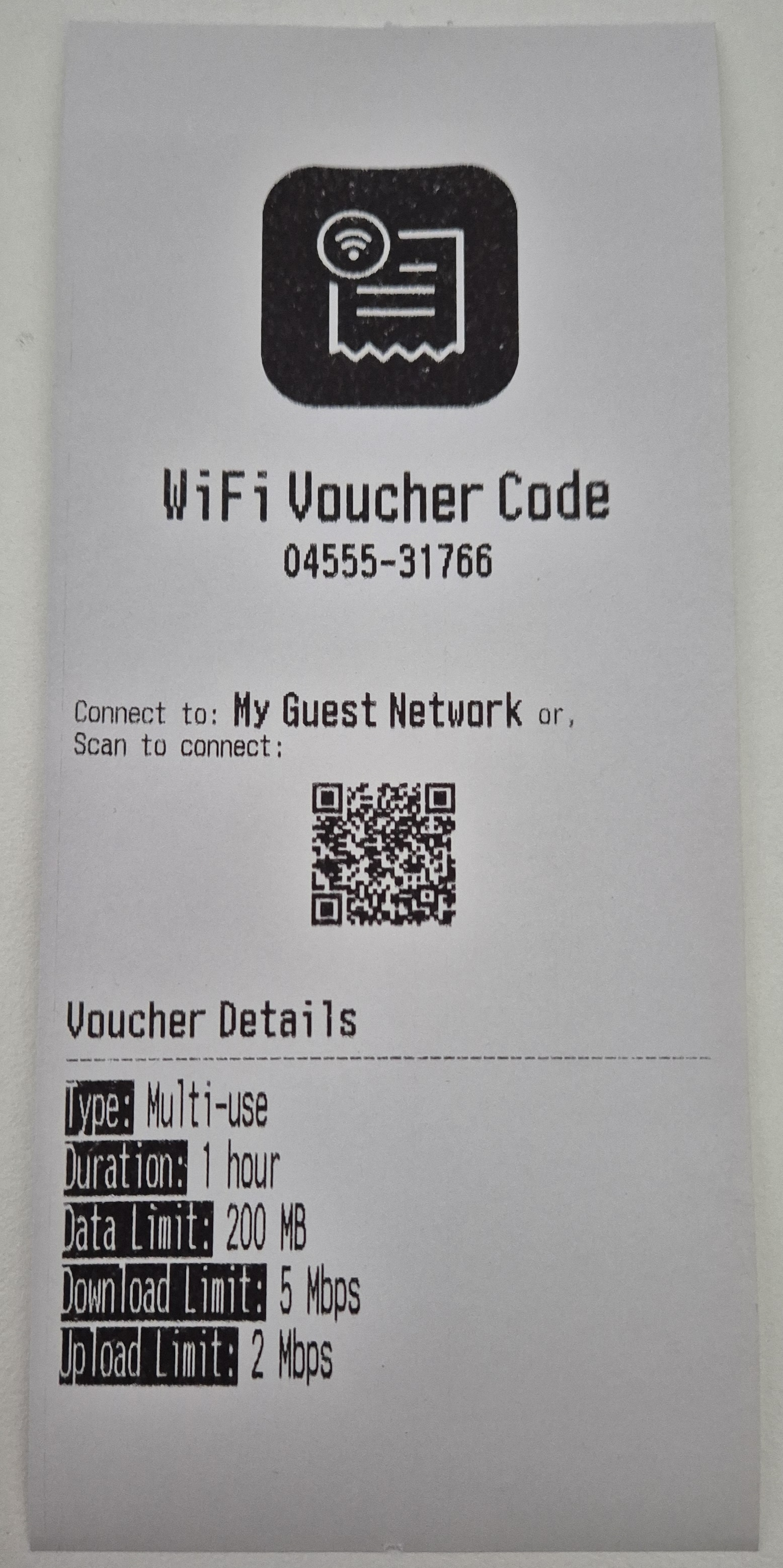
The UniFi Voucher Site application includes built-in support for printing vouchers using 80mm receipt printers, offering a convenient way to distribute vouchers in physical format.
Compatibility
The print functionality is compatible with most 80mm thermal receipt printers commonly used in various industries. These printers typically use thermal printing technology, eliminating the need for ink cartridges and ensuring efficient and cost-effective voucher printing.
Configuration
To enable the print feature, you need to set the following environment variables:
PRINTERS: ''
PRINTERS_LAYOUT: 'full'
Here’s what each variable represents:
PRINTERS: Sets the printer type used by UniFi Voucher Site. Supported options:pdf: For generating PDF files formatted for 80mm paper width.escpos: For printing directly to network-enabled ESC/POS compatible printers. Specify the IP address of the network-enabled ESC/POS printer
You can have multiple printers available at the same time. Let's say you have 2 ESC/POS network printers and want to print via pdf, then define:
PRINTERS: 'pdf,192.168.1.10,192.168.1.11'
PRINTERS_LAYOUT: Defines the layout format used when printing vouchers. This applies to both PDF generation and ESC/POS printers. Supported options:full: A detailed layout including all voucher information (e.g. name, code, expiration, and QR code). Best for customer-facing prints.slim_qr: A compact layout that focuses on the QR code with minimal additional text and without logo. Ideal for quick scans.slim: A minimal text-based layout without a QR code or logo, suitable for very fast printing or low-paper usage scenarios.
Custom Branding (Logo)
You can customize the appearance of the pdf and ESC/POS print layout by providing your own branding assets, including:
logo.png— Logo used in the print header
To do this, use Docker volume mappings to mount your custom assets into the /print directory inside the container.
The application will use these files (if present) instead of the default ones.
If you provide custom branding for printed vouchers, make sure your logo closely match the original application logo’s size, aspect ratio, and color space. This helps ensure the layout prints correctly and avoids color shifts or misalignment in the final output.
Example
Suppose you have your custom images in a local directory called branding/:
branding/
└── logo.png
You can configure this using Docker Compose:
services:
  unifi-voucher-site:
    image: glenndehaan/unifi-voucher-site:latest
    ports:
      - "3000:3000"
    environment:
      KIOSK_ENABLED: 'true'
      KIOSK_VOUCHER_TYPES: '480,1,,,;'
    volumes:
      - ./branding:/print
Usage
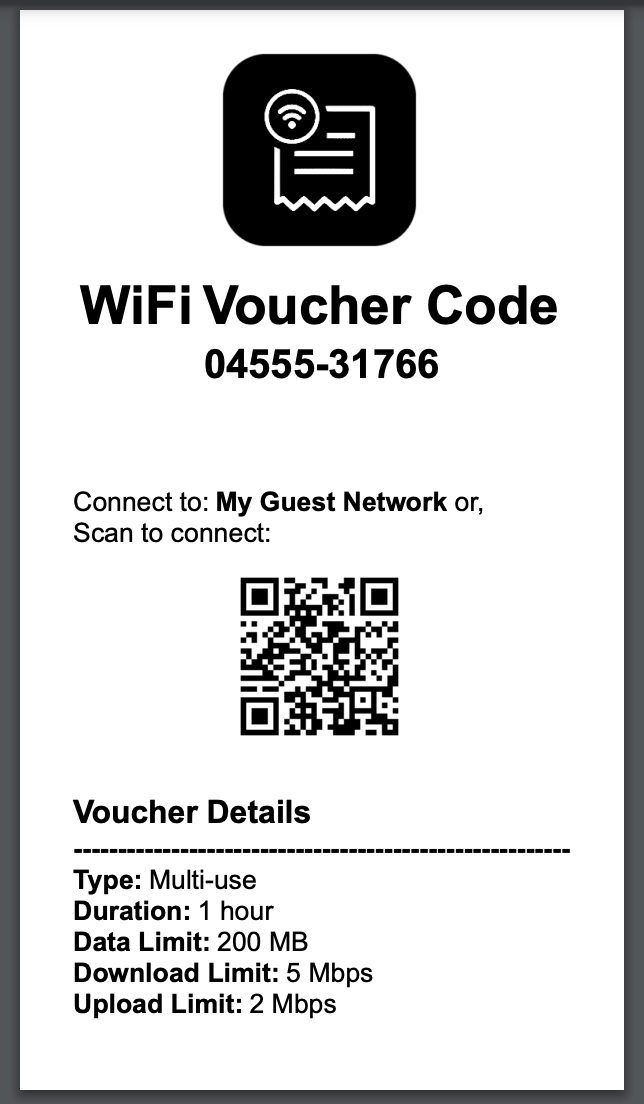
If you're using the PDF option, once your 80mm receipt printer is configured and connected to your local client, you can easily export vouchers to pdf from the UniFi Voucher Site application. Simply navigate to the voucher within the interface and click on the "Print" button.
The application will automatically format the voucher for 80mm paper width, ensuring optimal printing results. Depending on your printer settings and preferences, you may adjust print quality, paper type, and other printing parameters to suit your needs.
Example PDF
ESC/POS
For network-enabled ESC/POS compatible printers, provide the printer's IP address in the PRINTERS variable. Once configured, you can print vouchers directly to your network printer from the UniFi Voucher Site application.
Just like with PDF printing, navigate to the voucher and click on the "Print" button. The application will send the print job directly to the ESC/POS printer over the network, ensuring quick and seamless voucher printing. Make sure your printer supports ESC/POS commands and is correctly configured to accept print jobs over the network.
Tested Printers
- EPSON TM-T88V
- EPSON TM-T20X
- EPSON TM-T82IIIL
- Posman BTP-R880NP
- NetumScan NT-8360 / 80-V
Example Print
Email Functionality
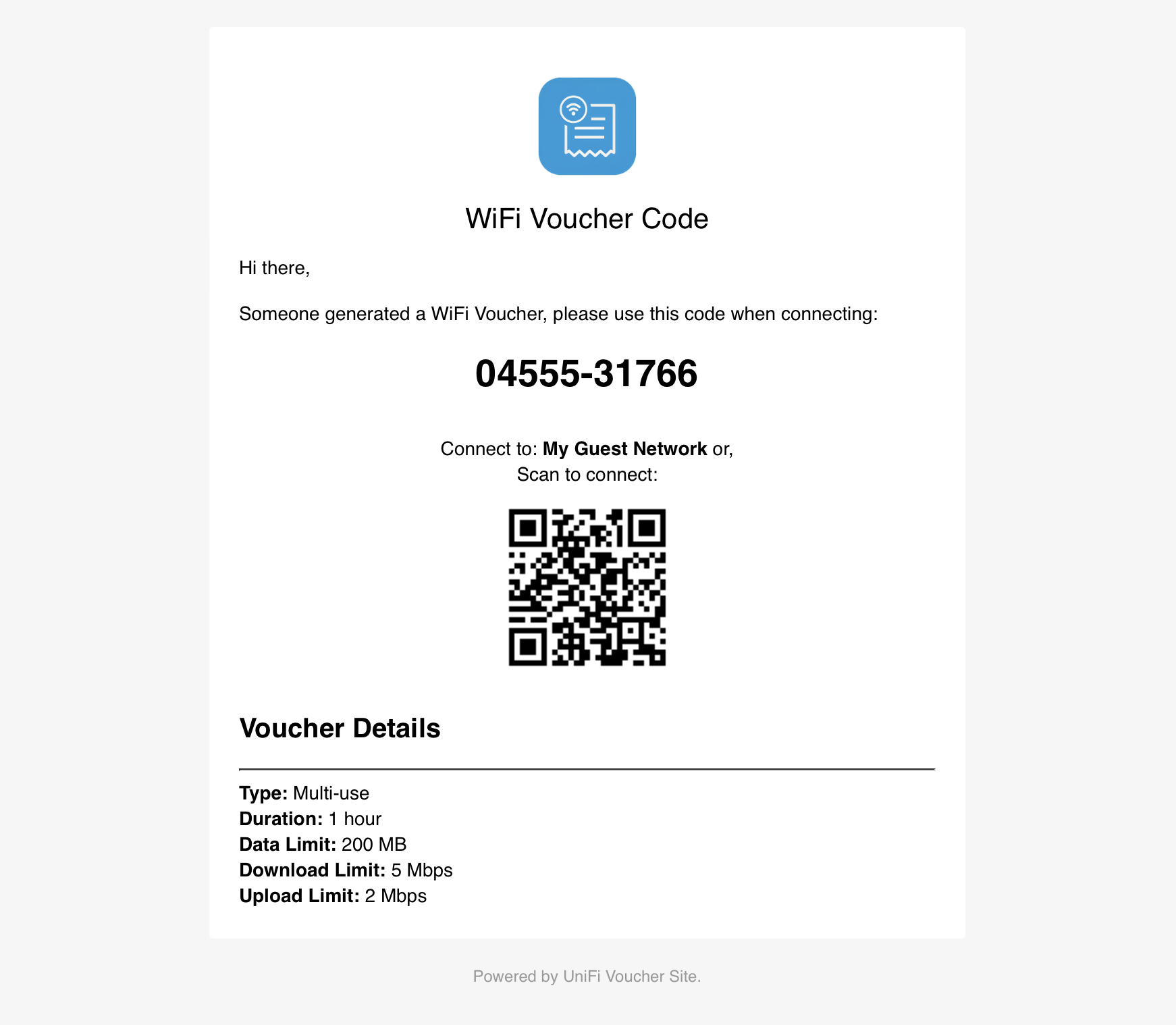
The UniFi Voucher Site includes a convenient email feature that allows you to send vouchers directly to users from the web interface. By configuring the SMTP settings, you can enable email sending and make it easy to distribute vouchers digitally.
Configuration
To enable the email feature, you need to set the following environment variables with your SMTP server details:
SMTP_FROM: ''
SMTP_HOST: ''
SMTP_PORT: ''
SMTP_SECURE: ''
SMTP_USERNAME: ''
SMTP_PASSWORD: ''
Here’s what each variable represents:
SMTP_FROM: The sender email address that will appear in the "From" field when users receive the voucher.SMTP_HOST: The hostname or IP address of your SMTP server (e.g.,smtp.example.com).SMTP_PORT: The port used by your SMTP server (e.g.,587for TLS or465for SSL).SMTP_SECURE: Set totrueif your SMTP server requires a secure connection (SSL/TLS), orfalseif it does not.SMTP_USERNAME: The username for authenticating with your SMTP server.SMTP_PASSWORD: The password for authenticating with your SMTP server.
These settings allow the application to connect to your SMTP server and send emails on your behalf.
Custom Branding (Logo)
You can customize the appearance of the email by providing your own branding assets, including:
logo.png— Logo used in the email header
To do this, use Docker volume mappings to mount your custom assets into the /email directory inside the container.
The application will use these files (if present) instead of the default ones.
We recommend to keep the logo at a maximum height of 75px, to prevent layout shifts
Example
Suppose you have your custom images in a local directory called branding/:
branding/
└── logo.png
You can configure this using Docker Compose:
services:
  unifi-voucher-site:
    image: glenndehaan/unifi-voucher-site:latest
    ports:
      - "3000:3000"
    environment:
      KIOSK_ENABLED: 'true'
      KIOSK_VOUCHER_TYPES: '480,1,,,;'
    volumes:
      - ./branding:/email
Usage
Once the SMTP environment variables are configured, the email feature will be available within the UniFi Voucher Site interface. After generating a voucher, you will see an option to send the voucher via email. Enter the recipient's email address, and the application will send the voucher details directly to their inbox.
Example Email
Kiosk Functionality
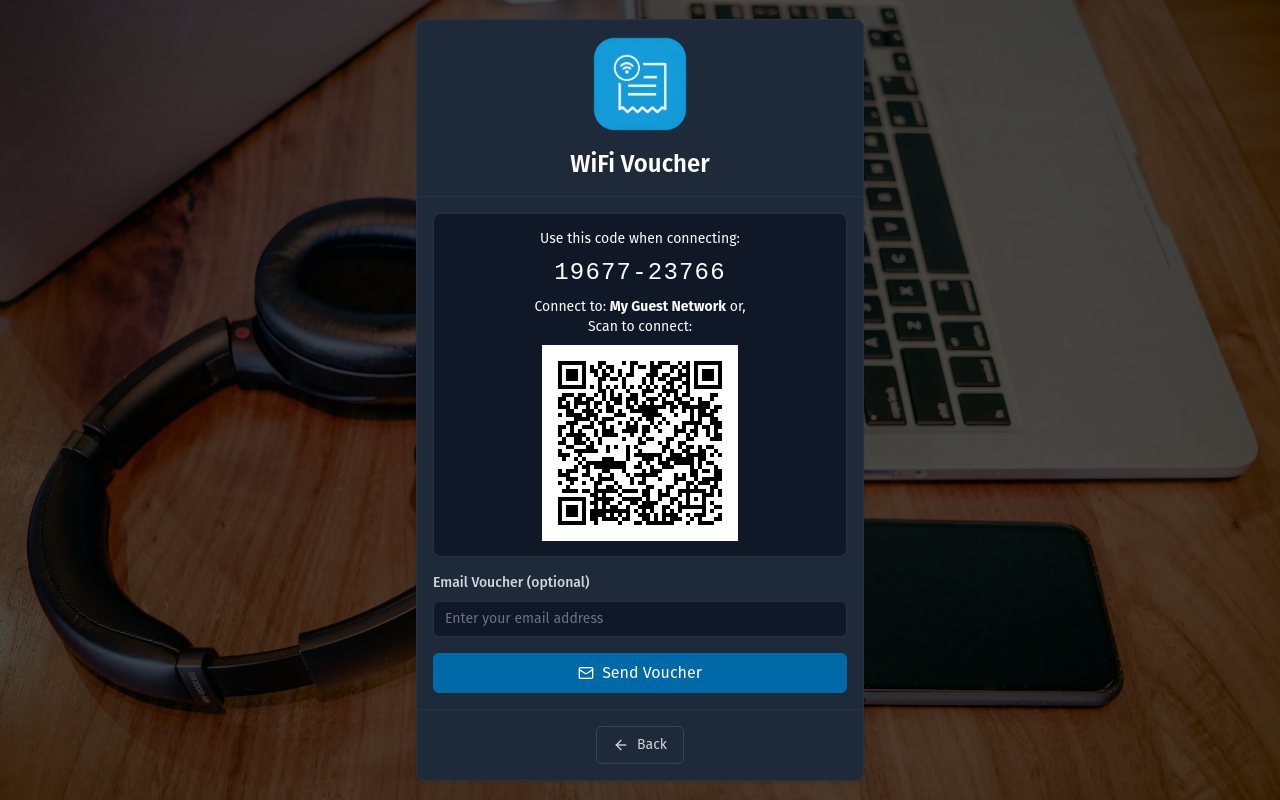
The UniFi Voucher Site includes a Kiosk Mode, allowing users to generate their own vouchers via a self-service interface. This is ideal for public areas, such as cafés, hotels, and co-working spaces, where users can obtain internet access without staff intervention.
To enable the kiosk functionality, set the following environment variables:
KIOSK_ENABLED: 'true'
KIOSK_VOUCHER_TYPES: '480,1,,,;'
Configuration
KIOSK_ENABLED:- Set to
'true'to enable the kiosk page, making it accessible at/kiosk. - Set to
'false'to disable the kiosk functionality.
- Set to
KIOSK_VOUCHER_TYPES: Defines the voucher properties for kiosk-generated vouchers. The format consists of the following parameters:expiration_in_minutes,single_use_or_multi_use,upload_speed_limit_kbps,download_speed_limit_kbps,data_transfer_limit_MB- Expiration (required): The validity period of the voucher in minutes. Example:
480(8 hours). - Voucher Type (required): Defines if the voucher is single-use or multi-use:
'0'→ Multi-use (unlimited)'1'→ Single-use'N'→ Multi-use (N times) (e.g.,'3'allows 3 uses)
- Upload Speed Limit (optional): Maximum upload speed in Kbps. Leave empty to disable.
- Download Speed Limit (optional): Maximum download speed in Kbps. Leave empty to disable.
- Data Transfer Limit (optional): Total data limit in MB. Leave empty to disable.
Multiple Voucher Types: You can define multiple voucher types by separating each configuration with a semicolon (
;). Example:480,1,,,;1440,0,512,2048,1000This defines two voucher types:
- A single-use voucher valid for 480 minutes with no speed or data limits.
- A multi-use (unlimited) voucher valid for 1440 minutes, limited to 512 Kbps upload, 2048 Kbps download, and 1000 MB data.
- Expiration (required): The validity period of the voucher in minutes. Example:
KIOSK_NAME_REQUIRED:- Set to
'true'to enable the requirement for a guest to enter their name before generating a voucher. - Set to
'false'to disable to allow generation of vouchers without a name.
- Set to
KIOSK_TIMEOUT: Defines the timeout timer for inactivity. The format is in seconds.KIOSK_HOMEPAGE:- Set to
'true'to redirect from/to/kiosk(Instead of the Admin UI). - Set to
'false'to disable the redirect functionality.
- Set to
KIOSK_EMAIL:- Set to
'true'to enable the email voucher form. - Set to
'false'to disable hide the email voucher form.
- Set to
Note: SMTP needs to be setup before the email form is shown!
KIOSK_PRINTER:Set this to the IP address of an ESC/POS-compatible network printer to enable automatic voucher printing.
Leave this value empty to disable printing.
Example:
KIOSK_PRINTER=192.168.1.50
Custom Branding (Logo and Background)
You can customize the appearance of the kiosk page by providing your own branding assets, including:
logo.png— Logo used in light modelogo_dark.png— Logo used in dark modebg.jpg— Background image
To do this, use Docker volume mappings to mount your custom assets into the /kiosk directory inside the container.
The application will use these files (if present) instead of the default ones.
Example
Suppose you have your custom images in a local directory called branding/:
branding/
├── logo.png
├── logo_dark.png
└── bg.jpg
You can configure this using Docker Compose:
services:
  unifi-voucher-site:
    image: glenndehaan/unifi-voucher-site:latest
    ports:
      - "3000:3000"
    environment:
      KIOSK_ENABLED: 'true'
      KIOSK_VOUCHER_TYPES: '480,1,,,;'
    volumes:
      - ./branding:/kiosk
Note: All branding files are optional — provide only the ones you want to override. Ensure
logo.png,logo_dark.png, andbg.jpgare valid image files.
Usage
Once enabled, the kiosk page is available at:
http://localhost:3000/kiosk
Users can visit this URL and generate a voucher without administrative intervention.
Example Kiosk
Translations
The UniFi Voucher Site supports multiple languages, and we're actively working to expand the list of available translations. To facilitate this, we use Crowdin, a platform that allows people from around the world to help translate and improve the localization of the project.
How to help
If you'd like to contribute by translating the UniFi Voucher Site into your language or improve existing translations, you're welcome to join our project on Crowdin. Even small contributions can make a big difference!
Simply visit our Crowdin project page by clicking the badge below:
Once you're there, you can choose your language and start contributing immediately. Crowdin provides an intuitive interface to help you suggest translations, review them, or vote on others' contributions.
Getting Started
- Create a Crowdin account (if you don't have one already).
- Join the UniFi Voucher Site project by visiting our Crowdin page.
- Choose the language you want to contribute to or suggest improvements for.
- Start translating or reviewing!
Your contributions will be automatically included in the next release after review.
Screenshots
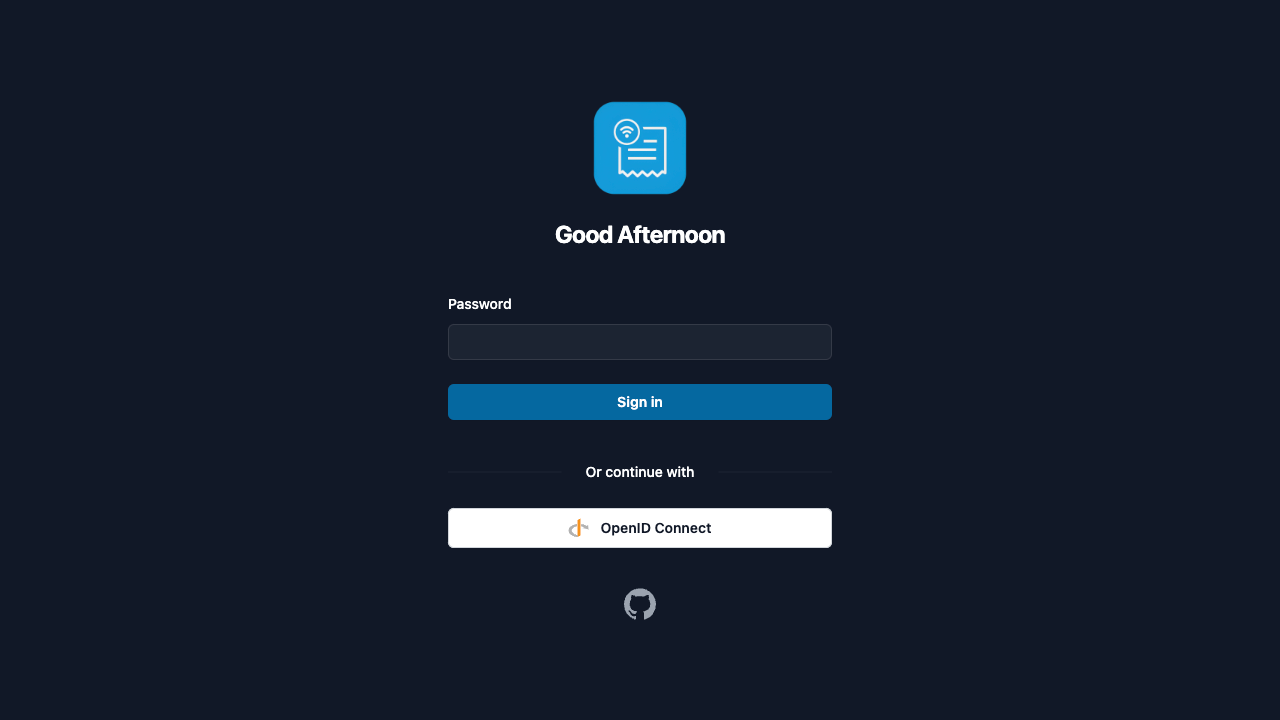
Login (Desktop)
Vouchers Overview (Desktop)
Create Voucher (Desktop)
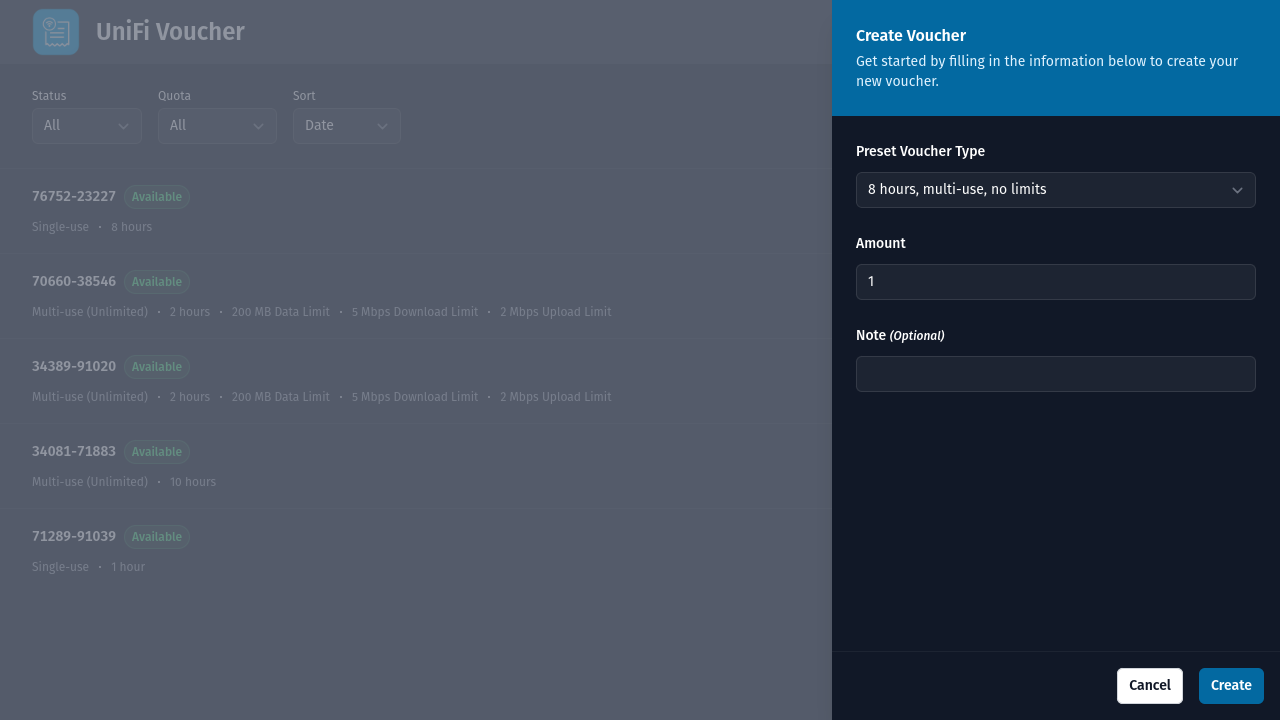
Voucher Details (Desktop)
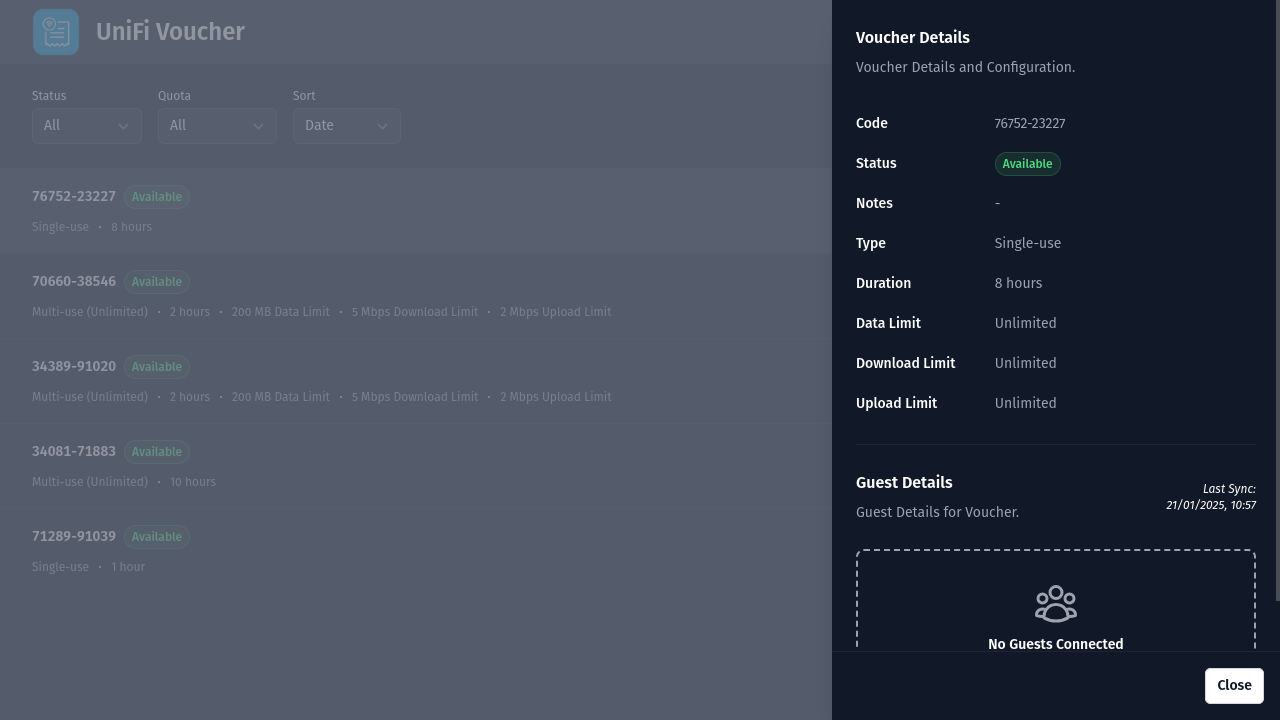
Login (Mobile)
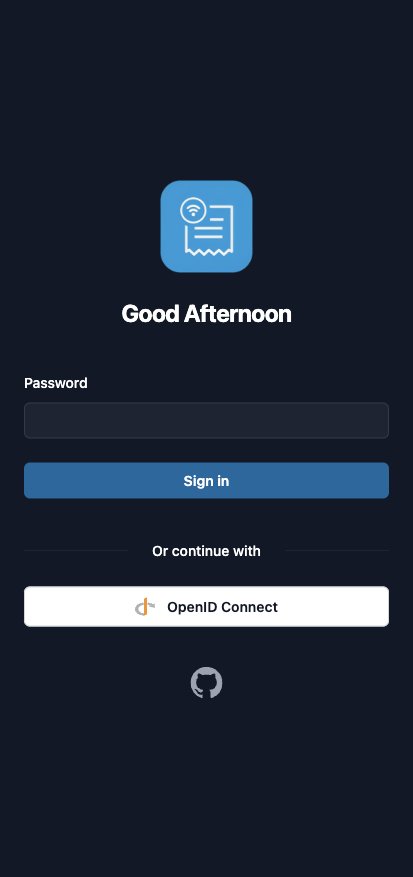
Vouchers Overview (Mobile)
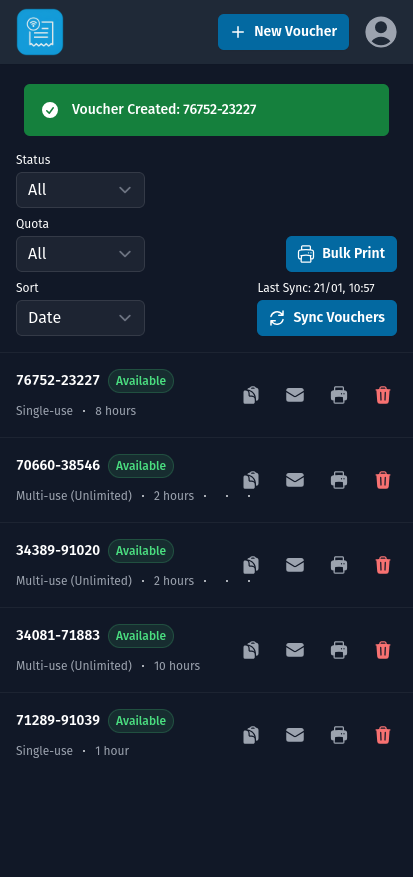
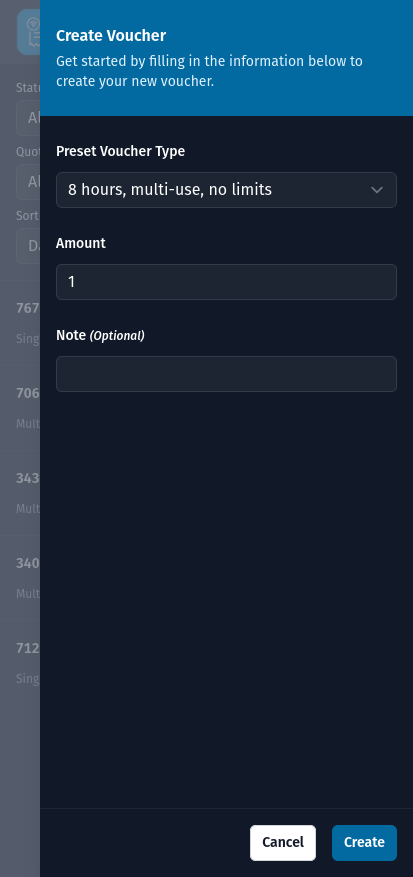
Create Voucher (Mobile)
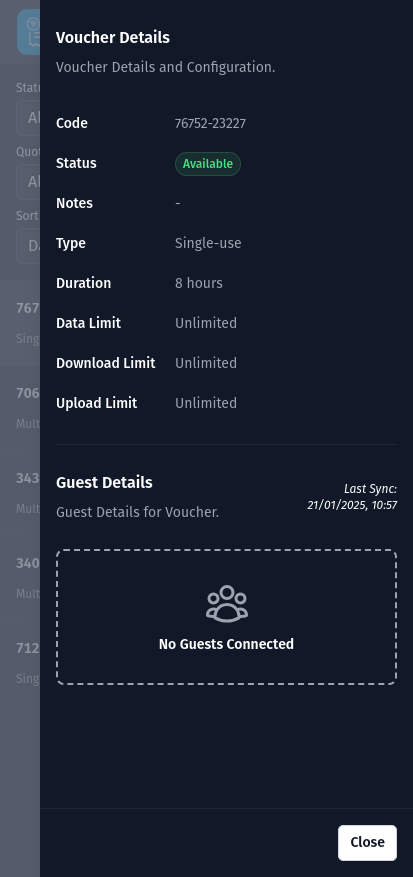
Voucher Details (Mobile)
Release Notes
Detailed information on the changes in each release can be found on the GitHub Releases page. It is highly recommended to review the release notes before updating or deploying a new version, especially if you are upgrading from a previous version.
Migration Guide
Migration from 7.x to 8.x
Warning! This release is only compatible with:
- UniFi OS v4.2.8+
- UniFi Network v9.1.119+ (Cloud Gateways, Cloud Key, or UniFi OS software)
This release requires the setup of a UniFi OS Integration API Key
Note: This release breaks the Connected Guests feature due to a limitation within the UniFi Integration API. Please check and upvote this issue: https://community.ui.com/questions/Feature-Request-Network-API-Guest-Access-Voucher-ID/d3c470e2-433d-4386-8a13-211712311202
When upgrading from 7.x to 8.x, the following changes need to be made:
UniFi Authentication Changes
- The environment variables
UNIFI_USERNAMEandUNIFI_PASSWORDhave been removed in 8.x. - Authentication is now handled via a single API token.
Before (7.x):
UNIFI_USERNAME='admin'
UNIFI_PASSWORD='supersecret'
After (8.x):
UNIFI_TOKEN='your-unifi-api-token'- Generate a new Integration API key within your UniFi Controller’s settings.
- Update your environment configuration to use
UNIFI_TOKENand remove the oldUNIFI_USERNAMEandUNIFI_PASSWORDvariables.
- The environment variables
Migration from 6.x to 7.x
When upgrading from 6.x to 7.x, the following changes need to be made:
KIOSK_VOUCHER_TYPERenamed toKIOSK_VOUCHER_TYPES- The configuration variable
KIOSK_VOUCHER_TYPEhas been renamed toKIOSK_VOUCHER_TYPESin 7.x. - This change supports multiple voucher types and enhances configurability.
Before (6.x):
KIOSK_VOUCHER_TYPE='480,1,,,'After (7.x):
KIOSK_VOUCHER_TYPES='480,1,,,;'- Update your environment configuration to use the new
KIOSK_VOUCHER_TYPESvariable. - Ensure the values provided are valid and supported — refer to the Kiosk Configuration for the complete list of accepted types and formatting rules.
- The configuration variable
Make sure to remove the deprecated
KIOSK_VOUCHER_TYPEand follow the structure outlined in the documentation to avoid misconfiguration issues during deployment.
Migration from 5.x to 6.x
When upgrading from 5.x to 6.x, the following changes need to be made:
UI_BACK_BUTTONRemoved- The
UI_BACK_BUTTONconfiguration option has been removed in 6.x. - This setting is no longer used and can be safely removed from your environment configuration.
- The
Printer Configuration Changes
- The legacy printer configuration options
PRINTER_TYPEandPRINTER_IPhave been replaced by a single setting:PRINTERS. - The new format is a comma-separated string combining the printer type and IP address.
Before (5.x):
PRINTER_TYPE='pdf'
PRINTER_IP='192.168.1.10'
After (6.x):
PRINTERS='pdf,192.168.1.10'- Update your configuration to use
PRINTERSand remove the oldPRINTER_TYPEandPRINTER_IPvariables.
- The legacy printer configuration options
Make sure to clean up any deprecated variables and update your printer configuration to ensure compatibility with 6.x.
Migration from 4.x to 5.x
When upgrading from 4.x to 5.x, the following changes need to be made:
Updated
/apiEndpoint Response- The
/apiendpoint now returns a structured response that includes the HTTP method for each available endpoint. Update API integrations to handle the new response structure.
Previous Response:
{
  "error": null,
  "data": {
    "message": "OK",
    "endpoints": [
      "/api",
      "/api/types",
      "/api/voucher/:type",
      "/api/vouchers"
    ]
  }
}
New Response:
{ "error": null, "data": { "message": "OK", "endpoints": [ { "method": "GET", "endpoint": "/api" }, { "method": "GET", "endpoint": "/api/types" }, { "method": "GET", "endpoint": "/api/languages" }, { "method": "GET", "endpoint": "/api/vouchers" }, { "method": "POST", "endpoint": "/api/voucher" } ] } }- The
/api/voucher/:typeEndpoint Replacement- The
/api/voucher/:typeendpoint has been replaced by/api/voucher. - The method has changed from
GETtoPOST. - The
:typeURL parameter is now passed in the JSON body.
Example Request:
POST /api/voucher Content-Type: application/json { "type": "480,0,,," }- The
Migration from 3.x to 4.x
When upgrading from 3.x to 4.x, the following changes need to be made:
OIDC Public Flow Removal
- The OIDC public flow has been removed in v4. Only the confidential flow is now supported.
- Users must migrate to the confidential flow. Updated integration guides are available to help with this migration: OIDC IdP Integration Guides.
OIDC Endpoints Update
- OIDC endpoints have been moved to dedicated paths.
- Update the IdP callback URL from
/callbackto/oidc/callbackin your IdP configuration.
Environment Variable Changes
AUTH_OIDC_CLIENT_TYPEhas been removed. It is no longer required.AUTH_OIDC_ENABLEDhas been introduced. If you are using OIDC, you must setAUTH_OIDC_ENABLEDtotruein your environment configuration.AUTH_INTERNAL_ENABLEDhas been introduced.- If you are using internal authentication, set
AUTH_INTERNAL_ENABLEDtotrue. - If you are using OIDC and want to disable internal authentication, set
AUTH_INTERNAL_ENABLEDtofalse.
- If you are using internal authentication, set
Password Variable Rename
AUTH_PASSWORDhas been renamed toAUTH_INTERNAL_PASSWORD.- Update your environment variable to use
AUTH_INTERNAL_PASSWORDif you rely on internal authentication.
Bearer Token Variable Rename
AUTH_TOKENhas been replaced byAUTH_INTERNAL_BEARER_TOKEN.- Update your environment variable to use
AUTH_INTERNAL_BEARER_TOKENfor api bearer token authentication.
Migration from 2.x to 3.x
When upgrading from 2.x to 3.x, the following changes need to be made:
SECURITY_CODEhas been replaced byAUTH_PASSWORD.- Update your environment variables configuration to use
AUTH_PASSWORDinstead ofSECURITY_CODE.
- Update your environment variables configuration to use
DISABLE_AUTHhas been replaced byAUTH_DISABLE.- Replace
DISABLE_AUTHwithAUTH_DISABLEin your environment variables.
- Replace
The API bearer token now uses a dedicated variable
AUTH_TOKEN.- Ensure that your API token is now stored under the
AUTH_TOKENvariable and update your implementations to use this new token instead of theSECURITY_CODE.
- Ensure that your API token is now stored under the
Migration from 1.x to 2.x
No migration steps are required.
Migration from Versions Prior to v1
Versions before v1 do not have a direct migration path. If you are using a version earlier than v1, a fresh installation is required. Be sure to back up any important data before proceeding with a re-install.
License
MIT
Media gallery
1 / 12Requirements
Can be configured via an `options.json` file or via environmental variables.
Download Statistics
Total Downloads Over Time
Related apps
Explore more like this
Explore allDetails
glenndehaan/unifi-voucher-site:latestRuntime arguments
- Web UI
http://[IP]:[PORT:3000]/- Network
bridge- Privileged
- false
Template configuration
Container Port: 3000
- Target
- 3000
- Default
- 3000
- Value
- 3000
Config file. Remove to use environmental variables instead.
- Target
- /data/options.json
- Default
- /mnt/user/appdata/unifi_voucher_site/options.json
- Value
- /mnt/user/appdata/unifi_voucher_site/options.json
IP address of the UniFi OS Console
- Target
- UNIFI_IP
Port of the UniFi OS Console
- Target
- UNIFI_PORT
- Default
- 443
- Value
- 443
The API Key created on the integrations tab within UniFi OS
- Target
- UNIFI_TOKEN
Site ID for the UniFi OS Console
- Target
- UNIFI_SITE_ID
- Default
- default
- Value
- default
Use remote site manager
- Target
- UNIFI_SITE_MANAGER
- Default
- false|true
Use remote site manager console ID
- Target
- UNIFI_SITE_MANAGER_CONSOLE_ID
The UniFi SSID where guests need to connect to (Used within templating and 'Scan to Connect')
- Target
- UNIFI_SSID
The UniFi SSID WPA/WPA2/WPA3 Password (Can be ignored for 'Open' networks) (Used within templating and 'Scan to Connect')
- Target
- UNIFI_SSID_PASSWORD
Enable internal authentication for the voucher portal web UI
- Target
- AUTH_INTERNAL_ENABLED
- Default
- true|false
Password for internal authentication for the voucher portal web UI
- Target
- AUTH_INTERNAL_PASSWORD
Enable OpenID Connect authentication for the voucher portal web UI
- Target
- AUTH_OIDC_ENABLED
- Default
- false|true
OIDC issuer base url provided by oauth provider. Example: https://auth.example.com/.well-known/openid-configuration
- Target
- AUTH_OIDC_ISSUER_BASE_URL
OIDC UniFi Voucher base url (This application). Example: https://voucher.example.com
- Target
- AUTH_OIDC_APP_BASE_URL
OIDC client id provided by oauth provider
- Target
- AUTH_OIDC_CLIENT_ID
OIDC client secret provided by oauth provider
- Target
- AUTH_OIDC_CLIENT_SECRET
The bearer token used for the API
- Target
- AUTH_INTERNAL_BEARER_TOKEN
Limit voucher administrators to managing only vouchers associated with their own organization. If enabled, system automatically assigns the administrator’s email domain as a note to each created voucher.
- Target
- PIN_OIDC_USER_TO_OWN_DOMAIN
- Default
- false|true
A semi-colon-separated list of voucher types in the following format: expiration in minutes (required),single-use or multi-use vouchers value - '0' is for multi-use (unlimited) - '1' is for single-use - 'N' is for multi-use (Nx) (optional),upload speed limit in kbps (optional),download speed limit in kbps (optional),data transfer limit in MB (optional)
- Target
- VOUCHER_TYPES
- Default
- 480,1,,,;
- Value
- 480,1,,,;
Allow users to create custom vouchers types within the UI
- Target
- VOUCHER_CUSTOM
- Default
- false|true
A comma-separated list of printer formats and IPs. Example: 'pdf,192.168.1.10'
- Target
- PRINTERS
The email address that will be used as the sender of the emails
- Target
- SMTP_FROM
The SMTP host to use for sending emails
- Target
- SMTP_HOST
The SMTP port to use for sending emails
- Target
- SMTP_PORT
- Default
- 587
- Value
- 587
Use TLS for the SMTP connection
- Target
- SMTP_SECURE
- Default
- false|true
The SMTP username to use for sending emails
- Target
- SMTP_USERNAME
The SMTP password to use for sending emails
- Target
- SMTP_PASSWORD
Enable/disable the kiosk page on /kiosk
- Target
- KIOSK_ENABLED
- Default
- false|true
A semi-colon-separated list of voucher types in the following format: expiration in minutes (required),single-use or multi-use vouchers value - '0' is for multi-use (unlimited) - '1' is for single-use - 'N' is for multi-use (Nx) (optional),upload speed limit in kbps (optional),download speed limit in kbps (optional),data transfer limit in MB (optional)
- Target
- KIOSK_VOUCHER_TYPES
- Default
- 480,1,,,;
- Value
- 480,1,,,;
Require the guest to enter their name on the kiosk page
- Target
- KIOSK_NAME_REQUIRED
- Default
- false|true
Sets the Kiosk timeout in seconds (Returns the user back to the starting page after inactivity)
- Target
- KIOSK_TIMEOUT
- Default
- 60
- Value
- 60
Enable/disable an override to redirect to the Kiosk on the / url (Also enables a link from the Kiosk back to the Admin UI)
- Target
- KIOSK_HOMEPAGE
- Default
- false|true
Enable/disable the email voucher button (Requires SMTP to be setup)
- Target
- KIOSK_EMAIL
- Default
- false|true
Enable a printer for Kiosk Vouchers (this automatically prints vouchers), e.g. an ESC/POS-compatible printer
- Target
- KIOSK_PRINTER
Enable/disable automatic cleanup of expired vouchers
- Target
- TASK_CLEANUP_EXPIRED
- Default
- false|true
Enable/disable automatic cleanup of unused (> 1 day) vouchers
- Target
- TASK_CLEANUP_UNUSED
- Default
- false|true
Log level for the application
- Target
- LOG_LEVEL
- Default
- info|error|debug
Disable all authentication methods
- Target
- AUTH_DISABLE
- Default
- false|true
Enable the web UI
- Target
- SERVICE_WEB
- Default
- true|false
Enable the API
- Target
- SERVICE_API
- Default
- true|false
Sets the default translation for dropdowns
- Target
- TRANSLATION_DEFAULT
- Default
- en
- Value
- en
A comma-separated list of language codes to hide from the language selection dropdown
- Target
- TRANSLATION_HIDDEN_LANGUAGES
Enables/disables translation debugging, when enabled only translation keys are shown
- Target
- TRANSLATION_DEBUG
- Default
- false|true