

uchiyomi
Docker app from irxs' Repository
Overview
Readme
View on GitHubUchiyomi
Self-hosted manga server that downloads too: a free, open-source manga, manhwa and webtoon reader and downloader that keeps up with new chapters on its own.
 Latest release
License: MPL-2.0
Container images
Latest release
License: MPL-2.0
Container images
🌐 uchiyomi.com · 🐙 GitHub · ☕ Ko-fi · 📜 Changelog
A self-hosted manga server for your own hardware. It serves your library the way Komga or Kavita do, downloads and watches for new chapters the way Mihon does, and puts a webtoon-first manga reader in front of both that installs as an app on any phone, tablet or computer. Free and open source, in one Docker Compose file.

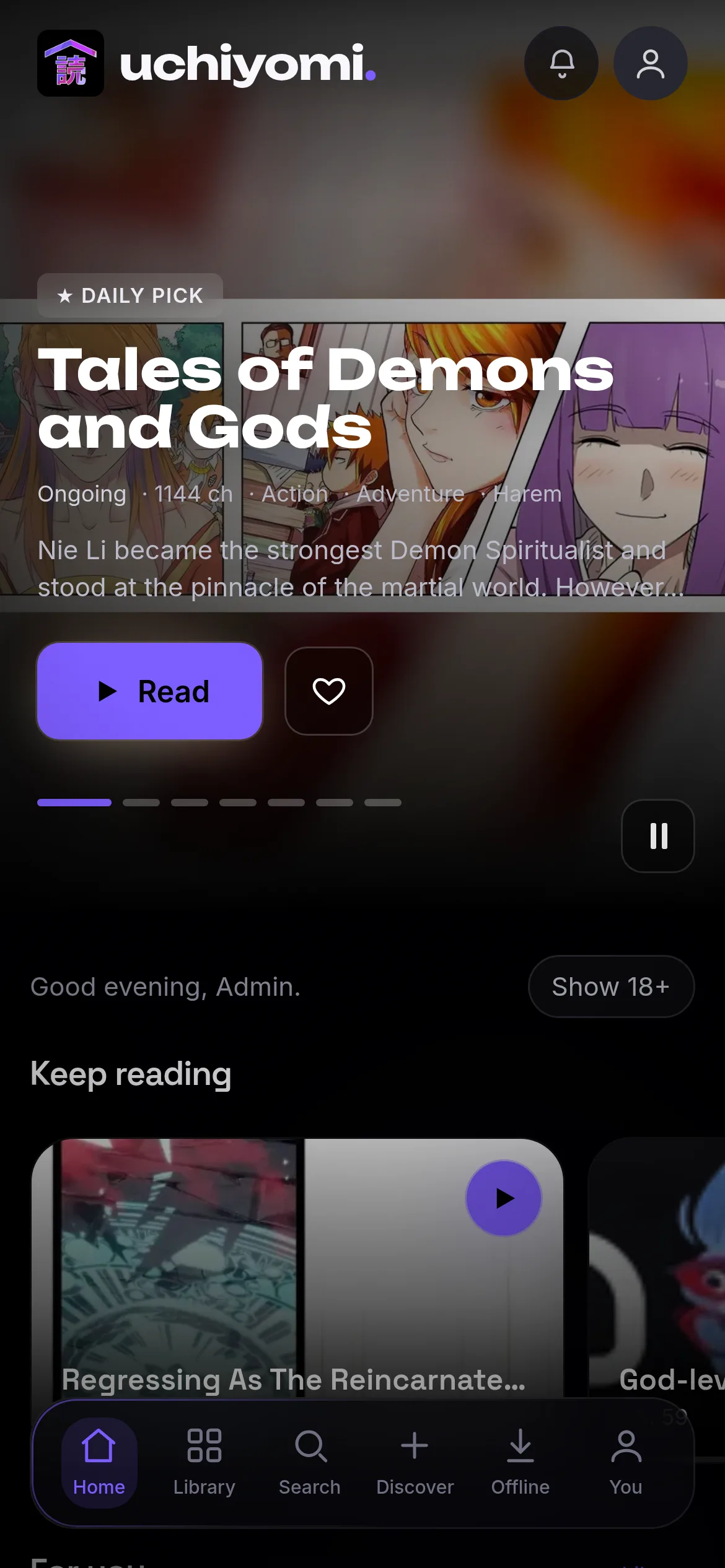
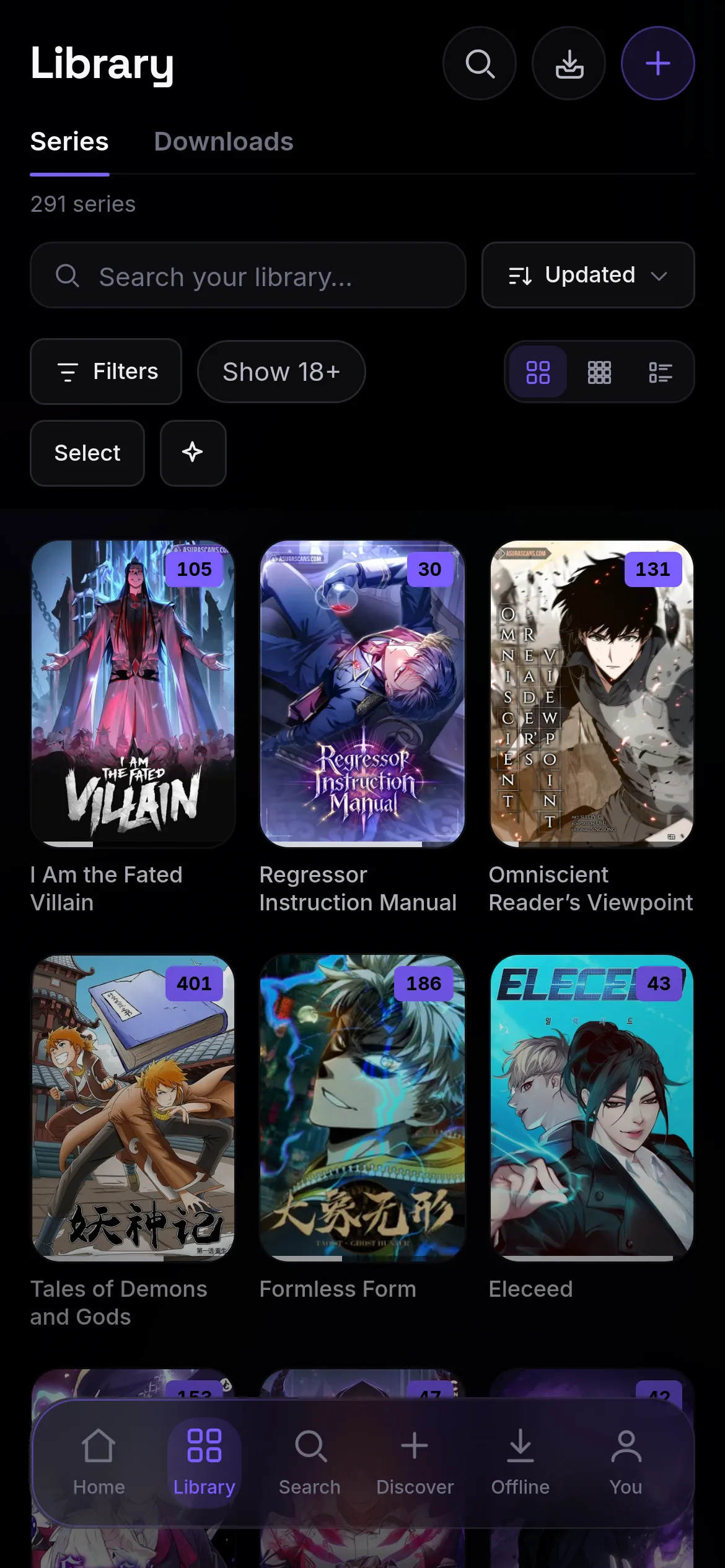
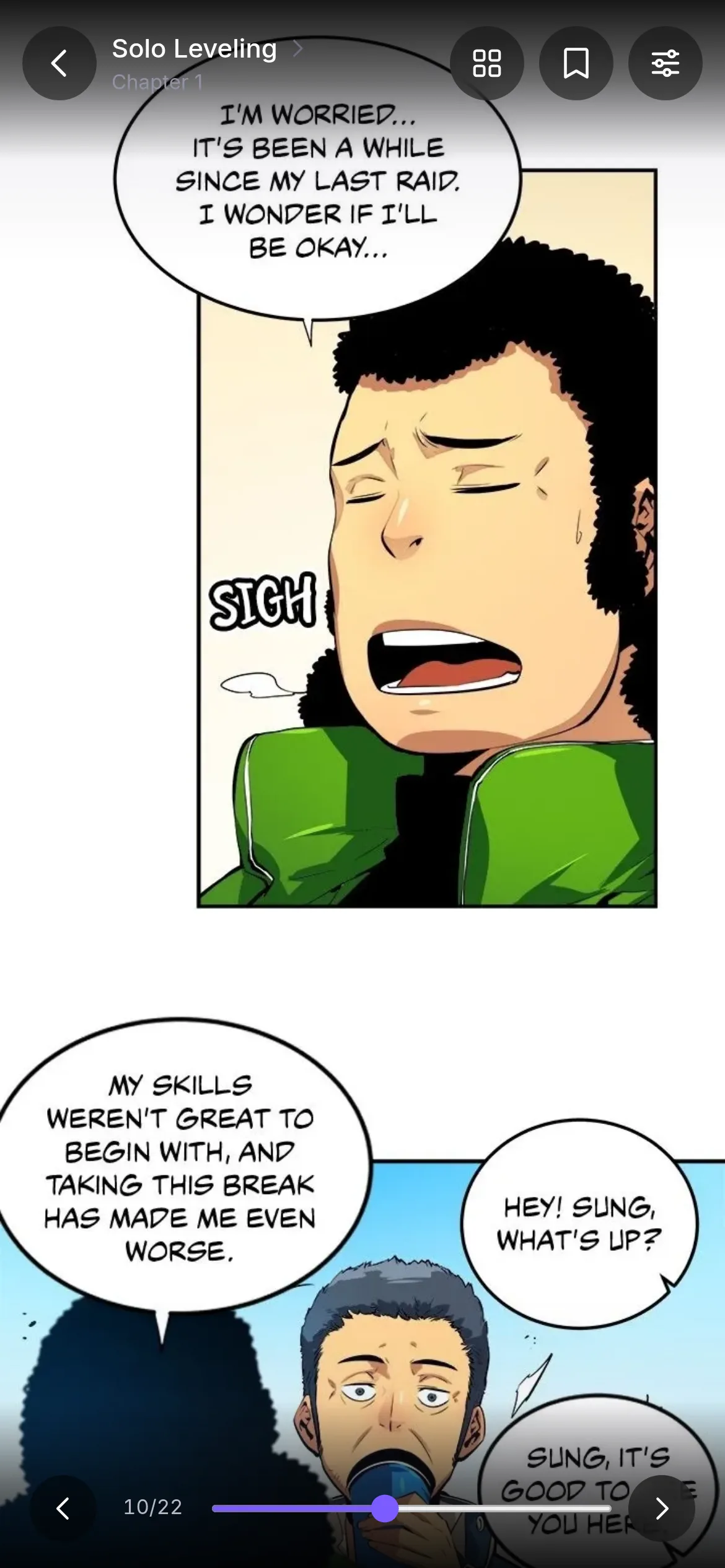
Why Uchiyomi
- A library server and a manga downloader in one. It reads the CBZ, CBR, PDF and image EPUB files you already own, and it follows series and downloads new chapters from Mihon / Tachiyomi extensions, MangaDex or a site you paste. No stack of five tools to wire together.
- A reader built for webtoons. Continuous scroll that runs straight into the next chapter, wide pages split, borders cropped, tap zones and a game controller. It installs as an app on iPhone, iPad and Android and reads offline, and your favourites' next chapters download to the phone by themselves.
- It repairs itself. Health finds chapter gaps, short chapters, bad downloads and failing sources, and names the step a source fails at; Fix everything works through them, once or every night. A second Cloudflare solver can take over when the first one fails.
- It picks your translation. Prefer or block scanlation groups, wait a day or two for your group, and swap in its release when it arrives.
- It knows when chapters are due. The release radar estimates each series' next chapter, and smart update checks ask quiet series less often: about half the requests a day on the library they were tested on.
- It reads where you read. The browser, the installed app, a Windows and Mac app, Mihon (with its own extension, or Mihon's Komga extension and tracker), OPDS readers such as KOReader and Panels, and a Homepage dashboard tile.
- It is built for a household. Accounts with their own progress, libraries and age limits, an 18+ library that stays hidden until someone asks for it, smart and shared lists, 2FA and single sign-on.
- It is safe to try beside Komga or Kavita. Unless you give it the library's owner (
PUID/PGID), it cannot write to your files at all, and what it downloads goes to its own folder.
How it compares
| Uchiyomi | Komga | Kavita | Suwayomi | Mihon | |
|---|---|---|---|---|---|
| Fetches new chapters by itself | ✅ | ❌ | ❌ | ✅ | ✅ |
| A server for several people, each with their own progress | ✅ | ✅ | ✅ | ◐ preview builds | ❌ |
| Installs as an app and reads offline | ✅ | ◐ no offline | ◐ no offline | ◐ no offline | ◐ Android only |
| Scrolls straight on into the next chapter | ✅ | ❌ | ◐ replaces the strip | ✅ | ✅ |
| Prefers or blocks scanlation groups | ✅ | – | – | ◐ per series | ◐ per series |
| Two-factor sign-in | ✅ | ❌ | ❌ | ❌ | – |
| Reads text ebooks (reflowable EPUB) | ❌ | ✅ | ✅ | ❌ | ❌ |
| Kobo or KOReader progress sync | ❌ | ✅ | ◐ KOReader only | ◐ KOReader only | ❌ |
Checked 2026-10-14 against Uchiyomi v0.61.2, Komga 1.29.0, Kavita 0.9.1.4, Suwayomi v2.4.2366 and Mihon 0.21.2. ◐ partly · – doesn't apply. All 26 rows, what each ◐ means and the sources are in docs/COMPARISON.md; uchiyomi.com/vs adds a paragraph on each project.
If you already run Sonarr for TV and Radarr for films, this is the same idea for manga, except the reader is included: the indexer, the scheduler, the downloader, the Cloudflare solver and the media server come in one compose file instead of five tools. The whole mapping is in the comparison: an *arr stack for manga, without the stack.
It fetches by two routes, and both ship in the default install. Mihon / Tachiyomi extensions: you point Uchiyomi at an extension repository you trust (how), and from then on its extensions are browsable in the admin panel, installable with one click and searchable immediately, run by a bundled engine (Suwayomi-Server, headless: you never open it) that starts with the stack and is optional; MangaDex and sites you add by URL work without it. And generic engines for the common manga-site families, where you paste a site's URL yourself. Plus MangaDex, via its official public API.
Uchiyomi hosts no sources, ships no extensions and compiles nothing into the image; no source is enabled until you choose one. You pick what to enable, and you are responsible for using it in line with those sites' terms and your local law.
📖 Full usage guide →: every screen walked through with screenshots (library, reader, Discover, admin, security, offline).
Features
Reading
- Webtoon-first reader — continuous vertical scroll that runs straight into the next chapter, or paged, RTL and double-page spreads, with the mode picked for each series from its pages. A spread a source cut into two pages can be joined back into one (or merged and split by hand, for you alone), wide spreads split or turned on a phone, borders cropped, an e-ink, grayscale or inverted filter, tap zones, rebindable keys and a game controller, a narrower column for a wide screen and pages fetched at your screen's size, each set per device. A refresh reopens the chapter you are reading, and moving on says which chapters the series is missing.
- Skips the pages that are not the story — the scanlator credit page that opens every chapter is found by repetition and collapsed into a band you can tap open (or hide entirely, or show everything).
- Translated pages (opt-in) — read a raw chapter in your own language: the server reads each speech bubble, translates the page with the lines before and the series' names, and writes it back into the bubble. Runs on your server, as an optional download; nothing changes until an admin turns it on.
- True-black OLED interface, or a softer Graphite or Midnight if you prefer, built for a phone and installable as a PWA.
- Offline downloads — save chapters to the device and read them with no connection at all; with Keep favorites offline on, your favourites' next unread chapters download to the phone by themselves.
- A Home that knows what to read next — Keep reading, Pick back up for the series you stopped part-way months ago, Hidden gems (well rated on AniList, read by nobody in the house) and Because you read, in the order you choose: Customize moves its rails and hides the ones you don't use.
- Moments — star a page and it lands on its own screen as the panel itself, with notes.
- Reading Studio & Wrapped — a year heat-map (or all time, scrolling back to your first read), chapters by month and weekday, your top series and genres, and how long you read: hours, minutes a chapter, by hour of the day and by device. Insights adds when you would finish what you are reading, your best day and week, this month's genre mix, the series you dropped and your backlog; badges say what they take, and each unlocks a frame for your avatar.
- Release radar — when each series' next chapter is likely, said as an estimate (~Friday, usually Fridays, running late), with an Expected this week list and a Releasing soon order.
- Incognito reading — keep your place without leaving history, stats or tracker updates, on every device.
Your library
- Manga title artwork — Home and series heroes show matching title logos or styled lettering. Admins can upload their own artwork, find verified Wikimedia logos, or review lettering cut from a cover with the optional local CPU service. Restore/Erase brushes repair a private preview before Apply; automatic work is opt-in and preserves manual choices.
- Files you already own — CBZ, CBR, PDF, image EPUB or a folder of images, in any folder layout.
- A Library you can find things in — search it by title or author, one Sort menu where every order runs both ways (newest, recently read, most popular and top rated on AniList, your own stars, most chapters, A–Z), Comfortable, Compact or List, covers that show how far you are, and filters (read state, status, source, format, genres) in rows that fold. Tap an author on a series page to see everything of theirs you have.
- Library management — several libraries, each over as many folders as you like, Select all with bulk fetch and removal, editable metadata that survives a rescan, merge (each chapter kept once), delete, restore and forget, and Rescan everything for files changed behind its back. Optionally, a series with no description, genres or author gets them filled in overnight from AniList or another of its sources, never over its own.
- Banners made from the series itself — a series with no banner on AniList gets one built from striking panels of its own pages.
- Language editions — the same series in English and in Spanish is one card, with chips to switch between them on the series page and in the reader; each language keeps its own chapters, folder and progress.
- Your stars beside AniList's score — one panel on the series page, the Library sorts by either, and Home has Most popular and Hidden gems rails.
- Related works — sequels, side stories and spin-offs from AniList on each series page, Next in the story at the end of the reader, and recommendations you already own first in More like this.
- Smart and shared lists — save any Library view as a live list, share a list with the household (view only), and show lists on Home and in OPDS readers.
- Health — finds chapter gaps, suspiciously short chapters, bad downloads and chapter files that cannot be read, duplicates and failing sources, a downloads disk too full to download or a share that is not mounted, and members' tracker sign-ins that need renewing, and names the step a source fails at. Read it card by card or series by series. Fix everything works through every card by itself, once or every night, and then says what only you can decide. Every fix says what it does before you press it, shows its progress live, and keeps what it did; Verify chapter files re-checks that what the database claims is on disk actually is. When something needs you, Admin in the sidebar turns amber or red, so you don't have to look.
- Notice chapters — the hiatus and announcement posts some sites number as chapters (100.5) can be hidden, per series type, from lists, counts, downloads and Mihon.
- Delete read chapters — optional: chapters it downloaded and everyone has finished go after a wait you choose, stay listed with everyone's history, and are never fetched back by themselves.
- Import what you already track — a Mihon backup, a MangaDex list, a pasted list of titles, or your AniList / MyAnimeList / Kitsu list. Every match is reviewed before it lands, with a confidence score, Change and Skip, and batches you can resume.
Fetching
- Mihon / Tachiyomi extensions, the whole catalogue of a repository you add, plus generic engines for common site families (paste a URL) and MangaDex. Nothing is enabled until you choose it, and each extension's own settings are one click away, as in Mihon. A site that wants you signed in opens in the engine's own browser (Open site, Mihon's Open in WebView), and the sign-in is kept.
- Discover — what your sources just published, one card per series with each source's icon, leaving out what you already own, from every source at once; and a search that answers progressively: results appear as each source replies instead of waiting for the slowest, and every source says whether it answered, failed or timed out. Picks for you (Recommended for you and Because you read) get a band of their own, the top pick big with its art glowing behind it; they and the trending manhwa, manga and manhua rows, with their Top 10, sit inside the wall, and any chapter can be read before you add the series.
- Follows a series on more than one source (three besides its main one, or up to ten if you allow it), and when a chapter will not come down it tries the other copies, then other sources, before giving up. When a site dies for good, Find other sources and Replace a source move its series to sources that work, after you have looked at each match.
- Chooses the translation — prefer or block scanlation groups, server-wide or per series; wait a couple
of days for a preferred group, and, if you switch it on, upgrade to its release when it turns up after another
group's; see every
version of a chapter and fetch a specific one. The group is written into the file as ComicInfo
<Translator>. - Shows you what you do not have — chapters the sources list but your disk lacks appear as grey rows you can select and fetch.
- Library → Downloads — everything the server is fetching, whoever started it, as covers that fill like apps being installed, with what came in today; a ring on the Library tab says when something is coming in.
- A slow archive — a whole back catalogue fetched a chapter at a time over nights or days, with the random pauses of someone reading, so a site never sees a burst; it survives restarts and never counts as new chapters.
- Numbers webtoon posts in the order they were posted — a source that gives many different posts one chapter number (an episode split into parts) no longer reads as a few chapters with dozens of versions.
- Survives real-world sources — it slows down when a site rate-limits instead of hammering it, a chapter missing a handful of pages is kept as a partial, with placeholders, and repaired overnight rather than thrown away, and a second site that splits a chapter differently is recognised instead of downloaded twice.
- Sources that explain themselves — each one is checked step by step (search, chapter list, page list, images), Test all checks them at once, and a site that says it is offline is told apart from a broken one.
- A backup Cloudflare solver — FlareSolverr, Byparr or trawl; a second solver takes a site over when the first one fails, and a busy solver is never mistaken for a broken site.
- Smart update checks (opt-in) — series that have been quiet for a long time are asked less often, at least every three days, and a series whose next chapter is due is asked as usual.
Household
- Multi-user — accounts, per-user progress and favourites, streaks and a leaderboard.
- Chapter comments — react to a chapter with one tap or say something about it, right where the chapter ends in the reader, and see which chapters the household talked about on the series page. Only members who can open the series see it, and anyone can switch it off for themselves.
- Age ratings and an 18+ library that stays off the home screen, the grid and search until somebody asks for it, with a per-member rating cap, a whole source rated Adult only when its extension does not say so, and a per-member permission to add series at all.
- Security — 2FA, lockout, active sessions, an audit log, and OIDC single sign-on against Authentik, Authelia or Keycloak.
- Scoped API tokens — read, write or admin, revocable, with an opt-in for 18+ libraries.
- Automatic nightly backups of the database and config, restorable, at an hour you pick: keep 1 to 365 of them, or switch the nightly off if you back up another way.
Beyond the browser
- Push notifications when a followed series gets a new chapter or someone adds to a chapter's comments you are in, and one digest per library update to a webhook, Home Assistant, ntfy or Discord.
- OPDS — read from Panels, Chunky or KOReader, page by page over OPDS-PSE.
- A Mihon / Tachimanga extension — read your library from Mihon, any Tachiyomi fork, Tachimanga (iOS) or Suwayomi with one API token: uchiyomi-extension.
- A Komga-compatible API — point Mihon's own Komga extension at Uchiyomi instead and its built-in Komga tracker syncs reading progress back in both directions, forward-only: how to set it up.
- Progress sync to AniList, MyAnimeList, Kitsu and MangaUpdates: the highest chapter you finished, never backwards, and Completed only once the series has ended.
- A Homepage dashboard tile — Homepage's own Komga widget shows your libraries, series and chapters with a read token (how).
- Nine languages, with right-to-left layout for Arabic.
- A Windows and macOS app (beta) — the whole thing as a program on your own computer, with the library in a folder there and no server to run, still checking for new chapters from the tray or menu bar when its window is closed; or, if you already run a server, a window onto it: download the desktop app.
Nothing phones home. An update check reads GitHub's public releases page and sends nothing about your server; it can be turned off. An anonymous install count exists and is off unless you turn it on, and the settings page shows you the exact object it would send before you agree to it — a monthly-rotating id, the version, the CPU architecture and which deployment shape you run. No library, no titles, no accounts, no address. What leaves your server.
📖 Every screen walked through with screenshots: docs/USAGE.md
Install
Requirements: Docker and Docker Compose, plus a manga library on disk. Any folder layout works — a directory counts as a series when it directly contains chapters, at whatever depth.
Don't clone the repo to install it. The top-level
docker-compose.ymlbuilds from source and is the development stack. The two commands below are the whole install.
curl -O https://raw.githubusercontent.com/AngeloSha/uchiyomi/main/deploy/docker-compose.yml
docker compose up -d
Open http://localhost:8080 and create your admin account in the browser. Nothing to generate, no config
file to edit. That starts the app (with Postgres inside it), a Cloudflare solver and the optional extension engine,
from multi-arch images (amd64 + arm64) that run on a NAS or a Raspberry Pi. On a small board, mind the memory: the
Cloudflare solver idles at about 850 MB and the extension engine is capped at 2 GB; EXTENSION_ENGINE=0 in
.env leaves the engine out.
📦 CasaOS, Unraid, Umbrel, an external database, reverse proxies and updating: docs/INSTALL.md
Rather not run a server at all? The desktop app below is the same Uchiyomi on your own Windows PC or Mac.
Download the desktop app
Uchiyomi Desktop (beta) for Windows and Mac. On first launch it asks how you want to use it: on this computer (the whole app, with the library in a folder on your PC and no Docker, server or account) or connected to your server (a window onto the Uchiyomi you already run).
| Your computer | Download (always the newest version) |
|---|---|
| Windows (x64) | Uchiyomi-Setup.exe |
| Mac with Apple silicon (M1 or newer) | Uchiyomi-mac-arm64.dmg |
| Mac with an Intel processor | Uchiyomi-mac-x64.dmg |
- Windows: run it; it installs for your account with no administrator prompt. The first time, choose More info → Run anyway on "Windows protected your PC" (the app is not signed yet).
- Mac: drag Uchiyomi to Applications. The first time, macOS refuses to open it; choose Open Anyway in System Settings → Privacy & Security. Not sure which Mac? Apple menu → About This Mac: Chip means Apple silicon, Processor means Intel.
Everything else — step by step with pictures, the two modes, adding sources, updates, backups, where files live, uninstalling — is in the desktop guide. No Linux or Windows on Arm build; use Docker there.
Documentation
| Usage | Every screen, with screenshots |
| Install | One-click stores, updating, HTTPS, external DB |
| Desktop app | Uchiyomi Desktop for Windows and macOS (beta): on your computer, or a window onto your server |
| Configuration | Environment variables and source paths |
| Extensions | Adding an extension repository, step by step; the Mihon / Tachiyomi engine |
| API | REST reference |
| Migrating | Moving between layouts and versions |
| Comparison | Komga, Kavita, Suwayomi and Mihon, row by row, dated and sourced |
Translations
The interface ships in English, Spanish, French, German, Portuguese (Brazil), Russian, Japanese, Chinese and Arabic, with right-to-left layout for Arabic. Pick one under Profile → Settings → General → Language; the choice follows your account to other devices.
Everything except English is machine-assisted and has not been checked by a native speaker. If something
reads wrong, it is one JSON file per language in web/public/locales/ and the keys are
the English source strings — edit a value, open a pull request, done. A missing key falls back to English
rather than showing a blank or a placeholder, so a partial translation is always safe to ship.
Adding a language: copy en semantics into web/public/locales/<code>.json, add the code to LOCALES in
web/lib/i18n.ts, and set dir if it is right-to-left.
Roadmap
Actively developed. On deck:
- 🧭 Per-source genre browsing — browsing one source's newest and popular titles already works; genres are the part still missing.
- 📱 Native App Store and Play builds — the PWA installs on both today; wrapping it properly is planned.
Everything already shipped is in the changelog.
Support
Uchiyomi is free and open-source. If it's useful to you, you can help fund continued development:
You'll also find a ♡ Sponsor button at the top of this repo's GitHub page, and a Support Uchiyomi link inside the app on the Profile rail.
Thank you to everyone who supports Uchiyomi on Ko-fi: ☕ Samukka · ☕ Allurise
Contributors
Uchiyomi is built and maintained by @AngeloSha. Pull requests, bug reports, and feature ideas are all welcome: start with CONTRIBUTING.md, or open an issue.
- 💬 Discussions — questions, ideas, and what you've built with it
- 📜 Releases / Changelog — watch the repo to hear about new ones
- 🔒 Security policy — please report vulnerabilities privately
Thanks to everyone who has helped build Uchiyomi, with code, reports and ideas:
@Squeaks72 · @TIGamingTV · @hawwwwwk · @ThomasRunting · @Kedryn · @Jamie96ITS · @tagius · @p3t3t3 · @nealhead · @ZukiFen · @Maaster · @DannyDynamite39
License
MPL-2.0. Source plugins are not part of this repository; they fetch from third-party sites and are your responsibility to use in line with those sites' terms and your local law.
Categories
Related apps
Explore more like this
Explore allDetails
ghcr.io/angelosha/uchiyomiRuntime arguments
- Web UI
http://[IP]:[PORT:3000]/- Network
bridge- Shell
sh- Privileged
- false
- Extra Params
--stop-timeout 40
Template configuration
The port you open in a browser.
- Target
- 3000
- Default
- 8080
- Value
- 8080
Your existing CBZ/CBR library. Any folder layout works. Set PUID/PGID to the owner of these files for renames and deletes; otherwise it is read-only.
- Target
- /library
- Default
- /mnt/user/media/comics
- Value
- /mnt/user/media/comics
Postgres lives here. Back it up like any appdata, or rely on the nightly dump in Backups.
- Target
- /data
- Default
- /mnt/user/appdata/uchiyomi/data
- Value
- /mnt/user/appdata/uchiyomi/data
Secrets, custom sites, art overrides.
- Target
- /config
- Default
- /mnt/user/appdata/uchiyomi/config
- Value
- /mnt/user/appdata/uchiyomi/config
Chapters Uchiyomi fetches from sources.
- Target
- /library-dl
- Default
- /mnt/user/appdata/uchiyomi/downloads
- Value
- /mnt/user/appdata/uchiyomi/downloads
Safe to delete.
- Target
- /cache
- Default
- /mnt/user/appdata/uchiyomi/cache
- Value
- /mnt/user/appdata/uchiyomi/cache
Nightly database and config dumps. Ideally a different disk from Data.
- Target
- /backups
- Default
- /mnt/user/appdata/uchiyomi/backups
- Value
- /mnt/user/appdata/uchiyomi/backups
Run as this user id (Unraid's nobody is 99). Use the owner of your library to allow renames and deletes.
- Default
- 99
- Value
- 99
Run as this group id (Unraid's users is 100).
- Default
- 100
- Value
- 100
How you reach it, e.g. http://192.168.1.10:8080 or https://manga.example.com. Must match, or logins and cookies break.
A FlareSolverr instance for Cloudflare-protected sources, e.g. http://192.168.1.10:8191. Optional.
Optional: Mihon/Tachiyomi extensions. Install uchiyomi-suwayomi from Apps (the extension engine, set up the way Uchiyomi needs it), then put http://YOUR-SERVER-IP:4567 here, and its user name and password in SUWAYOMI_USERNAME and SUWAYOMI_PASSWORD. A Suwayomi you already run works too: set FLARESOLVERR_ENABLED=true and FLARESOLVERR_URL on it, or extension sources behind Cloudflare fail. Empty = no extensions; MangaDex and sites you add by address work without it.
The engine's user name: AUTH_USERNAME on uchiyomi-suwayomi, which is uchiyomi unless you changed it. Sent only to SUWAYOMI_URL.
- Default
- uchiyomi
- Value
- uchiyomi
The password you gave uchiyomi-suwayomi (its AUTH_PASSWORD).
Tells Admin, Sources which setup steps to show. Leave it.
- Default
- unraid
- Value
- unraid
How many backups to keep, until you save a number under Admin, Settings, Backups to keep.
- Default
- 14
- Value
- 14