
U-Manager Push Notifications
Plugin from jandrop
Overview
Readme
View on GitHubU-Manager Unraid Plugin
Notification agent that delivers your Unraid notifications to the U-Manager iOS / Android app as push notifications.
This plugin registers itself as a Dynamix Notifications agent. When Unraid raises a notification (Subject + Description), the plugin forwards it to the device whose push token is configured here.
⚠️ Requirements
You need U-Manager app version
1.2.1or newer.Earlier versions have a known bug that prevents the push token from being generated ("Token not available yet. Open the app again to retry").
Check your installed version in the app under Settings → About. If you are below
1.2.1, update from the store before configuring this plugin. Note that the beta channel may currently be behind production — if so, leave the beta program and install the latest production release.
Installation
From Unraid WebGUI
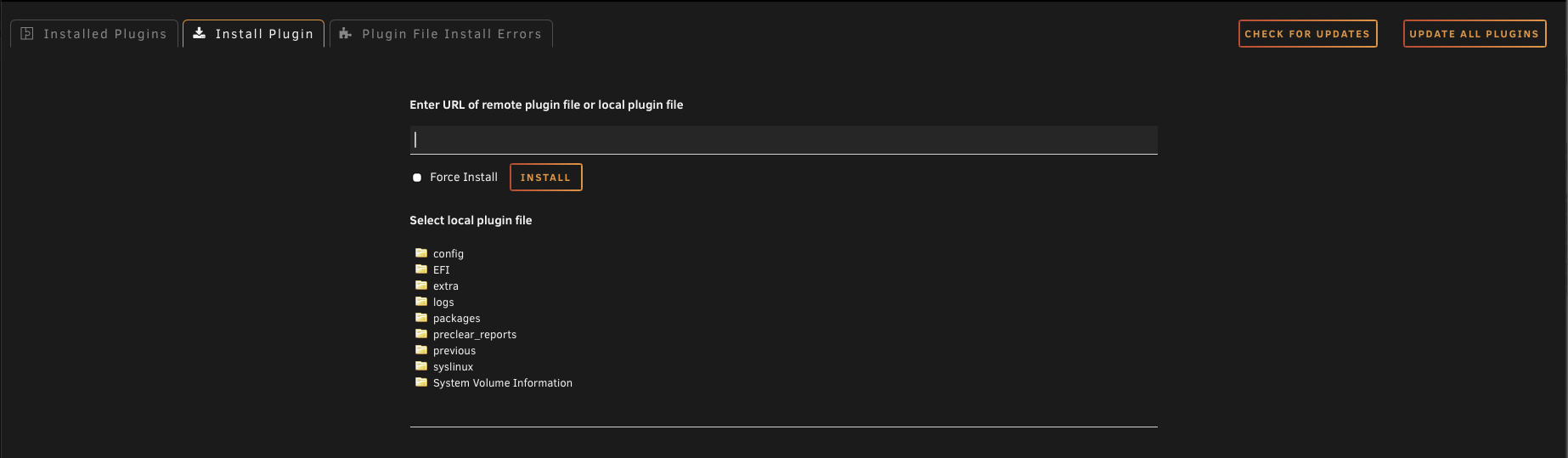
Open your Unraid WebGUI and go to Plugins → Install Plugin.
In the field "Enter URL of remote plugin file or local plugin file", paste:
https://raw.githubusercontent.com/jandrop/u-manager-unraid-plugin/main/UManager.plgClick INSTALL and wait for the installation to finish.
From command line (advanced)
plugin install https://raw.githubusercontent.com/jandrop/u-manager-unraid-plugin/main/UManager.plg
Configuration
Step 1 — Get your push token in U-Manager
Make sure the app is on version
1.2.1or newer (see Requirements). Older versions fail to generate the token.
- Open the U-Manager app on your phone.
- Go to Settings → Notifications.
- Enable the Push notifications toggle.
- Copy the token shown below the toggle.
The token is regenerated each time you toggle notifications off and back on. If you do that, you must paste the new token into the plugin again — the old token will not deliver anymore.
Stuck on "Token not available yet"? A DNS / ad blocker on your phone or network (NextDNS, Pi-hole, AdGuard, etc.) can silently block the request the app makes to register the device, so the token never arrives. If you use one, pause it while enabling notifications — or check its block log for the domain it dropped right after you toggled notifications on, and add an allow rule for it. This has been the cause for several users.
Step 2 — Configure the plugin in Unraid
In Unraid, go to Settings → Notification Settings.
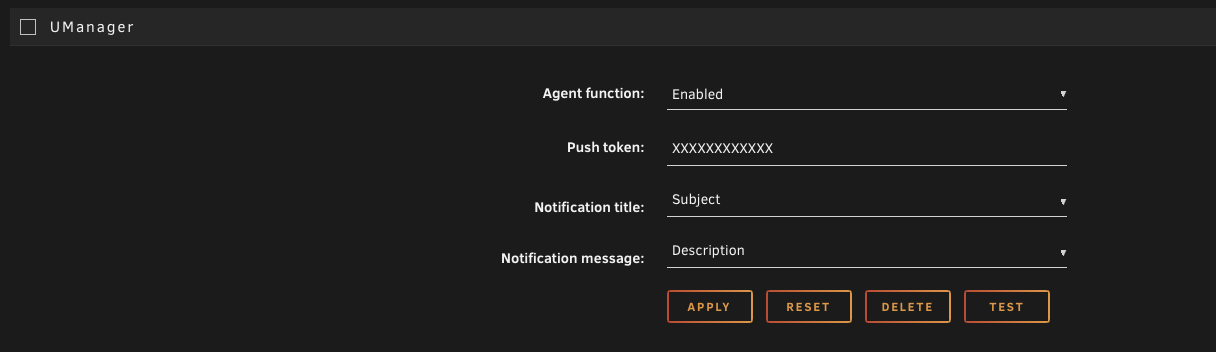
Scroll to the bottom of the page — you will see a UManager section with these fields:
Field Value Agent function EnabledPush token the token you copied from U-Manager Notification title Subject(default)Notification message Description(default)Click APPLY to save.
Click TEST to send a test notification. It should arrive on your phone within a few seconds.
How it works
The plugin is a stateless relay. Nothing is stored on this server, and no analytics or tracking happens here. When Unraid raises a notification, the data flows like this:
┌──────────┐  Dynamix       ┌────────────┐   HTTPS   ┌─────────────┐   FCM   ┌──────────┐
│  Unraid  │  notification  │  UManager  │  POST     │  Cloudflare │  push   │  Your    │
│  event   │  ────────────▶ │  agent     │ ────────▶ │   Worker    │ ──────▶ │  phone   │
└──────────┘                │  (bash)    │           └─────────────┘         └──────────┘
                            └────────────┘
- Unraid → Plugin (this repo): Unraid hands the agent a notification via the standard Dynamix system, the same way it does for Telegram, Discord, Pushover, etc.
- Plugin → Cloudflare Worker: the agent runs
curland POSTs a small JSON payload over HTTPS to a Cloudflare Worker hosted by the U-Manager developer. The Worker maps your push token to the right device. - Cloudflare Worker → Firebase Cloud Messaging (FCM): the Worker calls Google's FCM HTTP v1 API to deliver the notification to the U-Manager app on your phone.
That's it. There is no other backend, no database, no logs of your notifications.
What data is sent
Each notification contains exactly these five fields and nothing else:
| Field | What it is | Example |
|---|---|---|
title |
Unraid notification subject | Parity check finished |
message |
Unraid notification body | No errors detected |
importance |
Severity level | normal / warning / alert |
timestamp |
When Unraid raised it | 2026-05-09T14:30:00 |
link |
Optional URL to context | A link inside your Unraid WebGUI |
The plugin does not read or transmit:
- Your server's IP, hostname or any system identifier (beyond what HTTPS itself reveals to Cloudflare as part of the connection)
- Configuration files, shares, container or VM data
- API keys, passwords, tokens stored on Unraid
- CPU, memory, disk, parity or any telemetry not already in the notification's subject/body
- Anything from notifications other agents emit — only what Dynamix passes to this specific agent
Privacy
This plugin uses two third-party services to deliver the push:
- Cloudflare Workers (the relay). Sees the five fields above plus the originating IP for the duration of the HTTPS request. Stores only a
push_token → device_idmapping in a key-value store, with a 1-year TTL. No notification content is persisted. - Firebase Cloud Messaging (Google). Sees the title / message / importance to deliver the push. Subject to Google Firebase privacy.
You stay in control:
- Revoke at any time by toggling push notifications off in the U-Manager app — the token is regenerated and the old one stops working immediately.
- Switch devices by setting up the new phone in U-Manager and pasting the new token here. The old phone stops receiving.
- Uninstall this plugin to stop sending notifications from Unraid altogether.
The U-Manager app's full privacy policy (covering the mobile app side) is at https://jandrop.github.io/privacy_policy/PRIVACY_POLICY.html.
Behaviour
- One device per token. A token only delivers to the device that generated it. If you paste the same token on a second phone in U-Manager, the first phone stops receiving notifications. To switch devices, generate a new token on the new phone and update the plugin.
- Token rotates on toggle. Disabling and re-enabling push notifications in U-Manager regenerates the token. Always re-paste the new value here.
- Forwards every Dynamix notification. Any notification raised through Unraid's notification system (UPS events, parity check results, Docker container alerts, plugin errors, etc.) is forwarded.
Troubleshooting
- Test notification doesn't arrive: confirm the device is online, the token matches what U-Manager currently shows, and the Agent function is set to
Enabled. - Notifications stopped after toggling: re-paste the new token from U-Manager — toggling regenerates it.
- Wrong phone receives them: a token is bound to one device. Generate a new token on the desired phone and update the plugin.
Project layout
UManager.plg                      # Plugin manifest installed by Unraid
plugins/dynamix/
  agents/UManager.xml             # Dynamix notifications agent definition
  icons/umanager.png              # Plugin icon shown in the UI
Credits
This plugin follows the standard Dynamix Notifications agent pattern provided by Unraid — the same format used by all the stock agents (Pushbullet, Telegram, Discord, Pushover, Slack, ntfy.sh, etc.) shipped with Unraid in emhttp/plugins/dynamix/agents/.
The Dynamix system, the agent XML format, the $SUBJECT / $DESCRIPTION / $IMPORTANCE variables, and the .plg plugin manifest are all the work of Lime Technology / Unraid. This plugin is just a thin shim that takes the notification Unraid raises and forwards it via Cloudflare Workers to the U-Manager mobile app.
The notification agent script is adapted from unraid-deck-agent by mccray (MIT License, Copyright (c) 2026 mccray).
License
See LICENSE.
Categories
Download Statistics
Downloads by Month
Related apps
Explore more like this
Explore allDetails
https://github.com/jandrop/u-manager-unraid-plugin/releases/latest/download/UManager.plg