
All apps · 0 apps

TwitchMiner
Docker app from Uirel's Repository
Overview
Readme
View on GitHub

TwitchMiner
formerly Twitch Channel Points Miner v2



A script that watches streams for you and earns the channel points. It waits for a streamer to go live (+450 points when the stream starts), clicks the bonus button (+50 points), follows raids (+250 points), claims drops and keeps the watch streak going.
Read more about the channel points here.
TwitchMiner is a fork of Twitch Channel Points Miner v2. It is configured entirely through environment variables, keeps all of its data in one mountable folder, claims each drop only once, and ships as a multi-arch Docker image. Betting / predictions have been removed. See What's different in this fork.
Credits and license
This project is free software under the GNU General Public License v3.0 (see LICENSE). It is a modified version of a chain of GPL-3.0 projects, and keeps their copyright notices and license:
- Original idea and code: gottagofaster236/Twitch-Channel-Points-Miner
- v2 rewrite: Tkd-Alex/Twitch-Channel-Points-Miner-v2
- Fork this one is based on: rdavydov/Twitch-Channel-Points-Miner-v2
- This fork, TwitchMiner: Poag/TwitchMiner
As the GPL requires, any copy or modification you distribute must stay under the GPL-3.0 with its source available. The changes made in this fork are in the git history. The icon in assets/icon.svg is new in this fork and is released under the same license.
README Contents
- 🚀 What's different in this fork
- 🧾 Logs feature
- 🧐 How to use
- 🔧 Settings
- 📈 Analytics
- 🍪 Migrating from an old repository
If you want to help, please leave a star 🌟 and read CONTRIBUTING.md before opening a pull request.
What's different in this fork
Added in this fork
- Configuration through
TCPM_*environment variables (norun.pyto edit), with an.env.example - A single data folder (
TCPM_DATA_DIR) holding cookies, the drops database, logs and analytics, so Docker needs one volume - Each drop is claimed once only: attempts are stored in a small per-account database, so a failing claim is never retried and re-notified
- Drops for a game whose account is not connected are skipped, with a warning once a day that includes a countdown to the end of the campaign
- Multi-arch (
amd64andarm64) images on GHCR, built on native runners, withlatestonmain, version tags and a monthly rebuild for security updates - Lower idle CPU and memory use (no busy IRC loop, in-memory analytics writes, lazy pandas import, no needless drops polling)
- Smaller image on a current base (Python 3.12 slim, no compilers needed)
Removed in this fork
- Betting / predictions and all of their settings, events and colours
run.py/example.pyconfiguration, the Docker Hub image,arm/v7builds and the upstream badge workflows
Inherited from the upstream projects
- Improved logging: emojis, colors, files and much more
- Final report with all the data
- Automatic downloading of the list of followers and using it as an input
- Better 'Watch Streak' strategy in the priority system #11
- Auto claiming game drops from the Twitch inventory #21
- Switchable analytics chart that shows the progress of your points #96
- Joining the IRC Chat to increase the watch time and get StreamElements points #47
- Notifying on
@nicknamemention in the Twitch chat #227 - Notifications to Telegram, Discord, Matrix, Pushover, Gotify and generic webhooks
Logs feature
Full logs
%d/%m/%y %H:%M:%S - INFO - [run]: 💣  Start session: '9eb934b0-1684-4a62-b3e2-ba097bd67d35'
%d/%m/%y %H:%M:%S - INFO - [run]: 🤓  Loading data for x streamers. Please wait ...
%d/%m/%y %H:%M:%S - INFO - [set_offline]: 😴  Streamer(username=streamer-username1, channel_id=0000000, channel_points=67247) is Offline!
%d/%m/%y %H:%M:%S - INFO - [set_offline]: 😴  Streamer(username=streamer-username2, channel_id=0000000, channel_points=4240) is Offline!
%d/%m/%y %H:%M:%S - INFO - [set_offline]: 😴  Streamer(username=streamer-username3, channel_id=0000000, channel_points=61365) is Offline!
%d/%m/%y %H:%M:%S - INFO - [set_offline]: 😴  Streamer(username=streamer-username4, channel_id=0000000, channel_points=3760) is Offline!
%d/%m/%y %H:%M:%S - INFO - [set_online]: 🥳  Streamer(username=streamer-username, channel_id=0000000, channel_points=61365) is Online!
%d/%m/%y %H:%M:%S - INFO - [on_message]: 🚀  +12 → Streamer(username=streamer-username, channel_id=0000000, channel_points=61377) - Reason: WATCH.
%d/%m/%y %H:%M:%S - INFO - [on_message]: 🚀  +12 → Streamer(username=streamer-username, channel_id=0000000, channel_points=64218) - Reason: WATCH.
%d/%m/%y %H:%M:%S - INFO - [on_message]: 🚀  +12 → Streamer(username=streamer-username, channel_id=0000000, channel_points=64230) - Reason: WATCH.
%d/%m/%y %H:%M:%S - INFO - [claim_bonus]: 🎁  Claiming the bonus for Streamer(username=streamer-username, channel_id=0000000, channel_points=64230)!
%d/%m/%y %H:%M:%S - INFO - [on_message]: 🚀  +60 → Streamer(username=streamer-username, channel_id=0000000, channel_points=64290) - Reason: CLAIM.
%d/%m/%y %H:%M:%S - INFO - [on_message]: 🚀  +12 → Streamer(username=streamer-username, channel_id=0000000, channel_points=64326) - Reason: WATCH.
%d/%m/%y %H:%M:%S - INFO - [on_message]: 🚀  +400 → Streamer(username=streamer-username, channel_id=0000000, channel_points=64326) - Reason: WATCH_STREAK.
%d/%m/%y %H:%M:%S - INFO - [claim_bonus]: 🎁  Claiming the bonus for Streamer(username=streamer-username, channel_id=0000000, channel_points=64326)!
%d/%m/%y %H:%M:%S - INFO - [on_message]: 🚀  +60 → Streamer(username=streamer-username, channel_id=0000000, channel_points=64386) - Reason: CLAIM.
%d/%m/%y %H:%M:%S - INFO - [on_message]: 🚀  +12 → Streamer(username=streamer-username, channel_id=0000000, channel_points=64398) - Reason: WATCH.
%d/%m/%y %H:%M:%S - INFO - [update_raid]: 🎭  Joining raid from Streamer(username=streamer-username, channel_id=0000000, channel_points=64398) to another-username!
%d/%m/%y %H:%M:%S - INFO - [on_message]: 🚀  +250 → Streamer(username=streamer-username, channel_id=0000000, channel_points=6845) - Reason: RAID.
%d/%m/%y %H:%M:%S - INFO - [claim_drop]: 📦  Claim Skin Chest x1 (Skin Chest (10 Skins) x1) 120/120 (100%)
%d/%m/%y %H:%M:%S - WARNING - [__warn_account_not_connected]: 🔗  Drops available for Elim but your account is not connected to the game, not claiming - campaign ends in 3d 4h 12m. Connect it at https://www.twitch.tv/drops/inventory
Less logs
%d/%m %H:%M:%S - 💣  Start session: '9eb934b0-1684-4a62-b3e2-ba097bd67d35'
%d/%m %H:%M:%S - 🤓  Loading data for 13 streamers. Please wait ...
%d/%m %H:%M:%S - 😴  streamer-username1 (xxx points) is Offline!
%d/%m %H:%M:%S - 😴  streamer-username2 (xxx points) is Offline!
%d/%m %H:%M:%S - 😴  streamer-username3 (xxx points) is Offline!
%d/%m %H:%M:%S - 😴  streamer-username4 (xxx points) is Offline!
%d/%m %H:%M:%S - 🥳  streamer-username (xxx points) is Online!
%d/%m %H:%M:%S - 🚀  +12 → streamer-username (xxx points) - Reason: WATCH.
%d/%m %H:%M:%S - 🍀  Place 5k channel points on: SI (BLUE), Points: 848k, Users: 190 (70.63%), Odds: 1.24 (80.65%)
%d/%m %H:%M:%S - 🚀  +12 → streamer-username (xxx points) - Reason: WATCH.
%d/%m %H:%M:%S - 🚀  +12 → streamer-username (xxx points) - Reason: WATCH.
%d/%m %H:%M:%S - 🚀  +60 → streamer-username (xxx points) - Reason: CLAIM.
%d/%m %H:%M:%S - 🚀  +12 → streamer-username (xxx points) - Reason: WATCH.
%d/%m %H:%M:%S - 🚀  +400 → streamer-username (xxx points) - Reason: WATCH_STREAK.
%d/%m %H:%M:%S - 🚀  +60 → streamer-username (xxx points) - Reason: CLAIM.
%d/%m %H:%M:%S - 🚀  +12 → streamer-username (xxx points) - Reason: WATCH.
%d/%m %H:%M:%S - 🎭  Joining raid from streamer-username (xxx points) to another-username!
%d/%m %H:%M:%S - 🚀  +250 → streamer-username (xxx points) - Reason: RAID.
Final report:
%d/%m/%y %H:%M:%S - 🛑  End session 'f738d438-cdbc-4cd5-90c4-1517576f1299'
%d/%m/%y %H:%M:%S - 📄  Logs file: /.../path/TwitchMiner/data/logs/username.timestamp.log
%d/%m/%y %H:%M:%S - ⌛  Duration 10:29:19.547371

%d/%m/%y %H:%M:%S - 🤖  Streamer(username=streamer-username, channel_id=0000000, channel_points=67247), Total points gained (after farming - before farming): -7838
%d/%m/%y %H:%M:%S - 💰  CLAIM(11 times, 550 gained), WATCH(35 times, 350 gained)
%d/%m/%y %H:%M:%S - 🤖  Streamer(username=streamer-username2, channel_id=0000000, channel_points=61365), Total points gained (after farming - before farming): 977
%d/%m/%y %H:%M:%S - 💰  CLAIM(4 times, 240 gained), WATCH(11 times, 132 gained)
%d/%m/%y %H:%M:%S - 🤖  Streamer(username=streamer-username5, channel_id=0000000, channel_points=25960), Total points gained (after farming - before farming): 1680
%d/%m/%y %H:%M:%S - 💰  CLAIM(17 times, 850 gained), WATCH(53 times, 530 gained)
%d/%m/%y %H:%M:%S - 🤖  Streamer(username=streamer-username6, channel_id=0000000, channel_points=9430), Total points gained (after farming - before farming): 1120
%d/%m/%y %H:%M:%S - 💰  CLAIM(14 times, 700 gained), WATCH(42 times, 420 gained), WATCH_STREAK(1 times, 450 gained)
How to use:
Docker is the only supported way to run TwitchMiner. Running it straight from the source is only meant for development (see CONTRIBUTING.md).
All configuration is done with environment variables (prefix TCPM_). Copy .env.example to .env, fill it in and start the miner. There is no run.py to edit anymore.
Data folder
Everything the miner writes lives in one folder, TCPM_DATA_DIR (/data in the Docker image). Mount just this folder:
data/
+-- cookies/    <username>.pkl                login session
+-- database/   <username>_drops.db           drops already claimed
+-- logs/       <username>.log                log files
+-- analytics/  <username>/<streamer>.json    analytics series
Upgrading: move your old cookies/, logs/ and analytics/<username>/ folders into the data folder (the old analytics/ folder becomes data/analytics/).
Docker
Images are published to ghcr.io/poag/twitchminer for linux/amd64 and linux/arm64 (latest follows main and is rebuilt monthly).
Ready-made stack: compose.yaml (with a commented second-account example). Copy .env.example to .env, edit it, run docker compose run --rm miner once to log in, then docker compose up -d.
Unraid: install the beta TwitchMiner template from the docker-xml repository (Community Applications style template; add the repository URL https://github.com/Poag/docker-xml to your template repositories).
Minimal docker-compose example:
services:
  miner:
    image: ghcr.io/poag/twitchminer:latest
    stdin_open: true
    tty: true
    env_file: .env          # or list the TCPM_* variables under `environment:`
    environment:
      - TERM=xterm-256color
    volumes:
      - ./data:/data
    ports:
      - "5000:5000"         # only needed with TCPM_ENABLE_ANALYTICS=true (and TCPM_ANALYTICS_HOST=0.0.0.0)
Example with docker run:
docker run -it --env-file .env -v $(pwd)/data:/data -p 5000:5000 ghcr.io/poag/twitchminer:latest
If you don't mount /data you lose the login, logs and analytics when the container is removed. On the first run, without a cookie, start the container with -it so you can log in. For several accounts run one container per account, each with its own .env and data folder (and its own published port).
Limits
Twitch has a limit - you can't watch more than two channels at one time. We take the first two streamers from the list as they have the highest priority.
Make sure to write TCPM_STREAMERS in order of priority from left to right. If you use TCPM_FOLLOWERS=true you can choose to download the followers sorted by follow date (TCPM_FOLLOWERS_ORDER=ASC or DESC).
Settings
All settings are environment variables. Booleans accept true/false, 1/0, yes/no, on/off; lists are comma separated.
General
| Variable | Default | Description |
|---|---|---|
TCPM_USERNAME |
required | Your Twitch username |
TCPM_PASSWORD |
ask interactively | Your Twitch password (only needed for the first login) |
TCPM_DATA_DIR |
./data (/data in Docker) |
The single folder for cookies, database, logs and analytics |
TCPM_STREAMERS |
empty | Streamers in priority order, see below |
TCPM_BLACKLIST |
empty | Streamers to skip (useful with TCPM_FOLLOWERS) |
TCPM_FOLLOWERS |
false |
Also mine every channel you follow on Twitch. They are added after TCPM_STREAMERS (so those keep priority) and the log shows Load N followers from your profile! |
TCPM_FOLLOWERS_ORDER |
ASC |
Order of the followed channels by follow date: ASC or DESC |
TCPM_CLAIM_DROPS_STARTUP |
false |
Claim all drops from the Twitch inventory on startup |
TCPM_PRIORITY |
STREAK,DROPS,ORDER |
Priority list, see below |
TCPM_ENABLE_ANALYTICS |
false |
Enable analytics. Disabling it significantly reduces memory use and disk writes |
TCPM_DISABLE_SSL_CERT_VERIFICATION |
false |
At your own risk, only to fix SSL: CERTIFICATE_VERIFY_FAILED |
TCPM_DISABLE_AT_IN_NICKNAME |
false |
Detect mentions of your nickname in chat even without the @ |
TCPM_PRIORITY values:
STREAK- Catch the watch streak from all streamersDROPS- Claim all drops from streamers with drops tags enabledSUBSCRIBED- Prioritize streamers you're subscribed to (higher subscription tiers are mined first)ORDER- Following the order of the listPOINTS_ASCENDING- On top the streamers with the lowest pointsPOINTS_DESCENDING- On top the streamers with the highest points
You can combine priorities but using ORDER and POINTS_ASCENDING together doesn't make sense.
Streamers
TCPM_STREAMERS is a comma separated list. A streamer can override the default streamer settings after a colon, as key=value pairs separated by +:
TCPM_STREAMERS=streamer1,streamer2:follow_raid=false+watch_streak=true,streamer3:chat=never
Streamer settings
Defaults for every streamer (a per-streamer override wins).
| Variable | Default | Description |
|---|---|---|
TCPM_FOLLOW_RAID |
true |
Follow raids (+250 points) |
TCPM_CLAIM_DROPS |
true |
Increase watch-time for the current game so you can claim drops |
TCPM_WATCH_STREAK |
true |
Raise the priority of a streamer that just went online to catch the Watch Streak |
TCPM_COMMUNITY_GOALS |
false |
Contribute the max channel points per stream to community goals |
TCPM_CHAT |
ONLINE |
IRC chat presence: ALWAYS, NEVER, ONLINE (only while the streamer is online), OFFLINE |
The same keys (lower case, without the prefix) are used for per-streamer overrides.
Logging
| Variable | Default | Description |
|---|---|---|
TCPM_LOG_SAVE |
true |
Save logs to <data>/logs/<username>.log |
TCPM_LOG_CONSOLE_LEVEL |
INFO |
Console log level (DEBUG, INFO, ...) |
TCPM_LOG_FILE_LEVEL |
DEBUG |
File log level |
TCPM_LOG_CONSOLE_USERNAME |
false |
Prefix every line (and notification) with the username, useful with several accounts |
TCPM_LOG_AUTO_CLEAR |
true |
Rotate the log file daily, keeping 7 days |
TCPM_TIME_ZONE |
system | tz database name, e.g. America/Denver |
TCPM_LOG_EMOJI |
true (false on Windows) |
Print emoji |
TCPM_LOG_LESS |
false |
Shorter, less verbose logs |
TCPM_LOG_COLORED |
true |
Colored console output |
TCPM_COLOR_<EVENT> |
RESET |
Color of an event, e.g. TCPM_COLOR_STREAMER_ONLINE=GREEN. Allowed: BLACK, RED, GREEN, YELLOW, BLUE, MAGENTA, CYAN, WHITE, RESET |
Notifications
A notifier is enabled when its required variables are set. *_EVENTS is a comma separated list of events.
| Notifier | Variables (required in bold) | Default events |
|---|---|---|
| Telegram | TCPM_TELEGRAM_CHAT_ID, TCPM_TELEGRAM_TOKEN, TCPM_TELEGRAM_EVENTS, TCPM_TELEGRAM_DISABLE_NOTIFICATION (false) |
STREAMER_ONLINE,STREAMER_OFFLINE,CHAT_MENTION |
| Discord | TCPM_DISCORD_WEBHOOK_API, TCPM_DISCORD_EVENTS |
same |
| Generic webhook | TCPM_WEBHOOK_ENDPOINT, TCPM_WEBHOOK_METHOD (GET or POST, default GET), TCPM_WEBHOOK_EVENTS |
same |
| Matrix | TCPM_MATRIX_USERNAME, TCPM_MATRIX_PASSWORD, TCPM_MATRIX_HOMESERVER, TCPM_MATRIX_ROOM_ID, TCPM_MATRIX_EVENTS |
same |
| Pushover | TCPM_PUSHOVER_USERKEY, TCPM_PUSHOVER_TOKEN, TCPM_PUSHOVER_PRIORITY (0), TCPM_PUSHOVER_SOUND (pushover), TCPM_PUSHOVER_EVENTS |
CHAT_MENTION,DROP_CLAIM |
| Gotify | TCPM_GOTIFY_ENDPOINT, TCPM_GOTIFY_PRIORITY (8), TCPM_GOTIFY_EVENTS |
same as Telegram |
Events
STREAMER_ONLINESTREAMER_OFFLINEGAIN_FOR_RAIDGAIN_FOR_CLAIMGAIN_FOR_WATCHBONUS_CLAIMJOIN_RAIDDROP_CLAIMDROP_STATUSCHAT_MENTION
Analytics
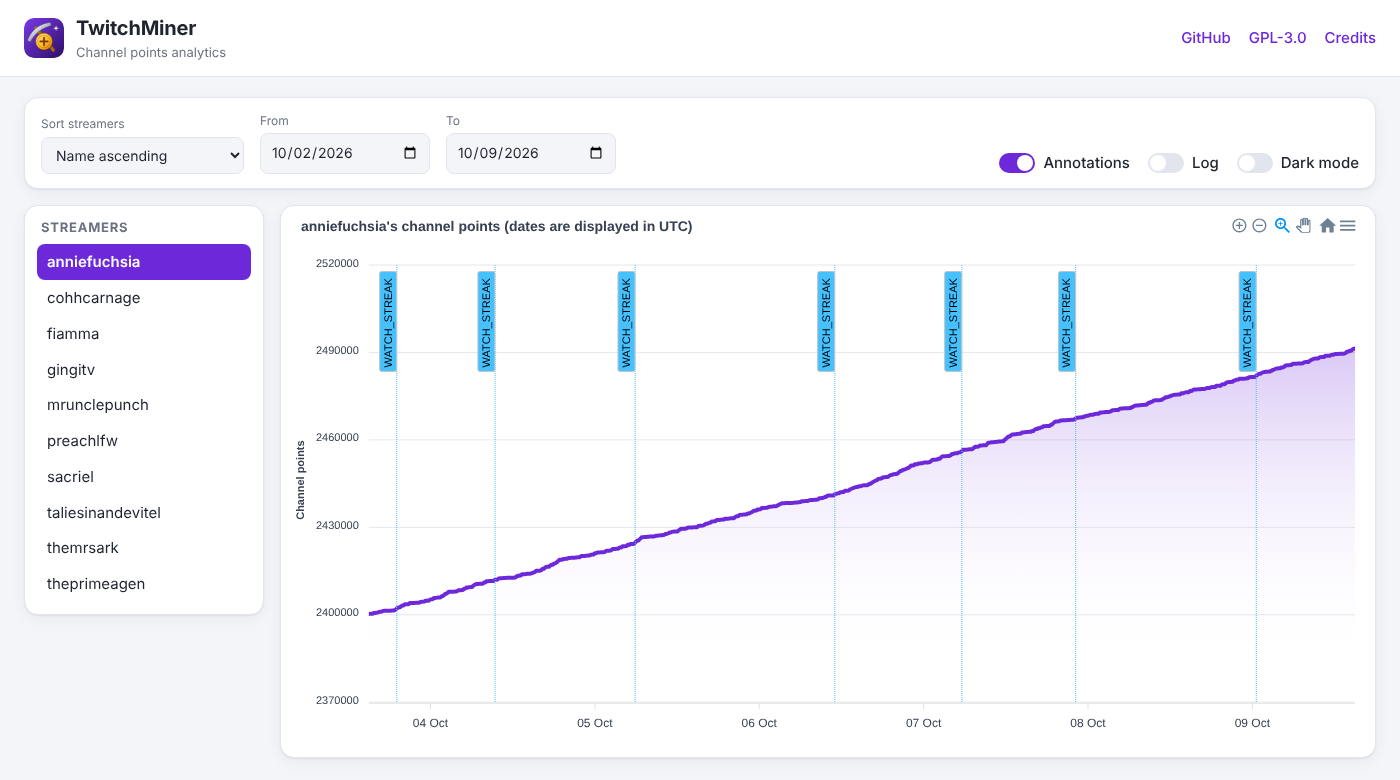
We have recently introduced a little frontend where you can show with a chart you points trend. The script will spawn a Flask web-server on your machine where you can select binding address and port. The chart provides some annotation to handle the watch strike events. Usually annotation are used to notice big increase / decrease of points. If you want to can disable annotations. On each (x, y) points Its present a tooltip that show points, date time and reason of points gained / lost. This web page was just a funny idea, and it is not intended to use for a professional usage. If you want you can toggle the dark theme with the dedicated checkbox.
| Light theme | Dark theme |
|---|---|
 |
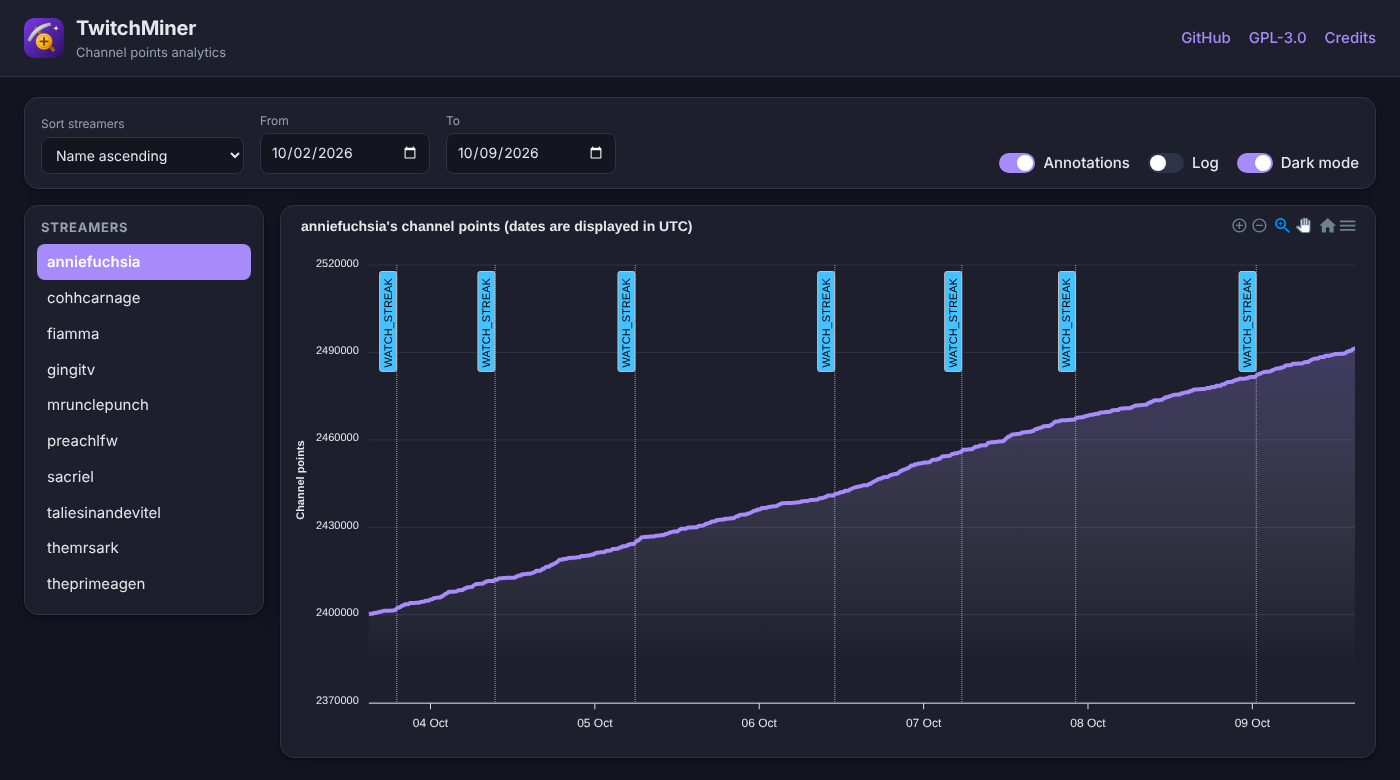 |
In the streamer list, the (up to two) streamers the miner is watching right now have a green border; the one you clicked is filled. Below the chart, a Drops table lists every drop the miner tried to claim (time, drop, game, claimed or failed), and the optional Log panel shows the current session's log live (at the console log level, from memory, so it works even with TCPM_LOG_SAVE=false). To use this feature set TCPM_ENABLE_ANALYTICS=true. Read more at: #96
| Variable | Default | Description |
|---|---|---|
TCPM_ANALYTICS_HOST |
127.0.0.1 |
Binding address. Use 0.0.0.0 to reach it from another machine or from outside a Docker container |
TCPM_ANALYTICS_PORT |
5000 |
Port |
TCPM_ANALYTICS_REFRESH |
5 |
The chart refreshes every N minutes |
TCPM_ANALYTICS_DAYS_AGO |
7 |
Days of history shown by default |
Disabling analytics (the default) significantly reduces memory consumption and saves disk space by not writing <data>/analytics/*.json.
Migrating from an old repository (the original one):
If you already have a twitch-cookies.pkl and you don't want to log in again, please create a data/cookies/ folder (inside your TCPM_DATA_DIR) and then copy the .pkl file with a new name your-twitch-username.pkl
.
+-- data
|   +-- cookies
|       +-- your-twitch-username.pkl
Categories
Related apps
Explore more like this
Explore allDetails
ghcr.io/poag/twitchminer:latestRuntime arguments
- Web UI
http://[IP]:[PORT:5000]/- Network
bridge- Shell
bash- Privileged
- false
- Extra Params
--user 99:100 --interactive --tty
Template configuration
Everything the miner writes: cookies, drops database, logs and analytics.
- Target
- /data
- Default
- /mnt/user/appdata/twitchminer
- Value
- /mnt/user/appdata/twitchminer
Analytics web page port (needs Enable analytics = true).
- Target
- 5000
- Default
- 5000
- Value
- 5000
Your Twitch username.
- Target
- TCPM_USERNAME
Only needed for the first login. Leave empty to be asked in the container console.
- Target
- TCPM_PASSWORD
Comma separated streamers in priority order. Per-streamer overrides: name:follow_raid=false+chat=never
- Target
- TCPM_STREAMERS
Also mine every channel you follow on Twitch (after the streamers above).
- Target
- TCPM_FOLLOWERS
- Default
- false
- Value
- false
Serve the analytics web page. Set to false to save memory and disk.
- Target
- TCPM_ENABLE_ANALYTICS
- Default
- true
- Value
- true
Bind address of the analytics page inside the container; keep 0.0.0.0.
- Target
- TCPM_ANALYTICS_HOST
- Default
- 0.0.0.0
- Value
- 0.0.0.0
Folder inside the container for all data; must match the Data path target.
- Target
- TCPM_DATA_DIR
- Default
- /data
- Value
- /data
STREAK, DROPS, SUBSCRIBED, ORDER, POINTS_ASCENDING, POINTS_DESCENDING (comma separated).
- Target
- TCPM_PRIORITY
- Default
- STREAK,DROPS,ORDER
- Value
- STREAK,DROPS,ORDER
Claim all drops from the Twitch inventory when starting.
- Target
- TCPM_CLAIM_DROPS_STARTUP
- Default
- false
- Value
- false
Comma separated streamers to skip (useful with Mine followed channels).
- Target
- TCPM_BLACKLIST
Follow raids for bonus points.
- Target
- TCPM_FOLLOW_RAID
- Default
- true
- Value
- true
Watch the current game so drops can be claimed.
- Target
- TCPM_CLAIM_DROPS
- Default
- true
- Value
- true
Prioritise streamers that just went online to catch the watch streak.
- Target
- TCPM_WATCH_STREAK
- Default
- true
- Value
- true
IRC chat presence: ALWAYS, NEVER, ONLINE or OFFLINE.
- Target
- TCPM_CHAT
- Default
- ONLINE
- Value
- ONLINE
DEBUG, INFO, WARNING or ERROR.
- Target
- TCPM_LOG_CONSOLE_LEVEL
- Default
- INFO
- Value
- INFO
tz database name for log timestamps, e.g. Europe/London.
- Target
- TCPM_TIME_ZONE
Optional Discord webhook URL for notifications.
- Target
- TCPM_DISCORD_WEBHOOK_API
Events sent to Discord (comma separated).
- Target
- TCPM_DISCORD_EVENTS
- Default
- STREAMER_ONLINE,STREAMER_OFFLINE,CHAT_MENTION,DROP_CLAIM
- Value
- STREAMER_ONLINE,STREAMER_OFFLINE,CHAT_MENTION,DROP_CLAIM
Optional Telegram notifications: chat ID (also set the token).
- Target
- TCPM_TELEGRAM_CHAT_ID
Telegram bot token.
- Target
- TCPM_TELEGRAM_TOKEN
Container time zone, e.g. Europe/London.
- Default
- UTC
- Value
- UTC