
All apps · 0 apps

TweetCapture
Docker app from grtgbln's Repository
Overview
Easily take screenshots of tweets, mentions, and full threads.
Readme
View on GitHubTweetCapture
Easily take screenshots of tweets/mentions and save them as image.
Command-Line Usage
> pip install tweet-capture
> tweetcapture https://twitter.com/jack/status/20
> tweetcapture -h
Code Usage Examples
Testing
> pip3 install opencv-python numpy
> cd tweetcapture/tests/
> python -m unittest
Docker Usage
docker run --rm -v $(pwd):/app xacnio/tweetcapture -h
docker run --rm -v $(pwd):/app xacnio/tweetcapture https://twitter.com/jack/status/20
- On Windows: Replace
$(pwd)with${PWD}(Powershell) - On Windows: Replace
$(pwd)with%cd%(Command Line)
Modes
| # | ||
|---|---|---|
| 0 | Hide everything outside tweet content and author. | 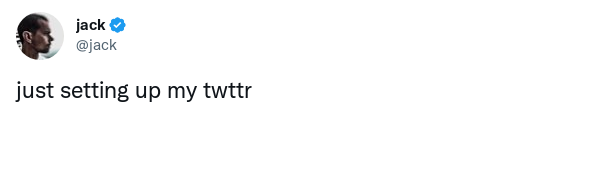 |
| 1 | Show retweet/like counts. | 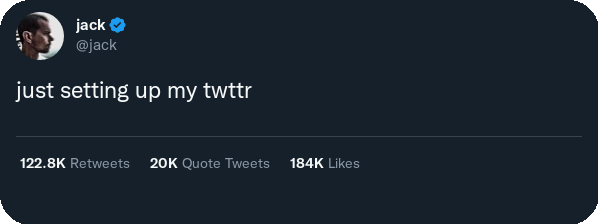 |
| 2 | Show retweet/like counts and timestamp. | 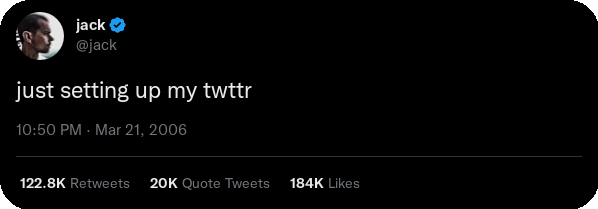 |
| 3 | Show everything. | 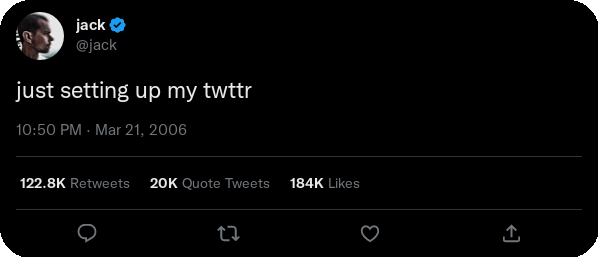 |
| 4 | Show timestamp. |  |
Night Modes
| # | ||
|---|---|---|
| 0 | Light mode | |
| 1 | Dark mode | |
| 2 | Black mode | |
Show Mentions Example
If the tweet have a very many mentions, there may be problems because "show more" option not supported. The tool can show only first loaded mentions. You can limit mention count on screenshot by using -sc argument
tweetcapture -sm 3 https://twitter.com/Twitter/status/1445078208190291973
Image

Show Parent Tweets Example
tweetcapture -sp https://twitter.com/elonmusk/status/1587911540770222081
Image

Requirements
This is a CLI application. Run it manually from a terminal via `docker run`: https://github.com/xacnio/tweetcapture?tab=readme-ov-file#docker-usage
Categories
Download Statistics
3,813
Total Downloads
Related apps
Explore more like this
Explore allDetails
Repository
xacnio/tweetcapture:latestLast Updated2024-04-15
First Seen2025-03-18
Runtime arguments
- Network
bridge- Privileged
- false