
All apps · 0 apps

trilium
Docker app from BGameiro's Repository
Overview
Links
Repository: https://github.com/zadam/trilium
Wiki: https://github.com/zadam/trilium/wiki
Docker: https://hub.docker.com/r/zadam/trilium
Configuration
/home/node/trilium-data Where Trilium should store logs, databases and configuration
/home/node/trilium-data/backup Where Trilium should store the backups
Readme
View on GitHubTrilium Notes





Arabic | Chinese (Simplified Han script) | Chinese (Traditional Han script) | Czech | English (United Kingdom) | English | French | German | Greek | Indonesian | Irish | Italian | Japanese | Korean | Polish | Romanian | Russian | Spanish | Ukrainian | Urdu | Uyghur | Vietnamese
Trilium Notes is a free and open-source, cross-platform hierarchical note taking application with focus on building large personal knowledge bases.
Looking for "Trillium Notes"? The project's canonical spelling is "Trilium Notes", with one l.
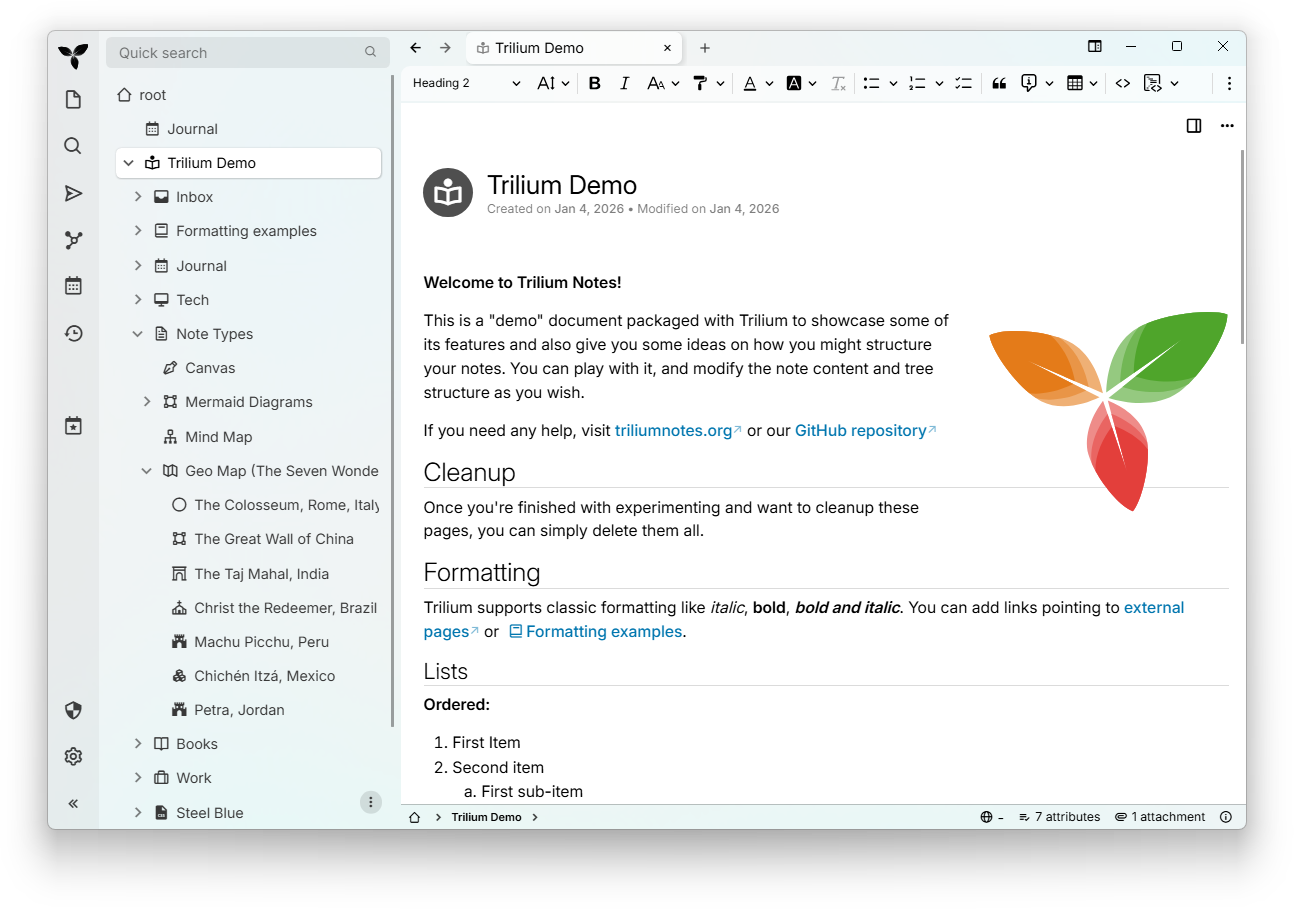
⏬ Download
- Latest release – stable version, recommended for most users.
- Nightly build – unstable development version, updated daily with the latest features and fixes.
📚 Documentation
Visit our comprehensive documentation at docs.triliumnotes.org
Our documentation is available in multiple formats:
- Online Documentation: Browse the full documentation at docs.triliumnotes.org
- In-App Help: Press
F1within Trilium to access the same documentation directly in the application - GitHub: Navigate through the User Guide in this repository
Quick Links
- Getting Started Guide
- Installation Instructions
- Docker Setup
- Upgrading TriliumNext
- Basic Concepts and Features
- Patterns of Personal Knowledge Base
🎁 Features
- Notes can be arranged into arbitrarily deep tree. Single note can be placed into multiple places in the tree (see cloning)
- Rich WYSIWYG note editor including e.g. tables, images and math with markdown autoformat
- Support for editing notes with source code, including syntax highlighting
- Fast and easy navigation between notes, full text search and note hoisting
- Seamless note versioning
- Note attributes can be used for note organization, querying and advanced scripting
- UI available in English, German, Spanish, French, Romanian, and Chinese (simplified and traditional)
- Direct OpenID and TOTP integration for more secure login
- Synchronization with self-hosted sync server
- Sharing (publishing) notes to public internet
- Strong note encryption with per-note granularity
- Sketching diagrams, based on Excalidraw (note type "canvas")
- Relation maps and note/link maps for visualizing notes and their relations
- Mind maps, based on Mind Elixir
- Geo maps with location pins and GPX tracks
- Scripting - see Advanced showcases
- REST API for automation
- Scales well in both usability and performance upwards of 100 000 notes
- Touch optimized mobile frontend for smartphones and tablets
- Built-in dark theme, support for user themes
- Evernote and Markdown import & export
- Web Clipper for easy saving of web content
- Customizable UI (sidebar buttons, user-defined widgets, ...)
- Metrics, along with a Grafana Dashboard.
✨ Check out the following third-party resources/communities for more TriliumNext related goodies:
- awesome-trilium for 3rd party themes, scripts, plugins and more.
- TriliumRocks! for tutorials, guides, and much more.
❓Why TriliumNext?
The original Trilium developer (Zadam) has graciously given the Trilium repository to the community project which resides at https://github.com/TriliumNext
⬆️Migrating from Zadam/Trilium?
There are no special migration steps to migrate from a zadam/Trilium instance to a TriliumNext/Trilium instance. Simply install TriliumNext/Trilium as usual and it will use your existing database.
Versions up to and including v0.90.4 are compatible with the latest zadam/trilium version of v0.63.7. Any later versions of TriliumNext/Trilium have their sync versions incremented which prevents direct migration.
💬 Discuss with us
Feel free to join our official conversations. We would love to hear what features, suggestions, or issues you may have!
- Matrix (For synchronous discussions.)
- The
GeneralMatrix room is also bridged to XMPP
- The
- Github Discussions (For asynchronous discussions.)
- Github Issues (For bug reports and feature requests.)
🏗 Installation
Windows / MacOS
Download the binary release for your platform from the latest release page, unzip the package and run the trilium executable.
Linux
If your distribution is listed in the table below, use your distribution's package.

You may also download the binary release for your platform from the latest release page, unzip the package and run the trilium executable.
TriliumNext is also provided as a Flatpak, but not yet published on FlatHub.
Browser (any OS)
If you use a server installation (see below), you can directly access the web interface (which is almost identical to the desktop app).
Currently only the latest versions of Chrome & Firefox are supported (and tested).
Mobile
To use TriliumNext on a mobile device, you can use a mobile web browser to access the mobile interface of a server installation (see below).
See issue https://github.com/TriliumNext/Trilium/issues/4962 for more information on mobile app support.
TriliumDroid
If you prefer a native Android app, you can use TriliumDroid. Report bugs and missing features at their repository. Note: It is best to disable automatic updates on your server installation (see below) when using TriliumDroid since the sync version must match between Trilium and TriliumDroid.
Pocket Trilium
If you want a full-featured native Android app, check out Pocket Trilium. It runs a complete Trilium instance on your phone, supports full offline use, and allows you to sync with your server.
Trinote
If you want a native iOS app, you can use Trinote, an open-source client for your self-hosted Trilium / TriliumNext server. It lets you browse and organize your note tree, search for notes on the server, read and edit all note types (text, code, mindmap, spreadsheet, geomap, canvas, etc.), and keeps notes available and editable offline. Here's the repo if you're interested in contributing and here's the discord server if you have any feedback or suggestions you want to discuss.
Server
To install TriliumNext on your own server (including via Docker from Dockerhub) follow the server installation docs.
💻 Contribute
Translations
If you are a native speaker, help us translate Trilium by heading over to our Weblate page.
Here's the language coverage we have so far:

Code
Download the repository, install dependencies using pnpm and then run the server (available at http://localhost:8080):
git clone https://github.com/TriliumNext/Trilium.git
cd Trilium
pnpm install
pnpm run server:start
Documentation
Download the repository, install dependencies using pnpm and then run the environment required to edit the documentation:
git clone https://github.com/TriliumNext/Trilium.git
cd Trilium
pnpm install
pnpm edit-docs:edit-docs
Alternatively, if you have Nix installed:
# Run directly
nix run .#edit-docs

# Or install to your profile
nix profile install .#edit-docs
trilium-edit-docs
Building the Executable
Download the repository, install dependencies using pnpm and then build the desktop app for Windows:
git clone https://github.com/TriliumNext/Trilium.git
cd Trilium
pnpm install
pnpm run --filter desktop electron-forge:make --arch=x64 --platform=win32
For more details, see the development docs.
Developer Documentation
Please view the documentation guide for details. If you have more questions, feel free to reach out via the links described in the "Discuss with us" section above.
💖 Sponsors
 NetPerfect EV certificate & Windows CI |
 CKEditor Premium editor features |
 Dosu Automated GitHub support |
👏 Shoutouts
- zadam for the original concept and implementation of the application.
- Sarah Hussein for designing the application icon.
- nriver for his work on internationalization.
- Thomas Frei for his original work on the Canvas.
- antoniotejada for the original syntax highlight widget.
- Tabler Icons for the system tray icons.
- The application icons in the import dialog are from:
- Material Design Icons for OneNote, Google Keep, Evernote.
- Font Awesome for Notion, Obsidian.
- SVGicons.com for Anytype.
- The LLM provider icons are from Lobe Icons.
Trilium would not be possible without the technologies behind it:
- CKEditor 5 - the visual editor behind text notes.
- CodeMirror - code editor with support for huge amount of languages.
- Excalidraw - the infinite whiteboard used in Canvas notes.
- Mind Elixir - providing the mind map functionality.
- Leaflet - for rendering geographical maps.
- Tabulator - for the interactive table used in collections.
- FancyTree - feature-rich tree library without real competition.
🤝 Support
Trilium is built and maintained with hundreds of hours of work. Your support keeps it open-source, improves features, and covers costs such as hosting.
Consider supporting the main developer (eliandoran) of the application via:
🔑 License
Copyright 2017-2025 zadam, Elian Doran, and other contributors
This program is free software: you can redistribute it and/or modify it under the terms of the GNU Affero General Public License as published by the Free Software Foundation, either version 3 of the License, or (at your option) any later version.
Categories
Download Statistics
Total Downloads Over Time
Related apps
Explore more like this
Explore allLinks
Details
zadam/trilium:0.54.3Runtime arguments
- Web UI
http://[IP]:[PORT:8080]- Network
bridge- Shell
sh- Privileged
- false
Template configuration
WebUI - Default 8888
- Target
- 8080
- Default
- 8080
- Value
- 8888
Container Path: /home/node/trilium-data
- Target
- /home/node/trilium-data
- Default
- /mnt/user/appdata/trilium
Container Path: /home/node/trilium-data/backup
- Target
- /home/node/trilium-data/backup
- Default
- /mnt/user/appdata/trilium/backup