
All apps · 0 apps

Trident
Docker app from mugenoesis' Repository
Overview
Readme
View on GitHub

TridentSlicer
A self-hosted slicer for your server.
OrcaSlicer's slicing engine, run headless in Docker, with a web UI you can use from any browser or phone.
Works with the printers OrcaSlicer supports, and with belt printers as a bonus.

What it does
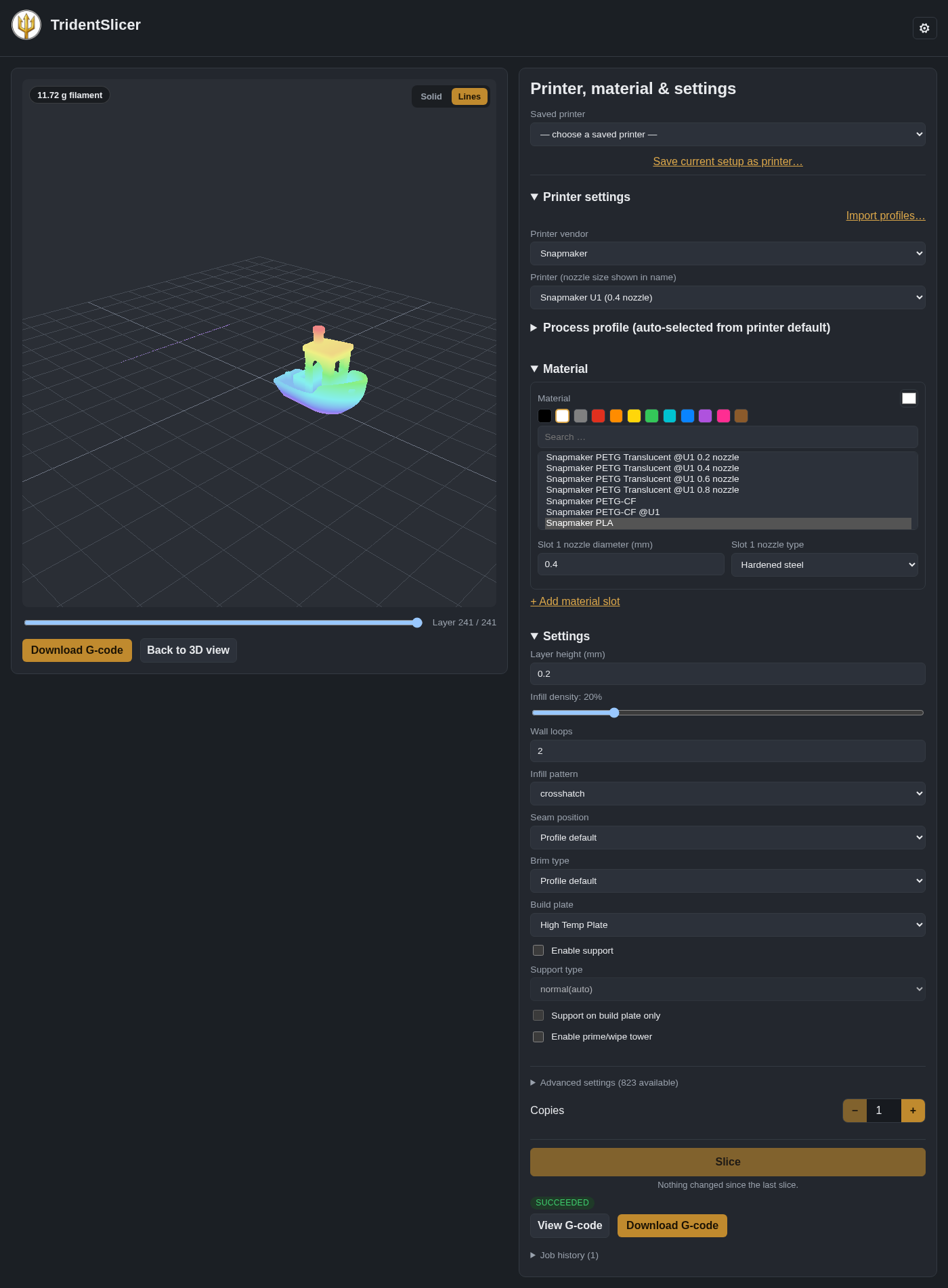
Upload a model, pick a printer and material, slice, preview the G-code layer by layer, and download it or send it straight to your printer. It runs on a NAS or home server, so you can slice from your phone, or from a machine that has no slicer installed.
- Your printer is probably already in it. OrcaSlicer's whole printer, filament and process library is built in,
from 70+ vendors (Bambu Lab, Prusa, Creality, Snapmaker, Voron, Elegoo, Anycubic, Qidi, Sovol and many more). You can
also import your own profiles (
.json,.zip,.orca_printer,.orca_filament,.orca_bundle). - Multi-material and tool changers. Assign a file's colours to nozzles and slice multi-colour models, including 4-head printers like the Snapmaker U1. The build plate list only offers plates your chosen filament supports.
- Multi-plate 3MF files. Preview each plate, slice any plate, and choose which objects in a file to print, with thumbnails so you can tell them apart.
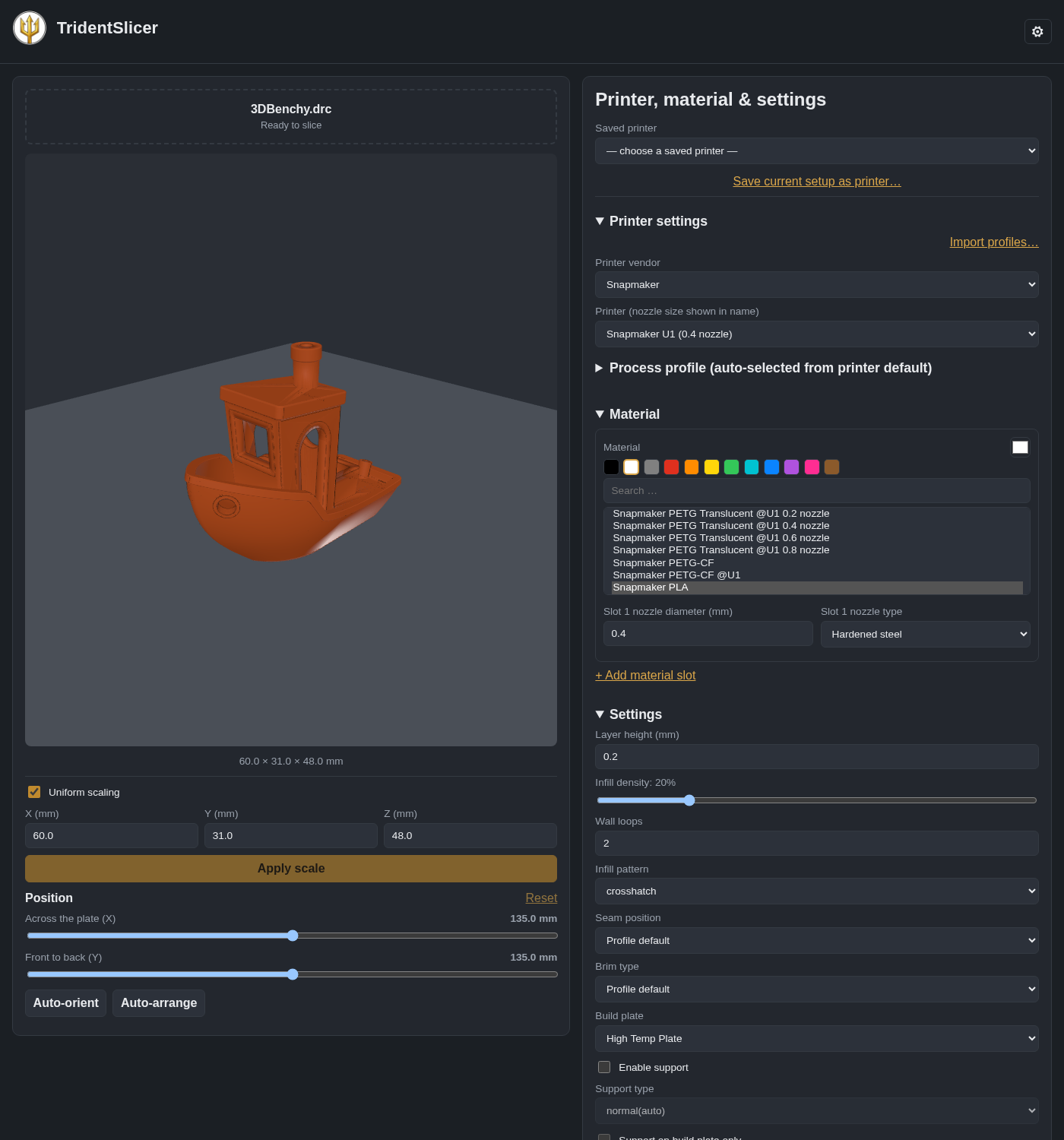
- Position, scale and copies. Move the model on the plate, scale it, auto-orient, auto-arrange, and print several copies.
- Mesh check. STL files are checked on upload for the defects the slicer repairs, and holes it cannot repair are flagged before they become a bad print.
- Send to your printer. Upload the G-code to a Moonraker (Klipper, Mainsail, Fluidd) or OctoPrint printer.
- Every setting is reachable. The common ones (layer height, infill, walls, seam, brim, supports, build plate) are up front, and all 800+ OrcaSlicer settings are under Advanced. Saved printers and settings profiles keep your setups.
- Works on a phone. Responsive single-page app, installable as a PWA. There is also an HTTP API with Swagger docs
at
/docs. - Single-user or multi-user. Run it just for yourself with no login, or switch to accounts.
Bonus: belt printers
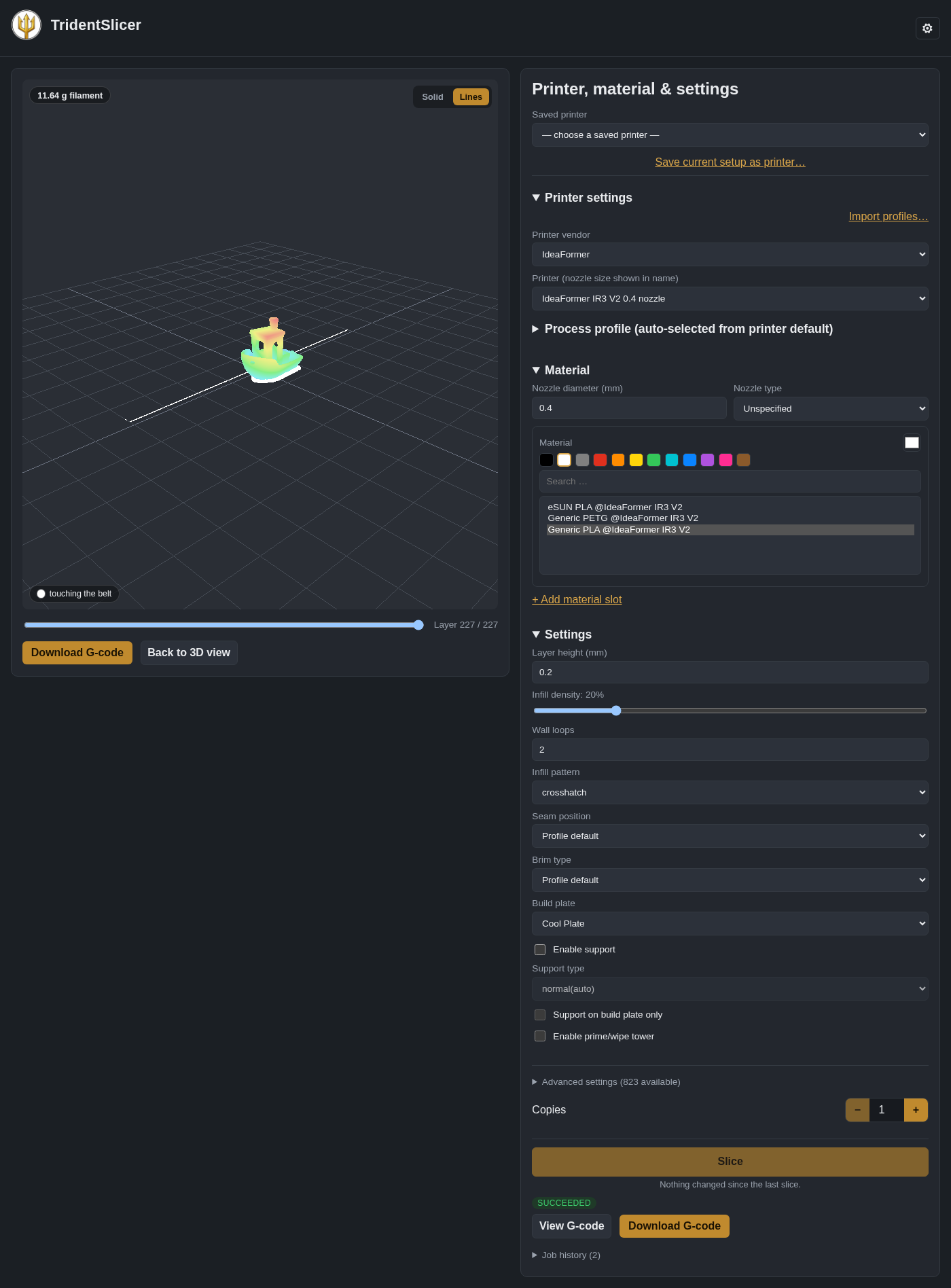
Belt (conveyor) printers such as the IdeaFormer IR3 V2 work too, which most slicers can't do well. Trident adds tree supports that grow down to the belt, a flat pad at the belt, purge-line alignment so the print starts right at the purge, and an endless-length bed. You can line several objects up along the belt and drag them into print order.
Install
Trident is one container. It needs port 8000 and three folders to keep your data.
Docker
docker run -d --name trident --restart unless-stopped \
  -p 8000:8000 \
  -v /path/to/trident/models:/data/models \
  -v /path/to/trident/output:/data/output \
  -v /path/to/trident/orcaslicer-datadir:/data/orcaslicer-datadir \
  mugenoesis/trident:latest
Then open http://<your-server>:8000/. The first visit asks whether it's just you (no login) or several people.
Security: in single-user mode there is no login, so anyone who can reach port 8000 can use Trident, see your models and use your saved printers. Keep it on your home network. Before exposing it to the internet, switch on multi-user mode (accounts) and put it behind an HTTPS reverse proxy.
Docker Compose
services:
  trident:
    image: mugenoesis/trident:latest
    container_name: trident
    restart: unless-stopped
    ports:
      - "8000:8000"
    volumes:
      - ./data/models:/data/models                    # uploaded models
      - ./data/output:/data/output                    # sliced G-code, jobs, saved printers and settings
      - ./data/orcaslicer-datadir:/data/orcaslicer-datadir
Unraid
Use the template in unraid/trident.xml. It maps port 8000 and stores everything under
/mnt/user/appdata/trident/. Once Trident is in Community Apps, search for "Trident" in the Apps tab.
Notes
- Architecture: the image is
linux/amd64only. - Size: about 1.4 GB on disk (about 560 MB to download).
- Your data lives only in the three mounted folders; the container itself keeps nothing.
- Exposing it outside your network: see the security note above (multi-user mode and an HTTPS reverse proxy).
Build it yourself
git clone --recurse-submodules https://github.com/mugenoesis/Trident.git
cd Trident
docker build -f docker/Dockerfile -t trident \
  --build-arg ORCASLICER_COMMIT_SHA=$(git -C vendor/orcaslicer rev-parse HEAD) .
The first build compiles OrcaSlicer from source and takes a long time (about an hour on a fast machine). Pass
--build-arg BUILD_JOBS=<n> to limit how many cores it uses. Later builds reuse the cached layers.
Developing
cd api
python3 -m venv .venv && .venv/bin/pip install -e ".[dev]"
.venv/bin/pytest                          # mocked, no OrcaSlicer binary needed
.venv/bin/uvicorn app.main:app --reload   # http://localhost:8000/docs
Without a real orca-slicer binary the slicing endpoints degrade gracefully, which is handy for working on the API.
The web app lives in web/. The design is in docs/ARCHITECTURE.md.
Trident/
├── vendor/orcaslicer/   # git submodule: the patched OrcaSlicer fork
├── docker/              # multi-stage Dockerfile and entrypoint
├── api/                 # FastAPI service
├── web/                 # React/Vite web app
├── docs/                # architecture and AGPL notes
└── scripts/             # smoke tests and helpers
Support the project
Trident is free and I build it in my spare time. If it saves you time or gets your printer printing, you can buy me a coffee on Ko-fi. Bug reports and ideas are welcome as GitHub issues.
License and credits
Trident is licensed under the GNU Affero General Public License v3.0. Copyright (C) 2026 mugenoesis.
It is built on OrcaSlicer (AGPL-3.0), which descends from Bambu
Studio, PrusaSlicer and Slic3r. This project is not affiliated with or endorsed by any of them. The slicer inside the
container is a patched fork (see vendor/orcaslicer, a git submodule). If you use a hosted instance over a network,
you are entitled to the corresponding source:
- Pseudorca, the patched OrcaSlicer fork: https://github.com/mugenoesis/Pseudorca/tree/headless-orca
- This repository: https://github.com/mugenoesis/Trident
The exact commit the running container was built from is shown by the app's /source and /version endpoints.
See docs/AGPL-COMPLIANCE.md.
Media gallery
Categories
Download Statistics
Related apps
Explore more like this
Explore allDetails
mugenoesis/tridentRuntime arguments
- Web UI
http://[IP]:[PORT:8000]/- Network
bridge- Shell
sh- Privileged
- false
Template configuration
Port for the web UI and API.
- Target
- 8000
- Default
- 8000
- Value
- 8000
Uploaded models.
- Target
- /data/models
- Default
- /mnt/user/appdata/trident/models
- Value
- /mnt/user/appdata/trident/models
Sliced G-code, job history, saved printers and settings.
- Target
- /data/output
- Default
- /mnt/user/appdata/trident/output
- Value
- /mnt/user/appdata/trident/output
OrcaSlicer working data and user profiles.
- Target
- /data/orcaslicer-datadir
- Default
- /mnt/user/appdata/trident/orcaslicer-datadir
- Value
- /mnt/user/appdata/trident/orcaslicer-datadir