
All apps · 0 apps

TravStats
Docker app from Abrechen2's Repository
Overview
Self-hosted travel logbook for small households and groups (1–10 users). It's a logbook, not a live tracker — you record trips manually, scan a boarding pass, or import an email/PDF; flights now, cruises in v2, hotels and POI on the roadmap. Visualise routes on interactive 2D/3D maps, collect 58 achievements, scan boarding passes (QR/barcode/OCR), import from email and PDF via an optional local Ollama LLM. Includes automated database backups with retention, optional WebDAV off-site sync, and encrypted API-key storage.
Requirements:
TravStats needs a PostgreSQL 15 database with the PostGIS extension. Install the companion template travstats-db (same repo) first — it is pre-configured with database, user and published port so only the password needs filling in. TravStats reaches the database through the Unraid host via host.docker.internal:5432, so no custom Docker network is required — both containers just sit on the default bridge and talk through the host.
If you bring your own PostGIS container instead, publish its port on the Unraid host — the default bridge has no DNS, so TravStats cannot reach it by container name — and use:
- Database name:
flights - Username:
flights - Password: (strong — generate with
openssl rand -base64 32) - Published host port:
5432(or adjust the port in DATABASE_URL below)
Optional: install the Ollama Community App and pull gemma3:12b (~8 GB) for local AI parsing of flight confirmation emails. Keep its port 11434 published on the host, then point TravStats at http://host.docker.internal:11434 via Admin → Settings → Parser after login (no ENV variable needed).
After first start, open http://[IP]:[PORT:80]/setup — the first-run wizard captures instance name, public URL, user cap and registration mode. Everything else (API keys, backup schedule, WebDAV, Ollama endpoint + model) is configurable from the admin UI later. No ENV editing needed.
The JWT secret and encryption key are auto-generated on first boot and persisted inside the Application Data mount (/mnt/user/appdata/travstats/secrets/) — single volume, survives container updates.
Troubleshooting — setup page shows "Error querying the database": the travstats-db data directory was left with the wrong UID (classic Unraid bind-mount issue). Fix: stop both containers, rm -rf /mnt/user/appdata/travstats-db/pgdata, start travstats-db, then start TravStats. Full guide is in the travstats-db template Overview.
Full documentation: https://github.com/Abrechen2/TravStats
Readme
View on GitHub
TravStats
Self-hosted travel logbook for small households and groups (1–10 users). It's a logbook, not a live tracker — you record trips manually, scan a boarding pass, or import a confirmation email, and TravStats turns them into history, stats and maps.







travstats.de · Documentation — installation, the parsers, the API and day-to-day operation.
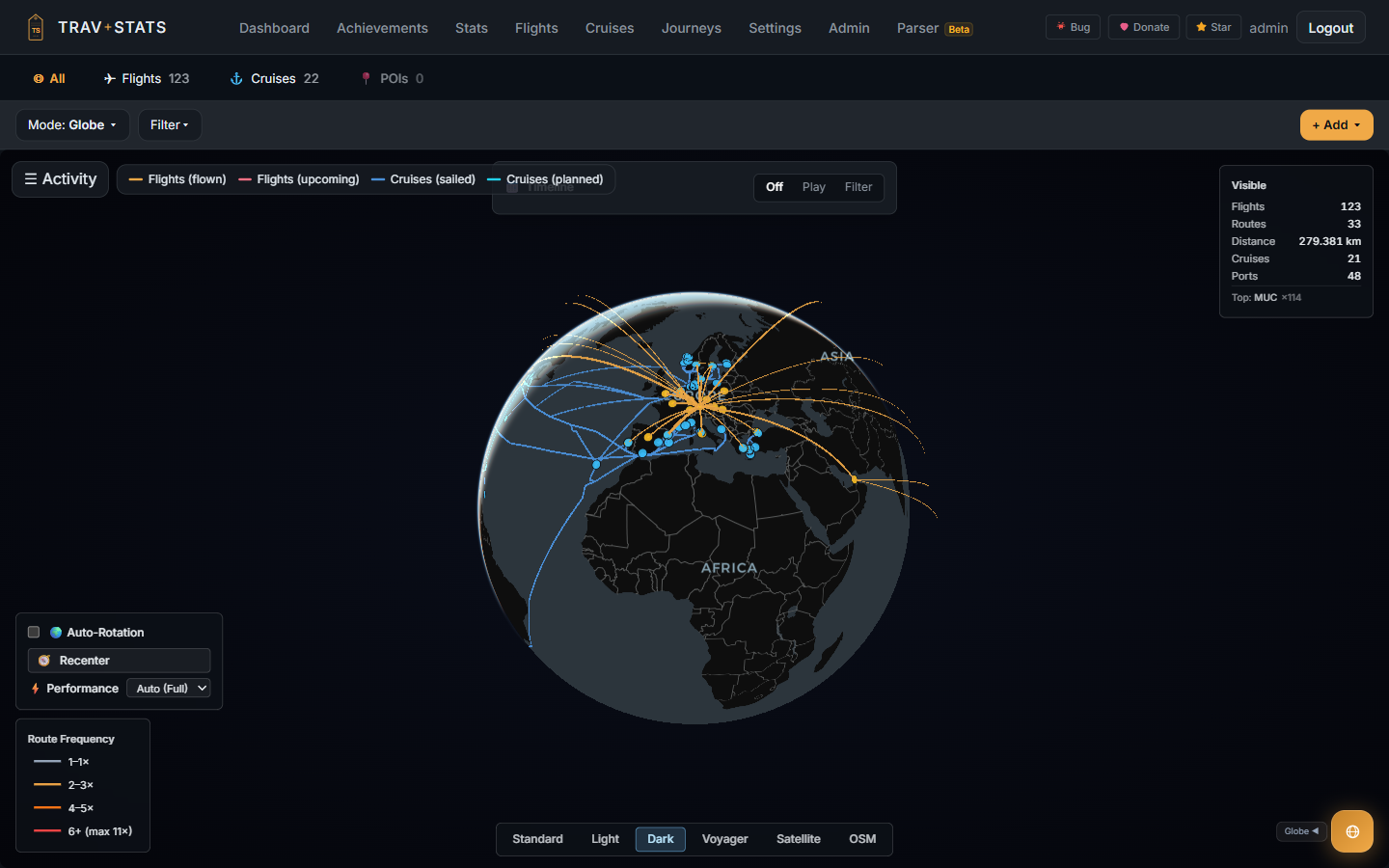
Multi-domain 3D globe — flights and cruises on one map, colour-coded by frequency and status
Why TravStats
Log every flight and cruise you take, visualise your routes on interactive 2D and 3D maps, collect 270+ achievements, and import flights from boarding passes (QR / PDF417 / OCR), confirmation emails, or Excel/CSV — all on your own server, no cloud, no telemetry.
It's a logbook, not a live tracker — you record trips manually, scan a boarding pass, or import a confirmation email, and TravStats turns them into history, stats and maps. Flight data is optionally enriched from AirLabs / Aviationstack / OpenSky, but everything you record lives in your own PostgreSQL. No accounts on someone else's servers, no analytics, no ads.
- 🚢 Flights and cruises — import a cruise from email or PDF: the ship, every port of call and sea day; fly-and-cruise trips link both
- 🗺️ Multi-domain maps — routes, heatmap, animated trips and a 3D globe for flights and cruises, colour-coded by frequency and status
- 📊 Cross-domain statistics — distance, countries, active days, top airlines and cruise lines, with year and all-time views
- 🏆 270+ achievements across flights, cruises and cross-domain — bronze to diamond
- 🎫 Boarding-pass scanner — QR / barcode / OCR
- 📧 Email import — plain text, HTML, Outlook
.msg,.eml, with optional local LLM parsing via Ollama - 📑 Excel/CSV round-trip import — export, edit in Excel, re-import; rows with an
idupdate existing flights - 🤖 Public REST API + OpenAPI 3.0 / Swagger UI — Personal Access Tokens with
read/write/adminscopes for AI agents and automation - 💾 Automated backups with retention + optional WebDAV sync
- 🔐 Invite-only by default — toggle public registration anytime from the admin UI; JWT in HttpOnly cookies, rate limiting on every sensitive endpoint
- 🌐 German + English UI with browser-locale auto-detection, i18n-ready
Is TravStats for you?
Being honest about the fit costs one paragraph and saves an evening of someone else's time.
It probably is, if you want your travel history on hardware you control; keep a household's or a small group's trips in one place; already run Docker and Postgres, or are happy to let the bundled compose file run Postgres for you; like filling in a logbook after the fact and getting maps, stats and achievements out of it; and want flights and cruises (and hotels and places) in one timeline rather than four apps.
It probably is not, if you want live flight tracking or a radar — this records where you have been, it does not watch aircraft move; expect a hosted account you just sign up for, because there is no SaaS version and running it means running a server; need to onboard more than a handful of people, since it is built and tested for roughly 1–10 users on one instance and has no SSO, no org/tenant model and no per-team permissions; need it on a phone as the primary interface — the web UI is responsive, but the native app is not released yet; or need automatic, hands-off import of everything, because a lot of travel history is typed in or imported from files you supply.
Screenshots
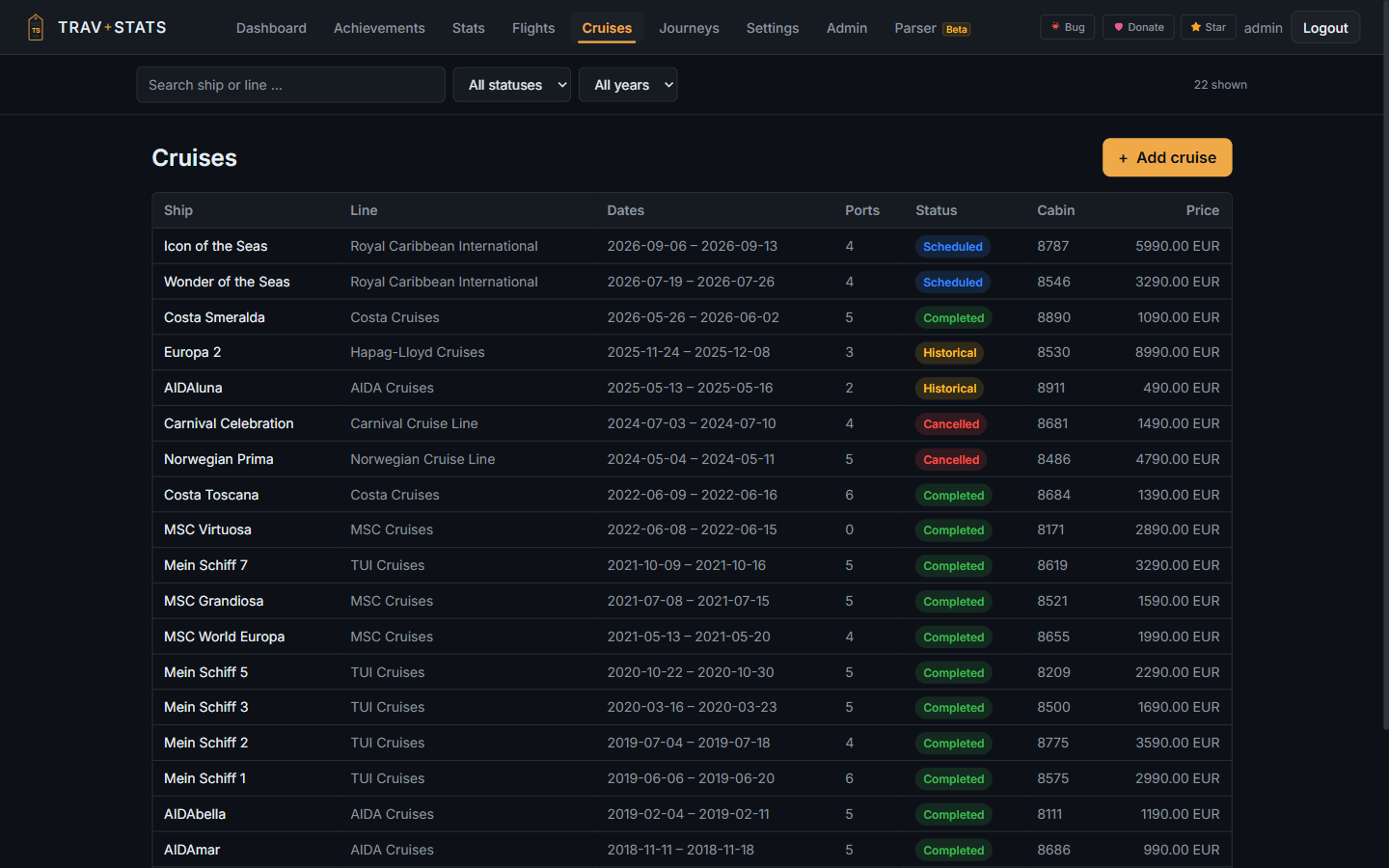 |
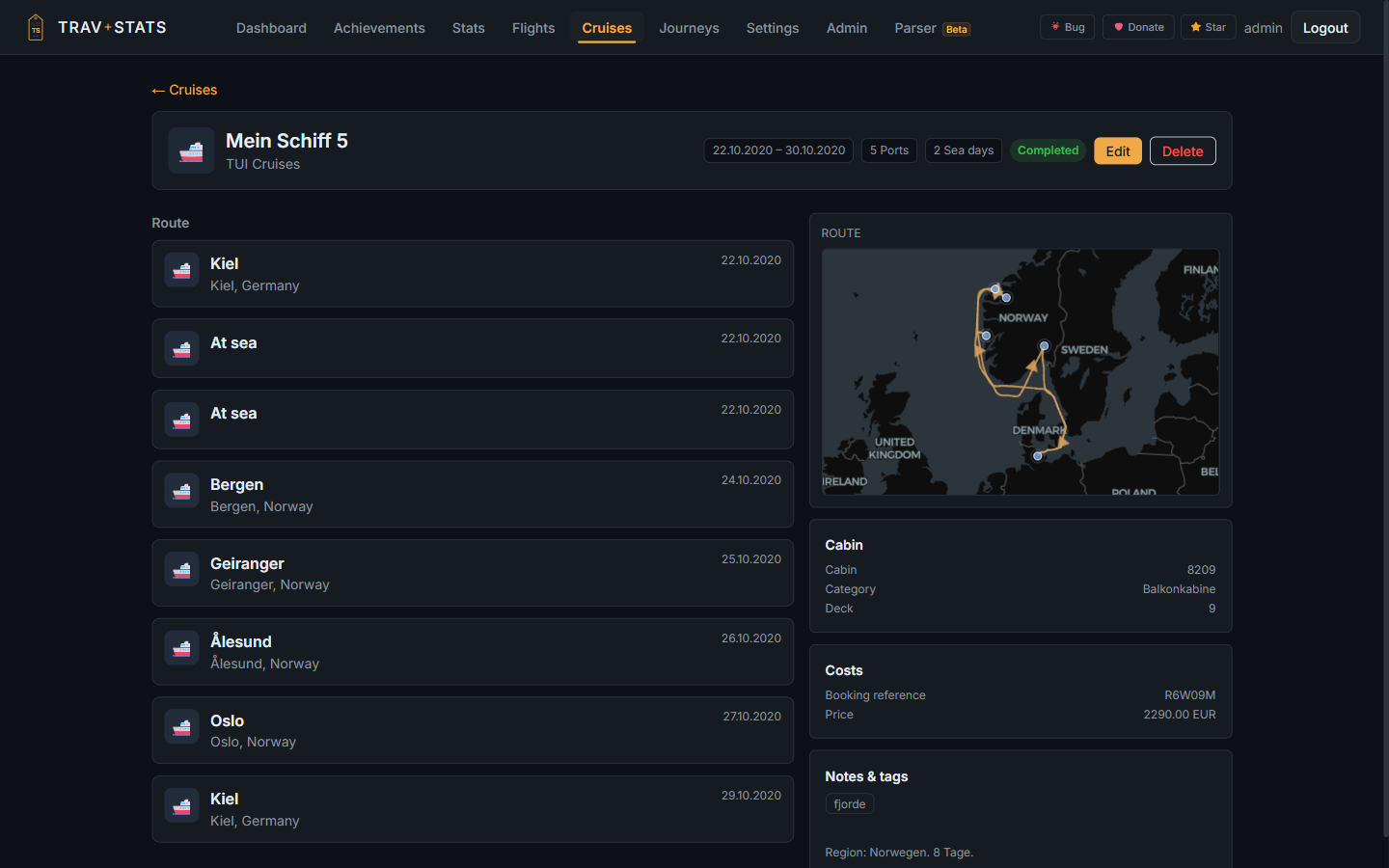 |
| Every cruise — ship, line, ports, sea days, status | Per-cruise itinerary with the reconstructed sea route |
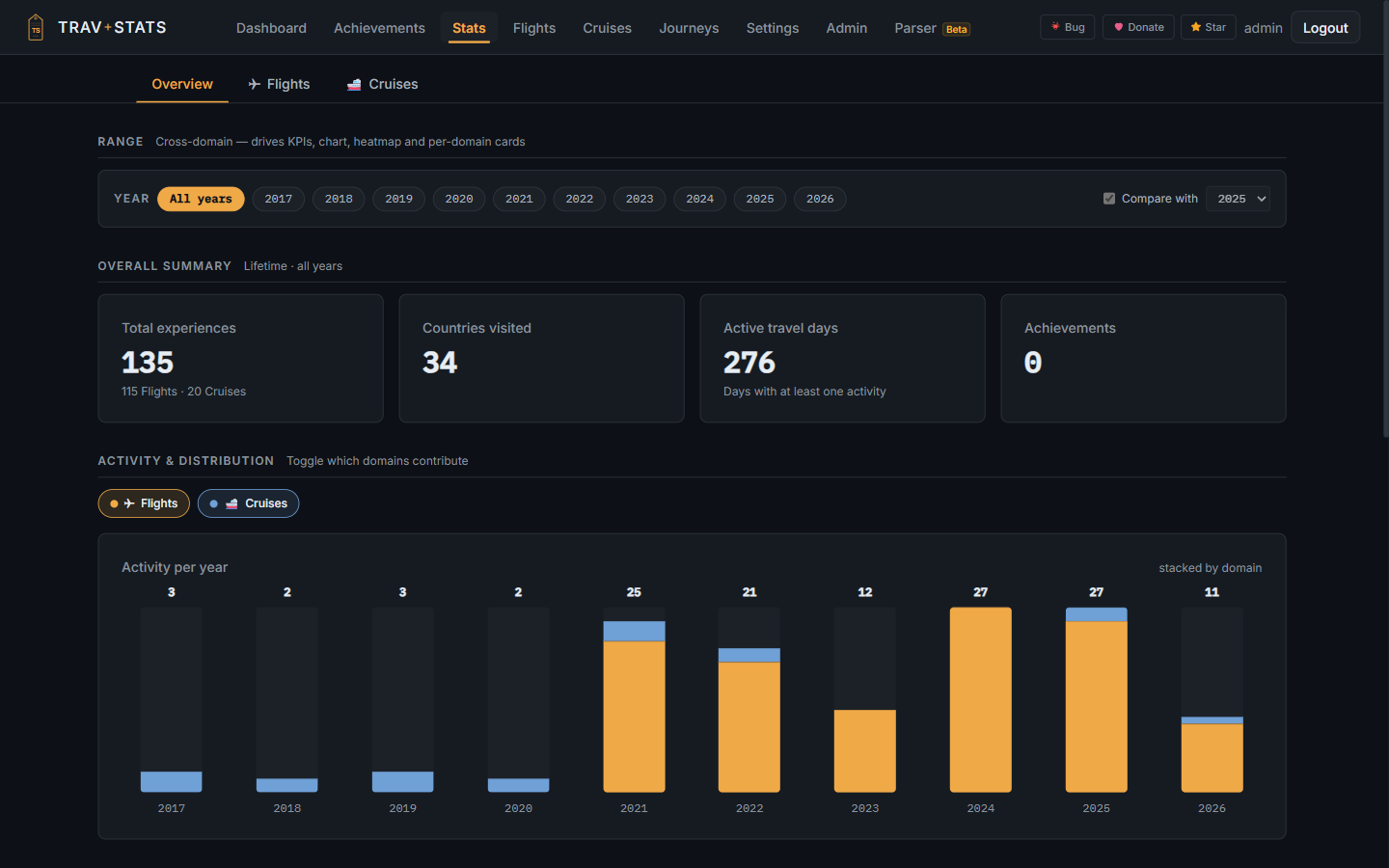 |
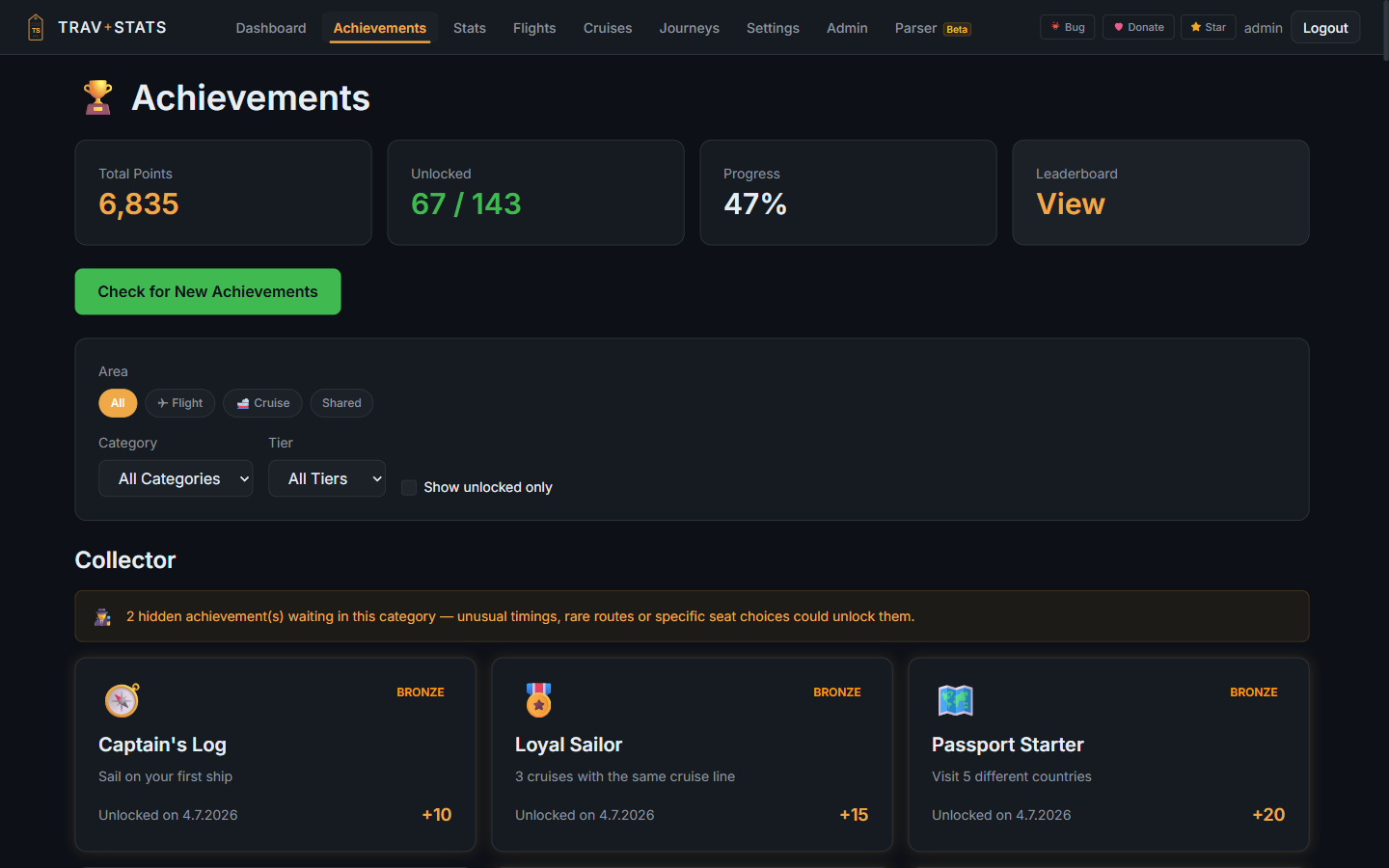 |
| Cross-domain stats with year and all-time views | 270+ achievements, bronze to diamond |
Quick start
The only thing you set in a file is a database password. Everything else — instance name, user cap, API keys, Ollama model, backup schedule, WebDAV — is captured by the first-run setup wizard in the browser.
The same route with screenshots and the per-platform detail: Installation and First run.
Option A — Stack (bundled Postgres, recommended)
# 1. Grab the compose file
curl -O https://raw.githubusercontent.com/Abrechen2/TravStats/main/docker-compose.prod.yml

# 2. Set one variable
echo "DB_PASSWORD=$(openssl rand -base64 32)" > .env

# 3. Start
docker compose -f docker-compose.prod.yml up -d

# 4. Open the setup wizard
open http://localhost:3000/setup
That's the complete install. The container seeds the airport database on first boot (~30 s), auto-generates a JWT secret, and the setup wizard persists instance settings to the database.
Option B — External Postgres
If you already run a Postgres server (homelab, managed DB), skip the
bundled db service by providing DATABASE_URL and removing the db and
depends_on blocks from the compose file:
DATABASE_URL=postgresql://user:pass@postgres.lan:5432/travstats
Unraid
Community Apps templates live in a dedicated repo —
Abrechen2/docker-templates.
Install travstats-db from there first, then TravStats, set the
Database URL password, open /setup. Walk-through with screenshots in
docs/unraid/README.md.
Optional local LLM parsing: install the Ollama Community App (or run Ollama anywhere else on your network), pull
gemma3:12b(~7.5 GB), then point TravStats at it from Admin → Parser. Multi-flight confirmation mails and unknown airline templates are then handled locally — nothing leaves your network.
Image tags
Both registries (GHCR and Docker Hub) carry the same digests for these moving tags. Pick the one your platform defaults to.
| Tag | Points to | Use for |
|---|---|---|
:latest, :stable |
Newest promoted stable release | Normal production. Auto-updates to the next promoted release. |
:X.Y.Z |
Pinned immutable release | Reproducible installs, audit, regulated environments. |
:rc-latest |
Newest Release Candidate | Beta testers — receive every fresh RC via docker compose pull. May include breaking schema changes; an in-place backup is taken automatically on the first start of ANY new version (see Upgrades). |
Which version those moving tags currently resolve to is on the releases page and in the Release badge at the top of this file.
Specific RC and beta tags (:X.Y.Z-rc.N, :X.Y.Z-beta.N) and dev builds
live on GHCR only — Docker Hub only mirrors the moving tags above plus
pinned final releases.
Configuration
Almost nothing to configure via environment variables. The setup wizard captures everything instance-level (name, public URL, user cap, registration mode) and the admin UI handles API keys, Ollama, backup schedule and WebDAV sync.
| Env variable | When to set it | Default |
|---|---|---|
DB_PASSWORD |
Always — shared secret between app and bundled Postgres | required |
APP_PORT |
Different host port | 3000 |
DATABASE_URL |
External Postgres instead of the bundled service | (derived from DB_PASSWORD) |
COOKIE_SECURE |
Reverse proxy doesn't send X-Forwarded-Proto |
(auto-detected) |
CORS_ORIGIN |
Frontend lives on a different hostname than the API | (same-origin only) |
TRUST_PROXY |
Another reverse proxy (NPM, Traefik, Caddy …) sits in front — name its address, e.g. loopback, 192.168.1.10, or every visitor shares one login rate limit |
loopback |
TZ |
Non-UTC container clock (not recommended) | UTC |
SKIP_PRE_MIGRATION_BACKUP |
Upgrade even though the automatic pre-upgrade backup cannot be taken — see Upgrades | (unset; only the literal true counts) |
See .env.prod.example for the annotated list.
Behind a reverse proxy or CDN
Never let a cache rule apply to /api/. Every API response — receipts,
avatars, photos, documents, exports — belongs to one signed-in user. The app
marks all of them Cache-Control: no-store (or private where a browser may
keep them), but several common proxy settings ignore that header:
- Nginx Proxy Manager → "Cache Assets" caches every URL ending in
.png,.jpg,.svg,.js,.css… for 30 minutes, keyed on host and path only, ignores the app'sCache-ControlandSet-Cookie, and stripsCache-Controlfrom the response. Whatever it caches is handed to the next visitor, signed in or not. - Cloudflare caches a fixed list of extensions by default (
.pdf,.png,.jpg,.zip,.gz,.csv,.xlsx…). It honoursno-store— unless a proxy in front of the app removed it, which is exactly what the NPM switch above does. "Cache Everything" page/cache rules and "Edge Cache TTL" overrides ignore the header outright.
The API itself serves no private data at a URL that ends in a file
extension: files live at extension-less URLs (…/content, …/file),
older URLs answer only with a redirect, and any other /api/ path ending in a
cacheable extension is refused with a 404. That closes the gap for
extension-based rules, but not for a rule that caches everything. So:
- In Nginx Proxy Manager, leave Cache Assets off for the TravStats proxy host.
- In Cloudflare, scope any cache rule to exclude
/api/*— or add a rule that bypasses the cache for/api/*. - In any other proxy (Traefik, Caddy, plain nginx), do not put
proxy_cacheor an equivalent on/api/.
Runtime-configurable from the admin UI
- Instance name, public URL, user cap, registration mode
- AirLabs / OpenSky / Aviationstack API keys (encrypted at rest)
- Ollama endpoint + model (default
gemma3:12b) - Backup schedule and retention
- WebDAV off-site backup sync (Nextcloud, HiDrive, …)
- SMTP for invitation and password-reset emails
- Logging level and retention
TravStats works without any API key; manual flight entry and boarding-pass scanning cover the full feature set.
Every field in that panel is documented under Admin panel, the optional third-party integrations (flight-data APIs, Ollama, SMTP) under External services, and the backup schedule, retention and WebDAV sync under Backups.
Upgrades
Starting a version you have not run on this data before takes a database
snapshot BEFORE any migration runs, into /app/data/backups/ as
pre-v<version>-upgrade-<timestamp>.sql. It happens on every version change,
not only a major one: the 2.4.0 → 2.5.0 upgrade applied seven migrations, and
"major bumps only" would have skipped exactly the release that most needed a
snapshot.
If that snapshot cannot be taken, the container refuses to start. It
logs a [pre-migration-backup] FATAL block naming the cause and stops before
prisma migrate deploy. Nothing has been migrated at that point: the database
is untouched, and the previous image still runs against it. That refusal is
deliberate — it is recoverable, and a schema change taken without a snapshot
may not be.
The usual causes, in order of how often they happen:
pg_dumpis older than the server.pg_dumprefuses to dump a server newer than itself, so the client must be at least the server's MAJOR version (a newer client against an older server is fine). This is the normal outcome of pointing TravStats at a Postgres you already run and later upgrading it. The fatal message names the two versions when it can read them.- The database container was renamed, so the backup cannot reach it
(
DOCKER_DB_CONTAINER). - No free space under the data volume.
To upgrade anyway, without a snapshot:
environment:
  SKIP_PRE_MIGRATION_BACKUP: "true"
It boots with a warning instead of the refusal. Only the literal string true
counts — 1 and yes do not, because this is consent to migrate with no way
back. Take your own backup first, and unset it again afterwards.
What's in a release
See CHANGELOG.md for the full history and ROADMAP.md for where things are heading. A native iOS & Android app (boarding-pass scan, a 3D globe of your travels) is in the works — no release date yet; hotels & places-of-interest, CO₂ tracking and a trip planner are on the map too.
Known limitations
Things worth knowing before you commit a weekend to this. None of them are secrets; they are just easier to read here than to discover later.
- amd64 only. The published images carry a single
linux/amd64manifest. A Raspberry Pi or an Apple-Silicon Mac cannot run them natively — you would have to build the image yourself for your architecture. - Single instance, small groups. Designed and tested for roughly 1–10 users on one instance. There is no multi-tenancy, no SSO/OIDC/LDAP, and no per-team permission model; accounts are invite-only by default and managed by an admin.
- Postgres is required. Bundled in the compose file, but there is no SQLite fallback, so the database is part of what you operate and back up.
- Enrichment depends on third-party APIs. Flight enrichment via AirLabs / Aviationstack / OpenSky is optional and works on free tiers, which means their rate limits and occasional gaps are yours too. Nothing breaks without a key — you just enter more by hand.
- Local LLM parsing needs real hardware. The Ollama path
(
gemma3:12b) handles messy multi-flight mails and unknown airline templates. On a shared, CPU-only VM it has been measured at a fraction of a token per second, which times out and falls back to the template parser. Budget a machine with a GPU or accept the regex path. - Import is assisted, not automatic. Boarding passes, confirmation emails and CSV/Excel are parsed for you, but there is no mailbox polling and no airline account linking. You bring the file or the text.
- The native mobile app is not released. It is in development; the web UI is responsive and is the way to use TravStats today.
- Some features sit behind a beta flag. An admin toggle hides unfinished areas on production instances. If something in the docs or a screenshot is not visible in your install, that is usually why.
- Solo project. One maintainer. Issues and fixes move at the pace that implies — see the commit history for an honest picture of it.
Symptoms that do have a fix — a container that won't start, a parser that returns nothing, a reverse proxy that breaks the login cookie — are collected in Troubleshooting.
Security
See SECURITY.md for the hardening summary, audit history, and verification commands. TL;DR: JWT in HttpOnly cookies, 18 distinct rate limiters, Zod validation on every endpoint, Prisma-parameterised queries, Helmet CSP, invite-only by default.
Report vulnerabilities via GitHub Security Advisories — please do not open a public issue.
API for external tools
TravStats ships an authenticated REST API for AI agents, automation scripts and integrations. Everything the web UI shows — flights, cruises, lodging, places, trips and the statistics over them — is reachable programmatically with the same token.
1. Mint a Personal Access Token: in the app, go to Settings →
API Tokens, give it a label and a scope (read, write, admin),
and copy the ts_pat_… value. The plaintext is shown exactly once —
only the bcrypt hash is persisted. Scopes, rotation and revocation:
Personal access tokens.
2. Browse the spec: open https://<your-host>/api/v1/docs
(Swagger UI) or fetch /api/v1/openapi.json for the raw OpenAPI 3.0
document. Request and response shapes come from the same Zod schemas
the backend validates with, so a documented field cannot describe a
shape the server rejects. Coverage is enforced separately: a test walks
the live route table and fails the build when an endpoint ships without
a spec entry. The admin API and the first-boot wizard are excluded on
purpose and named as such — they are not integration surfaces. A prose
walk-through of the endpoints, pagination and error shapes is at
REST API.
3. Call it: every endpoint accepts the token via the standard
Authorization header.
TOKEN="ts_pat_…"

# List your flights
curl -H "Authorization: Bearer $TOKEN" \
  https://travstats.example.com/api/v1/flights

# Create a flight (write or admin scope required)
curl -H "Authorization: Bearer $TOKEN" \
     -H "Content-Type: application/json" \
     -d '{"departure":{"iata":"FRA","lat":50.0379,"lon":8.5622},
          "arrival":{"iata":"JFK","lat":40.6413,"lon":-73.7781},
          "departureTime":"2026-05-01T08:00:00.000Z",
          "arrivalTime":"2026-05-01T17:00:00.000Z",
          "flightNumber":"LH400"}' \
  https://travstats.example.com/api/v1/flights
Pass ?merge=true on POST /flights to enrich an existing matching
flight (boarding-pass re-import, email confirmation upgrade) instead
of creating a duplicate. Read-only tokens are blocked from mutating
endpoints with 403; admin endpoints additionally require an
admin-scoped token even if the owning user is an admin.
Token requests get their own per-token rate-limit bucket so an aggressive script can't lock the user out of the web UI.
Contributing
Bug reports, feature ideas and pull requests are welcome. The Report Bug button in the app copies an anonymised diagnostic bundle for you. See CONTRIBUTING.md for the full guide.
Development
npm run install:all     # install backend + frontend
npm run dev             # backend :8000 + frontend :3000
npm run typecheck       # tsc --noEmit on both
npm run lint            # eslint on both
npm run test:frontend   # Vitest (backend tests need Postgres)
What CI checks
.github/workflows/ci.yml runs typecheck and
lint on both trees, the Vitest suite, and a Prettier check scoped to the
frontend files a change touches. The Jest backend suite runs there too
against a throwaway Postgres, but is marked advisory rather than blocking:
it currently has pre-existing test-isolation failures that have nothing to
do with the change under review. The measured numbers and both root causes
are written at the top of that job.
.github/workflows/security.yml runs
npm audit over production dependencies (blocking at critical), plus
Trivy and CodeQL, whose findings land in the repository's Security tab.
Locally, .pre-commit-config.yaml runs
typecheck and lint for whichever tree a commit touches, alongside the
formatting and hygiene hooks. Install it once with pre-commit install.
Deep-dive developer reference: CLAUDE.md.
License
Copyright © 2026 Dennis Wittke · AGPL-3.0-or-later
You may use, modify and redistribute TravStats, but if you run it as a web service (even modified) you must make the complete source code of your modifications available under the same licence. See LICENSE.
Third-party data and assets
- Airline logos — soaring-symbols,
MIT, © 2024 Anh Thang. Vendored under
backend/data/airline-logos/so a self-hosted instance gets logos with no API key and no external request. The logos are the trademarks of the respective airlines. They are shown to identify the carrier of a flight (nominative use) and neither TravStats nor the asset authors claim any right in them, nor imply any endorsement by or affiliation with the airlines. - Airports — OurAirports, public domain.
- Shipping lanes — Eurostat marnet network, © European Union.
- Rail stations — Trainline stations,
ODbL 1.0. A filtered copy (stations with a position that Trainline offers
in its own search, plus their parents; nine columns) is vendored under
backend/data/rail/, which carries the licence and how it was built. That derivative is itself available under the ODbL. - Train lookup and traced lines — Transitous and the timetables of its sources, used for open-source, non-commercial purposes as its terms ask; German journeys can also be looked up through db-rest. Both are asked only when a user presses "look the train up", and an admin can switch either off.
Support the project
TravStats is a solo side project. If it's useful to you, a small donation via PayPal keeps the lights on for AirLabs quota top-ups. ❤️
⭐ Star on GitHub · Releases · Roadmap · Issues
Made with ❤️ and a bit of AI for flight enthusiasts.
Ferry data sources (beta)
Ferry terminal search uses the configured Photon service with OpenStreetMap's
amenity=ferry_terminal filter. The editor can switch back to general place
search, coordinates or a map pin when a terminal is missing. Provider outages
are shown separately from an empty search result.
In Ferries → Add crossing → Read ferry ticket, upload a text PDF/EML or paste ticket text. A preview shows each proposed value with its source text. English/German labelled tickets work without AI; unfamiliar layouts can use the existing admin-enabled, consented AI provider chain. Scanned PDFs need pasted text or manual entry; an EML currently reads the message body. Dates without a printed year and ambiguous numeric dates are not guessed. Confirm port positions before saving. One crossing is created per save, and an uploaded original is attached to it. Cancelling leaves the original in the existing unfiled-document inbox, subject to its normal retention rules.
Optional live vessel snapshots use AISStream.
Set AISSTREAM_API_KEY on the backend through the normal secret configuration,
then enter the ship's nine-digit MMSI on a crossing's detail page and request a
position. This is an explicit current-vessel lookup, not automatic ship matching
or a historical journey track. Requests wait at most 15 seconds, share requests
for the same MMSI and cache answers for 30 seconds. Each backend process uses at
most two simultaneous sockets; account/IP limits also include other processes.
No signal is distinct from a stopped ship. Receipt time and source time are
separate; no observation time is invented when the source omits it. No historical
crossing, distance or status is changed. No API key is sent to the browser.
Requirements
Categories
Download Statistics
Related apps
Explore more like this
Explore allLinks
Details
abrechen2/travstats:latestRuntime arguments
- Web UI
http://[IP]:[PORT:80]/- Network
bridge- Shell
sh- Privileged
- false
- Extra Params
--restart=unless-stopped --add-host=host.docker.internal:host-gateway
Template configuration
Host port where TravStats will be accessible.
- Target
- 80
- Default
- 3000
- Value
- 3000
Persistent app data — holds the airport database, user uploads, backups, LLM training artefacts, and the auto-generated JWT secret + encryption key. Single volume; nothing else needs to be mounted.
- Target
- /app/data
- Default
- /mnt/user/appdata/travstats
- Value
- /mnt/user/appdata/travstats
PostgreSQL connection string. Replace the CHANGEME part with the password you set on the travstats-db container — everything else stays as-is. Uses host.docker.internal so TravStats reaches the DB through the Unraid host rather than needing a custom Docker network. If your PostgreSQL listens on a different host port, adjust the :5432 here to match. Format: postgresql://USER:PASSWORD@host.docker.internal:HOST-PORT/DB-NAME.
- Target
- DATABASE_URL
- Default
- postgresql://flights:CHANGEME@host.docker.internal:5432/flights
- Value
- postgresql://flights:CHANGEME@host.docker.internal:5432/flights
Container timezone. Keep UTC (recommended).
- Default
- UTC
- Value
- UTC