

Tracktor
Docker app from TeeCodeDev's Repository
Overview
Tracktor is a modern, open-source, self-hosted vehicle management platform built with SvelteKit, Tailwind CSS, and SQLite. Keep fuel logs, service history, insurance and compliance certificates, and maintenance reminders for all your vehicles in one place.
Key Features:
- Garage Management: Multi-vehicle fleet support with individual fuel types, specs, and history.
- Fuel & Efficiency Tracking: Log fill-ups and monitor fuel consumption, mileage, and cost-per-distance trends.
- Service & Maintenance Logs: Full service history with parts, costs, and scheduled maintenance alerts.
- Compliance & Documents: Track insurance policies, pollution certs, and upcoming renewal expiry dates.
- Customizable Dashboard: Fleet-wide overview with drag-and-drop widget layout.
- Multi-Language: Supports 11 languages (English, German, French, Spanish, Italian, and more).
- Fast & Self-Contained: SQLite with Drizzle ORM, local file uploads, and zero required external services.
Initial Setup:
When opening the web interface for the first time at [inline]http://[IP]:[PORT:3000]/[/inline], Tracktor will automatically display the account registration form to create your admin account.
Readme
View on GitHub⚠️ WARNING: Tracktor is under active development. There may be frequent breaking changes, though we are taking precautions but it is not stable for production use. Please keep regular backups of your data!

Tracktor





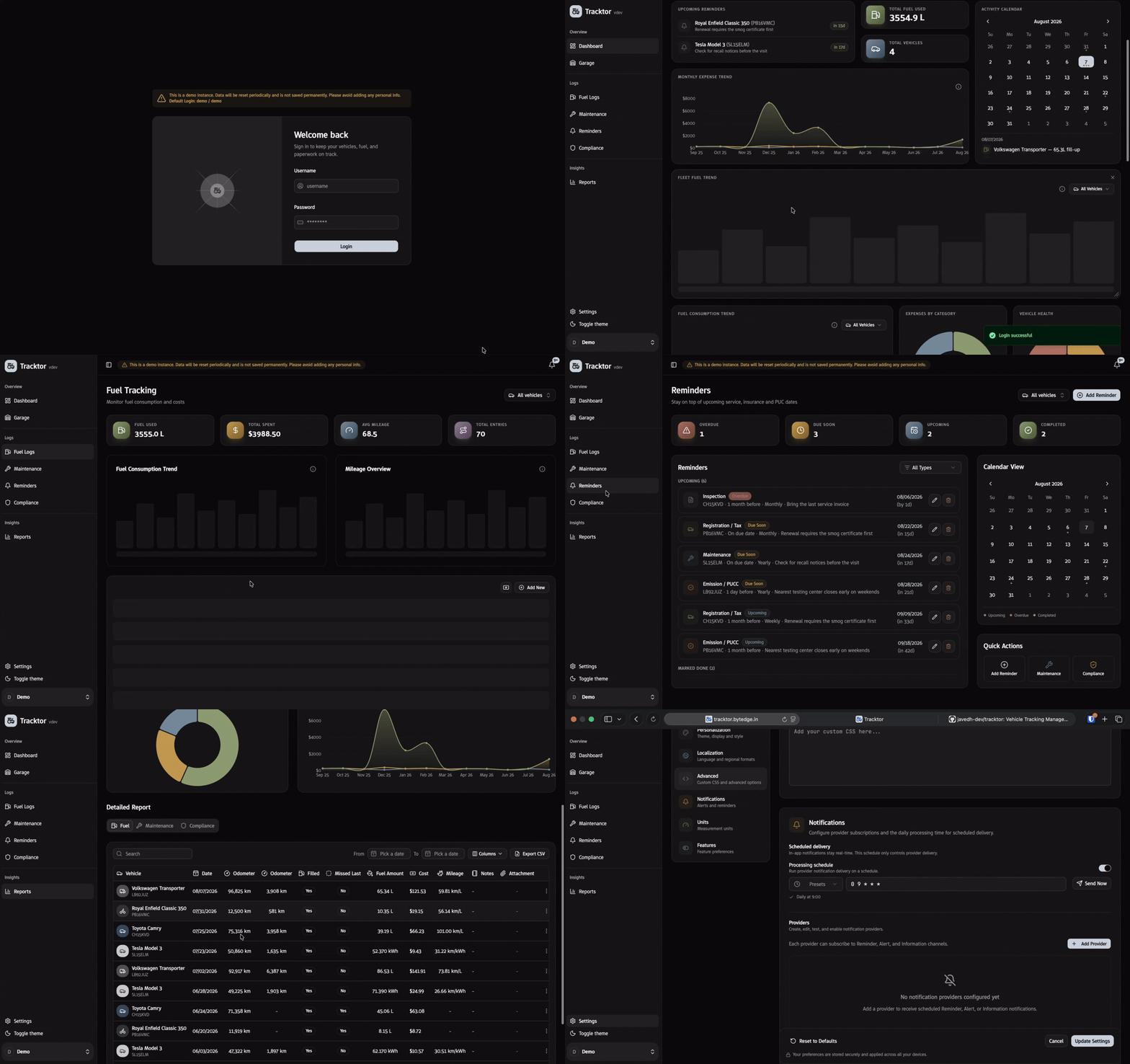
If you own more than one vehicle, you know the drill: fuel receipts in a drawer, insurance PDFs buried in email, a maintenance date you meant to write down somewhere. Tracktor is a self-hosted app that keeps all of that in one place — fuel logs, service history, insurance and pollution certs, reminders before they lapse, and a dashboard that actually shows you what's going on across your fleet.
Run it on a Raspberry Pi, a home server, or a $5 VPS. Your data stays yours.
What it does
- Garage — Add and manage multiple vehicles, each with its own fuel type and history.
- Fuel tracking — Log every fill-up and watch your mileage/efficiency trends over time.
- Maintenance log — Keep a full service history per vehicle, and know what's coming up next.
- Compliance — Track insurance and pollution (PUCC) certificates, with renewal dates that don't sneak up on you.
- Reminders — Get nudged before something expires or a service is due.
- Expenses & reports — See what your vehicles actually cost you.
- Dashboard — A fleet-wide overview with widgets you can rearrange to your liking.
- Auth & feature toggles — Username/password login with sessions, and the ability to turn off features you don't need.
- 11 languages — English, Hindi, Spanish, French, German, Italian, Arabic, Romanian, Hungarian, Finnish, and Russian.
Tech stack
SvelteKit (Svelte 5) + Tailwind CSS on the frontend, SvelteKit server routes on the backend, SQLite via Drizzle ORM for storage, shipped as a Docker image.
Getting started
The fastest way to try Tracktor is Docker Compose:
services:
  app:
    image: ghcr.io/javedh-dev/tracktor:latest
    container_name: tracktor-app
    restart: always
    ports:
      - '3333:3000'
    volumes:
      - tracktor-data:/data
volumes:
  tracktor-data:
docker-compose up -d
Then open http://<your_ip_address>:3333.
For local development, Proxmox LXC setup, reverse proxies, and every configuration option, see the installation guide.
Documentation
- Installation Guide — Docker, local dev, Proxmox LXC
- Environment Variables — every config option, explained
- Authentication — how login and sessions work
- Feature Toggles — turning features on/off
- Contributing — how to get involved
Contributing
PRs and issues are welcome — read the contributing guide first. If Tracktor is useful to you, a star ⭐ or a sponsorship helps keep it going.
License
MIT — see LICENSE.
Contributors
Media gallery
1 / 2Categories
Related apps
Explore more like this
Explore allDetails
ghcr.io/javedh-dev/tracktor:latestRuntime arguments
- Web UI
http://[IP]:[PORT:3000]/- Network
bridge- Shell
sh- Privileged
- false
Template configuration
The port for the Tracktor web interface (internal container port is 3000).
- Target
- 3000
- Default
- 3333
Storage path for SQLite database (tracktor.db), uploaded documents, images, and log files.
- Target
- /data
- Default
- /mnt/user/appdata/tracktor
Secret key used to encrypt stored credentials (e.g. notification provider passwords). Generate a random 32-character hex string (e.g. run 'openssl rand -hex 32' in terminal).
- Target
- APP_SECRET
Set to 'https' if running behind an SSL/TLS reverse proxy (marks session cookies as Secure), or 'http' for direct local network access.
- Target
- HTTP_MODE
- Default
- http
Base URL sub-path if serving behind a reverse proxy sub-folder (e.g. '/tracktor'). Leave blank if serving from root domain or subdomain.
- Target
- BASE_URL
Allowed CORS origins (comma-separated list, e.g. 'http://example.com,https://garage.domain.com' or '*' to allow all).
- Target
- CORS_ORIGINS
- Default
- *
Set to 'true' to disable authentication entirely (not recommended).
- Target
- TRACKTOR_DISABLE_AUTH
- Default
- false
Set to 'true' to load sample demo vehicles and data.
- Target
- TRACKTOR_DEMO_MODE
- Default
- false
Logging verbosity (error, warn, info, http, verbose, debug, silly).
- Target
- LOG_LEVEL
- Default
- info