
All apps · 0 apps

Tracefinity
OfficialDocker app from campu0999's Repository
Overview
Readme
View on GitHub




Generate custom gridfinity bins from photos of your tools.
How It Works
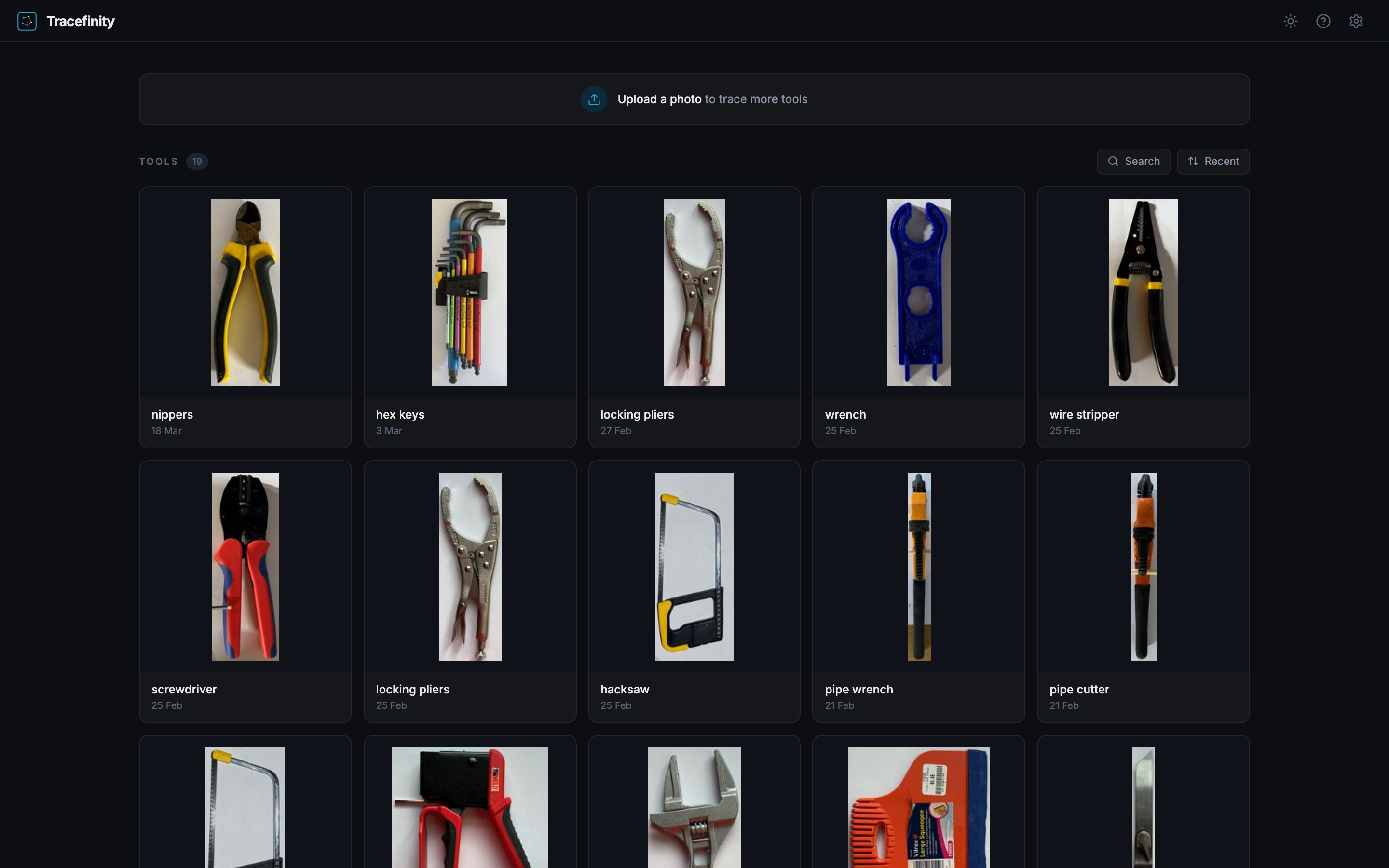
- Place tools on A4, Letter, A3, or Tabloid paper (tools can overflow the edges)
- Take a photo from above
- Upload and adjust paper corners for scale calibration
- AI traces tool outlines automatically
- Save traced tools to your library
- Group tools into projects when planning a drawer or workspace
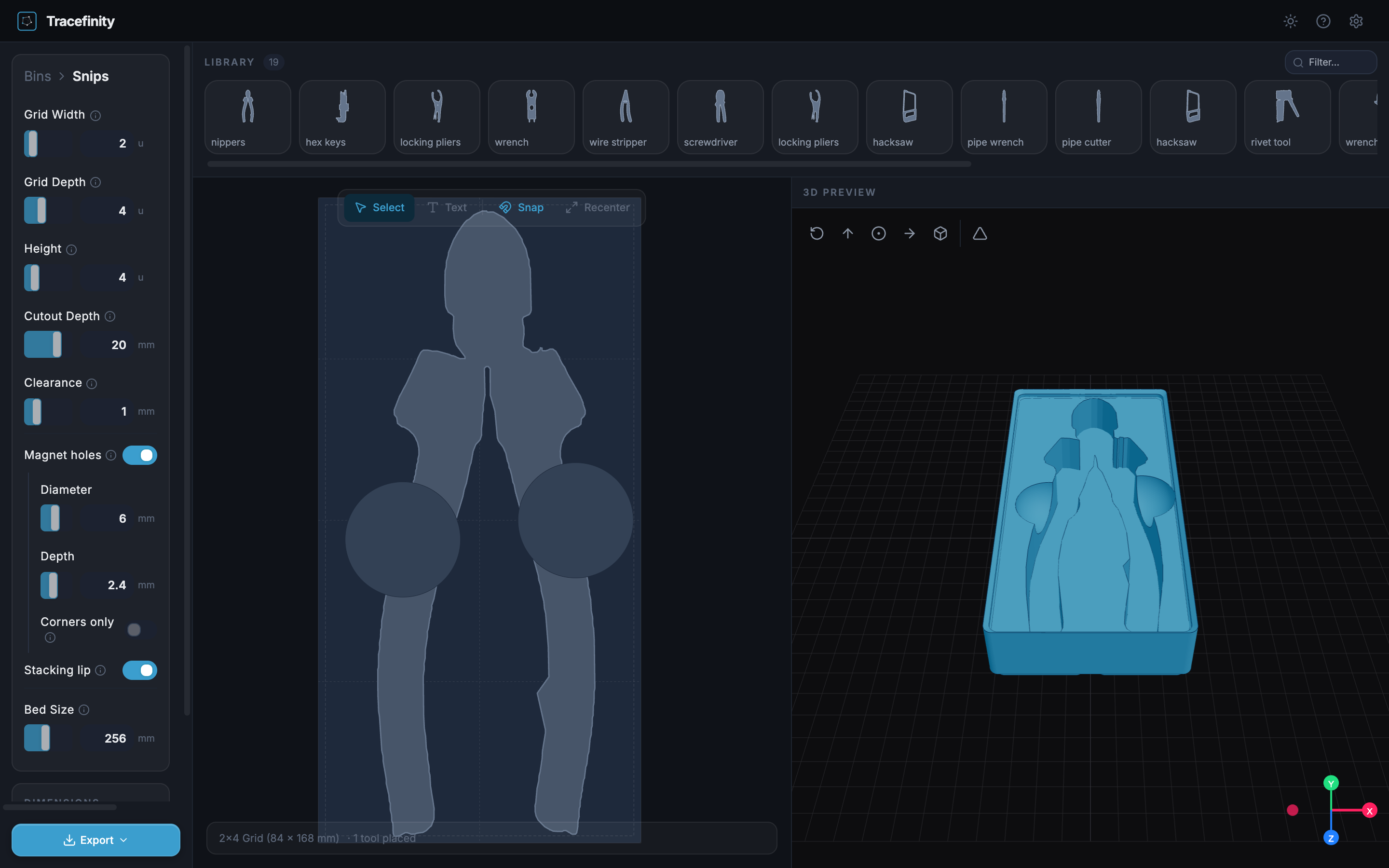
- Create bins from project tools, arrange the layout
- Download STL/3MF for 3D printing
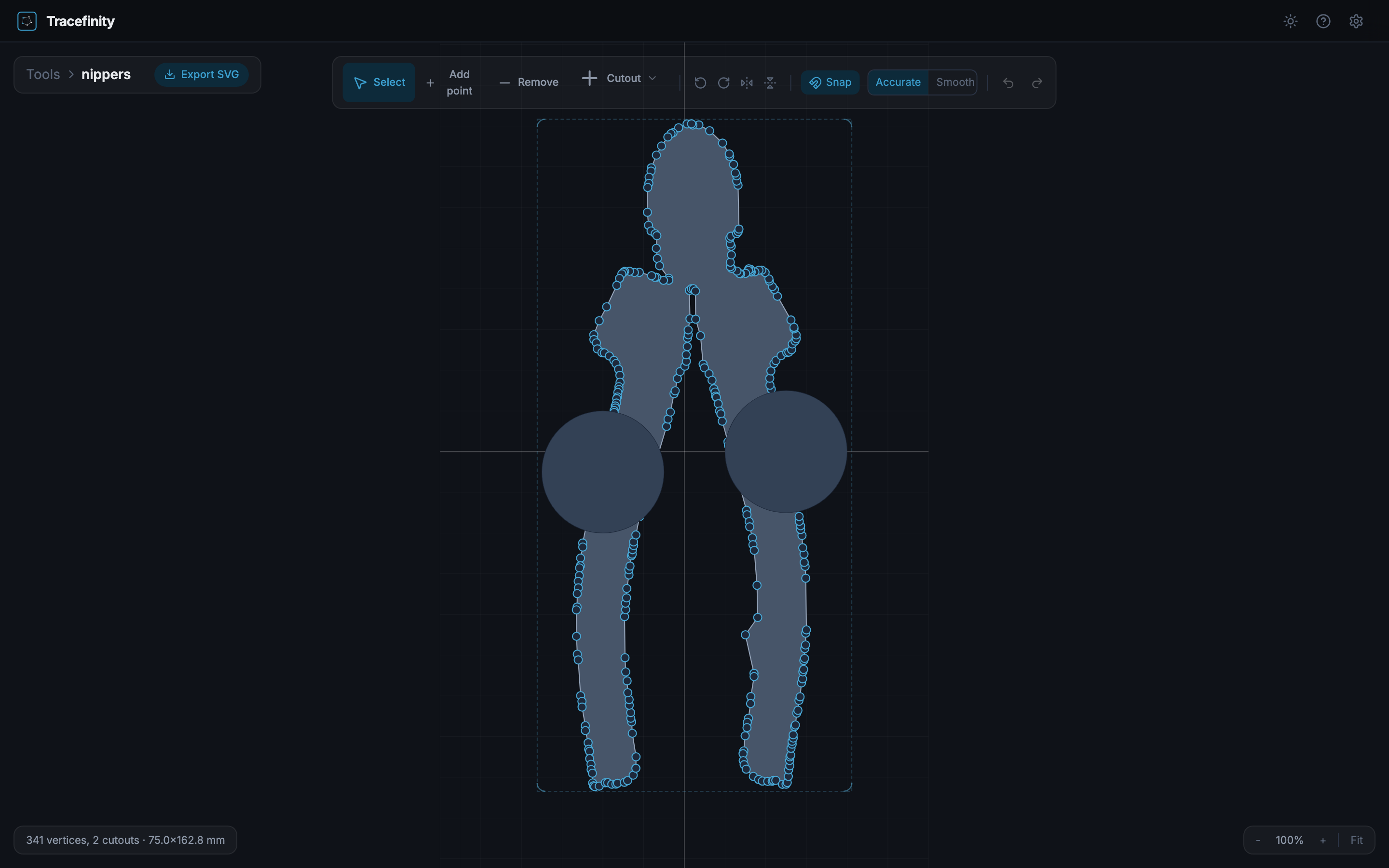
| Dashboard | Tool Editor | Bin Editor |
|---|---|---|
 |
 |
 |
Quick Start
Docker
# local model (no API key needed)
docker run -p 3000:3000 -v ./data:/app/storage ghcr.io/tracefinity/tracefinity

# or with Gemini API
docker run -p 3000:3000 -v ./data:/app/storage -e GOOGLE_API_KEY=your-key ghcr.io/tracefinity/tracefinity

# remote saliency via fal.ai
docker run -p 3000:3000 -v ./data:/app/storage -e FAL_KEY=your-key ghcr.io/tracefinity/tracefinity

# remote saliency via Replicate
docker run -p 3000:3000 -v ./data:/app/storage -e REPLICATE_API_TOKEN=your-token ghcr.io/tracefinity/tracefinity

# run as your host user (files in ./data owned by you, not root)
docker run -p 3000:3000 -v ./data:/app/storage --user "$(id -u):$(id -g)" ghcr.io/tracefinity/tracefinity
With a remote provider the corrected paper crop is sent to that provider for masking. When a tool overhangs the sheet the crop grows past the paper edge and is sent again, so some of the surrounding photo can go to the provider in a second or third request. fal is called with sync_mode, so the result is not kept in request history; Replicate API predictions (including the input image) auto-purge after about an hour, which is the only retention control Replicate exposes (it has no API to delete them sooner).
The Docker image supports linux/amd64 and linux/arm64. Apple Silicon Macs run arm64 natively via Docker Desktop. ARM devices need at least 2GB RAM (for U2-Net paper detection), so a Raspberry Pi 4/5 with 4GB+ works.
The first visit prompts you to create an administrator account; any data from an earlier version is claimed by that account, untouched on disk. See Authentication for modes, 2FA, and recovery.
By default, Tracefinity uses IS-Net for local tracing -- no API key needed. Set GOOGLE_API_KEY to use Gemini instead. See Tracing Modes for RAM requirements per model.
| Variable | Default | Description |
|---|---|---|
GOOGLE_API_KEY |
Gemini API key. Uses Gemini instead of local models | |
TRACERS |
auto-detected | Comma-separated list of available tracers, e.g. gemini,birefnet-lite,isnet. When set it is the complete list; unset with a Gemini or OpenRouter key offers gemini only |
MAX_UPLOAD_MB |
20 |
Maximum compressed upload size in megabytes |
MAX_IMAGE_PIXELS |
64000000 |
Maximum decoded pixels accepted before downscaling |
STL_GENERATION_CONCURRENCY |
unlimited | Process-wide maximum STL generation jobs; excess jobs wait up to 5 seconds, then receive 503 |
STL_RETENTION_HOURS |
24 |
Hours generated STL/3MF/zip exports are kept before a background sweep deletes them; a bin page regenerates them on the next visit or export download. 0 keeps exports forever |
TRACEFINITY_ONNX_PROVIDER |
auto |
Local ONNX provider: auto, cuda, or cpu |
GEMINI_IMAGE_MODEL |
gemini-3.1-flash-image-preview |
Gemini model for mask generation (see below) |
TOOL_LABEL_PROVIDER |
none |
Optional automatic tool naming: ollama (local vision model) or openrouter (any OpenAI-compatible endpoint via OPENROUTER_URL). See Tool naming |
SHOW_APP_VERSION |
true |
Show the running version in the settings popover. Set to false to hide it |
AUTH_MODE |
native |
Authentication mode: native (cookie login), proxy (trusted reverse proxy, deprecated), or open (no authentication, trusted networks only). See Authentication |
AUTH_SECRET |
auto-generated | Encrypts 2FA secrets at rest. Auto-generated into the storage volume when unset |
AUTH_COOKIE_SECURE |
false |
Mark the auth cookie Secure. Set true behind TLS |
AUTH_COOKIE_DOMAIN |
host-only | Auth cookie domain for subdomain topologies |
PROXY_SECRET |
Shared secret for a trusted multi-user reverse proxy (proxy mode). Leave unset for normal standalone use |
Docker Compose
services:
  tracefinity:
    image: ghcr.io/tracefinity/tracefinity
    ports:
      - "3000:3000"
    volumes:
      - ./data:/app/storage
    environment:
      GOOGLE_API_KEY: your-key  # optional, omit to use local model
    restart: unless-stopped
docker compose up -d
Kubernetes (Helm)
helm registry login ghcr.io --username <your-github-username> --password <your-github-token>

helm install tracefinity oci://ghcr.io/tracefinity/charts/tracefinity \
  --namespace tracefinity \
  --create-namespace \
  --set persistence.enabled=true \
  --set persistence.size=5Gi
To use Gemini instead of the local model:
helm install tracefinity oci://ghcr.io/tracefinity/charts/tracefinity \
  --namespace tracefinity \
  --create-namespace \
  --set persistence.enabled=true \
  --set persistence.size=5Gi \
  --set env.GOOGLE_API_KEY=your-key
Or with a values.yaml:
persistence:
  enabled: true
  size: 5Gi

env:
  GOOGLE_API_KEY: your-key
helm install tracefinity oci://ghcr.io/tracefinity/charts/tracefinity \
  --namespace tracefinity \
  --create-namespace \
  -f values.yaml
Note: The local tracing models load at startup and require at least 2GB of memory. Set resource limits accordingly — see Tracing Modes for per-model RAM requirements.
From Source
Prerequisites: Python 3.11+, Node.js 20+, pnpm
git clone https://github.com/tracefinity/tracefinity
cd tracefinity

# First time setup
cd backend && python3 -m venv venv && source venv/bin/activate && pip install -r requirements.txt
cd ../frontend && pnpm install
cd ..

# Run (starts backend on :8000 and frontend on :4001)
make dev
Tracing Modes
Tracefinity supports three ways to trace tool outlines from photos. All three produce the same output -- black and white mask images that get converted to editable polygons via OpenCV contour extraction.
Local models (default)
When no API key is configured, Tracefinity runs a local salient object detection model. No API key, no network access, no cost. Model weights download automatically on first trace. Three CPU-friendly models are available by default, selectable via the TRACERS env var or the UI dropdown:
| Model | Speed (CPU) | Min RAM | Quality | Notes |
|---|---|---|---|---|
| IS-Net (default) | ~0.8s | 2GB | Good | Fastest, lowest memory |
| BiRefNet Lite | ~3.6s | 8GB | Best | Handles reflections and shiny surfaces well |
| InSPyReNet | ~2.8s | 6GB | Good | Apple Silicon (MPS) support |
Paper corner detection runs U2-Net Portable alongside the tracer. RAM figures include both models. All models load at startup. All local models require ONNX Runtime, which needs AVX CPU instructions. On non-AVX CPUs (some older VMs, Atoms), U2-Net is skipped (paper detection falls back to OpenCV-only, less accurate) and local tracers are unavailable. Remote tracers (Gemini, Replicate, fal) work regardless.
Minimum RAM: 2GB (IS-Net). BiRefNet Lite needs 8GB. See Resource Requirements for full details including Docker memory limits and platform support.
Optional: NVIDIA CUDA acceleration
All local models run on CPU by default. No GPU needed.
If you have an NVIDIA GPU with CUDA, you can optionally enable GPU acceleration
for faster inference. Install the GPU requirements after the default backend
requirements, set TRACERS=birefnet-general,birefnet-lite,isnet, and set
TRACEFINITY_ONNX_PROVIDER=cuda:
pip install -r backend/requirements.txt -r backend/requirements-gpu.txt
This uses ONNX Runtime GPU for the rembg models (isnet, birefnet-lite,
birefnet-general) and avoids PyTorch CUDA for those tracers. Intel Arc and
AMD ROCm GPUs are not supported.
See #21 for the benchmark that led to this selection.
Automatic tool names
Set TOOL_LABEL_PROVIDER=ollama to have a local Ollama vision model suggest names for traced polygons before you save them to the tool library. Naming is disabled by default and falls back to generic names whenever it is unavailable.
See Automatic Tool Naming for setup and configuration.
Gemini API
Set GOOGLE_API_KEY to use Google's Gemini models instead. Higher accuracy overall, especially on complex or reflective tools. To get a key: Google AI Studio (free tier available).
| Model | Pros | Cons |
|---|---|---|
gemini-3.1-flash-image-preview (default) |
Fast, good mask quality | Preview model |
gemini-3-pro-image-preview |
Best mask quality, pixel-accurate alignment | Slower, preview model |
gemini-2.5-flash-image |
Faster, cheaper, GA | Returns arbitrary dimensions, needs post-hoc alignment |
Manual mask upload
No API key and prefer not to use the local model? Upload a mask manually:
- Upload your photo and set paper corners
- Click "Manual" and download the corrected image
- Open Gemini and paste the image with the provided prompt
- Download the generated mask (black tools on white background)
- Upload the mask back to Tracefinity
Features
- AI-powered tracing -- Local model or Gemini generates accurate tool silhouettes from photos
- Manual mask upload -- Use the Gemini web interface without an API key
- Selective saving -- Choose which traced outlines to keep before saving to your library
- Tool library -- Save traced tools and reuse them across multiple bins
- Bin projects -- Plan a group of tools and bins together, track which tools still need bins, and create project-scoped bins
- Tool editor -- Rotate tools, add/remove vertices, adjust outlines, snap to grid
- Smooth or accurate -- Toggle Chaikin subdivision for smooth curves, or keep the raw trace; SVG and STL exports both respect this
- Finger holes -- Circular, square, or rectangular cutouts for easy tool removal
- Interior rings -- Hollow tools (e.g. spanners) traced correctly with holes preserved
- Bin builder -- Drag and arrange tools with snap-to-grid, auto-sizing to fit the gridfinity grid
- Cutout clearance -- Configurable tolerance so tools fit without being too loose
- Cutout chamfer -- Bevelled top edges on tool pockets for easy tool insertion
- Contrast insert -- Generate a separate STL for printing tool silhouettes in a different colour
- Text labels -- Recessed or embossed text on bins
- Gridfinity compatible -- Proper base profile, magnet holes, stacking lip
- Live 3D preview -- See your bin in three.js before printing
- STL and 3MF export -- 3MF supports multi-colour printing for embossed text
- SVG export -- Individual tool outlines as SVG, with smoothing applied
- Bed splitting -- Large bins auto-split into printable pieces with diagonal fit detection
- Landscape and portrait -- Paper orientation auto-detected from corner positions
- Single-container Docker -- Frontend and backend in one image, data in a single volume
Guides
Step-by-step usage guides covering each part of the workflow:
- Getting started
- Uploading photos
- Tracing
- Tool editor
- Tool library
- Bin configuration
- Bin layout
- Projects
- Exporting
- Automatic tool naming
- Keyboard shortcuts
- Backup and restore
- Authentication
What is Gridfinity?
Gridfinity is a modular storage system designed by Zack Freedman. Bins snap into baseplates on a 42mm grid, making it easy to organise tools, components, and supplies. The system is open source and hugely popular in the 3D printing community.
Contributing
Tracefinity has a deliberately focused product boundary. Read the product constitution before proposing a substantial feature, then see CONTRIBUTING.md for the contribution workflow and DESIGN.md for engineering principles.
Licence
MIT
Requirements
Categories
Related apps
Explore more like this
Explore allDetails
ghcr.io/tracefinity/tracefinity:latestRuntime arguments
- Web UI
http://[IP]:[PORT:3000]- Network
bridge- Shell
sh- Privileged
- false
- Extra Params
--runtime=nvidia
Template configuration
The port used to access the Tracefinity Web Interface.
- Target
- 3000
- Default
- 3000
- Value
- 3000
Persistent path where your saved tools, library, and app data will be stored.
- Target
- /app/storage
- Default
- /mnt/user/appdata/tracefinity
- Value
- /mnt/user/appdata/tracefinity
Set to 'all' or provide a specific GPU UUID to let the container use your graphics card.
- Target
- NVIDIA_VISIBLE_DEVICES
Forces the local ONNX models to leverage CUDA instead of pinning the CPU. Local ONNX provider: auto, cuda, or cpu
- Target
- TRACEFINITY_ONNX_PROVIDER
- Default
- auto
Select local models. 'birefnet-general' is the heavy, high-quality model best suited for running via your GPU. By default, Tracefinity uses IS-Net for local tracing. Options: gemini, birefnet-lite, isnet
- Target
- TRACERS
- Default
- auto-detected
- Value
- auto-detected
(Optional) Set your Gemini Google API key here if you want to use cloud-based Gemini instead of your local GPU models.
- Target
- GOOGLE_API_KEY
(Optional) Gemini model for mask generation See https://github.com/tracefinity/tracefinity#gemini-api for current options.
UID for permissions. Do not change unless you know what you're doing.
- Default
- 99
- Value
- 99
GID for permissions. Do not change unless you know what you're doing.
- Default
- 100
- Value
- 100
Controls what driver features are exposed to the container (e.g., compute, utility).
- Target
- NVIDIA_DRIVER_CAPABILITIES
- Default
- all
- Value
- all