
All apps · 0 apps

tidbyt-unraid
Docker app from cmalec's Repository
Overview
Readme
View on GitHubTidbyt Unraid Monitor
A self-contained Docker app that displays Unraid server metrics on your Tidbyt device.
Features
- Fully local — runs entirely on your Unraid server (or any Docker host)
- No cloud dependencies — pushes directly to your Tidbyt over WiFi
- Customizable metrics — choose what to display and how often
- Auto-scaling layout — fonts resize dynamically based on how many metrics you enable
- Auto-updating — refreshes on your chosen interval
How It Works
- Fetch — The container queries your Unraid's native GraphQL API for the metrics you've enabled
- Render — It builds a 64x32 WebP image using PIL: metric labels and values in a centered grid layout
- Push — The image is pushed to your Tidbyt device via Tidbyt's HTTP API
- Repeat — Sleeps for
UPDATE_INTERVALseconds and does it again
The renderer dynamically scales fonts to fit your chosen metrics. Fewer metrics = bigger text. More metrics = compact layout.
Supported Metrics
| Metric | Label | Description |
|---|---|---|
cpu |
CPU | CPU load percentage |
ram |
RAM | RAM usage percentage |
array |
ARR | Array state + capacity used |
temps |
TMP | Average disk temperature |
docker |
DKR | Running / total containers |
vms |
VM | Running / total VMs |
uptime |
UP | Server uptime (e.g. 5d3h) |
network |
hostname | Short hostname display |
Note: Only the first 4 metrics are displayed. The renderer uses a grid layout:
- 1 metric → full screen
- 2 metrics → side by side
- 3 metrics → top half + bottom row split
- 4 metrics → 2×2 grid
Display Example
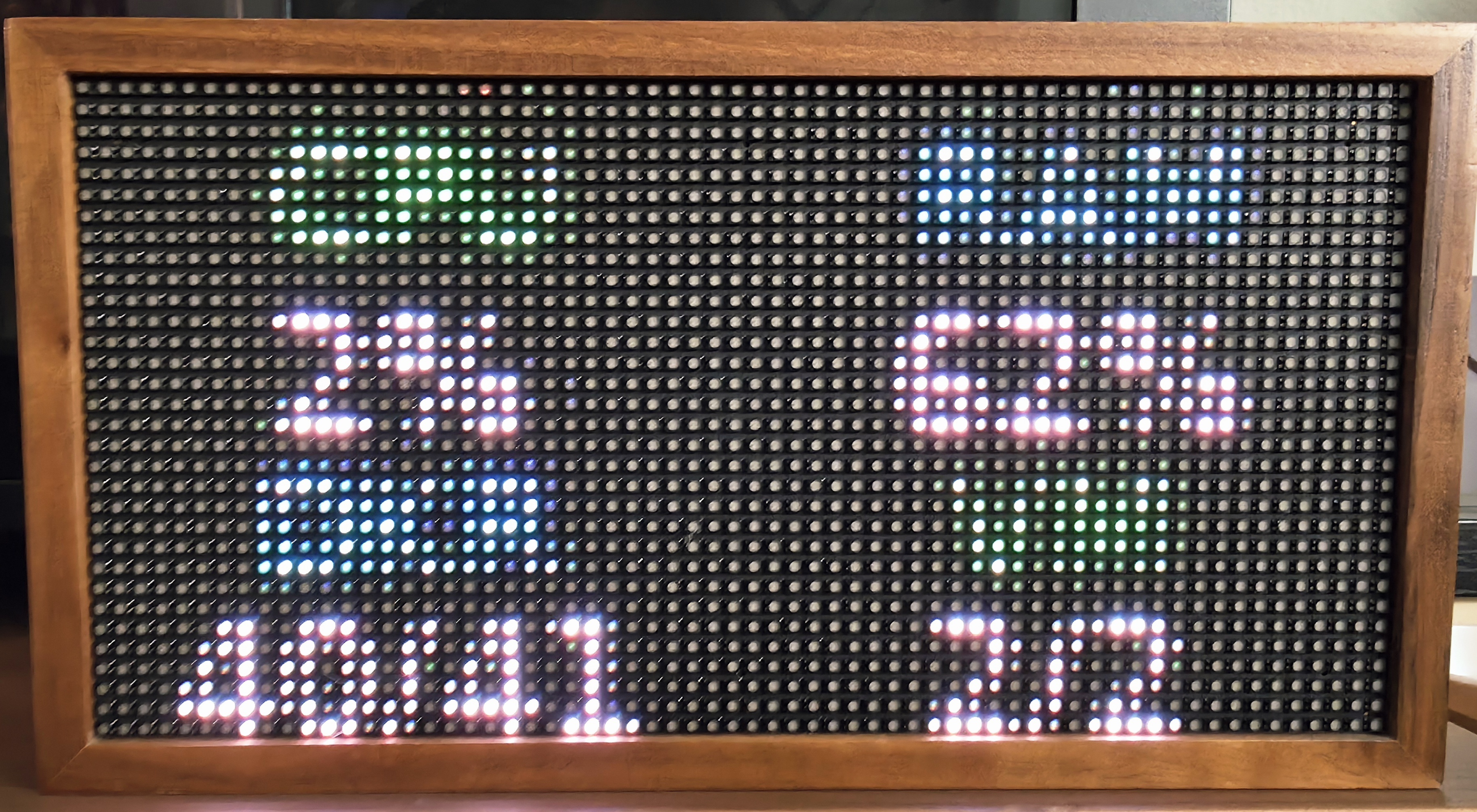
Quick Start
1. Prerequisites
- Unraid server running 7.2+ (native GraphQL API)
- Tidbyt device set up and connected
- Docker enabled/installed
2. Get Your Credentials
Tidbyt:
- Open the Tidbyt app → your device → Settings
- Note your Device ID and API Key
Unraid:
- Unraid 7.2+ exposes a native GraphQL API at
https://tower.local/graphql - Generate an API key in Settings → Management Access → API Keys in the Unraid web UI
3. Run with Docker Compose
# Clone the repo
git clone https://github.com/cmalec/tidbyt-unraid.git
cd tidbyt-unraid

# Edit environment variables
nano docker-compose.yml

# Pull and run from GitHub Container Registry
docker-compose up -d
Or use docker run:
docker run -d \
  --name tidbyt-unraid \
  --restart unless-stopped \
  -e UNRAID_URL=https://tower.local \
  -e UNRAID_API_KEY=your-key \
  -e TIDBYT_DEVICE_ID=your-device-id \
  -e TIDBYT_API_KEY=your-api-key \
  -e UPDATE_INTERVAL=3600 \
  -e METRICS=cpu,ram,array,uptime \
  ghcr.io/cmalec/tidbyt-unraid:latest
To build locally instead, use docker build -t tidbyt-unraid:latest . and update the image name in docker-compose.yml.
4. Environment Variables
| Variable | Required | Default | Description |
|---|---|---|---|
UNRAID_URL |
Yes | — | Unraid server URL (e.g. https://tower.local) |
UNRAID_API_KEY |
Yes | — | API key for authentication |
TIDBYT_DEVICE_ID |
Yes | — | Your Tidbyt device ID |
TIDBYT_API_KEY |
Yes | — | Your Tidbyt API key |
UPDATE_INTERVAL |
No | 3600 (1 hour) |
Seconds between updates |
METRICS |
No | cpu,ram,array,uptime |
Comma-separated list of metrics |
TEMP_UNIT |
No | F |
Temperature unit (C or F) |
TZ |
No | America/Los_Angeles |
Timezone for logs |
5. Installing on Unraid
- Go to Apps → search for "Tidbyt Unraid" (if published) or use the Community Applications template
- Fill in the environment variables
- Apply
Or manually add as a custom Docker container with the variables above.
Customizing Metrics
To change what appears on your Tidbyt, edit the METRICS environment variable. It's a comma-separated list with no spaces. After changing METRICS, restart the container. The layout auto-scales with 1 metric → full screen, 2 metrics → side by side, 3 metrics → top half + bottom row split, 4 metrics → 2×2 grid.
Example Logs
==================================================
Tidbyt Unraid Monitor
==================================================
Unraid URL: http://ip.example
Tidbyt Device: your-device-id
Update interval: 3600s
Metrics: cpu, ram, docker, vms
==================================================
Fetching Unraid metrics...
Rendering image...
Pushing to Tidbyt...
Push result: {}
Sleeping 3600s...
Troubleshooting
Connection refused to Unraid:
- Verify
UNRAID_URLpoints to your Unraid server (default:https://tower.local) - Ensure the API key is valid in Settings → Management Access → API Keys
Push fails:
- Double-check your
TIDBYT_DEVICE_IDandTIDBYT_API_KEY - Ensure your Tidbyt is online and connected to WiFi
Self-signed certificate errors:
- The app disables SSL verification for Unraid connections (Unraid uses self-signed certs by default)
Media gallery
Categories
Related apps
Explore more like this
Explore allDetails
ghcr.io/cmalec/tidbyt-unraid:latestRuntime arguments
- Network
bridge- Privileged
- false
Template configuration
Your Unraid server URL (e.g. https://tower.local or http://192.168.1.100)
- Target
- UNRAID_URL
API key from Unraid (Settings → Management Access → API Keys)
- Target
- UNRAID_API_KEY
Your Tidbyt device ID (from Tidbyt app)
- Target
- TIDBYT_DEVICE_ID
Your Tidbyt API key (from Tidbyt app settings)
- Target
- TIDBYT_API_KEY
Seconds between updates (default 1hr)
- Target
- UPDATE_INTERVAL
- Default
- 3600
Comma-separated, max 4: cpu,ram,array,temps,docker,vms,uptime,network
- Target
- METRICS
- Default
- cpu,ram,array,uptime
C or F
- Target
- TEMP_UNIT
- Default
- F
Timezone for logs
- Target
- TZ
- Default
- America/Los_Angeles