
All apps · 0 apps

thumbnail-generator
Docker app from Stoatworks Labs' Repository
Overview
Readme
View on GitHubThumbnail Generator
AI-assisted project. This codebase was created with Claude Code (Anthropic), directed and reviewed by a human author. The cards are built and checked in a browser, with 128 tests behind them: they render at their true raster, long names shrink and then wrap to two lines inside the margins, odd rasters such as 2056×1329 lay out correctly, and the PNG encoder produces a valid file whose header matches the canvas. No output has ever been loaded onto an Eventmaster or a LiveCore frame. PNG is a reasonable assumption about what those accept rather than a measurement, and the size presets are generic rather than taken from either vendor's documentation — which is why the encoder is a format registry, so a different format is one entry rather than a rewrite.
Bulk-build labelled source thumbnails for Barco Eventmaster and Analog Way RCS2. Type a list of sources, pick an icon, a size and a colour for each, and download the lot as a ZIP with one image per source, named after it.
Runs entirely in the browser. Nothing is uploaded; the batch you build is saved in the browser's local storage so it survives closing the tab.
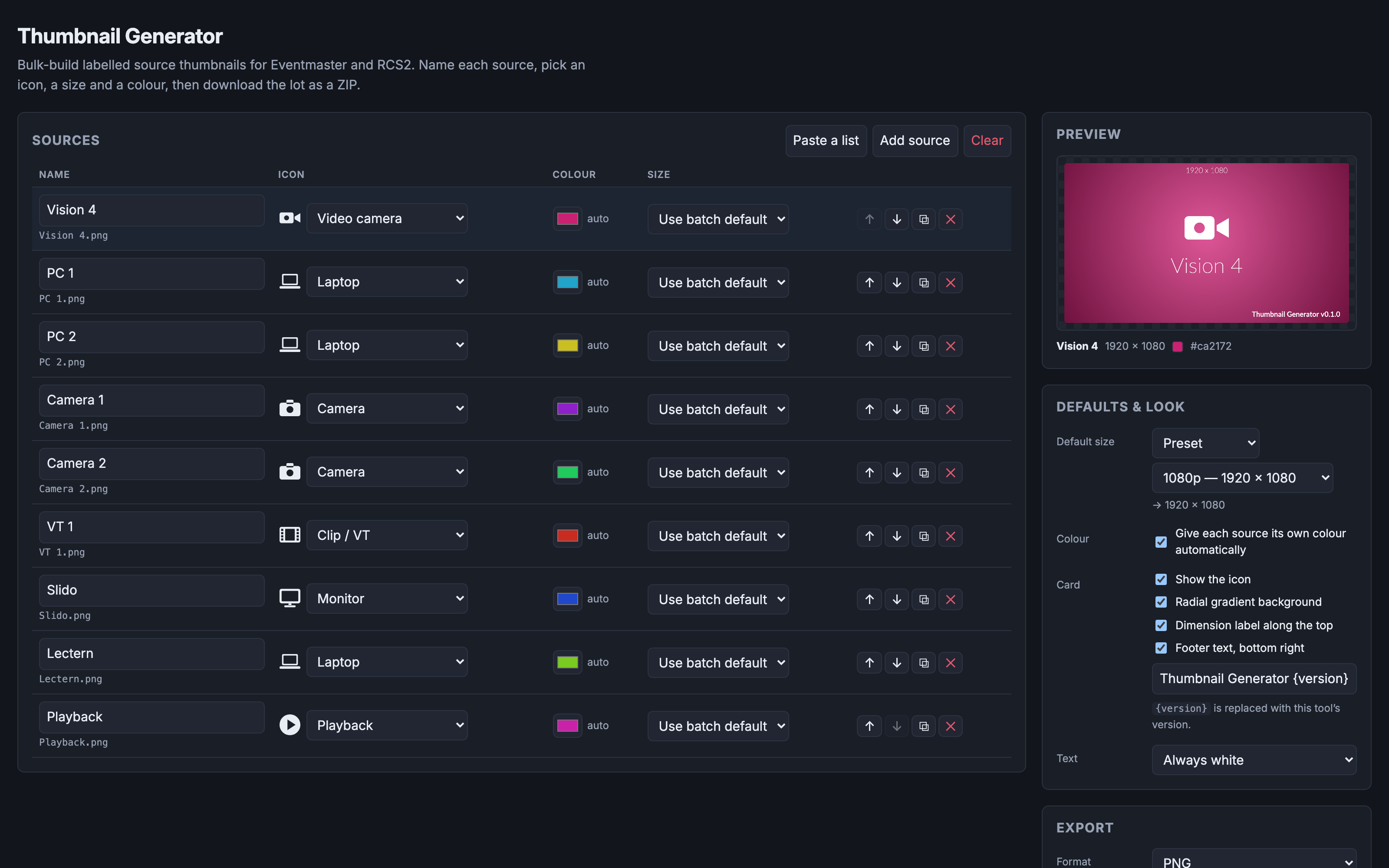
Nine sources named and typed — a vision mixer, PCs, cameras, a VT, Slido, a lectern, playback — each given its own colour automatically, with the 1920 × 1080 card for Vision 4 previewed on the right before the lot goes out as a ZIP.
What a card looks like
A radial gradient in the source's colour, a white knockout icon, and the source
name below it. Optionally a dimension label along the top (1920 x 1080) and a
footer bottom-right. Both are on by default and can be turned off.
Using it
- Add sources. One at a time, or Paste a list and drop in a column straight out of a patch sheet — newline or comma separated.
- Set the icon per source: camera, video camera, projector, monitor, laptop, desktop, tablet, phone, USB stick, drive, playback, clip, slides, microphone, speaker, server, network, web, or none.
- Set the size. 1080p by default. Per source you can override with a preset, an exact pixel size, or an aspect ratio plus a long edge.
- Set the colour, or leave Give each source its own colour on and let it spread them around the hue wheel.
- Generate. You get a ZIP of images plus a
manifest.csvlisting which file went with which source, at what size and colour.
Importing a list
Three ways in, under Import: a CSV file, a paste (copying straight out of a spreadsheet works — that arrives as tab-separated and is handled), or a published Google Sheet.
Four columns, of which only name is required. A blank cell means "use the
batch default".
| Column | Accepts |
|---|---|
name |
Anything. Also matches a heading called source, label, input, title. |
icon |
An icon name (camera, Video camera, usb) or a synonym — cam, PC, MacBook, screen, VT, PowerPoint, SSD and others. |
colour |
#1f6fd0, 1f6fd0, #f00, or a name: red, orange, amber, yellow, lime, green, teal, cyan, blue, navy, indigo, purple, violet, magenta, pink, brown, grey, black, white. |
size |
1920x1080, a ratio 16:9, a ratio with a long edge 16:9@2560, or a preset 1080p / 4K / 720p. |
Headings are matched loosely, so Source Name, source_name and SOURCE NAME
all work, in any column order. If no heading is recognised the columns are read
in order as name, icon, colour, size — which is what a bare list pasted from one
column actually is.
Nothing is applied until you have seen what parsed. The preview says how many sources it found, which heading it took each column from, which headings it ignored, and every value it could not understand — with the spreadsheet row number, so you can go and fix it. Values it cannot read fall back to the batch default and are listed; they are never silently guessed at. Then you choose to add them to what is already there, or replace everything.
Download a template CSV from the same panel. It is a working example — one row per accepted spelling — and importing it unchanged gives you eight cards.
Google Sheets
Use File ▸ Share ▸ Publish to web, pick the tab, choose Comma-separated
values (.csv), and paste that link. A normal /edit link is flagged before it
is fetched: it can work if the sheet is shared so anyone with the link can view
it, but Google answers with a sign-in page otherwise — and that page comes back
as 200 OK, so it is checked for and reported rather than parsed as if it were
your data.
What has been checked from the deployed site: a request to the published-CSV endpoint passes the page's content-security policy and Google's CORS, and comes back readable — tested with a made-up token, which returned a clean 404. So the plumbing works. What has not been checked is a genuinely published sheet returning its rows, because that needs a real Google account. If it misbehaves for you, the file and paste routes need no network at all.
Filenames
The label on the card and the name of the file are the same string. Names are
made unique before packing — two sources called "Laptop" become Laptop.png and
Laptop-2.png, because a ZIP with duplicate names extracts to one file and
silently loses a card.
Safe filenames (in Export) folds everything to ASCII with underscores for spaces. Use it when the files are going straight onto a frame rather than onto a computer.
Formats
PNG by default; JPEG with a quality slider is also there.
Be aware that a gradient card is about 25× bigger as a PNG than as a JPEG — a 2056×1329 card measures ~2.5 MB against ~93 KB. Browsers dither smooth gradients, which leaves PNG's compression nothing to work with. A 48-source batch of PNGs is around 100 MB. The export tells you the archive size. Turning the gradient off brings PNG back down to a few kilobytes.
Adding another format (BMP, say) is a small, contained change — see
src/lib/encode.ts.
What has and has not been verified
Built and checked in a browser: the cards render at their true raster, the gradient runs light-centre to dark-corner, long names shrink and then wrap to two lines inside the margins, odd rasters like 2056×1329 lay out correctly, and the PNG encoder produces a valid file whose header matches the canvas.
No output has been loaded onto an Eventmaster or a LiveCore frame. PNG is a reasonable assumption about what those accept, not a measurement, and the size presets are generic rather than taken from either vendor's documentation. If the gear turns out to want something else, the encoder registry is where it goes.
Output is also not byte-identical across machines, because the card uses a system font stack rather than a bundled one. Immaterial for labels like "PC 2"; worth knowing if you ever diff two machines' output.
Development
npm install
npm run dev
npm test
128 tests, all offline. The pure layers — layout geometry, colour derivation,
filename policy, icon bounds, the ZIP writer, the CSV parser and the import
mapping — are unit tested. export.test.ts drives the real export end to end
against a stubbed canvas and reads the resulting archive back with Python's
zipfile, and sheets.test.ts drives every Google Sheets failure path with an
injected fetch.
See AGENTS.md for the model, the invariants and the traps.
Run your own copy
Thumbnail Generator is a static page, so hosting it yourself is one container serving the built files — the same files the hosted copy serves, running somewhere that still works when the venue has no internet.
Docker. The image is built by this repo's docker.yml workflow on every
push and published as ghcr.io/stoatworks-labs/thumbnail-generator:
docker run -d --name thumbnail-generator --restart unless-stopped -p 8528:80 ghcr.io/stoatworks-labs/thumbnail-generator:latest
Or docker compose up -d with the docker-compose.yml
in this repo, which maps the same port. Either way it is then at
http://localhost:8528/.
Unraid. Search Community Applications for Thumbnail Generator — the template is
templates/thumbnail-generator.xml
in stoatworks-unraid, which is what the CA feed reads.
Stoatworks Burrow lists it under Self-hosted, with the compose file a click away.
The Dockerfile, docker-compose.yml, docker/ and the workflow are
generated from fleet.json in stoatworks-unraid. Change them there and
regenerate rather than editing them here.
This project is built on other people's work — see ATTRIBUTIONS.md.
Licence
MIT. Not a distributable product — this repo exists to feed the deployed web app, so it has no releases and no installers.
Install thumbnail-generator on Unraid in a few clicks.
Find thumbnail-generator in Community Apps on your Unraid server, review the template, and click Install. Unraid handles the Docker app or plugin setup from the published template.
Categories
Related apps
Explore more like this
Explore allDetails
ghcr.io/stoatworks-labs/thumbnail-generator:latestRuntime arguments
- Web UI
http://[IP]:[PORT:80]/- Network
bridge- Shell
sh- Privileged
- false
Template configuration
Host port for the web interface.
- Target
- 80
- Default
- 8528
- Value
- 8528