

Theme Switch
Plugin from JanitorHead
Overview
Readme
View on GitHubTheme Switch — Unraid light/dark toggle
A small Unraid plugin that adds a one-click light/dark switch to the webGUI header and can follow your operating system's colour scheme automatically. Simpler than Dynamix Day/Night — no schedules, just a button and your OS.
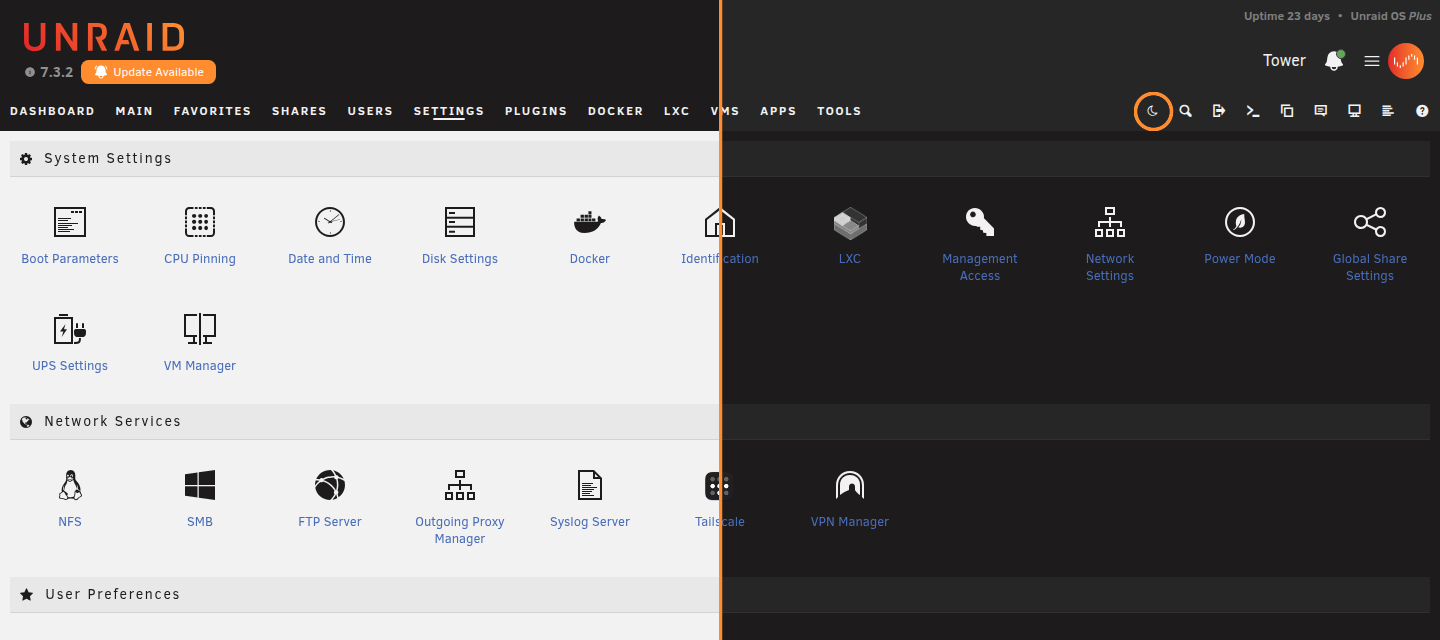
- Header toggle — a sun/moon button in the Unraid top toolbar (not a dashboard widget), available on every page.
- Three modes, cycled by clicking the button: Auto → Light → Dark.
- Auto follows your browser/OS
prefers-color-schemeand flips live when the OS does. - Light / Dark are manual overrides that stick until you cycle back to Auto.
- Auto follows your browser/OS
- Instant & per-client — the switch happens in your browser with no page reload and no server settings changed, so each client (and each OS) gets the right look without fighting over Unraid's single shared theme setting.
How it works
Unraid renders the active theme as one stylesheet <link> (white/azure/black/gray).
Theme Switch repoints that <link> and swaps the <html> Theme--* class in the browser,
deriving the light/dark pair from whichever theme the server is set to:
| Server theme | Light | Dark |
|---|---|---|
white / black (top-nav) |
white | black |
azure / gray (sidebar) |
azure | gray |
It stays within a layout family, so toggling only changes colours — never the page layout. Your
chosen mode is stored in localStorage (per browser) and synced across open tabs. In dark mode
it also forces the header bar dark and keeps command-execution output (e.g. docker run)
readable, which Unraid's stock dark themes don't fully cover. Several plugins ship their own
per-theme stylesheet, rendered for the theme the server is set to — Community Applications (the
Apps grid), Unassigned Devices and the Docker manager (their tables). Theme Switch repoints those
too, so the whole page follows the toggle instead of leaving mismatched light-on-dark (or
dark-on-dark) patches like invisible app cards or stray white table rows.
Unraid Connect components (the notifications panel and toasts, modals) decide light/dark from
the server-rendered theme, so on their own they would ignore the client-side switch. Theme
Switch re-declares the --theme-dark-mode variable they read at mount, and re-declares the colour
token set Connect resets on each of its .unapi wrappers — so their colours follow the toggle even
if a wrapper never gets its dark class, which otherwise paints the panel white under light text.
Those token values are read back from Connect's own stylesheet rather than hard-coded, so a palette
change on their side follows through. The dark classes and the toaster's theme attribute are kept
in sync too (a lightweight, frame-coalesced observer catches late-mounting pieces).
The dashboard's CPU and network graphs are <canvas> elements and its usage rings are
conic-gradients built in JavaScript, so no stylesheet reaches them: Unraid picks their label,
grid and ring colours server-side and bakes them into the page's own script. Left alone, a
forced dark page keeps near-black axis labels on a near-black graph. Theme Switch retints them
to the effective theme's stock palette, so they read the same as if the server had rendered
that theme.
Install
Unraid → Plugins → Install Plugin → paste:
https://raw.githubusercontent.com/JanitorHead/unraid-themeswitch/master/themeswitch.plg
Then hard-refresh the browser (Ctrl+Shift+R) once so the global script loads.
Compatibility
- Unraid 7.x — fully supported (verified against the variable-based theme system).
- Older Unraid — installs without error; if the theme layout isn't recognised the button simply does nothing, so it can't break the page.
Unraid Connect header
The server name, notification bell and account dropdown/hamburger live in the Unraid Connect header island, which tracks its own light/dark scheme independently of the theme. When a forced theme disagrees with that scheme those items can end up the wrong colour and disappear against the header band. Theme Switch recolours the island to contrast the band in every theme and mode, so they stay legible.
Building
themeswitch.plg is generated from source/ — never hand-edit it. After changing anything
under source/themeswitch/…, regenerate (version defaults to today's date):
build/make-standalone-plg.sh
The plugin ships as a self-contained inline .plg (no separate .txz to host): the web files
are embedded directly and written to /usr/local/emhttp/plugins/themeswitch/ on install.
License
MIT © JanitorHead.
Categories
Download Statistics
Downloads by Month
Related apps
Explore more like this
Explore allDetails
https://raw.githubusercontent.com/JanitorHead/unraid-themeswitch/master/themeswitch.plg