
All apps · 0 apps

test-card
Docker app from Stoatworks Labs' Repository
Overview
Readme
View on GitHubTest Card
AI-assisted project. This codebase was created with Claude Code (Anthropic), directed and reviewed by a human author. The RP 219 pattern is asserted against a reference measured from ffmpeg's
smptehdbarsat four resolutions rather than transcribed from prose descriptions of the standard, and its fifteen colours are computed through Rec. 709 and land exactly on those measured values — which is itself the proof the measurement is sound. The importers are tested against real files: Arena 7.27.0's own advanced-output XML, and exports produced by Blend Calc's and Pixel Peeker's own test suites. The ZIP writer is checked against the published CRC-32 vector and its archives unpacked with the systemunzip; 88 tests in all, and the whole path has been driven end to end in a browser. No image it produces has been played out to a real projector, LED processor or display and measured. The patterns are correct as pixels; what a screen does with them is not something this can tell you.
Generate test patterns for every physical output in a show, from the file that already describes the outputs.
Import a Resolume advanced output, a Pixel Peeker wall or a Blend Calc projector array, and get one PNG per physical output at that output's exact raster — or a single composition-sized image that proves the output map is what you think it is. Everything runs in the browser; nothing is uploaded.
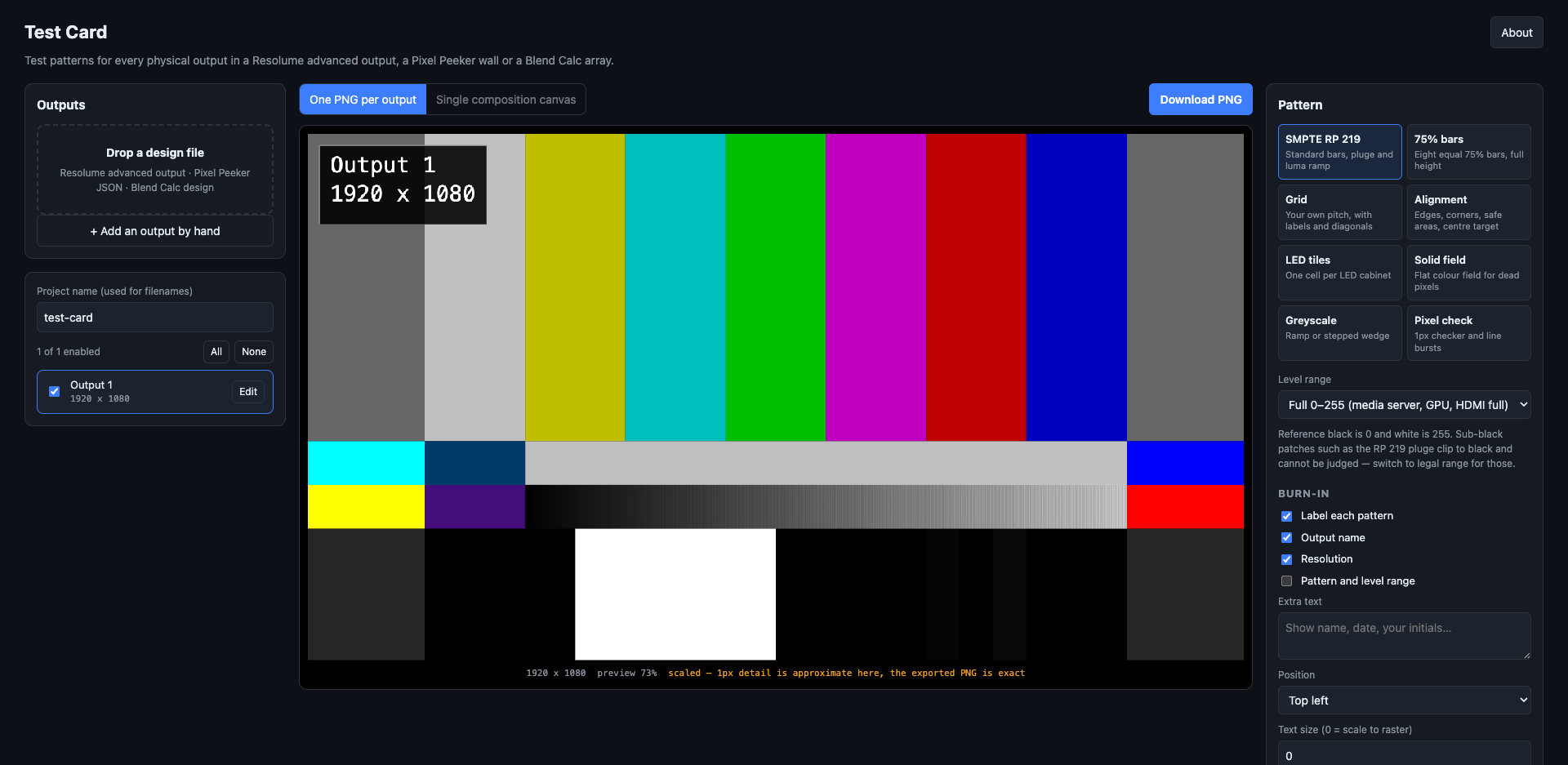
One 1920 × 1080 output added by hand, SMPTE RP 219 bars at full range with the output name and resolution burnt in. The preview is scaled; the exported PNG is pixel-exact.
Patterns
| Pattern | What it is for |
|---|---|
| SMPTE RP 219 | Standard bars, +I/+Q, luma ramp and pluge. Geometry and colours measured from a real generator — see docs/rp219.md |
| 75% bars | Eight equal full-height bars. Survives being squeezed onto a narrow LED strip where RP 219's four rows would be unreadable |
| Grid | Your own pitch or division count, heavy lines every N, cell labels, diagonals, centre target |
| Alignment | 1px edge border, corner markers with pixel counts, safe areas, centre target and circles, 1px checker patches |
| LED tiles | One cell per cabinet. Either a uniform tile size you state, or the real cabinet map imported from Pixel Peeker — including irregular walls, chain order and per-port colouring |
| Solid field | Flat colour at a chosen level, for dead pixels and uniformity |
| Greyscale | Continuous ramp or stepped wedge, optionally split into R, G, B and neutral |
| Pixel check | 1px checkerboard and line bursts. If it renders as flat grey on the real output, something in the chain is scaling |
Every pattern can carry a burn-in — output name, resolution, pattern, plus your own text — and can draw the imported slice or port outlines on top.
Two ways to render
- One PNG per output — each file at that output's native raster. One output
downloads as a bare PNG; several download as a ZIP with a
manifest.txtrecording which file is which output, the level range used, and any raster the app had to infer. - Single composition canvas — one image at composition size with every output's region drawn and labelled. Play it through Resolume and each physical output should light up showing its own name. That is the fastest proof the advanced output map matches what you think it does, and it needs no way of getting a file to each output individually.
Level range
SMPTE bars are defined in Y′CbCr; a PNG is RGB, and a PNG cannot say which convention it was written in. So the app asks, and records the answer in the manifest.
- Full 0–255 (default) — media server, GPU output, HDMI/DP set to full range. The −2% pluge patch clips to black and cannot be judged.
- Legal 16–235 — studio swing, for an SDI chain. Sub-black and super-white survive, so the pluge is meaningful. Looks washed out on a full-range display, correctly.
Imports
See docs/importers.md for what each file does and does not know. In short:
- Resolume — one output per
<Screen>. The raster is read from the output device when it records one, and otherwise inferred from slice bounds, which can come out too small. Inferred rasters are badged in the UI and called out in the manifest; correct them by hand. - Pixel Peeker — use
Export → JSON, notSave project. The project file stores cabinets as library references in millimetres and cannot be resolved to pixels here, so it is refused with a message naming the right export. - Blend Calc — needs the projector resolution (not in the file) and, for designs using a fit mode, the solved overlap (also not in the file — Blend Calc computes it and never writes it back). Both are asked for. Its Resolume XML export needs neither and is the better file to bring.
You can also just add outputs by hand.
Development
npm install
npm run dev
npm test
See CLAUDE.md for the full command list and AGENTS.md for the invariants and the traps.
Verification
- RP 219 — geometry and colour asserted against a reference measured from
ffmpeg's
smptehdbarsat four resolutions, committed astest/fixtures/rp219-ffmpeg.jsonand reproducible withscripts/extract-rp219-reference.py. - Importers — tested against real files: Arena 7.27.0's own
AdvancedOutput.xmland a saved Advanced Output preset, plus exports generated by runningblend-calc's andpixel-peeker's own test suites. No hand-written fixtures — a fixture invented to match the parser proves only that the parser matches itself. - ZIP writer — CRC-32 checked against the published test vector, archives
verified with the system
unzipand with Python'szipfile. - End to end — driven in a browser: a real Blend Calc export imported, six 1920x1200 PNGs rendered, packed, and the resulting ZIP unpacked and its PNG headers checked. Bar colours and pluge values sampled off the canvas and confirmed against the standard.
Run your own copy
Test Card is a static page, so hosting it yourself is one container serving the built files — the same files the hosted copy serves, running somewhere that still works when the venue has no internet.
Docker. The image is built by this repo's docker.yml workflow on every
push and published as ghcr.io/stoatworks-labs/test-card:
docker run -d --name test-card --restart unless-stopped -p 8522:80 ghcr.io/stoatworks-labs/test-card:latest
Or docker compose up -d with the docker-compose.yml
in this repo, which maps the same port. Either way it is then at
http://localhost:8522/.
Unraid. Search Community Applications for Test Card — the template is
templates/test-card.xml
in stoatworks-unraid, which is what the CA feed reads.
Stoatworks Burrow lists it under Self-hosted, with the compose file a click away.
The Dockerfile, docker-compose.yml, docker/ and the workflow are
generated from fleet.json in stoatworks-unraid. Change them there and
regenerate rather than editing them here.
This project is built on other people's work — see ATTRIBUTIONS.md.
Licence
MIT. Not a distributable product — this repo exists to feed the deployed web app, so it has no releases and no installers.
Install test-card on Unraid in a few clicks.
Find test-card in Community Apps on your Unraid server, review the template, and click Install. Unraid handles the Docker app or plugin setup from the published template.
Categories
Related apps
Explore more like this
Explore allDetails
ghcr.io/stoatworks-labs/test-card:latestRuntime arguments
- Web UI
http://[IP]:[PORT:80]/- Network
bridge- Shell
sh- Privileged
- false
Template configuration
Host port for the web interface.
- Target
- 80
- Default
- 8522
- Value
- 8522