
All apps · 0 apps

telethon-downloader
Docker app from jsavargas' Repository
Overview
Readme
View on GitHubTelethon Downloader

Find us at:



jsavargas/telethon_downloader
Telegram Bot with Automatic Download
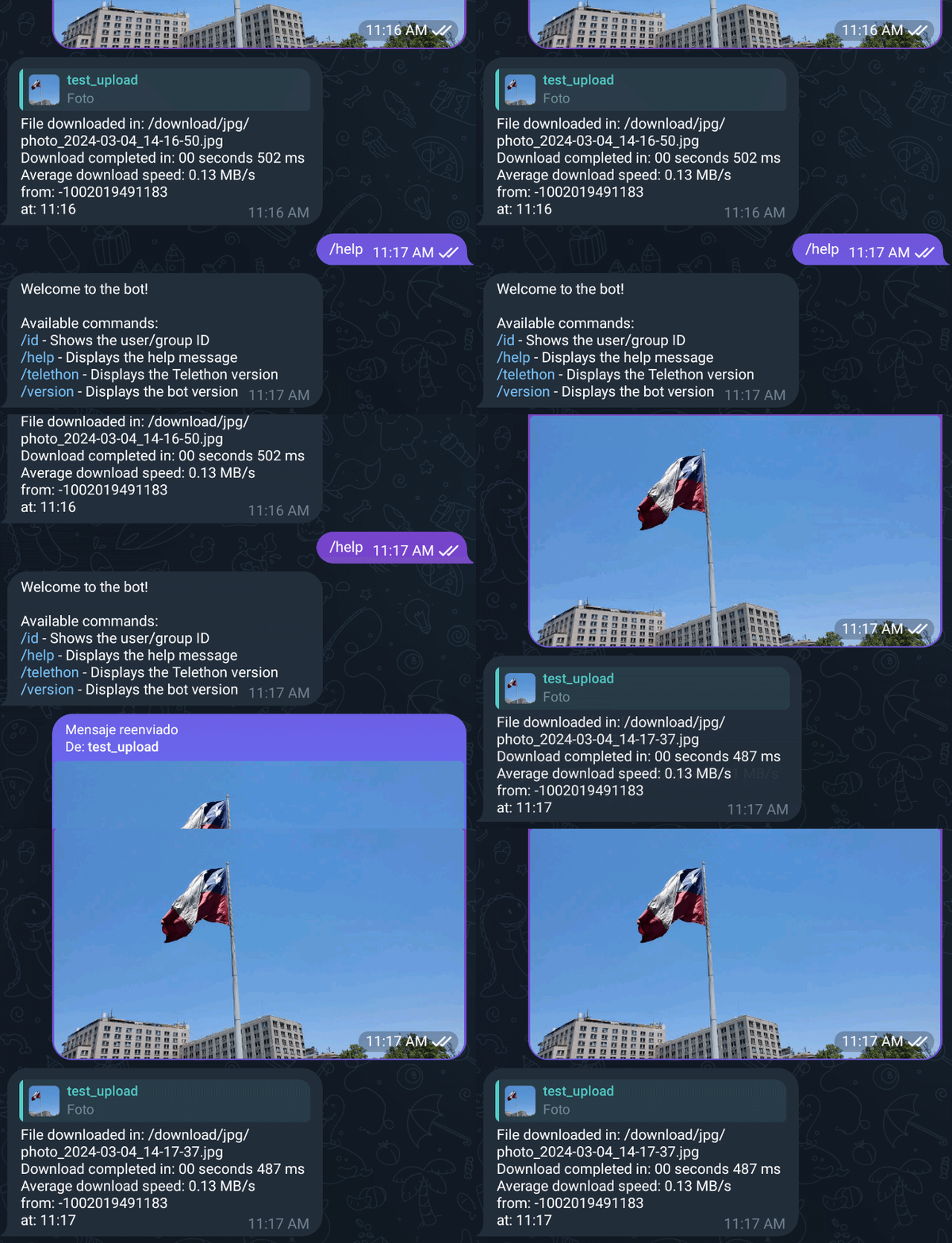
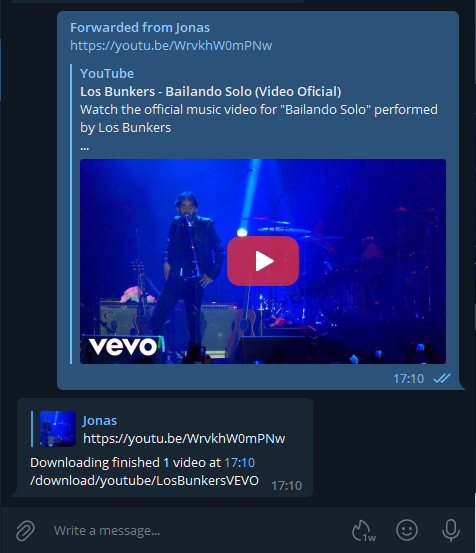
This Telegram Bot, based on the Telethon client, is designed to automatically download multimedia files sent to it. Additionally, it now has the capability to download videos or audios from YouTube and direct links to files via their URL, intelligently handling .torrent files by passing them to the configured torrent client.
Features
- Automatic Downloads: Automatically downloads files sent to the bot.
- YouTube & Direct Links: Download videos/audios from YouTube and files from direct URLs.
- Torrent Support: Handles
.torrentfiles by passing them to a configured torrent client (qBittorrent or a watch folder). - File Organization:
- Sorts files into folders based on file extension, group/channel ID, or keywords in the filename.
- Customizable paths via
config.inior bot commands.
- Interactive Commands:
/rename: Rename downloaded files./addpath: Interactive menu to configure download paths for extensions and groups./addextensionpath&/addgrouppath: Quickly set download paths with a single command.
- Directory Browser: An interactive directory browser to select paths when using
/addpath. Includes "Up" and "New Folder" functionality. - And more...: See the "Available Commands" section for a full list.
Enjoy an automated and organized downloading experience with telethon_downloader!
Running Telethon Downloader
Environment:
Pull or build the docker image and launch it with the following environment variables:
TG_AUTHORIZED_USER_ID : <telegram ´chat_id´ authorized>
NOTE: Unique identification of the user who has permissions to send files to the bot.
TG_API_ID : <telegram API key generated at ´Generating Telegram API keys´>
TG_API_HASH : <telegram API hash generated at ´Generating Telegram API keys´>
TG_BOT_TOKEN : <telegram BOT token generated at ´Creating a Telegram Bot´>
TORRENT_MODE [OPTIONAL]: <Mode for torrent handling. Set to 'qbittorrent' to enable qBittorrent API integration, or 'watch' for watch folder (default: watch)>
QBT_HOST [REQUIRED if TORRENT_MODE is 'qbittorrent']:
QBT_PORT [REQUIRED if TORRENT_MODE is 'qbittorrent']: <Port of the qBittorrent Web UI (default: 8080)>
QBT_USERNAME [OPTIONAL]:
QBT_PASSWORD [OPTIONAL]:
PUID [OPTIONAL]: <Unique identification of the user in the system, used for assigning permissions.>
PGID [OPTIONAL]: <Unique identifier for a group of users, used for assigning specific permissions to the group.>
PERMISSIONS_FOLDER [OPTIONAL]: <Folder permissions. (default: 777)>
PERMISSIONS_FILE [OPTIONAL]: <File permissions. (default: 755)>
TZ [OPTIONAL]: <Sets the system timezone, adjusting it based on the geographical location of the server or user.>
Example: America/Santiago
TG_MAX_PARALLEL [OPTIONAL]: <maximum number of parallel downloads allowed (default: 4)>
TG_DL_TIMEOUT [OPTIONAL]: <maximum time (in seconds) to wait for a download to complete. after this time the download is cancelled and an error is triggered (default: 3600)>
NOTE: DOWNLOADED FILES ARE SAVED AT A TMP DIRECTORY UNTIL THE DOWNLOAD IS COMPLETED TO PROTECT FROM MOVING UNFINISHED FILES
TG_PROGRESS_DOWNLOAD [OPTIONAL]: <Show download progress (default: True)>
PROGRESS_STATUS_SHOW [OPTIONAL]: <Show download progress every 10% (default: 10)>
YOUTUBE_FORMAT_AUDIO [OPTIONAL]: <YouTube audio download format (default: bestaudio/best)>
YOUTUBE_FORMAT_VIDEO [OPTIONAL]: <YouTube video download format (default: bestvideo+bestaudio/best)>
YOUTUBE_DEFAULT_DOWNLOAD [OPTIONAL]: <Automatic YouTube download preference, AUDIO or VIDEO (default: VIDEO)>
YOUTUBE_DEFAULT_EXTENSION [OPTIONAL]: <Extension format for downloading YouTube videos (default: MKV)>
YOUTUBE_SHOW_OPTION [OPTIONAL]: <Show or hide buttons to select YouTube Video or Audio download (default: True)>
YOUTUBE_TIMEOUT_OPTION [OPTIONAL]: <Time in which buttons are displayed to download YouTube Video or Audio before the default option "**YOUTUBE_DEFAULT_DOWNLOAD**" is chosen (default: 5)>
YOUTUBE_AUDIO_FOLDER [OPTIONAL]: <Folder where YouTube audios will be downloaded (default: /download/youtube)>
NOTE: To add a new path to these variables, remember to map them in the "volumes" section in docker.
YOUTUBE_VIDEO_FOLDER [OPTIONAL]: <Folder where YouTube videos will be downloaded (default: /download/youtube)>
NOTE: To add a new path to these variables, remember to map them in the "volumes" section in docker.
YOUTUBE_LINKS_SUPPORTED [OPTIONAL]: <YouTube links supported for downloading videos (default: youtube.com,youtu.be)>
NOTE: NOTE: THIS VARIABLE MUST BE UPDATED IF MORE URL IS REQUIRED TO BE ADDED TO THE YOUTUBE DOWNLOAD SUPPORT
Volumes:
/config: Path where configuration files, pending downloads, and recent downloads are stored.
/download: Folder where files are downloaded.
/watch: Folder where torrent files are downloaded, and transmission will upload them.
Config File: config.ini
A config.ini file is created that contains file extensions and paths where these files should be downloaded based on:
Download order by rules:
- KEYWORDS
- GROUP_PATH
- REGEX_PATH
- EXTENSIONS
By file extension
[EXTENSIONS]
mp4 = /download/mp4
By forwarded groups
[GROUP_PATH]
-100118xxxxxxxx = /download/games
By file name
[REGEX_PATH]
/Halo/i = /download/Serie YYYYYY
Example
[EXTENSIONS]
pdf = /download/pdf
cbr = /download/pdf
mp3 = /download/mp3
flac = /download/mp3
jpg = /download/jpg
mp4 = /download/mp4
mobi = /download/mobi

[GROUP_PATH]
-10012345789 = /download/1001234577

[KEYWORDS]
tanganana = /download/tanganana

[REGEX_PATH]
/example/i = /download/example

[REMOVE_PATTERNS]
* = tif_,[tof_,0001
-100123456 = tif_
Available Commands
/version: Shows the bot version./start: Shows the welcome message and help./rename: Renames a downloaded file. Reply to a file message with/rename <new_name>./addpath: Shows the menu to add new paths for extensions or groups./help: Shows this help message./addextensionpath: Sets the download path for an extension. Usage:/addextensionpath <ext> [<path>]or reply to a file with/addextensionpath [<path>]./addgrouppath: Sets the download path for a group. Usage:/addgrouppath <group_id> [<path>]or reply to a message with/addgrouppath [<path>].
Generating Telegram API keys
Before working with Telegram's API, you need to get your own API ID and hash:
Go to https://my.telegram.org/ and login with your phone number.
Click under API Development tools.
A Create new application window will appear. Fill in your application details. There is no need to enter any URL, and only the first two fields (App title and Short name) can currently be changed later.
Click on Create application at the end. Remember that your API hash is secret and Telegram won't let you revoke it. Don't post it anywhere!
Creating a Telegram Bot
Open a conversation with @BotFather in Telegram
Use the /newbot command to create a new bot. The BotFather will ask you for a name and username, then generate an authorization token for your new bot.
The name of your bot is displayed in contact details and elsewhere.
The Username is a short name, to be used in mentions and telegram.me links. Usernames are 5-32 characters long and are case insensitive, but may only include Latin characters, numbers, and underscores. Your bot's username must end in ‘bot’, e.g. ‘tetris_bot’ or ‘TetrisBot’.
The token is a string along the lines of 110201543:AAHdqTcvCH1vGWJxfSeofSAs0K5PALDsaw that is required to authorize the bot and send requests to the Bot API. Keep your token secure and store it safely, it can be used by anyone to control your bot.
Get PUID and PGID in Linux
If you need to obtain the PUID (User ID) and PGID (Group ID) in Linux, you can easily do so with the following commands:
Make sure to replace with the username for which you want to obtain the information. These commands will provide you with the corresponding user and group identifiers.
PUID
id -u <USUARIO>
PGID
id -g <USUARIO>
Example
root@Jonas > id -u nobody
99
root@Jonas > id -g nobody
100
docker-compose
version: '3'

services:

  telethon_downloader:
    image: jsavargas/telethon_downloader
    container_name: telethon_downloader
    restart: unless-stopped
    network_mode: host
    environment:
      - PUID=99
      - PGID=100
      - API_ID=
      - API_HASH=
      - BOT_TOKEN=
      - AUTHORIZED_USER_ID=                             #<telegram chat_id authorized>
      - TZ=America/Santiago
      - TG_MAX_PARALLEL=3                               # OPTIONAL
      - TG_DL_TIMEOUT=4600                              # OPTIONAL
      - TG_PROGRESS_DOWNLOAD=True                       # OPTIONAL (True/False)
      - PROGRESS_STATUS_SHOW=10                         # OPTIONAL (10)
      - YOUTUBE_FORMAT_AUDIO=bestaudio/best             # OPTIONAL (bestaudio/best)
      - YOUTUBE_FORMAT_VIDEO=bestvideo+bestaudio/best   # OPTIONAL (bestvideo[ext=mp4]+bestaudio[ext=m4a]/best[ext=mp4]/best)
      - YOUTUBE_DEFAULT_DOWNLOAD=VIDEO                  # OPTIONAL (AUDIO/VIDEO)
      - YOUTUBE_DEFAULT_EXTENSION=MKV                   # OPTIONAL (mkv/mp4)
      - YOUTUBE_SHOW_OPTION=True                        # OPTIONAL (True/False)
      - YOUTUBE_TIMEOUT_OPTION=5                        # OPTIONAL (5)
      - YOUTUBE_AUDIO_FOLDER=/youtube/audio             # OPTIONAL
      - YOUTUBE_VIDEO_FOLDER=/youtube/video             # OPTIONAL
      - TORRENT_MODE=qbittorrent                        # OPTIONAL (watch/qbittorrent)
      - QBT_HOST=192.168.1.10                           # OPTIONAL
      - QBT_PORT=8080                                   # OPTIONAL
      - QBT_USERNAME=admin                              # OPTIONAL
      - QBT_PASSWORD=adminadmin                         # OPTIONAL
    volumes:
      - /path/to/config:/config
      - /path/to/download:/download
      - /path/to/watch:/watch
      - /path/to/youtube:/youtube
Changelog
Backlog (Upcoming Features)
- Feature: Move Files - Implement the ability to move files to new locations.
- Feature: Rename Files - Develop functionality to rename files from the bot.
- Feature: Unzip Files - Add the capability to unzip files directly from the bot.
- Feature: Unrar Files - Add the capability to unrar files directly from the bot.
[Version 4.0.13] - 2025-12-05
- Feature: Implemented robust file conflict resolution. When a downloaded file has the same name as an existing file, their MD5 hashes are compared. If identical, the existing file is replaced. If different, a numeric suffix is added to the new file's name to ensure uniqueness.
- Enhancement: Improved download summary accuracy by extracting the final filename (including any numeric suffixes) for display and logging.
[Version 4.0.12] - 2025-11-28
- Update: Updated
telethonto version 1.42.0. - Update: Updated
yt_dlpto version 2025.11.12.
[Version 4.0.11] - 2025-09-30
- Update: Updated
telethonto version 1.41.2. - Update: Updated
yt_dlpto version 2025.09.26. - Feature: Added
/helpcommand to display available commands and project links. - Feature: The
/startcommand now combines the welcome message with the help text. - Feature: Implemented
/addextensionpathcommand to set download paths for extensions. It supports direct arguments or automatic extension detection from replied files, and handles relative paths. - Feature: Implemented
/addgrouppathcommand to set download paths for groups. It supports direct arguments or automatic group ID detection from replied forwarded messages, and handles relative paths. - Feature: Added
/idcommand to show the user's own ID or the ID of the replied message's origin. - Enhancement: The "Up" button in the directory browser now allows navigation up to the root directory (
/). - Enhancement: The "New Folder" button is now functional within the interactive "Add Path" flows.
[Version 4.0.10] - 2025-08-06
- Feature: Implemented torrent category selection when adding new torrents via qBittorrent API. Users can now choose from existing categories or add a new one.
- Feature: Added support for adding magnet links directly to qBittorrent with category selection.
- Fix: Improved resume functionality for pending downloads, ensuring media is correctly retrieved and downloads can be resumed after bot restarts.
- Fix: Resolved issue where category selection buttons would reappear after torrent processing.
[Version 4.0.8] - 2025-02-28
- Update: Updated
telethonto version 1.39.0. - Update: Updated
yt_dlpto version 2025.02.19.
[Version 4.0.7] - 2024-06-23
- Update: Updated
telethonto version 1.37.0. - Update: Updated
yt_dlpto version 2024.11.04.
[Version 4.0.6] - 2024-06-23
- Update: Updated
yt_dlpto version 2024.08.06.
[Version 4.0.5] - 2024-06-23
- Update: Updated
telethonto version 1.36.0. - Update: Updated
yt_dlpto version 2024.05.27. - Fix: Corrected the download of YouTube audios in MP3 format.
[Version 4.0.4] - 2024-03-04
- Enhancement: Re-enabled
MESSAGE_NO_LINKS_DOWNLOADfeature.
[Version 4.0.3] - 2024-03-03
- Feature: Added environment variable for YouTube video and audio download path.
- Feature: Implemented file renaming functionality using the /rename command, followed by the new name, using a reply on the file or download message.
- Feature: Added a function to move files to a new folder (under development).
- Feature: Improved creation of new folders, permission changes, and owner changes for files.
- Feature: Added environment variables to set permissions for folders and files.
- Feature: Created the file
/config/download_files.jsonto track the last 500 downloaded files, including download dates, original file names, and, if renamed, the new names along with the renaming date.
[Version 4.0.2] - 2024-02-19
- Feature: download youtube videos in mkv/mp4.
[Version 4.0.1] - 2024-02-17
- Enhancement: Completely restructured the code.
- Enhancement: Group downloads by extension, file names, and group IDs.
- Enhancement: Implemented immediate download for torrent files without queuing.
- Enhancement: Added language templates for en_EN and es_ES.
- Enhancement: Templates are stored in the /config/locale path.
- Enhancement: They are automatically initialized if they do not exist.
- Enhancement: Any language added in the docker-compose that does not have an existing template will default to English.
- Enhancement: Implemented retry for downloads from a pending_messages.json file when downloads are pending.
- Enhancement: Background tasks for handling
download_pending_messages. - Enhancement: Progress indication during downloads now includes percentage and download speed.
- Enhancement: Increased timeout by 30 minutes for failed downloads due to timeout.
- Enhancement: Improved messaging during download progress.
- Feature: Added buttons for downloading audio or video from YouTube.
- Feature: Added support for downloading links.
- Feature: Implemented the ability to unzip both zip and rar files.
- Feature: Display Telethon version information.
- Feature: Upgrade Telethon version to 1.34.0.
- Feature: Append ".tmp" to downloaded files and rename them after completion.
[Version 3.1.13] - 2024.01.10
- upgrade telethon to version 1.33.1
[Version 3.1.12] - 2023.08.17
- upgrade yt-dlp to version 2023.07.06
[Version 3.1.11] - 2023.03.31
- upgrade python to version 3.11
[Version 3.1.10] - 2023.02.28
- upgrade python to version 3.11
[Version 3.1.9] - 2023.02.01
- upgrade telethon to version 1.26.1
[Version 3.1.8] - 2022.10.10
- change docker building
[Version 3.1.7] - 2022.09.30
- change youtube-dlp to yt-dlp
- Fixed bugs
- Added more bugs to fix later (?) xD
[Version 3.0.1] - 2021.10.28
- Added config.ini file in /config
- Added regex support
Categories
Download Statistics
Total Downloads Over Time
Related apps
Explore more like this
Explore allDetails
jsavargas/telethon_downloaderRuntime arguments
- Network
bridge- Shell
bash- Privileged
- false
Template configuration
Container Path: /download
- Target
- /download
Container Path: /watch
- Target
- /watch
Container Variable: TG_AUTHORIZED_USER_ID
Container Variable: TG_API_ID
Container Variable: TG_API_HASH
Container Variable: TG_BOT_TOKEN
Container Path: /config
- Target
- /config
- Default
- /mnt/user/appdata/telethon_downloader
Container Variable: PUID
- Default
- 99
Container Variable: PGID
- Default
- 100
Container Variable: TZ
- Default
- Europe/London
Container Variable: TG_PROGRESS_DOWNLOAD
- Default
- False|True